Page 28 of 288
The recommended level for speed sensitive volume is from level 1
through level 3. Level 0 turns the speed sensitive volume off and level 7
is the maximum setting.
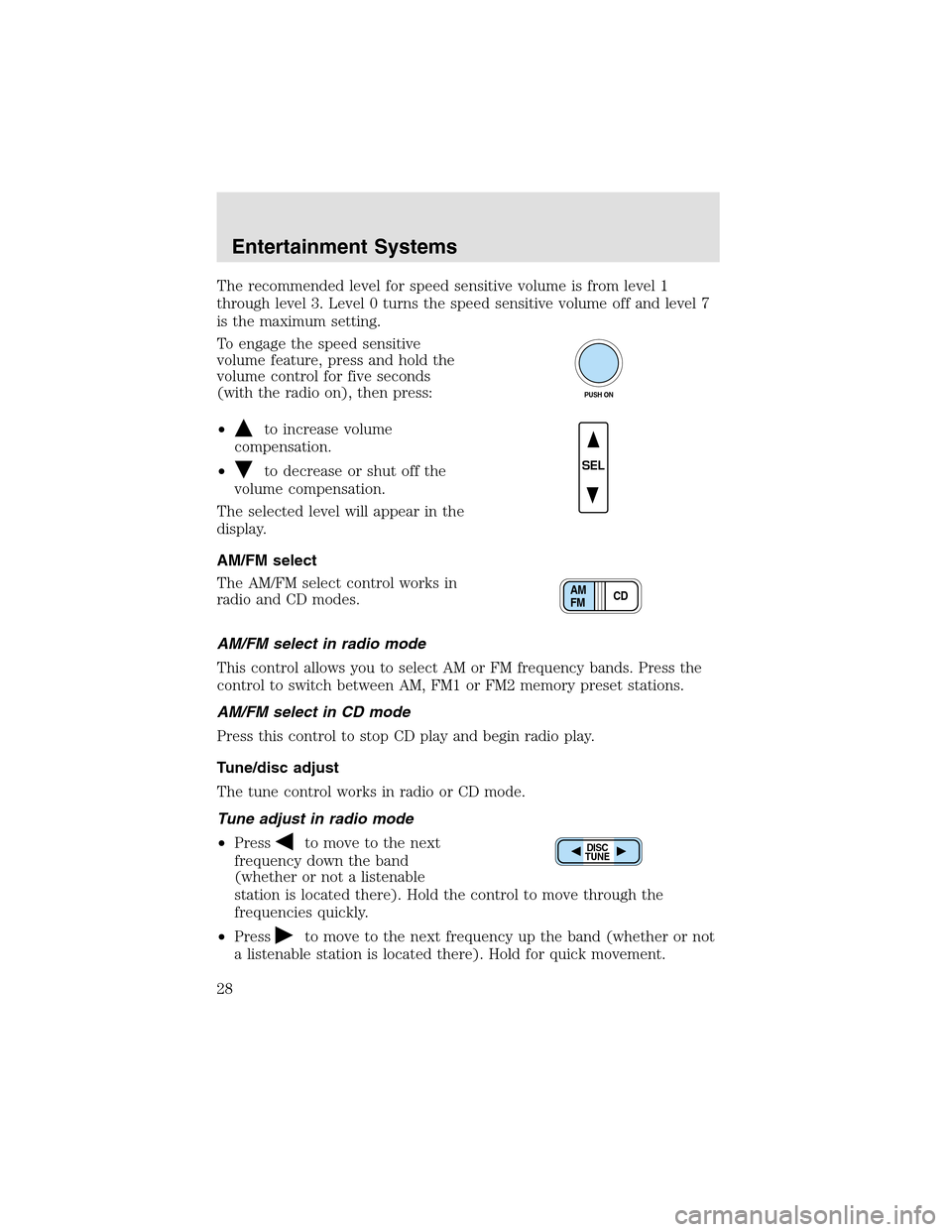
To engage the speed sensitive
volume feature, press and hold the
volume control for five seconds
(with the radio on), then press:
•
to increase volume
compensation.
•
to decrease or shut off the
volume compensation.
The selected level will appear in the
display.
AM/FM select
The AM/FM select control works in
radio and CD modes.
AM/FM select in radio mode
This control allows you to select AM or FM frequency bands. Press the
control to switch between AM, FM1 or FM2 memory preset stations.
AM/FM select in CD mode
Press this control to stop CD play and begin radio play.
Tune/disc adjust
The tune control works in radio or CD mode.
Tune adjust in radio mode
•Press
to move to the next
frequency down the band
(whether or not a listenable
station is located there). Hold the control to move through the
frequencies quickly.
•Press
to move to the next frequency upthe band (whether or not
a listenable station is located there). Hold for quick movement.
PUSH ON
SEL
CD AM
FM
DISC
TUNE
Entertainment Systems
28
Page 40 of 288
•Terrain.Hills, mountains and tall buildings between your vehicle’s
antenna and the radio station signal can cause FM reception problems.
Static can be caused on AM stations by power lines, electric fences,
traffic lights and thunderstorms. Moving away from an interfering
structure (out of its “shadow”) returns your reception to normal.
•Station overload.Weak signals are sometimes captured by stronger
signals when you pass a broadcast tower. A stronger signal may
temporarily overtake a weaker signal and play while the weak station
frequency is displayed.
The audio system automatically switches to single channel reception if it
will improve the reception of a station normally received in stereo.
AUDIO SYSTEM WARRANTIES AND SERVICE
Refer to theWarranty Guidefor audio system warranty information.
If service is necessary, see your dealer or a qualified technician.
Entertainment Systems
40
Page 43 of 288
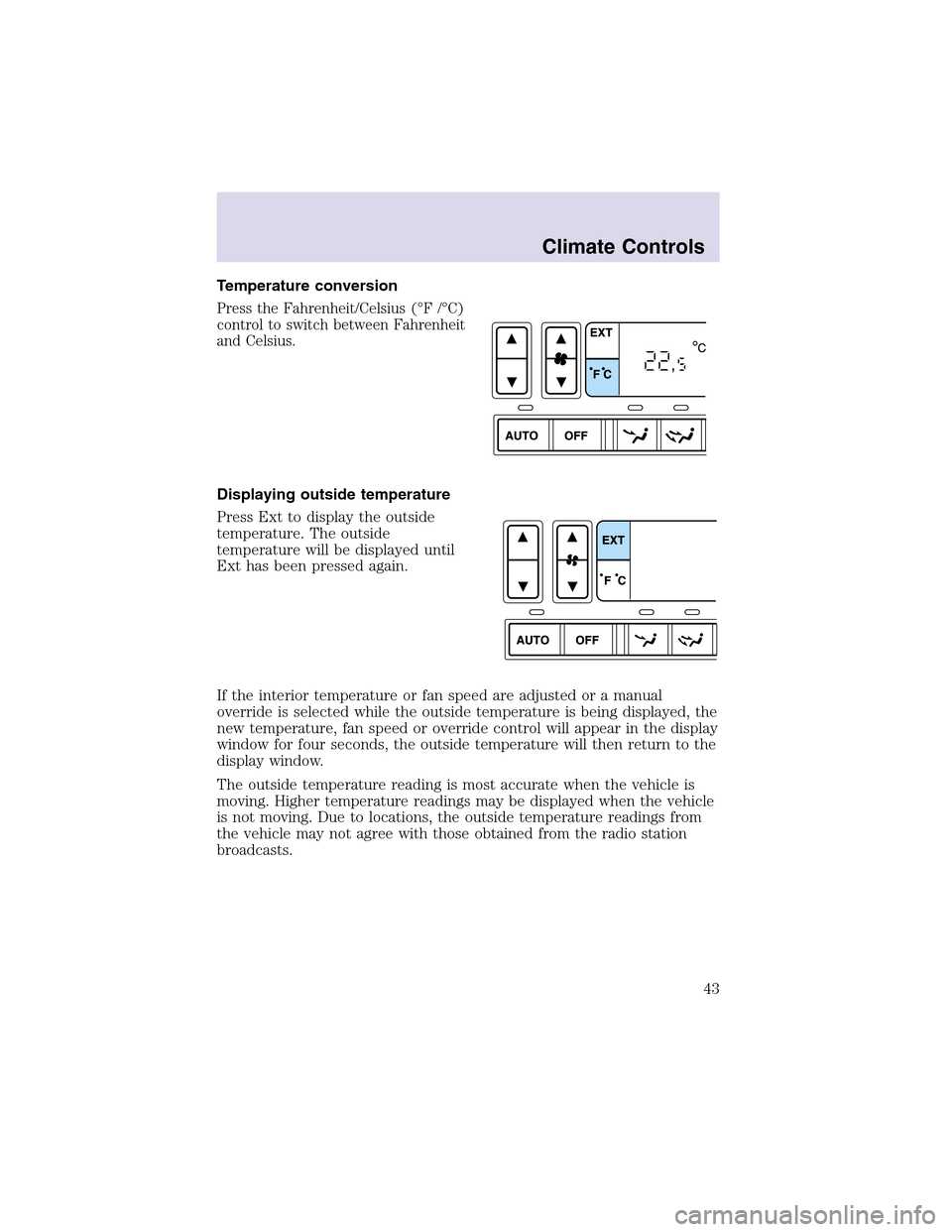
Temperature conversion
Press the Fahrenheit/Celsius (°F /°C)
control to switch between Fahrenheit
and Celsius.
Displaying outside temperature
Press Ext to display the outside
temperature. The outside
temperature will be displayed until
Ext has been pressed again.
If the interior temperature or fan speed are adjusted or a manual
override is selected while the outside temperature is being displayed, the
new temperature, fan speed or override control will appear in the display
window for four seconds, the outside temperature will then return to the
display window.
The outside temperature reading is most accurate when the vehicle is
moving. Higher temperature readings may be displayed when the vehicle
is not moving. Due to locations, the outside temperature readings from
the vehicle may not agree with those obtained from the radio station
broadcasts.
Climate Controls
43
Page 50 of 288
HEADLAMP CONTROL
Rotate the headlampcontrol
clockwise to the first position to
turn on the parking lamps. Rotate
clockwise to the second position to
also turn on the headlamps.
Foglamp control
The headlampcontrol also operates
the foglamps. The foglamps can be
turned on only when the headlamp
control is in the
,or
position and the high beams are not
turned on.
Pull headlampcontrol towards you
to turn foglamps on. The foglamp
indicator light
will illuminate if
the ignition is in the Run and Key
On position.
Autolamp control
The autolampsystem provides light
sensitive automatic on-off control of
the exterior lights normally
controlled by the headlampcontrol.
The autolampsystem also keeps the
lights on for approximately 20
seconds after the ignition switch is
turned to the OFF position.
•To turn autolamps on, rotate the
control counterclockwise.
•To turn autolamps off, rotate the control clockwise to the OFF
position.
Lights
50
Page 53 of 288

PANEL DIMMER CONTROL
Use to adjust the brightness of the
instrument panel and all applicable
switches in the vehicle during
headlampand parklampoperation.
Move the control to the full upright
position, past detent, to turn on the
interior lamps.
Move the control to the full down
position, past detent, to prevent the
interior lights from illuminating
when the doors are opened.
VERTICAL AIM ADJUSTMENT
Your vehicle is fitted with eitherVOR(conventional halogen) orVOL
(High Intensity Discharge - HID) headlamps. The adjustment procedure
depends on the type of headlamps that are equipped on your vehicle.
VORorVOLis marked on the bottom of the headlampin the center of
the lamp. Please check the lens markings prior to adjusting the vehicle
aim.
1. Park the vehicle on a level surface approximately 7.6 meters (25 feet)
from a vertical wall or screen directly in front of it.
•(1) Eight feet
•(2)VOR– Measurement of the center height of lampto ground
VOL– Subtract 50 mm’s (2 inches) from the measurement of the
center height of the lampto ground
•(3) Twenty-five feet
•(4) Horizontal reference line
Lights
53
Page 55 of 288
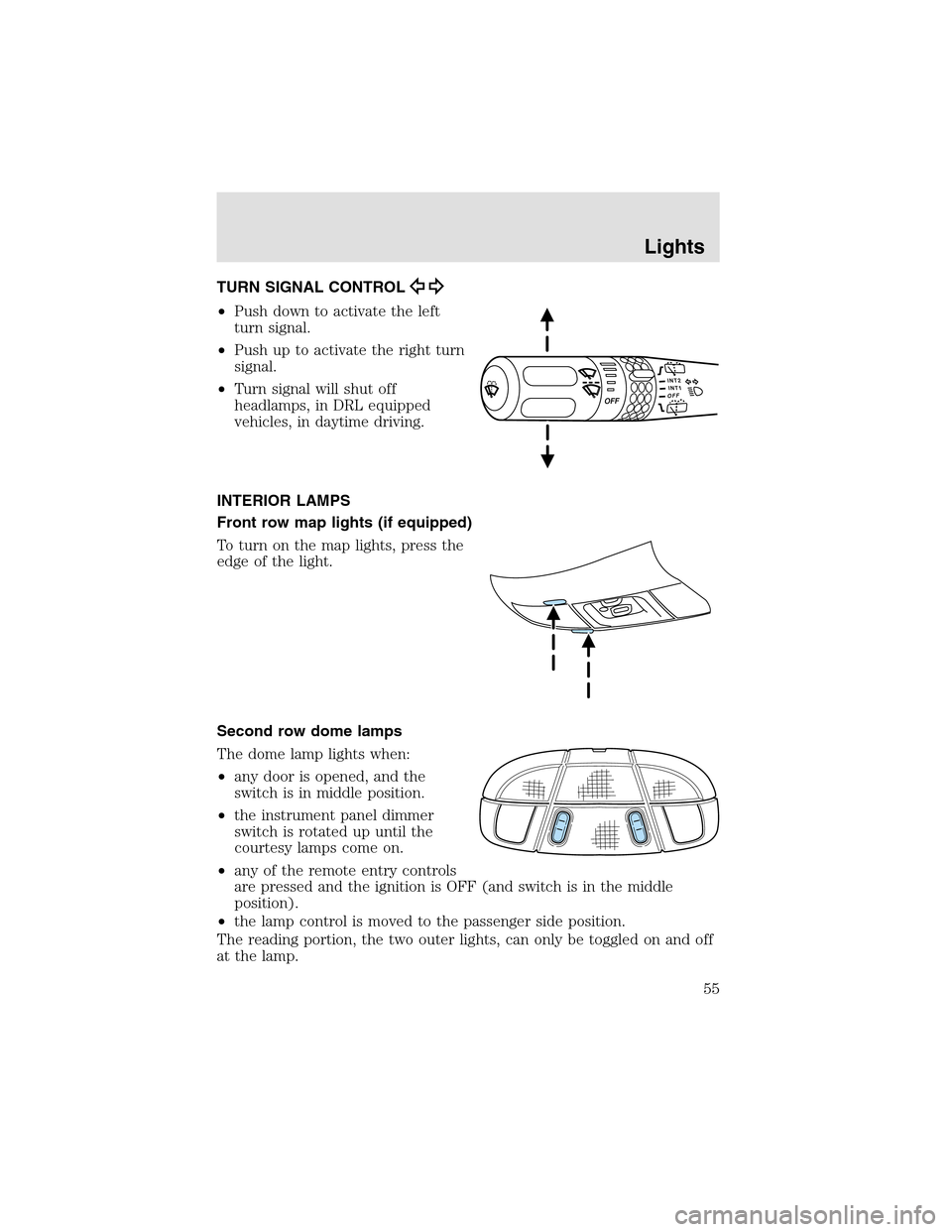
TURN SIGNAL CONTROL
•Push down to activate the left
turn signal.
•Push upto activate the right turn
signal.
•Turn signal will shut off
headlamps, in DRL equipped
vehicles, in daytime driving.
INTERIOR LAMPS
Front row map lights (if equipped)
To turn on the maplights, press the
edge of the light.
Second row dome lamps
The dome lamplights when:
•any door is opened, and the
switch is in middle position.
•the instrument panel dimmer
switch is rotated upuntil the
courtesy lamps come on.
•any of the remote entry controls
are pressed and the ignition is OFF (and switch is in the middle
position).
•the lamp control is moved to the passenger side position.
The reading portion, the two outer lights, can only be toggled on and off
at the lamp.
Lights
55
Page 58 of 288
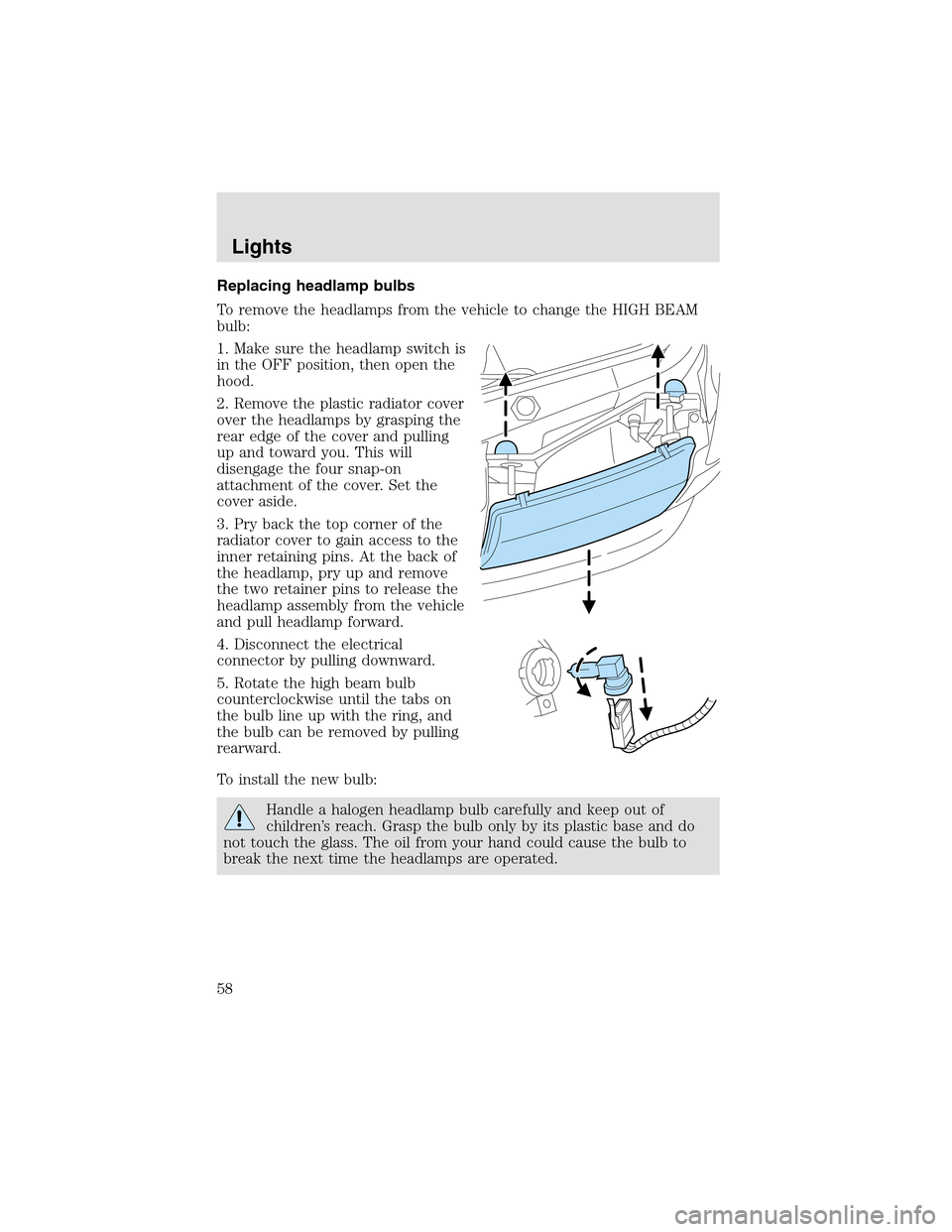
Replacing headlamp bulbs
To remove the headlamps from the vehicle to change the HIGH BEAM
bulb:
1. Make sure the headlampswitch is
in the OFF position, then open the
hood.
2. Remove the plastic radiator cover
over the headlamps by grasping the
rear edge of the cover and pulling
upand toward you. This will
disengage the four snap-on
attachment of the cover. Set the
cover aside.
3. Pry back the topcorner of the
radiator cover to gain access to the
inner retaining pins. At the back of
the headlamp, pry up and remove
the two retainer pins to release the
headlampassembly from the vehicle
and pull headlamp forward.
4. Disconnect the electrical
connector by pulling downward.
5. Rotate the high beam bulb
counterclockwise until the tabs on
the bulb line upwith the ring, and
the bulb can be removed by pulling
rearward.
To install the new bulb:
Handle a halogen headlampbulb carefully and keepout of
children’s reach. Graspthe bulb only by its plastic base and do
not touch the glass. The oil from your hand could cause the bulb to
break the next time the headlamps are operated.
Lights
58
Page 60 of 288
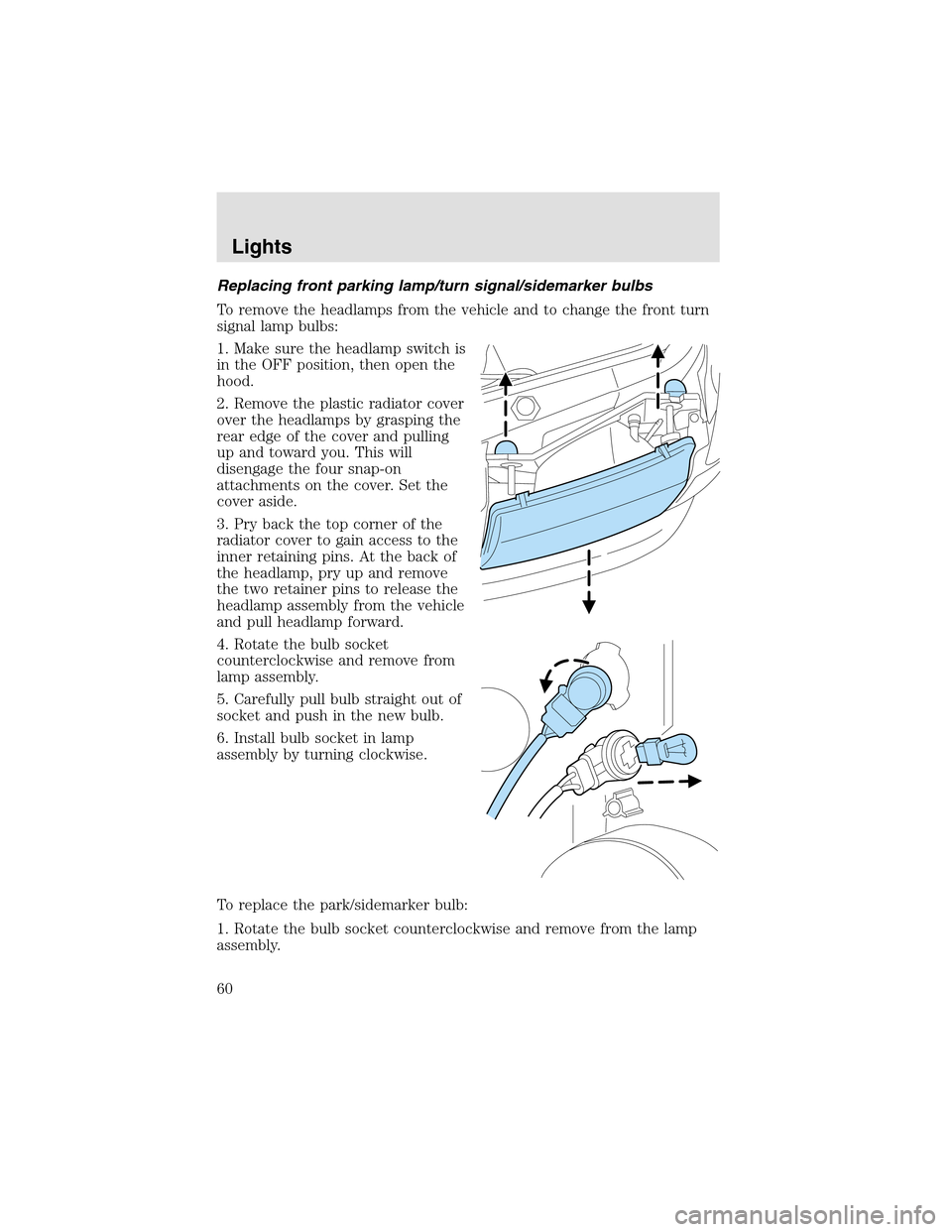
Replacing front parking lamp/turn signal/sidemarker bulbs
To remove the headlamps from the vehicle and to change the front turn
signal lampbulbs:
1. Make sure the headlampswitch is
in the OFF position, then open the
hood.
2. Remove the plastic radiator cover
over the headlamps by grasping the
rear edge of the cover and pulling
upand toward you. This will
disengage the four snap-on
attachments on the cover. Set the
cover aside.
3. Pry back the topcorner of the
radiator cover to gain access to the
inner retaining pins. At the back of
the headlamp, pry up and remove
the two retainer pins to release the
headlampassembly from the vehicle
and pull headlamp forward.
4. Rotate the bulb socket
counterclockwise and remove from
lampassembly.
5. Carefully pull bulb straight out of
socket and push in the new bulb.
6. Install bulb socket in lamp
assembly by turning clockwise.
To replace the park/sidemarker bulb:
1. Rotate the bulb socket counterclockwise and remove from the lamp
assembly.
Lights
60