Page 106 of 256
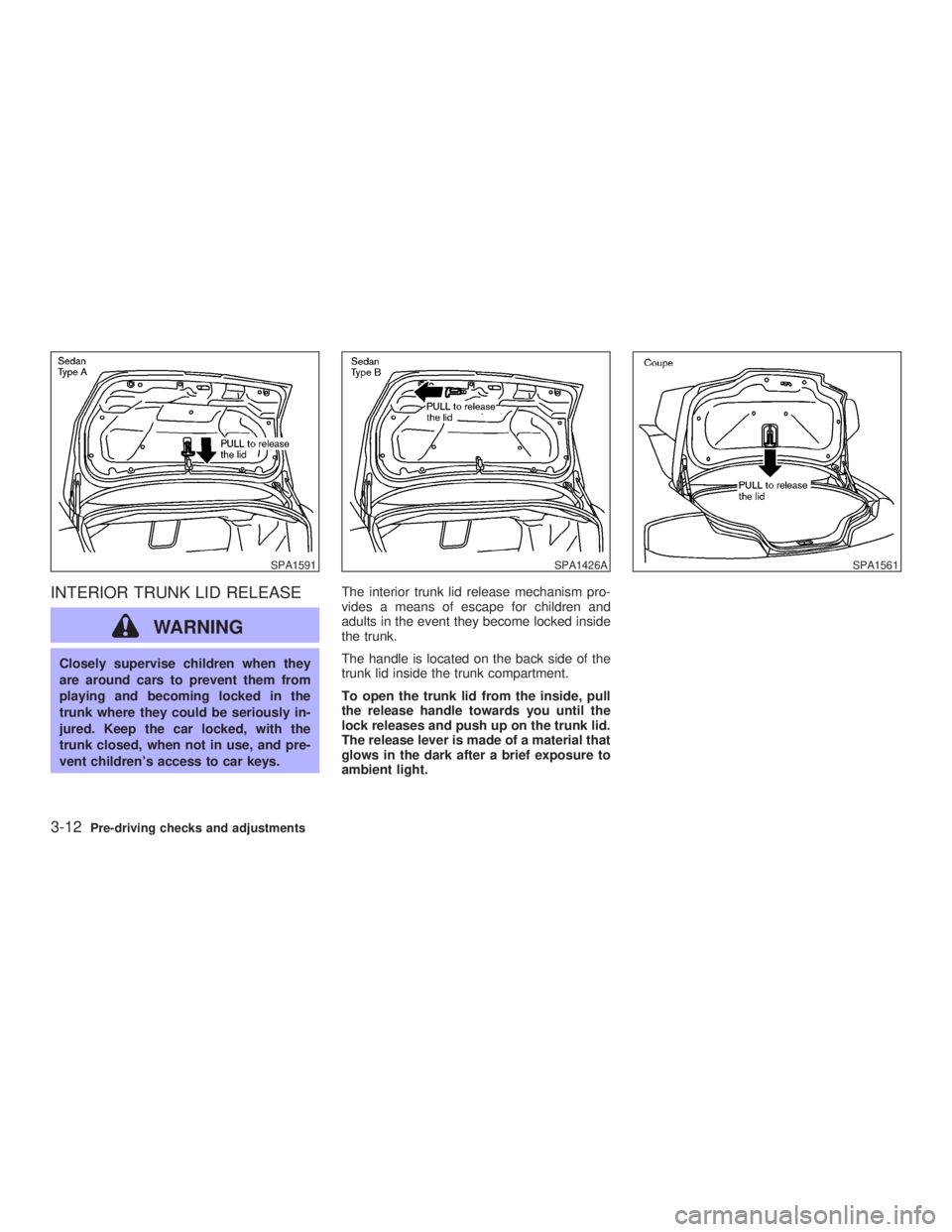
INTERIOR TRUNK LID RELEASE
WARNINGClosely supervise children when they
are around cars to prevent them from
playing and becoming locked in the
trunk where they could be seriously in-
jured. Keep the car locked, with the
trunk closed, when not in use, and pre-
vent children's access to car keys. The interior trunk lid release mechanism pro-
vides a means of escape for children and
adults in the event they become locked inside
the trunk.
The handle is located on the back side of the
trunk lid inside the trunk compartment.
To open the trunk lid from the inside, pull
the release handle towards you until the
lock releases and push up on the trunk lid.
The release lever is made of a material that
glows in the dark after a brief exposure to
ambient light.SPA1591 SPA1426A SPA1561
3-12 Pre-driving checks and adjustments
Z 02.7.29/V35-D/V5.0
X
Page 108 of 256
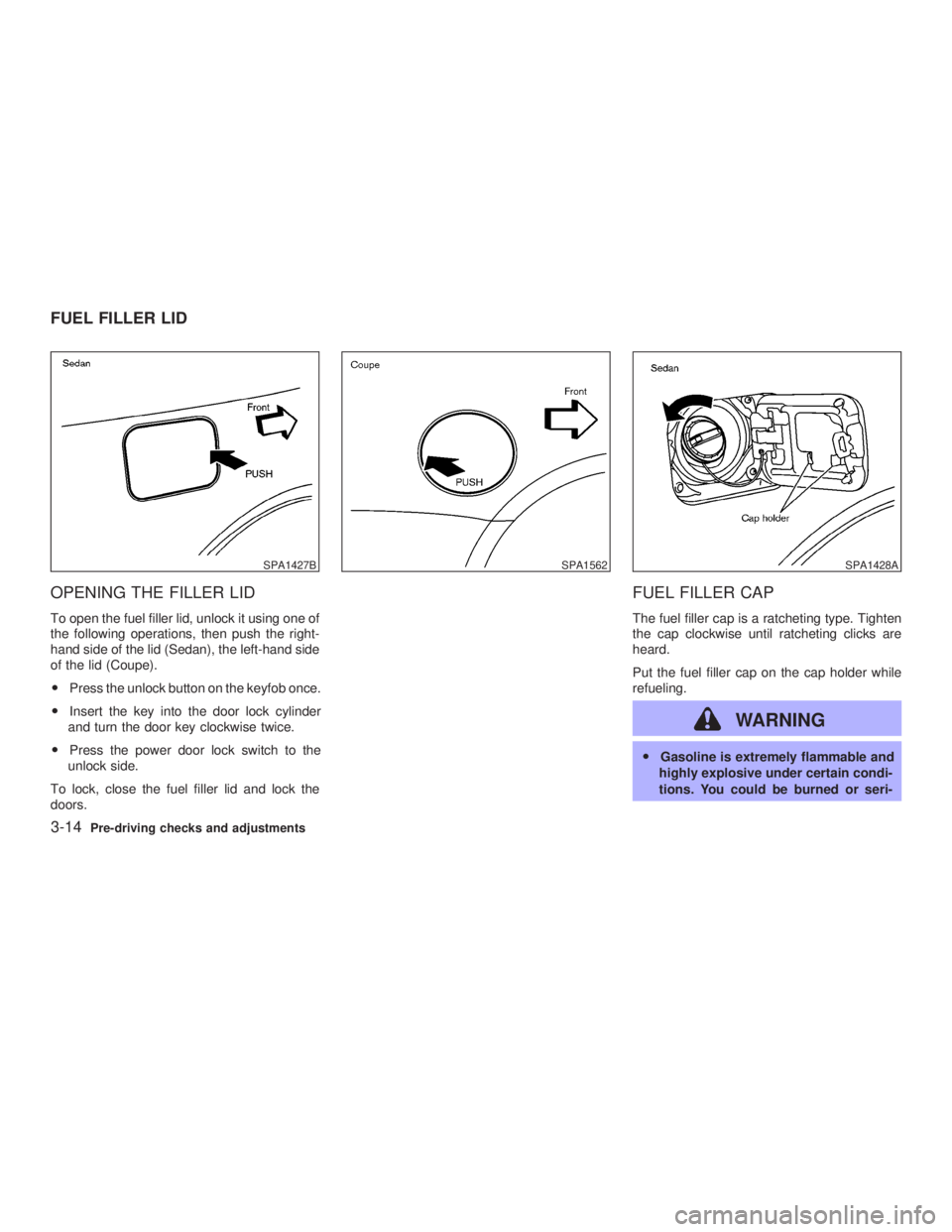
OPENING THE FILLER LID To open the fuel filler lid, unlock it using one of
the following operations, then push the right-
hand side of the lid (Sedan), the left-hand side
of the lid (Coupe).
O Press the unlock button on the keyfob once.
O Insert the key into the door lock cylinder
and turn the door key clockwise twice.
O Press the power door lock switch to the
unlock side.
To lock, close the fuel filler lid and lock the
doors. FUEL FILLER CAP The fuel filler cap is a ratcheting type. Tighten
the cap clockwise until ratcheting clicks are
heard.
Put the fuel filler cap on the cap holder while
refueling.
WARNING O Gasoline is extremely flammable and
highly explosive under certain condi-
tions. You could be burned or seri-SPA1427B SPA1562 SPA1428A
FUEL FILLER LID
3-14 Pre-driving checks and adjustments
Z 02.7.29/V35-D/V5.0
X
Page 110 of 256
O For additional information, see the
ªMalfunction indicator lamp (MIL)º in
the ª2. Instruments and controlsº
section.
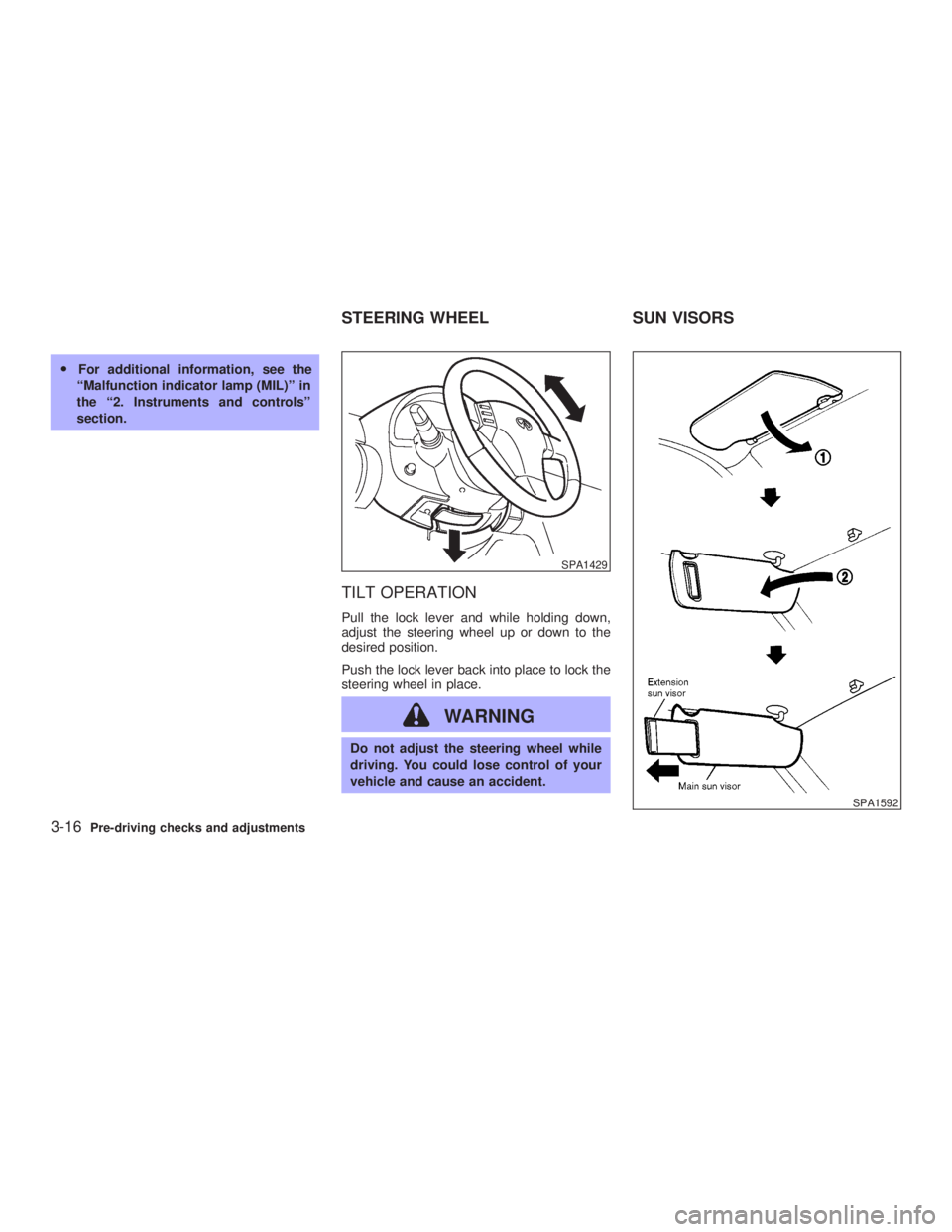
TILT OPERATION Pull the lock lever and while holding down,
adjust the steering wheel up or down to the
desired position.
Push the lock lever back into place to lock the
steering wheel in place.
WARNING Do not adjust the steering wheel while
driving. You could lose control of your
vehicle and cause an accident. SPA1429
SPA1592STEERING WHEEL SUN VISORS
3-16 Pre-driving checks and adjustments
Z 02.7.29/V35-D/V5.0
X
Page 111 of 256
CAUTIONStore the main sun visor after storing
the extension sun visor.
AUTOMATIC ANTI-GLARE INSIDE
MIRROR (if so equipped)
WARNING Use the AUTO position only when nec-
essary, because it reduces rear view
clarity.
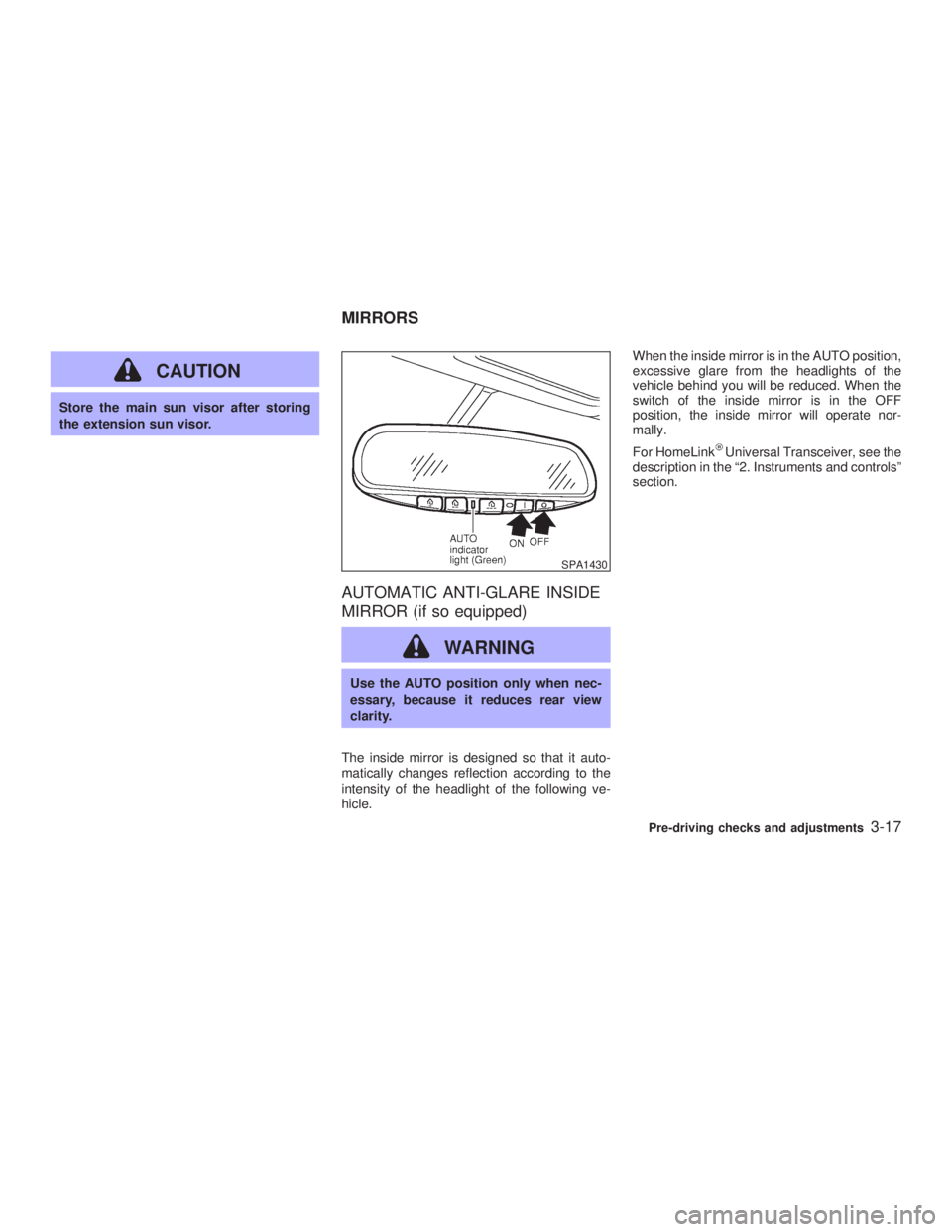
The inside mirror is designed so that it auto-
matically changes reflection according to the
intensity of the headlight of the following ve-
hicle. When the inside mirror is in the AUTO position,
excessive glare from the headlights of the
vehicle behind you will be reduced. When the
switch of the inside mirror is in the OFF
position, the inside mirror will operate nor-
mally.
For HomeLink Universal Transceiver, see the
description in the ª2. Instruments and controlsº
section. SPA1430
MIRRORS
Pre-driving checks and adjustments
3-17
Z 02.7.29/V35-D/V5.0
X
Page 112 of 256
OUTSIDE MIRRORS
WARNINGObjects viewed in the outside mirror on
the passenger side are closer than they
appear. Be careful when moving to the
right. Using only this mirror could cause
an accident. Use inside mirror or glance
over your shoulder to properly judge
distances to other objects.
The outside mirror adjustment will operate only when the ignition switch is in the ACC or ON
position.
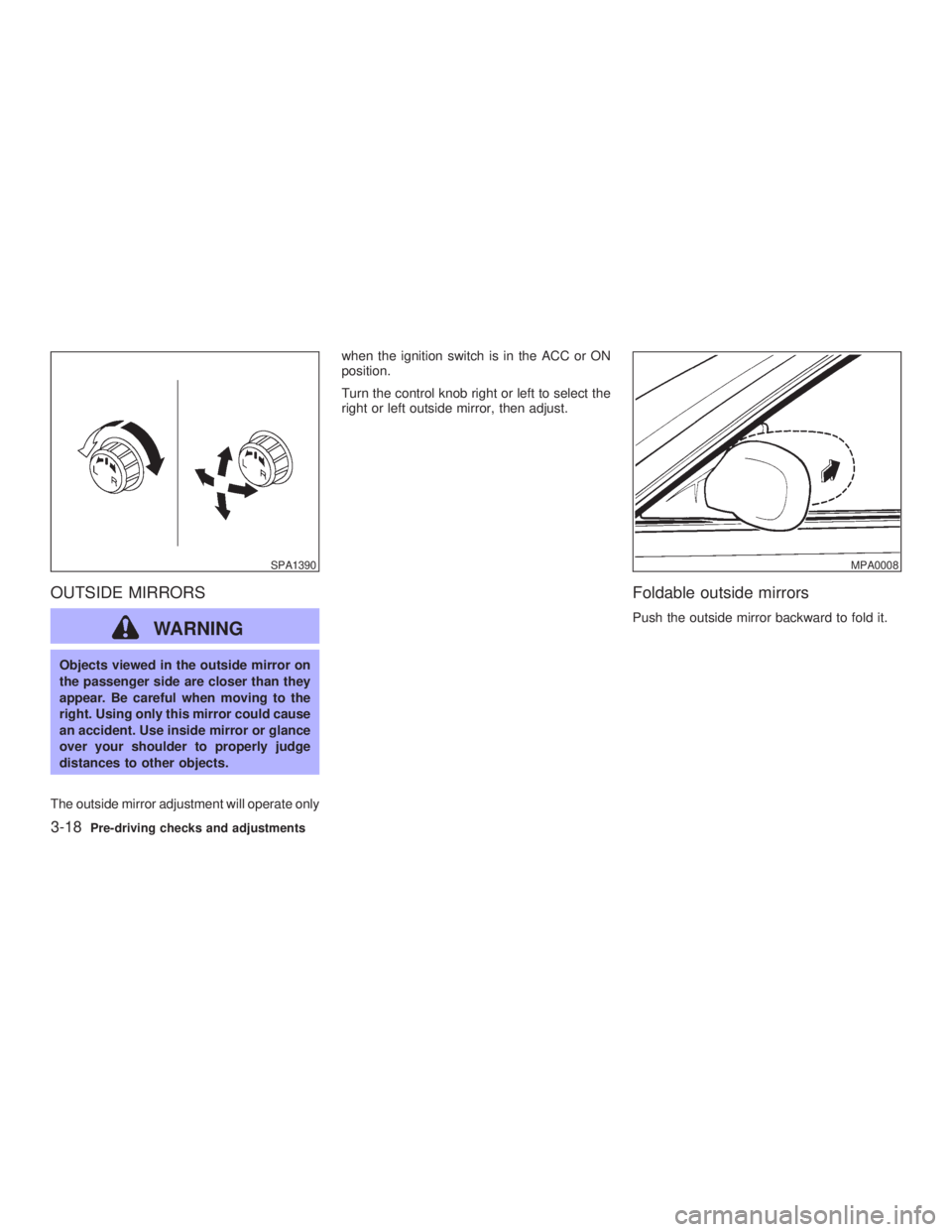
Turn the control knob right or left to select the
right or left outside mirror, then adjust.
Foldable outside mirrors Push the outside mirror backward to fold it.SPA1390 MPA0008
3-18 Pre-driving checks and adjustments
Z 02.7.29/V35-D/V5.0
X
Page 119 of 256
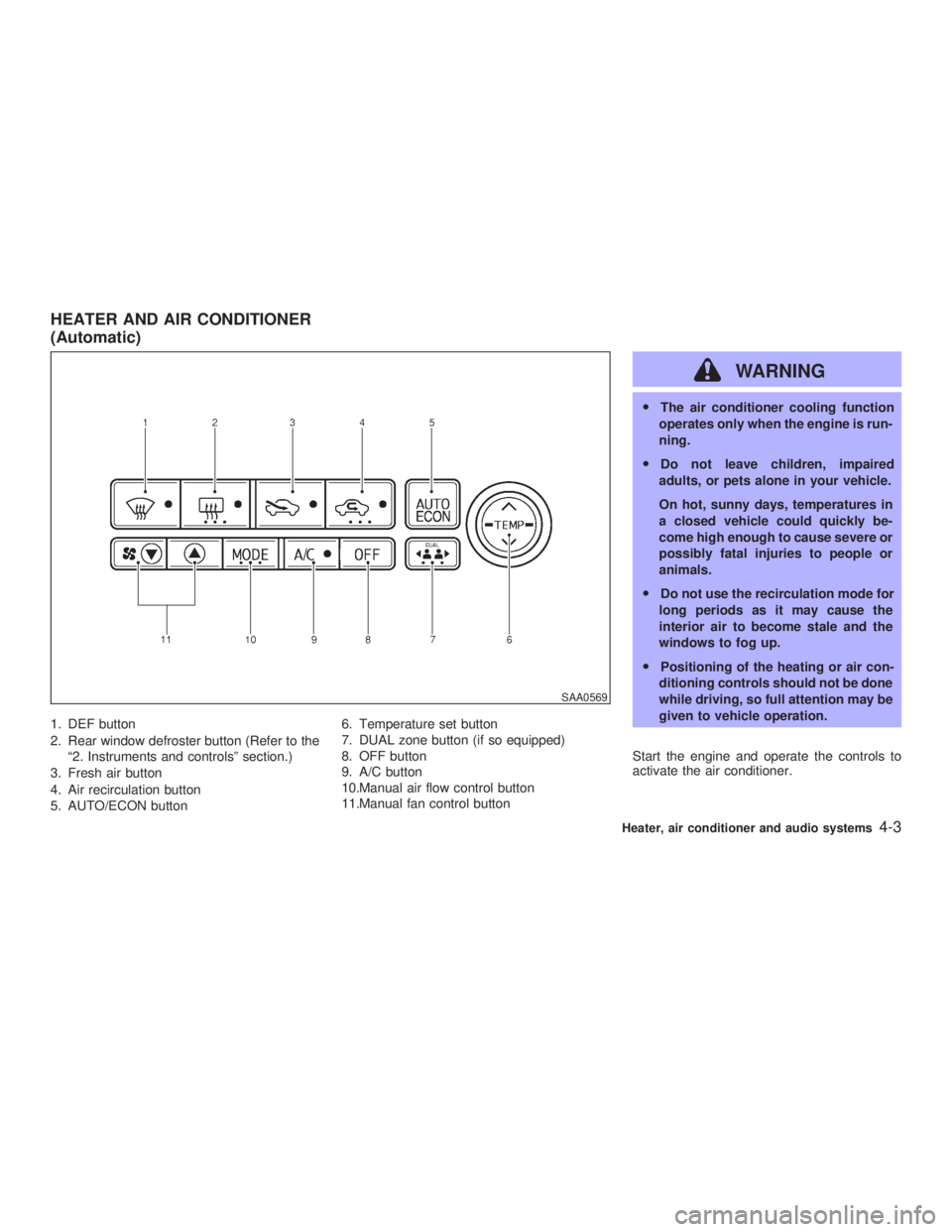
1. DEF button
2. Rear window defroster button (Refer to the
ª2. Instruments and controlsº section.)
3. Fresh air button
4. Air recirculation button
5. AUTO/ECON button 6. Temperature set button
7. DUAL zone button (if so equipped)
8. OFF button
9. A/C button
10.Manual air flow control button
11.Manual fan control button WARNING O The air conditioner cooling function
operates only when the engine is run-
ning.
O Do not leave children, impaired
adults, or pets alone in your vehicle.
On hot, sunny days, temperatures in
a closed vehicle could quickly be-
come high enough to cause severe or
possibly fatal injuries to people or
animals.
O Do not use the recirculation mode for
long periods as it may cause the
interior air to become stale and the
windows to fog up.
O Positioning of the heating or air con-
ditioning controls should not be done
while driving, so full attention may be
given to vehicle operation.
Start the engine and operate the controls to
activate the air conditioner. SAA0569HEATER AND AIR CONDITIONER
(Automatic)
Heater, air conditioner and audio systems
4-3
Z 02.7.29/V35-D/V5.0
X
Page 122 of 256
up easily when operating the heater or air
conditioning system. The air conditioning system in your INFINITI
vehicle is charged with a refrigerant designed
with the environment in mind. This refrigerant
will not harm the earth's ozone layer. How-
ever, special charging equipment and lubricant
are required when servicing your NISSAN air
conditioner. Using improper refrigerants or lu-
bricants will cause severe damage to your air
conditioning system. See ªCapacities and rec-
ommended fuel/lubricantsº in the ª10. Techni-
cal and consumer informationº section for air
conditioning system refrigerant and lubricant
recommendations.
Your INFINITI retailer will be able to service
your environmentally friendly air conditioning
system.
WARNING The air conditioner system contains re-
frigerant under high pressure. To avoid
personal injury, any air conditioner ser-
vice should be done only by an experi-
enced technician with proper equip-
ment. Turn the ignition key to ACC or ON and press
the POWER, FM or AM button to turn on the
radio. If you listen to the radio with the engine
not running, the key should be turned to the
ACC position.
Radio reception is affected by station signal
strength, distance from radio transmitter, build-
ings, bridges, mountains and other external
influences. Intermittent changes in reception
quality normally are caused by these external
influences.
Using a cellular phone in or near the ve-
hicle may influence radio reception quality.
Radio reception Your radio system is equipped with state-of-
the-art electronic circuits to enhance radio
reception. These circuits are designed to ex-
tend reception range, and to enhance the
quality of that reception.
However there are some general characteris-
tics of FM, AM and satellite radio signals that
can affect radio reception quality in a moving
vehicle, even when the finest equipment is
used. These characteristics are completely
normal in a given reception area, and do not
indicate any malfunction in your radio system.
Remember that a moving vehicle is not the
ideal place to listen to a radio. Because of theSERVICING AIR CONDITIONER AUDIO SYSTEM
4-6 Heater, air conditioner and audio systems
Z 02.7.29/V35-D/V5.0
X
Page 128 of 256
the radio will come on at the station last
played.
The last station played will also come on when
the POWER button is turned to ON.
If another audio source is playing when the
FM/AM band select button is turned to ON, the
other audio source will automatically be turned
off and the last radio station played will come
on.
The FM stereo indicator ST will glow during
FM stereo reception. When the stereo broad-
cast signal is weak, the radio will automatically
change from stereo to monaural reception.
Satellite radio operation
SAT Satellite channel select:
Pushing the SAT channel select button will
change the band as follows:
SAT1 ! SAT2 ! SAT1
If you have not signed up for satellite radio, or
if satellite radio receiver is not installed, ªNO
SATº will be shown on the display.
When SAT channel select button is pushed
while the ignition switch is in the ACC or ON
position, the radio will come on at the channel
last played. The last channel played will also come on
when the POWER button is turned to ON.
If another audio source is playing when the
SAT channel select button is turned to ON, the
other audio source will automatically be turned
off and the last channel played will come on.
TUNE (Tuning):
WARNING The radio should not be tuned while
driving so full attention may be given to
vehicle operation.
Use these buttons for manual tuning. To move
quickly through the channels, hold either of the
TUNE buttons down for more than 0.5 sec-
onds.
SEEK tuning:
For AM and FM radio:
Push the SEEK button or , to tune
from high to low or low to high frequencies and
stops at the next broadcasting station.
For satellite radio:
Push the SEEK button or to seek channels of the next or previous category.
SCAN tuning:
Push the SCAN tuning button to tune from low
to high frequencies and stops at each broad-
casting station for 5 seconds. Pushing the
button again during this 5 seconds period will
stop SCAN tuning and the radio will remain
tuned to that station.
If the SCAN tuning button is not pushed within
5 seconds, SCAN tuning moves to the next
station.
(DISP) Display mode of satellite
radio:
O Pushing the RPT button will display addi-
tional information about the satellite radio
broadcast (for example: Artist name, Title).
O Keep pushing the RPT button, and it will
change the information of the satellite radio
broadcast to be displayed as follows:
CH Number ! CH Name ! Artist Name !
Song Title ! CH Number
Station memory operations:
Twelve stations/channels can be set for the
FM band (six for FM1, six for FM2), twelve for
satellite radio (six for SAT1, six for SAT2) and
six stations can be set for the AM band.
4-12 Heater, air conditioner and audio systems
Z 02.7.29/V35-D/V5.0
X