2003 Hyundai Accent key
[x] Cancel search: keyPage 57 of 186

1- 44 FEATURES OF YOUR HYUNDAI
B400A01A-AAT
DIGITAL CLOCK (If Installed)
There are three control buttons for the digital
clock. Their functions are:
HOUR - Push "H" to advance the hour indicat-
ed.
MI
N - Push "M" to advance the minute indicat-
ed.
RESET - Push "R" to reset minutes to ":00" to
facilitate resetting the clock to the correct time.
When this is done:
Pressing "R" between 10 : 30 and 11 : 29
changes the readout to 11 : 00. Pressing "R"
between 11 : 30 and 12 : 29 changes the
readout to 12 : 00.
B360A03A-AAT
FRONT FOG LIGHT SWITCH
(If Installed)
To turn on the front fog lights, push the switch.
They will light when the headlight switch is in
the first or second position and the key is in the
"ON" position.
CAUTION:Do not clean the inner side of the rear window
glass with an abrasive type of glass cleaner or
use a scraper to remove foreign deposits from
the inner surface of the glass as this may
cause damage to the defroster elements.
NOTE:The ignition must be in the "ON" position
for the rear window defroster to operate.
!
HLC2100
B360B01A
Page 58 of 186
FEATURES OF YOUR HYUNDAI 1- 45
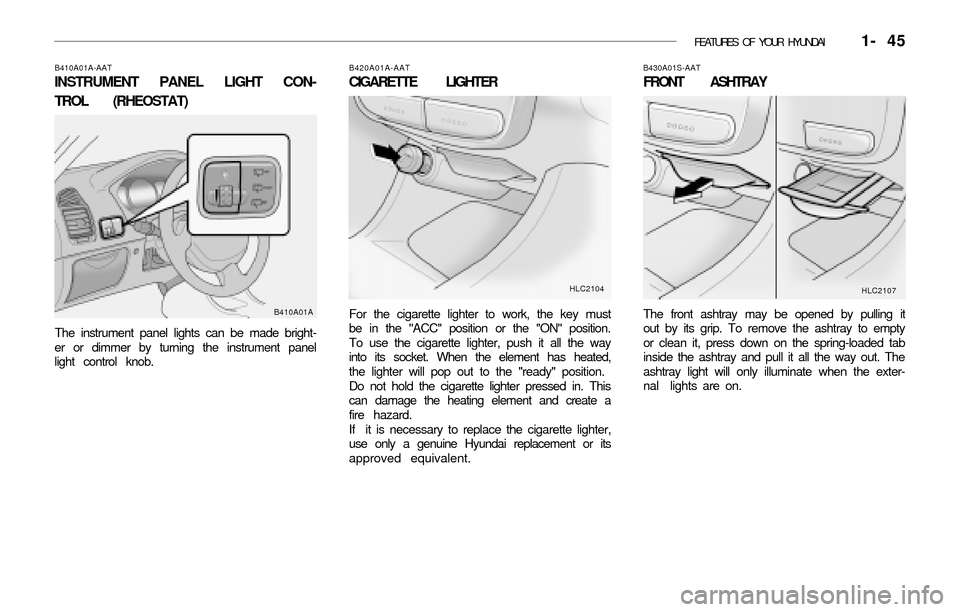
B410A01A-AAT
INSTRUMENT PANEL LIGHT CON-
TROL (RHEOSTAT)
The instrument panel lights can be made bright-
er or dimmer by turning the instrument panel
light control knob.
B420A01A-AAT
CIGARETTE LIGHTER
For the cigarette lighter to work, the key must
be in the "ACC" position or the "ON" position.
To use the cigarette lighter, push it all the way
into its socket. When the element has heated,
the lighter will pop out to the "ready" position.
Do not hold the cigarette lighter pressed in. This
can damage the heating element and create a
fire hazard.
If it is necessary to replace the cigarette lighter,
use only a genuine Hyundai replacement or its
approved equivalent.
B430A01S-AAT
FRONT ASHTRAY
The front ashtray may be opened by pulling it
out by its grip. To remove the ashtray to empty
or clean it, press down on the spring-loaded tab
inside the ashtray and pull it all the way out. The
ashtray light will only illuminate when the exter-
nal lights are on.B410A01AHLC2104
HLC2107
Page 60 of 186

FEATURES OF YOUR HYUNDAI 1- 47
oON
In the "ON" position, the light stays on at all
times.
o OFF
In the "OFF" position, the light stays off at all
times even though a door is open.
The interior courtesy light has a switch of three
positions. The three positions are:
o "DR" or "·"
In the "DR" or "·" position, the interior cour-
tesy light comes on when any door is opened
regardless of the ignition key position. The
light goes out when the door is closed.
NOTE:If your vehicle is equipped with the delay-out
interior light, the light goes out gradually
within 6 seconds after the door is closed.
B490A02A-AAT
Interior light
HLC2080
Type A (If Installed)Type B
B480A01E-AAT
INTERIOR LIGHT
Map Light (If Installed)
The two map light switches are located on both
sides of the front overhead console. Push in the
map light switch to turn the light on or off. This
light produces a spot beam for convenient use
as a map light at night or as a personal light for
the driver and the passenger.
HLC2081
HLC2110 B500A01A-AAT
GLOVE BOX
WARNING:
To avoid the possibility of injury in case of
an accident or a sudden stop, the glove box
door should be kept closed when the car is
in motion.
!
Page 64 of 186

FEATURES OF YOUR HYUNDAI 1- 51
B530A01A-AAT
PARKING BRAKE
Always engage the parking brake before leaving
the car. This also turns on the parking brake
indicator light when the key is in the "ON" or
"START" position. Before driving away, be sure
that the parking brake is fully released and the
indicator light is off.
o To engage the parking brake, pull the lever
up as far as possible.
o To release the parking brake, pull up the
lever and press the thumb button. Then,
while holding the button in, lower the brake
lever.
HLC3024B550A01S-GAT
HIGH-MOUNTED REAR STOP LIGHT
(If Installed)
In addition to the lower-mounted rear stop lights
on either side of the car, the high mounted rear
stop light in the center of the rear window or
inserted in the rear spoiler also lights when the
brakes are applied.
HLC2124HLC2017 B570A03A-GAT
HOOD RELEASE
1 . Pull the release knob to unlatch the hood.
2. Push the safety catch lever to the left and lift
the hood.
3. Hold the hood open with the support rod.
Before closing the hood, return the support rod
to its clip to prevent it from rattling. Lower the
hood until it is about 1 ft. (30 cm) above the
closed position and let it drop. Make sure that it
locks into place.
Page 66 of 186

FEATURES OF YOUR HYUNDAI 1- 53
The fuel-filler lid may be opened from inside the
vehicle by pulling up on the fuel-filler lid opener
located on the front floor area on the left side of
the car.
NOTE:If the fuel-filler lid will not open because ice
has formed around it, tap lightly or push on
the lid to break the ice and release the lid. Do
not pry on the lid. If necessary, spray around
the lid with an approved de-icer fluid (do not
use radiator anti-freeze) or move the vehicle
to a warm place and allow the ice to melt.
WARNING:o The fuel cap must be tightened at least 3
clicks, otherwise " " light will illumi-
nate.
o Gasoline vapors are dangerous. Before
refueling, always stop the engine and
never allow sparks or open flames near
the filler area. If you need to replace the
filler cap, use a genuine Hyundai replace-
ment part.
o If you open the fuel filler cap during high
ambient temperatures, a slight "pressure
sound" may be heard. This is normal and
not a cause for concern.
Whenever you open the fuel filler cap,
turn it slowly.
o Make sure the fuel filler cap is replaced
and securely seated after fueling. Failure
to replace or fully seat the fuel filler cap
will result in fuel vapors escaping into the
atmosphere and the check engine (MIL)
indicator " " illuminating.
o Do not "TOP-OFF" after the first nozzle
shut off when refueling.
HLC2016
B540A01E-GAT
TRUNK LID (4 DOOR)
Remote Trunk Lid Release
B540D01A
To open the trunk lid without using the key, pull
up the lid release lever.
To close, lower the trunk lid, then press down on
it until it locks. To be sure the trunk lid is
securely fastened, always try to pull it up again.
WARNING:The trunk lid should always be kept com-
pletely closed while the vehicle is in motion. If
it is left open or ajar, poisonous exhaust
gases may enter the car resulting in serious
illness or death to the occupants. See addi-
tional warnings concerning exhaust gases on
page 2-2.
!
!
Page 67 of 186

1- 54 FEATURES OF YOUR HYUNDAI
B540C01A-AAT
To Unlock Using the Key.
To open the trunk lid, insert the key and turn it
clockwise to unlock. The luggage compartment
light illuminates when the trunk lid is opened.
B450E01AB540F01A-AAT
Tailgate (3 DOOR)
To open the tailgate, unlock it by turning the key
clockwise, then pull the outside handle toward
you.
To close, lower the tailgate and shut firmly to
engage the latch. Lock the tailgate by turning the
key counterclockwise.
B540B02E-AAT
Trunk Lid Emergency Latch Release
Your vehicle is equipped with a glow-in-the dark
emergency trunk release lever located inside
the trunk. It will glow after the trunk is closed.
When pulled, this lever will release the trunk
latch mechanism and open the trunk.
NOTE:o If a person is locked in the trunk by one's
own will or by another person or by acci-
dent, pull the emergency trunk release
lever on the driver's side of the inside
panel of the trunk. This will open the
trunk lid.
o HYUNDAI recommends that cars be kept
locked and keys be kept out of the reach
of children, and that parents teach their
children about the dangers of playing in
trunks.
WARNING:Parents should teach children about the emer-
gency trunk release lever in their vehicle and
how to open the trunk lid if they are acciden-
tally locked in the trunk.
B540B02A
!
B540F01A
Page 68 of 186

FEATURES OF YOUR HYUNDAI 1- 55
If the vehicle is equipped with central door
locking, the tailgate can be locked without a key.
Push the central door lock switch toward the
front of the vehicle after closing the tailgate.
If the tailgate is open when the switch is pushed,
the tailgate will be locked when it is fully closed.
WARNING:The tailgate should always be kept completely
closed while the vehicle is in motion. If it is left
open or ajar, poisonous exhaust gases may
enter the car which could result in serious
injury or death to the occupants. See addi-
tional warnings concerning exhaust gases on
page 2-2.
!
HLC2105 B580A01TB-GAT
SUN VISOR
B580A01A
Type A
Type B
B650A01A-GAT
CARGO AREA COVER
(3 Door Model)
Nothing should be carried on top of the luggage
cover. Loose materials could result in injury to
vehicle occupants during sudden braking.
B650A01A-1Type A
Type B
Page 82 of 186

FEATURES OF YOUR HYUNDAI 1- 69
sound will be attenuated). When the control
knob is turned clockwise, rear speaker sound
will be emphasized (Front speaker sound will
be attenuated).
3. BASS Control Knob
Press to pop the knob out and turn to the left or
right for the desired bass tone.
TREBLE Control Knob.
Pull the bass control knob further out. Turn to
the left or right for the desired treble tone.
4. BAND Selector
Pressing the button changes the AM, FM1
and FM2 bands. The mode selected is dis-
played on LCD.
5. TUNE (Manual) Select Button
Press the ( ) side or ( ) side to increase or to
decrease the frequency. With the button held
down for 1 sec. or more, the stop signal (broad-
casting radio wave) is ignored and channel
selection continues.
SEEK Operation
(Automatic Channel Selection)
Press the TUNE select button for 1 sec. or
more. When the ( ) side is pressed, the unit will
automatically tune to the next higher frequencyand when the ( ) side is pressed, it will automa-
tically tune to the next lower frequency.
6 . PRESET STATION SELECT Button
Six (6) stations for AM, FM1 and FM2 respec-
tively can be preset in the electronic memory
circuit on this unit.
HOW TO PRESET STATIONS
Six AM and twelve FM stations may be pro-
grammed into the memory of the radio. Then, by
simply pressing the band select button and/or
one of the six station select buttons, you may
recall any of these stations instantly. To pro-
gram the stations, follow these steps:
o Press band selector to set the band for AM,
FM1, and FM2.
o Select the desired station to be stored by
seek, scan or manual tuning.
o Determine the preset station select button
you wish to use to access that station.
o Press the station select button for more than
two seconds. A select button indicator will
show in the display indicating which select
button you have depressed. You should then
release the button, and proceed to program
the next desired station. A total of 18 stations
can be programmed by selecting one AM
and two FM stations per button.
o When completed, any preset station may be
recalled by selecting AM, FM1 or FM2 band
and the appropriate station button.
H210B03O-AAT
1. POWER ON-OFF/VOLUME Control
Knob
The radio unit may be operated when the igni-
tion key is in the "ACC" or "ON" position. Rotate
the knob clockwise to switch the radio unit on
and to increase the volume.
The LCD shows the radio frequency in the radio
mode. Turn the knob counterclockwise to re-
duce the volume and to switch the radio unit off.
BAL (Balance Control) Knob
Pull and turn the control knob clockwise to
emphasize right speaker sound (Left speaker
sound will be attenuated.). When the control
knob is turned counterclockwise, left speaker
sound will be emphasized (Right speaker sound
will be attenuated.).
After adjusting the balance, push the knob again
to use the other function.
SCAN Knob
When the scan knob is pressed, the frequency
will increase and the receivable stations will be
tuned in one after another, receiving each sta-
tion for 5 seconds. To stop scanning, press the
scan knob again.
2 . FAD (Fader Control) Knob
Turn the control knob counterclockwise to em-
phasize front speaker sound (Rear speaker
FM
AM