2003 Hyundai Accent key
[x] Cancel search: keyPage 84 of 186

FEATURES OF YOUR HYUNDAI 1- 71
3. TREB (Treble Control) Knob
Press to pop the knob out and turn to the left or
right for the desired treble tone.
FAD (Fader Control) Knob
Pull the treble control knob further out.
Turn the control knob counterclockwise to em-
phasize front speaker sound. (Rear speaker
sound will be attenuated)
When the control knob is turned clockwise, rear
speaker sound will be emphasized.
(Front speaker sound will be attenuated)
4. TUNE (Manual) Select Button
Press the ( ) side or ( ) side to increase or to
decrease the frequency. Press either button and
hold down to continuously scroll. Release but-
ton once the desired station is reached.
SEEK Operation
(Automatic Channel Selection)
Press the TUNE select button 0.5 sec or more.
Releasing it will automatically tune to the next
available station with a beep sound.
When the ( ) side is pressed longer than 0.5
second, releasing will automatically tune to the
next higher frequency and when the ( ) side is
pressed longer than 0.5 second, releasing will
automatically tune to the next lower frequency.
5. BAND Selector
Pressing the button changes the AM, FM1
and FM2 bands. The mode selected is dis-
played on LCD.
6. PRESET STATION SELECT Button
Six (6) stations for AM, FM and FM2 respective-
ly can be preset in the electronic memory circuit
on this unit.
HOW TO PRESET STATIONS
Six AM and twelve FM stations may be pro-
grammed into the memory of the radio. Then, by
simply pressing the band select button and/or
one of the six station select buttons, you may
recall any of these stations instantly. To pro-
gram the stations, follow these steps:
o Press band selector to set the band for AM,
FM, and FM2.
o Select the desired station to be stored by
seek or manual tuning.
o Determine the preset station select button
you wish to use to access that station.
o Press the station select button for more than
two seconds. A select button indicator will
show in the display indicating which select
button you have depressed. The frequency
display will flash after it has been stored into
the memory with a beep sound. You should
then release the button, and proceed to pro-
H240B03O-AAT
1 . POWER ON-OFF Control Knob
The radio unit may be operated when the igni-
tion key is in the "ACC" or "ON" position. Press
the knob to switch the power on. The LCD
shows the radio frequency in the radio mode or
the tape direction indicator in the tape mode. To
switch the power off, press the knob again.
VOLUME Control
Rotate the knob clockwise to increase the vol-
ume and turn the knob counterclockwise to
reduce the volume.
2. BASS Control Knob
Press to pop the knob out and turn to the left or
right for the desired bass tone.
BAL (Balance Control) Knob
Pull the bass control knob further out.Turn the
control knob clockwise to emphasize right
speaker sound. (Left speaker sound will be
attenuated)
When the control knob is turned counterclock-
wise, left speaker sound will be emphasized.
(Right speaker sound will be attenuated)
FM/AM
Page 89 of 186

1- 76 FEATURES OF YOUR HYUNDAI
3 . BASS Control Knob
Press to pop the knob out and turn to the left or
right for the desired bass tone.
TREB (Treble Control) Knob
Pull the bass control knob further out. Turn to
the left or right for the desired treble tone.
4 . SCAN Button
When the scan button is pressed, the frequency
will increase and the receivable stations will be
tuned in one after another, receiving each sta-
tion for 5 seconds. To stop scanning, press the
scan button again.
5. TUNE (Manual) Select Button
Press the ( ) side or ( ) side to increase or to
decrease the frequency. Press either button and
hold down to continuously scroll. Release but-
ton once the desired station is reached.
SEEK Operation
(Automatic Channel Selection)
Press the TUNE select button for 0.5 sec or
more. Releasing it will automatically tune to the
next available station with a beep sound.
When the ( ) side is pressed longer than 0.5
second, releasing will automatically tune to the
next higher frequency and when the ( ) side is
pressed longer than 0.5 second, releasing will
automatically tune to the next lower frequency.
6. BAND Selector
Pressing the button changes the AM, FM1
and FM2 bands. The mode selected is dis-
played on LCD.
7. PRESET STATION SELECT Button
Six (6) stations for AM, FM and FM2 respective-
ly can be preset in the electronic memory circuit
on this unit.
H260B04O-AAT
1 . POWER ON-OFF Control Knob
The radio unit may be operated when the igni-
tion key is in the "ACC" or "ON" position. Press
the knob to switch the power on. The LCD
shows the radio frequency in the radio mode or
the CD track indicator in the CD mode. To
switch the power off, press the knob again.
VOLUME Control
Rotate the knob clockwise to increase the vol-
ume and turn the knob counterclockwise to
reduce the volume.
BALANCE Control
Pull and turn the control knob clockwise to
emphasize right speaker sound (Left speaker
sound will be attenuated). When the control
knob is turned counterclockwise, left speaker
sound will be emphasized. (Right speaker sound
will be attenuated)
2. FAD (Fader Control) Knob
Turn the control knob counterclockwise to em-
phasize front speaker sound. (Rear speaker
sound will be attenuated) When the control knob
is turned clockwise, rear speaker sound will be
emphasized. (Front speaker sound will be atten-
uated)
FM/AM
Page 96 of 186

FEATURES OF YOUR HYUNDAI 1- 83
B870A01A-AAT
ANTENNA
Fixed Rod Antenna
Your car uses a fixed rod antenna to receive
both AM and FM broadcast signals.
This antenna is a removable type. To remove
the antenna, turn it counterclockwise. To install
the antenna, turn it clockwise.
CAUTION:o Be sure to remove the antenna before
washing the car in an automatic car wash
or it may be damaged.
o When reinstalling your antenna, it is im-
portant that it is fully tightened to ensure
proper reception.
B870B01Y-AAT
Power Antenna (If Installed)
The antenna will automatically be extended when
the radio power switch is turned on while the
ignition key is in either the "ON" or "ACC"
position. The antenna will automatically be re-
tracted and stored when either the radio power
switch is turned off or the ignition key is set to
the "LOCK" position.
NOTE:o Before turning on the radio, make sure
that no one is near the antenna.
o Before entering an automatic car wash or
a place with a low height clearance, be
sure that the antenna is retracted and
stored.
o If the antenna is dirty, be sure to clean it
in order to avoid an operation malfunc-
tion.
HLC2123
B870A01A
Page 97 of 186
2. DRIVING YOUR HYUNDAI
Before Starting the Engine ............................................................. 2-3
Key Positions .................................................................................. 2-3
Starting ............................................................................................ 2-4
Operating the Manual Transaxle .................................................... 2-5
Automatic Transaxle ....................................................................... 2-7
Good Braking Practices ................................................................ 2-10
Anti-Lock Brake System ............................................................... 2-10
Driving for Economy ..................................................................... 2-11
Winter Driving ............................................................................... 2-12
Trailer Towing ............................................................................... 2-14
2
Page 99 of 186
DRIVING YOUR HYUNDAI 2- 3
C020A01A-AATBEFORE STARTING THE ENGINE
Before you start the engine, you should always:
1. Look around the vehicle to be sure there are
no flat tires, puddles of oil or water or other
indications of possible trouble.
2. After entering the car, check to be sure the
parking brake is engaged.
3. Check that all windows, and lights are clean.
4. Check that the interior and exterior mirrors
are clean and in position.
5. Check your seat, seatback and headrest to
be sure they are in their proper positions.
6. Lock all the doors.
7. Fasten your seat belt and be sure that all
other occupants have fastened theirs.
8. Turn off all lights and accessories that are
not needed.
9. When you turn the ignition switch to "ON",
check that all appropriate warning lights are
operating and that you have sufficient fuel.
10. Check the operation of warning lights and all
bulbs when key is in the "ON" position.
C030A01A-AATCOMBINATION IGNITION SWITCH
To Start the Engine
o If your Hyundai is equipped with a manual
transaxle, place the shift lever in neutral and
depress the clutch pedal fully.
o If your Hyundai has an automatic transaxle,
place the shift lever in "P" (park).
o To start the engine, insert the ignition key
and turn it to the "START" position. Release
it as soon as the engine starts. Do not hold
the key in the "START" position for more
than 15 seconds.
NOTE:o For safety, the engine will not start if the
clutch pedal is not depressed fully (Manual
Transaxle) or the shift lever is not in "P"
or "N" Position (Automatic Transaxle).
o The ignition key cannot be turned from
"ACC" position to "LOCK" position un-
less the shift lever is in the "P" (Park)
position or the negative battery terminal
is disconnected from the battery. (For
Automatic Transaxle)
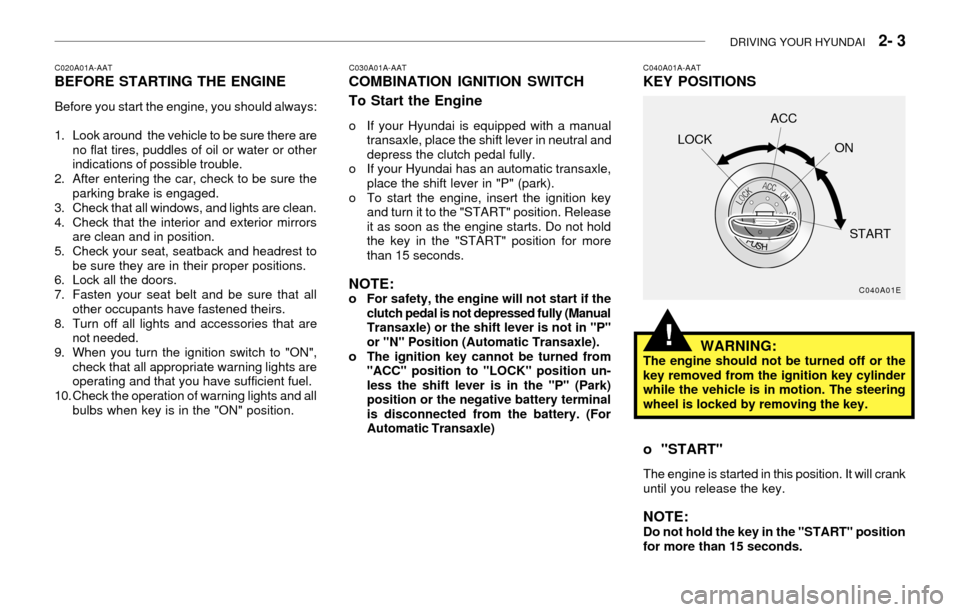
C040A01A-AATKEY POSITIONS
C040A01E
LOCKACC
ON
START
WARNING:The engine should not be turned off or the
key removed from the ignition key cylinder
while the vehicle is in motion. The steering
wheel is locked by removing the key.
o "START"
The engine is started in this position. It will crank
until you release the key.
NOTE:Do not hold the key in the "START" position
for more than 15 seconds.
!
Page 100 of 186
2- 4 DRIVING YOUR HYUNDAI
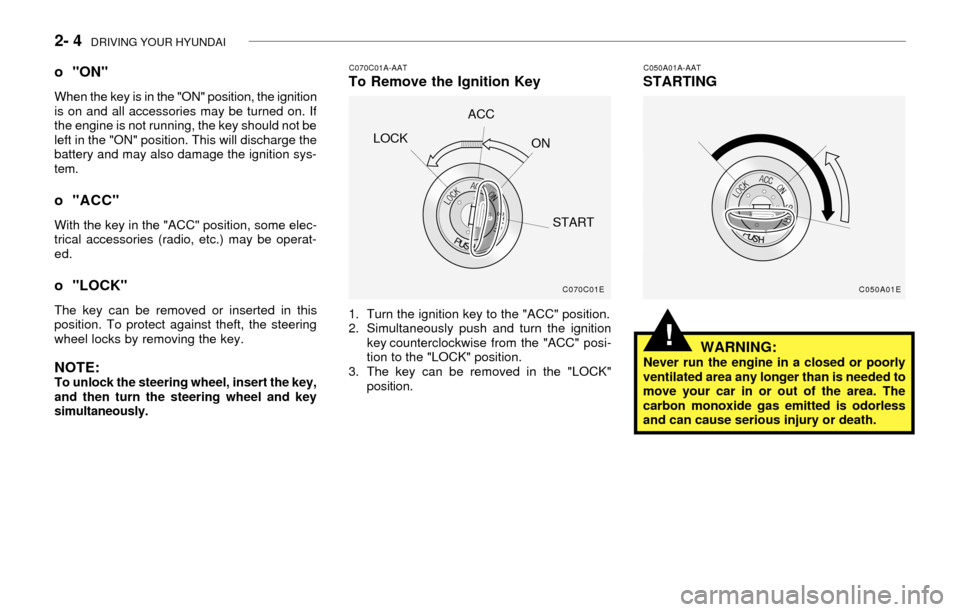
C070C01A-AATTo Remove the Ignition Key
1. Turn the ignition key to the "ACC" position.
2. Simultaneously push and turn the ignition
key counterclockwise from the "ACC" posi-
tion to the "LOCK" position.
3. The key can be removed in the "LOCK"
position.
C050A01A-AATSTARTING
WARNING:
Never run the engine in a closed or poorly
ventilated area any longer than is needed to
move your car in or out of the area. The
carbon monoxide gas emitted is odorless
and can cause serious injury or death.
o "ON"
When the key is in the "ON" position, the ignition
is on and all accessories may be turned on. If
the engine is not running, the key should not be
left in the "ON" position. This will discharge the
battery and may also damage the ignition sys-
tem.
o "ACC"
With the key in the "ACC" position, some elec-
trical accessories (radio, etc.) may be operat-
ed.
o "LOCK"
The key can be removed or inserted in this
position. To protect against theft, the steering
wheel locks by removing the key.
NOTE:To unlock the steering wheel, insert the key,
and then turn the steering wheel and key
simultaneously.
C070C01E
LOCKACC
ON
START
C050A01E
!
Page 101 of 186
DRIVING YOUR HYUNDAI 2- 5
The starter should not be operated for more
than 15 seconds at a time. Wait 15-30 sec-
onds between starting attempts to protect
the starter from overheating.C050B01A-AATNormal Conditions:
The Starting Procedure:
1. Insert key, and fasten the seat belt.
2. Depress the clutch pedal fully and place the
gearshift lever (manual transaxle) in neutral
or the selector lever (automatic transaxle) in
"P" (park) position.
3. After turning the ignition key to the "ON"
position, make certain all warning lights and
gauges are functioning properly before start-
ing the engine.
WARNING:Be sure that the clutch is fully depressed
when starting a manual transaxle vehicle.
Your manual transaxle equipped vehicle will
not start unless the clutch pedal is fully
depressed. On a manual transaxle equipped
vehicle that can be started without depress-
ing the clutch, there is the potential to cause
damage to the vehicle or injury to someone
inside or outside the vehicle as a result of
the forward or backward movement of the
vehicle that will occur if the clutch is not
depressed when the vehicle is started.
!
4. Turn the ignition key to the "Start" position
and release it when the engine starts.
After the engine has started, allow the engine
to run for 10 to 20 seconds prior to placing
the vehicle in gear.
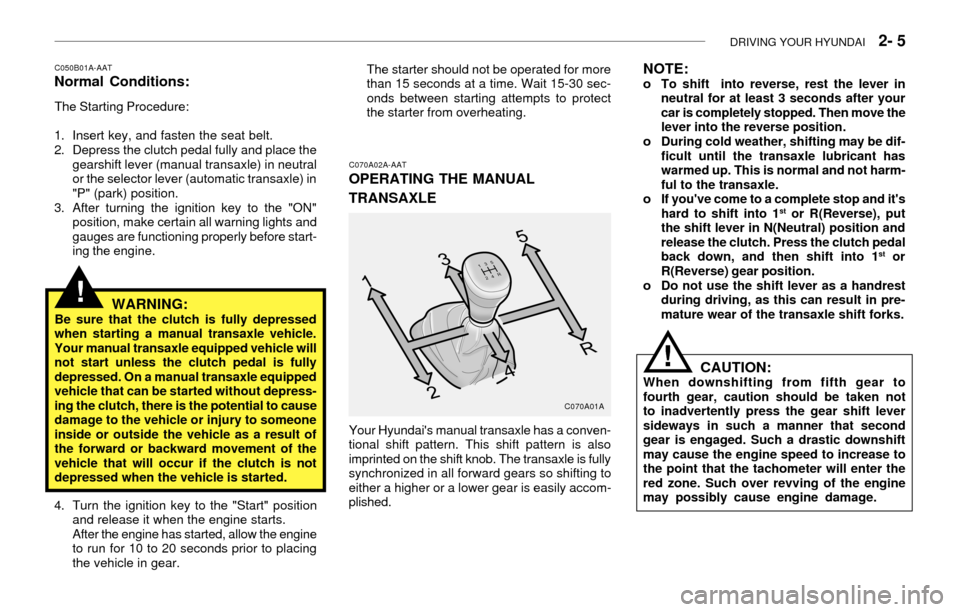
C070A02A-AAT
OPERATING THE MANUAL
TRANSAXLE
Your Hyundai's manual transaxle has a conven-
tional shift pattern. This shift pattern is also
imprinted on the shift knob. The transaxle is fully
synchronized in all forward gears so shifting to
either a higher or a lower gear is easily accom-
plished.
C070A01A
NOTE:o To shift into reverse, rest the lever in
neutral for at least 3 seconds after your
car is completely stopped. Then move the
lever into the reverse position.
o During cold weather, shifting may be dif-
ficult until the transaxle lubricant has
warmed up. This is normal and not harm-
ful to the transaxle.
o If you've come to a complete stop and it's
hard to shift into 1
st or R(Reverse), put
the shift lever in N(Neutral) position and
release the clutch. Press the clutch pedal
back down, and then shift into 1
st or
R(Reverse) gear position.
o Do not use the shift lever as a handrest
during driving, as this can result in pre-
mature wear of the transaxle shift forks.
CAUTION:When downshifting from fifth gear to
fourth gear, caution should be taken not
to inadvertently press the gear shift lever
sideways in such a manner that second
gear is engaged. Such a drastic downshift
may cause the engine speed to increase to
the point that the tachometer will enter the
red zone. Such over revving of the engine
may possibly cause engine damage.
!
Page 104 of 186

2- 8 DRIVING YOUR HYUNDAI
C090P01A-AATOverdrive Switch
When the overdrive switch is turned on, the
transaxle will automatically upshift to the sec-
ond, third and overdrive gears. When the over-
drive switch is turned off, the transaxle will not
upshift to the overdrive gear. For normal driving,
the selector lever should be left in the "D"
position and the overdrive switch turned on.
If you need to accelerate rapidly, press the
accelerator pedal all the way to the floor. The
transaxle will automatically shift to a lower gear,
depending on the vehicle speed and load.
C090G01A-AAT
o L (Low gear):
Use for driving up a very steep grade or for
engine braking when descending steep hills.
When downshifting to "L", the transaxle will
temporarily remain in second gear until the ve-
hicle has slowed enough for low gear to engage.
Do not exceed 31 mph (50 km/h) in low gear.
C090I01A-AAT C090F01A-AAT
o 2 (Second gear):
Use for driving on a slippery road, hill climbing
or engine braking downhill. "2" automatically
shifts between first and second gears.
This means that no shift-up to 3rd gear is per-
formed. However, the shift-up to third gear is
done when the car speed exceeds a certain
value to prevent the engine from over-revving.
Manually move the selector to "D" returning to
normal driving condition.
C090H01A-AATNOTE:
o For smooth and safe operation, depress
the brake pedal when shifting from "Neu-
tral" position or "Park" position to a for-
ward or reverse gear.
o The ignition key must be in the "ON"
position and the brake pedal fully de-
pressed in order to move the shift lever
from the "P" (Park) position to any of the
other positions.o It is always possible to shift from "R",
"N", "D", "2", "L" position to "P" posi-
tion.
CAUTION:o Shift into "R" and "P" position only when
the vehicle has completely stopped.
o Do not accelerate the engine in reverse or
any of the forward positions with the
brakes applied.
o Always apply the footbrake when shifting
from "P" or "N", to "R", "D", "2" or "L"
position.
o Do not use the "P" (Park) position in
place of the parking brake. Always set
the parking brake, shift the transaxle into
"P" (Park) position and turn off the igni-
tion when you leave the vehicle, even
momentarily. Never leave the vehicle un-
attended while the engine is running.
o Check the automatic transaxle fluid level
regularly, and add fluid as necessary.
!
C090P01A