Page 183 of 392
Noise reduction remains of f until you
turn it on by pressing the button
again.
When the system reaches the end of
the tape, it will automatically reverse
direction and play the other side. If
you want to remove the cassette
f rom the drive, press the EJECT
button.
You can remove the cassette with
the ignition switch in any position,
even if the audio system is turned of f .
If you turn the system of f while a
tape is playing, either with the PWR/
VOL knob or by turning of f the
ignition, the cassette will remain in
the drive. When you turn the system
back on, the tape will begin playing
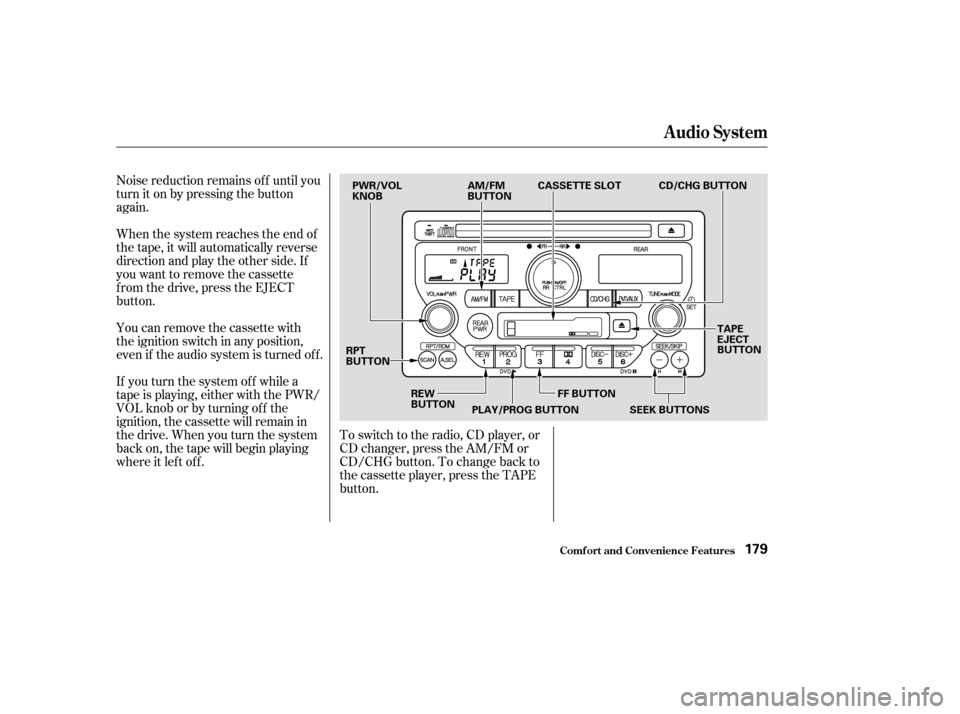
where it lef t of f .To switch to the radio, CD player, or
CD changer, press the AM/FM or
CD/CHG button. To change back to
the cassette player, press the TAPE
button.
Audio System
Comf ort and Convenience Feat ures179
PWR/VOL
KNOB
AM/FM
BUTTONCASSETTE SLOT
TAPE
EJECT
BUTTON
RPT
BUTTON
REW
BUTTONPLAY/PROG BUTTON FF BUTTON CD/CHG BUTTON
SEEK BUTTONS
Page 186 of 392
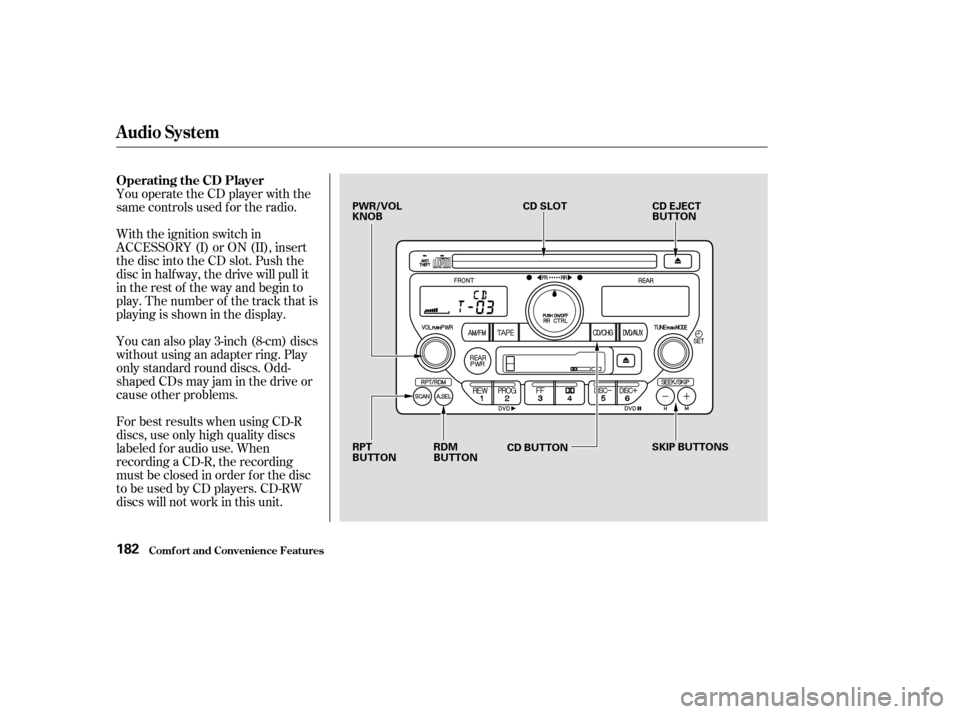
You operate the CD player with the
same controls used f or the radio.
With the ignition switch in
ACCESSORY (I) or ON (II), insert
the disc into the CD slot. Push the
disc in half way, the drive will pull it
in the rest of the way and begin to
play. The number of the track that is
playing is shown in the display.
You can also play 3-inch (8-cm) discs
without using an adapter ring. Play
only standard round discs. Odd-
shaped CDs may jam in the drive or
cause other problems.
For best results when using CD-R
discs, use only high quality discs
labeled f or audio use. When
recording a CD-R, the recording
must be closed in order f or the disc
to be used by CD players. CD-RW
discs will not work in this unit.
Comf ort and Convenience Feat ures
Operating the CD Player
Audio System
182
PWR/VOL
KNOBCD SLOT
CD EJECT
BUTTON
RPT
BUTTON RDM
BUTTON
CD BUTTON
SKIP BUTTONS
Page 187 of 392

�µ�µ
�´
�µ
�´ �µ
When the system reaches the end of
the disc, it will return to the begin-
ning and play that disc again.
You can switch to the radio while a
CD is playing by pressing the AM/
FM button. Press the CD button to
return to playing the CD. The CD
will begin playing where it lef t of f .
If you turn the system of f while a CD
is playing, either with the PWR/VOL
knob or by turning off the ignition,
the disc will stay in the drive. When
youturnthesystembackon,theCD
will begin playing where it lef t of f .
Press the eject button to remove the
disc f rom the drive.
If you eject the disc, but do not
remove it from the slot, the system
will automatically reload the disc
af ter 15 seconds and put the CD
player in pause mode. To begin
playing the disc, press the CD button. To activate the Repeat
f eature, press and release the RPT
button. You will see RPT in the
display. The system continuously
replays the current track. Press the
RPT button again to turn it off.
This feature,
when activated, plays the tracks on
the CD in random order, rather than
in the order they are recorded on the
CD. To activate Random Play, press
and release the A. SEL/RDM button.
You will see RDM in the display. The
system will then select and play
tracks randomly. This continues
until you deactivate Random Play by
pressing A. SEL/RDM again.
You can use the SEEK/SKIP buttons
while a disc is playing to select
passages and change tracks.
To move rapidly within a track, press
and hold the SEEK/SKIP button.
Press the button to move
f orward. You will see CUE in the
display. Press the button to
move backward. You will see REW
displayed. Release the button when
the system reaches the point you
want.
Each time you press and release the
SEEK/SKIP button, the
system skips f orward to the
beginning of the next track. Press
and release the button to skip
backward to the beginning of the
current track. Press it again to skip
to the beginning of the previous
track.
Audio System
Comf ort and Convenience Feat ures
REPEAT
RANDOM PLAY
183
Page 194 of 392
Your Honda is equipped with a Rear
Entertainment System that includes
a DVD player f or the enjoyment of
the rear passengers. With this
system, the rear passengers can
enjoy a dif f erent entertainment
source (radio, cassette player, CD
player or DVD player) than the f ront
seat occupants.
The ignition switch must be in
ACCESSORY (I) or ON (II) to
operate the Rear Entertainment
System.
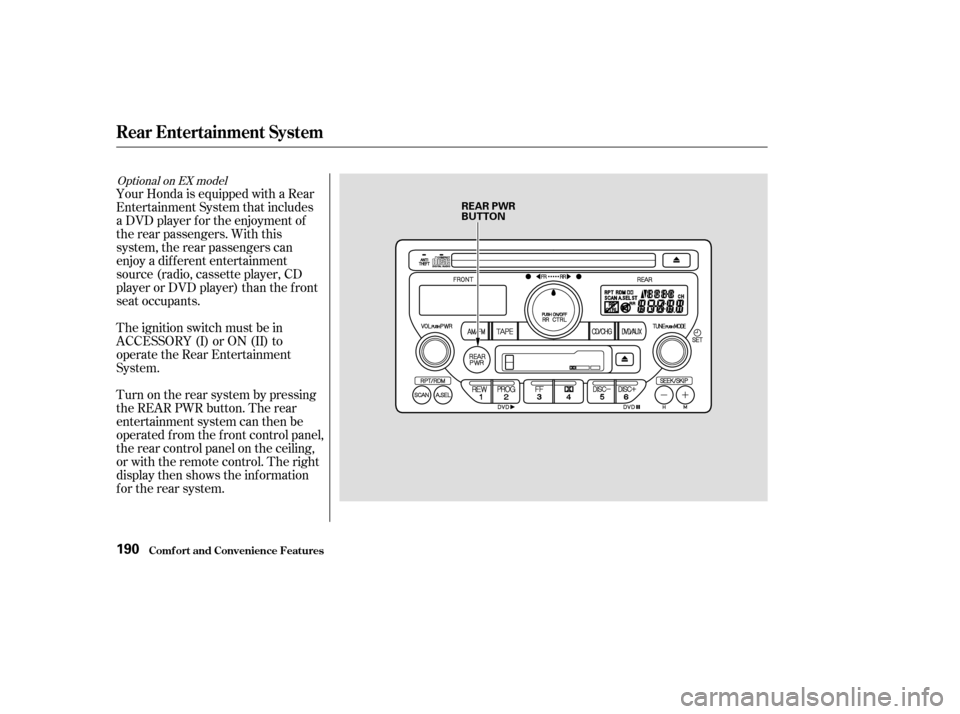
Turn on the rear system by pressing
the REAR PWR button. The rear
entertainment system can then be
operated f rom the f ront control panel,
the rear control panel on the ceiling,
or with the remote control. The right
display then shows the inf ormation
f or the rear system.
Optional on EX model
Rear Entertainment System
Comf ort and Convenience Feat ures190
REAR PWR
BUTTON
Page 235 of 392

Youshoulddothefollowingchecks
and adjustments every day bef ore
you drive your vehicle.Make sure all windows, mirrors,
and outside lights are clean and
unobstructed. Remove f rost, snow,
or ice. Check the adjustment of the seat
(see page ).
Check the adjustment of the
inside and outside mirrors (see
page ).
Check the adjustment of the
steering wheel (see page ).
Fasten your seat belt. Check that
your passengers have f astened
their seat belts (see page ).Turn the ignition switch ON (II).
Check the indicator lights in the
instrument panel.
Start the engine (see page ).
Check the gauges and indicator
lights in the instrument panel (see
page ).
Check that any items you may be
carrying with you inside are stored
properly or f astened down
securely. Visually check the tires. If a tire
looks low, use a gauge to check its
pressure. Check that the hood and tailgate
arefullyclosed. Makesurethedoorsandtailgate
are securely closed and locked.
3. 2.
1.
4. 5.
6.
7.
8.
9. 11.
12. 10.
15
78
61
102
232
89
Preparing to Drive
Driving231
Page 236 of 392

Apply the parking brake.
In cold weather, turn of f all
electrical accessories to reduce
the drain on the battery.
Make sure the shif t lever is in
Park. Press on the brake pedal.
Without touching the accelerator
pedal, turn the ignition key to the
START (III) position. If the engine
does not start right away, do not
hold the key in START (III) f or
more than 15 seconds at a time.
Pause f or at least 10 seconds
bef ore trying again.
If the engine does not start within
15 seconds, or starts but stalls
right away, repeat step 4 with the
accelerator pedal pressed half-way
down. If the engine starts, release
pressure on the accelerator pedal
so the engine does not race.If the engine still does not start,
press the accelerator pedal all the
way down and hold it there while
starting in order to clear f looding.
As bef ore, keep the ignition key in
the START (III) position f or no
more than 15 seconds. Return to
step 5 if the engine does not start.
If it starts, lif t your f oot of f the
accelerator pedal so the engine
does not race.
An engine is harder to start in cold
weather. The thinner air f ound at
high altitude above 8,000 f eet (2,400
meters) adds to the problem.
Use the f ollowing procedure: Turn of f all electrical accessories
to reduce the drain on the battery. Push the accelerator pedal half-
way to the f loor and hold it there
while starting the engine. Do not
hold the ignition key in START
(III) f or more than 15 seconds.
When the engine starts, release
the accelerator pedal gradually as
the engine speeds up and smooths
out.
If the engine fails to start in step 2,
push the accelerator pedal to the
f loor and hold it there while you
try to start the engine for no more
than 15 seconds. If the engine
does not start, return to step 2.
1. 2.
3.
5. 6.
1.
2.
3.
4.
Starting in Cold Weather at High
A ltitude (A bove 8,000 f eet/
2,400 meters)
Starting the Engine
Driving232
Page 237 of 392
This indicator on the instrument
panel shows which position the shif t
lever is in.
Your Honda’s transmission has f ive
f orward speeds, and is electronically
controlled f or smoother shif ting. It
also has a ‘‘lock-up’’ torque converter
forbetterfueleconomy.Youmay
f eel what seems like another shif t
when the converter locks.
The ‘‘D’’ indicator comes on f or a
f ew seconds when you turn the
ignition switch ON (II). If it f lashes
while driving (in any shif t position),
it indicates a possible problem in the
transmission. Avoid rapid acceler-
ation and have the transmission
checkedbyanauthorizedHonda
dealer as soon as possible.
The malf unction indicator lamp may
come on along with the ‘‘D’’ indicator
if there is a problem in the automatic
transmission control system.
Shif t L ever Position Indicator
Automatic Transmission
Driving233
Page 238 of 392
�µ
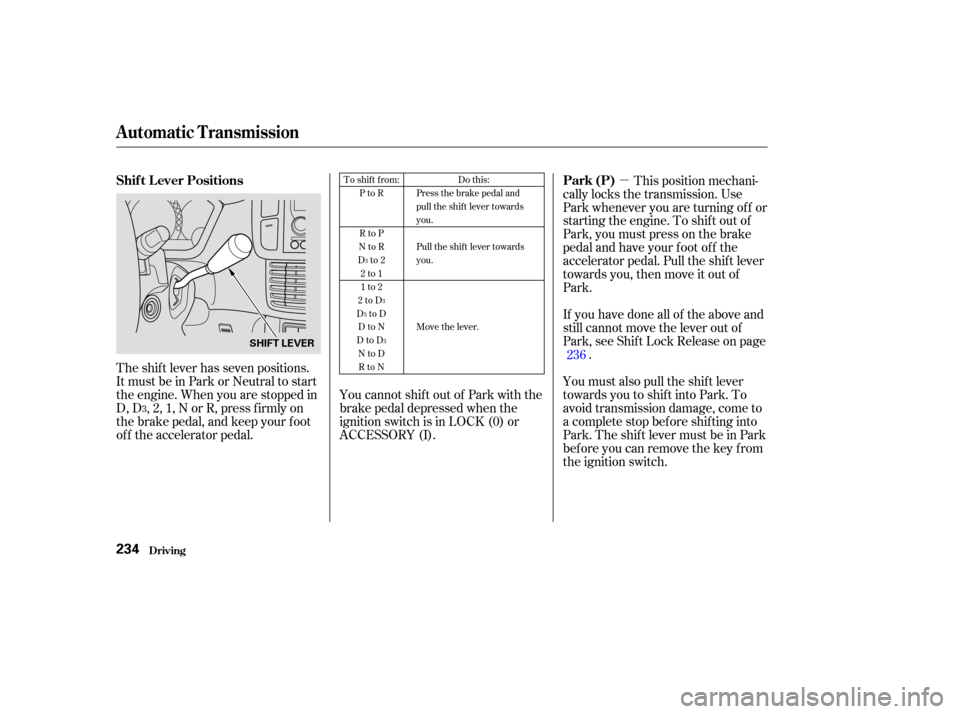
The shift lever has seven positions.
It must be in Park or Neutral to start
the engine. When you are stopped in
D, D , 2, 1, N or R, press f irmly on
the brake pedal, and keep your f oot
of f the accelerator pedal. This position mechani-
cally locks the transmission. Use
Park whenever you are turning of f or
starting the engine. To shif t out of
Park, you must press on the brake
pedal and have your f oot of f the
accelerator pedal. Pull the shif t lever
towards you, then move it out of
Park.
If you have done all of the above and
still cannot move the lever out of
Park, see Shif t Lock Release on page .
You must also pull the shif t lever
towards you to shift into Park. To
avoid transmission damage, come to
a complete stop bef ore shif ting into
Park. The shif t lever must be in Park
bef ore you can remove the key f rom
the ignition switch.
YoucannotshiftoutofParkwiththe
brake pedal depressed when the
ignition switch is in LOCK (0) or
ACCESSORY (I). 236
3 To shift from:
PtoR
RtoP
NtoR
Dto2 2to1
1to2
2toD
DtoD DtoN
DtoD NtoDRtoN Do this:
Press the brake pedal and
pull the shift lever towards
you.
Pull the shift lever towards
you.
Move the lever.
3
3
3
3
Shif t L ever Positions Park (P)
Automatic Transmission
Driving234
SHIFT LEVER