Page 251 of 415
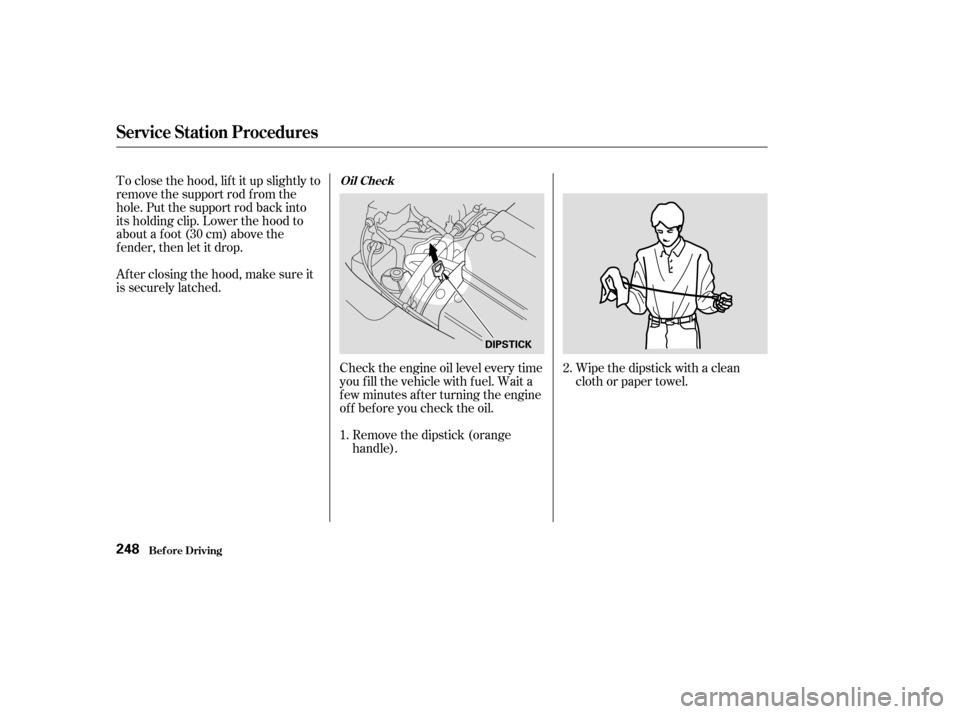
Wipe the dipstick with a clean
cloth or paper towel.
Check the engine oil level every time
you f ill the vehicle with f uel. Wait a
f ew minutes af ter turning the engine
of f bef ore you check the oil.
Remove the dipstick (orange
handle).
To close the hood, lif t it up slightly to
remove the support rod f rom the
hole. Put the support rod back into
its holding clip. Lower the hood to
about a f oot (30 cm) above the
fender,thenletitdrop.
Afterclosingthehood,makesureit
is securely latched.
2.
1.
Service Station Procedures
Bef ore Driving
Oil Check
248
DIPSTICK
Page 252 of 415
Refer toon page f or inf ormation
on checking other items in your
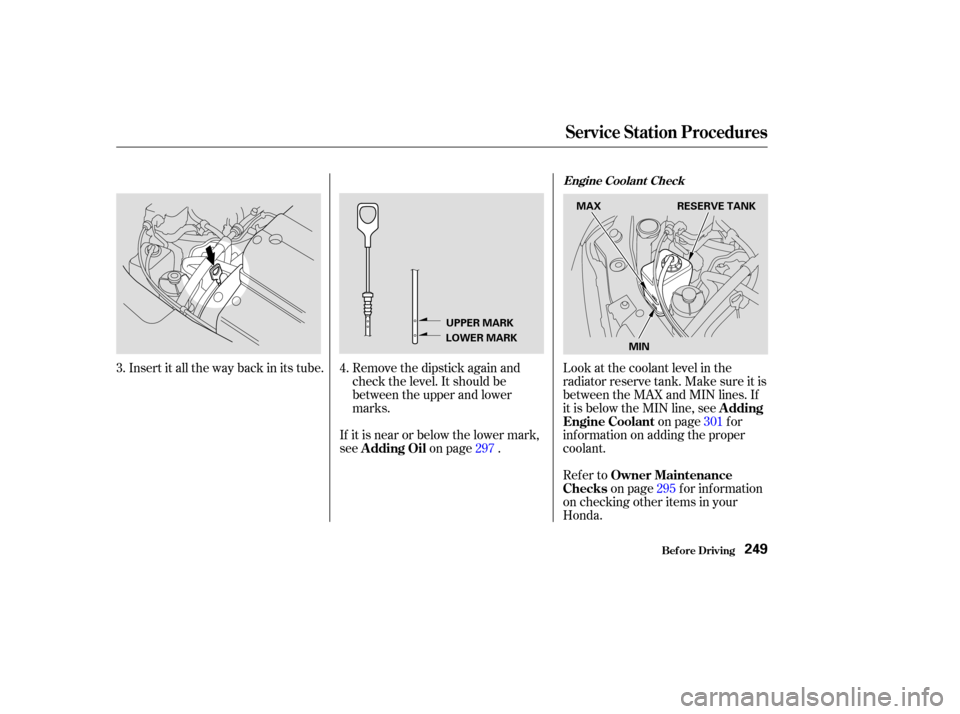
Honda. Look at the coolant level in the
radiator reserve tank. Make sure it is
between the MAX and MIN lines. If
it is below the MIN line, see on page f or
inf ormation on adding the proper
coolant.
If it is near or below the lower mark,
see
on page .
Insert it all the way back in its tube. Remove the dipstick again and
check the level. It should be
between the upper and lower
marks.
4.
3.
297301
295
Bef ore Driving
Service Station Procedures
Owner Maintenance
Checks A dding
Engine Coolant
A dding Oil
Engine Coolant Check
249
UPPER MARK
LOWER MARK MAX
RESERVE TANK
MIN
Page 253 of 415

The condition of your vehicle and
your driving habits are the two most
important things that affect the fuel
mileage you get.
Always maintain your vehicle accord-
ing to the maintenance schedule.
This will keep it in top operating
condition.A cold engine uses more f uel than a
warm engine. It is not necessary to
‘‘warm-up’’ a cold engine by letting it
idle f or a long time. You can drive
away in about a minute, no matter
how cold it is outside. The engine
will warm up f aster, and you get
better f uel economy. To cut down on
the number of ‘‘cold starts,’’ try to
combine several short trips into one.
You can improve f uel economy by
driving moderately. Rapid acceler-
ation, abrupt cornering, and hard
braking use more f uel.
Always drive in the highest gear that
allows the engine to run and acceler-
ate smoothly.
Depending on traf f ic conditions, try
to maintain a constant speed. Every
time you slow down and speed up,
your vehicle uses extra f uel. Use the
cruise control, when appropriate, to
increase f uel economy.
The air conditioning puts an extra
load on the engine which makes it
usemorefuel.Turnoff theA/Cto
cut down on air conditioning use.
Use the f low-through ventilation
when the outside air temperature is
moderate.
In winter, the build-up of snow on
your vehicle’s underside adds weight
and rolling resistance. Frequent
cleaning helps your f uel mileage and
reduces the chance of corrosion. An important part of that mainte-
nance is the (see page ). For
example, an underinf lated tire
causes more ‘‘rolling resistance,’’
which uses f uel. It also wears out
f aster, so check the tire pressure at
least monthly. 295
Vehicle Condition
Driving Habits
Owner Maintenance
Checks
Bef ore Driving
Fuel Economy
250
Page 261 of 415

Youshoulddothefollowingchecks
and adjustments every day bef ore
you drive your vehicle.Make sure all windows, mirrors,
and outside lights are clean and
unobstructed. Remove f rost, snow,
or ice. Check the adjustment of the seat
(see page ).
Check the adjustment of the
inside and outside mirrors (see
page ).
Check the adjustment of the
steering wheel (see page ).
Fasten your seat belt. Check that
your passengers have f astened
their seat belts (see page ).Turn the ignition switch ON (II).
Check the indicator lights in the
instrument panel.
Start the engine (see page ).
Check the gauges and indicator
lights in the instrument panel (see
page ).
Check that any items you may be
carrying with you inside are stored
properly or f astened down
securely. Visually check the tires. If a tire
looks low, use a gauge to check its
pressure. Check that the hood and tailgate
arefullyclosed. Makesurethedoorsandtailgate
are securely closed and locked.
3. 2.
1.
4. 5.
6.
7.
8.
9. 11.
12. 10.
128 88
17 259
71
110
Preparing to Drive
Driving258
Page 267 of 415
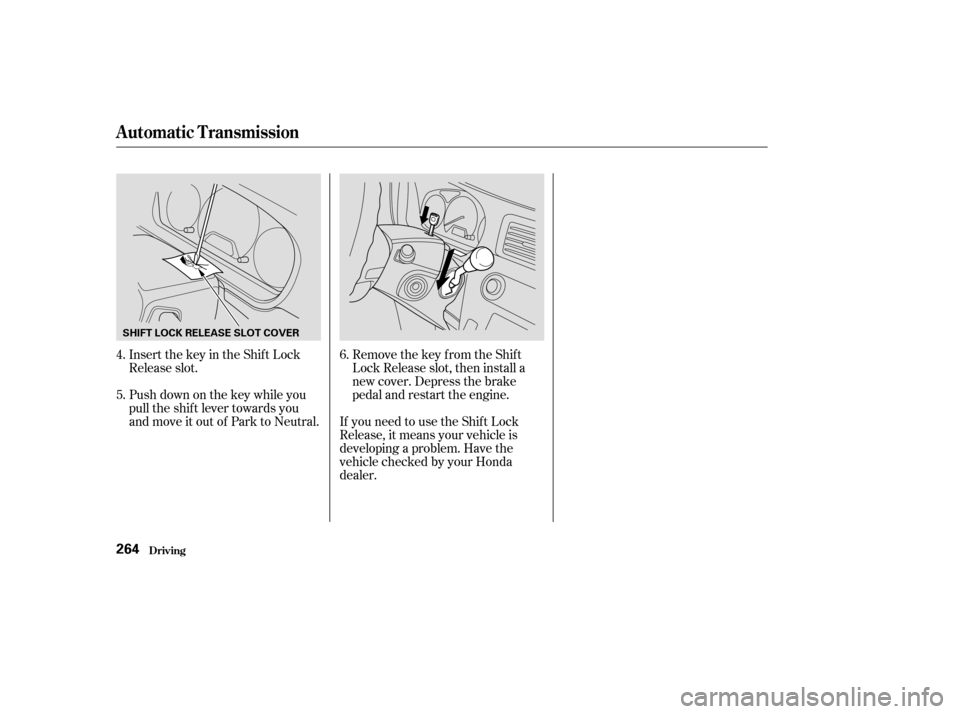
Insert the key in the Shift Lock
Release slot.
Push down on the key while you
pull the shif t lever towards you
and move it out of Park to Neutral.Remove the key from the Shift
Lock Release slot, then install a
new cover. Depress the brake
pedal and restart the engine.
If you need to use the Shif t Lock
Release, it means your vehicle is
developing a problem. Have the
vehicle checked by your Honda
dealer.
4.
5.
6.
Automatic Transmission
Driving264
SHIFT LOCK RELEASE SLOT COVER
Page 269 of 415

When the brake pads need replacing,
you will hear a distinctive metallic
‘‘screeching’’ sound when you apply
the brakes. If you do not have the
brake pads replaced, they will begin
screeching all the time.
Constant application of the brakes
when going down a long hill builds
up heat and reduces their ef f ective-
ness. Use the engine to assist the
brakes by downshif ting to a lower
gear and taking your f oot of f the
accelerator pedal.
Check your brakes af ter driving
through deep water. Apply the
brakes moderately to see if they f eel
normal. If not, apply them gently and
f requently until they do. Since a
longer distance is needed to stop
with wet brakes, be extra cautious
and alert in your driving.
Your Honda is equipped with disc
brakes at all f our wheels. A power
assist helps reduce the ef f ort needed
on the brake pedal. The ABS helps
you retain steering control when
braking very hard.
Put your f oot on the brake pedal only
when you intend to brake. Resting
your f oot on the pedal keeps the
brakes applied lightly, causing them
to build up heat. Heat build-up can
reduce how well your brakes work. It
also keeps your brake lights on all
the time, conf using drivers behind
you.
All f our brakes have audible brake
wear indicators.
Your brakes may sometimes squeal
or squeak when you apply them
lightly. Do not conf use this with the
brake wear indicators. The
indicators make a very audible
‘‘screeching.’’ Brake Wear Indicators
Driving
The Braking System
266
Page 286 of 415

This section explains the importance
of keeping your vehicle well
maintained and why you should
f ollow basic maintenance saf ety
precautions.
If you have the skills and tools to per-
f orm more complex maintenance
tasks on your Honda, you may want
to purchase the Service Manual. See
page f or inf ormation on how to
obtain a copy, or see your Honda
dealer. This section also includes
Maintenance Schedules f or normal
driving and severe driving conditions,
a Maintenance Record, and instruc-
tions f or simple maintenance tasks
you may want to take care of
yourself .......................
Maintenance Saf ety .284
.
Important Safety Precautions . 285
.................
Maintenance Schedule . 286
...
Required Maintenance Record . 293
.......
Owner Maintenance Checks . 295
..............................
Fluid Locations .296
......................................
Engine Oil .297
..................................
Adding Oil .297
....................
Recommended Oil .297
..............................
Synthetic Oil .298
....................................
Additives .299
.....
Changing the Oil and Filter . 299
.............................
Cooling System .301
............
Adding Engine Coolant . 301
.......
Replacing Engine Coolant . 303
....................
Windshield Washers .306
....
Automatic Transmission Fluid . 307
....................................
Brake Fluid .309
............................
Brake System .309
..............................
Power Steering .310
.....................
Air Cleaner Element .311
....................................
Hood Latch .313
....................................
Spark Plugs .313
..............................
Replacement .313
............................
Specif ications .316
...........................................
Battery .317 .................................
Wiper Blades .319
..............
Air Conditioning System . 321
..................
Dust and Pollen Filter . 322
.....................................
Drive Belts .322
....................................
Timing Belt .323
...............................................
Tires .323
......................................
Inf lation .323
..................................
Inspection .325
..............................
Maintenance .326
.............................
Tire Rotation .326
...
Replacing Tires and Wheels . 327
......................
Wheels and Tires .328
..........................
Winter Driving .328
.............................
Snow Tires .329
............................
Tire Chains .329
.............................................
Lights .330
.....................
Headlight Aiming .332
........................
Replacing Bulbs .332
....................
Storing Your Vehicle .341
401
Maintenance
Maint enance283
Page 291 of 415

�µ
�Ì
�Ì�Ì
Follow the Normal Conditions
Maintenance Schedule if the
severe driving conditions
specif ied in the Severe
Conditions Maintenance
Schedule do not apply.
NOTE: If you onlydrive under a
‘‘severe’’ condition, you should
f ollow the Normal Conditions
Maintenance Schedule.
Follow the Maintenance
Schedule f or Severe Conditions.
OCCASIONALLY
Maint enance
U.S. Owners
Canadian Owners
288
Visually inspect the following items: Replace every 7,500 miles (12,000 km) or 1 year
Check oil and coolant at each fuel stop
Service at the indicated
distance or time whichever
comes first.
miles x 1,000
km x 1,000
months
120,000 miles (192,000 km) or 10 years, then every 60,000 miles (96,000 km) or 5 years
Tie rod ends, steering gear box, and boots
Suspension components
Driveshaft boots
Brake hoses and lines (including ABS)
All fluid levels and condition of fluids
Cooling system hoses and connections
Exhaust system
Fuel lines and connections Rotate tires every 7,500 miles (12,000 km)
15
24
12
30
48
2445
72
3660
96
4875
120 60 90
144 72 105
168
84 120
192
96
See information on maintenance and emissions warranty, last column, page . Every 3 years (independent of mileage)
Replace engine oil
Replace engine oil filter
Check engine oil and coolant
Replace air cleaner element
Inspect valve clearance
Replace spark plugs
Replace timing belt, and inspect water pump
Inspect and adjust drive belts
Inspect idle speed
Replace engine coolant
Replace transmission fluid
Inspect front and rear brakes
Replace brake fluid
Check parking brake adjustment
Replace dust and pollen filter
Rotate tires (Check tire inflation and condition
at least once per month) Adjust only if noisy
: 287
Maintenance Schedule for Normal Conditions