Page 193 of 415

�µ�µ
You can use the TUNE and SEEK/
SKIP bars while a disc is playing to
select passages and change tracks.
To move rapidly within a track, press
andholdtheTUNEbar.Pressthe
side to move forward. You will
seeCUEinthedisplay.Pressthe side to move backward. You
will see REW displayed. Release the
bar when the system reaches the
point you want.
Each time you press and release the side of the SEEK/SKIP bar,
the system skips forward to the
beginning of the next track. Press
the sidetoskipbackwardtothe
beginning of the current track. Press
it again to skip to the beginning of
the previous track. To activate the Repeat
f eature, press and release the RPT
button. You will see RPT in the
display. The system continuously
replays the current track. Press the
RPT button again to turn it off.
This feature,
when activated, plays the tracks on
the CD in random order, rather than
in the order they are recorded on the
CD. To activate Random Play, press
and release the A. SEL/RDM button.
You will see RDM in the display. The
system will then select and play
tracks randomly. This continues
until you deactivate Random Play by
pressing A. SEL/RDM again.
If the system is in Repeat mode, you
must turn it of f by pressing the RPT
button bef ore selecting Random Play.
When the system reaches the end of
the disc, it will return to the begin-
ning and play the disc again.
You can switch to the radio while a
CD is playing by pressing the AM/
FM button. Press the CD button to
return to playing the CD. The CD
will begin playing where it lef t of f .
If you turn the system of f while a CD
is playing, either with the PWR/VOL
knob or by turning off the ignition,
the disc will stay in the drive. When
youturnthesystembackon,theCD
will begin playing where it lef t of f .
Press the eject button to remove the
disc f rom the drive.
If you eject the disc, but do not
remove it from the slot, the system
will automatically reload the disc
af ter 15 seconds and put the CD
player in pause mode. To begin
playing the disc, press the CD button.
Audio System
Comf ort and Convenience Feat ures
REPEAT
RANDOM PLAY
190
Page 198 of 415
�Î
�Î
CONT INUED
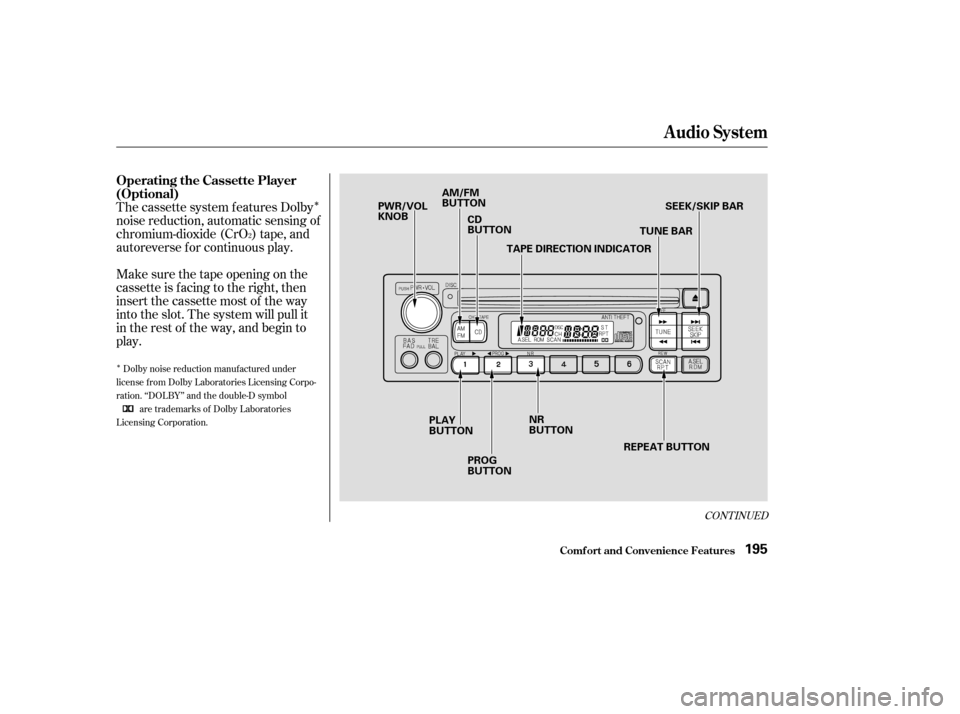
The cassette system f eatures Dolby
noise reduction, automatic sensing of
chromium-dioxide (CrO ) tape, and
autoreverse f or continuous play.
Make sure the tape opening on the
cassette is facing to the right, then
insert the cassette most of the way
into the slot. The system will pull it
in the rest of the way, and begin to
play.
2
Dolby noise reduction manuf actured under
license from Dolby Laboratories Licensing Corpo-
ration. ‘‘DOLBY’’ and the double-D symbol are trademarks of Dolby Laboratories
Licensing Corporation.
Audio System
Comf ort and Convenience Feat ures
Operating the Cassette Player
(Optional)
195
PWR/VOL
KNOB AM/FM
BUTTON
CD
BUTTON
TAPE DIRECTION INDICATOR TUNE BARSEEK/SKIP BAR
REPEAT BUTTON
NR
BUTTON
PROG
BUTTON
PLAY
BUTTON
Page 199 of 415

�Û�µ
The tape direction indicator will light
to show you which side of the
cassette is playing. The indicates
thesideyouinsertedfacingupward
is now playing. If you want to play
the other side, press the PROG
button.
Dolby noise reduction turns on when
you insert a cassette. If the tape was
not recorded with Dolby noise
reduction, turn it of f by pressing the
NR button. With a cassette playing, you can use
the FF, REW, SKIP, or REPEAT
f unction to f ind a desired program.
If you turn the system of f while a
tape is playing, either with the PWR/
VOL knob or by turning of f the
ignition, the cassette will remain in
the drive. When you turn the system
back on, the cassette player will be in
pause mode. To begin playing, press
the PLAY button.
To switch to the radio or CD player
while a tape is playing, press the
AM/FM, or CD button. To change
back to the cassette player, push the
CD button. Fast Forward and
Rewind move the tape rapidly. Press
and release the side of the
TUNE bar to fast forward the tape,
or the side to rewind. You
will see FF or REW f lashing in the
display. To stop f ast f orward or
rewind, press either side of the
TUNE bar or the PLAY button. If the
system reaches the end of the tape
while in f ast f orward or rewind, it
automatically stops that function,
reverses direction, and begins to play.
Noise reduction remains of f until you
turn it on by pressing the button
again.
When the system reaches the end of
the tape, it will automatically reverse
direction and play the other side. If
you want to remove the cassette
f rom the drive, press the EJECT
button on the cassette player.
Audio System
Comf ort and Convenience Feat ures
T ape Search Functions
FF/REW
196
Page 206 of 415
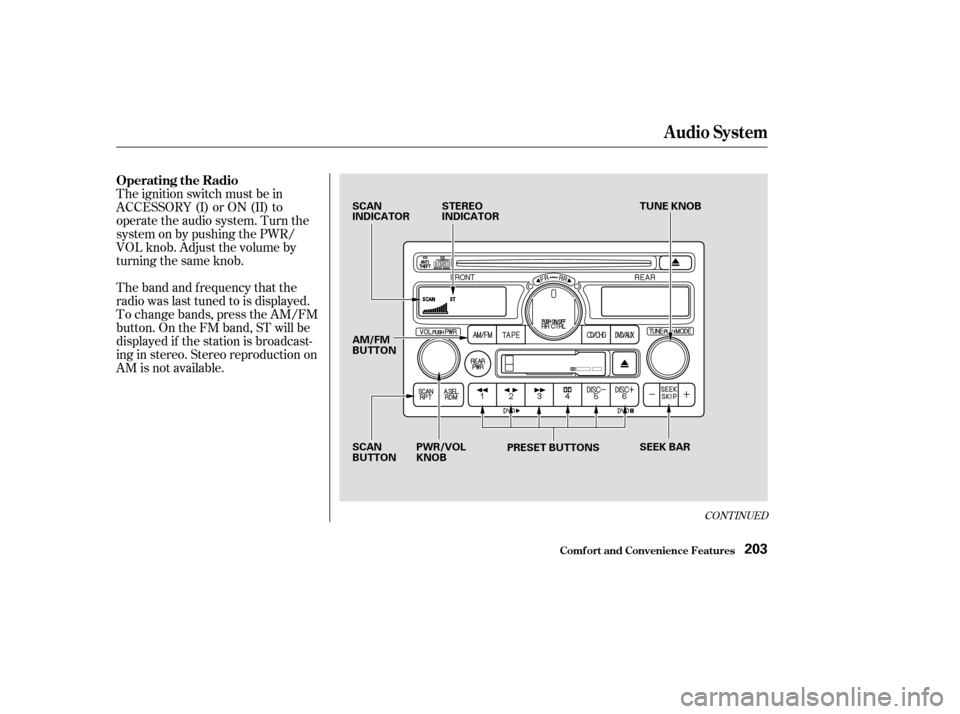
The ignition switch must be in
ACCESSORY (I) or ON (II) to
operate the audio system. Turn the
system on by pushing the PWR/
VOL knob. Adjust the volume by
turning the same knob.
The band and f requency that the
radio was last tuned to is displayed.
To change bands, press the AM/FM
button. On the FM band, ST will be
displayed if the station is broadcast-
ing in stereo. Stereo reproduction on
AM is not available.
CONT INUED
Operating the Radio
Audio System
Comf ort and Convenience Feat ures203
SCAN
INDICATORSTEREO
INDICATOR TUNE KNOB
SEEK BAR
PRESET BUTTONS
SCAN
BUTTON PWR/VOL
KNOB
AM/FM
BUTTON
Page 207 of 415

�µ
�µ �µ
�µ
�µ�´
Use the TUNE knob to
tune the radio to a desired f requency.
Turn the TUNE knob to the right to
tune to a higher f requency, or to the
lef t to tune to a lower f requency.
Turn the knob right or lef t until the
display reaches the desired
f requency.
The SEEK f unction
searches the band for a station with
a strong signal. To activate it, press
theSEEKbaror,then
release it. Depending on which part
of the SEEK bar you press, the
system scans upward or downward
f rom the current f requency. It stops
when it finds a station with a strong
signal. To store a f requency:
Select the desired band, AM or
FM. FM1 and FM2 let you store
two f requencies with each preset
button.
Pick the Preset button you want
for that station. Press the button
and hold it until you hear a beep.
Repeat steps 1 to 3 to store a total
of six stations on AM and twelve
on FM.
Once a station’s frequency is stored,
simply press and release the proper
Preset button to tune to it. The
preset f requencies will be lost if your
vehicle’s battery goes dead, is
disconnected, or the radio f use is
removed.
You can use any of f ive methods to
f ind radio stations on the selected
band: TUNE, SEEK, SCAN, AUTO
SELECT, and the preset buttons.
The SCAN f unction
samples all the stations with strong
signals on the selected band. To
activate it, press the SCAN button,
then release it. You will see SCAN in
the display. The system will scan up
the band for a station with a strong
signal. When it f inds one, it will stop
and play that station for
approximately f ive seconds. If you do
nothing, the system will then scan
f or the next strong station and play
that f or f ive seconds. When it plays a
station that you want to continue
listening to, press the SCAN button
again. UsetheTUNE,SEEK,orSCAN
function to tune the radio to a
desired station.
You can store the
f requencies of your f avorite radio
stations in the six preset buttons.
Each button will store one f requency
on the AM band, and two
f requencies on the FM band. 1.
2.
3.
4.
Comf ort and Convenience Feat ures
Audio System
TUNE
SEEK
SCAN
Preset
204
Page 209 of 415
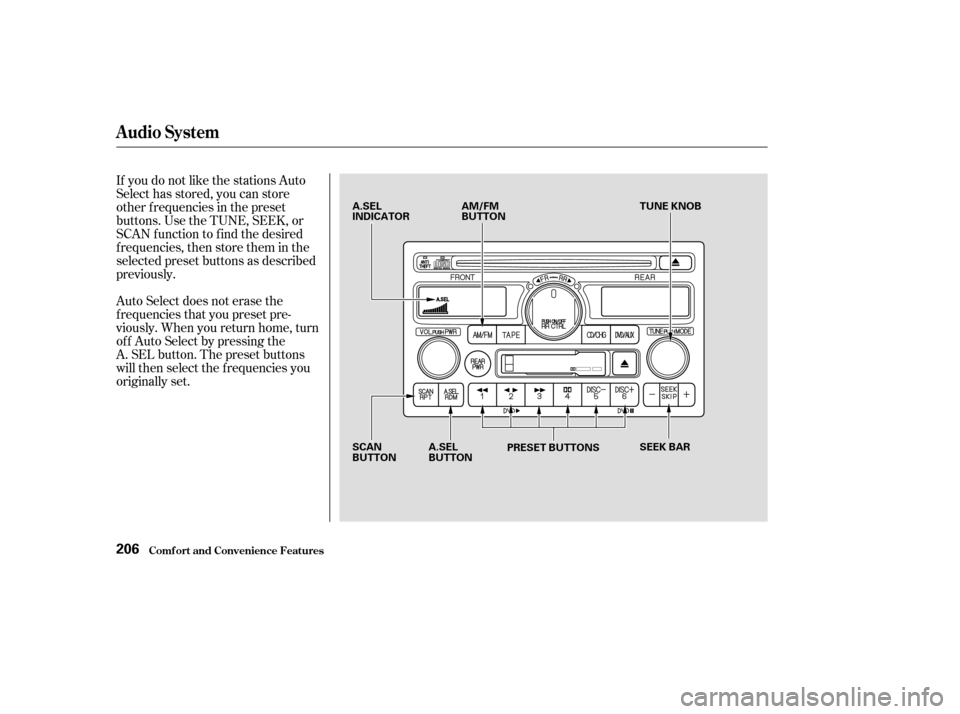
If you do not like the stations Auto
Select has stored, you can store
other f requencies in the preset
buttons. Use the TUNE, SEEK, or
SCAN f unction to f ind the desired
f requencies, then store them in the
selected preset buttons as described
previously.
Auto Select does not erase the
f requencies that you preset pre-
viously. When you return home, turn
of f Auto Select by pressing the
A. SEL button. The preset buttons
will then select the f requencies you
originally set.
Audio System
Comf ort and Convenience Feat ures206
A.SEL
INDICATORAM/FM
BUTTON TUNE KNOB
SCAN
BUTTON A.SEL
BUTTON
PRESET BUTTONS
SEEK BAR
Page 210 of 415
�µ�µ
CONT INUED
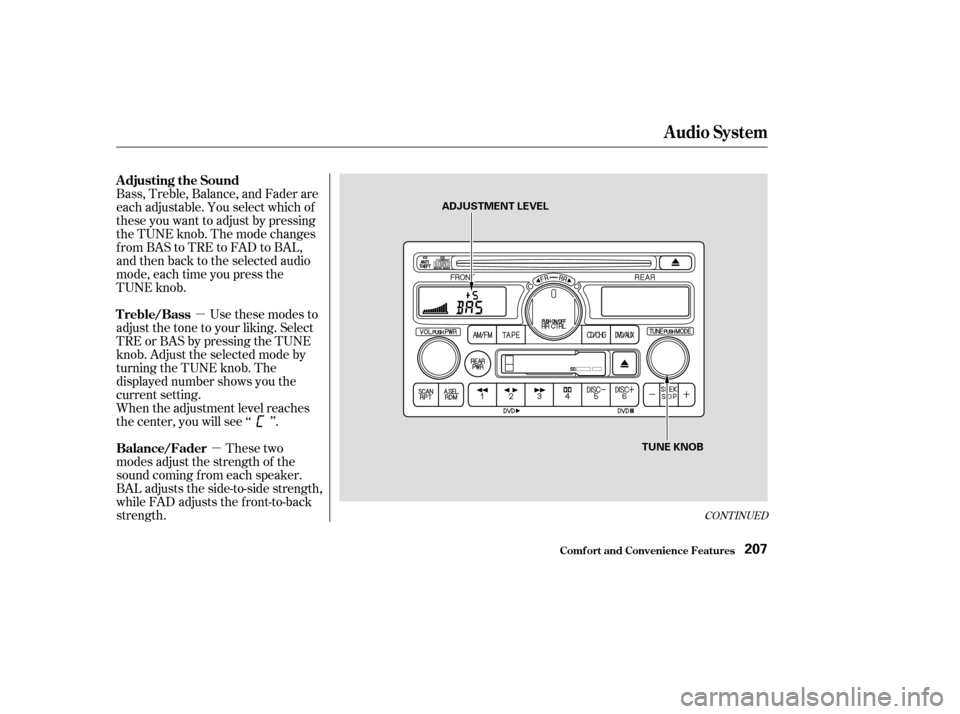
Bass, Treble, Balance, and Fader are
each adjustable. You select which of
these you want to adjust by pressing
the TUNE knob. The mode changes
fromBAStoTREtoFADtoBAL,
and then back to the selected audio
mode, each time you press the
TUNE knob. Use these modes to
adjust the tone to your liking. Select
TRE or BAS by pressing the TUNE
knob. Adjust the selected mode by
turning the TUNE knob. The
displayed number shows you the
current setting.
These two
modes adjust the strength of the
sound coming f rom each speaker.
BAL adjusts the side-to-side strength,
while FAD adjusts the f ront-to-back
strength. When the adjustment level reaches
the center, you will see ‘‘ ’’.
Audio System
Comf ort and Convenience Feat ures
Adjusting the Sound
Treble/Bass
Balance/Fader
207
ADJUSTMENT LEVEL
TUNE KNOB
Page 211 of 415
Select BAL or FAD by pressing the
TUNE knob. Adjust the Balance or
Fader to your liking by turning the
TUNE knob.
The displayed number shows you
the current setting.
When the adjustment level reaches
the center, you will see ‘‘ ’’.
The system will automatically return
the display to the selected audio
mode about f ive seconds af ter you
stop adjusting a mode with the
MODE knob.For inf ormation, see page .
You can use the instrument panel
brightness control knob to adjust the
illumination of the audio system (see
page ). The audio system
illuminates when the parking lights
are on, even if the radio is turned of f . 187
83
Comf ort and Convenience Feat ures
Audio System
A udio System L ighting Radio Frequencies and Reception
208