Page 227 of 411

You can increase the set cruising
speed in any of these ways:Press and hold the RES/ACCEL
button. When you reach the
desired cruising speed, release the
button.
To increase your speed in very
small amounts, tap the RES/
ACCEL button. Each time you do
this, the vehicle will speed up
about 1 mph (1.6 km/h). Press and hold the SET/DECEL
button. Release the button when
you reach the desired speed.
To slow down in very small
amounts, tap the SET/DECEL
button. Each time you do this,
your vehicle will slow down about
1 mph (1.6 km/h).
You can decrease the set cruising
speed in any of these ways:
Even with the cruise control turned
on, you can still use the accelerator
pedal to speed up f or passing. Af ter
completing the pass, take your foot
of f the accelerator pedal. The vehicle
will return to the set cruising speed.
Push on the accelerator pedal.
Accelerate to the desired cruising
speed, then press the SET/
DECEL button. Resting your f oot on the brake pedal
causes cruise control to cancel.
Tap the brake pedal lightly with
your f oot. The CRUISE
CONTROL indicator on the
instrument panel will go out.
When the vehicle slows to the
desired speed, press the SET/
DECEL button.
Changing the Set Speed
Cruise Control
Features
223
Page 249 of 411
CONT INUED
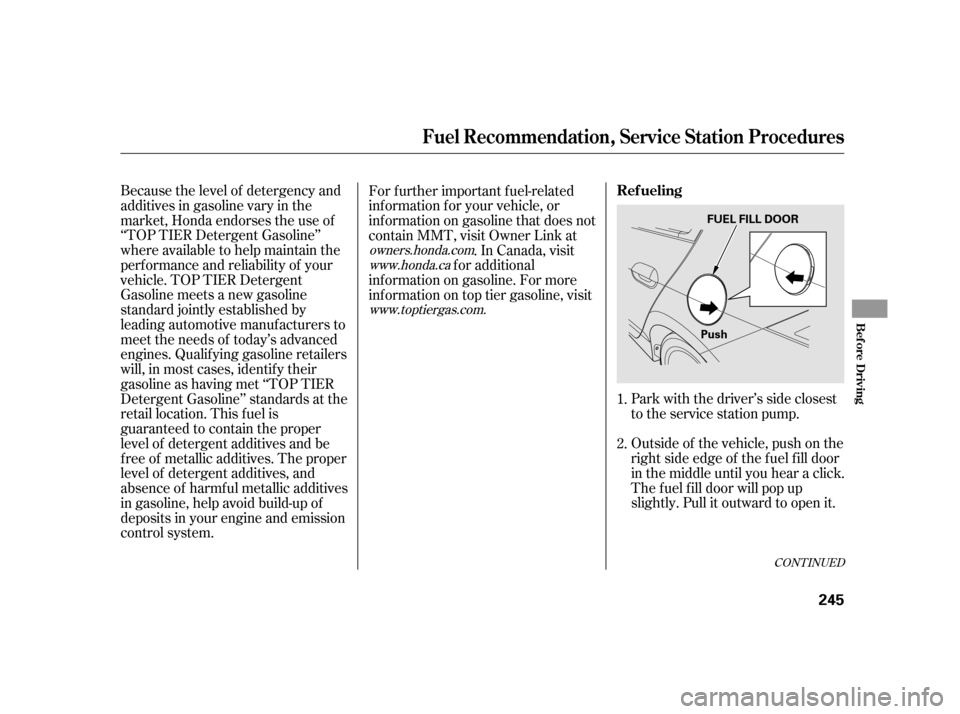
Outside of the vehicle, push on the
right side edge of the f uel f ill door
in the middle until you hear a click.
The f uel f ill door will pop up
slightly. Pull it outward to open it. Park with the driver’s side closest
to the service station pump.
Because the level of detergency and
additives in gasoline vary in the
market, Honda endorses the use of
‘‘TOP TIER Detergent Gasoline’’
where available to help maintain the
perf ormance and reliability of your
vehicle. TOP TIER Detergent
Gasoline meets a new gasoline
standard jointly established by
leading automotive manuf acturers to
meet the needs of today’s advanced
engines. Qualif ying gasoline retailers
will, in most cases, identif y their
gasoline as having met ‘‘TOP TIER
Detergent Gasoline’’ standards at the
retail location. This f uel is
guaranteed to contain the proper
level of detergent additives and be
f ree of metallic additives. The proper
level of detergent additives, and
absence of harmf ul metallic additives
in gasoline, help avoid build-up of
deposits in your engine and emission
control system. For f urther important f uel-related
inf ormation f or your vehicle, or
inf ormation on gasoline that does not
contain MMT, visit Owner Link at
. In Canada, visit
f or additional
inf ormation on gasoline. For more
inf ormation on top tier gasoline, visit
1.
2.
owners.honda.comwww.honda.ca
www.toptiergas.com.
Ref ueling
Fuel Recommendation, Service Station Procedures
Bef ore Driving
245
PushFUEL FILL DOOR
Page 252 of 411

Park the vehicle, and set the
parking brake. Pull the hood
release handle located under the
lower lef t corner of the dashboard.
The hood will pop up slightly.
If the system still detects a leak in
the vehicle’s evaporative emissions
system, the malf unction indicator
lamp (MIL) comes on. If the f uel f ill
cap was not already tightened, turn
the engine of f , and check or
retighten the f uel f ill cap until it
clicks at least once. The MIL should
go off after several days of normal
driving once the cap is tightened or
replaced. If the MIL does not go of f ,
have your vehicle inspected by a
dealer. For more inf ormation, see
page .
If the hood latch handle moves
stif f ly, or if you can open the hood
without lifting the handle, the
mechanism should be cleaned and
lubricated. Put your f ingers under the f ront
edge of the hood near the center.
Slide your hand to the lef t until
you f eel the hood latch handle.
Push this handle to the lef t to
release the hood. Lif t up the hood.
1.
2.
365 Opening and Closing the Hood
Service Station Procedures
248
LATCH
HOOD RELEASE HANDLE
Pull
Page 253 of 411
Insert the dipstick all the way back
into its hole. Wipe of f the dipstick with a clean
cloth or paper towel. Remove the dipstick (orange loop).
Wait a f ew minutes af ter turning the
engine of f bef ore you check the oil.
To close the hood, lif t it up slightly to
remove the support rod f rom the
hole. Put the support rod back into
its holding clip. Lower the hood to
about a f oot (30 cm) above the
f ender, then let it drop. Make sure it
is securely latched.
Holding the grip, pull the support
rod out of its clip. Insert the end
into the designated hole in the
hood. 2.
3. 1.
3.
CONT INUED
Oil Check
Service Station Procedures
Bef ore Driving
249
SUPPORT ROD
CLIP
GRIP
DIPSTICK
Page 255 of 411

�µ
�µ
�µ
�µ
Fuel economy is not a f ixed number.
It varies based on driving conditions,
driving habits, and vehicle condition.
Theref ore, it is not possible f or one
set of estimates to predict f uel
economy precisely f or all drivers in
all environments.
The EPA f uel economy estimates
shownintheexampletotheright
are a usef ul tool f or comparison
when buying a vehicle. EPA
estimates include:
Represents a combination of city and
highway driving. The scale
represents the range of combined
f uel economy f or other vehicles in
the class.
Represents a
mixture of rural and interstate
driving, in a warmed-up vehicle,
typical of longer trips in f ree-f lowing
traf f ic. A range of miles per gallon achieved is also provided.
Represents urban
driving in light traf f ic. A range of
miles per gallon achieved is also
provided.
Provides an estimated annual f uel
cost, based on 15,000 miles (20,000
km) per year multiplied by the costpergallon(basedonEPAfuelcost
data) divided by the combined f uel
economy.
For more inf ormation on f uel
economy ratings and factors that
af f ect f uel economy, visit
(Canada: Visit
)
www.
fueleconomy.gov www.
vehicles.gc.ca
Actual Mileage and EPA Fuel
Economy Estimates Comparison.
Combined Fuel Economy
Highway MPG City MPG Estimated Annual Fuel Cost
Fuel Economy
Bef ore Driving
251
Combined Fuel
Economy(Sample U.S. EPA label shown) Estimated Annual
Fuel Cost
City MPG
Highway MPG
Page 258 of 411

Your dealer has Honda accessories
that allow you to personalize your
vehicle. These accessories have
been designed and approved f or your
vehicle, and are covered by warranty.Bef ore installing any accessory:
When properly installed, cellular
phones, alarms, two-way radios, and
low-powered audio systems should
not interf ere with your vehicle’s
computer controlled systems, such
as your airbags, anti-lock brakes, and
tire pressure monitoring system (if
equipped). Do not install accessories on the
side pillars or across the rear
windows. Accessories installed in
theseareasmayinterferewith
proper operation of the side
curtain airbags. Bef ore installing any electronic
accessory, have the installer
contact your dealer for assistance.
If possible, have your dealer
inspect the f inal installation. Be sure electronic accessories do
not overload electrical circuits
(see page ) or interf ere with
the proper operation of your
vehicle. Make sure the accessory does not
obscure any lights, or interf ere
with proper vehicle operation or
perf ormance.
Although non-Honda accessories
may f it on your vehicle, they may not
meet f actory specif ications, and
could adversely af f ect your vehicle’s
handling, stability, and reliability. Modif ying your vehicle, or installing
non-Honda accessories, may make
your vehicle unsaf e. Bef ore you
make any modif ications or add any
accessories,besuretoreadthe
f ollowing inf ormation. 367
A ccessories
A ccessories and Modif ications
254
Improper accessories or
modifications can affect your
vehicle’s handling, stability, and
performance, and cause a
crash in which you can be hurt
or killed.
Follow all instructions in this
owner’s manual regarding
accessories and modifications.
Page 266 of 411
Make sure all windows, mirrors,
and outside lights are clean and
unobstructed. Remove f rost, snow,
or ice.Check that any items you may be
carrying are stored properly or
f astened down securely.
Check the seat adjustment (see
page ).
Check the adjustment of the
inside and outside mirrors (see
page ).
Check the steering wheel
adjustment (see page ).
Make sure the doors are securely
closed and locked.Fasten your seat belt. Check that
your passengers have f astened
their seat belts (see page ).
Youshoulddothefollowingchecks
and adjustments bef ore you drive
your vehicle.
Visually check the tires. If a tire
looks low, use a gauge to check its
pressure (see page ). Check that the hood and hatch are
f ully closed. When you start the engine, check
the gauges and indicators in the
instrument panel, and the
messages on the multi-inf ormation
display (see pages , and
).
1.
2.
3.
8. 7. 6.9.
4.
5.
61 7217
10.
141
147
128 89
338
Preparing to Drive
262
Page 270 of 411
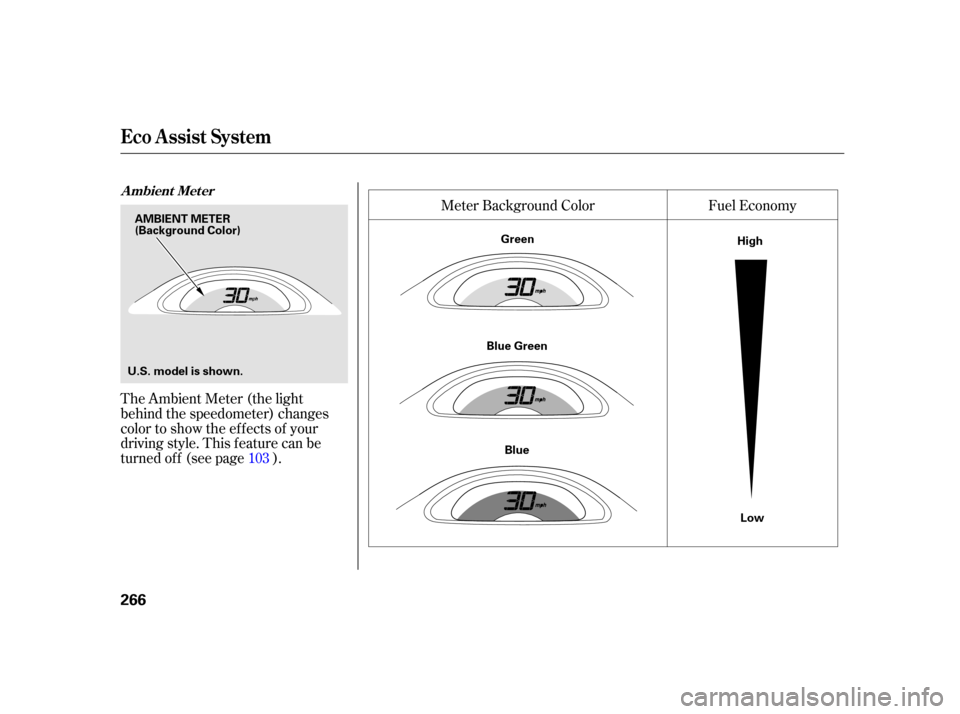
The Ambient Meter (the light
behind the speedometer) changes
color to show the ef f ects of your
driving style. This f eature can be
turned of f (see page ).Fuel Economy
Meter Background Color
103
A mbient Met er
Eco A ssist Syst em
266
AMBIENT METER
U.S. model is shown. (Background Color)
Green
Blue Green Blue High
Low