Page 75 of 338
Your dealer will reset this indicator
af ter completing the scheduled
maintenance. If this maintenance is
done by someone other than your
Honda dealer, reset the indicator as
f ollows.Turn of f the engine.
Press and hold the select/reset
button in the instrument panel,
then turn the ignition switch ON
(II).
Hold the button until the indicator
resets (approximately ten
seconds).
1.
2.
3.
Indicator L ights
Inst rument s and Cont rols71
Page 80 of 338
To f lash the high beams, pull the
turn signal lever back lightly, then
release it. The high beams will come
on and go of f . The high beams will
stay on f or as long as you hold the
lever back, no matter what position
the headlight switch is in.
The rotating switch on the lef t lever
controls the lights. Turning this
switch to the ‘‘ ’’ position turns
on the parking lights, taillights,
instrument panel lights, side-marker
lights, and rear license plate light.
Turning the switch to the ‘‘ ’’
position turns on the headlights. If you leave the lights on, you will
hear a reminder tone when you open
the driver’s door.
To change f rom low beams to high
beams, push the turn signal lever
f orward until you hear a click. The
blue high beam indicator will light
(see page ). To return to low
beams, pull the turn signal lever
back.
69
Headlights
Controls Near the Steering Wheel
Inst rument s and Cont rols76
Page 81 of 338
Canadian models only
With the headlight switch off, the
high beam headlights come on with
reduced brightness when you turn
the ignition switch to ON (II) and
release the parking brake. They
remain on until you turn the ignition
of f , even if you set the parking brake.
The headlights revert to normal
operation when you turn them on
with the switch.Signal a turn or lane change with this
lever. Push down on the lever to
signal a lef t turn, and up to signal a
right turn. If you push it up or down
all the way, the turn signal continues
to blink even when you release the
lever. It shuts off automatically as
you complete the turn.
Push the knob in the speedometer
repeatedly to adjust the brightness
of the instrument panel lights. There
are six brightness levels. A segment
display shows the current brightness
level.
CONT INUED
Instrument Panel Brightness
Daytime Running L ights T urn Signals
Controls Near the Steering Wheel
Inst rument s and Cont rols77
TURN SIGNAL LEVER
Page 85 of 338
The rear window def ogger will clear
fog, frost, and thin ice from the
window. Push the def ogger button to
turn it on and of f . The light in the
button lights to show the def ogger is
on.Make sure the rear window is clear
and you have good visibility bef ore
starting to drive.
Thedefoggerwiresontheinsideof
the rear window can be accidentally
damaged. When cleaning the glass,
always wipe side to side.
Push the button next to the shift
levertoturnonthehazardwarning
lights (f our-way f lashers). This
causes all f our outside turn signals
and both indicators in the instrument
panel to f lash. Use the hazard
warning lights if you need to park in
a dangerous area near heavy traffic,
or if your vehicle is disabled.
Controls Near the Steering Wheel
Inst rument s and Cont rols
Hazard Warning Rear Window Def ogger
81
Page 86 of 338
Push the lever up to lock the
steering wheel in that position.
Make sure you have securely
locked the steering wheel in place
by trying to move it up and down.
To adjust the steering wheel upward
or downward:
Make any steering wheel adjustment
bef ore you start driving.
Push the lever under the lef t side
of the steering column all the way
down.
Move the steering wheel to the
desired position, making sure the
wheel points toward your chest,
not toward your f ace. Make sure
you can see the instrument panel
gauges and the indicator lights.
1.
2. 3.
4.
See page f or important saf ety
inf ormation about how to properlyposition the steering wheel. 20
Steering Wheel A djustment
Controls Near the Steering Wheel
Inst rument s and Cont rols82
Adjusting the steering wheel
position while driving may
cause you to lose control of the
vehicle and be seriously injured
inacrash.
Adjust the steering wheel only
when the vehicle is stopped.
Page 90 of 338

�µ
�µ
�µ Use this position
only to start the engine. The switch
returns to ON (II) when you let go of
the key.
You will hear a reminder beeper if
you leave the key in the ignition
switch in the LOCK (0) or
ACCESSORY (I) position and open
the driver’s door. Remove the key to
turn of f the beeper. The engine will not start if the
Immobilizer System does not
recognize the key’s coding (see page ).
If the f ront wheels are turned, the
anti-thef t lock may sometimes make
it difficult to turn the key from
LOCK to ACCESSORY. Firmly turn
the steering wheel to the lef t or to
the right as you turn the key.
In this position,
you can operate the audio system
and the accessory power sockets.
This is the normal key
position when driving. All f eatures
and accessories on the vehicle are
usable. Several of the lights on the
instrument panel come on as a test
when you turn the ignition switch
f rom ACCESSORY to ON. 84
ST A RT (III)
A CCESSORY (I)
ON (II)
Keys and Locks
Inst rument s and Cont rols86
Removing the key from the
ignition switch while driving
locks the steering. This can
cause you to lose control.
Remove the key from the
ignition switch only when
parked.
Page 115 of 338
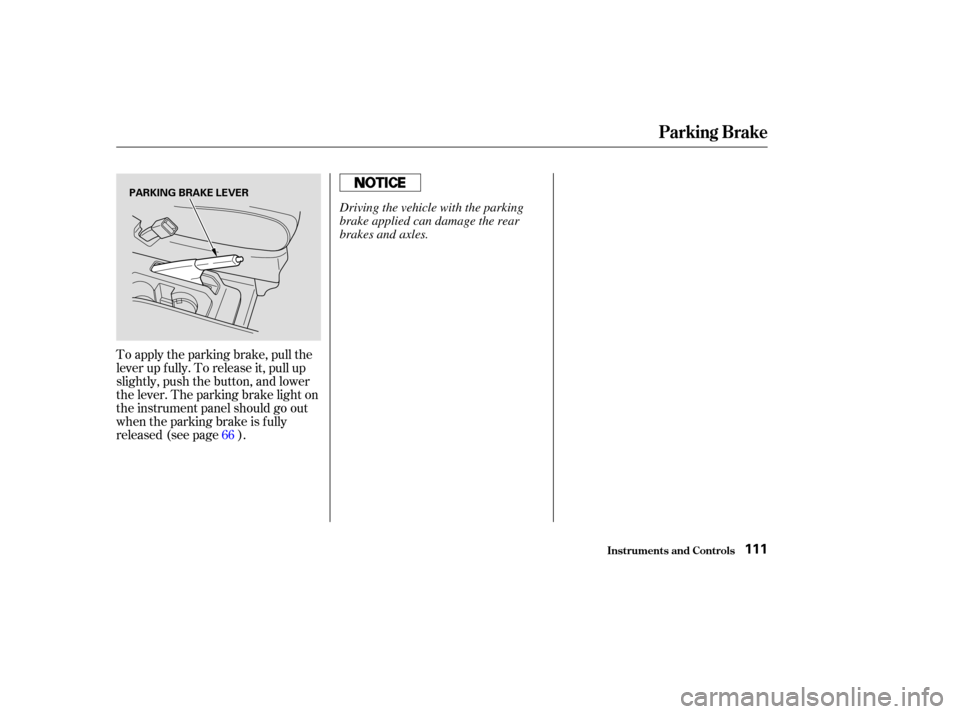
To apply the parking brake, pull the
lever up f ully. To release it, pull up
slightly, push the button, and lower
the lever. The parking brake light on
the instrument panel should go out
when the parking brake is f ully
released (see page ).66
Parking Brake
Inst rument s and Cont rols111
PARKING BRAKE LEVER
Driving the vehicle with the parking
brake applied can damage the rear
brakes and axles.
Page 136 of 338

For inf ormation, see page .
You can use the instrument panel
brightness control knob to adjust the
illumination of the audio system (see
page ). The audio system
illuminates when the parking lights
are on, even if the radio is turned of f .
You operate the CD player with the
same controls used f or the radio.
With the ignition switch in
ACCESSORY (I) or ON (II), insert
the disc into the CD slot. Push the
disc in half way, the drive will pull it
in the rest of the way and begin to
play. The number of the track that is
playing is shown in the display.You can also play 3-inch (8-cm) discs
without using an adapter ring. Play
only standard round discs. Odd-
shaped CDs may jam in the drive or
cause other problems.
For best results when using CD-R
discs, use only high quality discs
labeled f or audio use. When
recording a CD-R, the recording
must be closed in order f or the disc
to be used by CD players. CD-RW
discs will not work in this unit.
77
143
Comf ort and Convenience Feat ures
Audio System
Radio Frequencies and Reception
A udio System L ighting
Operating the CD Player
132
EJECT BUTTON
CD SLOT
CD BUTTON
PWR/VOL KNOB SEEK/SKIP BAR A.SEL/RDM BUTTON
RAMDOM INDICATOR REPEAT INDICATOR