Page 82 of 380
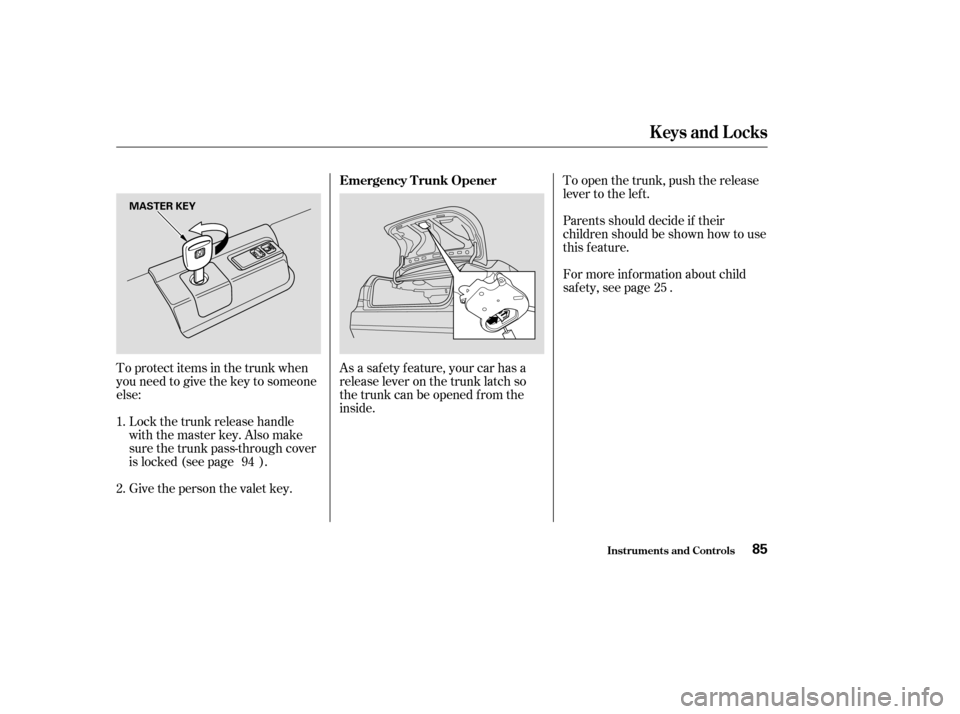
To protect items in the trunk when
you need to give the key to someone
else:Lock the trunk release handle
with the master key. Also make
sure the trunk pass-through cover
is locked (see page ).
Give the person the valet key. To open the trunk, push the release
lever to the lef t.
Parents should decide if their
children should be shown how to use
this feature.
For more inf ormation about child
saf ety, see page .
As a saf ety f eature, your car has a
release lever on the trunk latch so
the trunk can be opened f rom the
inside.
1. 2. 94 25
Emergency T runk Opener
Keys and Locks
Inst rument s and Cont rols85
MASTER KEY
�����—�����—�����y�����������
�
�y���
�(�����������y���������y
Page 83 of 380
Open the glove box by pulling the
handle to the lef t. Close it with a f irm
push. Lock or unlock the glove box
with the master key.
The glove box light comes on when
the parking lights are on.
Glove Box
Keys and Locks
Inst rument s and Cont rols86
GLOVE BOX
An open glove box can cause
serious injury to your passenger
inacrash,evenifthe
passenger is wearing the seatbelt.
Always keep the glove box
closed while driving.
�����—�����—�����y�����������
���y���
�(�����������y���������y
Page 89 of 380
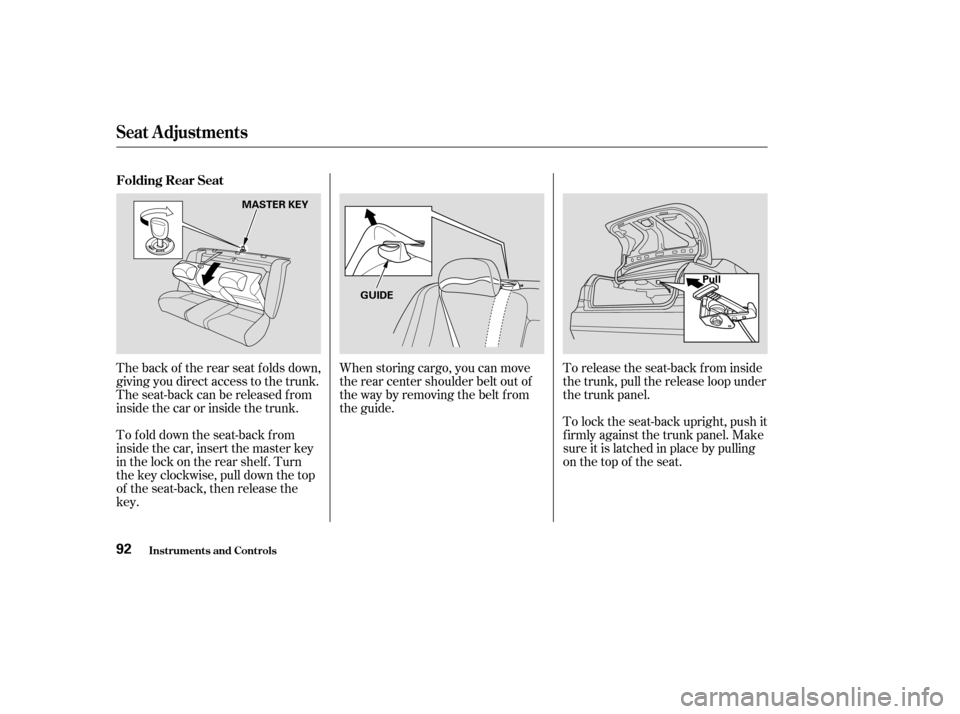
When storing cargo, you can move
therearcentershoulderbeltoutof
the way by removing the belt f rom
the guide.To release the seat-back from inside
the trunk, pull the release loop under
the trunk panel.
The back of the rear seat folds down,
giving you direct access to the trunk.
The seat-back can be released f rom
inside the car or inside the trunk.
To fold down the seat-back from
inside the car, insert the master key
in the lock on the rear shelf . Turn
the key clockwise, pull down the top
of the seat-back, then release thekey. To lock the seat-back upright, push it
firmly against the trunk panel. Make
sure it is latched in place by pulling
on the top of the seat.
Folding Rear Seat
Seat A djustments
Inst rument s and Cont rols92
MASTER KEY
GUIDE Pull
�����—�����—�����y�����������
���y���
�(�����������y���������y
Page 91 of 380
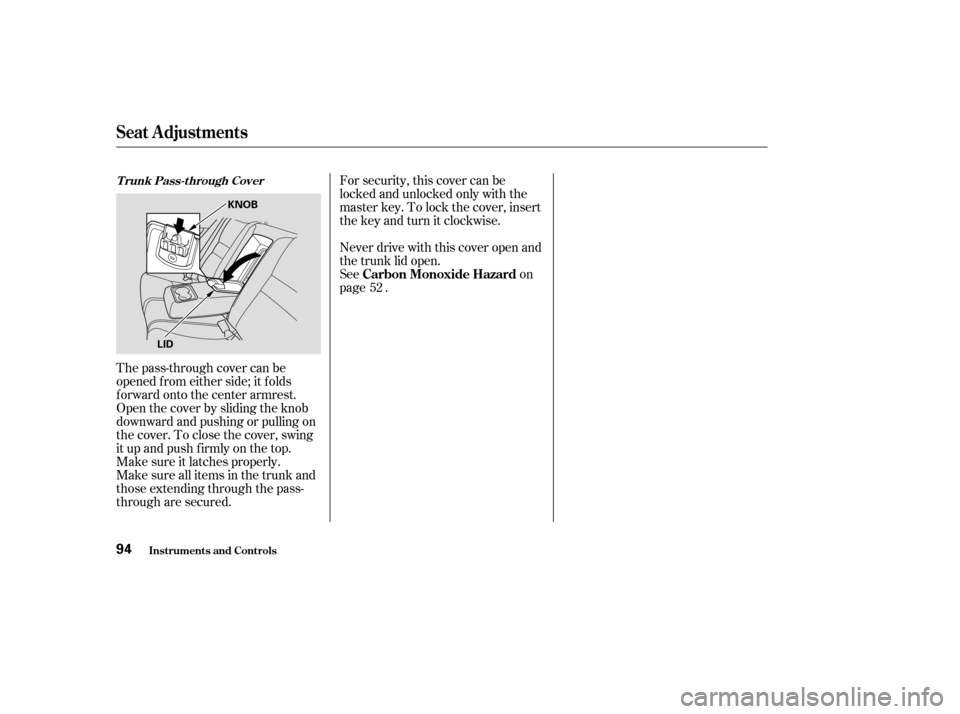
For security, this cover can be
locked and unlocked only with the
master key. To lock the cover, insert
thekeyandturnitclockwise.
The pass-through cover can be
opened f rom either side; it f olds
f orward onto the center armrest.
Open the cover by sliding the knob
downward and pushing or pulling on
the cover. To close the cover, swing
it up and push f irmly on the top.
Make sure it latches properly.
Make sure all items in the trunk and
those extending through the pass-
through are secured. Never drive with this cover open and
the trunk lid open.
See on
page .
52T runk Pass-through Cover
Carbon Monoxide Hazard
Seat A djustments
Inst rument s and Cont rols94
KNOB
LID
�����—�����—�����y���������������y���
�(�����������y���������y
Page 95 of 380
If your car’s battery is disconnected
or goes dead, or the driver’s window
f use is removed, the AUTO f unction
will be disabled. The power window
system needs to be reset af ter
reconnecting the battery or installing
the f use. You should do the f ollowing.Start the engine. Push down on
the driver’s window switch until
the window is f ully open.
Pull back on the driver’s window
switch to close the window
completely, then hold the switch
f or a second or two more. The power window system has a key-
of f delay f unction. The windows will
stilloperateforuptotenminutes
after you turn off the ignition.
Opening either f ront door cancels
the delay function. You must turn
the ignition switch ON (II) again
bef ore you can raise or lower the
windows.
If the power windows do not operate
properly af ter resetting, have your
car checked by a Honda dealer.
1. 2.
Power Windows
Inst rument s and Cont rols98
�����—�����—�����y�����������
���y���
�(�����������y���
���
�y
Page 96 of 380

Turnthekeyclockwiseagain,and
hold it. All f our windows start to
open. To stop the windows,
release the key.
To close the windows f urther, turn
andholdthekeyagain.
Turn the key counterclockwise
again, and hold it. All four
windowsstarttoclose.Tostopthe
windows, release the key.
Turn the key counterclockwise,
then release it.
Insert the key in the driver’s door
lock.
To close: To open the windows f urther, turn
andholdthekeyagain.
You can open and close the windows
with the key in the driver’s door lock.
To open: Insert the key in the driver’s door
lock.
Turn the key clockwise, then
release it.
You cannot close the windows with
the remote transmitter. Press the UNLOCK button once
to unlock the driver’s door.
Press the UNLOCK button a
second time, and hold it. The
passenger’s doors unlock, and all
f our windows start to open. To
stop the windows, release the
button.
To open the windows f urther,
press the button again.
You can open all of the windows
from the outside with the remote
transmitter. 1. 2. 3.
1. 2.3. 4.
1. 2. 3. 4.
All models except U.S. and Canada DX
Power Windows
Inst rument s and Cont rols
Opening t he Windows wit h t he
Remote Transmitter
Opening/Closing t he Windows wit hthe Key
Power Window Control
Operations
99
UNLOCK BUTTON
CloseOpen
�����—�����—�����y���������������y���
�(�����������y���
�����y
Page 97 of 380

The moonroof has a key-of f delay.
You can still open and close the
moonroof f or up to ten minutes af ter
you turn of f the ignition. The key-of f
delay cancels as soon as you open
either f ront door. You must then
turn the ignition ON (II) for the
moonroof to operate.
To tilt up the back of the moonroof ,
press and hold the center button
( ). To close the moonroof ,
press and hold the upper button
( ). To open the moonroof ,
press and hold the lower button
( ). Release the button when
the moonroof gets to the desired
position. Make sure everyone’s
hands are away f rom the moonroof
bef ore opening or closing it.
The moonroof has two positions: it
can be tilted up in the back f or
ventilation, or it can be slid back into
the roof . Use the switch under the
lef t dashboard vent to operate the
moonroof . The ignition switch must
be ON (II).
On all EX and EX-V6 models
Moonroof
Inst rument s and Cont rols100
MOONROOF SWITCH
Opening or closing the
moonroof on someone’s hands
or fingers can cause seriousinjury.
Make sure all hands and fingers
are clear of the moonroof
before opening or closing it. If you try to open the moonroof in
below-f reezing temperatures, or when
it is covered with snow or ice, you can
damage the moonroof panel or motor.
�����—�����—�����y�
�������������y���
�(�����������y���
�����y
Page 190 of 380

With the system set, you can still
open the trunk with the master key
or the remote transmitter without
triggering the alarm. The alarm will
sound if the trunk lock is f orced, or
the trunk is opened with the trunk
release handle.
Do not attempt to alter this system
or add other devices to it.
The security system will not set if
the hood, trunk, or any door is not
f ully closed. If the system will not set,
check the Door Monitor on the
instrument panel (see page ), to
see if the doors and trunk are f ully
closed. Since it is not part of the
monitor display, manually check thehood.
The security system helps to protect
your car and valuables f rom thef t.
The horn sounds and a combination
of headlights, parking lights, side
marker lights and taillights f lashes if
someone attempts to break into your
carorremovetheradio.Thisalarm
continues f or two minutes, then the
system resets. To reset an alarming
system bef ore the two minutes have
elapsed, unlock either f ront door
with the key or the remote
transmitter.
The security system automatically
sets 15 seconds after you lock the
doors, hood, and trunk. For the
system to activate, you must lock the
doors f rom the outside with the key,
lock tab, door lock switch, or remote
transmitter. The security system
light on the instrument panel starts
blinking immediately to show you
the system is setting itself.
Once the security system is set,
opening any door (without using the
key or the remote transmitter), the
hood, or the trunk will cause it to
sound. It also sounds if the radio is
removed f rom the dashboard or the
wiring is cut.
60On EX, all V6, and Canadian LX-G
models
Security System
Comf ort and Convenience Feat ures194
SECURITY SYSTEM LIGHT
�����—�����—�����y������
��������y���
�(�����������y���
�����y