Page 52 of 256
Eject
Press the EJ control to
stop and eject a CD.
You can choose which
CD will be ejected by pressing the EJ control and
the desired preset number (1–6). For example, to
eject CD 2, press the EJ control and then press the
preset 2 control. If you do not choose a specific CD,
the player will eject the current CD.
If a CD is ejected and not removed from the door of
the CD player, the player will automatically reload
the CD. This feature may be used when the ignition
is ON or OFF.
Auto eject
Press and momentarily
hold the EJ control to
engage auto eject. All
CDs which are present in the player will be ejected
one at a time. If a CD is ejected and not removed
from the door of the CD player, the player will
automatically reload the CD. This feature may be
used when the ignition is ON or OFF.
Shuffle feature
Press the SHUF control
until the desired
shuffle mode is
displayed. The audio system will then engage the
desired shuffle mode.
When engaged, the shuffle feature has two different
modes: SHUFFLE DISC and SHUFFLE TRK.
SHUFFLE DISC randomly plays tracks from all the
discs presently in the audio system.
SHUFFLE TRK plays all the tracks on the current
disc in random order.
EJ
EJ
Entertainment Systems
52
Page 65 of 256
Operating tips
•To reduce fogging in humid weather, place the
climate control system in Defrost and Rear
Defrost mode (if equipped) before driving.
•To reduce humidity buildup inside the vehicle
under warm weather conditions, do not drive with
the climate control system in the Off mode.
•To reduce humidity buildup inside the vehicle
under cold weather conditions, do not drive with
he climate control system in Max A/C (if
equipped), recirculation mode (if equipped) or
Off mode.
•Under normal weather conditions, do not leave
your vehicle in the Max A/C (if equipped),
recirculation mode (if equipped) or Off mode
when turning off the vehicle.
•Under snowy or dirty weather conditions, leave
your vehicle in the Max A/C (if equipped),
recirculation mode (if equipped) or Off mode
when turning off the ignition.
•Remove any snow, ice or leaves from the exterior
base of the windshield.
•
To increase the efficiency of the A/C (if equipped),
drive with the windows slightly open for two to
three minutes. or until the vehicle has been“aired
out”.
•Do not place objects under the front seat or over
the defroster ducts. They may reduce visibility,
fall into the ducts, or degrade the performance of
your climate control system.
Do not place objects on top of the
instrument panel, as these objects may
become projectiles in a collision or sudden stop.
Climate Controls
65
Page 66 of 256
REARWINDOWDEFROSTER
(IFEQUIPPED)
The rear defroster
control is located on
the instrument panel.
Press the rear defroster
control to clear the
rear window of thin ice
and fog.
•A small LED will illuminate when the rear
defroster is activated.
The ignition must be in the ON position to operate
the rear window defroster.
The defroster turns off automatically after 10
minutes or when the ignition is turned to the OFF
position. To manually turn off the defroster before
10 minutes have passed, push the control again.
Climate Controls
66
Page 67 of 256
HEADLAMPCONTROL
•Pull the headlamp
control toward you
to the first position
to turn on the
parking lamps, tail
lamps, license plate
lamps and marker
lamps.
•Pull the headlamp control toward you to the outer
position to turn on the headlamps (in addition to
the previous lamps).
Foglamp control (if equipped)
The foglamps can be
turned on when the
headlamp control is in
either of the following
positions:
•Parking lamps
•Low beams
Press the foglamp control to activate the foglamps.
Press the foglamp control again to deactivate the
foglamps.
When the highbeams are activated, the foglamps will
not operate.
Daytime running lamps (DRL) (if equipped)
Turns the headlamps on with a reduced output. To
activate:
•the ignition must be turned on
•the headlamp control is in the OFF or Parking
lamps position
•the high beam headlamps must be turned off
•the parking brake is released
Lights
67
Page 81 of 256
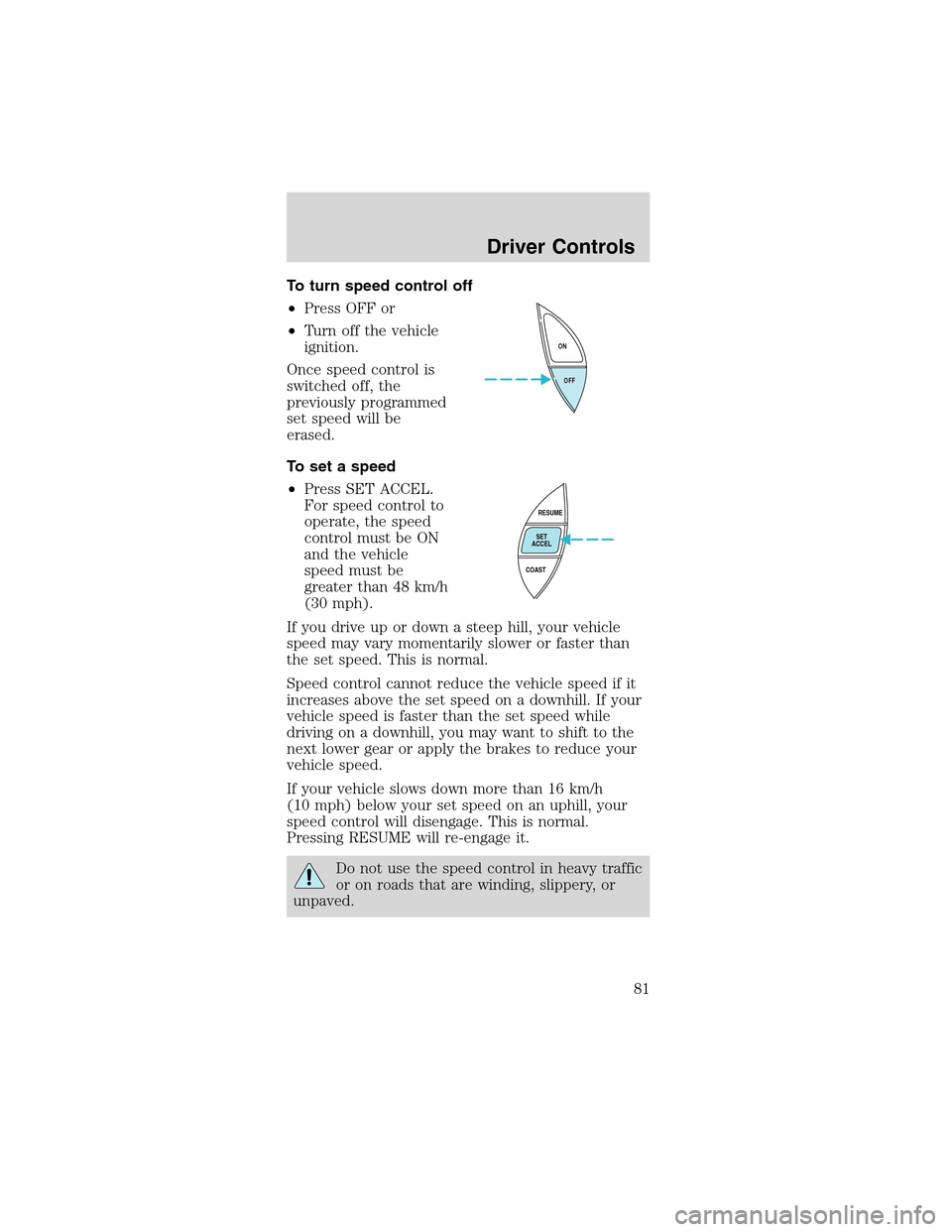
To turn speed control off
•Press OFF or
•Turn off the vehicle
ignition.
Once speed control is
switched off, the
previously programmed
set speed will be
erased.
To set a speed
•Press SET ACCEL.
For speed control to
operate, the speed
control must be ON
and the vehicle
speed must be
greater than 48 km/h
(30 mph).
If you drive up or down a steep hill, your vehicle
speed may vary momentarily slower or faster than
the set speed. This is normal.
Speed control cannot reduce the vehicle speed if it
increases above the set speed on a downhill. If your
vehicle speed is faster than the set speed while
driving on a downhill, you may want to shift to the
next lower gear or apply the brakes to reduce your
vehicle speed.
If your vehicle slows down more than 16 km/h
(10 mph) below your set speed on an uphill, your
speed control will disengage. This is normal.
Pressing RESUME will re-engage it.
Do not use the speed control in heavy traffic
or on roads that are winding, slippery, or
unpaved.
OFF ON
RESUME
SET
ACCEL
COAST
Driver Controls
81
Page 91 of 256
On hot days, the temperature in the trunk
or vehicle interior can rise very quickly.
Exposure of people or animals to these high
temperatures for even a short time can cause
death or serious heat-related injuries, including
brain damage. Small children are particularly at
risk.
REMOTE ENTRY SYSTEM
This device complies with part 15 of the FCC rules
and with RS-210 of Industry Canada. Operation is
subject to the following two conditions: (1) This
device may not cause harmful interference, and (2)
This device must accept any interference received,
including interference that may cause undesired
operation.
Changes or modifications not expressly
approved by the party responsible for
compliance could void the user’s authority to
operate the equipment.
The remote entry system allows you to:
•lock or unlock all vehicle doors without a key
•open the trunk
•activate the panic alarm
•confirms that the vehicle is locked with a short
“beep”from the horn.
The remote entry features only operate with the
ignition in the LOCK position.
If there is any potential remote keyless entry
problem with your vehicle, ensureALL remote
entry transmittersare brought to the dealership,
to aid in troubleshooting.
Locks and Security
91
Page 92 of 256
Unlockingthe doors
Press this control to
unlock the driver’s
door. The interior
lamps will illuminate.
With the all-door
remote entry system,
press the control a
second time within
three seconds to unlock the passenger door.
Locking the doors
Press this control to
lock all doors.
To confirm all doors
are closed and locked,
press the control a
second time within
three seconds. The
doors will lock again,
the horn will chirp and the lamps will flash.
If any of the doors are ajar, the horn will make two
quick chirps and the chime may sound, reminding
you to properly close all doors.
Sounding a panic alarm
Press this control to
activate the alarm.
To deactivate the
alarm, press the
control again or turn
the ignition to ACC or
ON.
Panic alarm will only
operate with the ignition in the OFF position.
Locks and Security
92
Page 93 of 256
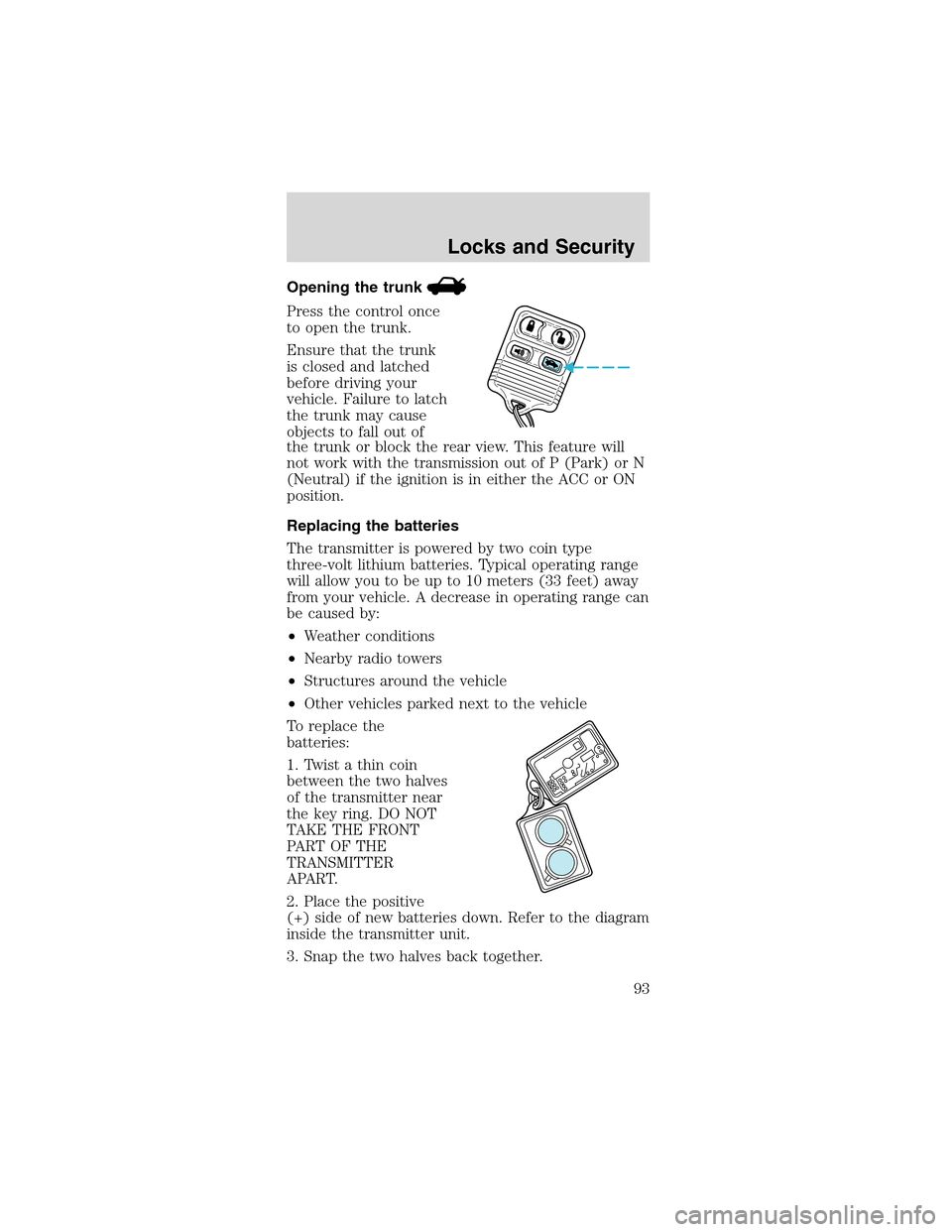
Opening the trunk
Press the control once
to open the trunk.
Ensure that the trunk
is closed and latched
before driving your
vehicle. Failure to latch
the trunk may cause
objects to fall out of
the trunk or block the rear view. This feature will
not work with the transmission out of P (Park) or N
(Neutral) if the ignition is in either the ACC or ON
position.
Replacing the batteries
The transmitter is powered by two coin type
three-volt lithium batteries. Typical operating range
will allow you to be up to 10 meters (33 feet) away
from your vehicle. A decrease in operating range can
be caused by:
•Weather conditions
•Nearby radio towers
•Structures around the vehicle
•Other vehicles parked next to the vehicle
To replace the
batteries:
1. Twist a thin coin
between the two halves
of the transmitter near
the key ring. DO NOT
TAKE THE FRONT
PART OF THE
TRANSMITTER
APART.
2. Place the positive
(+) side of new batteries down. Refer to the diagram
inside the transmitter unit.
3. Snap the two halves back together.
Locks and Security
93