2003 FORD EXPEDITION odometer
[x] Cancel search: odometerPage 17 of 320
Fuel gauge
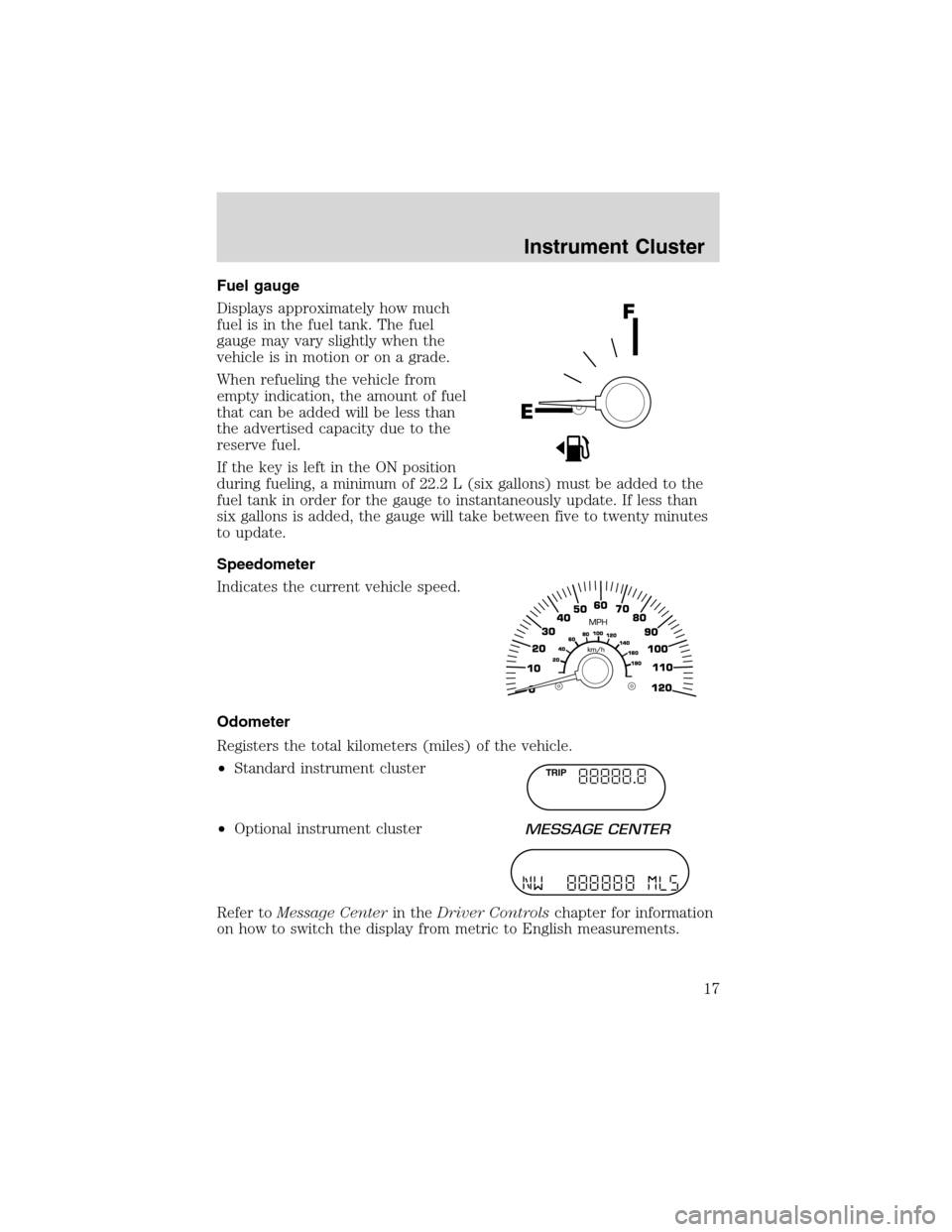
Displays approximately how much
fuel is in the fuel tank. The fuel
gauge may vary slightly when the
vehicle is in motion or on a grade.
When refueling the vehicle from
empty indication, the amount of fuel
that can be added will be less than
the advertised capacity due to the
reserve fuel.
If the key is left in the ON position
during fueling, a minimum of 22.2 L (six gallons) must be added to the
fuel tank in order for the gauge to instantaneously update. If less than
six gallons is added, the gauge will take between five to twenty minutes
to update.
Speedometer
Indicates the current vehicle speed.
Odometer
Registers the total kilometers (miles) of the vehicle.
•Standard instrument cluster
•Optional instrument cluster
Refer toMessage Centerin theDriver Controlschapter for information
on how to switch the display from metric to English measurements.
TRIP
Instrument Cluster
17
Page 18 of 320
Trip odometer
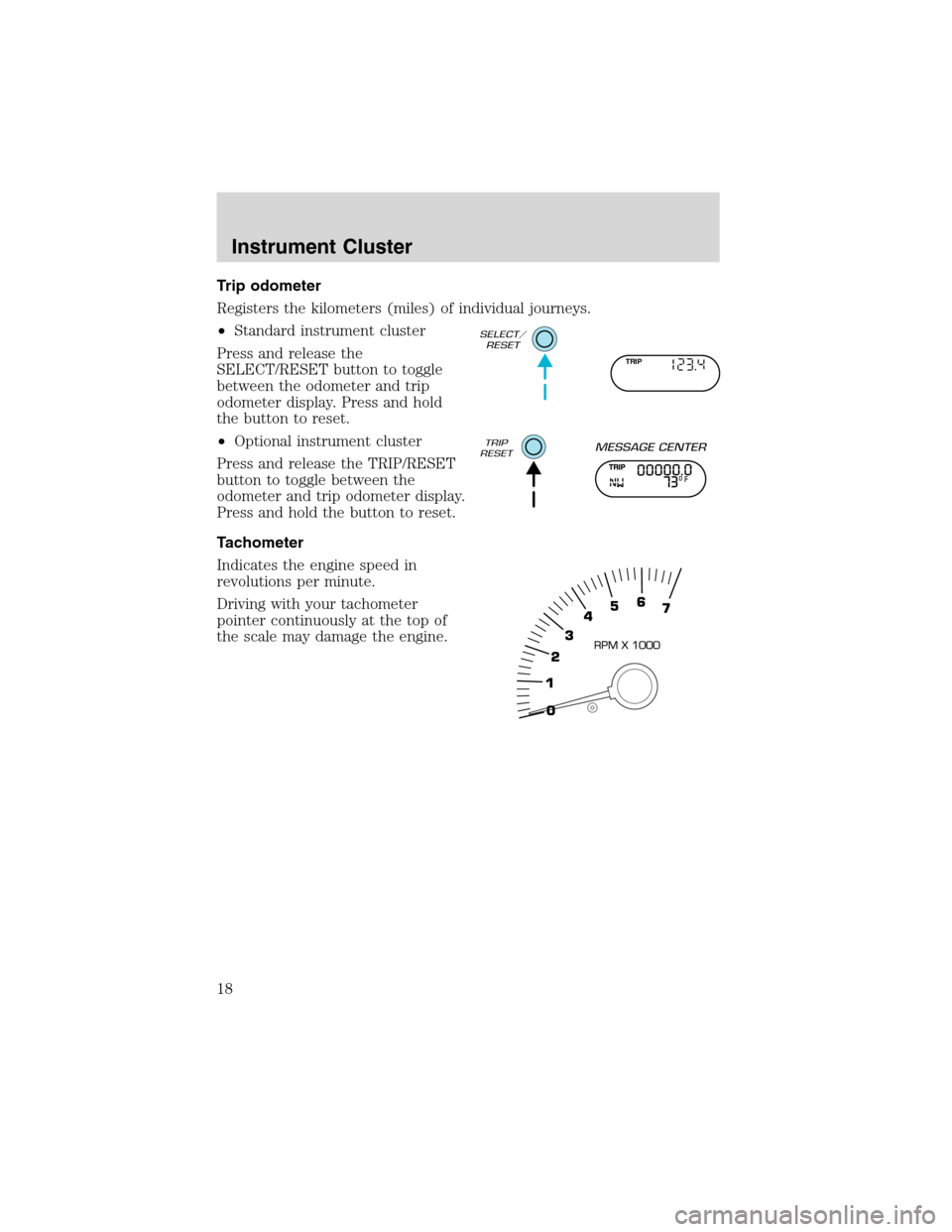
Registers the kilometers (miles) of individual journeys.
•Standard instrument cluster
Press and release the
SELECT/RESET button to toggle
between the odometer and trip
odometer display. Press and hold
the button to reset.
•Optional instrument cluster
Press and release the TRIP/RESET
button to toggle between the
odometer and trip odometer display.
Press and hold the button to reset.
Tachometer
Indicates the engine speed in
revolutions per minute.
Driving with your tachometer
pointer continuously at the top of
the scale may damage the engine.
TRIP
Instrument Cluster
18
Page 113 of 320
Compass zone adjustment
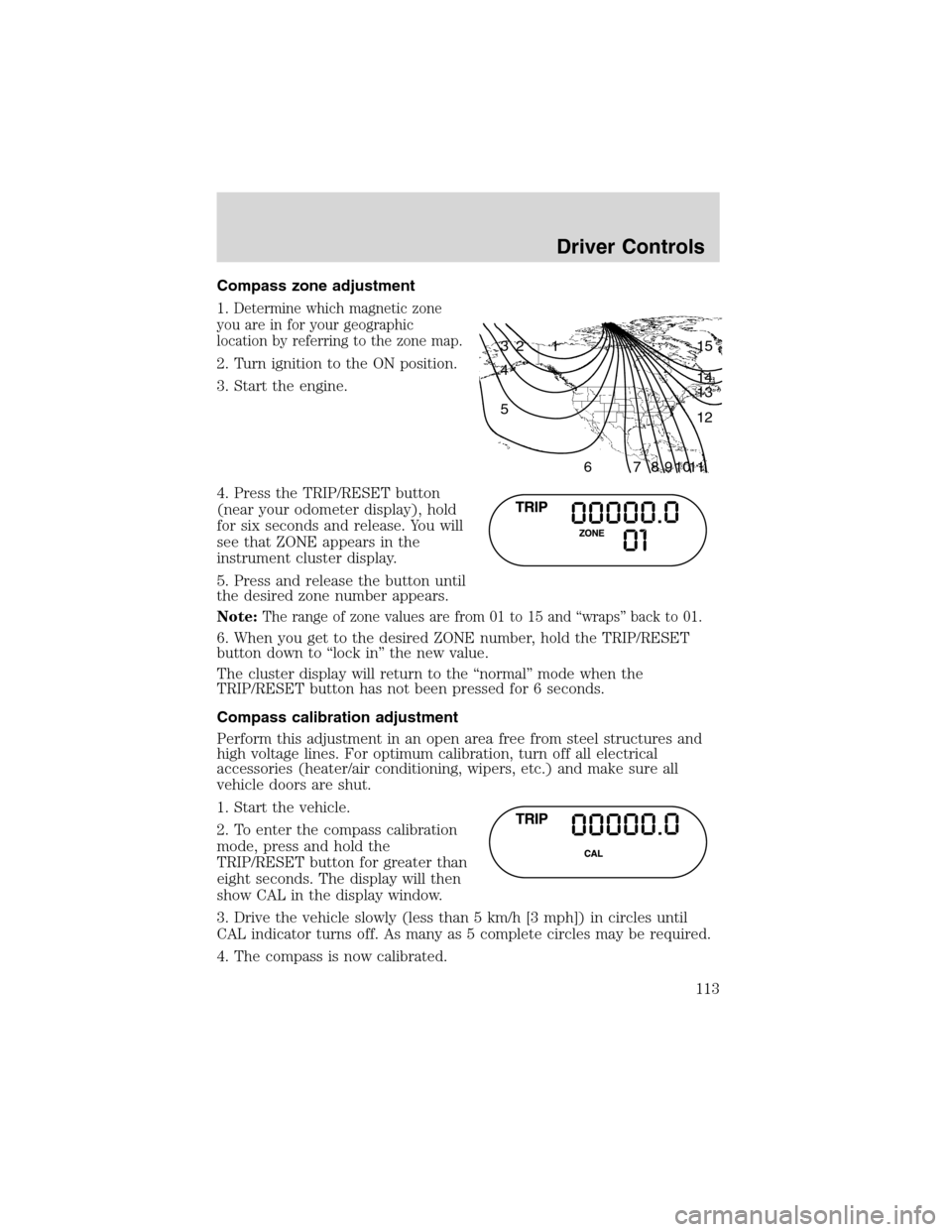
1.
Determine which magnetic zone
you are in for your geographic
location by referring to the zone map.
2. Turn ignition to the ON position.
3. Start the engine.
4. Press the TRIP/RESET button
(near your odometer display), hold
for six seconds and release. You will
see that ZONE appears in the
instrument cluster display.
5. Press and release the button until
the desired zone number appears.
Note:
The range of zone values are from 01 to 15 and“wraps”back to 01.
6. When you get to the desired ZONE number, hold the TRIP/RESET
button down to“lock in”the new value.
The cluster display will return to the“normal”mode when the
TRIP/RESET button has not been pressed for 6 seconds.
Compass calibration adjustment
Perform this adjustment in an open area free from steel structures and
high voltage lines. For optimum calibration, turn off all electrical
accessories (heater/air conditioning, wipers, etc.) and make sure all
vehicle doors are shut.
1. Start the vehicle.
2. To enter the compass calibration
mode, press and hold the
TRIP/RESET button for greater than
eight seconds. The display will then
show CAL in the display window.
3. Drive the vehicle slowly (less than 5 km/h [3 mph]) in circles until
CAL indicator turns off. As many as 5 complete circles may be required.
4. The compass is now calibrated.
1 2 3
4
5
6 7 8 9 101112 13 14 15
Driver Controls
113
Page 114 of 320
MESSAGE CENTER (IF EQUIPPED)
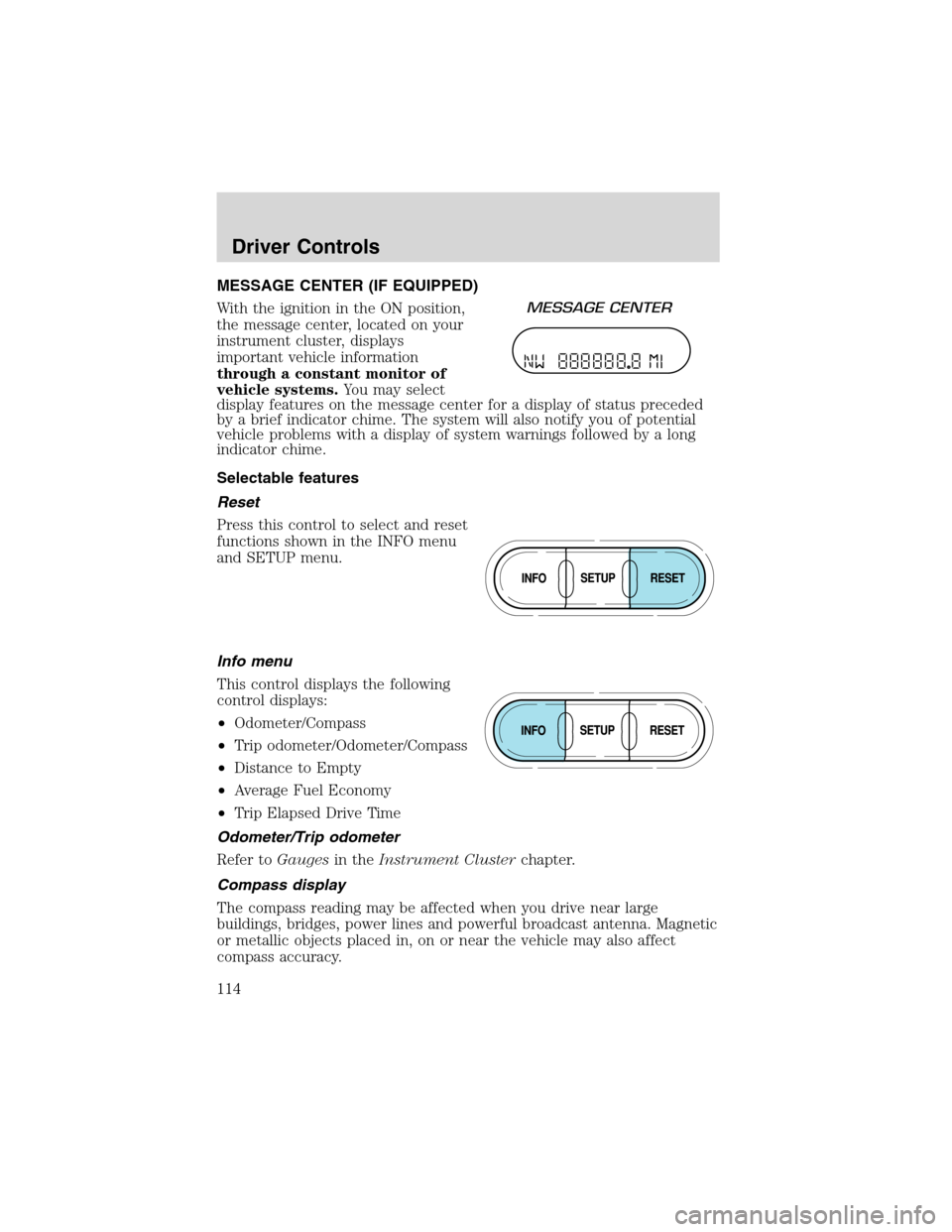
With the ignition in the ON position,
the message center, located on your
instrument cluster, displays
important vehicle information
through a constant monitor of
vehicle systems.You may select
display features on the message center for a display of status preceded
by a brief indicator chime. The system will also notify you of potential
vehicle problems with a display of system warnings followed by a long
indicator chime.
Selectable features
Reset
Press this control to select and reset
functions shown in the INFO menu
and SETUP menu.
Info menu
This control displays the following
control displays:
•Odometer/Compass
•Trip odometer/Odometer/Compass
•Distance to Empty
•Average Fuel Economy
•Trip Elapsed Drive Time
Odometer/Trip odometer
Refer toGaugesin theInstrument Clusterchapter.
Compass display
The compass reading may be affected when you drive near large
buildings, bridges, power lines and powerful broadcast antenna. Magnetic
or metallic objects placed in, on or near the vehicle may also affect
compass accuracy.
Driver Controls
114
Page 115 of 320
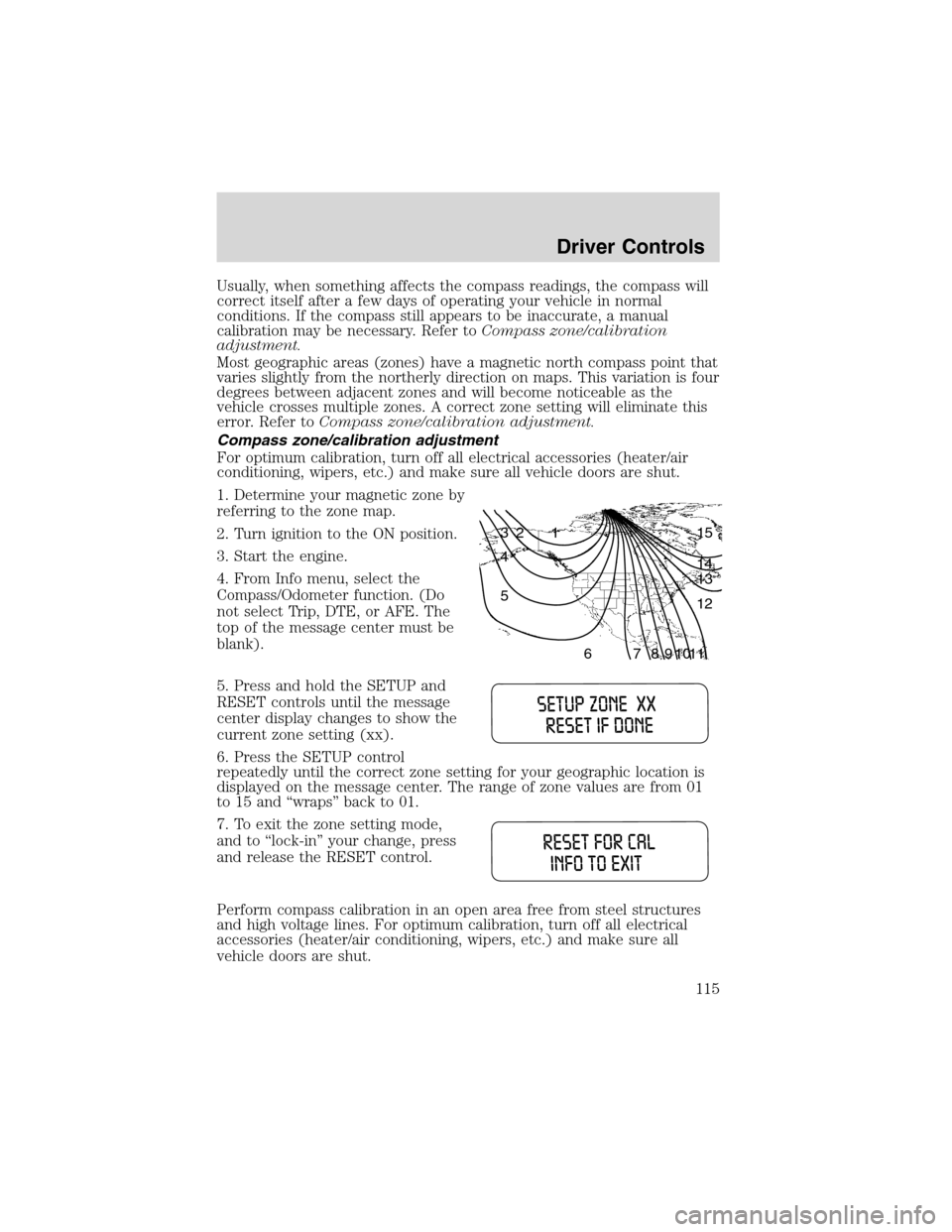
Usually, when something affects the compass readings, the compass will
correct itself after a few days of operating your vehicle in normal
conditions. If the compass still appears to be inaccurate, a manual
calibration may be necessary. Refer toCompass zone/calibration
adjustment.
Most geographic areas (zones) have a magnetic north compass point that
varies slightly from the northerly direction on maps. This variation is four
degrees between adjacent zones and will become noticeable as the
vehicle crosses multiple zones. A correct zone setting will eliminate this
error. Refer toCompass zone/calibration adjustment.
Compass zone/calibration adjustment
For optimum calibration, turn off all electrical accessories (heater/air
conditioning, wipers, etc.) and make sure all vehicle doors are shut.
1. Determine your magnetic zone by
referring to the zone map.
2. Turn ignition to the ON position.
3. Start the engine.
4. From Info menu, select the
Compass/Odometer function. (Do
not select Trip, DTE, or AFE. The
top of the message center must be
blank).
5. Press and hold the SETUP and
RESET controls until the message
center display changes to show the
current zone setting (xx).
6. Press the SETUP control
repeatedly until the correct zone setting for your geographic location is
displayed on the message center. The range of zone values are from 01
to 15 and“wraps”back to 01.
7. To exit the zone setting mode,
and to‘‘lock-in’’your change, press
and release the RESET control.
Perform compass calibration in an open area free from steel structures
and high voltage lines. For optimum calibration, turn off all electrical
accessories (heater/air conditioning, wipers, etc.) and make sure all
vehicle doors are shut.
1 2 3
4
5
6 7 8 9 101112 13 14 15
Driver Controls
115
Page 250 of 320
In Canada:
Customer Relationship Centre
Ford Motor Company of Canada, Limited
P.O. Box 2000
Oakville, Ontario L6J 5E4
1-800-565-3673 (FORD)
www.ford.ca
If you own a Lincoln vehicle and are away from home when your vehicle
needs service, or if you need more help than the dealership could
provide, after following the steps described above, contact the Ford
Customer Relationship Center to find an authorized dealership to help
you.
In the United States:
Ford Motor Company
Customer Relationship Center
16800 Executive Plaza Drive
P.O. Box 6248
Dearborn, Michigan 48121
1-800-521-4140
(TDD for the hearing impaired: 1-800-232-5952)
www.ford.com
In Canada:
Customer Relationship Centre
Ford Motor Company of Canada, Limited
P.O. Box 2000
Oakville, Ontario L6J 5E4
1-800-565-3673 (FORD)
www.ford.ca
In order to help you service your Ford or Lincoln Mercury vehicle, please
have the following information available when contacting a Customer
Relationship Center:
•Your telephone number (home and business)
•The name of the dealer and the city where the dealership is located
•The year and make of your vehicle
•The date of vehicle purchase
•The current odometer reading
•The vehicle identification number (VIN)
If you still have a complaint involving a warranty dispute, you may wish
to contact the Dispute Settlement Board (U.S.).
Customer Assistance
250
Page 286 of 320
•Have the vehicle loading and distribution the same every time.
Your results will be most accurate if your filling method is consistent.
Calculating fuel economy
1. Fill the fuel tank completely and record the initial odometer reading
(in kilometers or miles).
2. Each time you fill the tank, record the amount of fuel added (in liters
or gallons).
3. After at least three to five tank fill-ups, fill the fuel tank and record
the current odometer reading.
4. Subtract your initial odometer reading from the current odometer
reading.
5. Follow one of the simple calculations in order to determine fuel
economy:
Multiply liters used by 100, then divide by total kilometers
traveled.
Divide total miles traveled by total gallons used.
Keep a record for at least one month and record the type of driving (city
or highway). This will provide an accurate estimate of the vehicle’s fuel
economy under current driving conditions. Additionally, keeping records
during summer and winter will show how temperature impacts fuel
economy. In general, lower temperatures give lower fuel economy.
Driving style—good driving and fuel economy habits
Give consideration to the lists that follow and you may be able to change
a number of variables and improve your fuel economy.
Habits
•Smooth, moderate operation can yield up to 10% savings in fuel.
•Steady speeds without stopping will usually give the best fuel
economy.
•Idling for long periods of time (greater than one minute) may waste
fuel.
•Anticipate stopping; slowing down may eliminate the need to stop.
•Sudden or hard accelerations may reduce fuel economy.
•Slow down gradually.
•Driving at reasonable speeds (traveling at 88 km/h [55 mph] uses 15%
less fuel than traveling at 105 km/h [65 mph]).
Maintenance and Specifications
286
Page 315 of 320
cleaning ...................................260
coolant .....................................274
fail-safe coolant ......................279
idle speed control ...................272
lubrication
specifications ..................303, 305
refill capacities ........................300
service points ..................267–268
starting after a collision .........228
Engine block heater .................194
Engine oil ..................................269
change oil soon warning,
message center .......................269
checking and adding ..............269
dipstick ....................................269
filter, specifications ........271, 300
recommendations ...................271
refill capacities ........................300
specifications ..................303, 305
Exhaust fumes ..........................194
F
Fail safe cooling ........................279
Floor mats .................................126
Fluid capacities .........................300
Foglamps .....................................81
Four-Wheel Drive
vehicles ................................14, 208
control trac .............................208
description ..............................209
driving off road .......................211
electronic shift ........................210
indicator light .........................208
preparing to drive
your vehicle ............................198
Fuel ............................................280
calculating fuel
economy ..........................116, 285
cap ...........................................282capacity ...................................300
choosing the right fuel ...........283
comparisons with EPA
fuel economy estimates .........288
detergent in fuel .....................284
filling your vehicle
with fuel ..................280, 282, 285
filter, specifications ........284, 300
fuel pump shut-off switch .....228
gauge .........................................17
improving fuel economy ........285
low fuel warning light ..............12
octane rating ...................283, 305
quality ......................................284
running out of fuel .................284
safety information relating
to automotive fuels ................280
Fuses ..................................230–231
G
Garage door opener ..................108
Gas cap (see Fuel cap) ............282
Gas mileage
(see Fuel economy) .................285
Gauges .........................................15
battery voltage gauge ...............16
engine coolant temperature
gauge .........................................15
engine oil pressure gauge ........16
fuel gauge ..................................17
odometer ...................................17
speedometer .............................17
tachometer ................................18
trip odometer ............................18
GAWR (Gross Axle
Weight Rating) ..........................219
calculating ...............................221
definition .................................219
driving with a heavy load ......219
location ....................................219
Index
315