2003 DODGE RAM reset
[x] Cancel search: resetPage 497 of 2895

cluster illumination lamps and provide electronic
headlamp low beam and park lamp request messages
to the Front Control Module (FCM) located on the
Integrated Power Module (IPM) for default exterior
lamp operation. The FCM will also provide default
park lamp and headlamp low beam operation and the
EMIC will turn on the cluster illumination lamps if
there is a failure of the electronic data bus commu-
nication between the EMIC and the FCM.
²Heated Seat Control- The EMIC monitors
inputs from the ignition switch and electronic engine
speed messages from the Powertrain Control Module
(PCM) to control a high side driver output to the
heated seat switch Light Emitting Diode (LED) indi-
cators. This input allows the heated seat switches to
wake up the heated seat module if the switch is actu-
ated. The EMIC will de-energize the heated seat
switch LED indicators, which deactivates the heated
seat system, if the ignition switch is turned to any
position except On or Start, or if the engine speed
message indicates zero. (Refer to 8 - ELECTRICAL/
HEATED SEATS - DESCRIPTION).
²Interior Lamp Load Shedding- The EMIC
provides a battery saver feature which will automat-
ically turn off all interior lamps that remain on after
a timed interval of about fifteen minutes.
²Interior Lamps - Enhanced Accident
Response- The EMIC monitors inputs from the Air-
bag Control Module (ACM) and the Powertrain Con-
trol Module (PCM) to automatically turn on the
interior lighting after an airbag deployment event
ten seconds after the vehicle speed is zero. The inte-
rior lighting remains illuminated until the ignition
switch is turned to the Off position, at which time
the interior lighting returns to normal operation and
control. This feature, like all other enhanced accident
response features, is dependent upon a functional
vehicle electrical system following the vehicle impact
event.
²Interior Lighting Control- The EMIC moni-
tors inputs from the interior lighting switch, the door
ajar switches, the cargo lamp switch, the reading
lamp switches, and the Remote Keyless Entry (RKE)
module to provide courtesy lamp control. This
includes support for timed illuminated entry with
theater-style fade-to-off and courtesy illumination
defeat features.
²Lamp Out Indicator Control- The EMIC
monitors electronic lamp outage messages from the
Front Control Module (FCM) located on the Inte-
grated Power Module (IPM) in order to provide lamp
out indicator control for the headlamps (low and high
beams), turn signal lamps, and the brake lamps
(excluding CHMSL).
²Panel Lamps Dimming Control- The EMIC
provides a hard wired 12-volt Pulse-Width Modulated(PWM) output that synchronizes the dimming level
of all panel lamps dimmer controlled lamps with that
of the cluster illumination lamps.
²Parade Mode- The EMIC provides a parade
mode (also known as funeral mode) that allows all
Vacuum-Fluorescent Display (VFD) units in the vehi-
cle to be illuminated at full (daytime) intensity while
driving during daylight hours with the exterior
lamps turned on.
²Power Locks- The EMIC monitors inputs from
the power lock switches and the Remote Keyless
Entry (RKE) receiver module (optional) to provide
control of the power lock motors through high side
driver outputs to the power lock motors. This
includes support for rolling door locks (also known as
automatic door locks), automatic door unlock, a door
lock inhibit mode, and central locking (with the
optional Vehicle Theft Security System only). (Refer
to 8 - ELECTRICAL/POWER LOCKS - DESCRIP-
TION).
²Remote Keyless Entry- The EMIC supports
the optional Remote Keyless Entry (RKE) system fea-
tures, including support for the RKE Lock, Unlock
(with optional driver-door-only unlock, and unlock-
all-doors), Panic, audible chirp, optical chirp, illumi-
nated entry modes, an RKE programming mode, as
well as optional Vehicle Theft Security System
(VTSS) arming (when the proper VTSS arming con-
ditions are met) and disarming.
²Remote Radio Switch Interface- The EMIC
monitors inputs from the optional remote radio
switches and then provides the appropriate electronic
data bus messages to the radio to select the radio
operating mode, volume control, preset station scan
and station seek features.
²Rolling Door Locks- The EMIC provides sup-
port for the power lock system rolling door locks fea-
ture (also known as automatic door locks). This
feature will automatically lock all unlocked doors
each time the vehicle speed reaches twenty-four kilo-
meters-per-hour (fifteen miles-per-hour) and, follow-
ing an automatic lock event, will automatically
unlock all doors once the ignition is turned to the Off
position and the driver side front door is opened.
²Turn Signal & Hazard Warning Lamp Con-
trol- The EMIC provides electronic turn and hazard
lamp request messages to the Front Control Module
(FCM) located on the Integrated Power Module (IPM)
for turn and hazard lamp control. The EMIC also
provides an audible click at one of two rates to emu-
late normal and bulb out turn or hazard flasher oper-
ation based upon electronic lamp outage messages
from the FCM, and provides an audible turn signal
on chime warning if a turn is signalled continuously
for more than about 1.6 kilometers (one mile) and
8J - 4 INSTRUMENT CLUSTERDR
INSTRUMENT CLUSTER (Continued)
Page 501 of 2895

dles at several predetermined calibration points
across the gauge faces, and illuminating all segments
of the odometer/trip odometer and gear selector indi-
cator Vacuum-Fluorescent Display (VFD) units.
(Refer to 8 - ELECTRICAL/INSTRUMENT CLUS-
TER - DIAGNOSIS AND TESTING). See the owner's
manual in the vehicle glove box for more information
on the features, use and operation of the EMIC.
GAUGES
All gauges receive battery current through the
EMIC circuitry only when the ignition switch is in
the On or Start positions. With the ignition switch in
the Off position battery current is not supplied to
any gauges, and the EMIC circuitry is programmed
to move all of the gauge needles back to the low end
of their respective scales. Therefore, the gauges do
not accurately indicate any vehicle condition unless
the ignition switch is in the On or Start positions.
All of the EMIC gauges are air core magnetic
units. Two fixed electromagnetic coils are located
within each gauge. These coils are wrapped at right
angles to each other around a movable permanent
magnet. The movable magnet is suspended within
the coils on one end of a pivot shaft, while the gauge
needle is attached to the other end of the shaft. One
of the coils has a fixed current flowing through it to
maintain a constant magnetic field strength. Current
flow through the second coil changes, which causes
changes in its magnetic field strength. The current
flowing through the second coil is changed by the
EMIC circuitry in response to messages received over
the PCI data bus. The gauge needle moves as the
movable permanent magnet aligns itself to the
changing magnetic fields created around it by the
electromagnets.
The gauges are diagnosed using the EMIC self-di-
agnostic actuator test. (Refer to 8 - ELECTRICAL/
INSTRUMENT CLUSTER - DIAGNOSIS AND
TESTING). Proper testing of the PCI data bus and
the electronic data bus message inputs to the EMIC
that control each gauge require the use of a DRBIIIt
scan tool. Refer to the appropriate diagnostic infor-
mation. Specific operation details for each gauge may
be found elsewhere in this service information.
VACUUM-FLUORESCENT DISPLAYS
The Vacuum-Fluorescent Display (VFD) units are
soldered to the EMIC electronic circuit board. With
the ignition switch in the Off or Accessory positions,
the odometer display is activated when the driver
door is opened (Rental Car mode) and is deactivated
when the driver door is closed. Otherwise, both dis-
play units are active when the ignition switch is in
the On or Start positions, and inactive when the igni-
tion switch is in the Off or Accessory positions.The illumination intensity of the VFD units is con-
trolled by the EMIC circuitry based upon an input
from the headlamp switch and a dimming level input
received from the headlamp dimmer switch. The
EMIC synchronizes the illumination intensity of
other VFD units with that of the units in the EMIC
by sending electronic dimming level messages to
other electronic modules in the vehicle over the PCI
data bus.
The EMIC VFD units have several display capabil-
ities including odometer, trip odometer, engine hours,
gear selector indication (PRNDL) for models with an
automatic transmission, several warning or reminder
indications, and various diagnostic information when
certain fault conditions exist. An odometer/trip odom-
eter switch on the EMIC circuit board is used to con-
trol some of the display modes. This switch is
actuated manually by depressing the odometer/trip
odometer switch button that extends through the
lower edge of the cluster lens, just left of the tachom-
eter. Actuating this switch momentarily with the
ignition switch in the On position will toggle the
VFD between the odometer and trip odometer modes.
Depressing the switch button for about two seconds
while the VFD is in the trip odometer mode will
reset the trip odometer value to zero. While in the
odometer mode with the ignition switch in the On
position and the engine not running, depressing this
switch for about six seconds will display the engine
hours information. Holding this switch depressed
while turning the ignition switch from the Off posi-
tion to the On position will initiate the EMIC self-di-
agnostic actuator test. Refer to the appropriate
diagnostic information for additional details on this
VFD function. The EMIC microprocessor remembers
which display mode is active when the ignition
switch is turned to the Off position, and returns the
VFD display to that mode when the ignition switch is
turned On again.
The VFD units are diagnosed using the EMIC self-
diagnostic actuator test. (Refer to 8 - ELECTRICAL/
INSTRUMENT CLUSTER - DIAGNOSIS AND
TESTING). Proper testing of the PCI data bus and
the electronic data bus message inputs to the EMIC
that control some of the VFD functions requires the
use of a DRBIIItscan tool. Refer to the appropriate
diagnostic information. Specific operation details for
the odometer, the trip odometer, the gear selector
indicator and the various warning and reminder indi-
cator functions of the VFD may be found elsewhere
in this service information.
INDICATORS
Indicators are located in various positions within
the EMIC and are all connected to the EMIC elec-
tronic circuit board. The cargo lamp indicator, door
8J - 8 INSTRUMENT CLUSTERDR
INSTRUMENT CLUSTER (Continued)
Page 523 of 2895

²Actuator Test- Each time the cluster is put
through the actuator test, the low fuel indicator will
be turned on, then off again during the bulb check
portion of the test to confirm the functionality of the
LED and the cluster control circuitry.
On vehicles with a gasoline engine, the PCM con-
tinually monitors the fuel tank sending unit to deter-
mine the level of fuel in the fuel tank. On vehicles
with a diesel engine, the ECM continually monitors
the fuel tank sending unit to determine the level of
fuel in the fuel tank. The PCM or ECM then sends
the proper fuel level messages to the instrument
cluster. For further diagnosis of the low fuel indicator
or the instrument cluster circuitry that controls the
LED, (Refer to 8 - ELECTRICAL/INSTRUMENT
CLUSTER - DIAGNOSIS AND TESTING). For
proper diagnosis of the fuel tank sending unit, the
PCM, the ECM, the PCI data bus, or the electronic
message inputs to the instrument cluster that control
the low fuel indicator, a DRBIIItscan tool is
required. Refer to the appropriate diagnostic infor-
mation.
MALFUNCTION INDICATOR
LAMP (MIL)
DESCRIPTION
A Malfunction Indicator Lamp (MIL) is standard
equipment on all instrument clusters. The MIL is
located on the left side of the instrument cluster, to
the left of the voltage gauge. The MIL consists of a
stencil-like cutout of the International Control and
Display Symbol icon for ªEngineº in the opaque layer
of the instrument cluster overlay. The dark outer
layer of the overlay prevents the indicator from being
clearly visible when it is not illuminated. An amber
Light Emitting Diode (LED) behind the cutout in the
opaque layer of the overlay causes the icon to appear
in amber through the translucent outer layer of the
overlay when the indicator is illuminated from
behind by the LED, which is soldered onto the
instrument cluster electronic circuit board. The MIL
is serviced as a unit with the instrument cluster.
OPERATION
The Malfunction Indicator Lamp (MIL) gives an
indication to the vehicle operator when the Power-
train Control Module (PCM) on vehicles with a gaso-
line engine, or the Engine Control Module (ECM) on
vehicles with a diesel engine has recorded a Diagnos-
tic Trouble Code (DTC) for an On-Board Diagnostics
II (OBDII) emissions-related circuit or component
malfunction. The MIL is controlled by a transistor on
the instrument cluster circuit board based upon clus-
ter programming and electronic messages received bythe cluster from the PCM or ECM over the Program-
mable Communications Interface (PCI) data bus. The
MIL Light Emitting Diode (LED) is completely con-
trolled by the instrument cluster logic circuit, and
that logic will only allow this indicator to operate
when the instrument cluster receives a battery cur-
rent input on the fused ignition switch output (run-
start) circuit. Therefore, the LED will always be off
when the ignition switch is in any position except On
or Start. The LED only illuminates when it is pro-
vided a path to ground by the instrument cluster
transistor. The instrument cluster will turn on the
MIL for the following reasons:
²Bulb Test- Each time the ignition switch is
turned to the On position the indicator is illuminated
for about two seconds as a bulb test. The entire two
second bulb test is a function of the PCM or ECM.
²MIL Lamp-On Message- Each time the clus-
ter receives a MIL lamp-on message from the PCM
or ECM, the indicator will be illuminated. The indi-
cator can be flashed on and off, or illuminated solid,
as dictated by the PCM or ECM message. For some
DTC's, if a problem does not recur, the PCM or ECM
will send a lamp-off message automatically. Other
DTC's may require that a fault be repaired and the
PCM or ECM be reset before a lamp-off message will
be sent. For more information on the PCM, the ECM,
and the DTC set and reset parameters, (Refer to 25 -
EMISSIONS CONTROL - OPERATION).
²Communication Error- If the cluster receives
no lamp-on message from the PCM or ECM for ten
seconds, the MIL is illuminated by the instrument
cluster to indicate a loss of bus communication. The
indicator remains controlled and illuminated by the
cluster until a valid lamp-on message is received
from the PCM or ECM.
²Actuator Test- Each time the cluster is put
through the actuator test, the MIL indicator will be
turned on during the bulb check portion of the test to
confirm the functionality of the LED and the cluster
control circuitry.
On vehicles with a gasoline engine, the PCM con-
tinually monitors the fuel and emissions system cir-
cuits and sensors to decide whether the system is in
good operating condition. On vehicles with a diesel
engine, the ECM continually monitors the fuel and
emissions system circuits and sensors to decide
whether the system is in good operating condition.
The PCM or ECM then sends the proper lamp-on or
lamp-off messages to the instrument cluster. For fur-
ther diagnosis of the MIL or the instrument cluster
circuitry that controls the LED, (Refer to 8 - ELEC-
TRICAL/INSTRUMENT CLUSTER - DIAGNOSIS
AND TESTING). If the instrument cluster turns on
the MIL after the bulb test, it may indicate that a
malfunction has occurred and that the fuel and emis-
8J - 30 INSTRUMENT CLUSTERDR
LOW FUEL INDICATOR (Continued)
Page 524 of 2895
sions systems may require service. For proper diag-
nosis of the fuel and emissions systems, the PCM,
the ECM, the PCI data bus, or the electronic mes-
sage inputs to the instrument cluster that control the
MIL, a DRBIIItscan tool is required. Refer to the
appropriate diagnostic information.
ODOMETER
DESCRIPTION
An odometer and trip odometer are standard
equipment in all instrument clusters. The odometer,
trip odometer, and engine hours information are dis-
played in a common electronic, blue-green Vacuum-
Fluorescent Display (VFD). The VFD is soldered onto
the cluster electronic circuit board and is visible
through a window with a smoked clear lens located
on the lower edge of the tachometer gauge dial face
of the cluster overlay. The dark lens over the VFD
prevents it from being clearly visible when it is not
illuminated. However, the odometer, trip odometer,
and engine hours information are not displayed
simultaneously. The trip odometer reset switch on
the instrument cluster circuit board toggles the dis-
play between odometer and trip odometer modes by
depressing the odometer/trip odometer switch button
that extends through the lower edge of the cluster
lens, just left of the odometer VFD. When the trip
odometer information is displayed, the word ªTRIPº
is also illuminated in the upper right corner of the
VFD in a blue-green color and at the same lighting
level as the trip odometer information. The engine
hours information replaces the selected odometer or
trip odometer information whenever the ignition
switch is in the On position and the engine is not
running.
The odometer, trip odometer, and engine hours
information is stored in the instrument cluster mem-
ory. This information can be increased when the
proper inputs are provided to the instrument cluster,
but the information cannot be decreased. The odom-
eter can display values up to 999,999 kilometers
(999,999 miles). The odometer latches at these val-
ues, and will not roll over to zero. The trip odometer
can display values up to 9,999.9 kilometers (9,999.9
miles) before it rolls over to zero. The odometer dis-
play does not have a decimal point and will not show
values less than a full unit (kilometer or mile), while
the trip odometer display does have a decimal point
and will show tenths of a unit (kilometer or mile).
The unit of measure (kilometers or miles) for the
odometer and trip odometer display is not shown in
the VFD. The unit of measure for the instrument
cluster odometer/trip odometer is selected at the time
that it is manufactured, and cannot be changed.Engine hours are displayed in the format, ªhr9999º.
The cluster will accumulate values up to 9,999 hours
before the display rolls over to zero.
The odometer has a ªRental Carº mode, which will
illuminate the odometer information in the VFD
whenever the driver side front door is opened with
the ignition switch in the Off or Accessory positions.
During daylight hours (exterior lamps are Off) the
VFD is illuminated at full brightness for clear visibil-
ity. At night (exterior lamps are On) the VFD lighting
level is adjusted with the other cluster illumination
lamps using the panel lamps dimmer thumbwheel on
the headlamp switch. However, a ªParadeº mode
position of the panel lamps dimmer thumbwheel
allows the VFD to be illuminated at full brightness if
the exterior lamps are turned On during daylight
hours.
The VFD, the trip odometer switch, and the trip
odometer switch button are serviced as a unit with
the instrument cluster.
OPERATION
The odometer and trip odometer give an indication
to the vehicle operator of the distance the vehicle has
traveled. The engine hours give an indication of the
cumulative engine-on time. This indicator is con-
trolled by the instrument cluster circuitry based
upon cluster programming and electronic messages
received by the cluster from the Powertrain Control
Module (PCM) over the Programmable Communica-
tions Interface (PCI) data bus. The odometer, trip
odometer and engine hours information is displayed
by the instrument cluster Vacuum Fluorescent Dis-
play (VFD). The VFD will display the odometer infor-
mation whenever any door is opened with the
ignition switch in the Off or Accessory positions, and
will display the last previously selected odometer or
trip odometer information when the ignition switch is
turned to the On or Start positions. The instrument
cluster circuitry controls the VFD and provides the
following features:
²Odometer/Trip Odometer Display Toggling-
Actuating the trip odometer reset switch button
momentarily with the VFD illuminated will toggle
the display between the odometer and trip odometer
information. Each time the VFD is illuminated with
the ignition switch in the On or Start positions, the
display will automatically return to the last mode
previously selected (odometer or trip odometer).
²Engine Hours Display Toggling- When the
trip odometer reset switch button is pressed and held
for longer than about six seconds with the ignition
switch in the On position and the engine speed mes-
sage from the PCM is zero, the trip odometer infor-
mation will be momentarily displayed, then the
engine hours information will be displayed. The VFD
DRINSTRUMENT CLUSTER 8J - 31
MALFUNCTION INDICATOR LAMP (MIL) (Continued)
Page 525 of 2895

must be displaying the odometer information when
the trip odometer reset switch button is pressed in
order to toggle to the engine hours display. The
engine hours will remain displayed for about thirty
seconds, until the engine speed message is greater
than zero, or until the ignition switch is turned to
the Off position, whichever occurs first.
²Trip Odometer Reset- When the trip odome-
ter reset switch button is pressed and held for longer
than about two seconds with the ignition switch in
the On or Start positions, the trip odometer will be
reset to 0.0 kilometers (miles). The VFD must be dis-
playing the trip odometer information in order for
the trip odometer information to be reset.
²Communication Error- If the cluster fails to
receive a distance message during normal operation,
it will hold and display the last data received until
the ignition switch is turned to the Off position. If
the cluster does not receive a distance message
within one second after the ignition switch is turned
to the On position, it will display the last distance
message stored in the cluster memory. If the cluster
is unable to display distance information due to an
error internal to the cluster, the VFD display will be
dashes.
²Actuator Test- Each time the cluster is put
through the actuator test, the odometer VFD will dis-
play all of its segments simultaneously during the
VFD portion of the test to confirm the functionality
of each of the VFD segments and the cluster control
circuitry.
The PCM continually monitors the vehicle speed
pulse information received from the vehicle speed
sensor and engine speed pulse information received
from the crankshaft position sensor, then sends the
proper distance and engine speed messages to the
instrument cluster. For further diagnosis of the
odometer/trip odometer or the instrument cluster cir-
cuitry that controls these functions, (Refer to 8 -
ELECTRICAL/INSTRUMENT CLUSTER - DIAGNO-
SIS AND TESTING). For proper diagnosis of the
vehicle speed sensor, the crankshaft position sensor,
the PCM, the PCI data bus, or the electronic message
inputs to the instrument cluster that control the
odometer/trip odometer, a DRBIIItscan tool is
required. Refer to the appropriate diagnostic infor-
mation.
OIL PRESSURE GAUGE
DESCRIPTION
An oil pressure gauge is standard equipment on all
instrument clusters. The oil pressure gauge is located
in the upper right quadrant of the instrument clus-
ter, above the coolant temperature gauge. The oilpressure gauge consists of a movable gauge needle or
pointer controlled by the instrument cluster circuitry
and a fixed 90 degree scale on the cluster overlay
that reads left-to-right from ªLº (or Low) to ªHº (or
High) for gasoline engines. On vehicles with a diesel
engine the scale reads from ª0º kPa to ª760º kPa in
markets where a metric instrument cluster is speci-
fied, or from ª0º psi to ª110º psi in all other markets.
An International Control and Display Symbol icon for
ªEngine Oilº is located on the cluster overlay, directly
below the left end of the gauge scale. The oil pres-
sure gauge graphics are black against a white field
except for two red graduations at the low end of the
gauge scale, making them clearly visible within the
instrument cluster in daylight. When illuminated
from behind by the panel lamps dimmer controlled
cluster illumination lighting with the exterior lamps
turned On, the black graphics appear blue and the
red graphics still appear red. The orange gauge nee-
dle is internally illuminated. Gauge illumination is
provided by replaceable incandescent bulb and bulb
holder units located on the instrument cluster elec-
tronic circuit board. The oil pressure gauge is ser-
viced as a unit with the instrument cluster.
OPERATION
The oil pressure gauge gives an indication to the
vehicle operator of the engine oil pressure. This
gauge is controlled by the instrument cluster circuit
board based upon cluster programming and elec-
tronic messages received by the cluster from the
Powertrain Control Module (PCM) on vehicles with a
gasoline engine, or from the Engine Control Module
(ECM) on vehicles equipped with a diesel engine over
the Programmable Communications Interface (PCI)
data bus. The oil pressure gauge is an air core mag-
netic unit that receives battery current on the instru-
ment cluster electronic circuit board through the
fused ignition switch output (run-start) circuit when-
ever the ignition switch is in the On or Start posi-
tions. The cluster is programmed to move the gauge
needle back to the low end of the scale after the igni-
tion switch is turned to the Off position. The instru-
ment cluster circuitry controls the gauge needle
position and provides the following features:
²Engine Oil Pressure Message- The instru-
ment cluster circuitry restricts the oil pressure gauge
needle operation in order to provide readings that
are consistent with customer expectations. Each time
the cluster receives a message from the PCM or ECM
indicating the engine oil pressure is above about 41
kPa (6 psi) the cluster holds the gauge needle at a
point near the middle increment within the normal
range on the gauge scale.
²Engine Oil Pressure Low Message- Each
time the cluster receives a message from the PCM or
8J - 32 INSTRUMENT CLUSTERDR
ODOMETER (Continued)
Page 561 of 2895

LAMPS/LIGHTING - INTERIOR
TABLE OF CONTENTS
page page
DOME LAMP
DESCRIPTION.........................24
OPERATION...........................24
REMOVAL.............................24
INSTALLATION.........................24
DOOR AJAR SWITCH
DESCRIPTION.........................25
OPERATION...........................25GLOVE BOX LAMP/SWITCH
REMOVAL.............................25
INSTALLATION.........................25
READING LAMP
DESCRIPTION.........................26
OPERATION...........................26
REMOVAL.............................26
INSTALLATION.........................26
DOME LAMP
DESCRIPTION
The dome lamp is controlled by the instrument
cluster which provides power at all times, regardless
of the ignition switch position. The ground circuit for
the lamp is switched through the integral dome lamp
switch or through the door ajar switches via the
instrument cluster.
The dome lamp lens and bulb are available for ser-
vice replacement. If either of the lamp switch or bulb
holders is faulty or damaged, the dome lamp assem-
bly must be replaced.
For service of the dome lamp bulb, refer to the
appropriate wiring information.
OPERATION
The dome lamp is activated by the door ajar
switches via the instrument cluster. When all of the
doors are closed, the lamp can be activated by
depressing the lens. When any door is open, depress-
ing the lamp lense to activate the lamp switch will
not turn the lamps off.
The instrument cluster monitors the door ajar
switches. When a door is open the instrument cluster
grounds the low side drivers to turn on the lamp.
Upon closing all doors, the instrument cluster ini-
tiates a 30 second timer. If any of the doors are
opened during the ªtime outº cycle, the instrument
cluster will reset the timer until all doors are closed.
The instrument cluster will faid to off when the doors
are closed and the ignition is turned ON, the time
out expires or the power locks are activated.
REMOVAL
(1) Using a small flat blade, pry the left side (driv-
er's side) of the dome lamp lens downward from
dome lamp.(2) Allow the lens to hang down (Fig. 1), this will
disengage the right side of the lamp (passenger's
side) from the headliner.
(3) Pull the right side of the lamp down and slide
the lamp to the right (Fig. 2).
(4) Separate the lamp from the headliner.
(5) Disengage dome lamp wire connector from body
wire harness.
(6) Separate dome lamp from vehicle.
INSTALLATION
(1) Position dome lamp at headliner.
(2) Connect dome lamp wire connector to body
wire harness.
(3) Position the left side of the lamp in the head-
liner opening and slide lamp to the left (Fig. 1).
(4) Push the right side of the lamp in the head-
liner opening and push the lamp lens up into the
lamp to secure (Fig. 1).
Fig. 1 Dome Lamp Lens
1 - HEADLINER
2 - CONNECTOR
3 - DOME LAMP
4 - LENS
5 - BULB
8L - 24 LAMPS/LIGHTING - INTERIORDR
Page 563 of 2895

(4) Push the glove box lamp and switch unit into
the hole in the mounting bracket on the instrument
panel glove box opening upper reinforcement.
(5) Install the glove box onto the instrument panel.
(Refer to 23 - BODY/INSTRUMENT PANEL/GLOVE
BOX - INSTALLATION) for the procedures.
(6) Close the glove box.
(7) Reconnect the battery negative cable.
READING LAMP
DESCRIPTION
The overhead console in this vehicle is equipped
with two individual reading and courtesy lamps. The
lamp lenses are the only visible components of these
lamps. Each lamp has its own switch, bulb, reflector
and lens within the overhead console.
The overhead console reading and courtesy lamps
are controlled by the instrument cluster which pro-
vides power at all times, regardless of the ignition
switch position. The ground circuit for the lamps is
switched through the integral reading and courtesy
lamp switches or through the door ajar switches.
Each lamp is designed and aimed to provide illumi-
nation that will be directed only to that side of the
vehicle on which the lamp is located.
The reading and courtesy lamp lenses and bulbs
are available for service replacement. The reading
and courtesy lamp switches, bulb holders and wiring
are only available as part of the overhead console
wire harness. If either of the lamp switches or bulb
holders is faulty or damaged, the entire overhead
console wire harness assembly must be replaced.
For service of the reading and courtesy lamp bulbs,
refer to the appropriate wiring information.
OPERATION
All reading and courtesy lamps located in the over-
head console are activated by the door ajar switches
via the instrument cluster. When all of the doors are
closed, these lamps can be individually activated by
depressing the corresponding lens. When any door is
open, depressing the lamp lenses to activate the lamp
switches will not turn the lamps off.
The instrument cluster monitors the door ajar
switches. When a door is open the instrument cluster
grounds the low side drivers to turn on the lamps.
Upon closing all doors, the instrument cluster ini-
tiates a 30 second timer. If any of the doors are
opened during the ªtime outº cycle, the instrument
cluster will reset the timer until all doors are closed.
The instrument cluster will faid to off when the doors
are closed and the ignition is turned ON, the time
out expires or the power locks are activated.
REMOVAL
(1) Disconnect and isolate the battery negative
cable.
(2) Insert a long, narrow, flat-bladed tool between
the curved (outboard) edge of the reading and cour-
tesy lamp lens and the overhead console housing
(Fig. 4).
(3) Gently pry inward and downward against the
lens until the latch tab in the center of the outboard
edge of the reading and courtesy lamp lens is disen-
gaged from the overhead console housing.
(4)
Pull firmly on the lens toward the outboard side
of the vehicle to disengage the two pivot tabs on the
inboard edge of the reading and courtesy lamp lens
are disengaged from the overhead console housing.
(5) Remove the reading and courtesy lamp lens
from the overhead console housing.
INSTALLATION
(1) Position the reading and courtesy lamp lens
onto the overhead console housing.
(2) Align the two pivot tabs on the inboard edge of
the reading and courtesy lamp lens with the two
pivot holes in the overhead console housing.
(3) Push firmly on the lens toward the inboard
side of the vehicle to insert the two pivot tabs on the
inboard edge of the reading and courtesy lamp lens
into the two pivot holes in the overhead console hous-
ing.
(4) Pivot the lens back up into position and press
upward firmly until the latch tab in the center of the
outboard edge of the reading and courtesy lamp lens
snaps back into the overhead console housing.
(5) Reconnect the battery negative cable.
Fig. 4 Overhead Console Reading Lamp Bulb
Removal
1 - LENS
2 - FLAT BLADE
3 - CONSOLE
8L - 26 LAMPS/LIGHTING - INTERIORDR
GLOVE BOX LAMP/SWITCH (Continued)
Page 566 of 2895
(1) With the ignition switch in the Off position,
simultaneously depress and hold theSTEP and
RESET buttons.
(2) Turn the ignition switch to the On position.
(3) Following completion of the test, the electronics
module will display one of the following messages:
a.Pass Self Test (EVIC only), PASS (CMTC)-
The electronics module is working properly.
b.Failed Self Test (EVIC only), FAIL (CMTC)-
The electronics module has an internal failure. The
electronics module is faulty and must be replaced.
c.Failed J1850 Communication (EVIC only),
BUS (CMTC)- The electronics module is not receiv-
ing proper message input through the J1850 PCI
data bus circuit. This can result from one or more
faulty electronic modules in the vehicle, or from a
faulty PCI data bus. The use of a DRB IIItscan tool
and the proper Diagnostic Procedures manual are
required for further diagnosis.
NOTE: If the compass functions, but accuracy is
suspect, it may be necessary to perform a variation
adjustment. This procedure allows the compass
unit to accommodate variations in the earth's mag-
netic field strength, based on geographic location.
Refer to Compass Variation Adjustment in the Stan-
dard Procedures section of this group.
NOTE: If the compass reading displays dashes, and
only ªCALº appears in the display, demagnetizing
may be necessary to remove excessive residual
magnetic fields from the vehicle. Refer to Compass
Demagnetizing in the Standard Procedures section
of this group.
STANDARD PROCEDURE
STANDARD PROCEDURE - READING/
COURTESY LAMP REPLACEMENT
(1) Open hood, disconnect and isolate the negative
battery cable.
(2) Remove the reading/courtesy lamp lens. Using
a trim stick, gently pry the forward edge of the read-
ing/courtesy lamp lens outward.
(3) Remove the reading/courtesy lamp socket from
the overhead console. Rotate the reading/courtesy
lamp socket one quarter turn counter clockwise.
(4) Remove the lamp and socket assembly.
(5) Reverse the above procedure to install.
STANDARD PROCEDURE - MODULE LENS
REPLACEMENT
(1) Remove the overhead console (Refer to 8 -
ELECTRICAL/OVERHEAD CONSOLE - REMOV-
AL).
(2) Remove the electronics module from the over-
head console. Refer to the procedure later in this sec-
tion.
(3) Unsnap the lens from the module and replace
lens as necessary.
STANDARD PROCEDURE - MODULE LAMP
REPLACEMENT
(1) Remove the overhead console (Refer to 8 -
ELECTRICAL/OVERHEAD CONSOLE - REMOV-
AL).
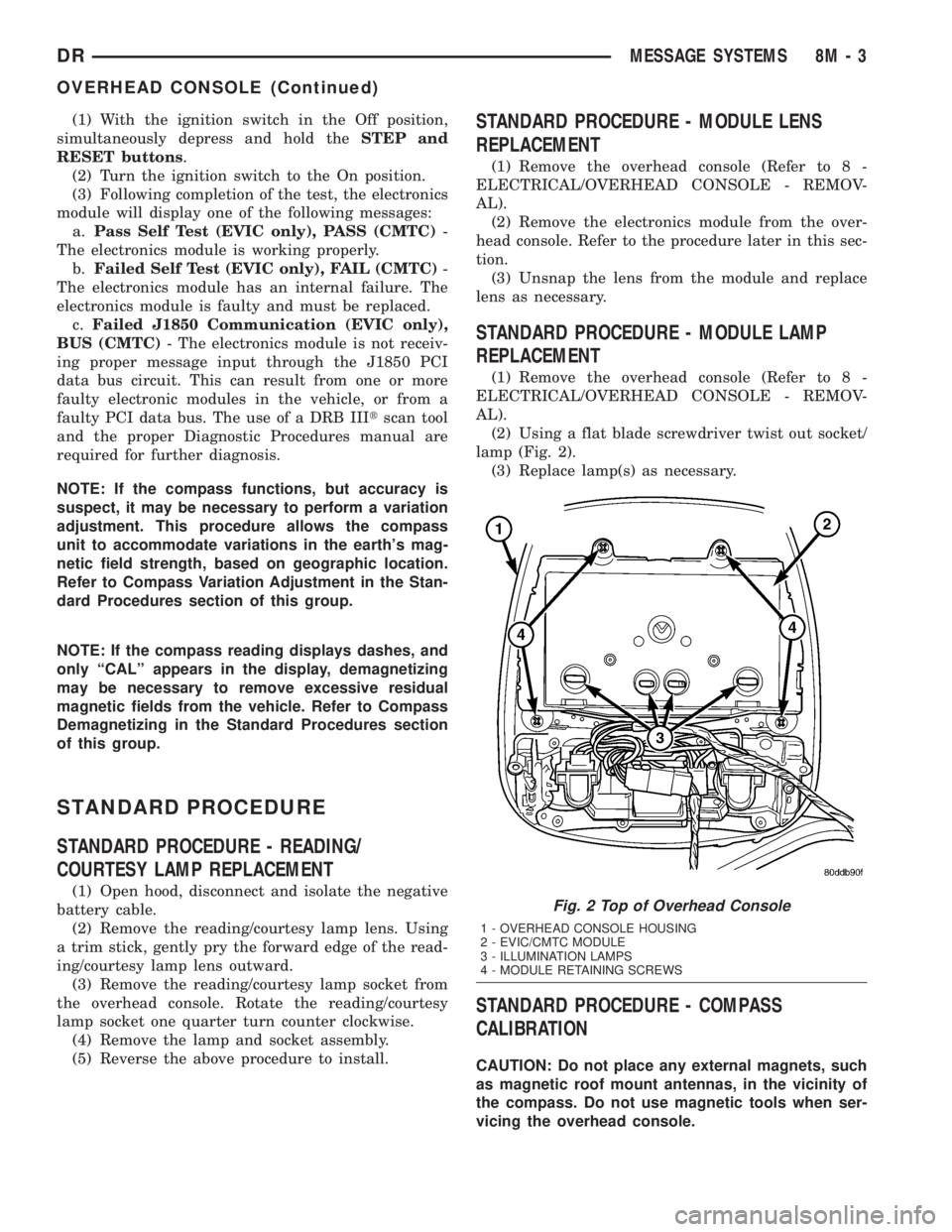
(2) Using a flat blade screwdriver twist out socket/
lamp (Fig. 2).
(3) Replace lamp(s) as necessary.
STANDARD PROCEDURE - COMPASS
CALIBRATION
CAUTION: Do not place any external magnets, such
as magnetic roof mount antennas, in the vicinity of
the compass. Do not use magnetic tools when ser-
vicing the overhead console.
Fig. 2 Top of Overhead Console
1 - OVERHEAD CONSOLE HOUSING
2 - EVIC/CMTC MODULE
3 - ILLUMINATION LAMPS
4 - MODULE RETAINING SCREWS
DRMESSAGE SYSTEMS 8M - 3
OVERHEAD CONSOLE (Continued)