2003 DODGE RAM length
[x] Cancel search: lengthPage 337 of 2895
(6) Install the radiator upper hose to the thermo-
stat housing.
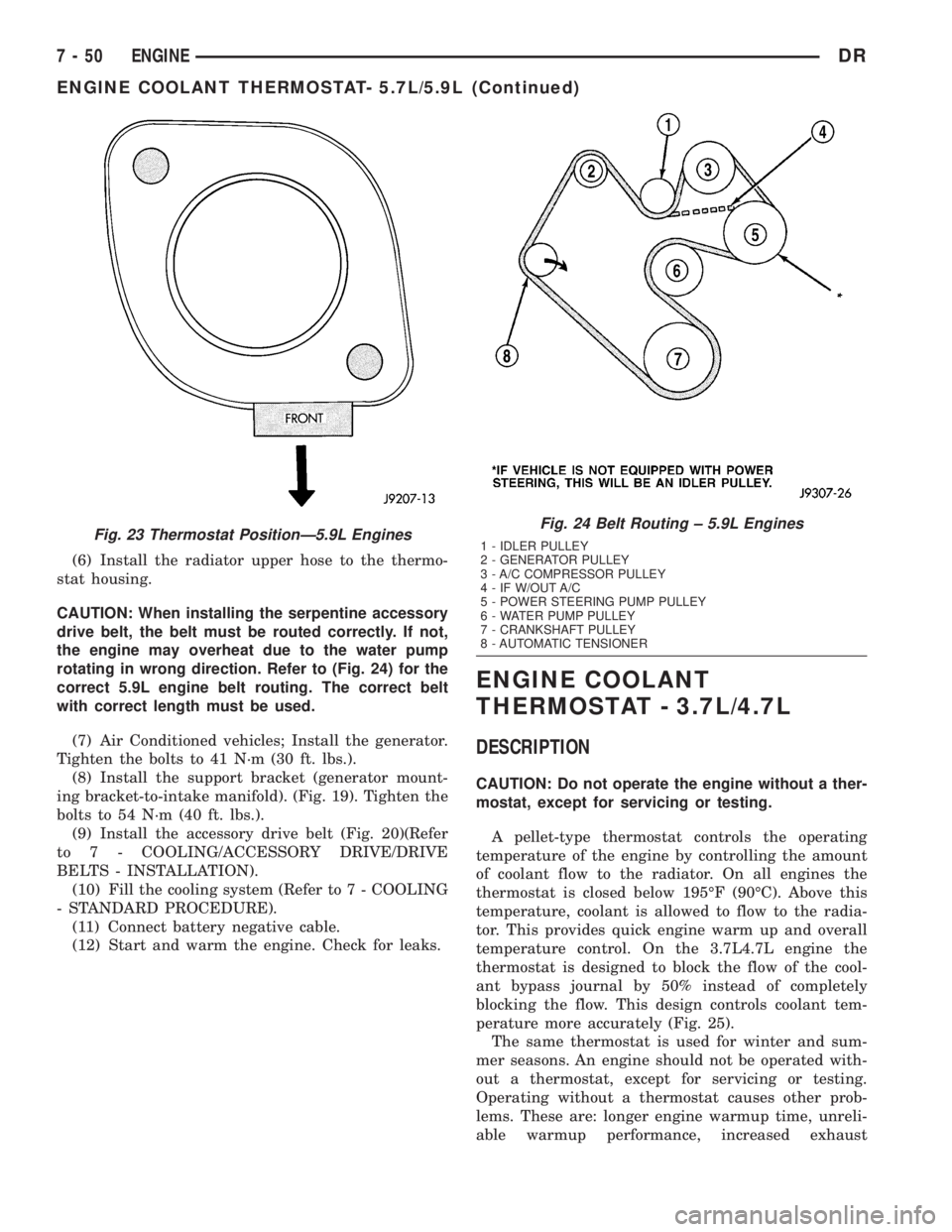
CAUTION: When installing the serpentine accessory
drive belt, the belt must be routed correctly. If not,
the engine may overheat due to the water pump
rotating in wrong direction. Refer to (Fig. 24) for the
correct 5.9L engine belt routing. The correct belt
with correct length must be used.
(7) Air Conditioned vehicles; Install the generator.
Tighten the bolts to 41 N´m (30 ft. lbs.).
(8) Install the support bracket (generator mount-
ing bracket-to-intake manifold). (Fig. 19). Tighten the
bolts to 54 N´m (40 ft. lbs.).
(9) Install the accessory drive belt (Fig. 20)(Refer
to 7 - COOLING/ACCESSORY DRIVE/DRIVE
BELTS - INSTALLATION).
(10) Fill the cooling system (Refer to 7 - COOLING
- STANDARD PROCEDURE).
(11) Connect battery negative cable.
(12) Start and warm the engine. Check for leaks.
ENGINE COOLANT
THERMOSTAT - 3.7L/4.7L
DESCRIPTION
CAUTION: Do not operate the engine without a ther-
mostat, except for servicing or testing.
A pellet-type thermostat controls the operating
temperature of the engine by controlling the amount
of coolant flow to the radiator. On all engines the
thermostat is closed below 195ÉF (90ÉC). Above this
temperature, coolant is allowed to flow to the radia-
tor. This provides quick engine warm up and overall
temperature control. On the 3.7L4.7L engine the
thermostat is designed to block the flow of the cool-
ant bypass journal by 50% instead of completely
blocking the flow. This design controls coolant tem-
perature more accurately (Fig. 25).
The same thermostat is used for winter and sum-
mer seasons. An engine should not be operated with-
out a thermostat, except for servicing or testing.
Operating without a thermostat causes other prob-
lems. These are: longer engine warmup time, unreli-
able warmup performance, increased exhaust
Fig. 23 Thermostat PositionÐ5.9L EnginesFig. 24 Belt Routing ± 5.9L Engines
1 - IDLER PULLEY
2 - GENERATOR PULLEY
3 - A/C COMPRESSOR PULLEY
4 - IF W/OUT A/C
5 - POWER STEERING PUMP PULLEY
6 - WATER PUMP PULLEY
7 - CRANKSHAFT PULLEY
8 - AUTOMATIC TENSIONER
7 - 50 ENGINEDR
ENGINE COOLANT THERMOSTAT- 5.7L/5.9L (Continued)
Page 354 of 2895
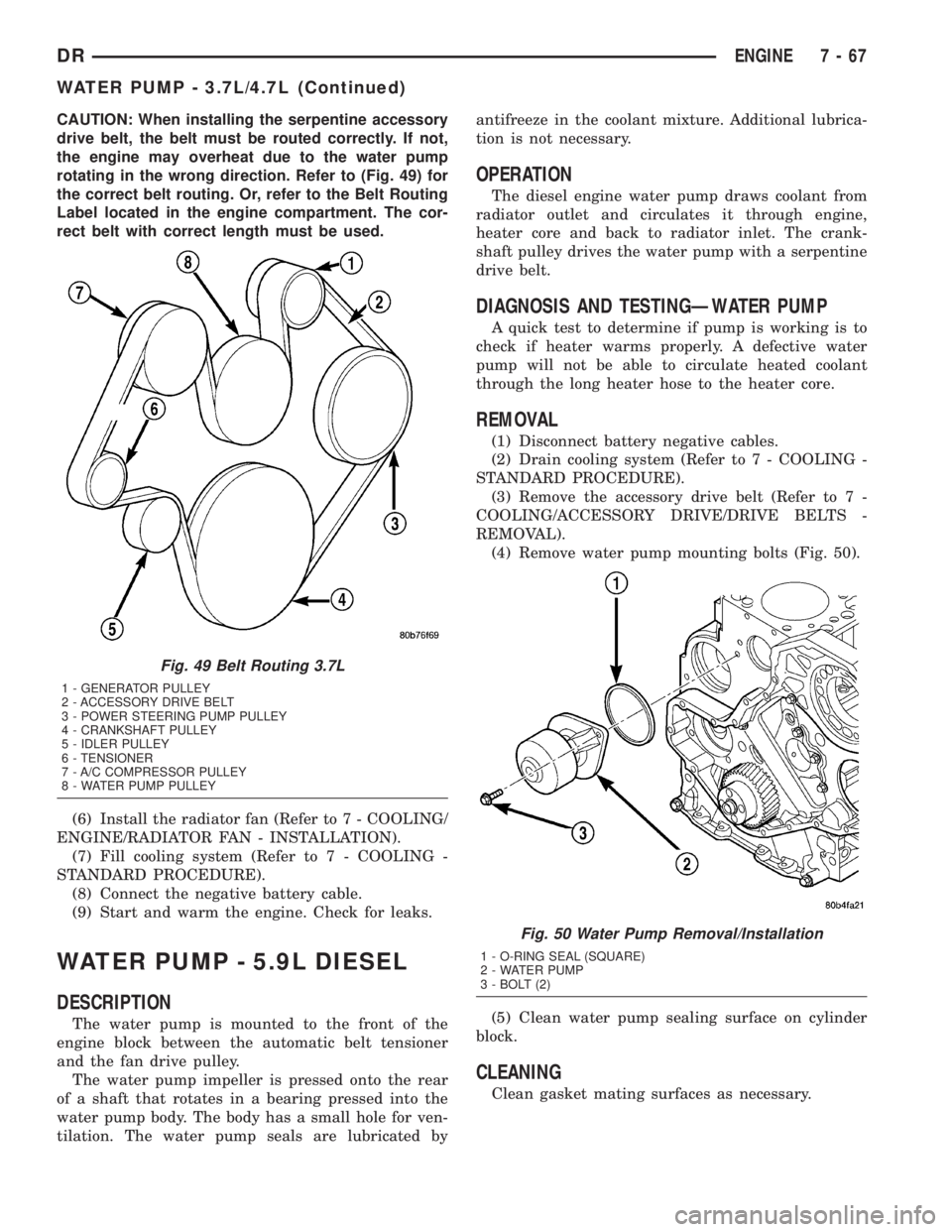
CAUTION: When installing the serpentine accessory
drive belt, the belt must be routed correctly. If not,
the engine may overheat due to the water pump
rotating in the wrong direction. Refer to (Fig. 49) for
the correct belt routing. Or, refer to the Belt Routing
Label located in the engine compartment. The cor-
rect belt with correct length must be used.
(6) Install the radiator fan (Refer to 7 - COOLING/
ENGINE/RADIATOR FAN - INSTALLATION).
(7) Fill cooling system (Refer to 7 - COOLING -
STANDARD PROCEDURE).
(8) Connect the negative battery cable.
(9) Start and warm the engine. Check for leaks.
WATER PUMP - 5.9L DIESEL
DESCRIPTION
The water pump is mounted to the front of the
engine block between the automatic belt tensioner
and the fan drive pulley.
The water pump impeller is pressed onto the rear
of a shaft that rotates in a bearing pressed into the
water pump body. The body has a small hole for ven-
tilation. The water pump seals are lubricated byantifreeze in the coolant mixture. Additional lubrica-
tion is not necessary.
OPERATION
The diesel engine water pump draws coolant from
radiator outlet and circulates it through engine,
heater core and back to radiator inlet. The crank-
shaft pulley drives the water pump with a serpentine
drive belt.
DIAGNOSIS AND TESTINGÐWATER PUMP
A quick test to determine if pump is working is to
check if heater warms properly. A defective water
pump will not be able to circulate heated coolant
through the long heater hose to the heater core.
REMOVAL
(1) Disconnect battery negative cables.
(2) Drain cooling system (Refer to 7 - COOLING -
STANDARD PROCEDURE).
(3) Remove the accessory drive belt (Refer to 7 -
COOLING/ACCESSORY DRIVE/DRIVE BELTS -
REMOVAL).
(4) Remove water pump mounting bolts (Fig. 50).
(5) Clean water pump sealing surface on cylinder
block.
CLEANING
Clean gasket mating surfaces as necessary.
Fig. 49 Belt Routing 3.7L
1 - GENERATOR PULLEY
2 - ACCESSORY DRIVE BELT
3 - POWER STEERING PUMP PULLEY
4 - CRANKSHAFT PULLEY
5 - IDLER PULLEY
6 - TENSIONER
7 - A/C COMPRESSOR PULLEY
8 - WATER PUMP PULLEY
Fig. 50 Water Pump Removal/Installation
1 - O-RING SEAL (SQUARE)
2 - WATER PUMP
3 - BOLT (2)
DRENGINE 7 - 67
WATER PUMP - 3.7L/4.7L (Continued)
Page 357 of 2895

CAUTION: A number or letter is stamped into the
tongue of the constant tension clamps. If replace-
ment is necessary, use only an original equipment
clamp with a matching number or letter and width.
(2) Loosen both of the bypass hose clamps and
position them to the center of the hose.
(3) Removethe hose from the vehicle.
INSTALLATION
INSTALLATION - WATER PUMP BYPASS HOSE
WITH AIR CONDITIONING
(1) Position the bypass hose clamps to the center
of the bypass hose.
(2) Install the bypass hose to the engine.
(3) Secure both of the hose clamps.
(4) Install the generator-A/C mounting bracket
assembly to the engine. Tighten bolt number 1 (Fig.
53) to 41 N´m (30 ft. lbs.). Tighten bolt number 2
(Fig. 53) to 28 N´m (20 ft. lbs.). Tighten bracket
mounting bolts (Fig. 53) (Fig. 53) to 40 N´m (30 ft.
lbs.).
(5) Install a new O-ring to the heater hose coolant
return tube. Coat the new O-ring with antifreeze
before installation.
(6) Install the coolant return tube and its mount-
ing bolt to the engine.
(7) Connect the throttle body control cables.
(8) Install the oil dipstick mounting bolt.
(9) Install the idler pulley. Tighten the bolt to 41
N´m (30 ft. lbs.) (Fig. 57).
(10) Install the drive belt (Refer to 7 - COOLING/
ACCESSORY DRIVE/DRIVE BELTS - INSTALLA-
TION).CAUTION: When installing the serpentine accessory
drive belt, the belt must be routed correctly. If not,
the engine may overheat due to the water pump
rotating in the wrong direction (Refer to 7 - COOL-
ING/ACCESSORY DRIVE/DRIVE BELTS - INSTALLA-
TION). The correct belt with the correct length must
be used.
(11) Install the air cleaner assembly.
(12) Install the upper radiator hose to the radiator.
(13) Connect the throttle cable to the clip at the
radiator fan shroud.
(14) Connect the wiring harness to the A/C com-
pressor.
(15) Fill the cooling system (Refer to 7 - COOLING
- STANDARD PROCEDURE).
(16) Start and warm the engine. Check for leaks.
INSTALLATION - WATER PUMP BYPASS HOSE
WITHOUT AIR CONDITIONING
(1) Position the bypass hose clamps to the center
of the bypass hose.
(2) Install the bypass hose tothe engine.
(3) Secure both of the hose clamps.
(4) Fill the cooling system (Refer to 7 - COOLING
- STANDARD PROCEDURE).
(5) Start and warm the engine. Check for leaks.
WATER PUMP - 5.7L
REMOVAL
(1) Disconnect negative battery cable.
(2) Drain coolant.
(3) Remove serpentine belt.
(4) Remove fan clutch assembly.
(5) Remove coolant fill bottle.
Fig. 56 Water Pump Bypass Hose - Typical
1 - WATER PUMP BYPASS HOSE
2 - FAN BLADE ASSEMBLY
3 - VISCOUS FAN DRIVE
4 - WATER PUMP AND PULLEY
Fig. 57 Tensioner Mounting
1 - DOWEL PIN HOLE
2 - TENSIONER MOUNTING BRACKET
7 - 70 ENGINEDR
WATER PUMP INLET TUBE - 5.9L (Continued)
Page 369 of 2895
antenna body to fender mating surfaces and tighten
the antenna cap nut to specifications.
(4) Check the resistance again with an ohmmeter.
If the resistance is still more then one ohm, replace
the faulty antenna body and cable.
REMOVAL
(1) Disconnect and isolate the battery negative
cable.
(2) Remove the right side kick panel.
(3) Disconnect antenna body cable from instru-
ment panel cable.
(4) Securely tie a suitable length of cord or twine
to the antenna half of the coaxial cable connector.
This cord will be used to pull the cable back into
position during installation.
(5) Remove the antenna mast.
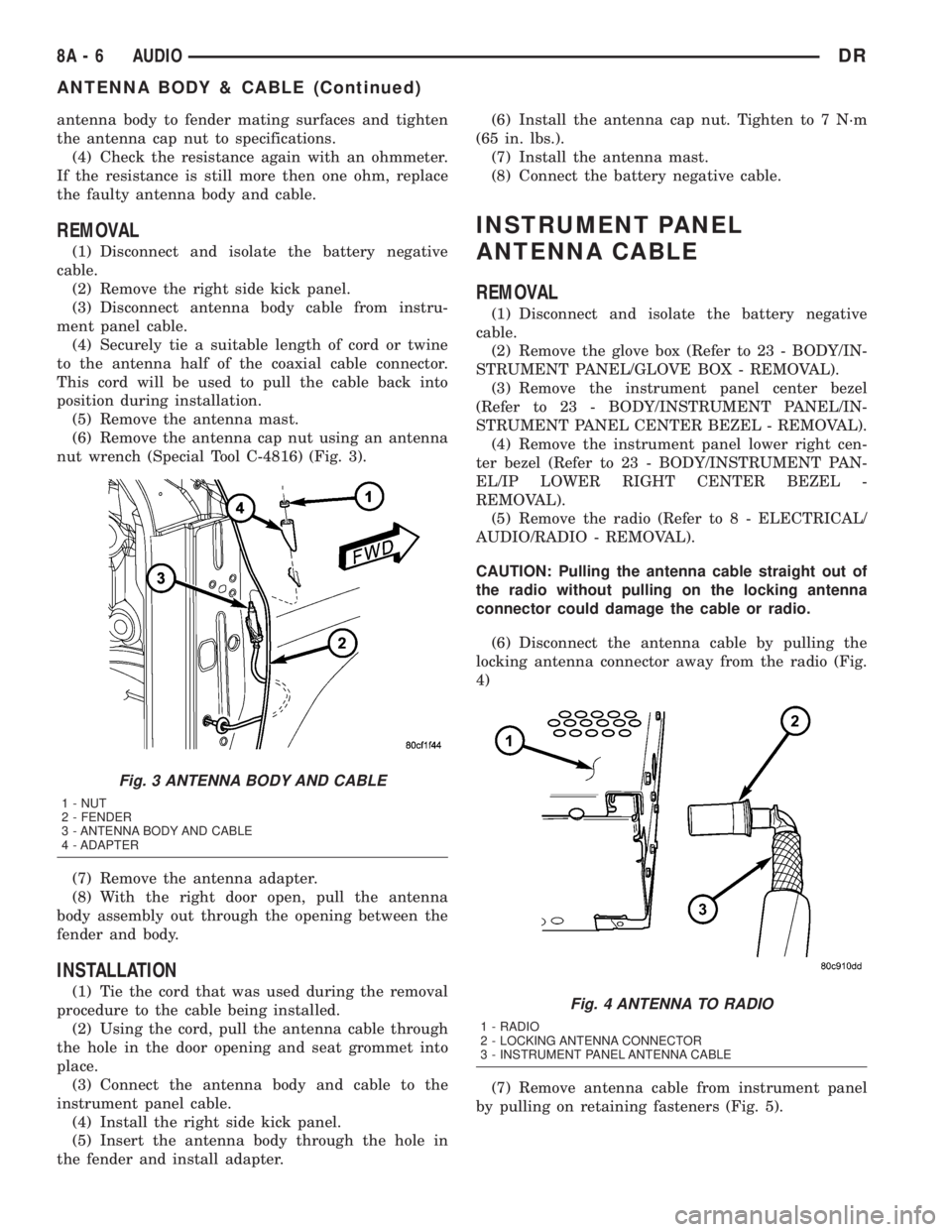
(6) Remove the antenna cap nut using an antenna
nut wrench (Special Tool C-4816) (Fig. 3).
(7) Remove the antenna adapter.
(8) With the right door open, pull the antenna
body assembly out through the opening between the
fender and body.
INSTALLATION
(1) Tie the cord that was used during the removal
procedure to the cable being installed.
(2) Using the cord, pull the antenna cable through
the hole in the door opening and seat grommet into
place.
(3) Connect the antenna body and cable to the
instrument panel cable.
(4) Install the right side kick panel.
(5) Insert the antenna body through the hole in
the fender and install adapter.(6) Install the antenna cap nut. Tighten to 7 N´m
(65 in. lbs.).
(7) Install the antenna mast.
(8) Connect the battery negative cable.
INSTRUMENT PANEL
ANTENNA CABLE
REMOVAL
(1) Disconnect and isolate the battery negative
cable.
(2) Remove the glove box (Refer to 23 - BODY/IN-
STRUMENT PANEL/GLOVE BOX - REMOVAL).
(3) Remove the instrument panel center bezel
(Refer to 23 - BODY/INSTRUMENT PANEL/IN-
STRUMENT PANEL CENTER BEZEL - REMOVAL).
(4) Remove the instrument panel lower right cen-
ter bezel (Refer to 23 - BODY/INSTRUMENT PAN-
EL/IP LOWER RIGHT CENTER BEZEL -
REMOVAL).
(5) Remove the radio (Refer to 8 - ELECTRICAL/
AUDIO/RADIO - REMOVAL).
CAUTION: Pulling the antenna cable straight out of
the radio without pulling on the locking antenna
connector could damage the cable or radio.
(6) Disconnect the antenna cable by pulling the
locking antenna connector away from the radio (Fig.
4)
(7) Remove antenna cable from instrument panel
by pulling on retaining fasteners (Fig. 5).
Fig. 3 ANTENNA BODY AND CABLE
1 - NUT
2 - FENDER
3 - ANTENNA BODY AND CABLE
4 - ADAPTER
Fig. 4 ANTENNA TO RADIO
1 - RADIO
2 - LOCKING ANTENNA CONNECTOR
3 - INSTRUMENT PANEL ANTENNA CABLE
8A - 6 AUDIODR
ANTENNA BODY & CABLE (Continued)
Page 371 of 2895
INSTALLATION
(1) Install antenna cable to radio.
(2) Connect electrical harness connector to radio.
(3) Install radio to instrument panel.
(4) Install instrument panel center bezel (Refer to
23 - BODY/INSTRUMENT PANEL/INSTRUMENT
PANEL CENTER BEZEL - INSTALLATION).
(5) Connect battery negative cable.
RADIO NOISE SUPPRESSION
GROUND STRAP
DESCRIPTION
Radio noise suppression devices are factory-in-
stalled standard equipment on this vehicle. Radio
Frequency Interference (RFI) and ElectroMagnetic
Interference (EMI) can be produced by any on-board
or external source of electromagnetic energy. These
electromagnetic energy sources can radiate electro-
magnetic signals through the air, or conduct them
through the vehicle electrical system.
When the audio system converts RFI or EMI to an
audible acoustic wave form, it is referred to as radio
noise. This undesirable radio noise is generally man-
ifested in the form of ªbuzzing,º ªhissing,º ªpopping,º
ªclicking,º ªcrackling,º and/or ªwhirringº sounds. In
most cases, RFI and EMI radio noise can be sup-
pressed using a combination of vehicle and compo-
nent grounding, filtering and shielding techniques.
This vehicle is equipped with factory-installed radio
noise suppression devices that were designed to min-
imize exposure to typical sources of RFI and EMI;
thereby, minimizing radio noise complaints.Factory-installed radio noise suppression is accom-
plished primarily through circuitry or devices that
are integral to the factory-installed radios, audio
power amplifiers and other on-board electrical com-
ponents such as generators, wiper motors, blower
motors, and fuel pumps that have been found to be
potential sources of RFI or EMI. External radio noise
suppression devices that are used on this vehicle to
control RFI or EMI, and can be serviced, include the
following:
²Engine-to-body ground strap- This length of
braided ground strap has an eyelet terminal connec-
tor crimped to each end. One end is secured to the
engine cylinder head(s). The other is secured to the
plenum at the exhaust heat shield forward/outer
attaching stud.
²Resistor-type spark plugs- This type of spark
plug has an internal resistor connected in series
between the spark plug terminal and the center elec-
trode to help reduce the production of electromag-
netic radiation that can result in radio noise.
OPERATION
There are two common strategies that can be used
to suppress Radio Frequency Interference (RFI) and
ElectroMagnetic Interference (EMI) radio noise. The
first suppression strategy involves preventing the
production of RFI and EMI electromagnetic signals
at their sources. The second suppression strategy
involves preventing the reception of RFI and EMI
electromagnetic signals by the audio system compo-
nents.
The use of braided ground straps in key locations
is part of the RFI and EMI prevention strategy.
These ground straps ensure adequate ground paths,
particularly for high current components such as
many of those found in the starting, charging, igni-
tion, engine control and transmission control sys-
tems. An insufficient ground path for any of these
high current components may result in radio noise
caused by induced voltages created as the high cur-
rent seeks alternative ground paths through compo-
nents or circuits intended for use by, or in close
proximity to the audio system components or circuits.
Preventing the reception of RFI and EMI is accom-
plished by ensuring that the audio system compo-
nents are correctly installed in the vehicle. Loose,
corroded or improperly soldered wire harness connec-
tions, improperly routed wiring and inadequate audio
system component grounding can all contribute to
the reception of RFI and EMI. A properly grounded
antenna body and radio chassis, as well as a shielded
antenna coaxial cable with clean and tight connec-
tions will each help reduce the potential for reception
of RFI and EMI.
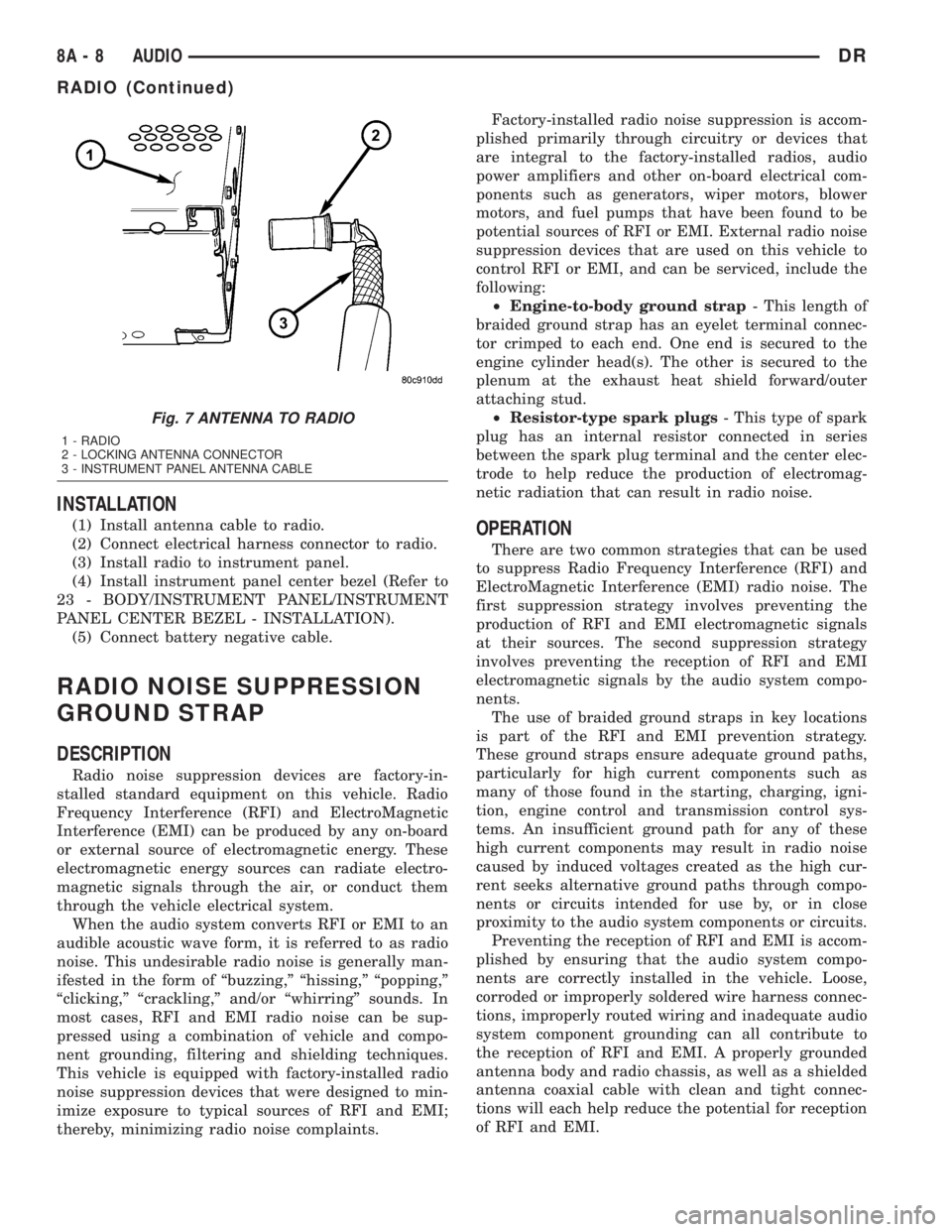
Fig. 7 ANTENNA TO RADIO
1 - RADIO
2 - LOCKING ANTENNA CONNECTOR
3 - INSTRUMENT PANEL ANTENNA CABLE
8A - 8 AUDIODR
RADIO (Continued)
Page 383 of 2895

Many of the electronic control modules in a vehicle
require information from the same sensing device. In
the past, if information from one sensing device was
required by several controllers, a wire from each con-
troller needed to be connected in parallel to that sen-
sor. In addition, each controller utilizing analog
sensors required an Analog/Digital (A/D) converter in
order to9read9these sensor inputs. Multiplexing
reduces wire harness complexity, sensor current
loads and controller hardware because each sensing
device is connected to only one controller, which
reads and distributes the sensor information to the
other controllers over the data bus. Also, because
each controller on the data bus can access the con-
troller sensor inputs to every other controller on the
data bus, more function and feature capabilities are
possible.
In addition to reducing wire harness complexity,
component sensor current loads and controller hard-
ware, multiplexing offers a diagnostic advantage. A
multiplex system allows the information flowing
between controllers to be monitored using a diagnos-
tic scan tool. The DaimlerChrysler system allows an
electronic control module to broadcast message data
out onto the bus where all other electronic control
modules can9hear9the messages that are being sent.
When a module hears a message on the data bus
that it requires, it relays that message to its micro-
processor. Each module ignores the messages on the
data bus that are being sent to other electronic con-
trol modules.
OPERATION
Data exchange between modules is achieved by
serial transmission of encoded data over a single wire
broadcast network. The wire colors used for the PCI
data bus circuits are yellow with a violet tracer, or
violet with a yellow tracer, depending upon the appli-
cation. The PCI data bus messages are carried over
the bus in the form of Variable Pulse Width Modu-
lated (VPWM) signals. The PCI data bus speed is an
average 10.4 Kilo-bits per second (Kbps). By compar-
ison, the prior two-wire Chrysler Collision Detection
(CCD) data bus system is designed to run at 7.8125
Kbps.
The voltage network used to transmit messages
requires biasing and termination. Each module on
the PCI data bus system provides its own biasing
and termination. Each module (also referred to as a
node) terminates the bus through a terminating
resistor and a terminating capacitor. There are two
types of nodes on the bus. The dominant node termi-
nates the bus througha1KWresistor and a 3300 pF
capacitor. The Powertrain Control Module (PCM) is
the only dominant node for the PCI data bus system.A standard node terminates the bus through an 11
KW resistor and a 330 pF capacitor.
The modules bias the bus when transmitting a
message. The PCI bus uses low and high voltage lev-
els to generate signals. Low voltage is around zero
volts and the high voltage is about seven and one-
half volts. The low and high voltage levels are gener-
ated by means of variable-pulse width modulation to
form signals of varying length. The Variable Pulse
Width Modulation (VPWM) used in PCI bus messag-
ing is a method in which both the state of the bus
and the width of the pulse are used to encode bit
information. A9zero9bit is defined as a short low
pulse or a long high pulse. A9one9bit is defined as a
long low pulse or a short high pulse. A low (passive)
state on the bus does not necessarily mean a zero bit.
It also depends upon pulse width. If the width is
short, it stands for a zero bit. If the width is long, it
stands for a one bit. Similarly, a high (active) state
does not necessarily mean a one bit. This too depends
upon pulse width. If the width is short, it stands for
a one bit. If the width is long, it stands for a zero bit.
In the case where there are successive zero or one
data bits, both the state of the bus and the width of
the pulse are changed alternately. This encoding
scheme is used for two reasons. First, this ensures
that only one symbol per transition and one transi-
tion per symbol exists. On each transition, every
transmitting module must decode the symbol on the
bus and begin timing of the next symbol. Since tim-
ing of the next symbol begins with the last transition
detected on the bus, all of the modules are re-syn-
chronized with each symbol. This ensures that there
are no accumulated timing errors during PCI data
bus communication.
The second reason for this encoding scheme is to
guarantee that the zero bit is the dominant bit on
the bus. When two modules are transmitting simul-
taneously on the bus, there must be some form of
arbitration to determine which module will gain con-
trol. A data collision occurs when two modules are
transmitting different messages at the same time.
When a module is transmitting on the bus, it is read-
ing the bus at the same time to ensure message
integrity. When a collision is detected, the module
that transmitted the one bit stops sending messages
over the bus until the bus becomes idle.
Each module is capable of transmitting and receiv-
ing data simultaneously. The typical PCI bus mes-
sage has the following four components:
²Message Header- One to three bytes in length.
The header contains information identifying the mes-
sage type and length, message priority, target mod-
ule(s) and sending module.
²Data Byte(s)- This is the actual message that
is being sent.
8E - 2 ELECTRONIC CONTROL MODULESDR
COMMUNICATION (Continued)
Page 401 of 2895

NOTE: If the TCM has been replaced, the ªQuick Learn
Procedureº must be performed. (Refer to 8 - ELECTRI-
CAL/ELECTRONIC CONTROL MODULES/TRANSMIS-
SION CONTROL MODULE - STANDARD PROCEDURE)
BATTERY FEED
A fused, direct battery feed to the TCM is used for
continuous power. This battery voltage is necessary
to retain memory in the TCM. When the battery (B+)
is disconnected, this memory is lost. When the bat-
tery (B+) is restored, this memory loss is detected by
the TCM and a Diagnostic Trouble Code (DTC) is set.
CLUTCH VOLUME INDEXES (CVI)
An important function of the TCM is to monitor
Clutch Volume Indexes (CVI). CVIs represent the vol-
ume of fluid needed to compress a clutch pack.
The TCM monitors gear ratio changes by monitor-
ing the Input and Output Speed Sensors. The Input,
or Turbine Speed Sensor sends an electrical signal to
the TCM that represents input shaft rpm. The Out-
put Speed Sensor provides the TCM with output
shaft speed information.
By comparing the two inputs, the TCM can deter-
mine transmission gear position. This is important to
the CVI calculation because the TCM determines
CVIs by monitoring how long it takes for a gear
change to occur (Fig. 11).
Gear ratios can be determined by using the
DRBIIItScan Tool and reading the Input/Output
Speed Sensor values in the ªMonitorsº display. Gear
ratio can be obtained by dividing the Input Speed
Sensor value by the Output Speed Sensor value.
For example, if the input shaft is rotating at 1000
rpm and the output shaft is rotating at 500 rpm,
then the TCM can determine that the gear ratio is
2:1. In direct drive (3rd gear), the gear ratio changes
to 1:1. The gear ratio changes as clutches are applied
and released. By monitoring the length of time it
takes for the gear ratio to change following a shift
request, the TCM can determine the volume of fluid
used to apply or release a friction element.
The volume of transmission fluid needed to apply
the friction elements are continuously updated for
adaptive controls. As friction material wears, the vol-
ume of fluid need to apply the element increases.
Certain mechanical problems within the input
clutch assembly can cause inadequate or out-of-range
element volumes. Also, defective Input/Output Speed
Sensors and wiring can cause these conditions. The
following chart identifies the appropriate clutch vol-
umes and when they are monitored/updated:
CLUTCH VOLUMES
Clutch When UpdatedProper Clutch
Volume
L/R2-1 or 3-1
downshift45 to 134
2C3-2 kickdown
shift25 to 85
OD 2-3 upshift 30 to 100
4C 3-4 upshift 30 to 85
UD4-3 kickdown
shift30 to 100
SHIFT SCHEDULES
As mentioned earlier, the TCM has programming that
allows it to select a variety of shift schedules. Shift
schedule selection is dependent on the following:
²Shift lever position
²Throttle position
²Engine load
²Fluid temperature
²Software level
As driving conditions change, the TCM appropri-
ately adjusts the shift schedule. Refer to the follow-
ing chart to determine the appropriate operation
expected, depending on driving conditions.
Fig. 11 Example of CVI Calculation
1 - OUTPUT SPEED SENSOR
2 - OUTPUT SHAFT
3 - CLUTCH PACK
4 - SEPARATOR PLATE
5 - FRICTION DISCS
6 - INPUT SHAFT
7 - INPUT SPEED SENSOR
8 - PISTON AND SEAL
8E - 20 ELECTRONIC CONTROL MODULESDR
TRANSMISSION CONTROL MODULE (Continued)
Page 450 of 2895

Diagnostic logic is built into the heated seat mod-
ule to help the person trying to locate the problem by
the most efficient means possible. Anytime a problem
is suspected, locate the diagnosis and testing proce-
dure for the component in question and follow the
steps until the specific problem is located and
resolved. Once the problem is thought to be cor-
rected, verify correct system operation. If the heated
seat system is functioning correctly return the vehi-
cle to service.
If a problem could not be verified such as not find-
ing anything wrong when following the diagnostic
procedure, this is a good indication that a INTER-
MITTENT problem may be present. You must then
attempt to find the intermittent problem, such as
moving the heating element within the seat while
testing continuity or wiggling the wire harness's/elec-
trical connectors under the seat while testing conti-
nuity. Always, eliminate all other potential problems
before attempting to replace the heated seat module.
PRELIMINARY TEST
Refer toWiringfor the location of complete heated
seat system wiring diagrams. Before testing the indi-
vidual components in the heated seat system, per-
form the following preliminary checks:
WARNING: DISABLE THE AIRBAG SYSTEM
BEFORE ATTEMPTING ANY STEERING WHEEL,
STEERING COLUMN, OR INSTRUMENT PANEL
COMPONENT DIAGNOSIS OR SERVICE. DISCON-
NECT AND ISOLATE THE BATTERY NEGATIVE
CABLE, THEN WAIT TWO MINUTES FOR THE AIR-
BAG SYSTEM CAPACITOR TO DISCHARGE
BEFORE PERFORMING FURTHER DIAGNOSIS OR
SERVICE. THIS IS THE ONLY SURE WAY TO DIS-
ABLE THE AIRBAG SYSTEM. FAILURE TO TAKE
THE PROPER PRECAUTIONS COULD RESULT IN
ACCIDENTAL AIRBAG DEPLOYMENT AND POSSI-
BLE PERSONAL INJURY.
²If the heated seat switch back lighting and the
cluster illumination lamps do not illuminate with the
headlamps or park lamps turned On, refer to the
Instrument Clustersection of the service manual
for the location of cluster illumination lamp diagnosis
and testing procedures. If the heated seat switch
back lighting does not illuminate, but the cluster illu-
mination lamps do illuminate with the headlamps or
park lamps turned On, refer toDiagnosis and Test-
ing the Heated Seat Switchin this section for the
location of the heated seat switch diagnosis and test-
ing procedures.
²If a single LED indicator lamp for one heated
seat switch does not operate and the heated seat ele-
ments do heat, refer toDiagnosis and Testing theHeated Seat Switchin this section for heated seat
switch diagnosis and testing procedures.
²If both LED indicator lamps for a heated seat
switch operate, but the heated seat elements do not
heat, refer toDiagnosis and Testing the Heated
Seat Modulein Electronic Control Modules for
heated seat module diagnosis and testing procedures.
²If the indicator lamp on either heated seat
switch remains illuminated after the heated seat has
been turned Off, refer toDiagnosis and Testing
the Heated Seat Modulein Electronic Control
Modules for heated seat module diagnosis and test-
ing procedures.
HEATED SEAT ELEMENT
DESCRIPTION
Vehicles equipped with the optional heated seat
system have two sets of electrically operated heating
element grids located in each front seat, one set for
the seat cushion and the other set for the seat back.
Each of the heated seat element grids consists of a
single length of resistor wire that is routed in a zig-
zag pattern and captured between a covering and the
adhesive foam rubber backing. Short pigtail wires
with connectors (Fig. 2) are soldered to each end of
each resistor wire element grid, which connect all of
Fig. 2 Heating Element Installed on Seat Cushion
Foam
1 - SEAT BACK WIRE HARNESS
2 - HEATED SEAT WIRE HARNESS CONNECTOR
3 - HEATED SEAT CUSHION ELEMENT
DRHEATED SEAT SYSTEM 8G - 5
HEATED SEAT SYSTEM (Continued)