2003 CHEVROLET VENTURE radio controls
[x] Cancel search: radio controlsPage 264 of 486

Adjusting the Speakers (Balance/Fade)
AUDIO:To adjust the balance between the right
and the left speakers, push the AUDIO knob until BAL
appears on the display. Turn the knob to move the
sound toward the left or the right speakers.
To adjust the fade between the front and rear speakers,
push and hold the AUDIO knob until FAD appears on
the display. Turn the knob to move the sound toward the
front or the rear speakers.
To adjust the balance and the fade to the middle
position, select balance or fade and push and hold the
AUDIO knob. The radio will beep once and will
adjust the display level to the middle position.
To adjust all tone and speaker controls to the middle
position, push and hold the AUDIO knob when no tone
or speaker controls are displayed. The radio will
produce one beep and CENTERED will appear on the
display.
Using RDS
Your audio system is equipped with a Radio Data
System (RDS). RDS features are available for use only
on FM stations that broadcast RDS information.
Using this system, the radio can do the following:
·Seek to stations broadcasting the selected type of
programming,
·receive announcements concerning local and
national emergencies,
·display messages from radio stations, and
·seek to stations with traffic announcements.
This system relies upon receiving speci®c information
from these stations and will only work when the
information is available. In rare cases, a radio station
may broadcast incorrect information that will cause
the radio features to work improperly. If this happens,
contact the radio station.
While you are tuned to an RDS station, the station
name or the call letters will appear on the display instead
of the frequency. RDS stations may also provide the
time of day, a program type (PTY) for current
programming and the name of the program being
broadcast.
3-84
Page 279 of 486

Battery Replacement
To change the batteries, do the following:
1. Remove the screw and open the battery door
located on the back of the remote control.
2. Replace the two AAA batteries in the compartment.
Make sure that they are installed correctly.
3. Replace the battery door and screw.
If the remote control is to be stored for a long period of
time, remove the batteries and keep them in a cool,
dry place.
Rear Seat Audio (RSA) (Without
Entertainment System)
This feature allows rear seat passengers to listen to and
control any of the music sources: radio, cassette
tapes and CDs. However, the rear seat passengers can
only control the music sources that the front seatpassengers are not listening to. For example, rear seat
passengers may listen to a cassette tape or CD
through headphones, while the driver listens to the radio
through the front speakers. The rear seat passengers
have control of the volume for each set of headphones.
Be aware that the front seat audio controls always
have priority over the RSA controls. If the front seat
passengers switch the source for the main radio
to a remote source, the RSA will play the same remote
source. The rear speakers will be muted when the
RSA power is turned on. You may operate the RSA
functions even when the main radio is off.
Primary Radio Controls
The following function is controlled by the knob on the
main radio:
PWR (Power):Push this knob twice to turn RSA off.
3-99
Page 280 of 486
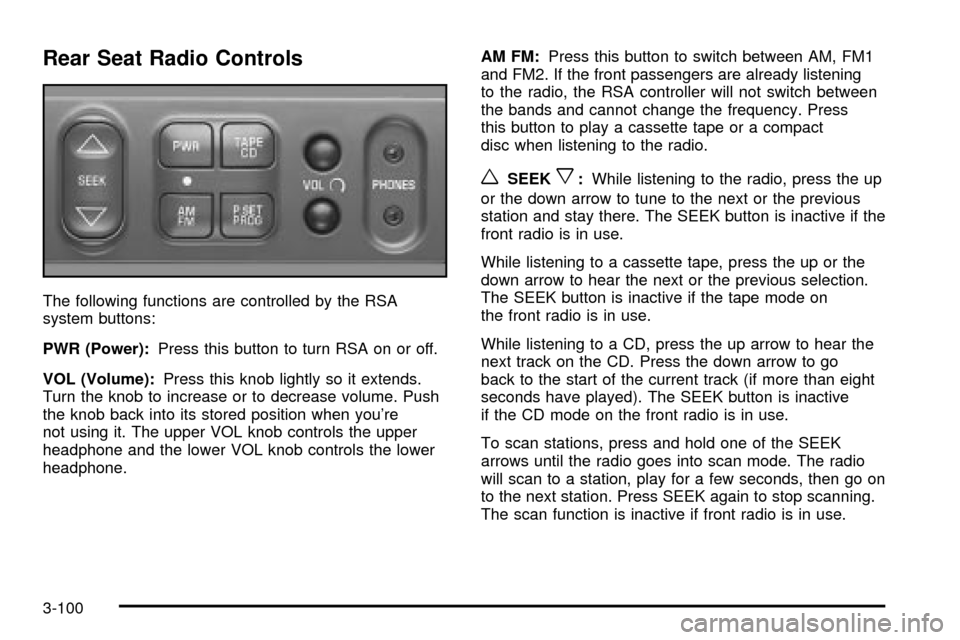
Rear Seat Radio Controls
The following functions are controlled by the RSA
system buttons:
PWR (Power):Press this button to turn RSA on or off.
VOL (Volume):Press this knob lightly so it extends.
Turn the knob to increase or to decrease volume. Push
the knob back into its stored position when you're
not using it. The upper VOL knob controls the upper
headphone and the lower VOL knob controls the lower
headphone.AM FM:Press this button to switch between AM, FM1
and FM2. If the front passengers are already listening
to the radio, the RSA controller will not switch between
the bands and cannot change the frequency. Press
this button to play a cassette tape or a compact
disc when listening to the radio.
wSEEKx:While listening to the radio, press the up
or the down arrow to tune to the next or the previous
station and stay there. The SEEK button is inactive if the
front radio is in use.
While listening to a cassette tape, press the up or the
down arrow to hear the next or the previous selection.
The SEEK button is inactive if the tape mode on
the front radio is in use.
While listening to a CD, press the up arrow to hear the
next track on the CD. Press the down arrow to go
back to the start of the current track (if more than eight
seconds have played). The SEEK button is inactive
if the CD mode on the front radio is in use.
To scan stations, press and hold one of the SEEK
arrows until the radio goes into scan mode. The radio
will scan to a station, play for a few seconds, then go on
to the next station. Press SEEK again to stop scanning.
The scan function is inactive if front radio is in use.
3-100
Page 281 of 486

P.SET PROG (Preset Program):The front passengers
must be listening to something different for each of
these functions to work:
·Press this button to scan through the preset radio
stations set on the pushbuttons on the main radio.
The radio will go to a preset station stored on
your pushbuttons, play for a few seconds, then go
on to the next preset station. Press this button
again to stop scanning presets.
·When a cassette tape is playing, press this button
to go to the other side of the tape.
·When a CD is playing, press this button to select
a disc.
TAPE CD:Press this button to switch between playing
a cassette tape or a compact disc when listening to
the radio. The inactive tape or compact disc will remain
safely inside the radio for future listening.
Rear Seat Audio (RSA) (With
Entertainment System)
This feature allows rear seat passengers to listen to and
control any of the music sources: radio, cassette
tapes and CDs. However, the rear seat passengers can
only control the music sources that the front seat
passengers are not listening to. For example, rear seat
passengers may listen to a cassette tape or CD
through headphones while the driver listens to the radio
through the front speakers. The rear seat passengers
have control of the volume for each set of headphones.
Be aware that the front seat audio controls always
have priority over the RSA controls. If the front seat
passengers switch the source for the main radio
to a remote source, the RSA will play the same remote
source. The rear speakers will be muted when the
RSA power is turned on. You may operate the RSA
functions even when the main radio is off.
3-101
Page 282 of 486
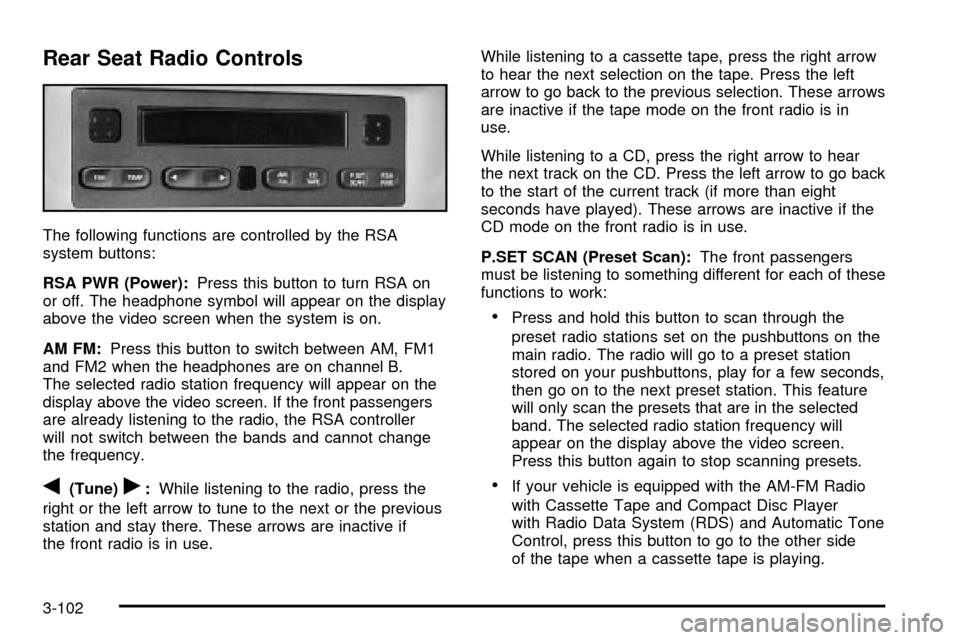
Rear Seat Radio Controls
The following functions are controlled by the RSA
system buttons:
RSA PWR (Power):Press this button to turn RSA on
or off. The headphone symbol will appear on the display
above the video screen when the system is on.
AM FM:Press this button to switch between AM, FM1
and FM2 when the headphones are on channel B.
The selected radio station frequency will appear on the
display above the video screen. If the front passengers
are already listening to the radio, the RSA controller
will not switch between the bands and cannot change
the frequency.
q(Tune)r:While listening to the radio, press the
right or the left arrow to tune to the next or the previous
station and stay there. These arrows are inactive if
the front radio is in use.While listening to a cassette tape, press the right arrow
to hear the next selection on the tape. Press the left
arrow to go back to the previous selection. These arrows
are inactive if the tape mode on the front radio is in
use.
While listening to a CD, press the right arrow to hear
the next track on the CD. Press the left arrow to go back
to the start of the current track (if more than eight
seconds have played). These arrows are inactive if the
CD mode on the front radio is in use.
P.SET SCAN (Preset Scan):The front passengers
must be listening to something different for each of these
functions to work:
·Press and hold this button to scan through the
preset radio stations set on the pushbuttons on the
main radio. The radio will go to a preset station
stored on your pushbuttons, play for a few seconds,
then go on to the next preset station. This feature
will only scan the presets that are in the selected
band. The selected radio station frequency will
appear on the display above the video screen.
Press this button again to stop scanning presets.
·If your vehicle is equipped with the AM-FM Radio
with Cassette Tape and Compact Disc Player
with Radio Data System (RDS) and Automatic Tone
Control, press this button to go to the other side
of the tape when a cassette tape is playing.
3-102
Page 431 of 486
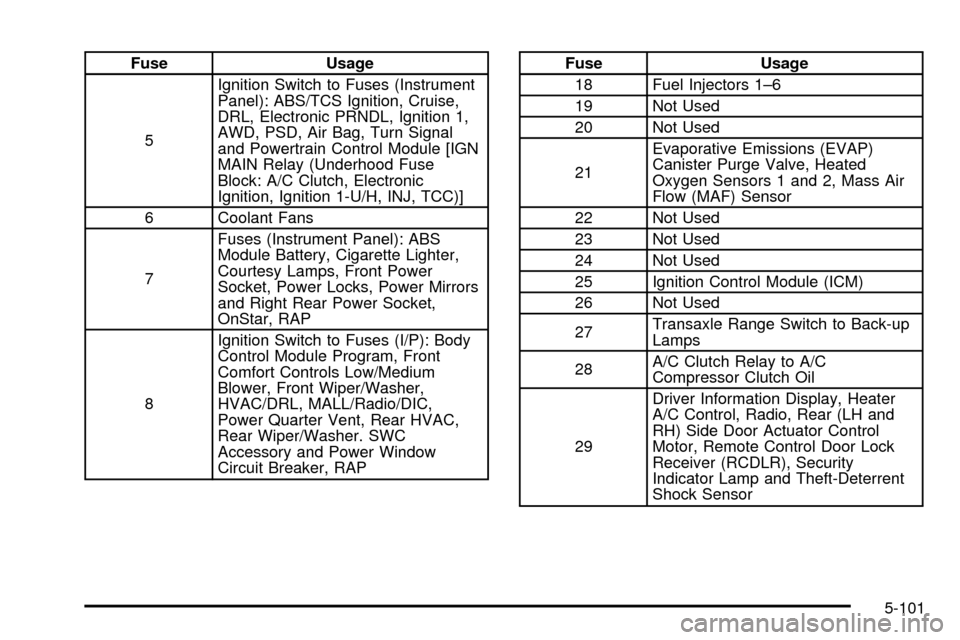
Fuse Usage
5Ignition Switch to Fuses (Instrument
Panel): ABS/TCS Ignition, Cruise,
DRL, Electronic PRNDL, Ignition 1,
AWD, PSD, Air Bag, Turn Signal
and Powertrain Control Module [IGN
MAIN Relay (Underhood Fuse
Block: A/C Clutch, Electronic
Ignition, Ignition 1-U/H, INJ, TCC)]
6 Coolant Fans
7Fuses (Instrument Panel): ABS
Module Battery, Cigarette Lighter,
Courtesy Lamps, Front Power
Socket, Power Locks, Power Mirrors
and Right Rear Power Socket,
OnStar, RAP
8Ignition Switch to Fuses (I/P): Body
Control Module Program, Front
Comfort Controls Low/Medium
Blower, Front Wiper/Washer,
HVAC/DRL, MALL/Radio/DIC,
Power Quarter Vent, Rear HVAC,
Rear Wiper/Washer. SWC
Accessory and Power Window
Circuit Breaker, RAPFuse Usage
18 Fuel Injectors 1±6
19 Not Used
20 Not Used
21Evaporative Emissions (EVAP)
Canister Purge Valve, Heated
Oxygen Sensors 1 and 2, Mass Air
Flow (MAF) Sensor
22 Not Used
23 Not Used
24 Not Used
25 Ignition Control Module (ICM)
26 Not Used
27Transaxle Range Switch to Back-up
Lamps
28A/C Clutch Relay to A/C
Compressor Clutch Oil
29Driver Information Display, Heater
A/C Control, Radio, Rear (LH and
RH) Side Door Actuator Control
Motor, Remote Control Door Lock
Receiver (RCDLR), Security
Indicator Lamp and Theft-Deterrent
Shock Sensor
5-101
Page 480 of 486

Passenger Compartment Air Filter.....................3-33
Passing.................................................4-13, 4-41
PASS-Key
žIII Operation..................................2-29
PASS-KeyžIII Security Message.......................3-56
PASS-KeyžIII ................................................2-29
Plan Ahead When Possible................................ 7-8
Playing a Cassette Tape..................................3-77
Playing a Compact Disc..................3-70, 3-79, 3-87
Playing a Speci®c Loaded
Compact Disc.............................................3-88
Playing the Radio...................3-62, 3-65, 3-72, 3-81
Power Steering...............................................4-10
Power...........................................................3-24
Accessory Outlets........................................3-24
Door Locks.................................................2-11
Electrical System.........................................5-96
Rear Quarter Windows.................................2-26
Six-Way Seats.............................................. 1-4
Sliding Door Warning Message......................3-54
Sliding Door................................................2-17
Steering Fluid.............................................5-37
Windows....................................................2-25
Pretensioners, Safety Belt................................1-54
Primary Radio Controls....................................3-99
Programmable Automatic Door Locks.................2-12
Programmable Modes.....................2-62, 2-63, 2-64,
2-65, 2-66, 2-67, 2-68Programming Mode.........................................2-62
Entering.....................................................2-62
Exiting.......................................................2-70
Programming the HomeLink Transmitter.............2-48
Q
Questions and Answers About Safety Belts.........1-34
R
Radiator Pressure Cap....................................5-26
Radio Messages.............................3-64, 3-69, 3-77
Radios..........................................................3-61
AM-FM Radio.............................................3-62
Care of Your Cassette Tape Player...............3-104
Care of Your CD and DVD Player................3-105
Care of Your CDs and DVDs.......................3-105
Radio with Cassette and CD.........................3-72
Radio with CD............................................3-65
Radio with Six-Disc CD................................3-81
Rear Seat Audio................................3-99, 3-101
Setting the Time for Radios with Radio
Data Systems (RDS)................................3-61
Setting the Time for Radios without
Radio Data Systems (RDS).......................3-61
12
Page 481 of 486

Radios (cont.)
Theft-Deterrent..........................................3-103
Understanding Reception............................3-104
RDS Messages..............................3-68, 3-76, 3-86
Rear Climate Control System...................3-29, 3-31
Rear Hatch Ajar Warning Message....................3-56
Rear Reading Lamps......................................3-20
Rear Safety Belt Comfort Guides......................1-52
Rear Seat Audio (RSA)..........................3-99, 3-101
Rear Seat Operation......................................... 1-7
Rear Seat Outside Passenger Positions.............1-49
Rear Seat Passengers, Safety Belts..................1-48
Rear Seat Radio Controls.....................3-100, 3-102
Rear Storage Area..........................................2-57
Rear Window Defogger....................................3-28
Rearview Mirrors.............................................2-44
Reclining Seatbacks.......................................... 1-4
Recreational Vehicle Towing.............................4-32
Remote Alarm.................................................. 2-7
Remote Control..............................................3-97
Remote Driver Unlock Control...........................2-65
Remote Keyless Entry System, Operation............ 2-6
Remote Keyless Entry System............................ 2-5
Remote Lock and Unlock Con®rmation...............2-66
Remote Power Sliding Door Operation................. 2-7
Removing the Bucket Seats.............................1-18
Removing the Captain's Chairs.........................1-23
Removing the Child from the Built-In Child
Restraint....................................................1-90
Removing the Convenience Center....................2-59Removing the Flat Tire and Installing the
Spare Tire..................................................5-77
Removing the Spare Tire and Tools...................5-72
Removing the Split Bench Seat........................1-11
Removing the Stowable Seat............................1-27
Removing the Wheel Covers............................5-77
Replacement Bulbs.........................................5-57
Replacing Brake System Parts..........................5-43
Replacing Restraint System Parts
After a Crash............................................1-104
Replacing the Bucket Seats..............................1-20
Replacing the Captain's Chairs.........................1-24
Replacing the Convenience Center....................2-59
Replacing the Split Bench Seats.......................1-12
Replacing the Stowable Seat............................1-28
Reporting Safety Defects.................................7-10
Canadian Government..................................7-10
General Motors...........................................7-10
United States Government.............................. 7-9
Reprogramming a Single HomeLink
žButton.......2-51
Resetting Defaults...........................................2-51
Resetting the Power Sliding Door......................2-21
Restraint System Check...................................6-11
Checking Your Restraint Systems.................1-103
Replacing Restraint System Parts
After a Crash.........................................1-104
Restraint Systems.........................................1-103
Checking..................................................1-103
Replacing Parts.........................................1-104
Retained Accessory Power (RAP)......................2-32
13