Page 87 of 374

If your vehicle is equipped with the HomeLink®
Transmitter, it complies with Part 15 of the FCC Rules.
Operation is subject to the following two conditions:
(1) this device may not cause harmful interference, and
(2) this device must accept any interference received,
including interference that may cause undesired
operation.
This device complies with RSS-210 of Industry Canada.
Operation is subject to the following two conditions:
(1) this device may not cause interference, and
(2) this device must accept any interference received,
including interference that may cause undesired
operation of the device.
Changes and modications to this system by other than
an authorized service facility could void authorization
to use this equipment.
HomeLink®Wireless Control
System Operation
Do not use the HomeLink®Transmitter with any garage
door opener that does not have the “stop and reverse”
feature. This includes any garage door opener model
manufactured before April 1, 1982. If you have a newer
garage door opener with rolling codes, please be
sure to follow Steps 6 through 8 to complete the
programming of your HomeLink
®Transmitter.Read the instructions completely before attempting to
program the HomeLink
®Transmitter. Because of
the steps involved, it may be helpful to have another
person available to assist you in programming the
transmitter.
Keep the original transmitter for use in other vehicles as
well as for future HomeLink
®programming. It is also
recommended that upon the sale of the vehicle,
the programmed HomeLink
®buttons should be erased
for security purposes. Refer to “Erasing HomeLink®
Buttons” or, for assistance, contact HomeLink®on the
Internet at: www.homelink.com or by calling
1-800-355-3515.
Be sure that people and objects are clear of the garage
door or gate operator you are programming. When
programming a garage door, it is advised to park outside
of the garage.
It is recommended that a new battery be installed in
your hand-held transmitter for quicker and more
accurate transmission of the radio frequency.
2-27
Page 94 of 374
4. Slide the cover rearward and then lift up on
the passenger’s side of the cargo cover. Then
have another person lift the driver’s side of the
cargo cover.
5. Reverse Steps 1 through 4 to reinstall the
cargo cover.
Emergency Cargo Cover Release
Handle
Notice:Using the emergency cargo cover release
handle as a tie-down or anchor point when securing
items in the cargo area may damage it. Use the
emergency cargo cover release handle only to help
you open the cargo cover.
Your vehicle has a glow-in-the-dark emergency cargo
cover release handle located in the cargo area on
the driver’s side of the vehicle. This handle will glow
following exposure to light. Pull the release handle up to
open the cargo cover from the inside.
2-34
Page 95 of 374

Cargo Area Rails
Your vehicle has side and lower cargo area rails in the
cargo area of your vehicle. The cargo area rails can
be used to attach additional storage items such as the
side-saddle storage system and cargo net system.
SeeCargo Net System on page 2-36andSide-Saddle
Storage on page 2-37for more information.
Cargo Tie Downs
There may be are
four cargo tie downs
in the rear cargo area.
Use the cargo tie downs to secure cargo in the cargo
storage area.
Cargo Cover Storage System
Your vehicle may have a cargo cover storage system.
To use the cargo area storage system, do the following:
1. Place the storage bag over the cargo cover and
secure the closure before removing any fasteners.
2. Remove the fasteners.
3. Install the support bar with the included pins.
4. With the assistance of another person, grasp the
handles on the storage bag, slide rearward, and lift.
5. Hang the entire assembly by the included support
bar with the forward edge of the cargo cover
pointing up on the pre-installed support brackets.
2-35
Page 102 of 374
15. Insert the convertible top release tool into the latch
closing mechanism between the sun visors and turn
it counterclockwise until the roof latches are
secured and the convertible top is fully closed.
Then replace the plastic cap.16. From the upright position, push down on the outer
area of the boot cover panel where the hinges and
hydraulic cylinders are located to separate it
from the roof tonneau. Then, continue to push the
boot cover panel down as far as it will go.
2-42
Page 103 of 374
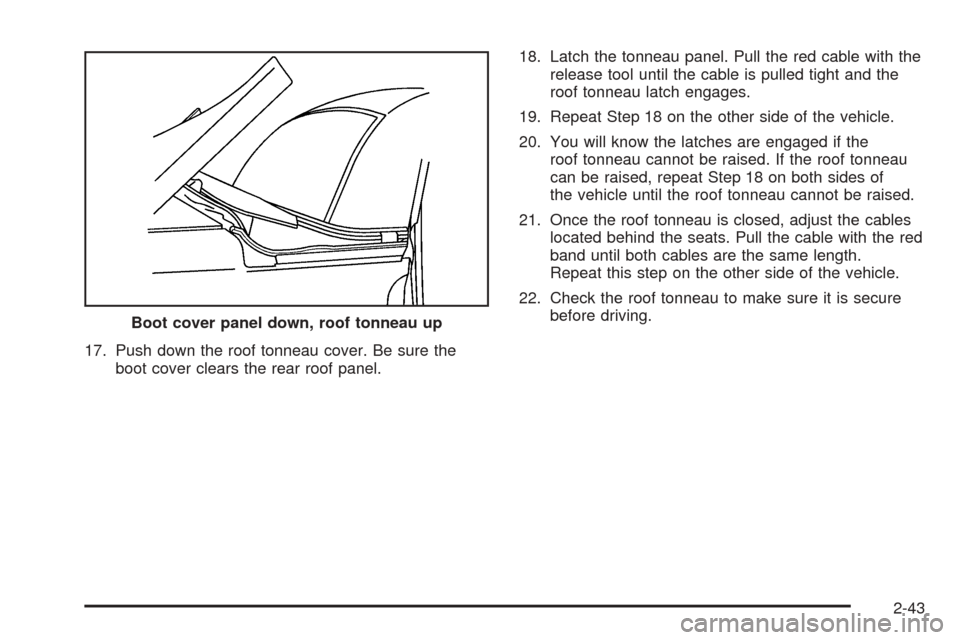
17. Push down the roof tonneau cover. Be sure the
boot cover clears the rear roof panel.18. Latch the tonneau panel. Pull the red cable with the
release tool until the cable is pulled tight and the
roof tonneau latch engages.
19. Repeat Step 18 on the other side of the vehicle.
20. You will know the latches are engaged if the
roof tonneau cannot be raised. If the roof tonneau
can be raised, repeat Step 18 on both sides of
the vehicle until the roof tonneau cannot be raised.
21. Once the roof tonneau is closed, adjust the cables
located behind the seats. Pull the cable with the red
band until both cables are the same length.
Repeat this step on the other side of the vehicle.
22. Check the roof tonneau to make sure it is secure
before driving.
Boot cover panel down, roof tonneau up
2-43
Page 105 of 374

Instrument Panel Overview...............................3-2
Hazard Warning Flashers................................3-3
Other Warning Devices...................................3-4
Horn.............................................................3-4
Tilt Wheel.....................................................3-4
Turn Signal/Multifunction Lever.........................3-5
Exterior Lamps.............................................3-11
Interior Lamps..............................................3-14
Center Console Switchbank............................3-16
Accessory Power Outlets...............................3-16
Ashtrays and Cigarette Lighter........................3-17
Climate Controls............................................3-18
Climate Control System.................................3-18
Outlet Adjustment.........................................3-21
Warning Lights, Gages, and Indicators............3-22
Instrument Panel Cluster................................3-23
Speedometer and Odometer...........................3-24
Trip Odometer..............................................3-24
Tachometer.................................................3-24
Safety Belt Reminder Light.............................3-24
Airbag Readiness Light..................................3-25
Airbag Off Light............................................3-26
Charging System Light..................................3-27
Brake System Warning Light..........................3-28
Anti-Lock Brake System Warning Light.............3-29
Traction Control System (TCS) Warning Light
(Automatic Transmission)
............................3-29Engine Coolant Temperature Gage..................3-30
Malfunction Indicator Lamp.............................3-30
Oil Pressure Gage........................................3-34
Change Engine Oil Light................................3-35
Security Light...............................................3-35
Cruise Control Light......................................3-35
Reduced Engine Power Light.........................3-36
Highbeam On Light.......................................3-36
Check Gages Warning Light...........................3-36
Fuel Gage...................................................3-37
Auxiliary Gage Package.................................3-38
Driver Information Center (DIC).......................3-41
DIC Controls and Displays.............................3-41
DIC Warnings and Messages.........................3-45
DIC Vehicle Personalization............................3-52
Audio System(s).............................................3-58
Setting the Time...........................................3-59
Radio with CD..............................................3-59
Radio with Six-Disc CD.................................3-68
Theft-Deterrent Feature..................................3-80
Audio Steering Wheel Controls.......................3-80
Radio Reception...........................................3-81
Care of Your CDs.........................................3-81
Care of the CD Player...................................3-81
Integrated Windshield Antenna........................3-81
Section 3 Instrument Panel
3-1
Page 107 of 374

A. Climate Control Vents. SeeClimate Control System
on page 3-18.
B. Instrument Panel Cluster. SeeInstrument Panel
Cluster on page 3-23.
C. Turn Signal/Multifunction Lever. SeeTurn
Signal/Multifunction Lever on page 3-5.
D. Exterior and Interior Lamps Control. SeeExterior
Lamps on page 3-11andInterior Lamps on
page 3-14.
E. Driver Information Center (DIC) buttons. SeeDriver
Information Center (DIC) on page 3-41.
F. Audio Steering Wheel Controls. SeeAudio Steering
Wheel Controls on page 3-80.
G. Storage Tray. SeeInstrument Panel Storage Area
on page 2-31.
H. Audio System. SeeAudio System(s) on page 3-58.
I. Climate Control System. SeeClimate Control
System on page 3-18.
J. Transmission Shift Lever. SeeAutomatic
Transmission Operation on page 2-17.
K. Cupholder. SeeCupholder(s) on page 2-31.
L. Glovebox. SeeGlove Box on page 2-31.Hazard Warning Flashers
Your hazard warning ashers let you warn others. They
also let police know you have a problem. Your front
and rear turn signal lamps will ash on and off.
3-3
Page 131 of 374

{CAUTION:
If the airbag readiness light ever comes on
when you have turned off the passenger’s
frontal airbag, it means that something may be
wrong with the airbag system. The passenger’s
frontal airbag could inate even though the
switch is off. If this ever happens, do not let
anyone whom the national government has
identied as a member of a passenger airbag
risk group sit in the passenger’s position
(for example, do not secure a rear-facing child
restraint in your vehicle) until you have your
vehicle serviced. SeeAirbag Off Switch on
page 1-48.
Charging System Light
The charging system light
will come on briey when
you turn on the ignition,
but the engine is not
running, as a check to
show you it is working.
It should go out once the engine is running. If it stays
on, or comes on while you are driving, you may have a
problem with the charging system. It could indicate
that you have problems with a generator drive belt, or
another electrical problem. Have it checked right
away. Driving while this light is on could drain your
battery.
If you must drive a short distance with the light on,
be certain to turn off all your accessories, such as the
radio and air conditioner.
3-27