2003 CHEVROLET CORVETTE service
[x] Cancel search: servicePage 267 of 368

Brake Wear
Your vehicle has four-wheel disc brakes.
Disc brake pads have built-in wear indicators that make
a high-pitched warning sound when the brake pads
are worn and new pads are needed. The sound
may come and go or be heard all the time your vehicle
is moving (except when you are pushing on the
brake pedal ®rmly).
{CAUTION:
The brake wear warning sound means that
soon your brakes won't work well. That could
lead to an accident. When you hear the brake
wear warning sound, have your vehicle
serviced.
Z06 models are equipped with high performance front
brake linings designed for improved brake performance
under severe use. They will normally exhibit some
low speed noise and you may notice an increase in the
amount of brake dust.
Notice:Continuing to drive with worn-out brake
pads could result in costly brake repair.
Some driving conditions or climates may cause a brake
squeal when the brakes are ®rst applied or lightly
applied. This does not mean something is wrong with
your brakes.
Brake linings should always be replaced as complete
axle sets.
See
Brake System Inspection on page 6-13.
Brake Pedal Travel
See your dealer if the brake pedal does not return to
normal height, or if there is a rapid increase in
pedal travel. This could be a sign of brake trouble.
Brake Adjustment
As you make brake stops, your disc brakes
automatically adjust for wear.
5-39
Page 268 of 368

Replacing Brake System Parts
The braking system on a vehicle is complex. Its many
parts have to be of top quality and work well together if
the vehicle is to have really good braking. Your
vehicle was designed and tested with top-quality GM
brake parts. When you replace parts of your braking
system Ð for example, when your brake linings
wear down and you need new ones put in Ð be sure
you get new approved GM replacement parts. If
you don't, your brakes may no longer work properly. For
example, if someone puts in brake linings that are
wrong for your vehicle, the balance between your front
and rear brakes can change Ð for the worse. The
braking performance you've come to expect can change
in many other ways if someone puts in the wrong
replacement brake parts.
Battery
Your new vehicle comes with a maintenance free
ACDelcožbattery. When it's time for a new battery, get
one that has the replacement number shown on the
original battery's label. We recommend an ACDelco
ž
battery.
For battery replacement, see your dealer or the service
manual. To purchase a service manual, see
Service
and Owner PublicationsinService Publications Ordering
Information on page 7-10.
Warning:Battery posts, terminals and related
accessories contain lead and lead compounds,
chemicals known to the State of California to cause
cancer and reproductive harm. Wash hands after
handling.
Vehicle Storage
If you're not going to drive your vehicle for 25 days
or more, remove the black, negative (-) cable from
the battery. This will help keep your battery from
running down.
{CAUTION:
Batteries have acid that can burn you and gas
that can explode. You can be badly hurt if you
aren't careful. See ªJump Startingº next for
tips on working around a battery without
getting hurt.
Contact your dealer to learn how to prepare your
vehicle for longer storage periods.
Also, for your audio system, see
Theft-Deterrent
Feature on page 3-75.
5-40
Page 273 of 368

11. Try to start the vehicle that had the dead battery. If
it won't start after a few tries, it probably needs
service.
Notice:Damage to your vehicle may result from
electrical shorting if jumper cables are removed
incorrectly. To prevent electrical shorting, take care
that the cables don't touch each other or any
other metal. The repairs wouldn't be covered by
your warranty.
A. Heavy, Unpainted Metal Engine Part
B. Good Battery
C. Dead BatteryTo disconnect the jumper cables from both vehicles, do
the following:
1. Disconnect the black negative (-) cable from the
vehicle that had the dead battery.
2. Disconnect the black negative (-) cable from the
vehicle with the good battery.
3. Disconnect the red positive (+) cable from the
vehicle with the good battery.
4. Disconnect the red positive (+) cable from the other
vehicle.
Jumper Cable Removal
5-45
Page 275 of 368
Bulb Replacement
For the proper type of replacement bulb, seeBulb
Replacement on page 5-47.
For any bulb changing procedure not listed in this
section, contact your dealer's service department.
Halogen Bulbs
{CAUTION:
Halogen bulbs have pressurized gas inside
and can burst if you drop or scratch the bulb.
You or others could be injured. Be sure to read
and follow the instructions on the bulb
package.
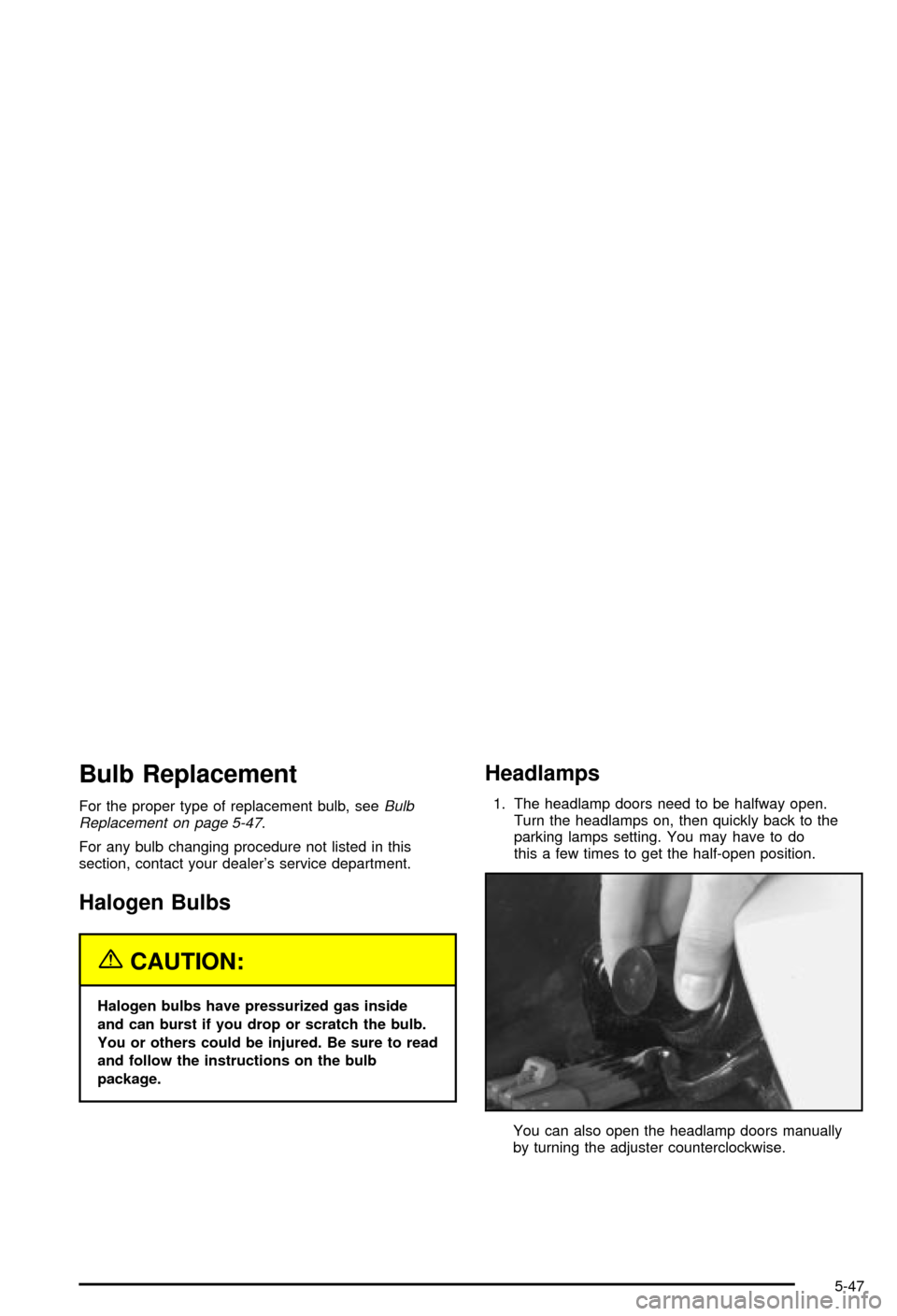
Headlamps
1. The headlamp doors need to be halfway open.
Turn the headlamps on, then quickly back to the
parking lamps setting. You may have to do
this a few times to get the half-open position.
You can also open the headlamp doors manually
by turning the adjuster counterclockwise.
5-47
Page 279 of 368

Back-Up Lamps
You can access the back-up lamps through the inboard
taillamp opening. SeeTaillamps and Turn Signal
Lamps on page 5-49.
1. Squeeze the tab on the socket while turning it
counterclockwise to remove it from the assembly.
2. Remove the bulb from the socket.
3. Reverse the steps listed previously with a new bulb.
Replacement Bulbs
Exterior Lamp Bulb Number
High-Beam Headlamp 9005
Low-Beam Headlamp 9006
Back-Up 2057
Rear Stop/Tail and Turn Signal 3057
For any bulb replacements or procedures not listed
here, please consult your dealer.
Windshield Wiper Blade
Replacement
Windshield wiper blades should be inspected at least
twice a year for wear or cracking. See ªWiper Blade
Checkº under
Part B: Owner Checks and Services on
page 6-8for more information.
Replacement blades come in different types and are
removed in different ways. For the proper type and
length, see
Normal Maintenance Replacement Parts on
page 5-94.
It's a good idea to clean or replace the wiper blade
assembly every six months.
Notice:Use care when removing or installing a
blade assembly. Accidental bumping can cause the
arm to fall back and strike the windshield.
To remove the wiper blade assembly, do the following:
1. Open the hood to gain access to the windshield
wipers.
2. Lift the wiper arm until it locks into a vertical
position.
5-51
Page 282 of 368

Tires
Your new vehicle comes with high-quality tires made by
a leading tire manufacturer. If you ever have questions
about your tire warranty and where to obtain service,
see your Chevrolet Warranty booklet for details.
{CAUTION:
Poorly maintained and improperly used tires
are dangerous.
·Overloading your tires can cause
overheating as a result of too much
friction. You could have an air-out and a
serious accident. See ªLoading Your
Vehicleº in the Index.
·Underin¯ated tires pose the same danger
as overloaded tires. The resulting accident
could cause serious injury. Check all tires
frequently to maintain the recommended
pressure. Tire pressure should be checked
when your tires are cold.
CAUTION: (Continued)
CAUTION: (Continued)
·
Overin¯ated tires are more likely to be
cut, punctured or broken by a sudden
impact Ð such as when you hit a pothole.
Keep tires at the recommended pressure.
·Worn, old tires can cause accidents. If
your tread is badly worn, or if your tires
have been damaged, replace them.
Extended Mobility Tires
(Except Z06)
Your vehicle, when new, had Goodyear Extended
Mobility Tires (EMT). There's no spare tire, no tire
changing equipment and no place to store a tire in the
vehicle. Extended Mobility Tires perform so well
without any air that a Tire Pressure Monitor (TPM) is
used to alert you if a tire has lost pressure.
If a tire goes ¯at, you won't need to stop on the side of
the road to change the tire. You can just keep on driving.
The shorter the distance you drive and the slower the
speed, the greater the chance that the tire will not have to
be replaced. If you drive on a de¯ated EMT for 50 miles
(80 km) or less and at speeds of 55 mph (90 km/h) or
less, there is a good chance that the tire can be repaired.
5-54
Page 283 of 368

The tire can operate effectively with no air pressure for up
to 200 miles (320 km) at speeds up to 55 mph (90 km/h),
but the tire would then have to be replaced. When a tire is
®lled with air, it provides a cushion between the road and
the wheel. Because you won't have this cushion when
driving on a de¯ated tire, try to avoid potholes that could
damage your wheel and require replacement of it.
Some road hazards can damage a tire beyond repair.
This damage could occur even before you've driven
on the tire in a de¯ated condition. When a tire has been
damaged, or if you've driven any distance on a
de¯ated EMT, check with an authorized Goodyear EMT
Service Center to determine whether the tire can be
repaired or should be replaced. To maintain your
vehicle's extended mobility feature, all replacement tires
must be Extended Mobility Tires. As soon as possible,
contact the nearest authorized GM or Goodyear
EMT servicing facility for inspection and repair or
replacement. To locate the nearest GM or Goodyear
EMT servicing facility, call Roadside Assistance.
For phone numbers and Roadside Assistance details
see
Roadside Assistance Program on page 7-6.
You may also contact Goodyear, for the nearest
authorized EMT servicing facility, by calling
1-800-789-9878.
{CAUTION:
Extended mobility tires are constructed
differently than other tires and could explode
during improper service. You or others could
be injured or killed if you attempt to repair,
replace, dismount, or mount a extended
mobility tire. Let only an authorized EMT
Service Center repair, replace, dismount and
mount extended mobility tires.
The valve stems on your extended mobility tires have
sensors that are part of the Tire Pressure Monitor
(TPM). See
Tire Pressure Monitor System (Except Z06)
on page 5-57. These sensors contain batteries which
are designed to last for 10 years under normal
driving conditions. See your dealer if you ever need to
have a wheel replaced, or if the sensors ever need
replacement.
Notice:Using liquid sealants can damage the tire
valves and tire pressure monitor sensors in your
extended mobility tires. This damage would not be
covered by warranty. Don't use liquid sealants
in your extended mobility tires.
5-55
Page 285 of 368

If the display doesn't show tire pressure, or if the
SERVICE TIRE MON SYS message appears see your
dealer for service. For more information, see
Tire
Pressure Monitor System (Except Z06) on page 5-57
andDriver Information Center (DIC) on page 3-44.
Tire Pressure Monitor System
(Except Z06)
The Tire Pressure Monitor (TPM) has a sensor on each
road wheel that transmits to a receiver on the
instrument panel.
The system operates on a radio frequency subject to
Federal Communications Commission (FCC) Rules and
with Industry and Science Canada.
This device complies with Part 15 of the FCC Rules.
Operation is subject to the following two conditions:
(1) this device may not cause harmful interference, and
(2) this device must accept any interference received,
including interference that may cause undesired
operation.This device complies with RSS±210 of Industry and
Science Canada. Operation is subject to the following
two conditions: (1) this device may not cause
interference, and (2) this device must accept any
interference received, including interference that may
cause undesired operation of the device.
Changes or modi®cations to this system by other than
an authorized service facility could void authorization to
use this equipment.
If a tire's in¯ation pressure is between 5 psi (35 kPa)
and 25 psi (170 kPa), you will see a message on
the Driver Information Center. This message will show
which tire is underin¯ated and two chimes will sound. An
example would be LOW TIRE PRESSURE-LR. This
would mean that the in¯ation pressure in your left rear
tire is between 5 psi (35 kPa) and 25 psi (170 kPa).
If the in¯ation pressure in the tire drops below
5 psi (35 kPa), the message would read FLAT TIRE-LR
and four chimes will sound. See
Driver Information
Center (DIC) on page 3-44.
The TPM will also alert you if a tire's pressure is higher
than 42 psi (290 kPa). The message will show which
tire is overin¯ated and two chimes will sound. An
example would be HIGH PRESSURE-LR. This would
mean that the in¯ation pressure in your left rear tire
is higher than 42 psi (290 kPa). See
Driver Information
Center (DIC) on page 3-44.
5-57