2003 CHEVROLET CORVETTE CD player
[x] Cancel search: CD playerPage 185 of 368

Whenever a CD magazine with discs is loaded in the
changer, the compact disc symbol will appear on
the radio display. If the CD changer is checking the
magazine for CDs, the compact disc symbol will ¯ash on
the display until the changer is ready to play. When a
CD begins playing, CD will appear in the bottom
left corner and a disc and track number will be
displayed. The disc numbers are listed on the front of
the magazine.
All of the CD functions are controlled by the radio
pushbuttons except for ejecting the magazine.
Operating the Trunk-Mounted CD
Changer with the AM-FM Radio with
Cassette
If an error appears on the display, see ªCompact Disc
Messagesº later in this section.
The following pushbuttons are used for the
trunk-mounted CD changer.
1 PREV (Previous):Press this pushbutton to go to the
previous track if the current track has been playing
for less than eight seconds. If pressed when the current
track has been playing for more than eight seconds,
it will go to the beginning of the current track. If you hold
or press this pushbutton more than once, the player
will continue moving back through the disc.2 PROG (Program):Press this pushbutton to select
the next disc in the magazine. If a CD cannot be played,
its number will be skipped when selecting discs while
using this pushbutton.
3 NEXT:Press this pushbutton to advance to the next
track. If you press and hold this pushbutton or press
it more than once, the player will continue moving
forward through the disc.
REV 4 (Reverse):Press and hold this pushbutton to
quickly reverse within a track. Release this pushbutton
to resume play.
W5 (Dolbyž):This pushbutton has no function when
playing a CD.
FWD 6 (Forward):Press and hold this pushbutton to
quickly advance within a track. Release this pushbutton
to resume play.
RECALL:Press this button to see what track is
currently playing. Press it again within ®ve seconds to
see how long the track has been playing. When a
new track starts to play, the track number will also
appear. Press it a third time and the time of day will be
displayed.
oSEEKp:The left arrow works the same as the
PREV pushbutton and the right arrow works the
same as the NEXT pushbutton.
3-73
Page 186 of 368

P.SCAN (Preset Scan):Press this button to play the
compact discs in random, rather than sequential, order.
RDM will appear on the display. Press this button
again to turn off random play.
AM/FM:Press this button to listen to the radio when
playing a cassette tape or a compact disc.
TAPE AUX (Auxiliary):Press this button to play a CD
when listening to the radio. You can also press this
button to switch between playing a tape in the cassette
tape player and playing a CD in the trunk-mounted
CD changer, if both are loaded.
Operating the Trunk-Mounted CD
Changer with the AM-FM Radio
with CD
If an error appears on the display, see ªCompact Disc
Messagesº later in this section.
The following pushbuttons are used for the
trunk-mounted CD changer.
1 PREV (Previous):Press this pushbutton to go to the
previous track if the current track has been playing
for less than eight seconds. If pressed when the current
track has been playing for more than eight seconds,
it will go to the beginning of the current track. If you hold
or press this pushbutton more than once, the player
will continue moving back through the disc.2 RDM (Random):Press this pushbutton to play the
compact discs in random, rather than sequential, order.
RDM will appear on the display. Press this pushbutton
again to turn off random play.
3 NEXT:Press this pushbutton to advance to the next
track. If you press and hold this pushbutton or press
it more than once, the player will continue moving
forward through the disc.
REV 4 (Reverse):Press and hold this pushbutton to
quickly reverse within a track. Release this pushbutton
to resume play.
5:Press this pushbutton to select the next disc in the
magazine. If a CD cannot be played, its number
will be skipped when selecting discs while using this
pushbutton.
FWD 6 (Forward):Press and hold this pushbutton to
quickly advance within a track. Release this pushbutton
to resume play.
RECALL:Press this button to see what track is
currently playing. Press it again within ®ve seconds to
see how long the track has been playing. When a
new track starts to play, the track number will also
appear. Press it a third time and the time of day will be
displayed.
3-74
Page 187 of 368

oSEEKp:The left arrow works the same as the
PREV pushbutton and the right arrow works the
same as the NEXT pushbutton.
AM/FM:Press this button to listen to the radio when
playing a compact disc.
CD AUX (Auxiliary):Press this button to play a CD
when listening to the radio. You can also press
this button to switch between playing a CD in the
compact disc player and playing a CD in the
trunk-mounted CD changer, if both are loaded.
Compact Disc Messages
If an error occurs while trying to play a CD in the
compact disc player or changer, the following conditions
may have caused the error:
·You're driving on a very rough road. When the road
becomes smoother, the disc should play.
·The disc is dirty, scratched, wet or upside down.
·The air is very humid. If so, wait about an hour and
try again.
·The CD changer door is open. Completely close the
changer door to restore normal operation.
·An empty magazine is in the CD changer. Try the
magazine again with a disc loaded on one of the
trays.If the CD is not playing correctly, for any other reason,
try a known good CD.
If any error occurs repeatedly or if an error can't be
corrected, contact your dealer. If your radio displays an
error message, write it down and provide it to your
dealer when reporting the problem.
Theft-Deterrent Feature
THEFTLOCKžis designed to discourage theft of your
radio. It works by using a secret code to disable all radio
functions whenever battery power is interrupted.
The THEFTLOCK feature for the radio may be used or
ignored. If ignored, the system plays normally and
the radio is not protected by the feature. If THEFTLOCK
is activated, your radio will not operate if stolen.
When THEFTLOCK is activated, the radio will display
LOC to indicate a locked condition anytime battery
power has been interrupted. If your battery loses power
for any reason, you must unlock the radio with the
secret code before it will operate.
3-75
Page 190 of 368

Care of Your Cassette Tape Player
A tape player that is not cleaned regularly can cause
reduced sound quality, ruined cassettes or a damaged
mechanism. Cassette tapes should be stored in their
cases away from contaminants, direct sunlight and
extreme heat. If they aren't, they may not operate
properly or may cause failure of the tape player.
Your tape player should be cleaned regularly after every
50 hours of use. Your radio may display CLN to
indicate that you have used your tape player for
50 hours without resetting the tape clean timer. If this
message appears on the display, your cassette
tape player needs to be cleaned. It will still play tapes,
but you should clean it as soon as possible to
prevent damage to your tapes and player. If you notice
a reduction in sound quality, try a known good
cassette to see if the tape or the tape player is at fault.
If this other cassette has no improvement in sound
quality, clean the tape player.
For best results, use a scrubbing action, non-abrasive
cleaning cassette with pads which scrub the tape
head as the hubs of the cleaner cassette turn. The
recommended cleaning cassette is available through
your dealership.The cut tape detection feature of your cassette tape
player may identify the cleaning cassette as a damaged
tape, in error. To prevent the cleaning cassette from
being ejected, use the following steps:
1. Turn the ignition on.
2. Turn the radio off.
3. Press and hold the TAPE AUX button for ®ve
seconds. The tape symbol on the display will
¯ash for two seconds.
4. Insert the scrubbing action cleaning cassette.
5. Eject the cleaning cassette after the manufacturer's
recommended cleaning time.
After the cleaning cassette is ejected, the cut tape
detection feature will be active again.
You may also choose a non-scrubbing action, wet-type
cleaner which uses a cassette with a fabric belt to
clean the tape head. This type of cleaning cassette will
not eject on its own. A non-scrubbing action cleaner
may not clean as thoroughly as the scrubbing type
cleaner. The use of a non-scrubbing action, dry-type
cleaning cassette is not recommended.
3-78
Page 191 of 368

After you clean the player, press and hold the EJECT
button for ®ve seconds to reset the CLN indicator.
The radio will display --- or CLEANED to show the
indicator was reset.
Cassettes are subject to wear and the sound quality
may degrade over time. Always make sure the cassette
tape is in good condition before you have your tape
player serviced.
Care of Your CDs
Handle discs carefully. Store them in their original cases
or other protective cases and away from direct sunlight
and dust. If the surface of a disc is soiled, dampen
a clean, soft cloth in a mild, neutral detergent solution
and clean it, wiping from the center to the edge.
Be sure never to touch the side without writing when
handling discs. Pick up discs by grasping the outer
edges or the edge of the hole and the outer edge.
Care of Your CD Player
The use of CD lens cleaner discs is not advised, due to
the risk of contaminating the lens of the CD optics
with lubricants internal to the CD mechanism.
Fixed Mast Antenna (Z06)
The ®xed mast antenna can withstand most car washes
without being damaged. If the mast should ever
become slightly bent, you can straighten it out by hand.
If the mast is badly bent, as it might be by vandals,
you should replace it.
Check occasionally to be sure the mast is still tightened
to the rear quarter panel.
Power Antenna Mast Care
(Convertible)
Your power antenna will look its best and work well if
it's cleaned from time to time. To clean the antenna mast
do the following:
1. Turn on the ignition and radio to raise the antenna.
2. Dampen a clean cloth with mineral spirits or
equivalent solvent.
3. Wipe the cloth over the mast sections, removing
any dirt.
4. Wipe dry with a clean cloth.
5. Make the antenna go up and down by turning the
radio or ignition off and on.
6. Repeat if necessary.
3-79
Page 315 of 368
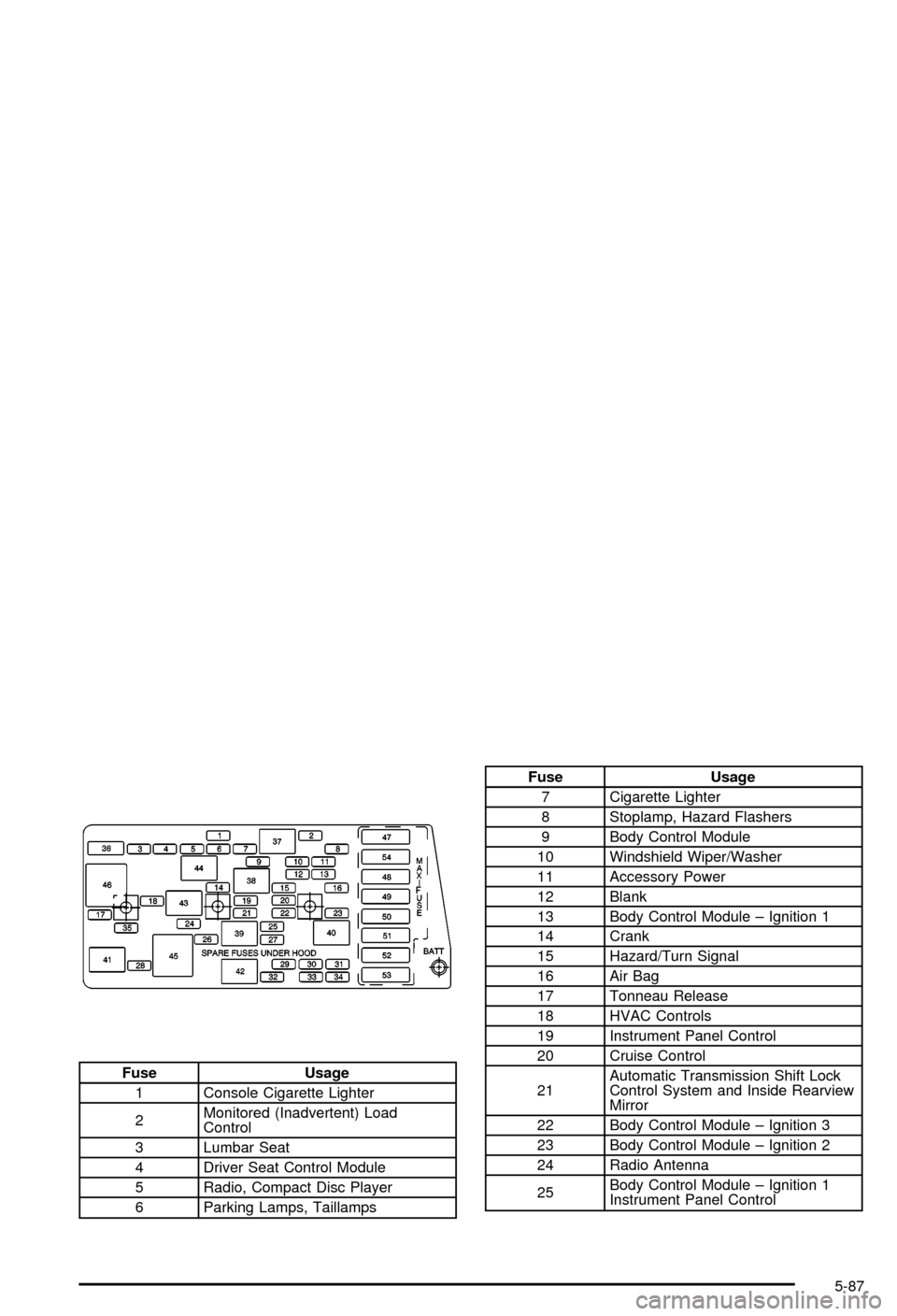
Fuse Usage
1 Console Cigarette Lighter
2Monitored (Inadvertent) Load
Control
3 Lumbar Seat
4 Driver Seat Control Module
5 Radio, Compact Disc Player
6 Parking Lamps, Taillamps
Fuse Usage
7 Cigarette Lighter
8 Stoplamp, Hazard Flashers
9 Body Control Module
10 Windshield Wiper/Washer
11 Accessory Power
12 Blank
13 Body Control Module ± Ignition 1
14 Crank
15 Hazard/Turn Signal
16 Air Bag
17 Tonneau Release
18 HVAC Controls
19 Instrument Panel Control
20 Cruise Control
21Automatic Transmission Shift Lock
Control System and Inside Rearview
Mirror
22 Body Control Module ± Ignition 3
23 Body Control Module ± Ignition 2
24 Radio Antenna
25Body Control Module ± Ignition 1
Instrument Panel Control
5-87
Page 332 of 368

Part B: Owner Checks and Services
Listed in this part are owner checks and services
which should be performed at the intervals speci®ed to
help ensure the safety, dependability and emission
control performance of your vehicle.
Be sure any necessary repairs are completed at once.
Whenever any ¯uids or lubricants are added to your
vehicle, make sure they are the proper ones, as shown
in Part D.
At Each Fuel Fill
It is important for you or a service station attendant to
perform these underhood checks at each fuel ®ll.
Engine Oil Level Check
Check the engine oil level and add the proper oil if
necessary. SeeEngine Oil on page 5-13for further
details.
Engine Coolant Level Check
Check the engine coolant level and add DEX-COOLž
coolant mixture if necessary. SeeEngine Coolant
on page 5-23for further details.
Windshield Washer Fluid Level Check
Check the windshield washer ¯uid level in the windshield
washer tank and add the proper ¯uid if necessary.
See
Windshield Washer Fluid on page 5-36for further
details.
At Least Once a Month
Tire In¯ation Check
Make sure tires are in¯ated to the correct pressures.
SeeTires on page 5-54for further details.
Cassette Tape Player Service
Clean cassette tape player. Cleaning should be done
every 50 hours of tape play. SeeAudio System(s)
on page 3-62for further details.
Power Antenna Service
Clean power antenna mast. SeeAudio System(s) on
page 3-62for further details.
6-8
Page 355 of 368

A
Accessory Power Outlets.................................3-20
Accessory Power Plug.....................................5-84
Activating the Theft-Deterrent Feature................3-76
Active Handling System Light...........................3-37
Active Handling System...................................4-10
Adding Washer Fluid.......................................5-36
Additional Program Information........................... 7-9
Additives, Fuel................................................. 5-6
Add-On Electrical Equipment............................5-84
Adjusting the Speakers (Balance/Fade)......3-65, 3-69
Air Bag System..............................................1-39
Air Bag Off Switch.......................................1-44
How Does an Air Bag Restrain?....................1-42
Servicing Your Air Bag-Equipped Vehicle.........1-47
What Makes an Air Bag In¯ate?....................1-42
What Will You See After an
Air Bag In¯ates?......................................1-43
When Should an Air Bag In¯ate?...................1-42
Where Are the Air Bags?..............................1-40
Air Bag .........................................................3-33
Off Light.....................................................3-33
Readiness Light..........................................3-32
Air Cleaner/Filter, Engine.................................5-18
Air Compressor..............................................5-71
Air Dam, Front...............................................2-19
AM ...............................................................3-77
Antenna, Fixed Mast.......................................3-79
Antenna, Power Antenna Mast Care..................3-79Antennas, Integrated Windshield and Rear
Window......................................................3-80
Anti-lock Brake System (ABS)............................ 4-7
Anti-Lock Brake, System Warning Light..............3-36
Appearance Care............................................5-75
Care of Safety Belts....................................5-77
Chemical Paint Spotting...............................5-81
Cleaning the Inside of Your Vehicle................5-75
Cleaning the Outside of Your Vehicle..............5-78
Fiberglass Springs.......................................5-81
Finish Damage............................................5-81
Titanium Exhaust System..............................5-81
Underbody Maintenance...............................5-81
Vehicle Care/Appearance Materials................5-82
Weatherstrips..............................................5-77
Arming the System.........................................2-16
Ashtrays........................................................3-21
Audio System(s).............................................3-62
Care of Your Cassette Tape Player................3-78
Care of Your CD Player...............................3-79
Care of Your CDs........................................3-79
Fixed Mast Antenna.....................................3-79
Integrated Windshield and Rear Window
Antennas................................................3-80
Power Antenna Mast Care............................3-79
Radio with Cassette.....................................3-63
Radio with CD............................................3-67
Setting the Time..........................................3-62
Theft-Deterrent Feature................................3-75
Trunk-Mounted CD Changer..........................3-71
1