2003 CADILLAC SEVILLE reset
[x] Cancel search: resetPage 192 of 408

Finding a Station
BAND:Press this button to select weather, FM1, FM2,
AM, or XM1, XM2 (USA only, if equipped).
¦TUNE SEEK¥:This button can be pressed to two
positions. Press this button to the ®rst position to
manually tune to the next or to the previous stations. If
this button is held at the ®rst position for a few
seconds, the radio will continue tuning until this button
is released.
Press this button to the second position and release it
to seek to the next or to the previous radio station.
The radio will seek only to stations that are in the
selected band and only to those with a strong signal.
SCAN:Press this button for less than two seconds
to scan radio stations. The radio will go to a station, play
for ®ve seconds, then go on to the next station. Press
this button again to stop scanning.
To scan preset stations, press and hold SCAN for more
than two seconds until you hear a beep. The radio
will go to the ®rst preset station stored on your
pushbuttons, play for ®ve seconds, then go on to the
next preset station. Press SCAN again to stop scanning
presets.
The radio will scan only to the stations that are in the
selected band and only to those with a strong signal.
Setting Preset Stations
The six numbered pushbuttons let you return to your
favorite stations. You can set up to 36 stations (six
weather, six FM1, six FM2, six AM, six XM1 and
six XM2 (USA only, if equipped), by performing the
following steps:
1. Turn the radio on.
2. Press BAND to select weather, FM1, FM2, AM, or
XM1, XM2.
3. Tune in the desired station.
4. Press and hold one of the six numbered
pushbuttons for more than two seconds until you
hear a beep.
5. Repeat the steps for each pushbutton. Whenever
you press that numbered pushbutton for less than
two seconds, the station you set will return.
When battery power is removed and later applied, you
will not have to reset your radio presets because
the radio remembers them.
3-80
Page 193 of 408

Setting the Tone (Bass/Treble)
TONE:Press and release this button until the desired
tone control (bass, treble or midrange) appears on
the display. The radio keeps separate tone settings for
each band, preset and source.
-LEVEL +:After selecting the desired tone control,
press the plus or minus symbol on this button to select
the desired level.
To save the tone settings for your presets, press and
hold the numbered pushbutton for the desired preset for
more than two seconds until you hear a beep.
Adjusting the Speakers (Balance/Fade)
M
(Speaker):Press and release this button until the
desired control (balance or fade) appears on the display.
-LEVEL +:After selecting the desired control, press
the plus or minus symbol on this button to select
the desired level.
PTY (Program Type):This button is inoperable on this
radio, except if your radio is equipped with XMŸ
Satellite Radio Service.
Finding a PTY Station (XMŸ Only)
To select and ®nd a desired PTY perform the following:
1. Press PTY. PTY will be displayed on the screen.
2. Select a category by pressing-LEVEL +.
3. Once the desired category is displayed, press
TUNE/SEEK to select the category and take
you to the category's ®rst station.
4. If you want to go to another station within that
category, press TUNE/SEEK once to display
the category, then press TUNE/SEEK again to go
to another station.
5. If PTY times out and is no longer on the display, go
back to Step 1.
SCAN:You can also scan through the channels within
a category by performing the following:
1. Press PTY. PTY will be displayed on the screen.
2. Select a category by pressing-LEVEL +.
3. Once the desired category is displayed, press
SCAN, and the radio will begin scanning within
your chosen category.
4. Press SCAN again to stop at a particular section.
3-81
Page 194 of 408
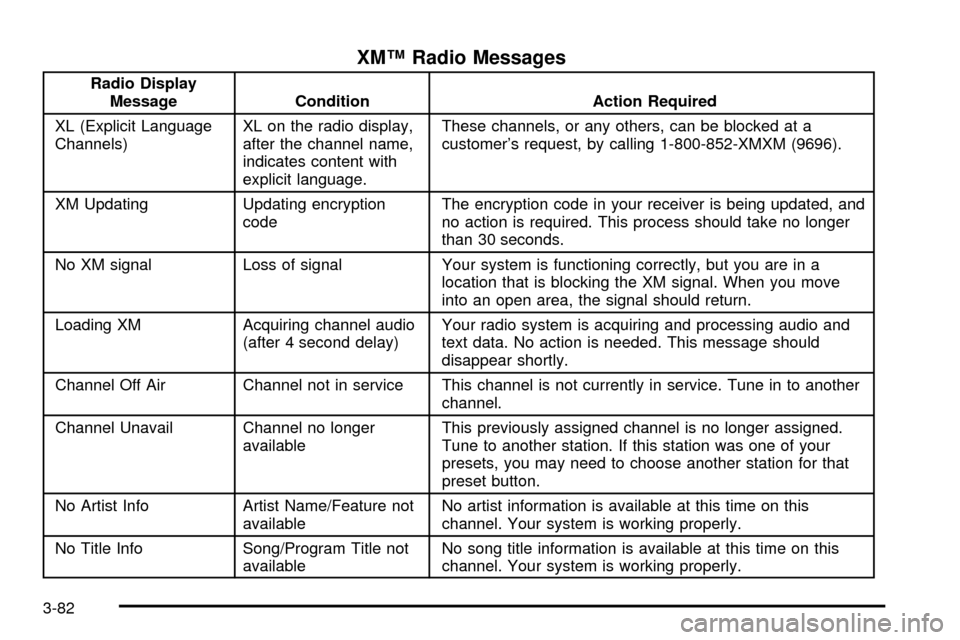
XMŸ Radio Messages
Radio Display
Message Condition Action Required
XL (Explicit Language
Channels)XL on the radio display,
after the channel name,
indicates content with
explicit language.These channels, or any others, can be blocked at a
customer's request, by calling 1-800-852-XMXM (9696).
XM Updating Updating encryption
codeThe encryption code in your receiver is being updated, and
no action is required. This process should take no longer
than 30 seconds.
No XM signal Loss of signal Your system is functioning correctly, but you are in a
location that is blocking the XM signal. When you move
into an open area, the signal should return.
Loading XM Acquiring channel audio
(after 4 second delay)Your radio system is acquiring and processing audio and
text data. No action is needed. This message should
disappear shortly.
Channel Off Air Channel not in service This channel is not currently in service. Tune in to another
channel.
Channel Unavail Channel no longer
availableThis previously assigned channel is no longer assigned.
Tune to another station. If this station was one of your
presets, you may need to choose another station for that
preset button.
No Artist Info Artist Name/Feature not
availableNo artist information is available at this time on this
channel. Your system is working properly.
No Title Info Song/Program Title not
availableNo song title information is available at this time on this
channel. Your system is working properly.
3-82
Page 201 of 408

Finding a Station
BAND:Press this button to select weather, FM1, FM2,
AM, or XM1, XM2 (USA only, if equipped).
¦TUNE SEEK¥:This button can be pressed to two
positions. Press this button to the ®rst position to
manually tune to the next or to the previous stations. If
this button is held at the ®rst position for a few
seconds, the radio will continue tuning until this button
is released.
Press this button to the second position and release it
to seek to the next or to the previous radio station.
The radio will seek only to stations that are in the
selected band and only to those with a strong signal.
SCAN:Press this button for less than two seconds
to scan radio stations. The radio will go to a station, play
for ®ve seconds, then go on to the next station. Press
this button again to stop scanning.
To scan preset stations, press and hold SCAN for more
than two seconds until you hear a beep. The radio
will go to the ®rst preset station stored on your
pushbuttons, play for ®ve seconds, then go on to the
next preset station. Press SCAN again to stop scanning
presets.
The radio will scan only to the stations that are in the
selected band and only to those with a strong signal.
Setting Preset Stations
The six numbered pushbuttons let you return to your
favorite stations and associated tone and DSP settings.
The RDS PTY mode must be off to use this mode.
You can set up to 36 stations (six weather, six FM1,
six FM2, six AM, six XM1 and six XM2 (USA only,
if equipped), by performing the following steps:
1. Turn the radio on.
2. Press BAND to select weather, FM1, FM2, AM, or
XM1, XM2.
3. Tune in the desired station.
4. Press and hold one of the six numbered
pushbuttons for more than two seconds. Whenever
you press that numbered pushbutton for less
than two seconds, the station you set will return.
5. Repeat the steps for each pushbutton.
When battery power is removed and later applied, you
will not have to reset your radio presets because
the radio remembers them.
3-89
Page 202 of 408

Setting the Tone (Bass/Treble)
TONE:Press and release this button until the desired
tone BASS, TREBLE or MIDRANGE appears on
the display. The radio keeps separate tone settings for
each band, preset (except weather band presets)
and source.
-LEVEL +:After selecting the desired tone control,
press the plus or minus symbol on this button to select
the desired level.
To save the tone settings for your presets, press and
hold the numbered button for the desired preset for more
than two seconds until you hear a beep.
Adjusting the Speakers (Balance/Fade)
TONE:Press and release this button until BALANCE
or FADE appears on the display.
-LEVEL +:After selecting the desired control, press
the plus or minus symbol on this button to select
the desired level.
To save the tone settings for your presets, press and
hold the numbered pushbutton for the desired preset for
more than two seconds until you hear a beep.
Using Digital Signal Processing (DSP)
DSP:This feature is used to provide a choice of
four different listening experiences: talk, front seat,
ambience and spacious. DSP can be used while
listening to the radio, cassette, CD, or XMŸ. Press this
button to turn DSP on. Press and release this button
until the desired selection appears on the display.
To turn DSP off, press and hold this button until DSP
OFF appears on the display. When DSP OFF is
displayed, the system will provide the best overall audio
performance. The radio keeps separate DSP settings
for each band (except weather band, which is always set
to talk), preset and source.
TALK:This setting should be used when listening to
non-musical material such as news, talk shows,
sports broadcasts and books on tape. TALK makes
spoken words sound very clear.
FRONT SEAT:This setting adjusts the audio to give
the driver the best possible sound qualities. Front Seat
can be used at any time for any material. Rear seat
passengers in the vehicle may not get the same effect.
AMBIENCE:This setting is used to enhance the
stereo effect.
SPACIOUS:This setting is used to make the listening
space seem larger.
3-90
Page 205 of 408
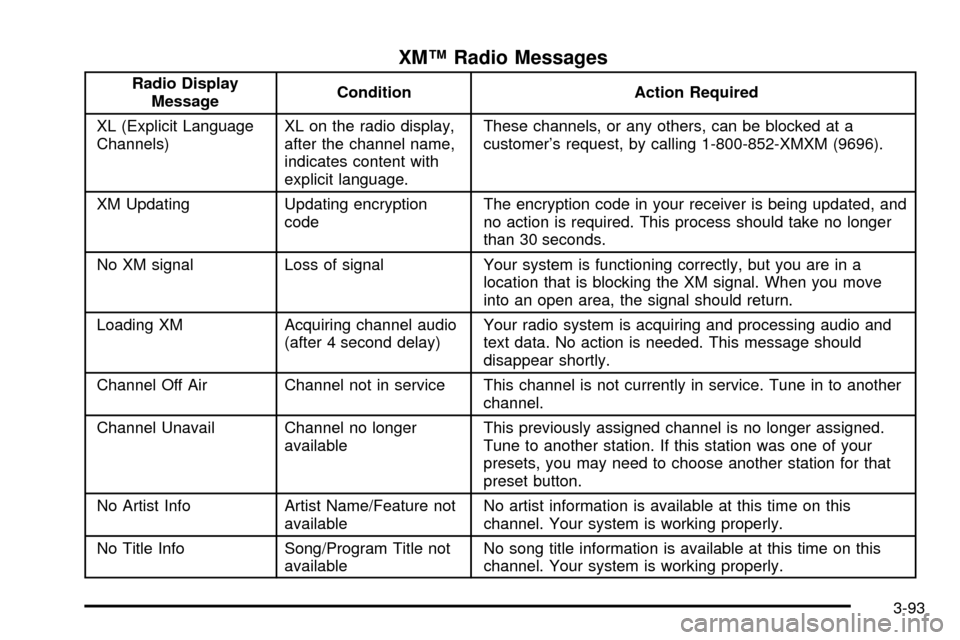
XMŸ Radio Messages
Radio Display
MessageCondition Action Required
XL (Explicit Language
Channels)XL on the radio display,
after the channel name,
indicates content with
explicit language.These channels, or any others, can be blocked at a
customer's request, by calling 1-800-852-XMXM (9696).
XM Updating Updating encryption
codeThe encryption code in your receiver is being updated, and
no action is required. This process should take no longer
than 30 seconds.
No XM signal Loss of signal Your system is functioning correctly, but you are in a
location that is blocking the XM signal. When you move
into an open area, the signal should return.
Loading XM Acquiring channel audio
(after 4 second delay)Your radio system is acquiring and processing audio and
text data. No action is needed. This message should
disappear shortly.
Channel Off Air Channel not in service This channel is not currently in service. Tune in to another
channel.
Channel Unavail Channel no longer
availableThis previously assigned channel is no longer assigned.
Tune to another station. If this station was one of your
presets, you may need to choose another station for that
preset button.
No Artist Info Artist Name/Feature not
availableNo artist information is available at this time on this
channel. Your system is working properly.
No Title Info Song/Program Title not
availableNo song title information is available at this time on this
channel. Your system is working properly.
3-93
Page 214 of 408

Radio Personalization with Home
and Away Feature
If DRIVER 1 (HOME or AWAY) PRESETS or DRIVER 2
(HOME or AWAY) PRESETS appears in the display
when the radio is ®rst turned on, your vehicle is
equipped with this feature.
This feature allows the driver to return to the last used
audio source (radio, cassette, or CD) using the
remote keyless entry transmitter. This feature can also
store and recall AM and FM presets, volume, tone,
and the last selected radio station. The number on the
back of each transmitter (1 or 2) corresponds to
driver 1 or 2. If transmitter 1 is used to enter the vehicle,
the last used audio source and/or settings set by
driver 1 will be recalled. If transmitter 2 is used to enter
the vehicle, the last used audio source and/or settings
set by driver 2 will be recalled. The settings can also be
recalled by pressing the MEMORY seat buttons 1 or 2
located on the driver's door.
Your radio can store home and away presets. Home
and away presets allow you to use one set of preset
radio settings in the area where you live, and another set
when you go out of town. You will not need to
reprogram your presets every time you travel. With the
radio off and the time displayed, use fast forward
and reverse to select home or away presets. To selectthe away presets, press and hold FF for ®ve seconds
until you hear a beep. The next time the radio comes on,
the away presets will be active. To select the home
presets, press and hold RW for ®ve seconds until you
hear a beep. The next time the radio comes on,
the home presets will be active.
When battery power is removed and later applied, you
will not have to reset your home radio presets
because the radio remembers them. However, you will
have to reset your away radio presets.
Theft-Deterrent Feature
THEFTLOCKžis designed to discourage theft of your
radio. Your vehicle has a ªbuilt inº theft-deterrent feature
on each radio that is automatic ± there is no
programming required. The radio in your vehicle cannot
be used in any other vehicle. When the radio was
originally installed in your vehicle at the factory, it stored
the Vehicle Identi®cation Number (VIN). Each time
the ignition is turned on, the VIN is veri®ed. If the
vehicle's VIN does not match the VIN stored in the
radio, THEFTLOCK
žwill be activated and the audio
system will not play. If the radio is removed from your
vehicle, the original VIN in the radio can be used to trace
the radio back to your vehicle.
3-102
Page 215 of 408
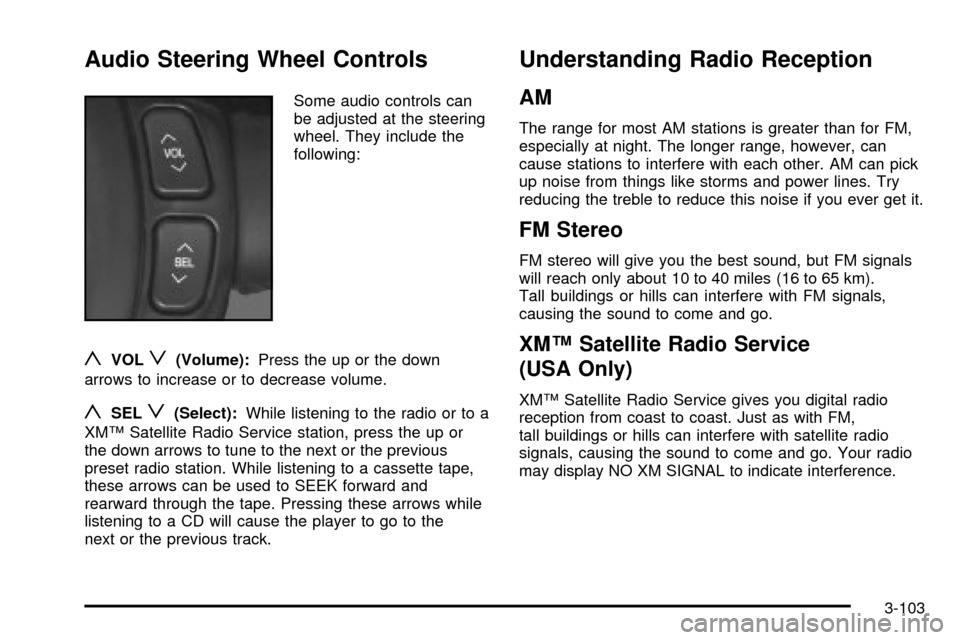
Audio Steering Wheel Controls
Some audio controls can
be adjusted at the steering
wheel. They include the
following:
yVOLz(Volume):Press the up or the down
arrows to increase or to decrease volume.
ySELz(Select):While listening to the radio or to a
XMŸ Satellite Radio Service station, press the up or
the down arrows to tune to the next or the previous
preset radio station. While listening to a cassette tape,
these arrows can be used to SEEK forward and
rearward through the tape. Pressing these arrows while
listening to a CD will cause the player to go to the
next or the previous track.
Understanding Radio Reception
AM
The range for most AM stations is greater than for FM,
especially at night. The longer range, however, can
cause stations to interfere with each other. AM can pick
up noise from things like storms and power lines. Try
reducing the treble to reduce this noise if you ever get it.
FM Stereo
FM stereo will give you the best sound, but FM signals
will reach only about 10 to 40 miles (16 to 65 km).
Tall buildings or hills can interfere with FM signals,
causing the sound to come and go.
XMŸ Satellite Radio Service
(USA Only)
XMŸ Satellite Radio Service gives you digital radio
reception from coast to coast. Just as with FM,
tall buildings or hills can interfere with satellite radio
signals, causing the sound to come and go. Your radio
may display NO XM SIGNAL to indicate interference.
3-103