2003 CADILLAC SEVILLE reset
[x] Cancel search: resetPage 216 of 408

Cellular Phone Usage
Cellular phone usage may cause interference with your
vehicle's radio. This interference may occur when making
or receiving phone calls, charging the phone's battery, or
simply having the phone on. This interference is
described as an increased level of static while listening to
the radio. If you notice static while listening to the radio,
unplug the cellular phone and turn it off.
Weather Band
Weather band is restricted to speech and the audio
quality is not as good as with the AM or FM bands.
Depending on location, the radio should receive one or
two channels.
Care of Your Cassette Tape Player
A tape player that is not cleaned regularly can cause
reduced sound quality, ruined cassettes or a damaged
mechanism. Cassette tapes should be stored in their
cases away from contaminants, direct sunlight and
extreme heat. If they aren't, they may not operate
properly or may cause failure of the tape player.
Your tape player should be cleaned regularly after every
50 hours of use. Your radio may display CLEAN
TAPE to indicate that you have used your tape player
for 50 hours without resetting the tape clean timer. If this
message appears on the display, your cassette tape
player needs to be cleaned. It will still play tapes,
but you should clean it as soon as possible to prevent
damage to your tapes and player. If you notice a
reduction in sound quality, try a known good cassette to
see if the tape or the tape player is at fault. If this
other cassette has no improvement in sound quality,
clean the tape player.
For best results, use a scrubbing action, non-abrasive
cleaning cassette with pads which scrub the tape
head as the hubs of the cleaner cassette turn. The
recommended cleaning cassette is available through
your dealership.
3-104
Page 217 of 408

The broken tape detection feature of your cassette tape
player may identify the cleaning cassette as a
damaged tape, in error. To prevent the cleaning cassette
from being ejected, use the following steps:
1. Turn the ignition on.
2. Turn the radio off.
3. Press and hold the SOURCE button for two
seconds. The tape symbol on the display will ¯ash
three times.
4. Turn the radio on and insert the scrubbing action
cleaning cassette.
5. Eject the cleaning cassette after the manufacturer's
recommended cleaning time.
After the cleaning cassette is ejected, the broken tape
detection feature will be active again.
You may also choose a non-scrubbing action, wet-type
cleaner which uses a cassette with a fabric belt to
clean the tape head. This type of cleaning cassette will
not eject on its own. A non-scrubbing action cleaner
may not clean as thoroughly as the scrubbing type
cleaner. The use of a non-scrubbing action, dry-type
cleaning cassette is not recommended.After you clean the player, press and hold the eject
button for ®ve seconds to reset the CLEAN TAPE
indicator. The radio will display CLEAN TAPE MSG
CLEARED to show the indicator was reset.
Cassettes are subject to wear and the sound quality
may degrade over time. Always make sure the cassette
tape is in good condition before you have your tape
player serviced.
Care of Your CDs
Handle CDs carefully. Store them in their original cases
or other protective cases and away from direct
sunlight and dust. If the surface of a CD is soiled,
dampen a clean, soft cloth in a mild, neutral detergent
solution and clean it, wiping from the center to the edge.
Be sure never to touch the side without writing when
handling CDs. Pick up CDs by grasping the outer edges
or the edge of the hole and the outer edge.
Care of Your CD Player
The use of CD lens cleaners for CDs is not advised,
due to the risk of contaminating the lens of the CD optics
with lubricants internal to the CD mechanism.
3-105
Page 277 of 408

As in the chart shown previously, SAE 5W-30 is the
only viscosity grade recommended for your vehicle. You
should look for and use only oils which have the API
Starburst symbol and which are also identi®ed as
SAE 5W-30. If you cannot ®nd such SAE 5W-30 oils,
you can use an SAE 10W-30 oil which has the API
Starburst symbol, if it's going to be 0ÉF (-18ÉC)
or above. Do not use other viscosity grade oils, such as
SAE 10W-40 or SAE 20W-50 under any conditions.
Notice:Use only engine oil with the American
Petroleum Institute Certi®ed For Gasoline Engines
starburst symbol. Failure to use the recommended
oil can result in engine damage not covered by
your warranty.
GM Goodwrench
žoil meets all the requirements for
your vehicle.
If you are in an area of extreme cold, where the
temperature falls below-20ÉF (-29ÉC), it is
recommended that you use either an SAE 5W-30
synthetic oil or an SAE 0W-30 oil. Both will provide
easier cold starting and better protection for your engine
at extremely low temperatures.
Engine Oil Additives
Don't add anything to your oil. The recommended oils
with the starburst symbol are all you will need for
good performance and engine protection.
When to Change Engine Oil (GM Oil
Life System)
Your vehicle has a computer system that lets you know
when to change the engine oil and ®lter. This is
based on engine revolutions and engine temperature,
and not on mileage. Based on driving conditions,
the mileage at which an oil change will be indicated can
vary considerably. For the oil life system to work
properly, you must reset the system every time the oil is
changed.
When the system has calculated that oil life has been
diminished, it will indicate that an oil change is
necessary. A CHANGE ENGINE OIL message in the
Driver Information Center (DIC) will come on. Change
your oil as soon as possible within the next two
times you stop for fuel. It is possible that, if you are
driving under the best conditions, the oil life system may
not indicate that an oil change is necessary for over a
year. However, your engine oil and ®lter must be
changed at least once a year and at this time the system
must be reset. Your dealer has GM-trained service
people who will perform this work using genuine GM
parts and reset the system. It is also important to check
your oil regularly and keep it at the proper level.
If the system is ever reset accidentally, you must change
your oil at 3,000 miles (5 000 km) since your last oil
change. Remember to reset the oil life system whenever
the oil is changed.
5-17
Page 278 of 408

How to Reset the CHANGE ENGINE OIL
Message
The GM Oil Life SystemŸ calculates when to change
your engine oil and ®lter based on vehicle use. Anytime
your oil is changed, reset the system so it can
calculate when the next oil change is required. If a
situation occurs where you change your oil prior to a
CHANGE ENGINE OIL message in the Driver
Information Center (DIC) being turned on, reset
the system.
After the oil has been changed, the CHANGE ENGINE
OIL message must be reset. To reset the message,
do the following:
1. Turn the key to the ªONº position without starting
the engine.
2. Press the INFO button on the Driver Information
Center (DIC) until ENGINE OIL LIFE is displayed.
3. Press and hold the INFO RESET button until 100%
ENGINE OIL LIFE is displayed. This resets the oil
life indicator.
The percentage of oil life remaining may be checked at
any time by pressing the INFO button until ENGINE
OIL LIFE is displayed on the DIC. For more information
on the oil life indicator, see
Oil Life Indicator on
page 3-77.
What to Do with Used Oil
Used engine oil contains certain elements that may be
unhealthy for your skin and could even cause cancer.
Don't let used oil stay on your skin for very long. Clean
your skin and nails with soap and water, or a good
hand cleaner. Wash or properly dispose of clothing or
rags containing used engine oil. See the manufacturer's
warnings about the use and disposal of oil products.
Used oil can be a threat to the environment. If you
change your own oil, be sure to drain all the oil from the
®lter before disposal. Never dispose of oil by putting it
in the trash, pouring it on the ground, into sewers, or into
streams or bodies of water. Instead, recycle it by
taking it to a place that collects used oil. If you have a
problem properly disposing of your used oil, ask
your dealer, a service station or a local recycling center
for help.
5-18
Page 284 of 408

How to Add Fluid
Refer to the Maintenance Schedule to determine what
kind of transaxle ¯uid to use. SeePart D:
Recommended Fluids and Lubricants on page 6-15.
If the ¯uid level is low, add only enough of the proper
¯uid to bring the level into the cross-hatched area on the
dipstick.
1. Pull out the dipstick.
2. Using a long-neck funnel, add enough ¯uid at the
dipstick hole to bring it to the proper level.
It doesn't take much ¯uid, generally less than one
pint (0.5 L). Don't over®ll.
Notice:We recommend you use only ¯uid labeled
DEXRONž±III, because ¯uid with that label is
made especially for your automatic transaxle.
Damage caused by ¯uid other than DEXRON
ž±III is
not covered by your new vehicle warranty.
3. After adding ¯uid, recheck the ¯uid level as
described under
How to Check.
4. When the correct ¯uid level is obtained, push the
dipstick back in all the way and turn the handle
clockwise. Reinstall the engine air cleaner/®lter
assembly.
How to Reset the Transaxle Fluid
Change Indicator
Once the transaxle ¯uid has been changed, the
transaxle ¯uid change indicator must be reset. Use the
following steps to reset the indicator:
1. Press the INFO button on the Driver Information
Center (DIC) until TRANS FLUID LIFE is displayed.
2. Press and hold the INFO RESET button until 100%
is displayed.
The indicator is now reset. The percentage of transaxle
¯uid life remaining may be checked at any time by
pressing the INFO button several times until the TRANS
FLUID LIFE message appears.
5-24
Page 289 of 408
Notice:After driving in the overheated engine
protection operating mode, to avoid engine damage,
allow the engine to cool before attempting any
repair. The engine oil will be severely degraded.
Repair the cause of coolant loss, change the oil
and reset the oil life system. See ªEngine Oilº in
the Index.
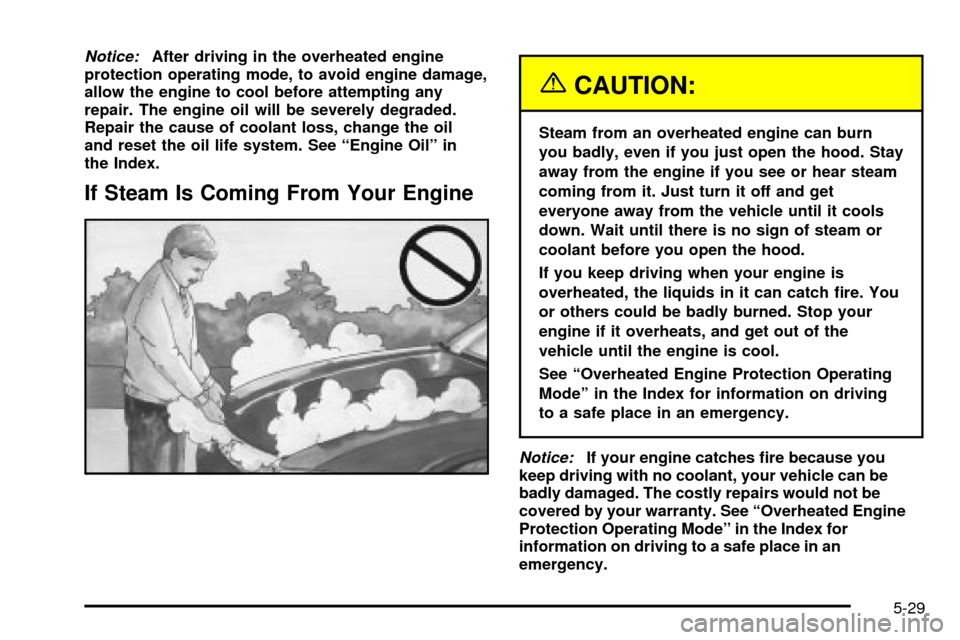
If Steam Is Coming From Your Engine
{CAUTION:
Steam from an overheated engine can burn
you badly, even if you just open the hood. Stay
away from the engine if you see or hear steam
coming from it. Just turn it off and get
everyone away from the vehicle until it cools
down. Wait until there is no sign of steam or
coolant before you open the hood.
If you keep driving when your engine is
overheated, the liquids in it can catch ®re. You
or others could be badly burned. Stop your
engine if it overheats, and get out of the
vehicle until the engine is cool.
See ªOverheated Engine Protection Operating
Modeº in the Index for information on driving
to a safe place in an emergency.
Notice:If your engine catches ®re because you
keep driving with no coolant, your vehicle can be
badly damaged. The costly repairs would not be
covered by your warranty. See ªOverheated Engine
Protection Operating Modeº in the Index for
information on driving to a safe place in an
emergency.
5-29
Page 311 of 408

Headlamp Aiming
Your vehicle has a visual optical headlamp aiming
system equipped with horizontal aim indicators. The aim
has been preset at the factory and should need no
further adjustment. This is true even though your
horizontal aim indicators may not fall exactly on the ª0º
(zero) marks on their scales.If your vehicle is damaged in an accident, the headlamp
aim may be affected. Aim adjustment to the low beam
may be necessary if it is difficult to see lane markers (for
horizontal aim), or if oncoming drivers ¯ash their high
beams at you (for vertical aim). If you believe your
headlamps need to be re-aimed, we recommend that
you take your vehicle to your dealer for service.
However, it is possible for you to re-aim your headlamps
as described in the following procedure.
Notice:To make sure your headlamps are aimed
properly, read all the instructions before beginning.
Failure to follow these instructions could cause
damage to headlamp parts.
5-51
Page 326 of 408

If the TPM system detects low tire pressure, below
25 psi (172 kPa), or high tire pressure, above 38 psi
(262 kPa), a message, CHECK TIRE PRESSURE, will
appear on the Driver Information Center (DIC)
display. By pressing the INFO button, the DIC screen
will show which tire(s) has the low or high pressure
condition. See
In¯ation -- Tire Pressure on page 5-64for
information regarding correct tire in¯ation. If a tire is
low, you should stop as soon as possible and check all
your tires for damage. If a tire is ¯at, see
If a Tire
Goes Flat on page 5-73.
Notice:Do not use a tire sealant if your vehicle is
equipped with Tire Pressure Monitors. The liquid
sealant can damage the tire pressure monitor
sensors.
Once a low or high tire pressure condition is detected,
the TPM system will display the CHECK TIRE
MESSAGE each time the engine is started, until the
tire(s) are set to the correct in¯ation pressure.
The Tire-Loading Information Label, which is located on
the rear edge of the driver's door, shows the correct
in¯ation pressure for the tires on your vehicle.
The TPM system also allows the driver to check the air
pressure status of each road tire using the Driver
Information Center (DIC). Each tire's air pressure will belisted individually, in the following order: LF (left front or
driver's side front tire), RF (right front or passenger's
side front tire), RR (right rear or passenger's side
rear tire) and LR (left rear or driver's side rear tire). See
In¯ation -- Tire Pressure on page 5-64for information
regarding correct tire in¯ation. Also, seeDriver
Information Center (DIC) on page 3-53for information
on the DIC controls and displays.
If the DIC display doesn't show tire pressures or the
SERVICE TPM SYSTEM message appears, see
your dealer for service. The TPM system may not work
properly while the compact spare tire is installed.
Anytime you replace one or more tires or rotate your
tires, the TPM system will need to be reset. A special
tool is needed to reset the sensor identi®cation
codes. See your dealer for service.
Your vehicle was delivered from the factory with
aluminum valve stem caps. If you ever have to replace
the valve stem caps on your vehicle, you should
replace them with aluminum or plastic caps.
The TPM system can alert you about a low or high tire
pressure condition, but it doesn't replace normal tire
maintenance. See
Tires on page 5-63.
5-66