2003 CADILLAC SEVILLE ESP
[x] Cancel search: ESPPage 214 of 408

Radio Personalization with Home
and Away Feature
If DRIVER 1 (HOME or AWAY) PRESETS or DRIVER 2
(HOME or AWAY) PRESETS appears in the display
when the radio is ®rst turned on, your vehicle is
equipped with this feature.
This feature allows the driver to return to the last used
audio source (radio, cassette, or CD) using the
remote keyless entry transmitter. This feature can also
store and recall AM and FM presets, volume, tone,
and the last selected radio station. The number on the
back of each transmitter (1 or 2) corresponds to
driver 1 or 2. If transmitter 1 is used to enter the vehicle,
the last used audio source and/or settings set by
driver 1 will be recalled. If transmitter 2 is used to enter
the vehicle, the last used audio source and/or settings
set by driver 2 will be recalled. The settings can also be
recalled by pressing the MEMORY seat buttons 1 or 2
located on the driver's door.
Your radio can store home and away presets. Home
and away presets allow you to use one set of preset
radio settings in the area where you live, and another set
when you go out of town. You will not need to
reprogram your presets every time you travel. With the
radio off and the time displayed, use fast forward
and reverse to select home or away presets. To selectthe away presets, press and hold FF for ®ve seconds
until you hear a beep. The next time the radio comes on,
the away presets will be active. To select the home
presets, press and hold RW for ®ve seconds until you
hear a beep. The next time the radio comes on,
the home presets will be active.
When battery power is removed and later applied, you
will not have to reset your home radio presets
because the radio remembers them. However, you will
have to reset your away radio presets.
Theft-Deterrent Feature
THEFTLOCKžis designed to discourage theft of your
radio. Your vehicle has a ªbuilt inº theft-deterrent feature
on each radio that is automatic ± there is no
programming required. The radio in your vehicle cannot
be used in any other vehicle. When the radio was
originally installed in your vehicle at the factory, it stored
the Vehicle Identi®cation Number (VIN). Each time
the ignition is turned on, the VIN is veri®ed. If the
vehicle's VIN does not match the VIN stored in the
radio, THEFTLOCK
žwill be activated and the audio
system will not play. If the radio is removed from your
vehicle, the original VIN in the radio can be used to trace
the radio back to your vehicle.
3-102
Page 215 of 408
Audio Steering Wheel Controls
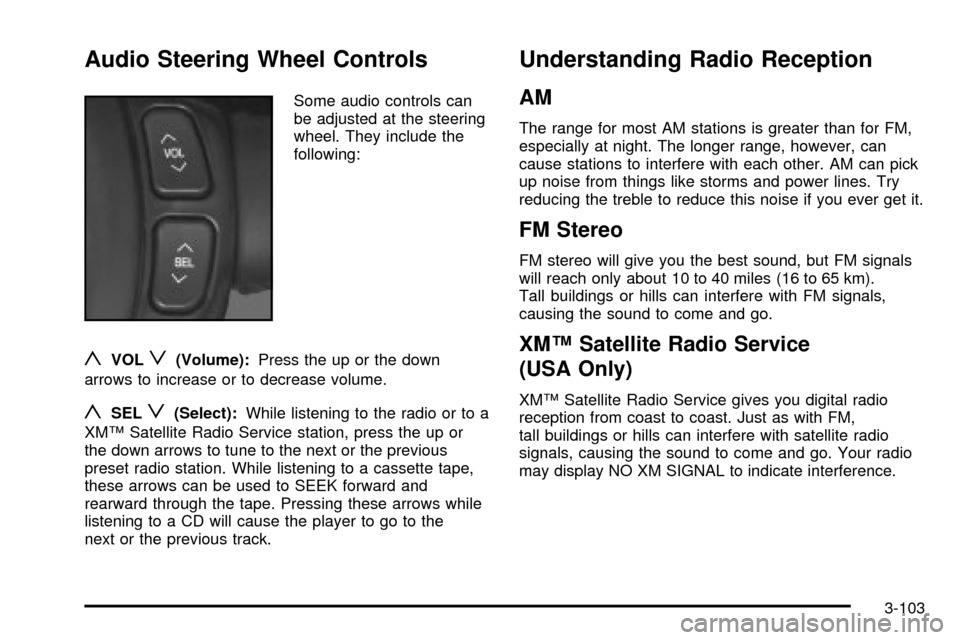
Some audio controls can
be adjusted at the steering
wheel. They include the
following:
yVOLz(Volume):Press the up or the down
arrows to increase or to decrease volume.
ySELz(Select):While listening to the radio or to a
XMŸ Satellite Radio Service station, press the up or
the down arrows to tune to the next or the previous
preset radio station. While listening to a cassette tape,
these arrows can be used to SEEK forward and
rearward through the tape. Pressing these arrows while
listening to a CD will cause the player to go to the
next or the previous track.
Understanding Radio Reception
AM
The range for most AM stations is greater than for FM,
especially at night. The longer range, however, can
cause stations to interfere with each other. AM can pick
up noise from things like storms and power lines. Try
reducing the treble to reduce this noise if you ever get it.
FM Stereo
FM stereo will give you the best sound, but FM signals
will reach only about 10 to 40 miles (16 to 65 km).
Tall buildings or hills can interfere with FM signals,
causing the sound to come and go.
XMŸ Satellite Radio Service
(USA Only)
XMŸ Satellite Radio Service gives you digital radio
reception from coast to coast. Just as with FM,
tall buildings or hills can interfere with satellite radio
signals, causing the sound to come and go. Your radio
may display NO XM SIGNAL to indicate interference.
3-103
Page 223 of 408
But the ability to drive is affected well below a BAC of
0.10 percent. Research shows that the driving skills
of many people are impaired at a BAC approaching
0.05 percent, and that the effects are worse at night. All
drivers are impaired at BAC levels above 0.05 percent.
Statistics show that the chance of being in a collision
increases sharply for drivers who have a BAC of
0.05 percent or above. A driver with a BAC level of
0.06 percent has doubled his or her chance of having a
collision. At a BAC level of 0.10 percent, the chance
of this driver having a collision is 12 times greater; at a
level of 0.15 percent, the chance is 25 times greater!
The body takes about an hour to rid itself of the alcohol
in one drink. No amount of coffee or number of cold
showers will speed that up. ªI will be carefulº is not the
right answer. What if there is an emergency, a need
to take sudden action, as when a child darts into
the street? A person with even a moderate BAC might
not be able to react quickly enough to avoid the
collision.There is something else about drinking and driving that
many people do not know. Medical research shows
that alcohol in a person's system can make crash
injuries worse, especially injuries to the brain, spinal
cord or heart. This means that when anyone who has
been drinking Ð driver or passenger Ð is in a crash,
that person's chance of being killed or permanently
disabled is higher than if the person had not been
drinking.
{CAUTION:
Drinking and then driving is very dangerous.
Your re¯exes, perceptions, attentiveness and
judgment can be affected by even a small
amount of alcohol. You can have a
serious Ð or even fatal Ð collision if you drive
after drinking. Please do not drink and drive or
ride with a driver who has been drinking. Ride
home in a cab; or if you are with a group,
designate a driver who will not drink.
4-5
Page 224 of 408

Control of a Vehicle
You have three systems that make your vehicle go
where you want it to go. They are the brakes, the steering
and the accelerator. All three systems have to do their
work at the places where the tires meet the road.
Sometimes, as when you are driving on snow or ice, it
is easy to ask more of those control systems than
the tires and road can provide. That means you can lose
control of your vehicle. Also see
Traction Control
System (TCS) on page 4-9.
Braking
Braking action involvesperception timeandreaction time.
First, you have to decide to push on the brake pedal.
That'sperception time.Then you have to bring up your
foot and do it. That'sreaction time.
Averagereaction timeis about 3/4 of a second. But
that's only an average. It might be less with one driver
and as long as two or three seconds or more with
another. Age, physical condition, alertness, coordination
and eyesight all play a part. So do alcohol, drugs and
frustration. But even in 3/4 of a second, a vehicle moving
at 60 mph (100 km/h) travels 66 feet (20 m). That
could be a lot of distance in an emergency, so keeping
enough space between your vehicle and others is
important.
And, of course, actual stopping distances vary greatly
with the surface of the road (whether it's pavement
or gravel); the condition of the road (wet, dry, icy); tire
tread; the condition of your brakes; the weight of
the vehicle and the amount of brake force applied.
4-6
Page 227 of 408

Remember: Anti-lock doesn't change the time you need
to get your foot up to the brake pedal or always
decrease stopping distance. If you get too close to the
vehicle in front of you, you won't have time to apply
your brakes if that vehicle suddenly slows or stops.
Always leave enough room up ahead to stop, even
though you have anti-lock brakes.
Using Anti-Lock
Don't pump the brakes. Just hold the brake pedal down
®rmly and let anti-lock work for you. You may hear
the anti-lock pump or motor operate, and feel the brake
pedal pulsate, but this is normal.
Braking in Emergencies
With anti-lock, you can steer and brake at the same
time. In many emergencies, steering can help you more
than even the very best braking.
Traction Control System (TCS)
Your vehicle has a traction control system that limits
wheel spin. This is especially useful in slippery
road conditions. The system operates only if it senses
that one or both of the front wheels are spinning or
beginning to lose traction. When this happens,
the system works the front brakes and reduces engine
power to limit wheel spin.
The TRACTION ENGAGED message will display on the
Driver Information Center when the traction control
system is limiting wheel spin. See
DIC Warnings and
Messages on page 3-56. You may feel or hear the
system working, but this is normal.
If your vehicle is in cruise control when the traction
control system begins to limit wheel spin, the cruise
control will automatically disengage. When road
conditions allow you to safely use it again, you may
reengage the cruise control. See ªCruise Controlº under
Turn Signal/Multifunction Lever on page 3-9.
4-9
Page 228 of 408
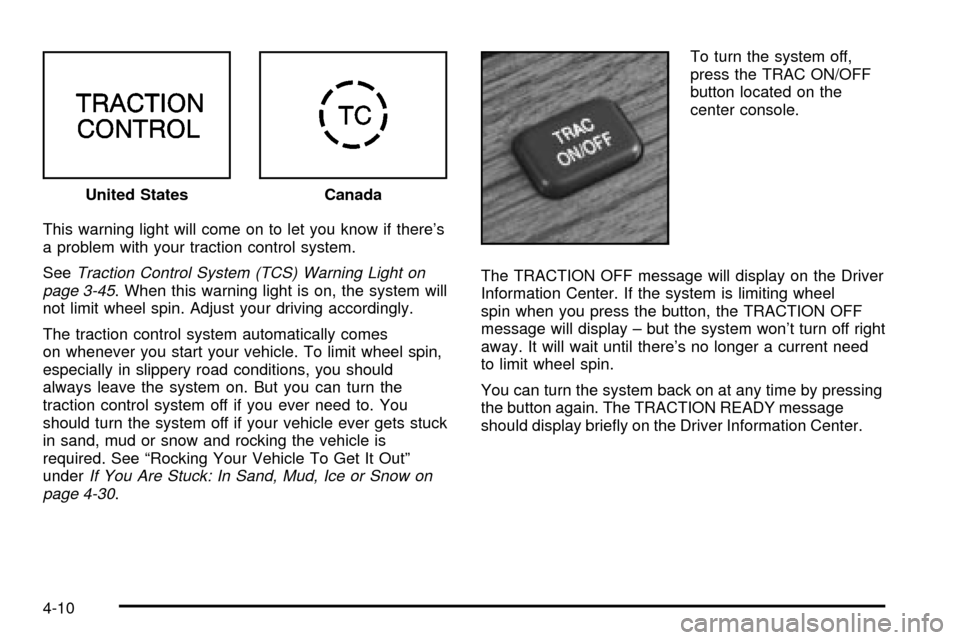
This warning light will come on to let you know if there's
a problem with your traction control system.
See
Traction Control System (TCS) Warning Light on
page 3-45. When this warning light is on, the system will
not limit wheel spin. Adjust your driving accordingly.
The traction control system automatically comes
on whenever you start your vehicle. To limit wheel spin,
especially in slippery road conditions, you should
always leave the system on. But you can turn the
traction control system off if you ever need to. You
should turn the system off if your vehicle ever gets stuck
in sand, mud or snow and rocking the vehicle is
required. See ªRocking Your Vehicle To Get It Outº
under
If You Are Stuck: In Sand, Mud, Ice or Snow on
page 4-30.To turn the system off,
press the TRAC ON/OFF
button located on the
center console.
The TRACTION OFF message will display on the Driver
Information Center. If the system is limiting wheel
spin when you press the button, the TRACTION OFF
message will display ± but the system won't turn off right
away. It will wait until there's no longer a current need
to limit wheel spin.
You can turn the system back on at any time by pressing
the button again. The TRACTION READY message
should display brie¯y on the Driver Information Center. United States
Canada
4-10
Page 229 of 408

Magnetic Ride Control
Magnetic Ride Control automatically adjusts the ride of
your vehicle. Automatic ride control is achieved
through a computer used to control and monitor the
suspension system. The controller receives input from
various sensors to determine the proper system
response. If the controller detects a problem within the
system, the DIC will display a SERVICE SUSPENSION
SYS message. See
DIC Warnings and Messages
on page 3-56for more information. See your dealer for
service.
Steering
Power Steering
If you lose power steering assist because the engine
stops or the system is not functioning, you can steer but
it will take much more effort.
Magnetic Speed Variable Assist
Steering
Your vehicle may be equipped with a steering system
that continuously adjusts the effort you feel when
steering at all vehicle speeds. It provides ease when
parking, yet a ®rm, solid feel at highway speeds.
Steering Tips
Driving on Curves
It's important to take curves at a reasonable speed.
A lot of the ªdriver lost controlº accidents mentioned on
the news happen on curves. Here's why:
Experienced driver or beginner, each of us is subject to
the same laws of physics when driving on curves.
The traction of the tires against the road surface makes
it possible for the vehicle to change its path when
you turn the front wheels. If there's no traction, inertia
will keep the vehicle going in the same direction. If
you've ever tried to steer a vehicle on wet ice, you'll
understand this.
4-11
Page 230 of 408

The traction you can get in a curve depends on the
condition of your tires and the road surface, the angle at
which the curve is banked, and your speed. While
you're in a curve, speed is the one factor you can
control.
Suppose you're steering through a sharp curve.
Then you suddenly accelerate. Both control
systems Ð steering and acceleration Ð have to do their
work where the tires meet the road. Adding the
sudden acceleration can demand too much of those
places. You can lose control. See
Traction Control
System (TCS) on page 4-9.
What should you do if this ever happens? Ease up on
the accelerator pedal, steer the vehicle the way you
want it to go, and slow down.
Since your vehicle is equipped with Stabilitrak
žyou may
see the STABILITY SYS ENGAGED message on the
Driver Information Center. See ªStability System
Engaged Messageº under
DIC Warnings and Messages
on page 3-56.Speed limit signs near curves warn that you should
adjust your speed. Of course, the posted speeds
are based on good weather and road conditions. Under
less favorable conditions you'll want to go slower.
If you need to reduce your speed as you approach a
curve, do it before you enter the curve, while your front
wheels are straight ahead.
Try to adjust your speed so you can ªdriveº through the
curve. Maintain a reasonable, steady speed. Wait to
accelerate until you are out of the curve, and then
accelerate gently into the straightaway.
To help you steer in the direction you want to go, during
certain sharp or sudden cornering maneuvers, gear
selection is controlled. This will maximize the available
drive wheel torque and minimize the transaxle
response time and shift activity. During this kind of
maneuver, the transaxle shifts automatically as vehicle
speed changes.
4-12