2003 BMW M3 COUPE window
[x] Cancel search: windowPage 8 of 158

Contents
Notes
About this Owner's Manual4
Symbols used4
Your individual vehicle4
Status at time of printing5
For your own safety5
Symbol on vehicle parts6
Service and warranty6
Reporting safety defects6
Overview
Cockpit14
Instrument cluster16
Indicator and warning lamps18
Steering wheel with multifunction
buttons22
Hazard warning triangle*23
First-aid kit*23
Refueling24
Fuel specifications25
Tire inflation pressure25
Controls and features
Opening and closing:
Keys30
Central locking system30
Opening and closing – via the
remote control31
Opening and closing – via the
door lock33
Opening and closing – from the
inside34
Luggage compartment lid35
Luggage compartment37
Alarm system*38
Electric power windows40
Sliding/tilt sunroof*40
To adjust:
Safe seating position43
Seats44
Manual seat adjustment44
Power seat adjustment*45
Head restraints46
Entering the rear47
Safety belts47
Seat and mirror memory*49
Seat heating*50
Steering wheel51
Mirrors51
Passenger safety systems:
Airbags53
Transporting children safely55
Vehicle Memory, Key
Memory59
handbook.book Page 8 Saturday, July 27, 2002 1:12 PM
Page 15 of 158

15
1Parking lamps/Low beams86
2
>
Turn signal indicators70
>
Standing lamps87
>
High beams87
>
Headlamp flasher70
>
Computer78
3Washer/wiper system/Rain
sensor71
4Hazard warning flashers
5Rear window defroster93
6Central locking system30
7Steering wheel51
8Horn: the entire surface
9Fog lamps88
Cockpit
OverviewControlsMaintenanceRepairsDataIndex
handbook.book Page 15 Saturday, July 27, 2002 1:12 PM
Page 33 of 158
33
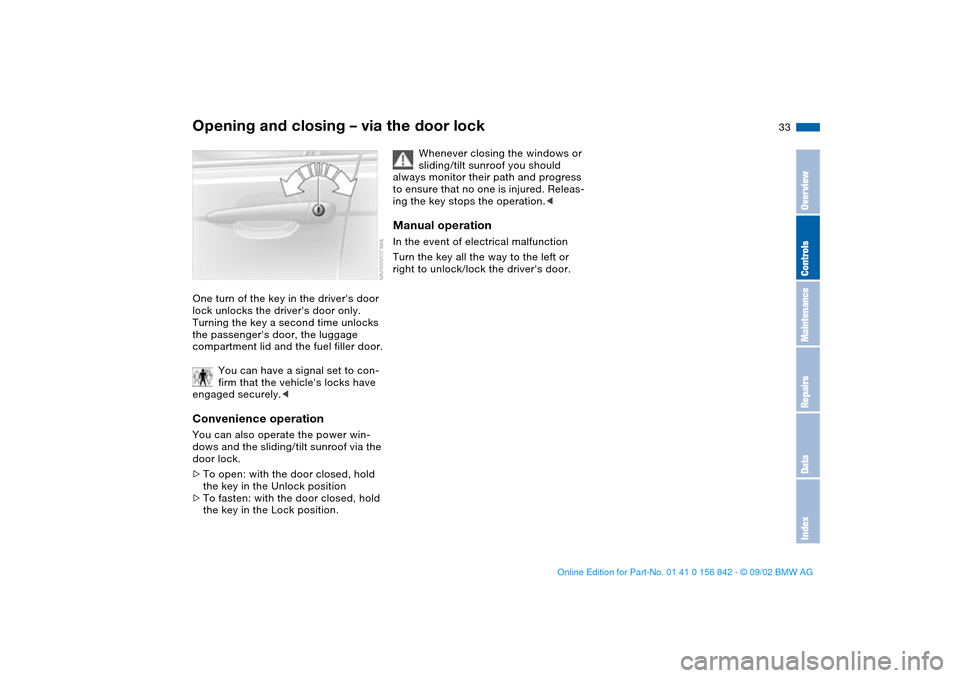
Opening and closing – via the door lockOne turn of the key in the driver's door
lock unlocks the driver's door only.
Turning the key a second time unlocks
the passenger's door, the luggage
compartment lid and the fuel filler door.
You can have a signal set to con-
firm that the vehicle's locks have
engaged securely.
door lock.
>To open: with the door closed, hold
the key in the Unlock position
>To fasten: with the door closed, hold
the key in the Lock position.
Whenever closing the windows or
sliding/tilt sunroof you should
always monitor their path and progress
to ensure that no one is injured. Releas-
ing the key stops the operation.<
Manual operationIn the event of electrical malfunction
Turn the key all the way to the left or
right to unlock/lock the driver's door.
OverviewControlsMaintenanceRepairsDataIndex
handbook.book Page 33 Saturday, July 27, 2002 1:12 PM
Page 36 of 158
36
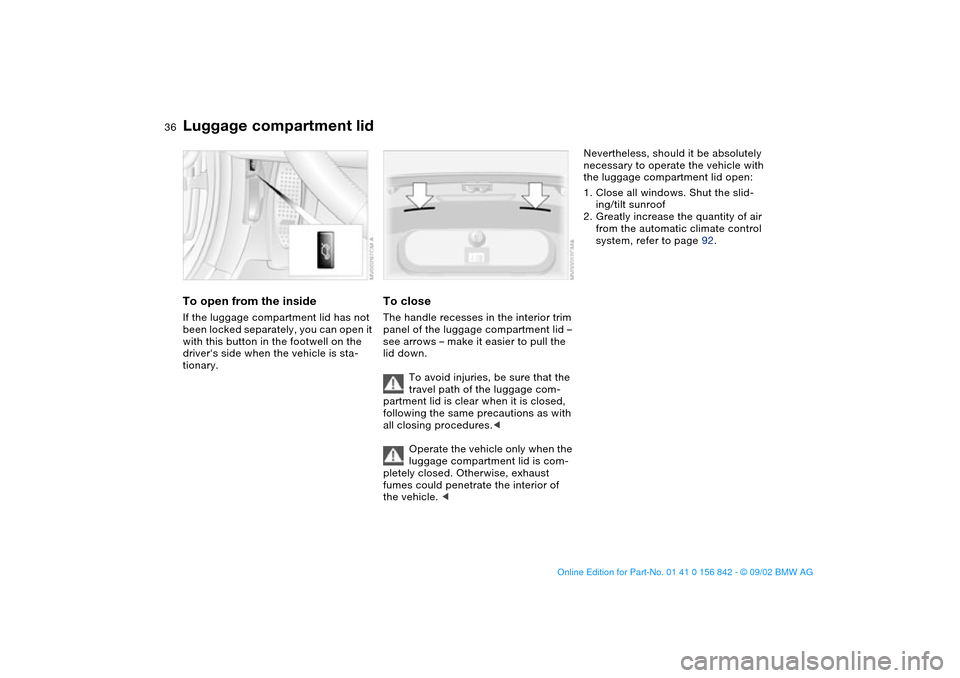
To open from the insideIf the luggage compartment lid has not
been locked separately, you can open it
with this button in the footwell on the
driver's side when the vehicle is sta-
tionary.
To closeThe handle recesses in the interior trim
panel of the luggage compartment lid –
see arrows – make it easier to pull the
lid down.
To avoid injuries, be sure that the
travel path of the luggage com-
partment lid is clear when it is closed,
following the same precautions as with
all closing procedures.<
Operate the vehicle only when the
luggage compartment lid is com-
pletely closed. Otherwise, exhaust
fumes could penetrate the interior of
the vehicle. <
Nevertheless, should it be absolutely
necessary to operate the vehicle with
the luggage compartment lid open:
1. Close all windows. Shut the slid-
ing/tilt sunroof
2. Greatly increase the quantity of air
from the automatic climate control
system, refer to page 92.
Luggage compartment lid
handbook.book Page 36 Saturday, July 27, 2002 1:12 PM
Page 39 of 158

39
Indicator lamp displays>The indicator lamp below the interior
rearview mirror flashes continuously:
the system is armed
>The indicator lamp flashes when it is
armed: the door(s), the hood or lug-
gage compartment lid are not com-
pletely closed. Even if you do not
close the alerted area, the remaining
areas are deadlocked, and the indi-
cator lamp flashes continuously after
10 seconds. However, the interior
motion sensor is not activated
>If the indicator lamp goes out when
the system is disarmed: no manipula-
tion or attempted intrusions have
been detected in the period since the
system was armed
>If the indicator lamp flashes for
10 seconds when the system is dis-
armed: an attempted entry has been
detected in the period since the sys-
tem was armed.
Following triggering of an alarm, the
indicator lamp will flash continuously.Avoiding unintentional alarmsThe tilt alarm sensor and interior motion
sensor may be deactivated at the same
time. You can do this to prevent a false
alarm from being triggered in garages
with elevator ramps, for instance, or
when the vehicle is transported by train:
Lock the vehicle twice to arm the sys-
tem. Press button on the remote control
twice in succession or lock the vehicle
twice with the key.
The indicator lamp lights up briefly and
then flashes continuously. The tilt alarm
sensor and the interior motion sensor
are deactivated as long as the system is
armed.Interior motion sensorIn order for the interior motion sensor to
function properly, the windows and the
sliding/tilt sunroof must be completely
closed.
Nevertheless, you should deactivate
the interior motion sensor, refer to
Avoiding unintentional alarms, if
>persons or animals are left in the
vehicle
>the windows or the sliding/tilt sunroof
are being left open.
The tilt and interior motion sen-
sors are inadvertently switched off
when convenience closing of the win-
dows is interrupted within the first
10 seconds and then started again. If
this happens, they must be disarmed
and reactivated.<
Alarm system*
OverviewControlsMaintenanceRepairsDataIndex
handbook.book Page 39 Saturday, July 27, 2002 1:12 PM
Page 40 of 158

40
Electric power windowsTo open and close windows
When leaving the vehicle, always
remove the ignition key from the
lock and remember to close the doors
to prevent children from operating the
power windows and injuring them-
selves, etc.<
After the ignition has been switched off,
you can still operate the power win-
dows for up to 15 minutes as long as
no one has opened and again closed
any of the doors.
With the ignition key in position 1 or
higher
>Press the switch until you feel resis-
tance: the window retracts and the
swivel window opens as long as you
maintain pressure on the switch
>Press the switch briefly past the pres-
sure point: the window moves auto-
matically. Pressing the switch again
stops the opening cycle.
You can close the windows in the same
manner by pulling the switch. The
swivel window does not close automat-
ically.
For convenience closing via the door
lock or the remote control, refer to
page 33 or 32.Safety featureThe windows are each equipped with
contact strips located in the upper win-
dow frames. If pressure is exerted
against this contact strip while a win-
dow is being raised, the system will
respond by stopping the window and
then retracting it a small distance.
Despite this safety feature, be
extremely careful to ensure that
the closing path of the window is not
obstructed. Some types of objects –
very thin objects, for instance, might fail
to trigger the contact strip in some situ-
ations.
You can override this safety feature by
pressing the switch beyond the resis-
tance point and holding it.<
Sliding/tilt sunroof*
To prevent injuries, exercise care
when closing the sliding/tilt sun-
roof and keep it in your field of vision
until it is shut.
When leaving the vehicle, always
remove the ignition key from the lock
and remember to close the doors to
prevent children from operating the
sunroof and injuring themselves, etc.<
handbook.book Page 40 Saturday, July 27, 2002 1:12 PM
Page 59 of 158

59
Vehicle Memory, Key MemoryHow the system functionsYou have probably frequently wished
that you could configure individual
functions of your vehicles to reflect your
own personal requirements. In engi-
neering your vehicle, BMW has pro-
vided for a number of options for per-
sonal adjustment that can be
programmed into your vehicle at your
BMW center.
The available configuration data fall into
two categories, according to whether
their primary orientation is the vehicle –
Vehicle Memory – or the individual –
Key Memory. You can have up to four
different basic settings adjusted for four
different persons. The only require-
ment is that each person uses his or her
own remote control key.
When your vehicle is unlocked with the
remote control, the vehicle recognizes
the individual user by means of a data
exchange with the key, and makes
adjustments accordingly.
In order for you to distinguish between
different keys, colored decals are sup-
plied together with the keys.What the system can doYour BMW center can provide you with
details on the possibilities that the Vehi-
cle and Key Memory systems offer:
Examples for Vehicle Memory:
>Various signals that can serve as
acknowledgment for locking and
unlocking the vehicle, refer to
page 31
>Activates/deactivates the Follow me
home lamps function, refer to
page 86
>Activates/deactivates daytime driv-
ing lamps, refer to page 86
>Sets the units of measure for display-
ing time, outside temperature, dis-
tance traveled and fuel consumption
in the instrument cluster
>Indicates via an acoustic tone that
PDC has been activated, refer to
page 80>Switches on rear window defroster
automatically, refer to page 93
>After giving an ice warning, the dis-
play returns to the previous setting,
refer to page 78.
Examples for Key Memory:
>Locks the vehicle automatically after
you start off, refer to page 34
>Automatically moves the seat and
outside mirror into position for the
programmed driver when unlocking
the vehicle, refer to page 49
>Automatic tilting of the passenger-
side mirror, refer to page 50
>After the engine is started, calls up
the last selected driving program for
each shifting mode, refer to page 68.
You will see this symbol through-
out the Owner's Manual. It is to
remind you at appropriate places of the
settings that are available to you.<
OverviewControlsMaintenanceRepairsDataIndex
handbook.book Page 59 Saturday, July 27, 2002 1:12 PM
Page 91 of 158

91
1Air onto the windshield and the side
windows
2Air for the upper body area93
3Air to the footwell
4Outside air/Automatic recirculated-
air control (AUC)/Recirculated
air93
5Air supply/Blower92
6Temperature92
7Automatic air distribution and
supply92
8Individual air distribution92
9Interior temperature sensor – please
keep clear and unobstructed
10 Display for temperature and air
supply92
11 To defrost windows and remove
condensation92
12 Air conditioning92
13 Rear window defroster93Automatic climate control
OverviewControlsMaintenanceRepairsDataIndex
handbook.book Page 91 Saturday, July 27, 2002 1:12 PM