Page 173 of 308

’02 4Runner_U (L/O 0108)
1672002 MY 4RUNNER_U (OM 35787U)
“AUTO” button
For automatic operation of the air condi-
tioning, press the “AUTO” button. An indi-
cator light will illuminate to show that the
automatic operation mode has been se-
lected.
In the automatic operation mode, the air
conditioning selects the most suitable fan
speed, air flow, air intake and onoff of
the air conditioning according to the tem-
perature.
When you adjust the temperature selector
button to maximum cooling, a “MAX
COLD” message will appear on the display
and the air intake mode will be automati-
cally changed to RECIRCULATE.
You may use manual controls if you want
to select your own settings.
To turn off the automatic operation, press
the “OFF” button.
Fan speed selector
Turn the knob to adjust the fan speed.
In automatic operation, you do not have
to adjust the fan speed unless you desire
another fan speed mode. Temperature selector
Turn the knob to adjust the temperatu-
re—to the right to warm, to the left to
cool.
“OFF” button
Push the button to turn off the air condi-
tioning system.
Air flow selector, “MODE” button
Press the button to select the vents used
for air flow.
In automatic operation, you do not have
to select the air flow unless you desire
another air flow mode.
1. Panel— Air flows mainly from the
instrument panel vents.
2. Bilevel— Air flows from both the floor
vents and the instrument panel vents.
3. Floor— Air flows mainly from the floor
vents.
It is recommended that you close the
lower vent. For details about this, see
“Instrument panel vents” in this section.
Page 174 of 308

’02 4Runner_U (L/O 0108)
1682002 MY 4RUNNER_U (OM 35787U)
4. Floor/Windshield— Air flows mainly
from the floor vents and windshield
vents.
It is recommended that you close the
lower vent. For details about this, see
“Instrument panel vents” in this section.
For details about air flow selector settings,
see the illustration after “A/C” button.
Windshield air flow button
When this button is pressed, air flows
mainly from the windshield vents and the
FRESH mode is automatically set. This
setting clears the front view more quickly.
If you want to return the setting to RE-
CIRCULATE mode, press the air intake
selector button once again.
Pressing the button once again returns the
air flow mode to the last one used.
Pressing the windshield air flow button
turns on the defrosterlinked air condition-
ing. At this time, the “A/C” button indicator
comes on regardless of whether or not the
“A/C” button is pressed in. This is to
clean up the front view more quickly. To turn off the air conditioning alone,
press the “A/C” button once again.
When the “A/C” button is not pressed in,
pressing another air flow button turns off
the air conditioning.
It is recommended that you close the low-
er vent. For details about this, see “Instru-
ment panel vents” in this section.
For details about air flow selector settings,
see the illustration after “A/C” button.
For further information for removing frost
and fog, see “Instrument panel vents” in
this section.
Page 176 of 308

’02 4Runner_U (L/O 0108)
1702002 MY 4RUNNER_U (OM 35787U)
�To cool off your Toyota after it has
been parked in the hot sun, drive with
the windows open for a few minutes.
This vents the hot air, allowing the air
conditioning to cool the interior more
quickly.
�Make sure the air intake grilles in front
of the windshield are not blocked (by
leaves or snow, for example).
�On humid days, do not blow cold air
on the windshield. The windshield could
fog up because of the difference in air
temperature on the inside and outside
of the windshield.
�Keep the area under the front seats
clear to allow air to circulate through-
out the vehicle.
�On cold days, set the fan speed to
high for a minute to help clear the
intake ducts of snow or moisture. This
can reduce the amount of fogging on
the windows.
�When driving on dusty roads, close all
windows. If dust thrown up by the ve-
hicle is still drawn into the vehicle after
closing the windows, it is recommended
that the air intake selector be set to
FRESH and the fan speed to any set-
ting except “OFF”.
—Air flow selector settings
: See “Instrument panel vents” in this section.
—Operating tips
Page 179 of 308

’02 4Runner_U (L/O 0108)
1732002 MY 4RUNNER_U (OM 35787U)
—The outside of the windshield
For best results, set controls to:
For automatic operation—
Temperature— To w a r d s WARM
(to the right)
Air intake—FRESH (outside air)
Air flow—WINDSHIELD
Lower vent—CLOSED
For manual operation—
Fan speed— To the desired fan speed
Temperature— To w a r d s WARM
(to the right)
Air intake—FRESH (outside air)
Air flow—WINDSHIELD
Lower vent—CLOSED
When pressing the windshield air flow but-
ton, the air intake selects FRESH auto-
matically. This is to clean up the front
view more quickly.
If you want to return the setting to RE-
CIRCULATE mode, press the air intake
selector button once again.
Pressing the windshield button turns on
the defrosterlinked air conditioning. At
this time, the “A/C” button indicator comes
on regardless of whether or not the “A/C”
button is pressed in. This is to clean up
the front view more quickly. To turn off the air conditioning alone,
press the “A/C” button once again.
When the “A/C” button is not pressed in,
pressing another air flow button turns off
the air conditioning.
�To heat the vehicle interior while de-
frosting the windshield, choose
floor/windshield air flow.
Side vents
Lower vent
Instrument panel vents
Page 180 of 308
’02 4Runner_U (L/O 0108)
1742002 MY 4RUNNER_U (OM 35787U)
If air flow control is not satisfactory, check
the instrument panel vents. The instrument
panel vents may be opened or closed as
shown.
For removing frost or fog, it is recom-
mended to close the lower vent when you
push the windshield air flow button or us-
ing the “Floor”, “Floor/Windshield” or
“Windshield” mode.
Page 184 of 308

’02 4Runner_U (L/O 0108)
1782002 MY 4RUNNER_U (OM 35787U)
The digital clock indicates the time.
The key must be in the “ACC” or “ON”
position.
To reset the hour: Push the “H” button.
To reset the minutes: Push the “M” button.
If quick adjustment to a full hour is de-
sired, push the “:00” button.
For example, if the “:00” button is de-
pressed when the time is between
1:01—1:29, the time will change to 1:00.
If the time is between 1:30—1:59, the
time will change to 2:00. If the electrical power source has been
disconnected from the clock, the time dis-
play will automatically be set to 1:00 (one
o’clock).
When the instrument panel lights are
turned on, the brightness of the time in-
dication will be reduced.The thermometer indicates the outside
air temperature when you push the
“OUT/T” button.
The key must be in the “ON” position.
Pushing the button once again or turning
the temperature selector will turn off the
display.
When the air conditioning system is on,
pushing the button once indicates the out-
side temperature and a second time
changes the display back to the air condi-
tioning temperature.
Also, turning the temperature selector
while the outside temperature is indicated
changes the display to the air conditioning
temperature.
Clock
Thermometer
Page 186 of 308
’02 4Runner_U (L/O 0108)
1802002 MY 4RUNNER_U (OM 35787U)
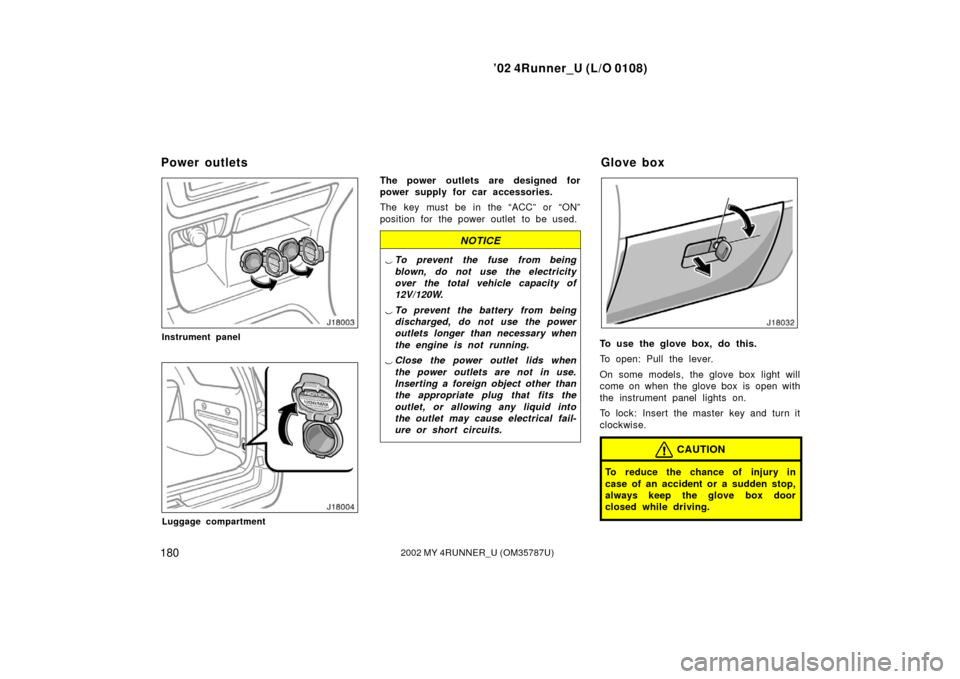
Instrument panel
Luggage compartment
The power outlets are designed for
power supply for car accessories.
The key must be in the “ACC” or “ON”
position for the power outlet to be used.
NOTICE
�To prevent the fuse from being
blown, do not use the electricity
over the total vehicle capacity of
12V/120W.
� To prevent the battery from being
discharged, do not use the power
outlets longer than necessary when
the engine is not running.
� Close the power outlet lids when
the power outlets are not in use.
Inserting a foreign object other than
the appropriate plug that fits the
outlet, or allowing any liquid into
the outlet may cause electrical fail-
ure or short circuits.
To use the glove box, do this.
To open: Pull the lever.
On some models, the glove box light will
come on when the glove box is open with
the instrument panel lights on.
To lock: Insert the master key and turn it
clockwise.
CAUTION
To reduce the chance of injury in
case of an accident or a sudden stop,
always keep the glove box door
closed while driving.
Power outlets Glove box
Page 211 of 308
’02 4Runner_U (L/O 0108)
2052002 MY 4RUNNER_U (OM 35787U)
�Never allow anyone to ride in the
luggage compartment. It is not de-
signed for passengers. They should
ride in their seats with their seat
belts properly fastened. Otherwise,
they are much more likely to suffer
serious bodily injury, in the event
of sudden braking or a collision.
�Do not place anything on the lug-
gage cover. Such items may be
thrown about and possibly injure
people in the vehicle during sudden
braking or an accident. Secure all
items in a safe place.
�Do not drive with objects left on
top of the instrument panel. They
may interfere with the driver’s field
of view. Or they may move during
sharp vehicle acceleration or turn-
ing, and impair the driver’s control
of the vehicle. In an accident they
may injure the vehicle occupants.
NOTICE
Do not load the vehicle beyond the
vehicle capacity weight specified in
Section 8.
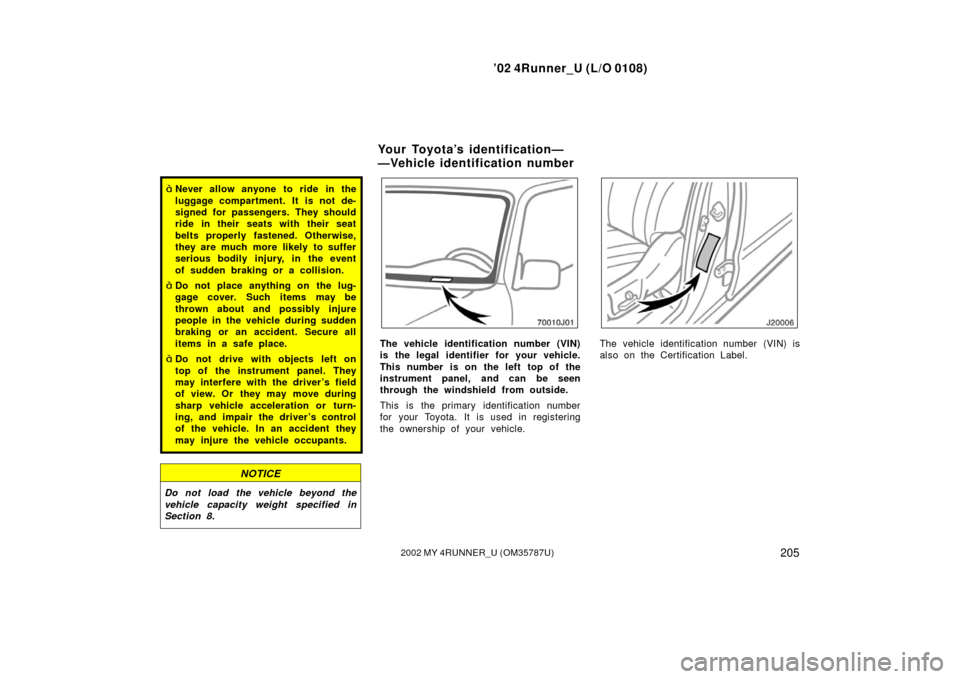
The vehicle identification number (VIN)
is the legal identifier for your vehicle.
This number is on the left top of the
instrument panel, and can be seen
through the windshield from outside.
This is the primary identification number
for your Toyota. It is used in registering
the ownership of your vehicle.The vehicle identification number (VIN) is
also on the Certification Label.
Your Toyota’s identification—
—Vehicle identification number
