2002 NISSAN PATHFINDER ignition
[x] Cancel search: ignitionPage 88 of 288
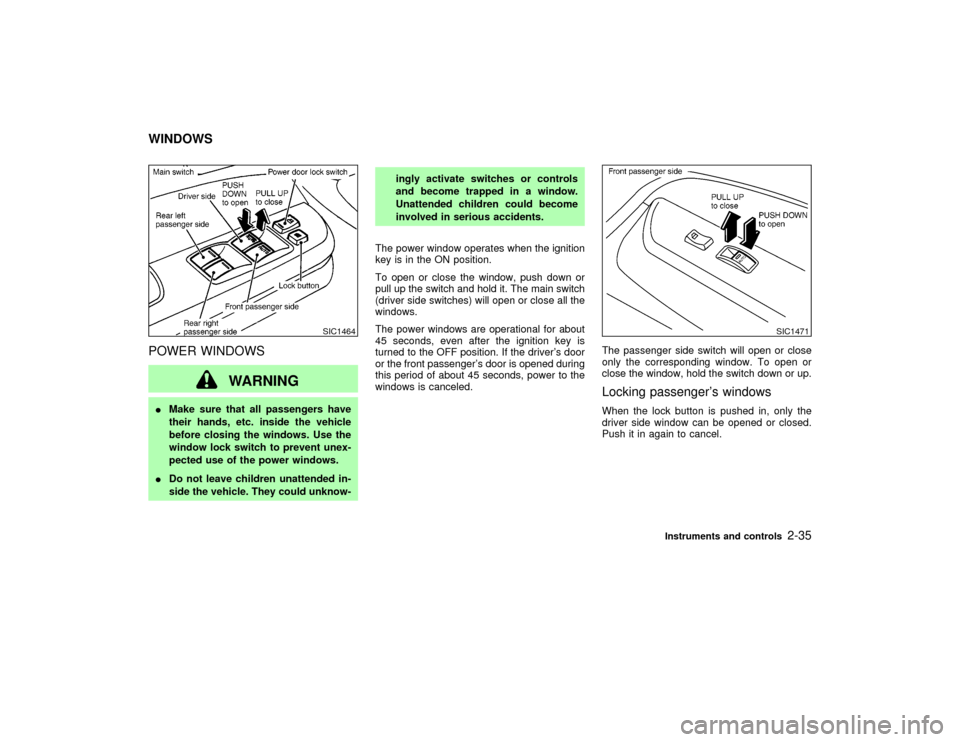
POWER WINDOWS
WARNING
IMake sure that all passengers have
their hands, etc. inside the vehicle
before closing the windows. Use the
window lock switch to prevent unex-
pected use of the power windows.
IDo not leave children unattended in-
side the vehicle. They could unknow-ingly activate switches or controls
and become trapped in a window.
Unattended children could become
involved in serious accidents.
The power window operates when the ignition
key is in the ON position.
To open or close the window, push down or
pull up the switch and hold it. The main switch
(driver side switches) will open or close all the
windows.
The power windows are operational for about
45 seconds, even after the ignition key is
turned to the OFF position. If the driver's door
or the front passenger's door is opened during
this period of about 45 seconds, power to the
windows is canceled.The passenger side switch will open or close
only the corresponding window. To open or
close the window, hold the switch down or up.
Locking passenger's windowsWhen the lock button is pushed in, only the
driver side window can be opened or closed.
Push it in again to cancel.
SIC1464
SIC1471
WINDOWS
Instruments and controls
2-35
Z
01.9.21/R50-D/V5
X
Page 89 of 288
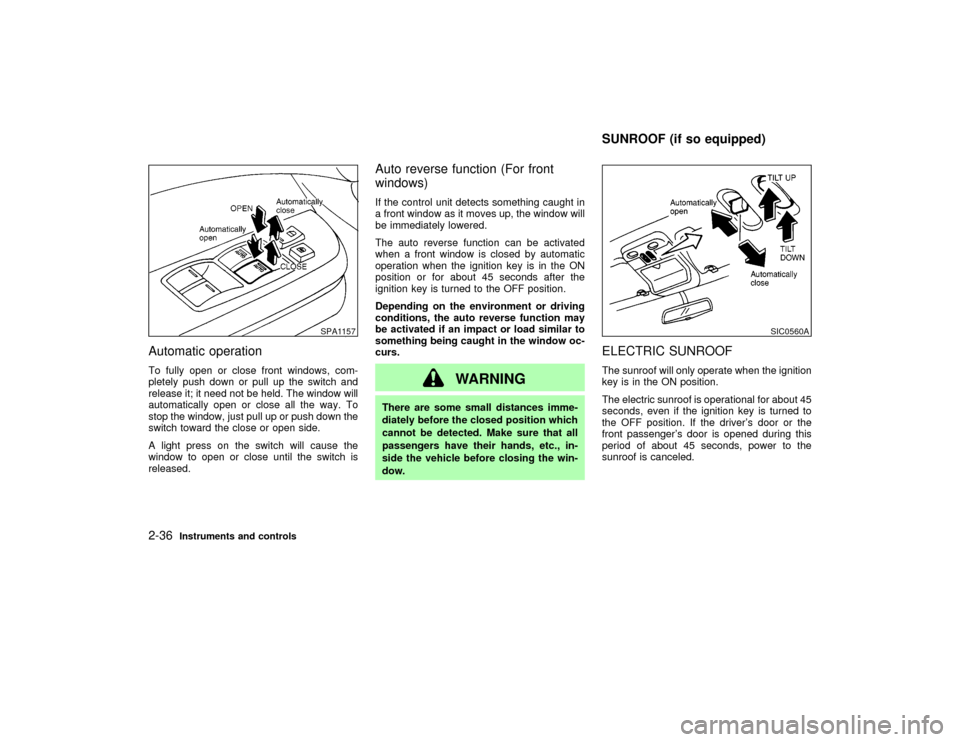
Automatic operationTo fully open or close front windows, com-
pletely push down or pull up the switch and
release it; it need not be held. The window will
automatically open or close all the way. To
stop the window, just pull up or push down the
switch toward the close or open side.
A light press on the switch will cause the
window to open or close until the switch is
released.
Auto reverse function (For front
windows)If the control unit detects something caught in
a front window as it moves up, the window will
be immediately lowered.
The auto reverse function can be activated
when a front window is closed by automatic
operation when the ignition key is in the ON
position or for about 45 seconds after the
ignition key is turned to the OFF position.
Depending on the environment or driving
conditions, the auto reverse function may
be activated if an impact or load similar to
something being caught in the window oc-
curs.
WARNING
There are some small distances imme-
diately before the closed position which
cannot be detected. Make sure that all
passengers have their hands, etc., in-
side the vehicle before closing the win-
dow.
ELECTRIC SUNROOFThe sunroof will only operate when the ignition
key is in the ON position.
The electric sunroof is operational for about 45
seconds, even if the ignition key is turned to
the OFF position. If the driver's door or the
front passenger's door is opened during this
period of about 45 seconds, power to the
sunroof is canceled.
SPA1157
SIC0560A
SUNROOF (if so equipped)
2-36
Instruments and controls
Z
01.9.21/R50-D/V5
X
Page 90 of 288
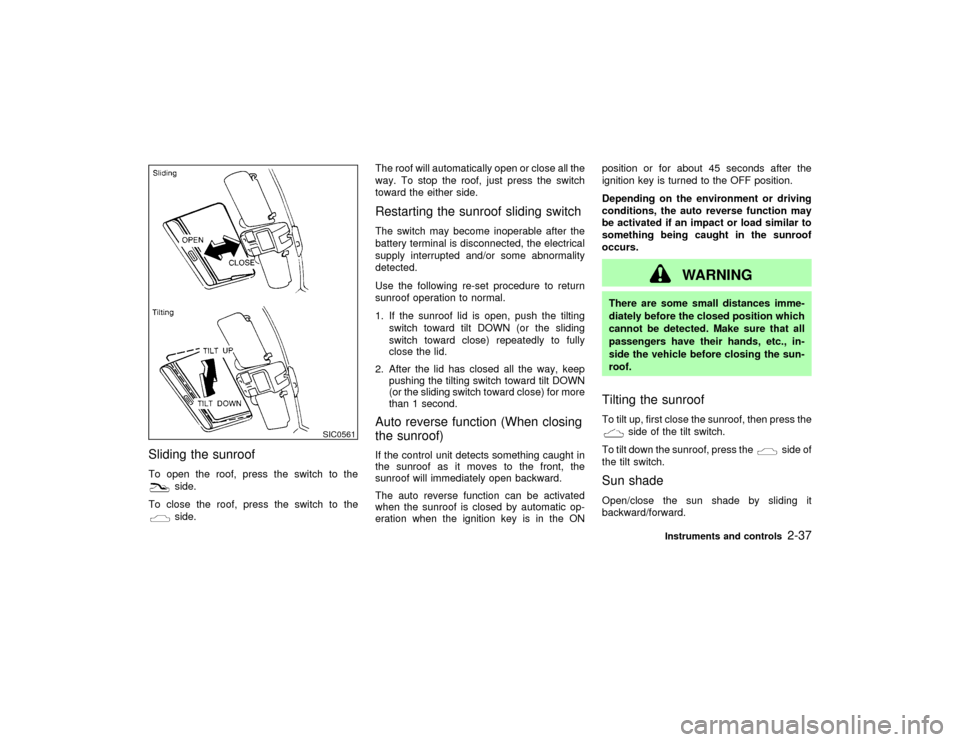
Sliding the sunroofTo open the roof, press the switch to the
side.
To close the roof, press the switch to theside.The roof will automatically open or close all the
way. To stop the roof, just press the switch
toward the either side.
Restarting the sunroof sliding switchThe switch may become inoperable after the
battery terminal is disconnected, the electrical
supply interrupted and/or some abnormality
detected.
Use the following re-set procedure to return
sunroof operation to normal.
1. If the sunroof lid is open, push the tilting
switch toward tilt DOWN (or the sliding
switch toward close) repeatedly to fully
close the lid.
2. After the lid has closed all the way, keep
pushing the tilting switch toward tilt DOWN
(or the sliding switch toward close) for more
than 1 second.Auto reverse function (When closing
the sunroof)If the control unit detects something caught in
the sunroof as it moves to the front, the
sunroof will immediately open backward.
The auto reverse function can be activated
when the sunroof is closed by automatic op-
eration when the ignition key is in the ONposition or for about 45 seconds after the
ignition key is turned to the OFF position.
Depending on the environment or driving
conditions, the auto reverse function may
be activated if an impact or load similar to
something being caught in the sunroof
occurs.
WARNING
There are some small distances imme-
diately before the closed position which
cannot be detected. Make sure that all
passengers have their hands, etc., in-
side the vehicle before closing the sun-
roof.Tilting the sunroofTo tilt up, first close the sunroof, then press the
side of the tilt switch.
To tilt down the sunroof, press the
side of
the tilt switch.
Sun shadeOpen/close the sun shade by sliding it
backward/forward.
SIC0561
Instruments and controls
2-37
Z
01.9.21/R50-D/V5
X
Page 92 of 288
The ceiling light will stay on for about 30
seconds when:
IThe driver's door is unlocked by the keyfob,
a key or the power door lock switch when all
doors are locked.
IThe driver's door is opened and then closed
without the key in the ignition switch.
IThe key is removed from the ignition switch
while all doors are closed.
The ceiling light will turn off while the 30
second timer is activated when:
IThe driver's door is locked with the keyfob,
a key or the power door lock switch.
IThe ignition switch is turned ON.
When the interior light switch or the personal
light switch is in the ON position, the interior,
personal and vanity mirror lights will automati-
cally turn off 30 minutes after the ignition
switch has been turned to the OFF position to
save the battery. To turn on the lights again,
insert the key into the ignition switch and move
it to the ON position.
After the above procedure, the interior, per-
sonal, or vanity mirror lights will automatically
turn off 30 minutes after the latest operation ofthe following with the ignition switch in the
ACC or OFF position:
IOpening or closing any door
ILocking or unlocking any door with the
keyfob, a key, or the power door lock switch
IInserting or removing a key from the ignition
switch
These lights will turn on again when any of the
above operations is performed after the lights
have turned off automatically. (The lights will
turn off 30 minutes after the latest operation of
the above as well.)
CAUTION
ITurn off the interior, personal and
vanity mirror lights when you leave
the vehicle.
IDo not use for extended periods of
time with the engine stopped. This
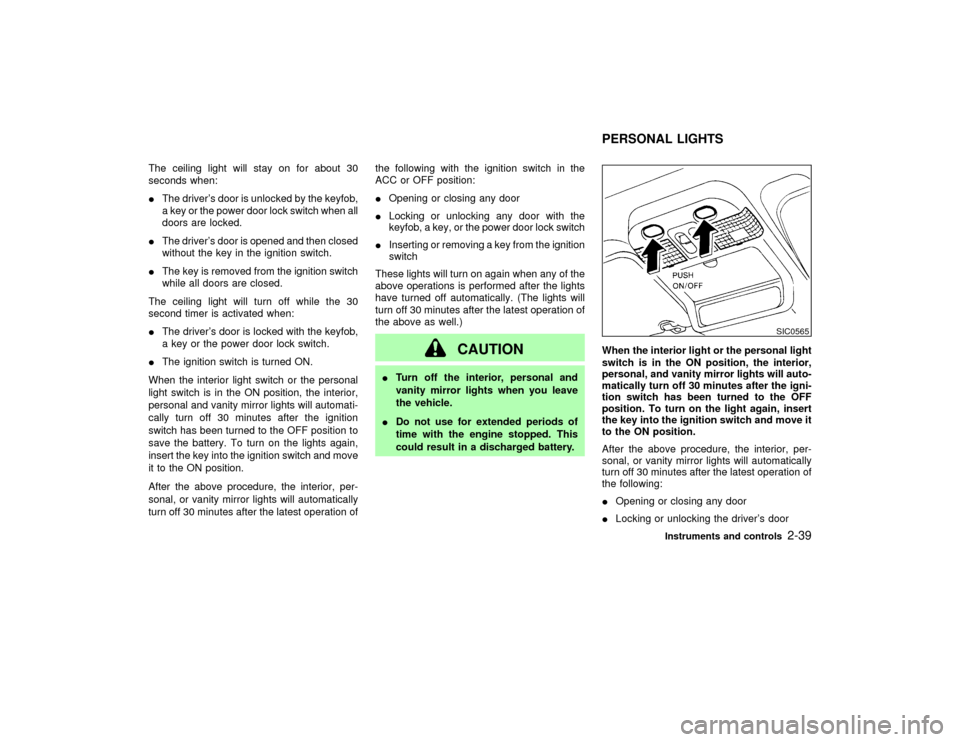
could result in a discharged battery.When the interior light or the personal light
switch is in the ON position, the interior,
personal, and vanity mirror lights will auto-
matically turn off 30 minutes after the igni-
tion switch has been turned to the OFF
position. To turn on the light again, insert
the key into the ignition switch and move it
to the ON position.
After the above procedure, the interior, per-
sonal, or vanity mirror lights will automatically
turn off 30 minutes after the latest operation of
the following:
IOpening or closing any door
ILocking or unlocking the driver's door
SIC0565
PERSONAL LIGHTS
Instruments and controls
2-39
Z
01.9.21/R50-D/V5
X
Page 93 of 288
IInserting or removing a key from the ignition
switch
These lights will turn on again when any of the
above operations is performed after the lights
have turned off automatically. (The lights will
turn off 30 minutes after the latest operation of
the above as well.)
CAUTION
ITurn off the interior, personal and
vanity mirror lights when you leave
the vehicle.
IDo not use for extended periods of
time with the engine stopped. This
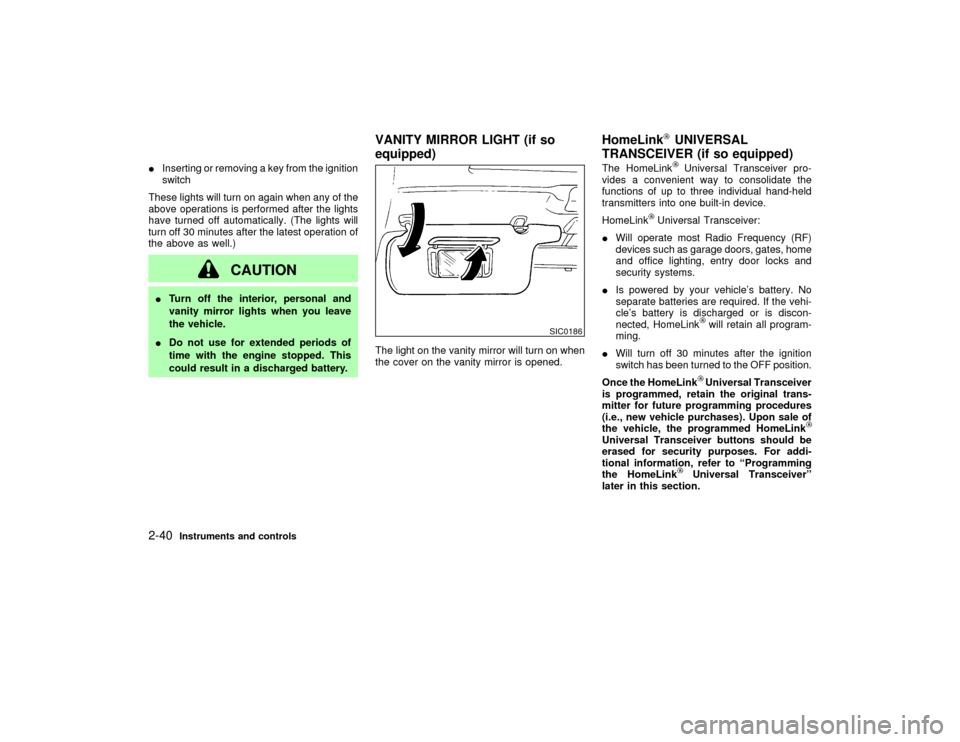
could result in a discharged battery.The light on the vanity mirror will turn on when
the cover on the vanity mirror is opened.The HomeLink
Universal Transceiver pro-
vides a convenient way to consolidate the
functions of up to three individual hand-held
transmitters into one built-in device.
HomeLink
Universal Transceiver:
IWill operate most Radio Frequency (RF)
devices such as garage doors, gates, home
and office lighting, entry door locks and
security systems.
IIs powered by your vehicle's battery. No
separate batteries are required. If the vehi-
cle's battery is discharged or is discon-
nected, HomeLink
will retain all program-
ming.
IWill turn off 30 minutes after the ignition
switch has been turned to the OFF position.
Once the HomeLinkUniversal Transceiver
is programmed, retain the original trans-
mitter for future programming procedures
(i.e., new vehicle purchases). Upon sale of
the vehicle, the programmed HomeLink
Universal Transceiver buttons should be
erased for security purposes. For addi-
tional information, refer to ªProgramming
the HomeLink
Universal Transceiverº
later in this section.
SIC0186
VANITY MIRROR LIGHT (if so
equipped)HomeLink
UNIVERSAL
TRANSCEIVER (if so equipped)
2-40
Instruments and controls
Z
01.9.21/R50-D/V5
X
Page 94 of 288
WARNING
IDo not use the HomeLink
Universal
Transceiver with any garage door
opener that lacks safety stop and
reverse features as required by fed-
eral safety standards. (These stan-
dards became effective for opener
models manufactured after April 1,
1982.) A garage door opener which
cannot detect an object in the path of
a closing garage door and then auto-
matically stop and reverse, does not
meet current federal safety stan-
dards. Using a garage door opener
without these features increases the
risk of serious injury or death.
IDuring programming, your garage
door or gate may open or close. Make
sure that people and objects are clear
of the garage door or gate that you
are programming.
IYour vehicle's engine should be
turned off while programming the
HomeLink
Universal Transceiver.
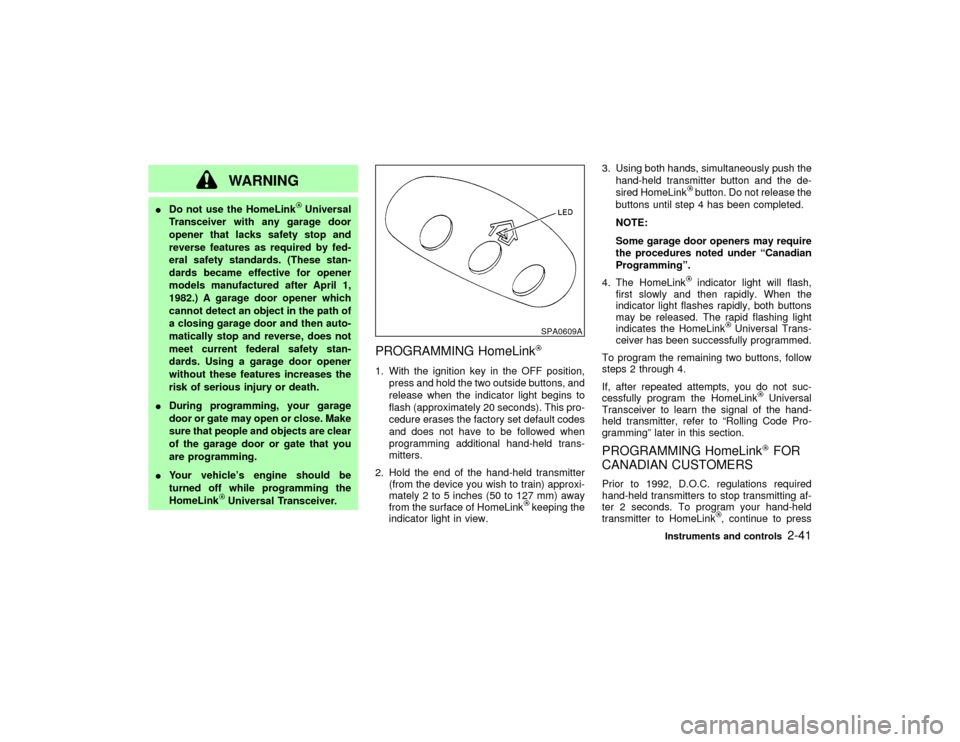
PROGRAMMING HomeLink1. With the ignition key in the OFF position,
press and hold the two outside buttons, and
release when the indicator light begins to
flash (approximately 20 seconds). This pro-
cedure erases the factory set default codes
and does not have to be followed when
programming additional hand-held trans-
mitters.
2. Hold the end of the hand-held transmitter
(from the device you wish to train) approxi-
mately 2 to 5 inches (50 to 127 mm) away
from the surface of HomeLink
keeping the
indicator light in view.3. Using both hands, simultaneously push the
hand-held transmitter button and the de-
sired HomeLink
button. Do not release the
buttons until step 4 has been completed.
NOTE:
Some garage door openers may require
the procedures noted under ªCanadian
Programmingº.
4. The HomeLinkindicator light will flash,
first slowly and then rapidly. When the
indicator light flashes rapidly, both buttons
may be released. The rapid flashing light
indicates the HomeLink
Universal Trans-
ceiver has been successfully programmed.
To program the remaining two buttons, follow
steps 2 through 4.
If, after repeated attempts, you do not suc-
cessfully program the HomeLink
Universal
Transceiver to learn the signal of the hand-
held transmitter, refer to ªRolling Code Pro-
grammingº later in this section.
PROGRAMMING HomeLink
FOR
CANADIAN CUSTOMERS
Prior to 1992, D.O.C. regulations required
hand-held transmitters to stop transmitting af-
ter 2 seconds. To program your hand-held
transmitter to HomeLink
, continue to press
SPA0609A
Instruments and controls
2-41
Z
01.9.21/R50-D/V5
X
Page 103 of 288

LOCKING WITH POWER DOOR
LOCK SWITCH (if so equipped)Operating the lock-unlock switch will lock or
unlock all doors including the back door simul-
taneously.
All door locks will be engaged when the power
door lock switch is moved to the LOCK posi-
tion with the driver's or front passenger's door
open. Then close the door and all doors will be
locked.
When the power door lock switch is moved to
the LOCK position while any front doors is
open and a key is in the ignition switch, alldoors will lock once and then unlock automati-
cally.
CHILD SAFETY REAR DOOR
LOCKChild safety locking helps prevent doors from
being opened accidentally, especially when
small children are in the vehicle.
When the lever is in the lock position, the
rear door can be opened only from the
outside.
SPA0944
SPA0841
3-4
Pre-driving checks and adjustments
Z
01.9.21/R50-D/V5
X
Page 104 of 288
It is possible to lock/unlock all doors and
activate the panic alarm by using the keyfob
from outside the vehicle.
Before locking the doors, make sure the
key is not left in the vehicle.
The keyfob can operate at a distance of ap-
proximately 33 ft (10 m) from the vehicle. (The
effective distance depends upon the condi-
tions around the vehicle.)
As many as four keyfobs can be used with one
vehicle. For information concerning the pur-
chase and use of additional keyfobs, contact
your NISSAN dealer.
The keyfob will not function when:
Ithe battery is dead,
Ithe distance between the vehicle and the
keyfob is over 33 ft (10 m).
The panic alarm will not activate when the
key is in the ignition switch.
CAUTION
The following conditions or occurrences
will damage the keyfob.
IDo not allow the keyfob to become
wet.IDo not drop the keyfob.
IDo not strike the keyfob sharply
against another object.
IDo not place the keyfob for an ex-
tended period in an area where tem-
peratures exceed 140ÉF (60ÉC).
If a keyfob is lost or stolen, NISSAN
recommends erasing the ID code of that
controller. This will prevent the keyfob
from unauthorized use to unlock the
vehicle. For information regarding the
erasing procedure, please contact an
authorized NISSAN dealer.
HOW TO USE REMOTE KEYLESS
ENTRY SYSTEM
Setting hazard indicator and horn
modeThis vehicle is set in hazard indicator and horn
mode when you first receive the vehicle.
In hazard indicator and horn mode, when the
LOCK button is pushed, the hazard indicator
flashes twice and the horn chirps once. Whenthe UNLOCK button is pushed, the hazard
indicator flashes once.
If hazard indicator and horn mode is not nec-
essary, you can switch to hazard indicator only
mode by following the switching procedure
below.
In hazard indicator only mode, when the LOCK
button is pushed, the hazard indicator flashes
twice. When the UNLOCK button is pushed,
neither the hazard indicator nor the horn oper-
ates.
(Switching procedure)
Press and hold the LOCK and UNLOCK but-
tons on the keyfob simultaneously for at least
2 seconds to switch from one mode to the
other.
When pushing the buttons to set hazard indi-
cator only mode, the hazard indicator flashes 3
times.
When pushing the buttons to set hazard indi-
cator and horn mode, the hazard indicator
flashes once and the horn chirps once.
REMOTE KEYLESS ENTRY
SYSTEM
Pre-driving checks and adjustments
3-5
Z
01.9.21/R50-D/V5
X