Page 56 of 165
52
IntroductionAudioTelephone Navigation Index
System settings
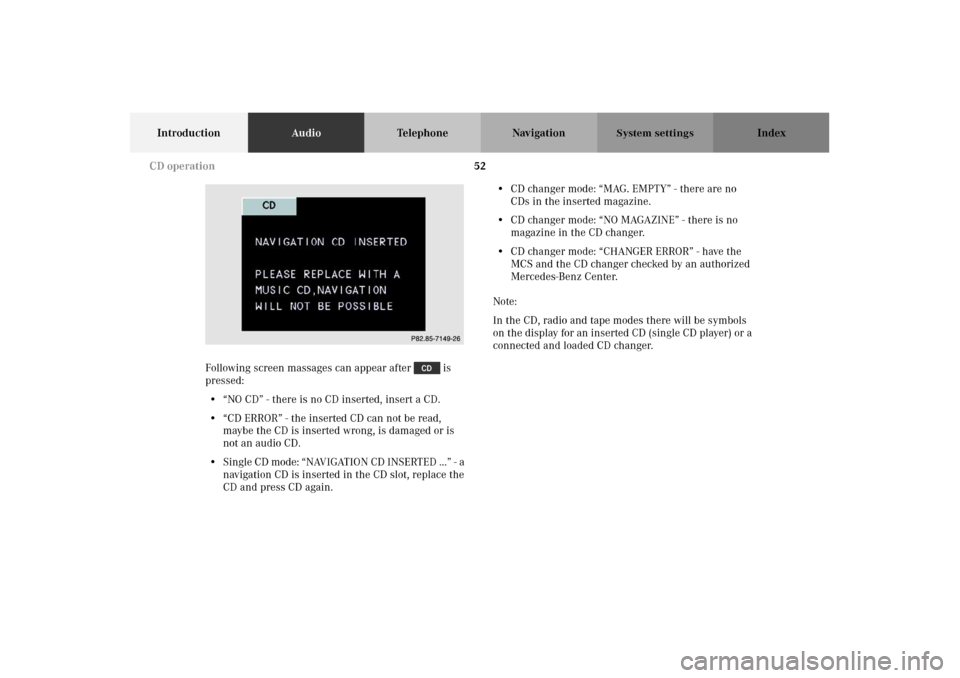
Following screen massages can appear after is
pressed:
• “NO CD” - there is no CD inserted, insert a CD.
• “CD ERROR” - the inserted CD can not be read,
maybe the CD is inserted wrong, is damaged or is
not an audio CD.
• Single CD mode: “NAVIGATION CD INSERTED ...” - a
navigation CD is inserted in the CD slot, replace the
CD and press CD again.• CD changer mode: “MAG. EMPTY” - there are no
CDs in the inserted magazine.
• CD changer mode: “NO MAGAZINE” - there is no
magazine in the CD changer.
•CD changer mode: “CHANGER ERROR” - have the
MCS and the CD changer checked by an authorized
Mercedes-Benz Center.
Note:
In the CD, radio and tape modes there will be symbols
on the display for an inserted CD (single CD player) or a
connected and loaded CD changer.P82.85-7149-26
CD operation
Page 57 of 165
53
IntroductionAudioTelephone Navigation Index
System settings
Selecting CDs
(MCS with CD changer)
Selecting a CD with the number keypad:
Press a number key, e.g. , to select the correspond-
ing CD.
Note:
You can only select CD’s by pressing a number key from
to .The screen as shown above will appear for 4 seconds on
the display. The selected CD will be highlighted. If the
selected magazine slot is empty, the message “NO CD”
and the number of the selected slot will appear on the
screen. Then the next CD inserted will be selected.
The playback will begin with track 1 of the selected CD.
Note:
After the last track of the current CD has been played,
the next CD inserted in the magazine is selected and the
playback will continue with track 1.
P82.85-7148-26
P82.85-7150-26
CD operation
Page 92 of 165
88
Introduction Audio TelephoneNavigationIndex
System settings
Switching navigation operation on and off
The navigation operation starts by pressing the button
.
Only during the software loading process the navigation
start up screen appears.
Note:
The navigation system starts only after a navigation CD
has been inserted in the CD slot.
After the navigation system is booted the disclaimer
screen appears. If you accept the statements press .
Note:
The radio, tape, CD changer or telephone function can
be used while the navigation system is running.
To switch off navigation operation:
Switch to the radio, tape or CD changer mode and the
navigation system will continue to run in the back-
ground. If you switch off the MCS, the navigation and
audio system will also switch off.
Destination input
Page 157 of 165
153
Introduction Audio Telephone Navigation Index
System settings
Adjusting sound settings
You can adjust the sound settings for the audio sources.
The audio sources include:
• Radio (FM, AM, WB)
•Tape deck
•CD
•CD-Changer
Each audio source has its own adjustments for sound
system, bass and treble levels.
The adjustment for balance and fader are the same for
all audio sources.
Press the softkey “ADJ” in any audio menu (e.g.:
Radio FM menu).
With the softkeys , and you can select
the parameter you want to adjust. The selected parame-
ter will be highlighted.
P82.85-7156-26
System settings
Page 164 of 165

I
Incoming calls .................................................................... 68
Inserting or ejecting a CD (Single CD player) ............... 42
Inserting or ejecting a navigation CD............................. 89
Inserting or ejecting a tape .............................................. 31
L
Loading CDs in the CD changer ...................................... 43
M
Memory functions
(FM or AM mode) ........................................................... 25
Menu overview - Navigation............................................. 86
Menu overview - Radio.......................................................16
Menu overview - Telephone ............................................. 64
Menu overview - Single CD player (optional)
and CD changer (optional) ............................................ 48
Menu overview - Tape deck .............................................. 32
Music search....................................................................... 36
Music seek .......................................................................... 55
Mute voice instructions .................................................. 127O
Operating and display elements - Navigation................ 85
Operating and display elements - Radio ........................ 15
Operating and display elements -
Single CD player (optional) and
CD changer (optional).................................................... 41
Operating and display elements - System settings..... 152
Operating and display elements - Tape deck ................. 30
Operating and display elements - telephone ................. 63
Outgoing calls ..................................................................... 70
P
Pause (tape)......................................................................... 40
Pause (CD) ........................................................................... 58
Play CD tracks in random order ...................................... 57
Q
Quick-dialing....................................................................... 76
Page 165 of 165

R
Recent Route editing ....................................................... 120
Redial ....................................................................................74
Requesting and displaying Info Services ....................... 79
Road obstructed.................................................................131
Route guidance................................................................. 124
S
Saving the current vehicle position .............................. 109
Scanning (tape) .................................................................. 37
Scanning (CD) .................................................................... 56
Selecting a station
(FM or AM mode) ............................................................19
Selecting CDs (MCS with CD changer) .......................... 53
Selecting the language.................................................... 147
Selecting the off-route recalculation mode.................. 146
Selecting the route calculation mode ........................... 144
Select time display............................................................. 59
Setting map screen orientation ..................................... 139
Setting points of interest icon options ..........................141
Setting the display dimming characteristics............... 157
Setting type of guidance display ................................... 137
Setting voice prompt type/frequency........................... 135
Skip blanks ......................................................................... 38
Speed-dialing ...................................................................... 75Switching between
the light mode and the dark mode ............................ 155
Switching CD operation on and off ................................. 50
Switching navigation operation on and off .................... 88
Switching radio operation on and off ............................. 18
Switching tape operation on and off ............................... 33
Switching telephone operation on and off ..................... 66
T
The principle of route guidance..................................... 122
Today’s Plan .......................................................................115
Track select ......................................................................... 54
V
Viewing GPS Information ............................................... 149
Viewing the Maneuver List during guidance .............. 130
Viewing Software Information ....................................... 150
W
Weather band...................................................................... 22
Page:
< prev 1-8 9-16 17-24