Page 85 of 250
5-5
Driving Your Mazda
Starting and Driving
Form No. 8Q50-EA-01G
�
�� � Parking Brake
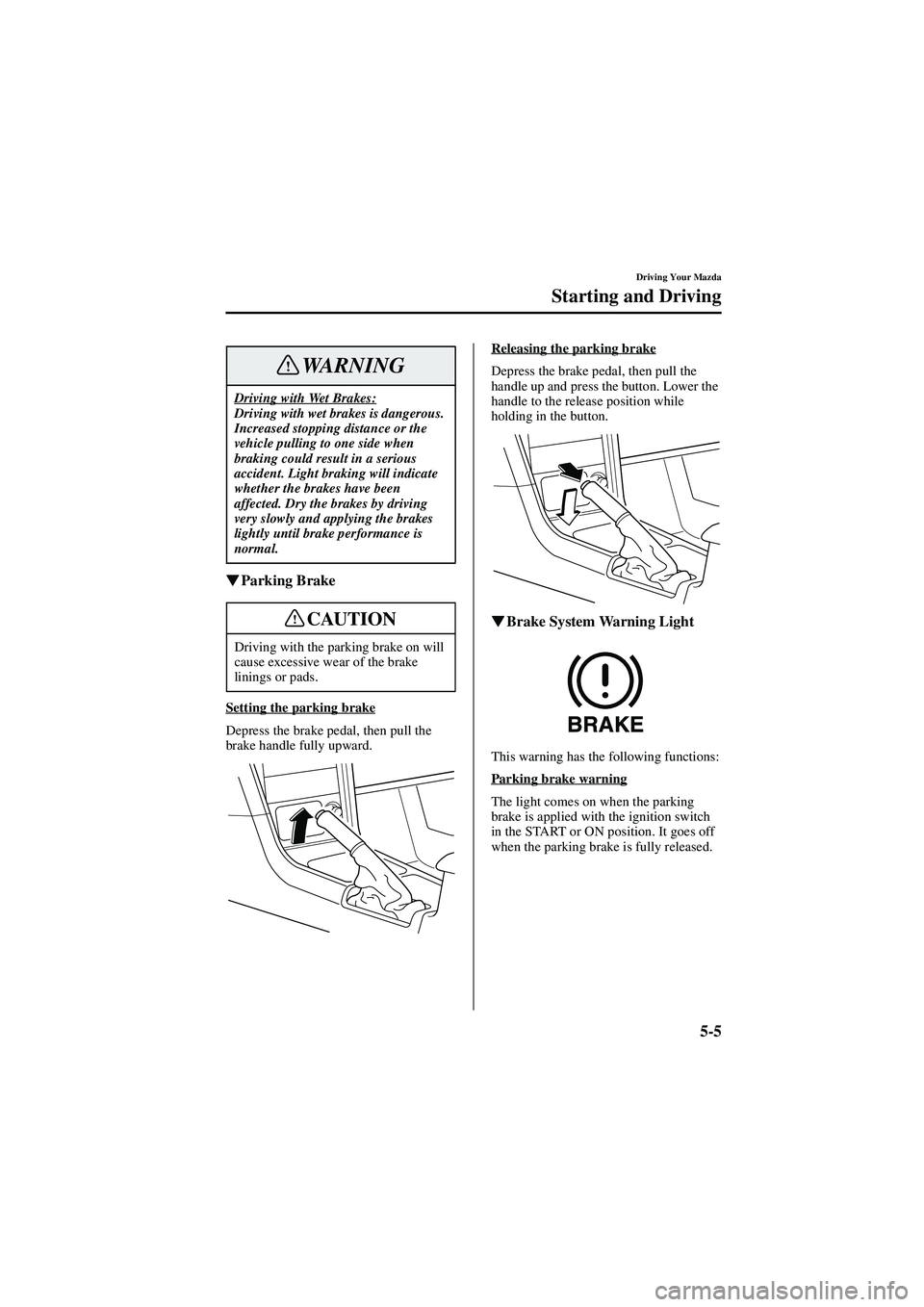
Setting the parking brake
Depress the brake pedal, then pull the
brake handle fully upward. Releasing the parking brake
Depress the brake pedal, then pull the
handle up and press the button. Lower the
handle to the release position while
holding in the button.
�
�� � Brake System Warning Light
This warning has the following functions:
Parking brake warning
The light comes on when the parking
brake is applied with the ignition switch
in the START or ON position. It goes off
when the parking brake is fully released.
Driving with Wet Brakes:Driving with wet brakes is dangerous.
Increased stopping distance or the
vehicle pulling to one side when
braking could result in a serious
accident. Light braking will indicate
whether the brakes have been
affected. Dry the brakes by driving
very slowly and applying the brakes
lightly until brake performance is
normal.
Driving with the parking brake on will
cause excessive wear of the brake
linings or pads.
WARNING
CAUTION
J94S.book Page 5 Saturday, June 23, 2001 1:04 PM
Page 86 of 250

5-6
Driving Your Mazda
Starting and Driving
Form No. 8Q50-EA-01G
Low brake fluid level warning
If the light stays on after the parking brake
is fully released, you may have a brake
problem.
Drive to the side of the road and park off
the right-of-way.
You may notice that the pedal is harder to
push or that it may go closer to the floor.
In either case, it will take longer to stop
the vehicle.
1. With the engine stopped, check the brake fluid level immediately and add
fluid as required (page 8-15).
2. After adding fluid, check the light again.
If the warning light remains on, or if the
brakes do not operate properly, do not
drive the vehicle. Have it towed to an
Authorized Mazda Dealer.
Even if the light goes off, have your brake
system inspected as soon as possible.
�
�� � Anti-Lock Brake System (ABS)
The ABS control unit continuously
monitors the speed of each wheel. If one
is about to lock up, the ABS responds by
automatically releasing and reapplying
that wheel’ s brake.
The driver will feel a slight vibration in
the brake pedal and may hear a chattering
noise from the brake system. This is
normal when the ABS operates. Don ’t
pump the brakes, continue to press down
on the brake pedal.
Brake Warning Light:Driving with the brake system
warning light on is dangerous. It
indicates that your brakes may not
work at all or that they could
completely fail at any time. If this
light remains on, have the brakes
inspected immediately. Don ’t drive
with this light on, and contact an
Authorized Mazda Dealer to have the
brakes inspected as soon as possible.
WARNING
ABS:The ABS cannot compensate for
unsafe and reckless driving, excessive
speed, tailgating (following another
vehicle too closely), and hydroplaning
(reduced tire friction and road
contact because of water on the road
surface). You can still have an
accident. So don ’t rely on ABS as a
substitute for safe driving.
NOTE
Braking distances may be longer on
loose surfaces (snow or gravel, for
example) which usually have a hard
foundation. A vehicle with a normal
braking system may require less
distance to stop under these conditions
because the tires will build up a wedge
of surface layer when the wheels skid.
WARNING
J94S.book Page 6 Saturday, June 23, 2001 1:04 PM
Page 87 of 250

5-7
Driving Your Mazda
Starting and Driving
Form No. 8Q50-EA-01G
�
�� � ABS Warning Light
The warning light stays on for a few
seconds when the ignition switch is turned
to the ON position.
If the ABS warning light stays on while
you ’re driving, the ABS control unit has
detected a system malfunction. If this
occurs, your brakes will function
normally as if the vehicle had no ABS.
Should this happen, consult an Authorized
Mazda Dealer as soon as possible.
�
�� � Brake Pad Wear Indicator
When the disc brake pads become worn,
the built-in wear indicators contact the
disc plates. This causes a screeching noise
to warn that the pads should be replaced.
When you hear this noise, consult an
Authorized Mazda Dealer as soon as
possible.
NOTE
When the engine is jump-started to
charge the battery, uneven rpm occurs
and the ABS warning light comes on.
This is due to a weak battery, not a
malfunction.
Recharge the battery.
Driving with Worn Disc Pads:Driving with worn disc pads is
dangerous. The brakes could fail and
cause a serious accident. As soon as
you hear a screeching noise consult
an Authorized Mazda Dealer.
WARNING
J94S.book Page 7 Saturday, June 23, 2001 1:04 PM
Page 89 of 250
5-9
Driving Your Mazda
Starting and Driving
Form No. 8Q50-EA-01G
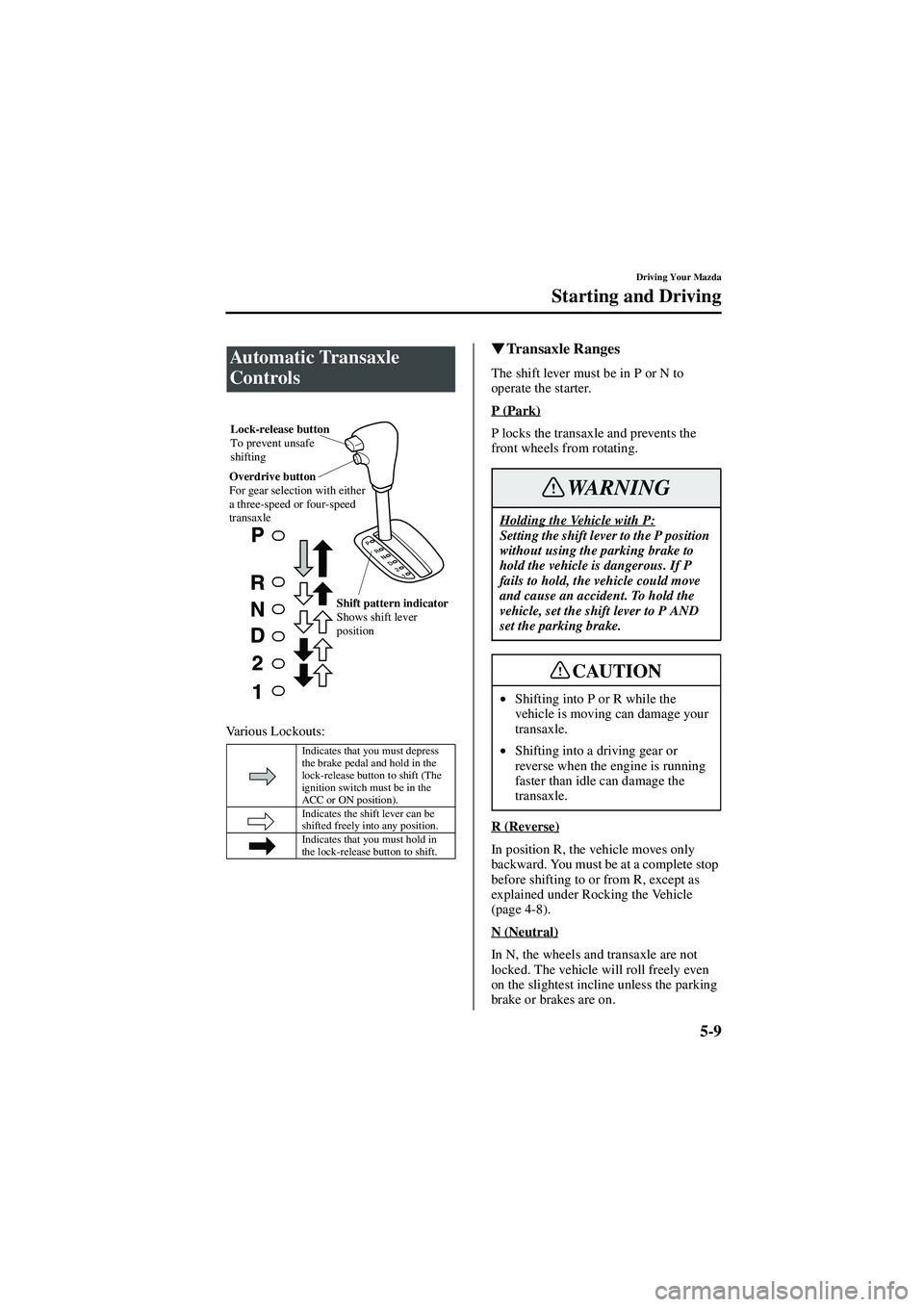
Various Lockouts:
�
�� � Transaxle Ranges
The shift lever must be in P or N to
operate the starter.
P (Park)
P locks the transaxle and prevents the
front wheels from rotating.
R (Reverse)
In position R, the vehicle moves only
backward. You must be at a complete stop
before shifting to or from R, except as
explained under Rocking the Vehicle
(page 4-8).
N (Neutral)
In N, the wheels and transaxle are not
locked. The vehicle will roll freely even
on the slightest incline unless the parking
brake or brakes are on.
Automatic Transaxle
Controls
Indicates that you must depress
the brake pedal and hold in the
lock-release button to shift (The
ignition switch must be in the
ACC or ON position).
Indicates the shift lever can be
shifted freely into any position.
Indicates that you must hold in
the lock-release button to shift.
Lock-release button
To prevent unsafe
shifting
Overdrive button
For gear selection with either
a three-speed or four-speed
transaxle
Shift pattern indicator
Shows shift lever
position
Holding the Vehicle with P:Setting the shift lever to the P position
without using the parking brake to
hold the vehicle is dangerous. If P
fails to hold, the vehicle could move
and cause an accident. To hold the
vehicle, set the shift lever to P AND
set the parking brake.
•Shifting into P or R while the
vehicle is moving can damage your
transaxle.
• Shifting into a driving gear or
reverse when the engine is running
faster than idle can damage the
transaxle.
WARNING
CAUTION
J94S.book Page 9 Saturday, June 23, 2001 1:04 PM
Page 93 of 250

5-13
Driving Your Mazda
Starting and Driving
Form No. 8Q50-EA-01G
With cruise control, you can set and
automatically maintain any speed of more
than about 40 km/h (25 mph).
�
�� � Cruise Set Indicator Light
This light comes on when a cruising speed
is set.
�
�� � Activation/Deactivation
To activate the system, push the CRUISE
MAIN switch.
To deactivate the system, push the OFF
end.Cruise Control
Cruise Control Use:Using cruise control in the following
conditions could cause you to lose
control of the vehicle:
•
•• • Heavy or unsteady traffic
•
••
• Slippery or winding roads
•
••
• Similar restrictions that require
inconsistent speed
Don ’t use cruise control in these
situations.
WARNING
Cruise Main Switch:Leaving the CRUISE MAIN switch
on when not using the cruise control
is dangerous as it may be switched on
accidentally. This could result in loss
of vehicle control. Keep the CRUISE
MAIN switch off when cruise control
is not in use.
WARNING
J94S.book Page 13 Saturday, June 23, 2001 1:04 PM
Page 96 of 250

5-16
Driving Your Mazda
Starting and Driving
Form No. 8Q50-EA-01G
�
�� � To Cancel
To turn off the system, use one of these
methods:
• Push the OFF end of the CRUISE
MAIN switch.
• Slightly depress the brake pedal.
• (Manual transaxle)
Depress the clutch pedal.
The system is off when the ignition is off. The Traction Control System (TCS)
enhances traction and safety by regulating
engine torque. When the TCS detects
driving wheel slippage, it lowers engine
torque to prevent loss of traction.
This means that on a slick surface, the
engine adjusts automatically to provide
optimum power to the drive wheels
without causing them to spin and lose
traction.
NOTE
Cruise control will cancel at about 15
km/h (9 mph) below the preset speed
or below 40 km/h (25 mph).
Traction Control System
(TCS)
TCS and Unsafe Driving:The traction control system (TCS)
cannot compensate for unsafe and
reckless driving, excessive speed,
tailgating (following another vehicle
too closely), and hydroplaning
(reduced tire friction and road
contact because of water on the road
surface). You can still have an
accident. So don
’t rely on the traction
control system as a substitute for safe
driving.
TCS and Snow and Ice:
Driving without proper traction
devices on snow and ice-covered
roads is dangerous. The traction
control system (TCS) alone cannot
provide adequate traction and you
could still have an accident. Use snow
tires or tires chains and drive at
reduced speeds when roads are
covered with ice and snow.
WARNING
J94S.book Page 16 Saturday, June 23, 2001 1:04 PM
Page 97 of 250

5-17
Driving Your Mazda
Starting and Driving
Form No. 8Q50-EA-01G
�
�� � TCS Warning Light
This warning light stays on for a few
seconds when the ignition switch is turned
to the ON position. It flashes when the
system regulates engine torque.
If the light stays on, take your vehicle to
an Authorized Mazda Dealer. The traction
control system may have a malfunction.
�
�� � TCS OFF Indicator Light
This light comes on when the ignition
switch is turned to the ON position.
It goes off when the engine is started. It
also comes on when you switch off the
traction control system or when the
system has a malfunction.
�
�� � TCS OFF Switch
Push this switch once to turn off the TCS.
Push it again to turn the TCS back on.
NOTE
• In addition to the TCS warning light
flashing, a slight lugging sound will
come from the engine. This
indicates that the traction control
system is operating properly.
• On slippery surfaces, such as fresh
snow, it will be impossible to
achieve high rpm when the traction
control system is on.
NOTE
After starting the engine on very cold
days, the TCS OFF indicator will
remain on and TCS will not operate
until the engine is warm.
J94S.book Page 17 Saturday, June 23, 2001 1:04 PM
Page 102 of 250
5-22
Driving Your Mazda
Instrument Cluster and Indicators
Form No. 8Q50-EA-01G
�
�� � Fuel Gauge
The fuel gauge shows approximately how
much fuel is in the tank. We recommend
keeping the tank over 1/4 full. When the
low fuel warning light illuminates or
when the needle is near E, refuel as soon
as possible.
�
�� � Dashboard Illumination
When the parking lights or headlights are
on, rotate the thumb-wheel to adjust the
brightness of the dashboard lights.
Warning light
Bright
Dim
J94S.book Page 22 Saturday, June 23, 2001 1:04 PM
