2002 Hyundai Atos set clock
[x] Cancel search: set clockPage 180 of 249
FEATURES OF YOUR HYUNDAI 1-43
B900B02X-GAT
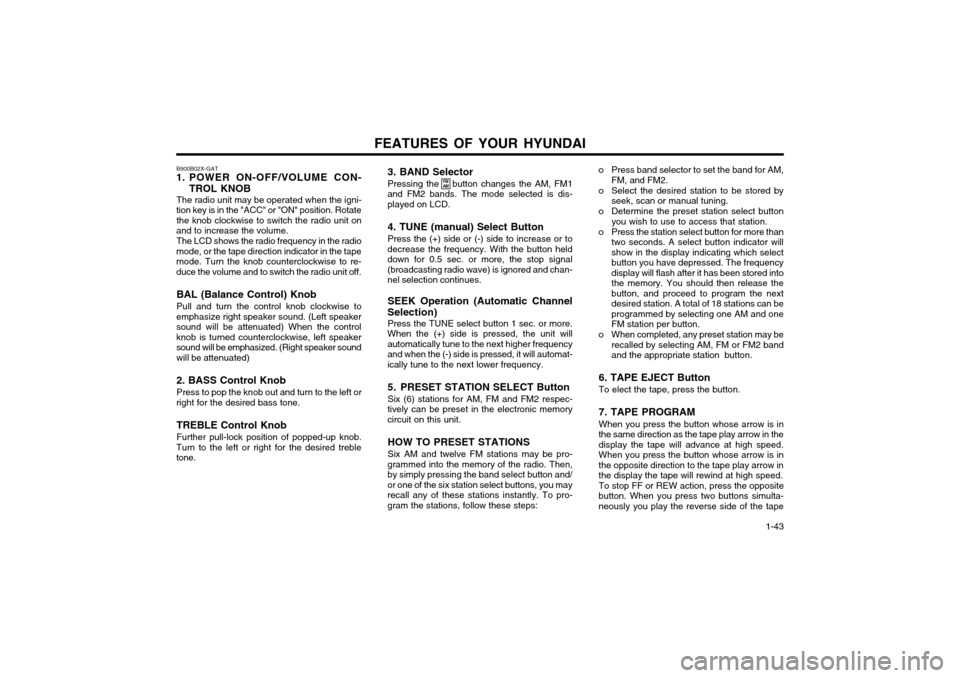
1. POWER ON-OFF/VOLUME CON-
TROL KNOB
The radio unit may be operated when the igni-
tion key is in the "ACC" or "ON" position. Rotate the knob clockwise to switch the radio unit on
and to increase the volume.
The LCD shows the radio frequency in the radio
mode, or the tape direction indicator in the tape mode. Turn the knob counterclockwise to re-duce the volume and to switch the radio unit off.
BAL (Balance Control) Knob Pull and turn the control knob clockwise to
emphasize right speaker sound. (Left speaker sound will be attenuated) When the controlknob is turned counterclockwise, left speakersound will be emphasized. (Right speaker sound
will be attenuated) 2. BASS Control Knob Press to pop the knob out and turn to the left or
right for the desired bass tone.
TREBLE Control Knob Further pull-lock position of popped-up knob.
Turn to the left or right for the desired treble tone. 3. BAND Selector Pressing the button changes the AM, FM1
and FM2 bands. The mode selected is dis- played on LCD.
4. TUNE (manual) Select Button Press the (+) side or (-) side to increase or to
decrease the frequency. With the button held down for 0.5 sec. or more, the stop signal(broadcasting radio wave) is ignored and chan-nel selection continues.
SEEK Operation (Automatic Channel
Selection) Press the TUNE select button 1 sec. or more.
When the (+) side is pressed, the unit willautomatically tune to the next higher frequencyand when the (-) side is pressed, it will automat-ically tune to the next lower frequency.
5. PRESET STATION SELECT Button Six (6) stations for AM, FM and FM2 respec-
tively can be preset in the electronic memory circuit on this unit.
HOW TO PRESET STATIONS Six AM and twelve FM stations may be pro-
grammed into the memory of the radio. Then, by simply pressing the band select button and/or one of the six station select buttons, you mayrecall any of these stations instantly. To pro-gram the stations, follow these steps:
FM AMo Press band selector to set the band for AM, FM, and FM2.
o Select the desired station to be stored by seek, scan or manual tuning.
o Determine the preset station select button you wish to use to access that station.
o Press the station select button for more than two seconds. A select button indicator will show in the display indicating which selectbutton you have depressed. The frequencydisplay will flash after it has been stored intothe memory. You should then release thebutton, and proceed to program the nextdesired station. A total of 18 stations can beprogrammed by selecting one AM and oneFM station per button.
o When completed, any preset station may be recalled by selecting AM, FM or FM2 bandand the appropriate station button.
6. TAPE EJECT Button To elect the tape, press the button. 7. TAPE PROGRAM When you press the button whose arrow is in
the same direction as the tape play arrow in the display the tape will advance at high speed.When you press the button whose arrow is inthe opposite direction to the tape play arrow inthe display the tape will rewind at high speed. To stop FF or REW action, press the opposite
button. When you press two buttons simulta-neously you play the reverse side of the tape
Page 183 of 249
FEATURES OF YOUR HYUNDAI
1-46 B922B02X-GAT
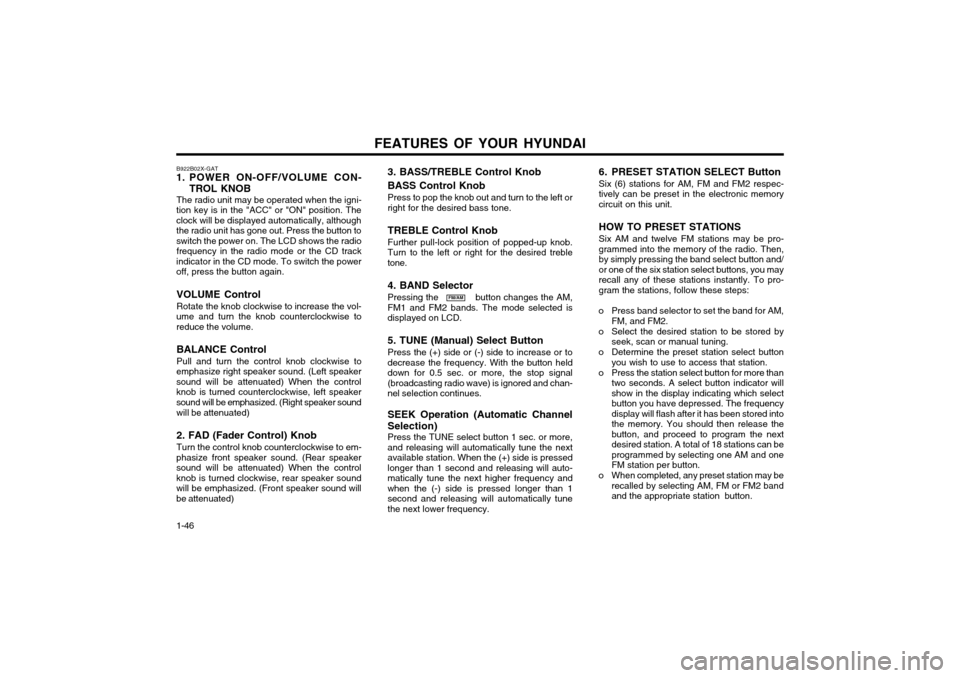
1. POWER ON-OFF/VOLUME CON-
TROL KNOB
The radio unit may be operated when the igni-
tion key is in the "ACC" or "ON" position. The clock will be displayed automatically, althoughthe radio unit has gone out. Press the button toswitch the power on. The LCD shows the radio frequency in the radio mode or the CD track
indicator in the CD mode. To switch the poweroff, press the button again.
VOLUME Control Rotate the knob clockwise to increase the vol-
ume and turn the knob counterclockwise to reduce the volume.
BALANCE Control Pull and turn the control knob clockwise to
emphasize right speaker sound. (Left speaker sound will be attenuated) When the controlknob is turned counterclockwise, left speakersound will be emphasized. (Right speaker sound
will be attenuated) 2. FAD (Fader Control) Knob Turn the control knob counterclockwise to em-
phasize front speaker sound. (Rear speaker sound will be attenuated) When the controlknob is turned clockwise, rear speaker soundwill be emphasized. (Front speaker sound willbe attenuated)
FM/AM 6. PRESET STATION SELECT Button Six (6) stations for AM, FM and FM2 respec- tively can be preset in the electronic memorycircuit on this unit. HOW TO PRESET STATIONS Six AM and twelve FM stations may be pro- grammed into the memory of the radio. Then,by simply pressing the band select button and/or one of the six station select buttons, you mayrecall any of these stations instantly. To pro-gram the stations, follow these steps:
o Press band selector to set the band for AM, FM, and FM2.
o Select the desired station to be stored by seek, scan or manual tuning.
o Determine the preset station select button you wish to use to access that station.
o Press the station select button for more than two seconds. A select button indicator willshow in the display indicating which selectbutton you have depressed. The frequencydisplay will flash after it has been stored intothe memory. You should then release thebutton, and proceed to program the nextdesired station. A total of 18 stations can beprogrammed by selecting one AM and oneFM station per button.
o When completed, any preset station may be recalled by selecting AM, FM or FM2 bandand the appropriate station button.
3. BASS/TREBLE Control Knob BASS Control Knob Press to pop the knob out and turn to the left or right for the desired bass tone. TREBLE Control Knob Further pull-lock position of popped-up knob. Turn to the left or right for the desired trebletone. 4. BAND Selector Pressing the button changes the AM, FM1 and FM2 bands. The mode selected isdisplayed on LCD. 5. TUNE (Manual) Select Button Press the (+) side or (-) side to increase or to decrease the frequency. With the button helddown for 0.5 sec. or more, the stop signal(broadcasting radio wave) is ignored and chan-nel selection continues. SEEK Operation (Automatic Channel Selection) Press the TUNE select button 1 sec. or more, and releasing will automatically tune the nextavailable station. When the (+) side is pressedlonger than 1 second and releasing will auto-matically tune the next higher frequency andwhen the (-) side is pressed longer than 1second and releasing will automatically tunethe next lower frequency.
Page 206 of 249
3-5
WHAT TO DO IN AN EMERGENCY
SD070G1-E
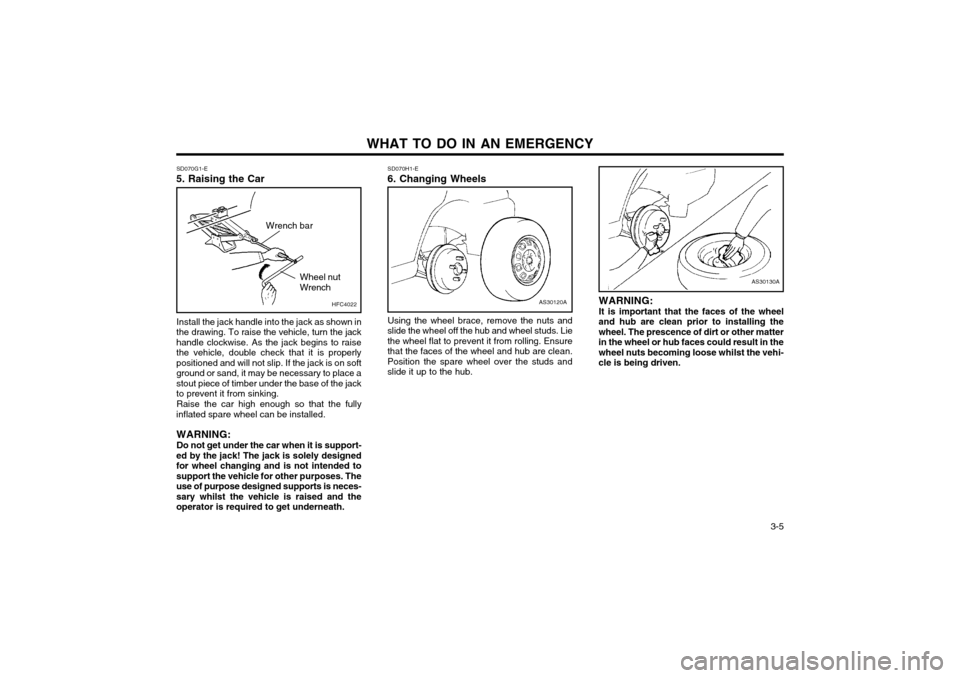
5. Raising the Car
AS30120A
SD070H1-E 6. Changing Wheels
Using the wheel brace, remove the nuts and
slide the wheel off the hub and wheel studs. Lie the wheel flat to prevent it from rolling. Ensurethat the faces of the wheel and hub are clean.Position the spare wheel over the studs andslide it up to the hub.
Install the jack handle into the jack as shown in
the drawing. To raise the vehicle, turn the jackhandle clockwise. As the jack begins to raisethe vehicle, double check that it is properlypositioned and will not slip. If the jack is on softground or sand, it may be necessary to place astout piece of timber under the base of the jackto prevent it from sinking.
Raise the car high enough so that the fully
inflated spare wheel can be installed.
WARNING: Do not get under the car when it is support-
ed by the jack! The jack is solely designed for wheel changing and is not intended tosupport the vehicle for other purposes. Theuse of purpose designed supports is neces-sary whilst the vehicle is raised and theoperator is required to get underneath. WARNING: It is important that the faces of the wheel
and hub are clean prior to installing the wheel. The prescence of dirt or other matterin the wheel or hub faces could result in thewheel nuts becoming loose whilst the vehi-cle is being driven.
AS30130A
HFC4022
Wrench bar
Wheel nut Wrench
Page 207 of 249
WHAT TO DO IN AN EMERGENCY
3-6 SD070I1-E
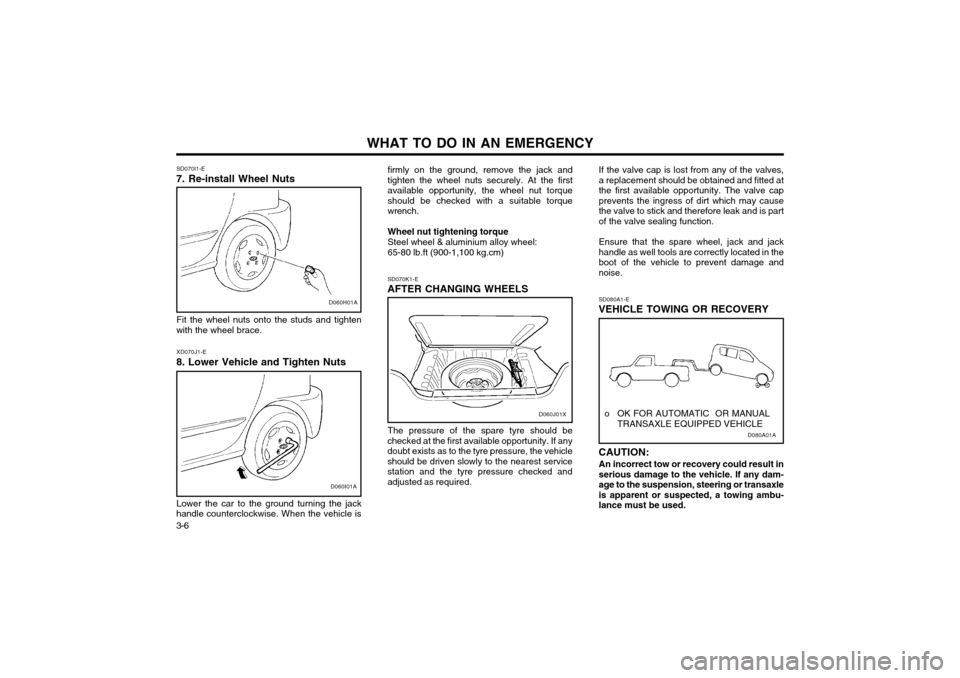
7. Re-install Wheel Nuts
D060H01A
Fit the wheel nuts onto the studs and tighten
with the wheel brace.
D060I01A
XD070J1-E
8. Lower Vehicle and Tighten Nuts
Lower the car to the ground turning the jack
handle counterclockwise. When the vehicle is firmly on the ground, remove the jack and tighten the wheel nuts securely. At the firstavailable opportunity, the wheel nut torqueshould be checked with a suitable torquewrench. Wheel nut tightening torque Steel wheel & aluminium alloy wheel:65-80 lb.ft (900-1,100 kg.cm) SD070K1-E
AFTER CHANGING WHEELS
The pressure of the spare tyre should be
checked at the first available opportunity. If any doubt exists as to the tyre pressure, the vehicleshould be driven slowly to the nearest servicestation and the tyre pressure checked andadjusted as required. If the valve cap is lost from any of the valves,a replacement should be obtained and fitted atthe first available opportunity. The valve capprevents the ingress of dirt which may causethe valve to stick and therefore leak and is partof the valve sealing function. Ensure that the spare wheel, jack and jack handle as well tools are correctly located in theboot of the vehicle to prevent damage andnoise.
D080A01A
o OK FOR AUTOMATIC OR MANUAL
TRANSAXLE EQUIPPED VEHICLE
SD080A1-E
VEHICLE TOWING OR RECOVERY CAUTION:
An incorrect tow or recovery could result in serious damage to the vehicle. If any dam-age to the suspension, steering or transaxleis apparent or suspected, a towing ambu-lance must be used.D060J01X
Page 222 of 249
DO-IT-YOURSELF MAINTENANCE
6-4 G040A01X-GAT
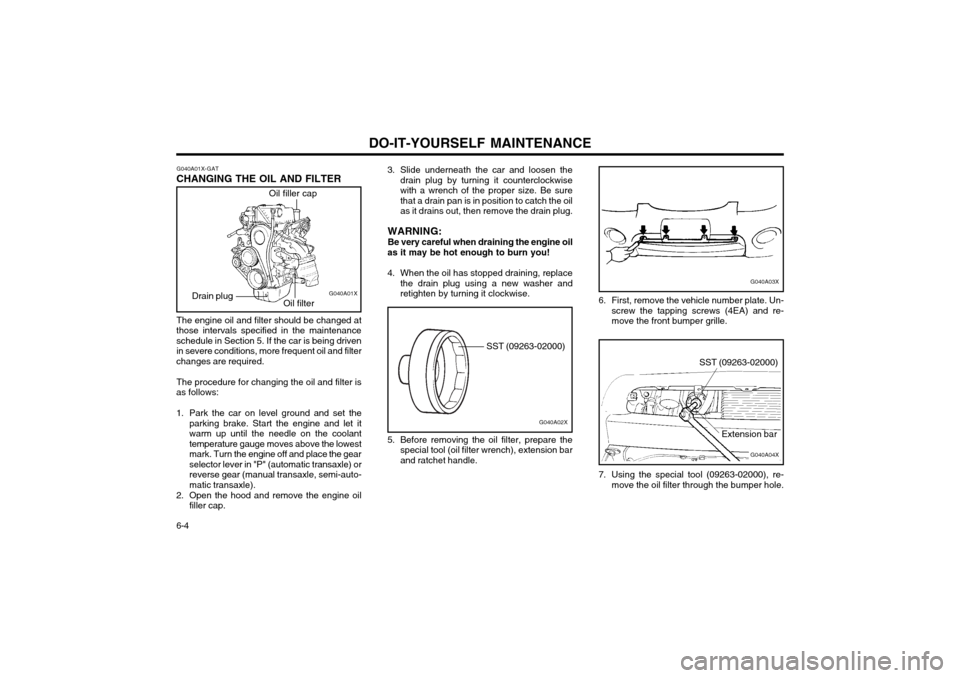
CHANGING THE OIL AND FILTER
Oil filler cap
Oil filter G040A01X
Drain plug
The engine oil and filter should be changed at
those intervals specified in the maintenance schedule in Section 5. If the car is being driven in severe conditions, more frequent oil and filter
changes are required.
The procedure for changing the oil and filter is
as follows:
1. Park the car on level ground and set the parking brake. Start the engine and let it warm up until the needle on the coolanttemperature gauge moves above the lowest
mark. Turn the engine off and place the gearselector lever in "P" (automatic transaxle) orreverse gear (manual transaxle, semi-auto-matic transaxle).
2. Open the hood and remove the engine oil filler cap. 3. Slide underneath the car and loosen the
drain plug by turning it counterclockwisewith a wrench of the proper size. Be sure
that a drain pan is in position to catch the oilas it drains out, then remove the drain plug.
WARNING: Be very careful when draining the engine oil
as it may be hot enough to burn you!
4. When the oil has stopped draining, replace the drain plug using a new washer and retighten by turning it clockwise.
G040A03X
6. First, remove the vehicle number plate. Un- screw the tapping screws (4EA) and re- move the front bumper grille.
G040A04X
SST (09263-02000)
Extension bar
7. Using the special tool (09263-02000), re- move the oil filter through the bumper hole.
G040A02X
SST (09263-02000)
5. Before removing the oil filter, prepare the special tool (oil filter wrench), extension bar and ratchet handle.
Page 247 of 249
INDEX10-1
A ABS SYSTEM
..................................................................................... 2-7
ADJUSTABLE FRONT SEATS .......................................................... 1-5
AIR CLEANER FILTER ...................................................................... 6-8
AIR CONDITIONER CARE .............................................................. 6-12
AIR CONDITIONING SWITCH ......................................................... 1-36
AIR CONDITIONING OPERATION .................................................1-37
ANTENNA ......................................................................................... 1-52
APPEARANCE CARE ....... ........................................................ 4-1 ~ 4-2
ASHTRAY ......................................................................................... 1-25
AUDIO FAULT CODE ...................................................................... 1-49
AUTOMATIC TRANSAXLE ......................... .............................. 2-5 ~ 2-6
BBATTERY MAINTENANCE .............................................................. 6-15
BEFORE STARTING THE ENGINE .................................................. 2-2
BONNET RELEASE ......................................................................... 1-30
BRAKE CIRCUIT FAILURE WARNING LAMP ................................1-18
BRAKE PEDAL CLEARANCE ......................................................... 6-14
BRAKE PEDAL FREEPLAY ............................................................. 6-13
BRAKES ........................................................................................... 6-11
C
CARE OF SEAT BELTS .................................................................... 1-7
CARE OF CASSETTE TAPE ................................................ 1-50 ~ 1-51
CARE OF DISC ................................................................................ 1-50
CATALYTIC CONVERTER (For MFI ) ................................................ 7-1 CENTRAL DOOR LOCKING
SYSTEM ............................................. 1-7
CHANGING THE OIL AND FILTER .................. ....................... 6-4 ~ 6-5
CHARGING WARNING LIGHT ........................................................ 1-19
CHILD PROTECTOR REAR DOOR LOCKS .................................... 1-4
CHILD RESTRAINT SYSTEM ............................................... 1-10 ~ 1-11
CIGAR LIGHTER .............................................................................. 1-24
CLOCK .............................................................................................. 1-24
CLUTCH PEDAL FREEPLAY .......................................................... 6-13
COMPACT DISK PLAYER OPERATION (H922M) .............. 1-47 ~ 1-48
COMPRESSOR DRIVE BELT ......................................................... 6-12
COOLING FANS .............................................................................. 6-15
D
DAY-NIGHT REAR VIEW MIRROR .................................................1-26
DOOR LOCKS .................................................................................... 1-3DRIVE BELTS .................................................................................. 6-14
DRIVING FOR ECONOMY ................................................................ 2-8
EEFFECTIVE BRAKING ....................................................................... 2-7
EMERGENCY T OWING ..................................................................... 3-8
EMISSION CONTROL SYSTEM ......... .............................................. 7-1
ENGINE COMPARTMENT (For MFI Engine) .................................... 6-1
ENGINE COOLANT ........................................................................... 6-5
ENGINE COOLANT TEMPERATURE GAUGE ...............................1-20
ENGINE OIL CONSUMPTION ........................................................... 6-3
F
FILLING THE WASHER RESERVOIR .............................................. 6-9
FOLDING REAR SEAT BACK AND SEAT CUSHION ...................1-27
FOLDING THE OUTSIDE REAR VIEW MIRRORS ........................1-26
ZK000A1-E 10. INDEX
10