Page 39 of 1139
Starting System
Circuit Diagram
- ilo.20lOA) :USA motklNo.2! l50A) : C.nid. model
UiIOEN H@D fUSE/REI.IY BOX
UNDEi OASTIFUST/ifLAY80x
Y.
ST HOT in STA8T illl
cLuTot [{Tr8LocKswtlcH
4-4
a
Page 41 of 1139
Starting System
Starter Circuit Troubleshooting
(cont'dl
6. Check the following items in the order listed untilyou find the open circuit.
. Check the BLIVWHT wire and connectors
between the under-dash fuse/relay box and theignition switch, and between the under-dash
fuse/relay box and the starter.. Check the ignition switch {see page 22-53).. Check the clutch interlock switch and connector.. Check the starter cut relay (see page 22-51).. Check LT GRN wire between the starter cut relayl
under-dash fuse/relay box and the clutch
interlock switch.. Check the BLK wire between the clutch interlock
switch and G501.
7, Check the cranking voltage and current draw.
ls ctanking voltage greatet than or equal to 8.7 V
and current draw less than or equal to 230 A?
YES-Go to step 8.
NO Replace the starter. or remove and
disassemble it, and check these items until you find
the cause.
. Starter armature dragging. Shorted armatu re winding. Excessive drag in engine
8. Check the engine speed while cranking the engine.
ls the engine speed above 100 tpm?
YES Go to step 9.
NO-Replace the starter, or remove and
disassemble it, and check for the following untilyou find the cause.
. Excessively worn starter brushes. Open circuit in commutator brushes. Open circuit in starter armature commutator
segments. Dirty or damaged helical splines or drive gear. Faulty drive gear clutch
9. Remove the starter, and inspect its drive gear andthe flywheel ring gear for damage. Replace anydamaged pans.I
4-6
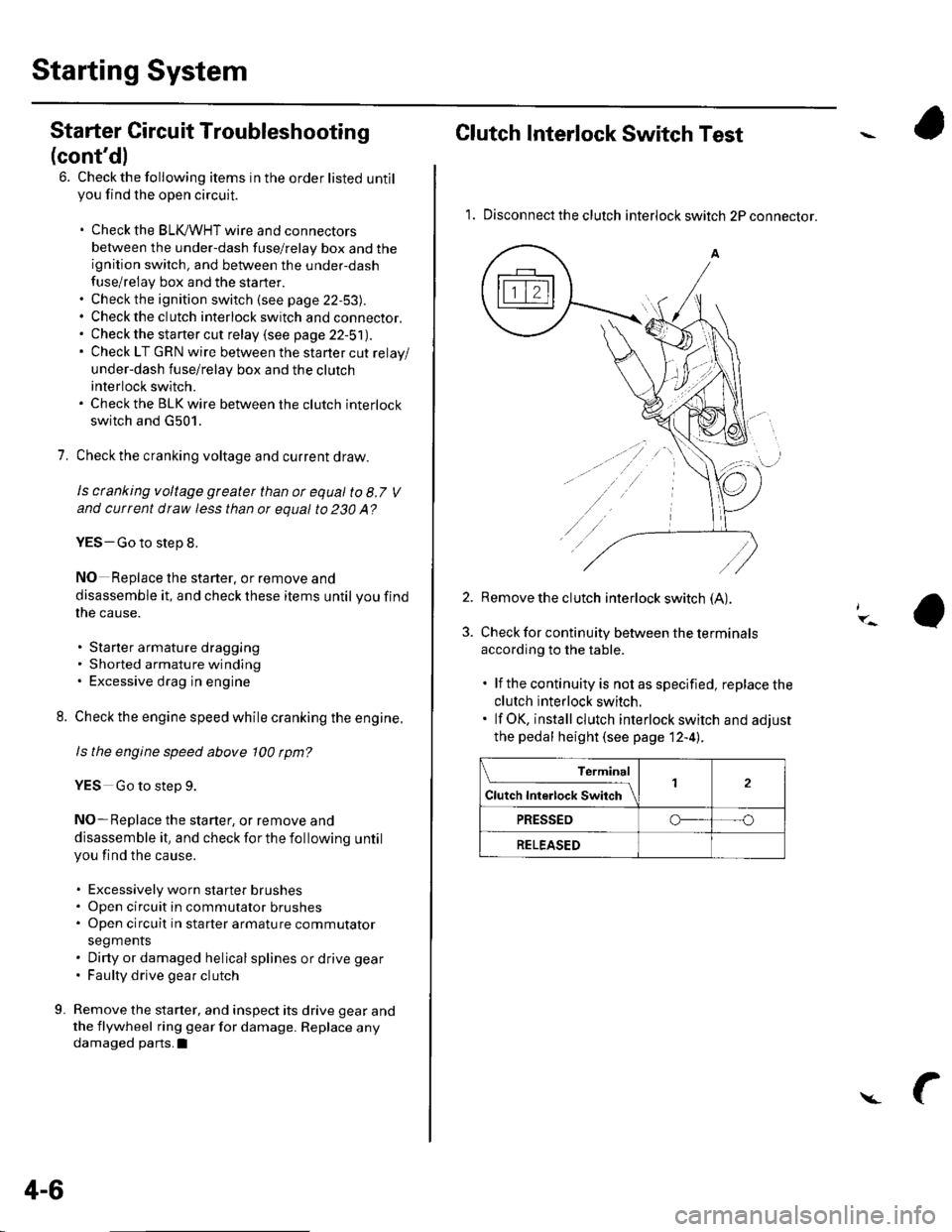
Clutch Interlock Switch Test
1. Disconnect the clutch interlock switch 2P connector.
2. Remove the clutch interlock switch (A).
Check for continuity between the terminals
according to the table.
. lf the continuity is not as specified, replace the
clutch interlock switch.. lf OK, install clutch interlock switch and adjust
the pedal height (see page 12-4l..
Terminal
Cl","f ri"t.tf ."tS""*Jrl2
PRESSEDo--- --o
RELEASED
Page 44 of 1139

Starter Replacement
1. Make sure you have the anti-theft code for the radio.
then write down the frequencies for the radio's
preset buttons.
2. Disconnect the negative cable from the battery first,
then disconnect the positive cable.
3. Disconnect the knock sensor connector.
4. Remove the bolt (A) securing the harness bracket,
then remove the intake manifold bracket (B).
A6x1,0mm12 N.m {1.2 kgf.m,8.7 tbt.ft)
8 x 1.25 mm22 N,m 12.2 kgt.m,16 rbf.ftl
L't2.
4-9
5. Disconnect the starter cable (A)from the B terminal
on the solenoid, then disconnect the BLK,/WHT wire
{B) from the S terminal.
10 x 1.25 mm44 N.m {a.5 kgf.m,33lblft)
8 x 1.25 mm9Nm10.9 kgf.m,7 lbl ft)
7.
9.
'10.
11.
2
S'-12x12smm6ilNm{6.5 kgl m,47lbfft)
Remove the two bolts holding the starter, then
remove the starter.
lnstall the starter in the reverse order of removal.
Make sure the crimped side of the ring terminal (A)
is facing out.
Connect the positive cable and negative cable to
the batterY.
Start the engine to make sure the starter operates
propeny.
Enter the anti-theft code for the radio, then enter
the customer's radio station presets.
Set the clock.
Perform the engine control module (EcM) idle learn
procedure (see page 1 '1- 139 ).
I
Page 49 of 1139

Starting System
Starter Overhaul (cont'dl
Planetary Gear Inspection
16. Check the planetary gears (A) and ring gear {B).Replace them if they are worn or damaged.
Overrunning Cluich Inspection
17. Slide the overrunning clutch along the shaft.
Replace it if it does not slide smoothly.
18. Rotate the overrunning clutch (A) both ways.
Does it lock in one direction and rotate smoothly inreverse? lf it does not lock in either direction or it
locks in both directions, replace it.
lf the starter drive gear (B) is worn or damaged,
replace the overrunning clutch assembly; the gear
is not available separately.
Check the condition of the flywheel ring gear.
Replace it if the starter drive gear teeth are
oamageo.
19.
4-14
i.-
Starter Reassembly
20, Pry back each brush spring with a screwdriver, thenposition the brush about halfway out of its holder,
and release the spring to hold it there.
NOTE: To seatthe new brushes. slip a strip of #5OO
or # 600 sandpaper. with the grit side out, be&veen
the commutator and each brush, and smoothly
rotate the armature. The contact surface of the
brushes will be sanded to the same contour as the
commutator.
21lnstallthe armature in the housing, and installthe
brush holder. Next, pry back each brush spring
again, and push the brush down until it seats
against the commutator, then release the spring
against the end of the brush.
s
Install the starter end cover to retain the brush
holder.
Page 64 of 1139
l\-Alternator Replacement
1. Make sure you have the anti-theft code for the radio,
then write down the frequencies for the radio'spreset buttons,
2. Disconnect the negative cable from the battery first,
then disconnect the positive cable.
3. Remove the front bumper (see page 20-85).
4. Remove the right side headlight (see page 22-79).
5. Remove the reserve tank from the bracket.
6. Remove the drive belt (see page 4-26).
7. Remove the three bolts securing the alternator.
8 x 1.25 mm22 N.n 12.2 kgl.m,
Disconnect the alternator connector (A) and BLK
wire (B) from the alternator.
8 N.m10.8 kgf.m,6lbf.ft)
\
6
'I 1.
9.
10.
13.
14.
Remove the alternator.
Installthe alternator and drive belt in the reverse
order of removal.
Connect the positive cable and negative cable to
the battery.
Enter the anti-theft code for the radio, then enter
the customer's radio station presets.
Set the clock.
Perform the engine control module {ECM) idle learn
procedure (see page 11-139).
tt.
4-29
Page 65 of 1139
Charging System
Alternator Overhaul
Exploded View
BEARING
PULLEYLOCKNUT
\-a
TERMINALINSULATOR
REAR HOUSINGASSEMBLY
INSULATORBUSHING
PULLEY
/
\/
/@
W|UF., .oy." -
/
REAR BEARING / ,/ ./ FRoNr B
@b.J.y{=RE+LN'"'
IvVFko"-% /
qtr*njlv
V( r),
"V
BRUSH \11BRUSH HOLOER HOLDER -\
TNSULATOR \l VOLTAGE }
\-
REGULATOR (-
@*F, -\:
v_re *^i
\gP^@' I
*ffilw9
ROTOR
4-30
Page 66 of 1139
L
Special Tools Required. Driver 07749-0010000. Attachment,52 x 55 mm 07746-0010400
NOTE: Refer to the Exploded View as needed during
this procedure.
1, Test the alternator and regulator before you
remove them (see page 4-22l,.
2. Remove the alternator (see page 4-29).
3. lf the front bearing needs replacing, remove thepulley locknut with a 10 mm wrench (A) and a
22 mm wrench (B). lf necessary, use an impact
wrencn.
Remove the harness bracket (A), insulator (B). three
flange nuts (C), and the screw (D), then remove theplate terminal (E).
,( ( , tt I;r_ lLt
5. Remove the end cover (A) anddustseal {B).
Remove the brush holder (A), voltage regulator (B),
and the rubber seal {C}.
6.
L1i.21---^
tqLJ
B-"--|.
(cont'd)
1!q[-dr,:l
4-31
Page 70 of 1139
Stator Test
20. Checkthatthere is continuity between each pair of
leads (A).
lf there is continuity, go to step 21 .
lf there is no continuity, replace the alternator.
Check for no continuity between each lead and the
coil core (B).
. lf there is no continuity, goto step 22.. lfthere is continuity, replace the alternator.
Assemble the alternator in reverse order of
disassembly, and note these items:
. Be careful not to get any grease or oil on lhe slip
n ngs.. lf you removed lhe pulley, tighten its locknutto
111 N.m (11.3 kgf m,81.7 lbf.ft)whenyou install
it.
21.
22.
'--l-- --i
4-35


