2002 DODGE RAM ECU
[x] Cancel search: ECUPage 385 of 2255
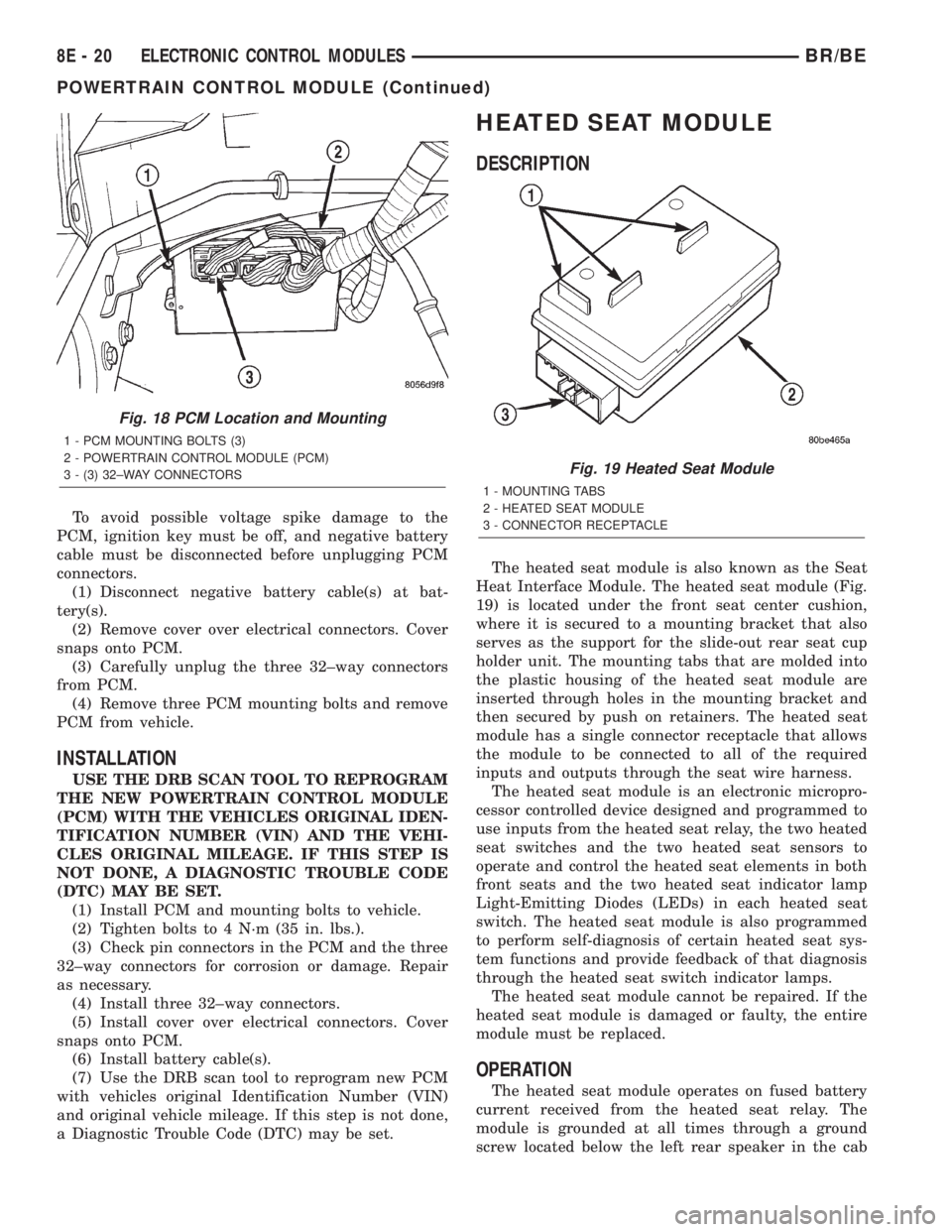
To avoid possible voltage spike damage to the
PCM, ignition key must be off, and negative battery
cable must be disconnected before unplugging PCM
connectors.
(1) Disconnect negative battery cable(s) at bat-
tery(s).
(2) Remove cover over electrical connectors. Cover
snaps onto PCM.
(3) Carefully unplug the three 32±way connectors
from PCM.
(4) Remove three PCM mounting bolts and remove
PCM from vehicle.
INSTALLATION
USE THE DRB SCAN TOOL TO REPROGRAM
THE NEW POWERTRAIN CONTROL MODULE
(PCM) WITH THE VEHICLES ORIGINAL IDEN-
TIFICATION NUMBER (VIN) AND THE VEHI-
CLES ORIGINAL MILEAGE. IF THIS STEP IS
NOT DONE, A DIAGNOSTIC TROUBLE CODE
(DTC) MAY BE SET.
(1) Install PCM and mounting bolts to vehicle.
(2) Tighten bolts to 4 N´m (35 in. lbs.).
(3) Check pin connectors in the PCM and the three
32±way connectors for corrosion or damage. Repair
as necessary.
(4) Install three 32±way connectors.
(5) Install cover over electrical connectors. Cover
snaps onto PCM.
(6) Install battery cable(s).
(7) Use the DRB scan tool to reprogram new PCM
with vehicles original Identification Number (VIN)
and original vehicle mileage. If this step is not done,
a Diagnostic Trouble Code (DTC) may be set.
HEATED SEAT MODULE
DESCRIPTION
The heated seat module is also known as the Seat
Heat Interface Module. The heated seat module (Fig.
19) is located under the front seat center cushion,
where it is secured to a mounting bracket that also
serves as the support for the slide-out rear seat cup
holder unit. The mounting tabs that are molded into
the plastic housing of the heated seat module are
inserted through holes in the mounting bracket and
then secured by push on retainers. The heated seat
module has a single connector receptacle that allows
the module to be connected to all of the required
inputs and outputs through the seat wire harness.
The heated seat module is an electronic micropro-
cessor controlled device designed and programmed to
use inputs from the heated seat relay, the two heated
seat switches and the two heated seat sensors to
operate and control the heated seat elements in both
front seats and the two heated seat indicator lamp
Light-Emitting Diodes (LEDs) in each heated seat
switch. The heated seat module is also programmed
to perform self-diagnosis of certain heated seat sys-
tem functions and provide feedback of that diagnosis
through the heated seat switch indicator lamps.
The heated seat module cannot be repaired. If the
heated seat module is damaged or faulty, the entire
module must be replaced.
OPERATION
The heated seat module operates on fused battery
current received from the heated seat relay. The
module is grounded at all times through a ground
screw located below the left rear speaker in the cab
Fig. 18 PCM Location and Mounting
1 - PCM MOUNTING BOLTS (3)
2 - POWERTRAIN CONTROL MODULE (PCM)
3 - (3) 32±WAY CONNECTORS
Fig. 19 Heated Seat Module
1 - MOUNTING TABS
2 - HEATED SEAT MODULE
3 - CONNECTOR RECEPTACLE
8E - 20 ELECTRONIC CONTROL MODULESBR/BE
POWERTRAIN CONTROL MODULE (Continued)
Page 388 of 2255

(5) Back-probe the heated seat module wire har-
ness connector (Fig. 20) , do not disconnect. Check
cavity #2 for approx. 5v, 5 voltage should be present,
If OK go to Step 6. If NOT OK replace the heated
seat control module.
(6) Back-probe the heated seat module wire har-
ness connector, do not disconnect. Check cavity #8 for
a range in voltage from 1.72v (warm seat) ± 3.0v
(cold seat). It should be within this range, If OK
replace the heated seat control module. If NOT OK,
test the Heated Seat Sensor. If NOT OK, replace the
left heated seat element and sensor assembly. If the
heated seat sensor tests OK, check for continuity
between the left heated seat cushion connector and
control module connector on the 5v supply circuit, If
NOT OK, repair the open or shorted 5v supply circuit
as required. If OK check for continuity between the
left heated seat cushion connector and control mod-
ule connector on the temperature sensor input cir-
cuit. If NOT OK, repair the open or shorted
temperature sensor input circuit as required. If OK
replace the heated seat control module.
BOTH SEATS INOPERATIVE
If both seats (driver and passenger) fail to heat
and the indicator lamps on the heated seat switches
for both seats fail to operate, test the heated seat
relay and/or fuses. Refer toRelay Diagnosis and
Testingin the Power Distribution section for heated
seat relay diagnosis and testing procedures. If the
heated seat relay checks OK, go to Step 1.
(1) Back-probe the heated seat module wire har-
ness connector (Fig. 20) , do not disconnect. Check for
continuity between the ground circuit cavity #13 of
the heated seat module connector and a good ground.
If OK go to Step 2. If NOT OK, repair the open or
shorted ground circuit as required.
(2) Back-probe the heated seat module wire har-
ness connector (Fig. 20) , do not disconnect. Check
cavity #4 and #6 for battery voltage, voltage should
be present, If OK go to Step 3. If NOT OK repair the
open or shorted fused B(+) circuit as required.
(3) Back-probe the heated seat module wire har-
ness connector, do not disconnect. Check cavity #2 for
approx. 5v, voltage should be present, replace the
heated seat control module with a known good mod-
ule and verify system operation.
REMOVAL
(1) Working under the center front seat console,
cut the tiestrap and remove the two push-on retain-
ers that secure the mounting tabs of the heated seat
module to the of the mounting bracket.
(2) Position the driver seat to the full forward and
inclined position and working under the center of the
front seat, from behind the seat, disconnect the seat
wire harness connector from the connector receptacle
on the back of the heated seat module (Fig. 21).
(3) Remove the heated seat module from under the
front seat.
INSTALLATION
(1) Working under the front seat connect the seat
wire harness connector to the connector receptacle on
the back of the heated seat module.
(2) Position the driver seat in the full rearward
and reclined position, and working under the front of
the seat, install the two push-on retainers onto the
heated seat module mounting tabs to secure the mod-
ule to the top of the mounting bracket or install
tiestrap.
Fig. 21 Heated Seat Module Remove/Install
1 - MOUNTING BRACKET
2 - HEATED SEAT MODULE
3 - MOUNTING TABS
4 - PUSH-ON RETAINERS
BR/BEELECTRONIC CONTROL MODULES 8E - 23
HEATED SEAT MODULE (Continued)
Page 391 of 2255

²Battery- The storage battery provides a reli-
able means of storing a renewable source of electrical
energy within the vehicle.
²Battery Cable- The battery cables connect the
battery terminal posts to the vehicle electrical sys-
tem.
²Battery Holddown- The battery holddown
hardware secures the battery in the battery tray in
the engine compartment.
²Battery Tray- The battery tray provides a
secure mounting location in the vehicle for the bat-
tery and an anchor point for the battery holddown
hardware.
For battery system maintenance schedules and
jump starting procedures, see the owner's manual in
the vehicle glove box. Optionally, refer to Lubrication
and Maintenance for the recommended battery main-
tenance schedules and for the proper battery jump
starting procedures. While battery charging can be
considered a maintenance procedure, the battery
charging procedures and related information are
located in the standard procedures section of this ser-
vice manual. This was done because the battery must
be fully-charged before any battery system diagnosis
or testing procedures can be performed. Refer to
Standard procedures for the proper battery charging
procedures.
OPERATION
The battery system is designed to provide a safe,
efficient, reliable and mobile means of delivering and
storing electrical energy. This electrical energy is
required to operate the engine starting system, as
well as to operate many of the other vehicle acces-
sory systems for limited durations while the engine
and/or the charging system are not operating. The
battery system is also designed to provide a reserve
of electrical energy to supplement the charging sys-
tem for short durations while the engine is running
and the electrical current demands of the vehicle
exceed the output of the charging system. In addition
to delivering, and storing electrical energy for the
vehicle, the battery system serves as a capacitor and
voltage stabilizer for the vehicle electrical system. It
absorbs most abnormal or transient voltages caused
by the switching of any of the electrical components
or circuits in the vehicle.
DIAGNOSIS AND TESTING - BATTERY SYSTEM
The battery, starting, and charging systems in the
vehicle operate with one another and must be tested
as a complete system. In order for the engine to start
and the battery to maintain its charge properly, all of
the components that are used in these systems must
perform within specifications. It is important that
the battery, starting, and charging systems be thor-
oughly tested and inspected any time a battery needs
to be charged or replaced. The cause of abnormal bat-
tery discharge, overcharging or early battery failure
must be diagnosed and corrected before a battery is
replaced and before a vehicle is returned to service.
The service information for these systems has been
separated within this service manual to make it eas-
ier to locate the specific information you are seeking.
However, when attempting to diagnose any of these
systems, it is important that you keep their interde-
pendency in mind.
The diagnostic procedures used for the battery,
starting, and charging systems include the most
basic conventional diagnostic methods, to the more
sophisticated On-Board Diagnostics (OBD) built into
the Powertrain Control Module (PCM). Use of an
induction-type milliampere ammeter, a volt/ohmme-
ter, a battery charger, a carbon pile rheostat (load
tester) and a 12-volt test lamp may be required. All
OBD-sensed systems are monitored by the PCM.
Each monitored circuit is assigned a Diagnostic Trou-
ble Code (DTC). The PCM will store a DTC in elec-
tronic memory for any failure it detects. Refer to
Charging System for the proper charging system on-
board diagnostic test procedures.
MIDTRONICS ELECTRICAL SYSTEM TESTER
The Midtronicstautomotive battery and charging
system tester is designed to help the dealership tech-
nicians diagnose the cause of a defective battery or
charging system. Follow the instruction manual sup-
plied with the tester to properly diagnose a vehicle. If
the instruction manual is not available refer to the
standard procedure in this section, which includes
the directions for using the midtronics electrical sys-
tem tester.
8F - 2 BATTERY SYSTEMBR/BE
BATTERY SYSTEM (Continued)
Page 401 of 2255

Test the specific gravity of the electrolyte in each
battery cell. If the specific gravity of all cells is above
1.235, but the variation between cells is more than
fifty points (0.050), the battery should be replaced. If
the specific gravity of one or more cells is less than
1.235, charge the battery at a rate of approximately
five amperes. Continue charging the battery until
three consecutive specific gravity tests, taken at one-
hour intervals, are constant. If the cell specific grav-
ity variation is more than fifty points (0.050) at the
end of the charge period, replace the battery.
When the specific gravity of all cells is above 1.235,
and the cell variation is less than fifty points (0.050),
the battery may be load tested to determine its
cranking capacity. Refer to Standard Procedures for
the proper battery load test procedures.
STANDARD PROCEDURE - OPEN-CIRCUIT
VOLTAGE TEST
A battery open-circuit voltage (no load) test will
show the approximate state-of-charge of a battery.
This test can be used in place of the hydrometer test
when a hydrometer is not available, or for mainte-
nance-free batteries with non-removable cell caps.
Before proceeding with this test, completely charge
the battery (Refer to 8 - ELECTRICAL/BATTERY
SYSTEM/BATTERY - STANDARD PROCEDURE).
(1) Before measuring the open-circuit voltage, the
surface charge must be removed from the battery.
Turn on the headlamps for fifteen seconds, then
allow up to five minutes for the battery voltage to
stabilize.
(2) Disconnect and isolate both battery cables, neg-
ative cable first.
(3) Using a voltmeter connected to the battery
posts (see the instructions provided by the manufac-
turer of the voltmeter), measure the open-circuit volt-
age (Fig. 9).See the Open-Circuit Voltage Table. This voltage
reading will indicate the battery state-of-charge, but
will not reveal its cranking capacity. If a battery has
an open-circuit voltage reading of 12.4 volts or
greater, it may be load tested to reveal its cranking
capacity (Refer to 8 - ELECTRICAL/BATTERY SYS-
TEM/BATTERY - STANDARD PROCEDURE).
OPEN CIRCUIT VOLTAGE TABLE
Open Circuit Voltage Charge Percentage
11.7 volts or less 0%
12.0 volts 25%
12.2 volts 50%
12.4 volts 75%
12.6 volts or more 100%
STANDARD PROCEDURE - LOAD TEST
A battery load test will verify the battery cranking
capacity. The test is based on the Cold Cranking
Amperage (CCA) rating of the battery. To determine
the battery CCA rating, see the label affixed to the
battery case or refer to Battery Specifications for the
proper factory-installed specifications.
Before proceeding with this test, completely charge
the battery (Refer to 8 - ELECTRICAL/BATTERY
SYSTEM/BATTERY - STANDARD PROCEDURE).
(1) Disconnect and isolate both battery cables, neg-
ative cable first. The battery top and posts should be
clean (Refer to 8 - ELECTRICAL/BATTERY SYSTEM
- CLEANING).
(2) Connect a suitable volt-ammeter-load tester
(Fig. 10) to the battery posts (Fig. 11). See the
instructions provided by the manufacturer of the
tester you are using. Check the open-circuit voltage
(no load) of the battery (Refer to 8 - ELECTRICAL/
BATTERY SYSTEM/BATTERY - STANDARD PRO-
CEDURE). The battery open-circuit voltage must be
12.4 volts or greater.
Fig. 9 Testing Open-Circuit Voltage - Typical
Fig. 10 Volt-Ammeter-Load Tester - Typical
8F - 12 BATTERY SYSTEMBR/BE
BATTERY (Continued)
Page 403 of 2255

Excessive IOD can be caused by:
²Electrical items left on.
²Faulty or improperly adjusted switches.
²Faulty or shorted electronic modules and compo-
nents.
²An internally shorted generator.
²Intermittent shorts in the wiring.
If the IOD is over thirty-five milliamperes, the
problem must be found and corrected before replac-
ing a battery. In most cases, the battery can becharged and returned to service after the excessive
IOD condition has been corrected.
(1) Verify that all electrical accessories are off.
Turn off all lamps, remove the ignition key, and close
all doors. If the vehicle is equipped with an illumi-
nated entry system or an electronically tuned radio,
allow the electronic timer function of these systems
to automatically shut off (time out). This may take
up to three minutes. See the Electronic Module Igni-
tion-Off Draw Table for more information.
ELECTRONIC MODULE IGNITION-OFF DRAW (IOD) TABLE
ModuleTime Out?
(If Yes, Interval And Wake-Up Input)IOD IOD After Time Out
Radio No 1 to 3 milliamperes N/A
Audio Power
AmplifierNo up to 1 milliampere N/A
Central Timer
Module (CTM)No4.75 milliamperes
(max.)N/A
Powertrain Control
Module (PCM)No 0.95 milliampere N/A
ElectroMechanical
Instrument Cluster
(EMIC)No 0.44 milliampere N/A
Combination Flasher No 0.08 milliampere N/A
(2) Determine that the underhood lamp is operat-
ing properly, then disconnect the lamp wire harness
connector or remove the lamp bulb.
(3) Disconnect the battery negative cable.
(4) Set an electronic digital multi-meter to its
highest amperage scale. Connect the multi-meter
between the disconnected battery negative cable ter-
minal clamp and the battery negative terminal post.
Make sure that the doors remain closed so that the
illuminated entry system is not activated. The multi-
meter amperage reading may remain high for up to
three minutes, or may not give any reading at all
while set in the highest amperage scale, depending
upon the electrical equipment in the vehicle. The
multi-meter leads must be securely clamped to the
battery negative cable terminal clamp and the bat-
tery negative terminal post. If continuity between the
battery negative terminal post and the negative cable
terminal clamp is lost during any part of the IOD
test, the electronic timer function will be activated
and all of the tests will have to be repeated.
(5) After about three minutes, the high-amperage
IOD reading on the multi-meter should become very
low or nonexistent, depending upon the electrical
equipment in the vehicle. If the amperage reading
remains high, remove and replace each fuse or circuit
breaker in the Power Distribution Center (PDC) andthen in the Junction Block (JB), one at a time until
the amperage reading becomes very low, or nonexist-
ent. Refer to the appropriate wiring information in
this service manual for complete PDC and JB fuse,
circuit breaker, and circuit identification. This will
isolate each circuit and identify the circuit that is the
source of the high-amperage IOD. If the amperage
reading remains high after removing and replacing
each fuse and circuit breaker, disconnect the wire
harness from the generator. If the amperage reading
now becomes very low or nonexistent, refer to Charg-
ing System for the proper charging system diagnosis
and testing procedures. After the high-amperage IOD
has been corrected, switch the multi-meter to pro-
gressively lower amperage scales and, if necessary,
repeat the fuse and circuit breaker remove-and-re-
place process to identify and correct all sources of
excessive IOD. It is now safe to select the lowest mil-
liampere scale of the multi-meter to check the low-
amperage IOD.
CAUTION: Do not open any doors, or turn on any
electrical accessories with the lowest milliampere
scale selected, or the multi-meter may be damaged.
(6) Observe the multi-meter reading. The low-am-
perage IOD should not exceed thirty-five milliam-
peres (0.035 ampere). If the current draw exceeds
8F - 14 BATTERY SYSTEMBR/BE
BATTERY (Continued)
Page 406 of 2255

BATTERY HOLDDOWN
DESCRIPTION
The battery hold down hardware (Fig. 17) includes
two bolts, two U-nuts and a hold down strap. The
battery hold down bracket consists of a formed steel
rod with a stamped steel angle bracket welded to
each end. The hold down bracket assembly is then
plastic-coated for corrosion protection. Models
equipped with the optional diesel engine have a sec-
ond battery installed in a second battery tray on the
right side of the engine compartment. The hold down
hardware for the right side battery is mirror image of
the hold down hardware used for the left side bat-
tery.
When installing a battery into the battery tray, be
certain that the hold down hardware is properly
installed and that the fasteners are tightened to the
proper specifications. Improper hold down fastener
tightness, whether too loose or too tight, can result in
damage to the battery, the vehicle or both.
OPERATION
The battery holddown secures the battery in the
battery tray. This holddown is designed to prevent
battery movement during the most extreme vehicle
operation conditions. Periodic removal and lubrica-tion of the battery holddown hardware is recom-
mended to prevent hardware seizure at a later date.
CAUTION: Never operate a vehicle without a battery
holddown device properly installed. Damage to the
vehicle, components and battery could result.
REMOVAL
All of the battery hold down hardware except for
the outboard U-nut can be serviced without removal
of the battery or the battery tray. The battery tray
must be removed from the vehicle to service the out-
board U-nut. If the outboard U-nut requires service
replacement, refer toBattery Trayin the index of
this service manual for the location of the proper bat-
tery tray removal and installation procedures.
(1) Turn the ignition switch to the Off position. Be
certain that all electrical accessories are turned off.
(2) Loosen the battery negative cable terminal
clamp pinch-bolt hex nut.
(3) Disconnect the battery negative cable terminal
clamp from the battery negative terminal post. If
necessary, use a battery terminal puller to remove
the terminal clamp from the battery post.
(4) Remove the two battery hold down bolts from
the battery hold down strap (Fig. 18).
Fig. 17 Battery Hold Downs - Typical
1 - BATTERY TRAY
2 - U-NUT (2)
3 - BATTERY
4 - BOLT (2)
5 - HOLD DOWN STRAP
Fig. 18 Left Battery Hold Downs Remove/Install -
Typical for Right Battery
1 - BATTERY TRAY
2 - U-NUT (2)
3 - BATTERY
4 - BOLT (2)
5 - HOLD DOWN STRAP
BR/BEBATTERY SYSTEM 8F - 17
Page 408 of 2255

the top of the battery. The eyelet terminals secured
to the ends of the battery cable wires opposite the
female battery terminal clamps provide secure and
reliable connection of the battery to the vehicle elec-
trical system.
GASOLINE ENGINE
The battery positive cable terminal clamp is
crimped onto the ends of two wires. One wire has an
eyelet terminal that connects the battery positive
cable to the B(+) terminal stud of the Power Distri-
bution Center (PDC), and the other wire has an eye-
let terminal that connects the battery positive cable
to the B(+) terminal stud of the engine starter motor
solenoid. The battery negative cable terminal clamp
is also crimped onto the ends of two wires. One wire
has an eyelet terminal that connects the battery neg-
ative cable to the vehicle powertrain through a stud
on the front of the left engine cylinder head. The
other wire has an eyelet terminal that connects the
battery negative cable to the vehicle body through a
ground screw on the left front fender inner shield,
just ahead of the battery. An additional ground wire
with two eyelet terminals is used to provide ground
to the vehicle frame. One eyelet terminal of this
ground wire is installed under the head of the bat-
tery negative cable terminal clamp pinch-bolt, and
the other eyelet terminal is secured with a ground
screw to the outer surface of the left frame rail,
below the battery.
DIESEL ENGINE
The left battery positive cable terminal clamp is
die cast onto the ends of two wires. One wire has an
eyelet terminal that connects the left battery positive
cable to the B(+) terminal stud of the Power Distri-
bution Center (PDC), and the other wire has an eye-
let terminal that connects the left battery positive
cable to the B(+) terminal stud of the engine starter
motor solenoid. The right battery positive cable ter-
minal clamp is die cast onto the end of a single wire.
The eyelet terminal on the other end of the right bat-
tery positive cable is connected to the stud on the
pinch-bolt of the left battery positive cable terminal
clamp. This stud also provides a connection point for
the eyelet terminals from the fuel heater relay and
intake air heater relay jumper harness take outs. All
of these eyelet terminals are secured to the left bat-
tery positive cable terminal clamp pinch-bolt stud
with a single hex nut.The left battery negative cable terminal clamp is
die cast onto the ends of two wires. One wire has an
eyelet terminal that connects the left battery nega-
tive cable to the vehicle powertrain through a ground
screw on the left side of the engine block, below the
power steering and vacuum pumps. The other wire
has an eyelet terminal that connects the left battery
negative cable to the vehicle body through a ground
screw on the left front fender inner shield, just ahead
of the left battery. An additional ground wire with
two eyelet terminals is used to provide ground to the
vehicle frame. One eyelet terminal of this ground
wire is installed under the nut of the left battery
negative cable terminal clamp pinch-bolt, and the
other eyelet terminal is secured with a ground screw
to the outer surface of the left frame rail, below the
left battery. The right battery negative cable terminal
is also die cast onto the ends of two wires. One wire
has an eyelet terminal that connects the right bat-
tery negative cable to the vehicle powertrain through
a ground screw on the right side of the engine block,
just forward of the right engine mount. The other
wire has an eyelet terminal that connects the right
battery negative cable to the vehicle body through a
ground screw on the right front fender inner shield,
just behind the right battery.
DIAGNOSIS AND TESTING - BATTERY CABLES
A voltage drop test will determine if there is exces-
sive resistance in the battery cable terminal connec-
tions or the battery cables. If excessive resistance is
found in the battery cable connections, the connec-
tion point should be disassembled, cleaned of all cor-
rosion or foreign material, then reassembled.
Following reassembly, check the voltage drop for the
battery cable connection and the battery cable again
to confirm repair.
When performing the voltage drop test, it is impor-
tant to remember that the voltage drop is giving an
indication of the resistance between the two points at
which the voltmeter probes are attached.EXAM-
PLE:When testing the resistance of the battery pos-
itive cable, touch the voltmeter leads to the battery
positive cable terminal clamp and to the battery pos-
itive cable eyelet terminal at the starter solenoid
B(+) terminal stud. If you probe the battery positive
terminal post and the battery positive cable eyelet
terminal at the starter solenoid B(+) terminal stud,
you are reading the combined voltage drop in the
battery positive cable terminal clamp-to-terminal
post connection and the battery positive cable.
BR/BEBATTERY SYSTEM 8F - 19
BATTERY CABLE (Continued)
Page 411 of 2255

(4) Disconnect the starter motor signal wire har-
ness connector, located on the PDC housing.
(5) Disengage wire harness assembly pushpin
retainers.
(6) From under the vehicle, disengage wire har-
ness assembly pushpin retainers.
(7) Remove the positive battery cable from the
starter motor B+ terminal stud.
(8) Remove the starter motor trigger wire from the
starter motor.
(9) Remove the positive cable wire harness assem-
bly from the vehicle.
NEGATIVE CABLE REMOVAL - GASOLINE
ENGINE
Both the battery negative cable and the battery
positive cable are serviced in the battery wire har-
ness. If either battery cable is damaged or faulty, the
battery wire harness unit must be replaced.
(1) Turn the ignition switch to the Off position. Be
certain that all electrical accessories are turned off.
(2) Loosen the battery negative cable terminal
clamp pinch-bolt hex nut.
(3) Disconnect the battery negative cable terminal
clamp from the battery negative terminal post. If
necessary, use a battery terminal puller to remove
the terminal clamp from the battery post.
(4) Remove the negative cable jumper from the left
side of the radiator closure panel.
(5) Remove the negative cable jumper from the left
side of the frame assembly.
(6) Remove the PDC cover and remove the gener-
ator output wire from the PDC.
(7) Following the wire, remove the pushpin retain-
ers holding the wire assembly in place.
(8) Remove the negative cable eyelet from the
power steering pump pivot bolt.
(9) Remove the generator output wire from the
generator.
(10) Remove the negative battery cable assembly,
by fishing out from under the compressor mounting
bracket, if equipped.
INSTALLATION
POSITIVE CABLE INSTALLATION - GASOLINE
ENGINE
(1) Position the battery wire harness into the
engine compartment.
(2) Install the positive battery cable on the battery.
(3) Install the positive battery cable on the PDC.
(4) Install the cover on the PDC.
(5) Connect the starter motor signal wire harness
connector, located on the PDC housing.(6) Install wire harness assembly pushpin retain-
ers in their original position.
(7) From under the vehicle, install wire harness
assembly pushpin retainers.
(8) Install and tighten the nut that secures the
battery positive cable eyelet terminal to the B(+) ter-
minal stud on the starter solenoid. Tighten the nut to
10 N´m (90 in. lbs.).
(9) Connect the starter motor trigger wire on the
starter motor.
(10) Reconnect the battery positive cable terminal
clamp to the battery positive terminal post. Tighten
the terminal clamp pinch-bolt hex nut to 4 N´m (35
in. lbs.).
(11) Apply a thin coating of petroleum jelly or
chassis grease to the exposed surfaces of the battery
cable terminal clamps and the battery terminal
posts.
NEGATIVE CABLE INSTALLATION - GASOLINE
ENGINE
(1) Position the battery wire harness into the
engine compartment and under the compressor
mounting bracket, if equipped.
(2) Install and tighten the nut that secures the
battery negative cable ground eyelet terminal to the
stud on the power steering pump pivot bolt.
(3) Install the generator output cable eyelet termi-
nal onto the generator output terminal stud.
(4) Install and tighten the nut that secures the
generator output cable eyelet terminal to the genera-
tor output terminal stud. Tighten the nut to 8.4 N´m
(75 in. lbs.).
(5) Position the cover for the generator output ter-
minal stud housing onto the back of the generator
and snap it into place.
(6) Secure wire assembly in place with pushpin
retainers in there original positions.
(7) Install and tighten the screw that secures the
battery negative cable eyelet terminal to the radiator
closure panel, near the battery. Tighten the screw to
40 in. lbs.
(8) Install and tighten the screw that secures the
battery negative cable eyelet terminal to the left
front side of the frame assembly. Tighten the screw
to 80 in. lbs.
(9) Install and tighten the nut that secures the
battery positive cable eyelet terminal and the gener-
ator output cable eyelet terminal to the PDC B(+)
terminal stud. Tighten the nut to 80 in. lbs.
(10) Reconnect the battery negative cable terminal
clamp to the battery negative terminal post. Tighten
the terminal clamp pinch-bolt hex nut to 35 in. lbs.
(11)
Apply a thin coating of petroleum jelly or chas-
sis grease to the exposed surfaces of the battery cable
terminal clamps and the battery terminal posts.
8F - 22 BATTERY SYSTEMBR/BE
BATTERY CABLE (Continued)