2002 DODGE RAM ECU
[x] Cancel search: ECUPage 1466 of 2255
(7) Remove idler gear thrust washers from gear
case. Install washers on idler shaft to keep them
together for cleaning and inspection.
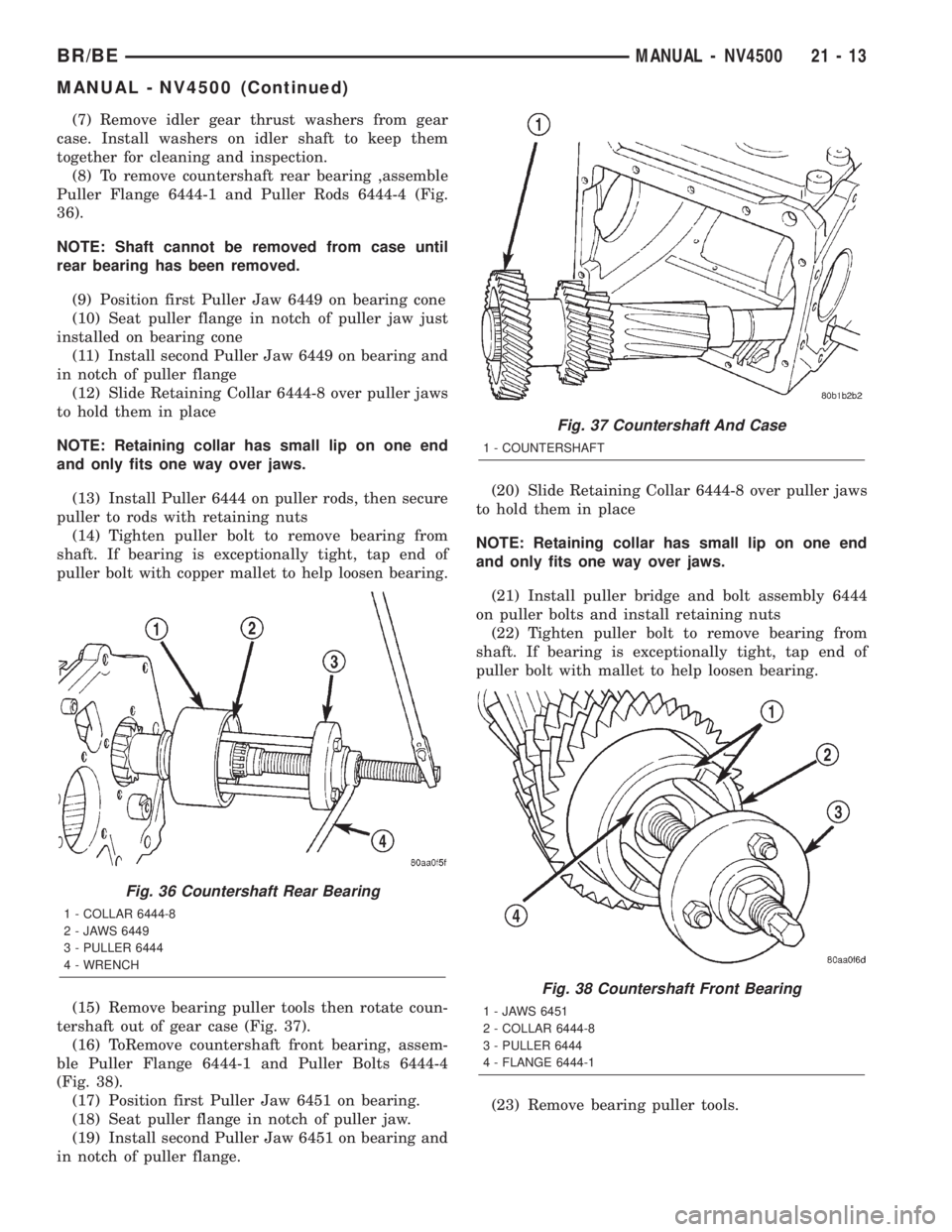
(8) To remove countershaft rear bearing ,assemble
Puller Flange 6444-1 and Puller Rods 6444-4 (Fig.
36).
NOTE: Shaft cannot be removed from case until
rear bearing has been removed.
(9) Position first Puller Jaw 6449 on bearing cone
(10) Seat puller flange in notch of puller jaw just
installed on bearing cone
(11) Install second Puller Jaw 6449 on bearing and
in notch of puller flange
(12) Slide Retaining Collar 6444-8 over puller jaws
to hold them in place
NOTE: Retaining collar has small lip on one end
and only fits one way over jaws.
(13) Install Puller 6444 on puller rods, then secure
puller to rods with retaining nuts
(14) Tighten puller bolt to remove bearing from
shaft. If bearing is exceptionally tight, tap end of
puller bolt with copper mallet to help loosen bearing.
(15) Remove bearing puller tools then rotate coun-
tershaft out of gear case (Fig. 37).
(16) ToRemove countershaft front bearing, assem-
ble Puller Flange 6444-1 and Puller Bolts 6444-4
(Fig. 38).
(17) Position first Puller Jaw 6451 on bearing.
(18) Seat puller flange in notch of puller jaw.
(19) Install second Puller Jaw 6451 on bearing and
in notch of puller flange.(20) Slide Retaining Collar 6444-8 over puller jaws
to hold them in place
NOTE: Retaining collar has small lip on one end
and only fits one way over jaws.
(21) Install puller bridge and bolt assembly 6444
on puller bolts and install retaining nuts
(22) Tighten puller bolt to remove bearing from
shaft. If bearing is exceptionally tight, tap end of
puller bolt with mallet to help loosen bearing.
(23) Remove bearing puller tools.
Fig. 36 Countershaft Rear Bearing
1 - COLLAR 6444-8
2 - JAWS 6449
3 - PULLER 6444
4 - WRENCH
Fig. 37 Countershaft And Case
1 - COUNTERSHAFT
Fig. 38 Countershaft Front Bearing
1 - JAWS 6451
2 - COLLAR 6444-8
3 - PULLER 6444
4 - FLANGE 6444-1
BR/BEMANUAL - NV4500 21 - 13
MANUAL - NV4500 (Continued)
Page 1467 of 2255

GEAR CASE
(1) Remove countershaft front bearing cap with
hammer (Fig. 39).
(2) Remove countershaft front bearing cup with
Remover 6454 and Handle C-4171 (Fig. 40).
(3) Remove roll pin that secures shift lug on shift
rail in case (Fig. 41). A small pin punch can be mod-
ified by putting a slight bend in it to drive pin com-
pletely out of shift rail (Fig. 41).
(4) Remove shift lug rail.MAINSHAFT
NOTE: Gear and synchro components can be
installed backwards. Paint or scriber gear and syn-
chro components for installation reference. Then
stack geartrain parts in order of removal.
(1) Remove drive gear thrust bearing from end of
mainshaft, if not previously removed.
(2) Remove 3-4 synchro hub, third gear stop ring
and third gear as an assembly (Fig. 42).
(3) Remove third gear bearing from mainshaft
(Fig. 43).
(4) Remove third gear bearing spacer (Fig. 44).
(5) Remove second gear thrust washer snap ring
from mainshaft (Fig. 44).
Fig. 39 Countershaft Front Bearing Cap
1 - HAMMER
2 - BEARING CAP
Fig. 40 Countershaft Front Bearing Cup
1 - REMOVER 6454
2 - HANDLE C-4171
Fig. 41 Shift Lug Roll Pin
1 - PUNCH
2 - 30É BEND
3 - PIN PUNCH MODIFICATION
4 - SHIFT LUG
5 - SHIFT RAIL
21 - 14 MANUAL - NV4500BR/BE
MANUAL - NV4500 (Continued)
Page 1471 of 2255
(22) Install Puller 6444 on the puller rods and
secure with nuts.
(23) Hold hex portion of Puller 6444 a wrench (Fig.
57) and tighten screw.
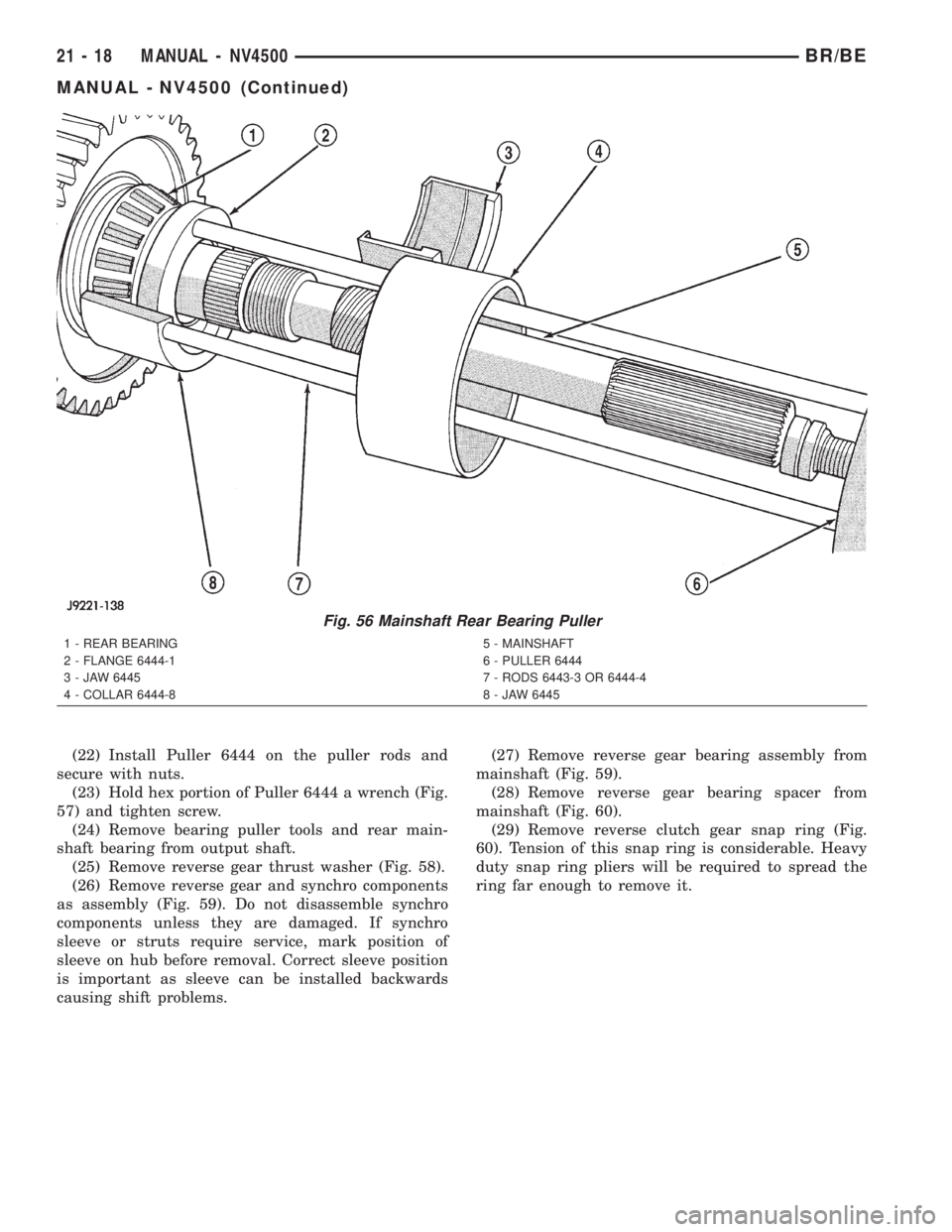
(24) Remove bearing puller tools and rear main-
shaft bearing from output shaft.
(25) Remove reverse gear thrust washer (Fig. 58).
(26) Remove reverse gear and synchro components
as assembly (Fig. 59). Do not disassemble synchro
components unless they are damaged. If synchro
sleeve or struts require service, mark position of
sleeve on hub before removal. Correct sleeve position
is important as sleeve can be installed backwards
causing shift problems.(27) Remove reverse gear bearing assembly from
mainshaft (Fig. 59).
(28) Remove reverse gear bearing spacer from
mainshaft (Fig. 60).
(29) Remove reverse clutch gear snap ring (Fig.
60). Tension of this snap ring is considerable. Heavy
duty snap ring pliers will be required to spread the
ring far enough to remove it.
Fig. 56 Mainshaft Rear Bearing Puller
1 - REAR BEARING
2 - FLANGE 6444-1
3 - JAW 6445
4 - COLLAR 6444-85 - MAINSHAFT
6 - PULLER 6444
7 - RODS 6443-3 OR 6444-4
8 - JAW 6445
21 - 18 MANUAL - NV4500BR/BE
MANUAL - NV4500 (Continued)
Page 1477 of 2255
(6)Install countershaft rear bearing plate (Fig. 72).
NOTE: Verify plate is seated in reverse idler shaft
notch and end play shims are still in position
before installing bolts.
(7) Apply 1-2 drops Mopar Loc N' Seal or equiva-
lent to threads of rear bearing plate bolts. Then
install and tighten bearing plate bolts to 23 N´m (200
in. lbs.).
SHIFT LUG AND RAIL
(1) Lubricate shift lug and rail with CastroltSyn-
torq or equivalent.
(2) Insert shift lug rail part way into case.
(3) Install shift lug on rail.
(4) Position shift rail so roll pin notches are
toward outside of case (Fig. 76).
(5) Install roll pin that secures lug to rail (Fig. 76).
MAINSHAFT AND GEARTRAIN
CAUTION: The reverse, 1-2 and 3-4 synchro compo-
nents can be assembled and installed incorrectly.
Follow assembly procedures for component identi-
fication and location.
Lubricate mainshaft bearing surfaces and all bear-
ing assemblies with CastroltSyntorq or with petro-
leum jelly.
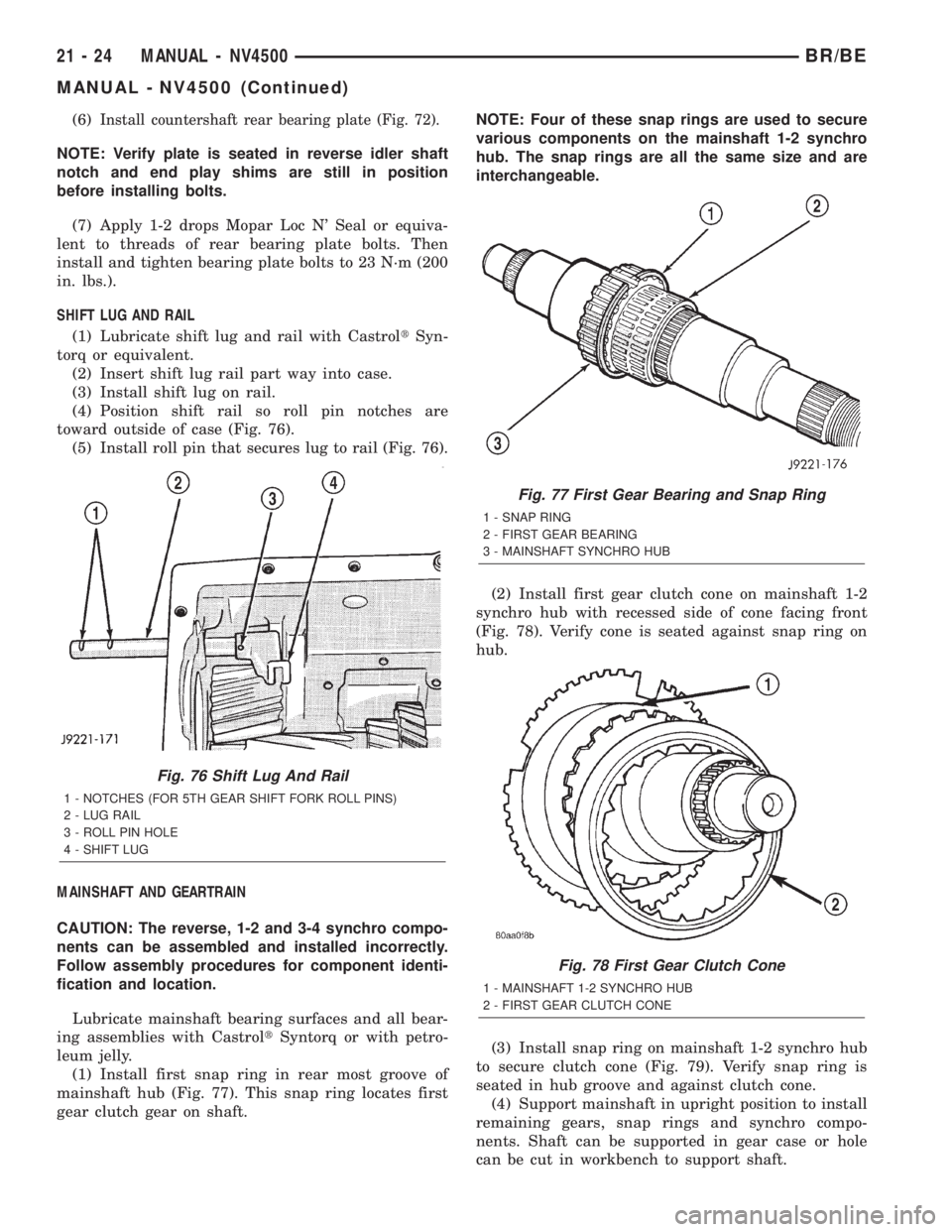
(1) Install first snap ring in rear most groove of
mainshaft hub (Fig. 77). This snap ring locates first
gear clutch gear on shaft.NOTE: Four of these snap rings are used to secure
various components on the mainshaft 1-2 synchro
hub. The snap rings are all the same size and are
interchangeable.
(2) Install first gear clutch cone on mainshaft 1-2
synchro hub with recessed side of cone facing front
(Fig. 78). Verify cone is seated against snap ring on
hub.
(3) Install snap ring on mainshaft 1-2 synchro hub
to secure clutch cone (Fig. 79). Verify snap ring is
seated in hub groove and against clutch cone.
(4) Support mainshaft in upright position to install
remaining gears, snap rings and synchro compo-
nents. Shaft can be supported in gear case or hole
can be cut in workbench to support shaft.
Fig. 76 Shift Lug And Rail
1 - NOTCHES (FOR 5TH GEAR SHIFT FORK ROLL PINS)
2 - LUG RAIL
3 - ROLL PIN HOLE
4 - SHIFT LUG
Fig. 77 First Gear Bearing and Snap Ring
1 - SNAP RING
2 - FIRST GEAR BEARING
3 - MAINSHAFT SYNCHRO HUB
Fig. 78 First Gear Clutch Cone
1 - MAINSHAFT 1-2 SYNCHRO HUB
2 - FIRST GEAR CLUTCH CONE
21 - 24 MANUAL - NV4500BR/BE
MANUAL - NV4500 (Continued)
Page 1479 of 2255
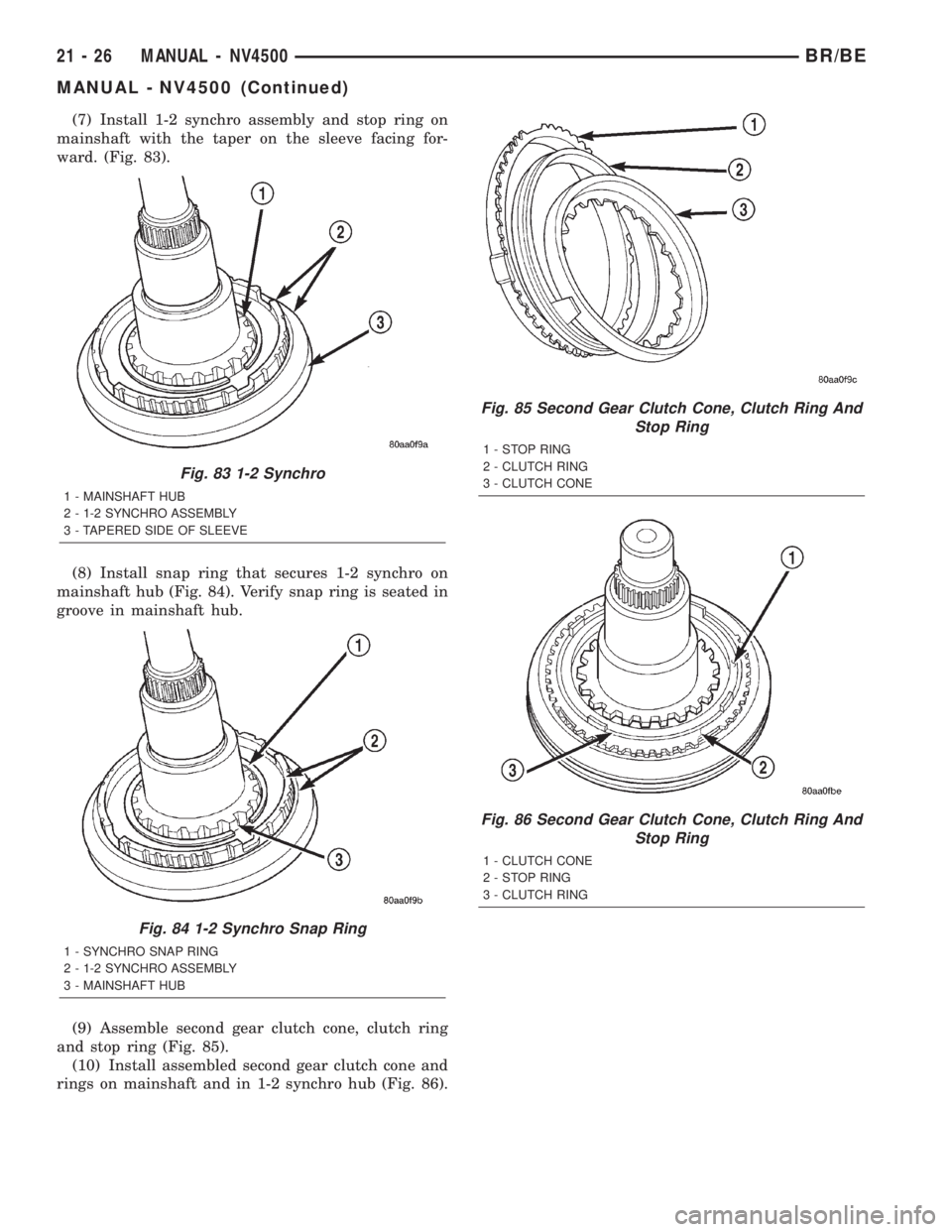
(7) Install 1-2 synchro assembly and stop ring on
mainshaft with the taper on the sleeve facing for-
ward. (Fig. 83).
(8) Install snap ring that secures 1-2 synchro on
mainshaft hub (Fig. 84). Verify snap ring is seated in
groove in mainshaft hub.
(9) Assemble second gear clutch cone, clutch ring
and stop ring (Fig. 85).
(10) Install assembled second gear clutch cone and
rings on mainshaft and in 1-2 synchro hub (Fig. 86).
Fig. 83 1-2 Synchro
1 - MAINSHAFT HUB
2 - 1-2 SYNCHRO ASSEMBLY
3 - TAPERED SIDE OF SLEEVE
Fig. 84 1-2 Synchro Snap Ring
1 - SYNCHRO SNAP RING
2 - 1-2 SYNCHRO ASSEMBLY
3 - MAINSHAFT HUB
Fig. 85 Second Gear Clutch Cone, Clutch Ring And
Stop Ring
1 - STOP RING
2 - CLUTCH RING
3 - CLUTCH CONE
Fig. 86 Second Gear Clutch Cone, Clutch Ring And
Stop Ring
1 - CLUTCH CONE
2 - STOP RING
3 - CLUTCH RING
21 - 26 MANUAL - NV4500BR/BE
MANUAL - NV4500 (Continued)
Page 1480 of 2255
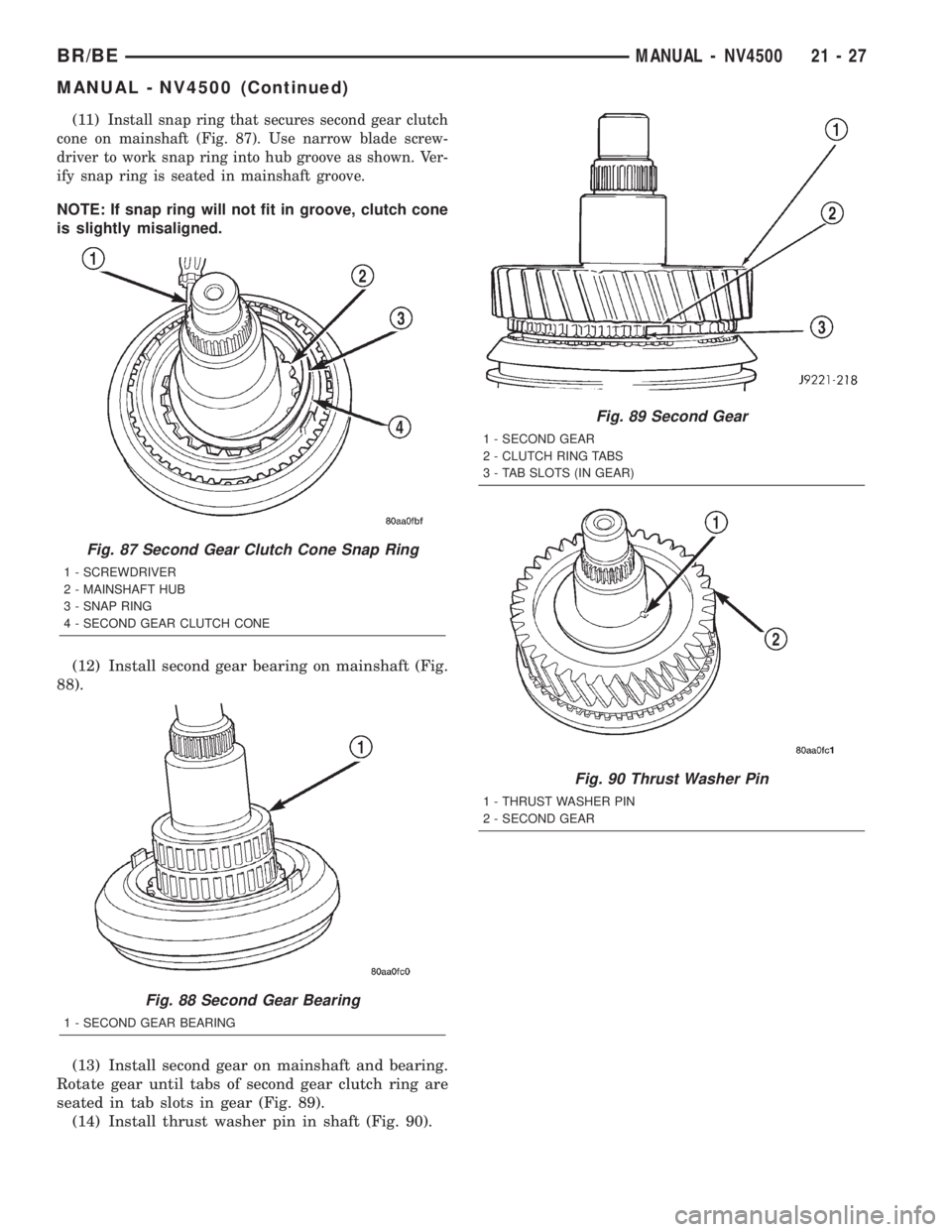
(11)Install snap ring that secures second gear clutch
cone on mainshaft (Fig. 87). Use narrow blade screw-
driver to work snap ring into hub groove as shown. Ver-
ify snap ring is seated in mainshaft groove.
NOTE: If snap ring will not fit in groove, clutch cone
is slightly misaligned.
(12) Install second gear bearing on mainshaft (Fig.
88).
(13) Install second gear on mainshaft and bearing.
Rotate gear until tabs of second gear clutch ring are
seated in tab slots in gear (Fig. 89).
(14) Install thrust washer pin in shaft (Fig. 90).
Fig. 87 Second Gear Clutch Cone Snap Ring
1 - SCREWDRIVER
2 - MAINSHAFT HUB
3 - SNAP RING
4 - SECOND GEAR CLUTCH CONE
Fig. 88 Second Gear Bearing
1 - SECOND GEAR BEARING
Fig. 89 Second Gear
1 - SECOND GEAR
2 - CLUTCH RING TABS
3 - TAB SLOTS (IN GEAR)
Fig. 90 Thrust Washer Pin
1 - THRUST WASHER PIN
2 - SECOND GEAR
BR/BEMANUAL - NV4500 21 - 27
MANUAL - NV4500 (Continued)
Page 1486 of 2255
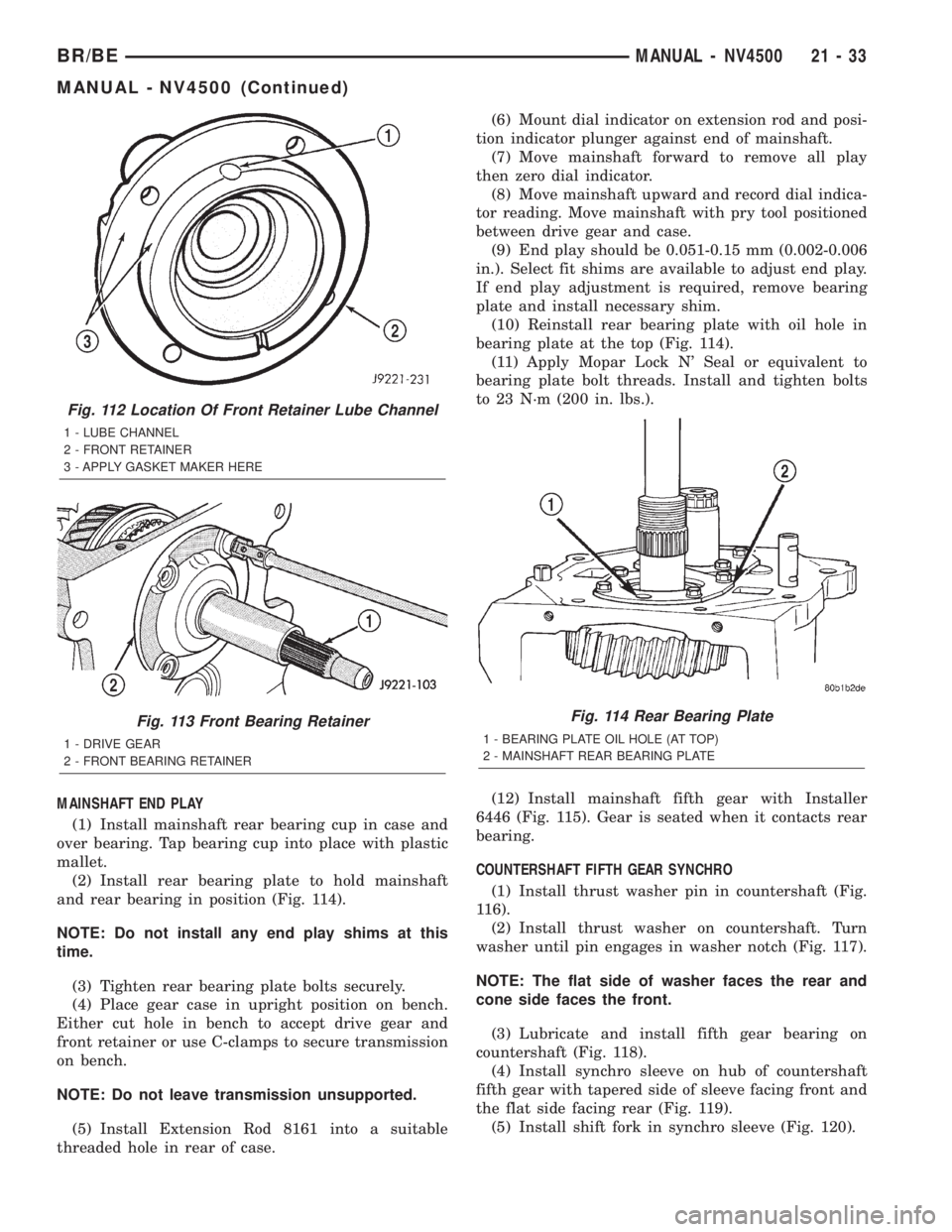
MAINSHAFT END PLAY
(1) Install mainshaft rear bearing cup in case and
over bearing. Tap bearing cup into place with plastic
mallet.
(2) Install rear bearing plate to hold mainshaft
and rear bearing in position (Fig. 114).
NOTE: Do not install any end play shims at this
time.
(3) Tighten rear bearing plate bolts securely.
(4) Place gear case in upright position on bench.
Either cut hole in bench to accept drive gear and
front retainer or use C-clamps to secure transmission
on bench.
NOTE: Do not leave transmission unsupported.
(5) Install Extension Rod 8161 into a suitable
threaded hole in rear of case.(6) Mount dial indicator on extension rod and posi-
tion indicator plunger against end of mainshaft.
(7) Move mainshaft forward to remove all play
then zero dial indicator.
(8) Move mainshaft upward and record dial indica-
tor reading. Move mainshaft with pry tool positioned
between drive gear and case.
(9) End play should be 0.051-0.15 mm (0.002-0.006
in.). Select fit shims are available to adjust end play.
If end play adjustment is required, remove bearing
plate and install necessary shim.
(10) Reinstall rear bearing plate with oil hole in
bearing plate at the top (Fig. 114).
(11) Apply Mopar Lock N' Seal or equivalent to
bearing plate bolt threads. Install and tighten bolts
to 23 N´m (200 in. lbs.).
(12) Install mainshaft fifth gear with Installer
6446 (Fig. 115). Gear is seated when it contacts rear
bearing.
COUNTERSHAFT FIFTH GEAR SYNCHRO
(1) Install thrust washer pin in countershaft (Fig.
116).
(2) Install thrust washer on countershaft. Turn
washer until pin engages in washer notch (Fig. 117).
NOTE: The flat side of washer faces the rear and
cone side faces the front.
(3) Lubricate and install fifth gear bearing on
countershaft (Fig. 118).
(4) Install synchro sleeve on hub of countershaft
fifth gear with tapered side of sleeve facing front and
the flat side facing rear (Fig. 119).
(5) Install shift fork in synchro sleeve (Fig. 120).
Fig. 112 Location Of Front Retainer Lube Channel
1 - LUBE CHANNEL
2 - FRONT RETAINER
3 - APPLY GASKET MAKER HERE
Fig. 113 Front Bearing Retainer
1 - DRIVE GEAR
2 - FRONT BEARING RETAINER
Fig. 114 Rear Bearing Plate
1 - BEARING PLATE OIL HOLE (AT TOP)
2 - MAINSHAFT REAR BEARING PLATE
BR/BEMANUAL - NV4500 21 - 33
MANUAL - NV4500 (Continued)
Page 1490 of 2255
INSTALLATION
NOTE: If a new transmission is being installed, use
all components supplied with the new transmission.
For example, if a new shift tower is supplied with
the new transmission, do not re-use the original
shift tower.
(1) Apply light coat of Mopar high temperature
bearing grease or equivalent to contact surfaces of
the following components:
²input shaft splines.
²release bearing slide surface of front retainer.
²release bearing bore.
²release fork.
²release fork ball stud.
²propeller shaft slip yoke.
(2) Apply sealer to threads of bottom PTO cover
bolt and install bolt in case.
(3) Mount transmission on jack and position trans-
mission under vehicle.
(4) Raise transmission until input shaft is centered
in release bearing and clutch disc hub.
(5) Move transmission forward and start input
shaft in release bearing, clutch disc and pilot bush-
ing.
(6) Work transmission forward until seated against
clutch housing. Do not allow transmission to remain
unsupported after input shaft has entered clutch
disc.
(7) Install and tighten transmission-to-clutch hous-
ing bolts to 108 N´m (80 ft. lbs.).
(8) Install transmission mount on transmission or
rear crossmember.
(9) Install rear crossmember.
(10) Remove transmission jack and engine support
fixture.
(11) Position transmission harness wires in clips
on shift cover.
(12) Install clutch slave cylinder and install slave
cylinder shield, if equipped.
(13) Connect speed sensor and backup light switch
wires.
TWO WHEEL DRIVE
(1) Fill transmission with recommended lubricant.
Correct fill level is bottom edge of fill plug hole.
(2) Align and install propeller shaft.
(3) Lower vehicle.
(4) Clean the mating surfaces of shift tower, isola-
tor plate and shift cover with suitable wax and
grease remover.
(5) Apply Mopar Gasket Maker or equivalent to
the sealing surface of the shift cover. Do not over
apply sealant.(6) Install the isolator plate onto the shift cover,
metal side down.
(7) Install the shift tower onto the isolator plate.
No sealant is necessary between the shift tower and
the isolator plate.
(8) Verify that the shift tower, isolator plate and
the shift tower bushings are properly aligned.
(9) Install the bolts to hold the shift tower to the
isolator plate and the shift cover. Tighten the shift
tower bolts to 10.2±11.25 N´m (7.5±8.3 ft. lbs.).
(10) Install the shift lever extension onto the shift
tower and lever assembly.
(11) Install shift boot and bezel.
(12) Connect battery negative cable.
FOUR WHEEL DRIVE
(1) Install transfer case shift mechanism on trans-
mission.
(2) Install transfer case on transmission jack.
Secure transfer case to jack with safety chains.
(3) Raise jack and align transfer case input gear
with transmission mainshaft.
(4) Move transfer case forward and seat it on
adapter.
(5) Install and tighten transfer case attaching
nuts. Tighten nuts to 41-47 N´m (30-35 ft. lbs.) if
case has 3/8 studs or 30-41 N´m (22-30 ft. lbs.) if case
has 5/16 studs.
(6) Install transfer case shift mechanism to side of
transfer case.
(7) Connect transfer case shift lever to range lever
on transfer case.
(8) Align and connect propeller shafts.
(9) Fill transmission with required lubricant.
Check lubricant level in transfer case and add lubri-
cant if necessary.
(10) Install transfer case skid plate, if equipped
and crossmember. Tighten attaching bolts/nuts to 41
N´m (30 ft. lbs.).
(11) Install exhaust system components.
(12) Lower vehicle.
(13) Clean the mating surfaces of shift tower, iso-
lator plate and shift cover with suitable wax and
grease remover.
(14) Apply Mopar Gasket Maker or equivalent to
the sealing surface of the shift cover. Do not over
apply sealant.
(15) Install the isolator plate onto the shift cover,
metal side down.
(16) Install the shift tower onto the isolator plate.
No sealant is necessary between the shift tower and
the isolator plate.
(17) Verify that the shift tower, isolator plate and
the shift tower bushings are properly aligned.
BR/BEMANUAL - NV4500 21 - 37
MANUAL - NV4500 (Continued)