Page 167 of 486
2-59
Tilt Wheel
A tilt wheel allows you to adjust the steering wheel
before you drive. You can raise it to the highest level
to give your legs more room when you exit and enter
the vehicle.
The lever that allows you to tilt the steering wheel is
located on the left side of the steering column.
To tilt the wheel, hold the
wheel and pull the lever.
Then move the steering
wheel to a comfortable
position and release the
lever to lock the wheel
in place.
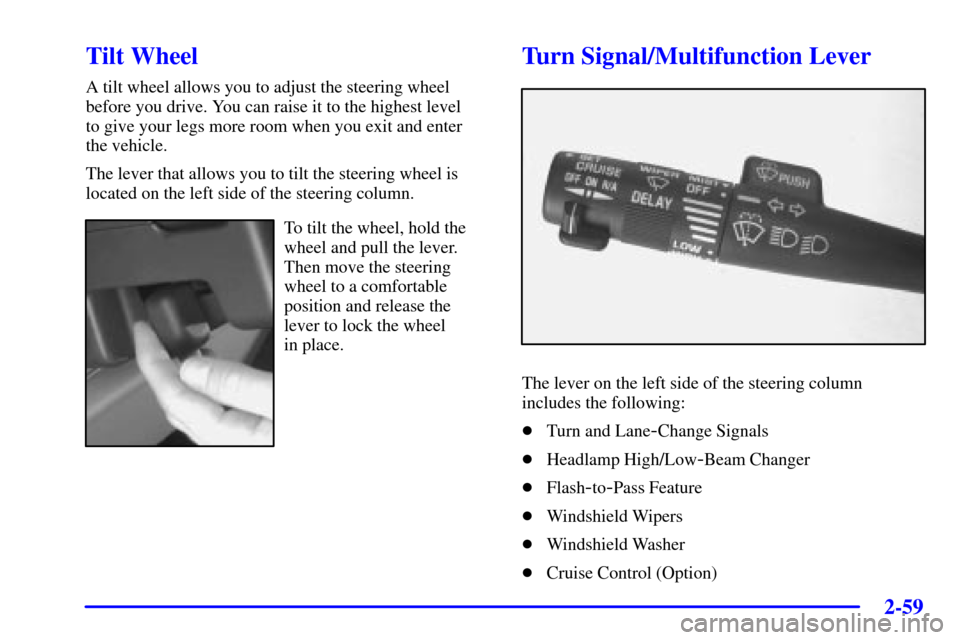
Turn Signal/Multifunction Lever
The lever on the left side of the steering column
includes the following:
�Turn and Lane
-Change Signals
�Headlamp High/Low
-Beam Changer
�Flash
-to-Pass Feature
�Windshield Wipers
�Windshield Washer
�Cruise Control (Option)
Page 169 of 486

2-61
Headlamp High/Low-Beam Changer
To change the headlamps from high to low beam, or low
to high, simply pull the turn signal lever all the way
toward you. Then release it.
When the high beams
are on, this light on the
instrument panel cluster
will also be on.
Your fog lamps will turn off when you switch to high
beams. Using your high beams in fog is not recommended.
Flash-to-Pass Feature
When the headlamps are off, pull the lever toward you
to momentarily switch on the high beams (to signal that
you are going to pass). When you release the lever, they
will turn off.
Windshield Wipers
To operate the windshield wipers turn the band
marked WIPER, located on the multifunction lever,
upward or downward.MIST: Turn the band to MIST for a single wiping cycle.
Hold it there until the wipers start. Then let go. The
wipers will stop after one wipe. If you want more wipes,
hold the band on mist longer.
OFF: Turn the band to OFF to turn off the
windshield wipers.
LOW: Turn the band to LOW, for steady wiping at
low speed.
HIGH: Turn the band to HIGH, for steady wiping at
high speed.
DELAY: Turn the band away from you to one of the
five sensitivity settings between OFF and LOW, to
choose the delayed wiping cycle. The further the band is
turned toward LOW, the shorter the delay will be. Use
this setting for light rain or snow.
Remember that damaged wiper blades may prevent you
from seeing well enough to drive safely. To avoid
damage, be sure to clear ice and snow from the wiper
blades before using them. If they're frozen to the
windshield, carefully loosen or thaw them. If your
blades do become damaged, get new blades or
blade inserts.
Heavy snow or ice can overload your wipers. A circuit
breaker will stop them until the motor cools. Clear away
snow or ice to prevent an overload.
Page 274 of 486

3-42
�SCAN �: To scan one disc, press and hold either
SCAN arrow for more than two seconds until SCAN
appears on the display and you hear a beep. Use this
feature to listen to each track of the currently selected
disc for ten seconds. The sound will mute while
scanning. SCAN will appear on the display. Press either
SCAN arrow again, to stop scanning.
To scan all loaded discs, press and hold either SCAN
arrow for more than four seconds until DISC SCAN
appears on the display and you hear a beep. Use this
feature to listen to the first track, for ten seconds for
each disc loaded. The sound will mute while scanning to
the next track. DISC SCAN will appear on the display.
Press either SCAN arrow again, to stop scanning.
P
-TYPE (Program Type): Press this knob to see how
long the current track has been playing. To change what
is normally shown on the display (track or elapsed
time), press the knob until you see the display you want,
then hold the knob until the display flashes.
AM FM: Press this button to play the radio when a
disc(s) is in the player.Using Song List Mode
The integrated six
-disc CD changer has a feature
called song list. This feature is capable of saving
20 track selections.
To save tracks into the song list feature, perform the
following steps:
1. Turn the disc player on and load it with at least one
disc. See ªLOAD CDº listed previously in this
section for more information.
2. Check to see that the disc changer is not in song list
mode. S
-LIST should not appear in the display. If
S
-LIST is present, press the SONG LIST button to
turn it off.
3. Select the desired disc by pressing the numbered
pushbutton and then use the SEEK SCAN right
arrow button to locate the track that you want to
save. The track will begin to play.
4. Press and hold the SONG LIST button for two or
more seconds to save the track into memory. When
SONG LIST is pressed a beep will be heard
immediately. After two seconds of pressing SONG
LIST continuously, two beeps will sound to confirm
that the track has been saved.
5. Repeat Steps 3 and 4 for saving other selections.