Page 278 of 432

4-46 Dinghy Towing
When towing your vehicle, turn the ignition off. To
prevent your battery from draining while towing,
remove the Ignition A and the Ignition B fuses from the
engine compartment fuse block. Be sure to reinstall the
fuse when you reach your destination. See ªFuses and
Circuit Breakersº in the Index.
Tw o
-Wheel-Drive Vehicles
Tw o
-wheel-drive vehicles, should not be towed with
all four wheels on the ground. Two
-wheel-drive
transmissions have no provisions for internal lubrication
while being towed. To properly tow these vehicles, they
should be placed on a platform trailer with all four
wheels off the ground.
In rare cases when it's unavoidable that a
two
-wheel-drive vehicle is to be towed with all
four wheels on the ground, the propeller shaft to axle
yoke orientation should be marked and the propeller
shaft removed following the applicable service manual
removal/installation procedure.
Dust or dirt can enter the back of the transmission
through the opening created by removing the propeller
shaft if proper protection is not provided. Also, check
the transmission fluid level before driving the truck.Four
-Wheel-Drive Vehicles
Use the following procedure to tow your vehicle:
1. Firmly set the parking brake.
2. Shift the transmission to PARK (P).
3. Securely attach the vehicle being towed to the
tow vehicle.
Page 291 of 432
4-59 When You Are Ready to Leave After
Parking on a Hill
1. Apply your regular brakes and hold the pedal down
while you:
�start your engine,
�shift into a gear, and
�release the parking brake.
2. Let up on the brake pedal.
3. Drive slowly until the trailer is clear of the chocks.
4. Stop and have someone pick up and store the chocks.
Maintenance When Trailer Towing
Your vehicle will need service more often when you're
pulling a trailer. See the Maintenance Schedule for
more on this. Things that are especially important
in trailer operation are automatic transmission fluid
(don't overfill), engine oil, axle lubricant, belt, cooling
system and brake system. Each of these is covered in
this manual, and the Index will help you find them
quickly. If you're trailering, it's a good idea to review
these sections before you start your trip.
Check periodically to see that all hitch nuts and bolts
are tight.
Page 292 of 432
4-60 Trailer Wiring Harness
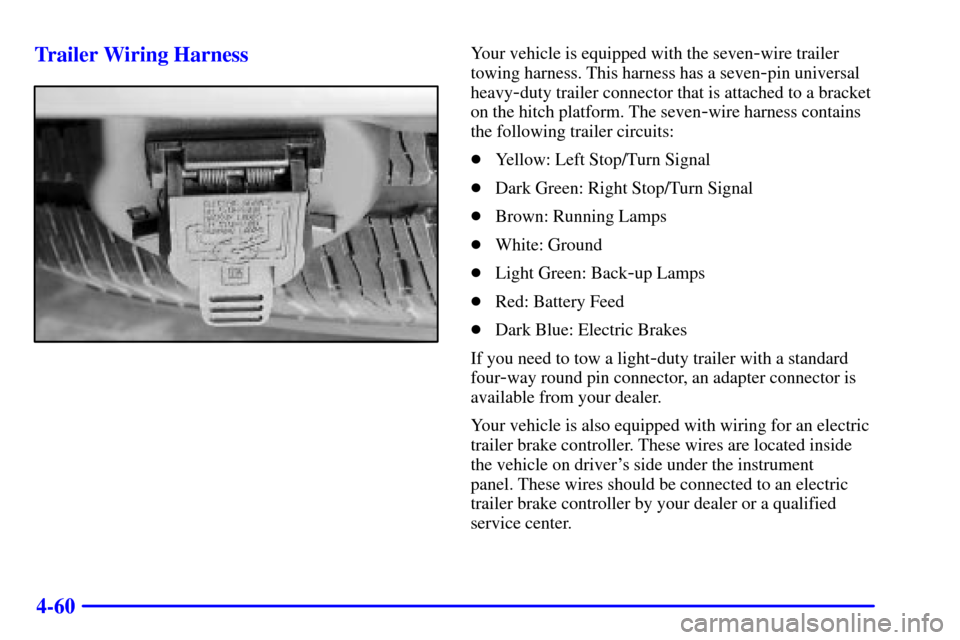
Your vehicle is equipped with the seven-wire trailer
towing harness. This harness has a seven
-pin universal
heavy
-duty trailer connector that is attached to a bracket
on the hitch platform. The seven
-wire harness contains
the following trailer circuits:
�Yellow: Left Stop/Turn Signal
�Dark Green: Right Stop/Turn Signal
�Brown: Running Lamps
�White: Ground
�Light Green: Back
-up Lamps
�Red: Battery Feed
�Dark Blue: Electric Brakes
If you need to tow a light
-duty trailer with a standard
four
-way round pin connector, an adapter connector is
available from your dealer.
Your vehicle is also equipped with wiring for an electric
trailer brake controller. These wires are located inside
the vehicle on driver's side under the instrument
panel. These wires should be connected to an electric
trailer brake controller by your dealer or a qualified
service center.
Page 299 of 432
5-7
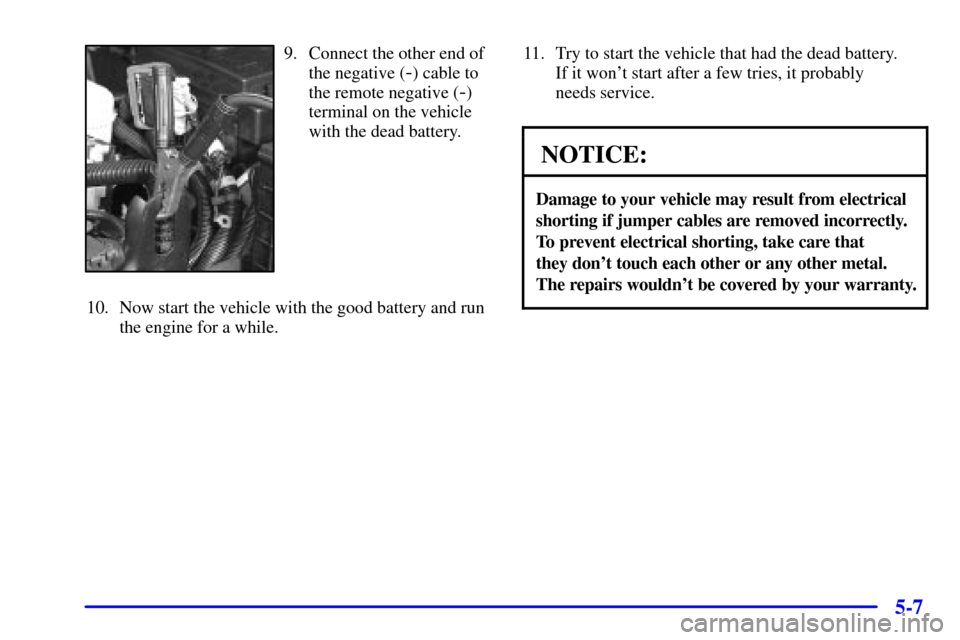
9. Connect the other end of
the negative (
-) cable to
the remote negative (
-)
terminal on the vehicle
with the dead battery.
10. Now start the vehicle with the good battery and run
the engine for a while.11. Try to start the vehicle that had the dead battery.
If it won't start after a few tries, it probably
needs service.
NOTICE:
Damage to your vehicle may result from electrical
shorting if jumper cables are removed incorrectly.
To prevent electrical shorting, take care that
they don't touch each other or any other metal.
The repairs wouldn't be covered by your warranty.
Page 300 of 432
5-8
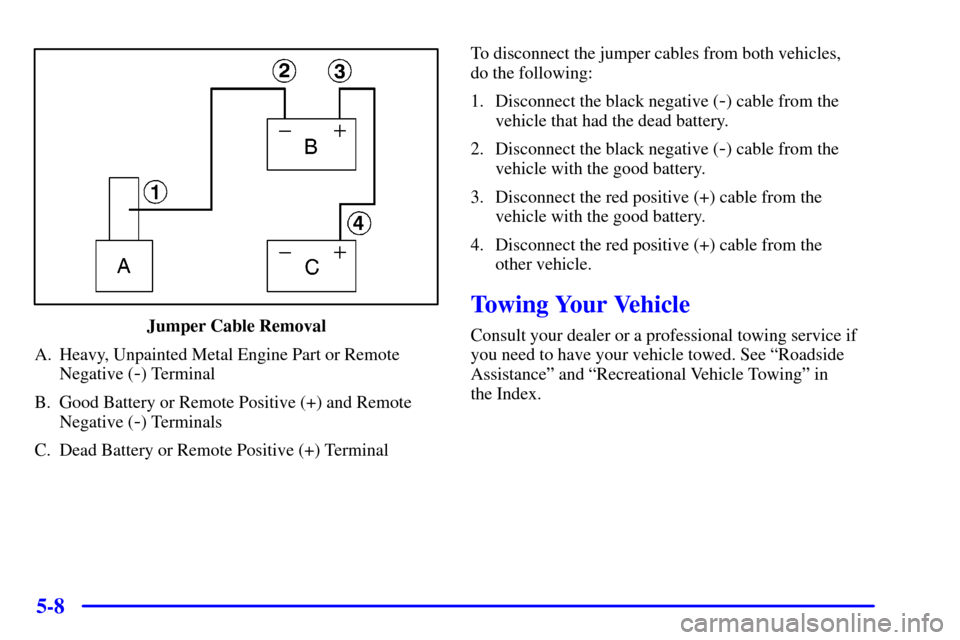
Jumper Cable Removal
A. Heavy, Unpainted Metal Engine Part or Remote
Negative (
-) Terminal
B. Good Battery or Remote Positive (+) and Remote
Negative (
-) Terminals
C. Dead Battery or Remote Positive (+) TerminalTo disconnect the jumper cables from both vehicles,
do the following:
1. Disconnect the black negative (
-) cable from the
vehicle that had the dead battery.
2. Disconnect the black negative (
-) cable from the
vehicle with the good battery.
3. Disconnect the red positive (+) cable from the
vehicle with the good battery.
4. Disconnect the red positive (+) cable from the
other vehicle.
Towing Your Vehicle
Consult your dealer or a professional towing service if
you need to have your vehicle towed. See ªRoadside
Assistanceº and ªRecreational Vehicle Towingº in
the Index.
Page 302 of 432
5-10 If No Steam Is Coming From Your Engine
If you get an engine overheat warning but see or hear no
steam, the problem may not be too serious. Sometimes
the engine can get a little too hot when you:
�Climb a long hill on a hot day.
�Stop after high
-speed driving.
�Idle for long periods in traffic.
�Tow a trailer. See ªDriving on Gradesº in the Index.
If you get the overheat warning with no sign of steam,
try this for a minute or so:
1. If your air conditioner is on, turn it off.
2. Turn on your heater to full hot at the highest fan
speed and open the window as necessary.
3. If you're in a traffic jam, shift to NEUTRAL (N);
otherwise, shift to the highest gear while
driving
-- DRIVE (D) or THIRD (3).If you no longer have the overheat warning,
you can drive. Just to be safe, drive slower for
about 10 minutes. If the warning doesn't come
back on, you can drive normally.
If the warning continues, pull over, stop, and park
your vehicle right away.
If there's still no sign of steam, push down the
accelerator until the engine speed is about twice as fast
as normal idle speed for at least three minutes while
you're parked. If you still have the warning, turn off
the engine and get everyone out of the vehicle until it
cools down.
You may decide not to lift the hood but to get service
help right away.
Page 304 of 432
5-12
NOTICE:
Engine damage from running your engine
without coolant isn't covered by your warranty.
NOTICE:
When adding coolant, it is important that you
use only DEX
-COOL� (silicate-free) coolant.
If coolant other than DEX-COOL is added to
the system, premature engine, heater core or
radiator corrosion may result. In addition, the
engine coolant will require change sooner
-- at
30,000 miles (50 000 km) or 24 months,
whichever occurs first. Damage caused by the
use of coolant other than DEX
-COOL� is not
covered by your new vehicle warranty.
If there seems to be no leak, start the engine again. See if
the engine cooling fan speed increases when idle speed
is doubled by pushing the accelerator pedal down. If it
doesn't, your vehicle needs service. Turn off the engine.
How to Add Coolant to the Coolant
Recovery Tank
If you haven't found a problem yet, but the coolant level
isn't at the FULL COLD mark, add a 50/50 mixture of
clean, drinkable water and DEX
-COOL� engine
coolant at the coolant recovery tank. See ªEngine
Coolantº in the Index for more information.
CAUTION:
Adding only plain water to your cooling system
can be dangerous. Plain water, or some other
liquid such as alcohol, can boil before the proper
coolant mixture will. Your vehicle's coolant
warning system is set for the proper coolant
mixture. With plain water or the wrong mixture,
your engine could get too hot but you wouldn't
get the overheat warning. Your engine could
catch fire and you or others could be burned.
Use a 50/50 mixture of clean, drinkable water
and DEX
-COOL� coolant.
Page 327 of 432
6-
6-1
Section 6 Service and Appearance Care
Here you will find information about the care of your vehicle. This section begins with service and fuel information,
and then it shows how to check important fluid and lubricant levels. There is also technical information about your
vehicle, and a part devoted to its appearance care.
6
-2 Service
6
-3 Fuel
6
-5 Fuels in Foreign Countries
6
-6 Filling Your Tank
6
-8 Filling a Portable Fuel Container
6
-8 Checking Things Under the Hood
6
-11 Engine Oil
6
-16 Engine Air Cleaner/Filter
6
-18 Automatic Transmission Fluid
6
-21 Rear Axle
6
-22 Four-Wheel Drive
6
-24 Engine Coolant
6
-27 Radiator Pressure Cap
6
-28 Power Steering Fluid
6
-29 Windshield Washer Fluid
6
-30 Brakes6
-34 Battery
6
-35 Bulb Replacement
6
-36 Windshield Wiper Blade Replacement
6
-38 Tires
6
-46 Appearance Care
6
-47 Cleaning the Inside of Your Vehicle
6
-49 Care of Safety Belts
6
-50 Cleaning the Outside of Your Vehicle
6
-54 GM Vehicle Care/Appearance Materials
6
-55 Vehicle Identification Number (VIN)
6
-55 Service Parts Identification Label
6
-56 Electrical System
6
-63 Replacement Bulbs
6
-63 Capacities and Specifications
6
-63 Normal Maintenance Replacement Parts