Page 100 of 432
2-31
Shifting Into PARK (P)
CAUTION:
It can be dangerous to get out of your vehicle if
the shift lever is not fully in PARK (P) with the
parking brake firmly set. Your vehicle can roll. If
you have left the engine running, the vehicle can
move suddenly. You or others could be injured.
To be sure your vehicle won't move, even when
you're on fairly level ground, use the steps that
follow. With four
-wheel drive, your vehicle will
be free to roll
-- even if your shift lever is in
PARK (P)
-- if your transfer case is in
NEUTRAL. So be sure the transfer case is in a
drive gear
-- not in NEUTRAL. See ªFour-Wheel
Drive (Automatic Transfer Case)º in the Index.
Always put the shift lever fully in PARK (P) with
the parking brake firmly set. If you're pulling a
trailer, see ªTowing a Trailerº in the Index.
1. Hold the brake pedal down with your right foot and
set the parking brake.
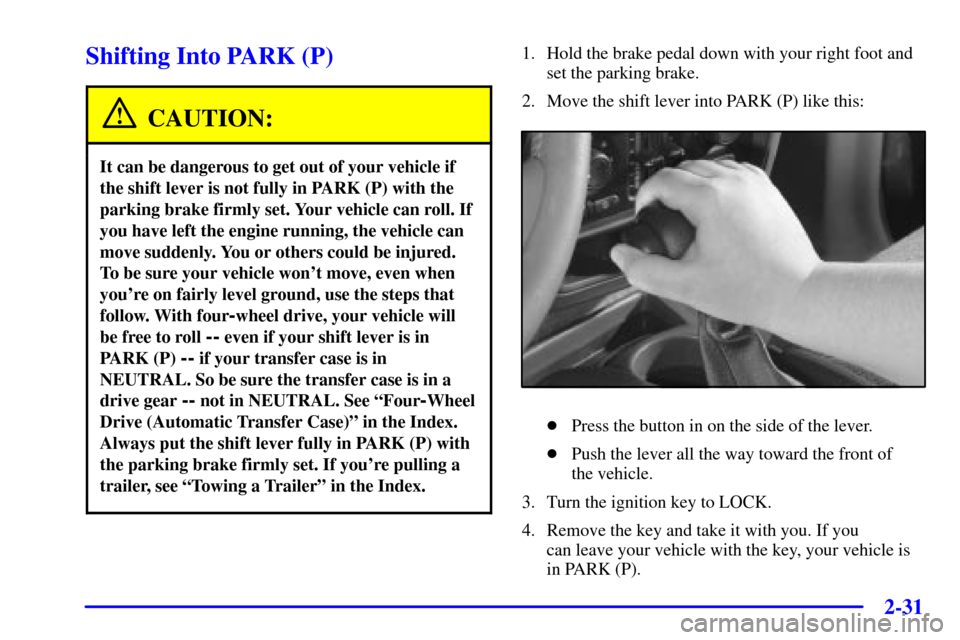
2. Move the shift lever into PARK (P) like this:
�Press the button in on the side of the lever.
�Push the lever all the way toward the front of
the vehicle.
3. Turn the ignition key to LOCK.
4. Remove the key and take it with you. If you
can leave your vehicle with the key, your vehicle is
in PARK (P).
Page 101 of 432
2-32
Leaving Your Vehicle With the
Engine Running
CAUTION:
It can be dangerous to leave your vehicle with the
engine running. Your vehicle could move
suddenly if the shift lever is not fully in PARK (P)
with the parking brake firmly set. If you have
four
-wheel drive, your vehicle will be free to
roll
-- even if your shift lever is in PARK (P) -- if
your transfer case is in NEUTRAL. So be sure
the transfer case is in a drive gear
-- not in
NEUTRAL. See ªFour
-Wheel Drive (Automatic
Transfer Case)º in the Index. And, if you leave
the vehicle with the engine running, it could
overheat and even catch fire. You or others could
be injured. Don't leave your vehicle with the
engine running unless you have to.
If you have to leave your vehicle with the engine
running, be sure your vehicle is in PARK (P) and your
parking brake is firmly set before you leave it. After
you've moved the shift lever into PARK (P), hold the
regular brake pedal down. Then, see if you can move the
shift lever away from PARK (P) without first pulling it
toward you (or pressing the button on a console shift
lever). If you can, it means that the shift lever wasn't
fully locked into PARK (P).
Torque Lock
If you are parking on a hill and you don't shift your
transmission into PARK (P) properly, the weight of the
vehicle may put too much force on the parking pawl in
the transmission. You may find it difficult to pull the
shift lever out of PARK (P). This is called ªtorque lock.º
To prevent torque lock, set the parking brake and then
shift into PARK (P) properly before you leave the
driver's seat. To find out how, see ªShifting Into
PARK (P)º in the Index.
When you are ready to drive, move the shift lever out of
PARK (P) before you release the parking brake.
If torque lock does occur, you may need to have another
vehicle push yours a little uphill to take some of the
pressure from the parking pawl in the transmission, so
you can pull the shift lever out of PARK (P).
Page 104 of 432
2-35
CAUTION:
It can be dangerous to get out of your vehicle if
the shift lever is not fully in PARK (P) with the
parking brake firmly set. Your vehicle can roll.
Don't leave your vehicle when the engine is
running unless you have to. If you've left the
engine running, the vehicle can move suddenly.
You or others could be injured. To be sure your
vehicle won't move, even when you're on fairly
level ground, always set your parking brake and
move the shift lever to PARK (P).
If you have four-wheel drive, your vehicle will be
free to roll
-- even if your shift lever is in
PARK (P)
-- if your transfer case is in
NEUTRAL. So be sure the transfer case is in a
drive gear
-- not in NEUTRAL. See ªFour-Wheel
Drive (Automatic Transfer Case)º in the Index.
Follow the proper steps to be sure your vehicle won't
move. See ªShifting Into PARK (P)º in the Index.
If you're pulling a trailer, see ªTowing a Trailerº in
the Index.
Locking Rear Axle
If your vehicle has this feature, your locking rear axle
can give you additional traction on snow, mud, ice, sand
or gravel. It works like a standard axle most of the time,
but when one of the rear wheels has no traction and the
other does, this feature will allow the wheel with
traction to move the vehicle.
Horn
To sound the horn, press the horn symbols on the
steering wheel pad.
Page 105 of 432
2-36
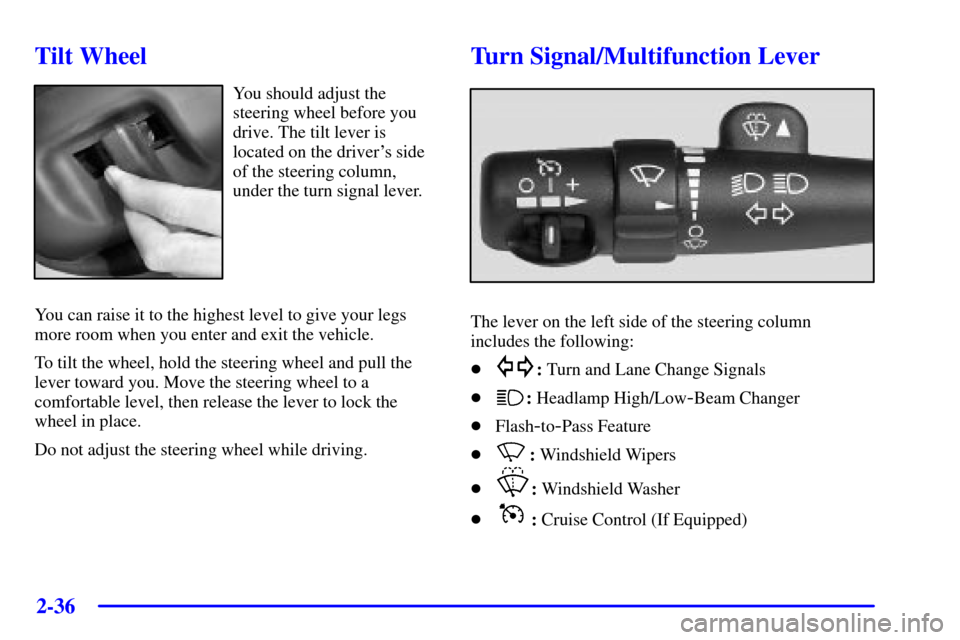
Tilt Wheel
You should adjust the
steering wheel before you
drive. The tilt lever is
located on the driver's side
of the steering column,
under the turn signal lever.
You can raise it to the highest level to give your legs
more room when you enter and exit the vehicle.
To tilt the wheel, hold the steering wheel and pull the
lever toward you. Move the steering wheel to a
comfortable level, then release the lever to lock the
wheel in place.
Do not adjust the steering wheel while driving.
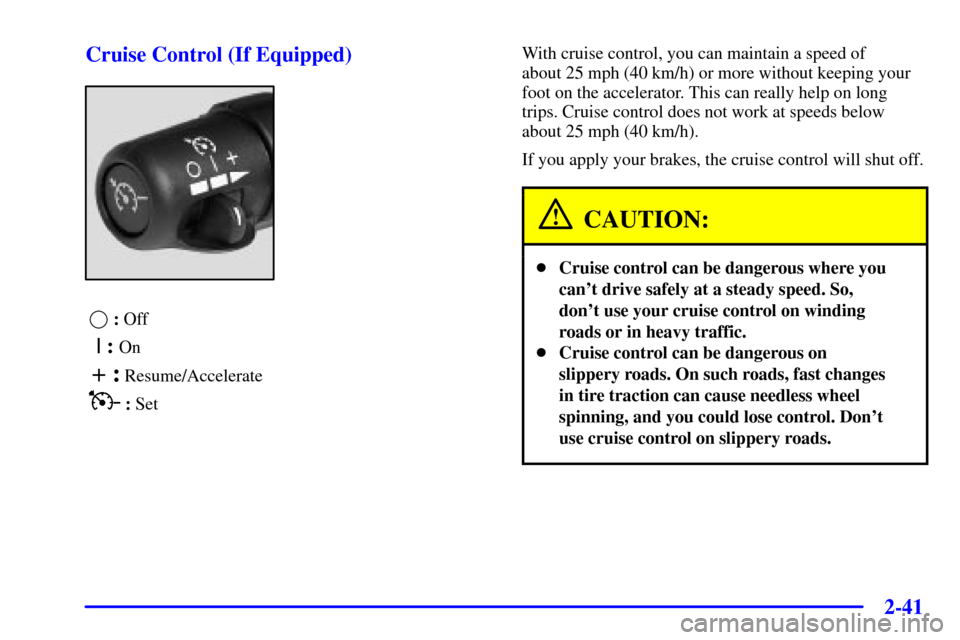
Turn Signal/Multifunction Lever
The lever on the left side of the steering column
includes the following:
�
: Turn and Lane Change Signals
�
: Headlamp High/Low-Beam Changer
�Flash
-to-Pass Feature
�
: Windshield Wipers
�
: Windshield Washer
�
: Cruise Control (If Equipped)
Page 109 of 432
2-40
Windshield Washer
There is a paddle marked with the windshield washer
symbol at the top of the multifunction lever. To spray
washer fluid on the windshield, press the paddle. The
wipers will clear the window and then either stop or
return to your preset speed.
CAUTION:
In freezing weather, don't use your washer until
the windshield is warmed. Otherwise the washer
fluid can form ice on the windshield, blocking
your vision.
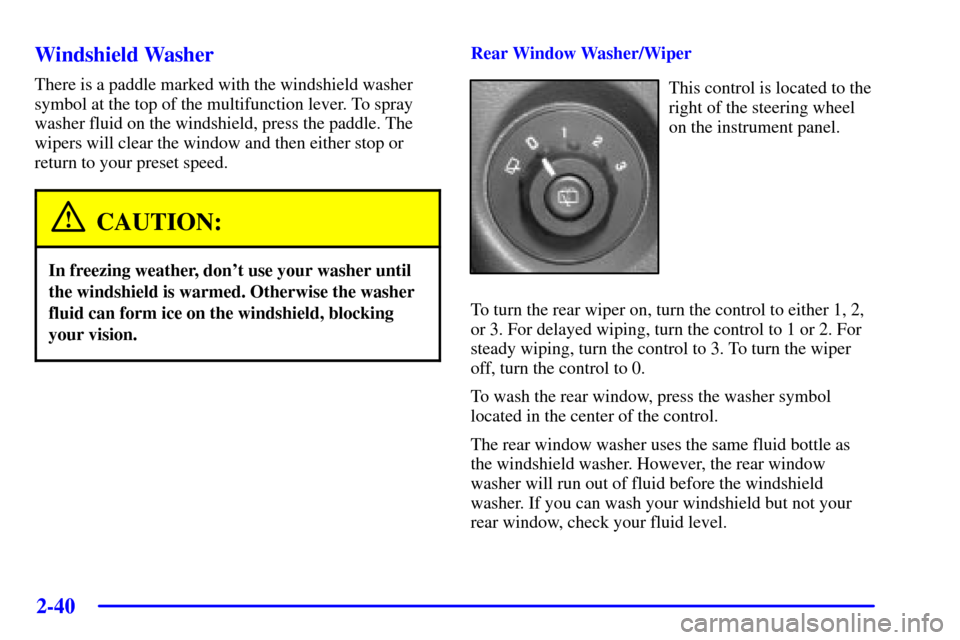
Rear Window Washer/Wiper
This control is located to the
right of the steering wheel
on the instrument panel.
To turn the rear wiper on, turn the control to either 1, 2,
or 3. For delayed wiping, turn the control to 1 or 2. For
steady wiping, turn the control to 3. To turn the wiper
off, turn the control to 0.
To wash the rear window, press the washer symbol
located in the center of the control.
The rear window washer uses the same fluid bottle as
the windshield washer. However, the rear window
washer will run out of fluid before the windshield
washer. If you can wash your windshield but not your
rear window, check your fluid level.
Page 110 of 432
2-41
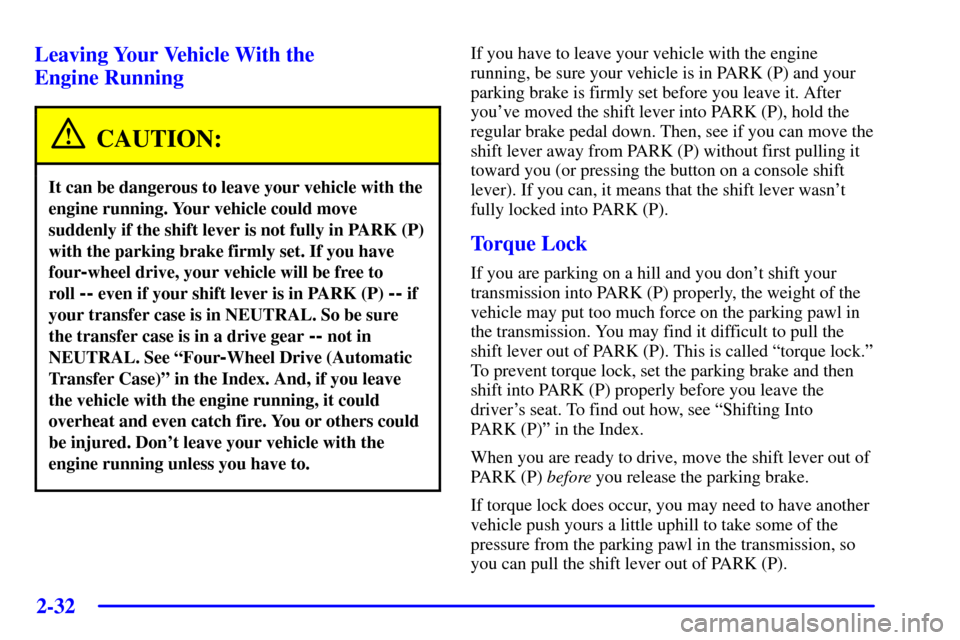
Cruise Control (If Equipped)
: Off
| : On
+ : Resume/Accelerate
: SetWith cruise control, you can maintain a speed of
about 25 mph (40 km/h) or more without keeping your
foot on the accelerator. This can really help on long
trips. Cruise control does not work at speeds below
about 25 mph (40 km/h).
If you apply your brakes, the cruise control will shut off.
CAUTION:
�Cruise control can be dangerous where you
can't drive safely at a steady speed. So,
don't use your cruise control on winding
roads or in heavy traffic.
�Cruise control can be dangerous on
slippery roads. On such roads, fast changes
in tire traction can cause needless wheel
spinning, and you could lose control. Don't
use cruise control on slippery roads.
Page 117 of 432
2-48
Exit Lighting
With exit lighting, the interior lamps will come on when
you remove the key from the ignition to help you see
while exiting the vehicle. With the dome override button
in the ªoutº position, these lights will stay on for a short
period of time and then will go out.
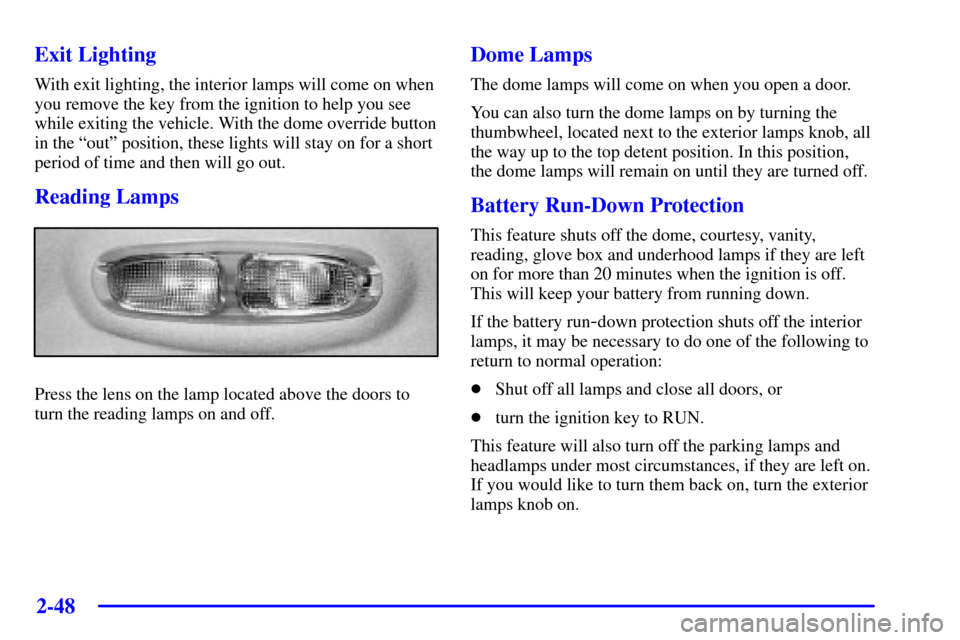
Reading Lamps
Press the lens on the lamp located above the doors to
turn the reading lamps on and off.
Dome Lamps
The dome lamps will come on when you open a door.
You can also turn the dome lamps on by turning the
thumbwheel, located next to the exterior lamps knob, all
the way up to the top detent position. In this position,
the dome lamps will remain on until they are turned off.
Battery Run-Down Protection
This feature shuts off the dome, courtesy, vanity,
reading, glove box and underhood lamps if they are left
on for more than 20 minutes when the ignition is off.
This will keep your battery from running down.
If the battery run
-down protection shuts off the interior
lamps, it may be necessary to do one of the following to
return to normal operation:
�Shut off all lamps and close all doors, or
�turn the ignition key to RUN.
This feature will also turn off the parking lamps and
headlamps under most circumstances, if they are left on.
If you would like to turn them back on, turn the exterior
lamps knob on.
Page 133 of 432

2-64
Volume Control: You can control the volume of the
OnStar System using either the volume control knob
on the radio or using the steering wheel volume control
(if equipped).
Telltale Light: This light will indicate the status of
the system. A solid green light will come on when you
start the vehicle to let you know that the system is on
and is ready to make or receive calls.
If the light blinks green it means that an incoming or
outgoing call is in progress. Press the Call
ANSWER/END button if you notice the light blinking
and you are not on a call.
The light will be red in the event of an OnStar system
malfunction. If this occurs press the OnStar button to
attempt to contact an advisor. If the connection is made,
the advisor will assist you with steps to take to make
sure that the system is functioning properly. If you
cannot contact the advisor, take your vehicle to your
dealership as soon as possible for assistance.
Safety and Security Services
Automatic Notification of Air Bag Deployment: If an
air bag deploys, a priority emergency signal is
automatically sent to the center. An advisor will locate
your vehicle's position, try to contact you and assist you
in the situation. If the center is unable to contact you, an
emergency service provider will be contacted.
Stolen Vehicle Tracking: Call the center at
1
-888-4-ONSTAR (1-888-466-7827) to report your
vehicle stolen. The system can then locate and track
your vehicle and the advisor will be able to notify the
proper authorities.
Roadside Assistance with Location: For vehicle
breakdowns, press the OnStar button. An advisor will
contact the appropriate help.
Remote Diagnostics: If an instrument panel light comes
on, the center can perform a check of the engine
on
-board computer. An advisor can then recommend
what action needs to be taken.