Page 14 of 384
1-2
Seats and Seat Controls
This part tells you about the seats -- how to adjust them,
and also about reclining seatbacks and seatback latches.
Manual Seats
CAUTION:
You can lose control of the vehicle if you try to
adjust a manual driver's seat while the vehicle is
moving. The sudden movement could startle and
confuse you, or make you push a pedal when you
don't want to. Adjust the driver's seat only when
the vehicle is not moving.
To move a manual seat, pull up on the lever located in
front of the seat to unlock it. Slide the seat to where
you want it and release the lever. Then try to move the
seat with your body to make sure the seat is locked
into place.
Page 16 of 384
1-4 Sport Seat (Option)
If your vehicle is equipped with a sport seat, there are
three other controls that help you change the shape of the
seat in addition to the power seat control. There are two
lumbar supports for the middle (A) and lower (B) back.
There's also a side bolster control (C) that adjusts the sides
of the seat around you to give you more lateral support.
For lumbar support, move each control (A and B)
forward to inflate or rearward to deflate.
Move the side bolster control (C) up for more side
support and down for less support.
Reclining Seatbacks
The lever for the reclining seatback is located on the
outboard side of each seat, near the base.
To adjust the seatback, lean slightly forward to lift your
weight off the seatback. Pull completely up on the lever
until it stops, and lean back to position the seatback to
where you want it. Release the lever to lock the seatback
into place.
Page 18 of 384
1-6 Seatback Latches
Both seatbacks fold forward to give you access to
the rear area. To fold a seatback forward, lift this latch,
which is located on top of the backside of the seat, and
pull the seatback forward. The seatback will lock down
in this position. To unlock, lift up on the latch and push the seatback
rearward. When you return the seatback to its original
position, make sure the seatback is locked in place.
CAUTION:
If the seatback isn't locked, it could move forward
in a sudden stop or crash. That could cause injury
to the person sitting there. Always press rearward
on the seatback to be sure it is locked.
Page 25 of 384

1-13
Driver Position
This part describes the driver's restraint system.
Lap-Shoulder Belt
The driver has a lap-shoulder belt. Here's how to
wear it properly.
1. Close and lock the door.
2. Adjust the seat so you can sit up straight.
To see how, see ªSeatsº in the Index.
3. Pick up the latch plate and pull the belt across you.
Don't let it get twisted.
The lap
-shoulder belt may lock if you pull the belt
across you very quickly. If this happens, let the belt
go back slightly to unlock it. Then pull the belt
across you more slowly.
When the lap portion of the belt is pulled out all the
way, it will lock. If it does, let it go back all the way
and start again. See ªLap Belt Cinch Featureº in
the Index.
4. Push the latch plate into the buckle until it clicks.
Pull up on the latch plate to make sure it is secure.
If the belt isn't long enough, see ªSafety Belt
Extenderº at the end of this section.
Make sure the release button on the buckle is
positioned so you would be able to unbuckle the
safety belt quickly if you ever had to.
Page 26 of 384
1-14
The lap part of the belt should be worn low and snug
on the hips, just touching the thighs. In a crash, this
applies force to the strong pelvic bones. And you'd be
less likely to slide under the lap belt. If you slid under it,
the belt would apply force at your abdomen. This could
cause serious or even fatal injuries. The shoulder belt
should go over the shoulder and across the chest.
These parts of the body are best able to take belt
restraining forces.
The safety belt locks if there's a sudden stop or crash,
or if you pull the belt very quickly out of the retractor.
Lap Belt Cinch Feature
If you do not want the lap belt to move freely, pull the
lap belt out all the way to set the lock. To permit the lap
belt to move freely again, unbuckle the belt, let it retract
all the way, and buckle up again.
Page 53 of 384
1-41
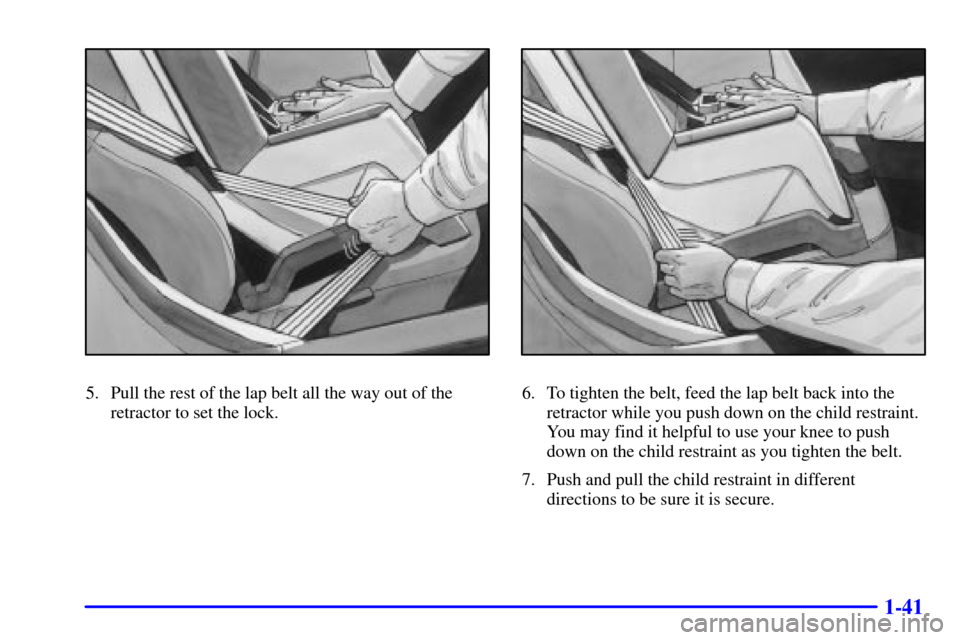
5. Pull the rest of the lap belt all the way out of the
retractor to set the lock.6. To tighten the belt, feed the lap belt back into the
retractor while you push down on the child restraint.
You may find it helpful to use your knee to push
down on the child restraint as you tighten the belt.
7. Push and pull the child restraint in different
directions to be sure it is secure.
Page 59 of 384

2-
2-1
Section 2 Features and Controls
Here you can learn about the many standard and optional features on your vehicle, and information on starting,
shifting and braking. Also explained are the instrument panel and the warning systems that tell you if everything is
working properly
-- and what to do if you have a problem.
2
-2 Windows
2
-4 Keys
2
-6 Door Locks
2
-8 Memory (Option)
2
-9 Remote Keyless Entry (RKE) System
2
-14 Hatch/Trunk
2
-19 Theft-Deterrent System
2
-20 PASS-Key�
2-21 New Vehicle ªBreak-Inº
2
-22 Ignition Switch
2
-24 Starting Your Engine
2
-26 Engine Coolant Heater (Canada Only)
2
-28 Automatic Transmission Operation
2
-31 Manual Transmission Operation
2
-35 Parking Brake
2
-36 Shifting Into PARK (P)
(Automatic Transmission Only)
2
-38 Shifting Out of PARK (P)
(Automatic Transmission)2
-38 Parking Your Vehicle
(Manual Transmission Models Only)
2
-39 Parking Over Things That Burn
2
-39 Engine Exhaust
2
-40 Running Your Engine While You're Parked
(Automatic Transmission)
2
-40 Limited-Slip Rear Axle
2
-41 Selective Real Time Damping (Option)
2
-43 Turn Signal/Multifunction Lever
2
-49 Exterior Lamps
2
-53 Interior Lamps
2
-54 Mirrors
2
-57 Storage Compartments
2
-62 Roof Panel (If Equipped)
2
-69 Convertible Top (Option)
2
-76 The Instrument Panel -- Your
Information System
2
-80 Warning Lights, Gages and Messages
2
-94 Driver Information Center (DIC)
Page 63 of 384
2-5
One key is used for the
ignition, the driver's
door and all other locks.
When a new vehicle is delivered, the dealer gives the
first owner a key and a bar coded tag. Both the key
and the tag are attached to a key ring.The paper tag has a code on it that tells your dealer or a
qualified locksmith how to make an extra key. Keep the
bar
-coded tag in a safe place. If you lose your key,
you'll be able to have a new one made easily using this
tag. If your key doesn't have a tag and you need a new
ignition key, go to your dealer for the correct key code.
NOTICE:
Your vehicle has a number of features that can
help prevent theft. But you can have a lot of
trouble getting into your vehicle if you ever lock
your key inside. You may even have to damage
your vehicle to get in. So be sure you have an
extra key.
If you ever do get locked out of your vehicle,
call Chevrolet Roadside Assistance. See ªRoadside
Assistanceº in the Index for more information.