Page 210 of 384

3-34
After you clean the player, press and hold the EJECT
for five seconds to reset the CLN indicator. The radio
will display
--- to show the indicator was reset.
Cassettes are subject to wear and the sound quality may
degrade over time. Always make sure the cassette tape is in
good condition before you have your tape player serviced.
Care of Your Compact Discs
Handle discs carefully. Store them in their original cases
or other protective cases and away from direct sunlight
and dust. If the surface of a disc is soiled, dampen a
clean, soft cloth in a mild, neutral detergent solution and
clean it, wiping from the center to the edge.
Be sure never to touch the side without writing when
handling discs. Pick up discs by grasping the outer edges
or the edge of the hole and the outer edge.
Care of Your Compact Disc Player
The use of CD lens cleaner discs is not advised, due to
the risk of contaminating the lens of the CD optics with
lubricants internal to the CD mechanism.
Fixed Mast Antenna (Z06)
The fixed mast antenna can withstand most car washes
without being damaged. If the mast should ever become
slightly bent, you can straighten it out by hand. If the
mast is badly bent, as it might be by vandals, you should
replace it.
Check every once in a while to be sure the mast is still
tightened to the rear quarter panel.
Page 221 of 384
4-10
The SERVICE TRACTION
SYSTEM message and the
TCS warning light will
come on to let you know if
there's a problem with your
TCS system. See ªService
Traction System Messageº
in the Index.
When this light and the SERVICE TRACTION
SYSTEM message are on, the system will not limit
wheel spin. Adjust your driving accordingly.The TCS system automatically comes on whenever
you start your vehicle. To limit wheel spin, especially in
slippery road conditions, you should always leave the
system on. But you can turn the TCS system off
if you ever need to.
To turn the system off,
press the button located on
the console. You can turn
the system ON or OFF at
any time by pressing the
TCS switch. The DIC will
display the appropriate
message when you push
the button.
Page 222 of 384

4-11
Active Handling System
The Active Handling System is a computer controlled
system that helps the driver maintain directional control
of the vehicle in difficult driving conditions. This is
accomplished by selectively applying any one of the
vehicle's brakes.
When you first start your vehicle and begin to drive
away (6 mph (10 km/h)), the message ACT HNDLG
WARMING UP may be displayed in the DIC, the
instrument cluster light will be on, and a chime will
sound. This is normal. You can acknowledge this
message by pressing the RESET button. The Active
Handling System performance is affected until the
message, WARM UP COMPLETE, is displayed in
the DIC.
The ACT HNDLG WARMING UP message may be
displayed in the DIC after exceeding 12 mph (20 km/h)
for 30 seconds. The Active Handling System is off until
the WARM UP COMPLETE message is displayed.The ACTIVE HANDLING message will come on when
the system is operating. See ªDriver Information Center
Messagesº in the Index for more information. You may
also feel or hear the system working. This is normal.
The SERVICE ACTIVE
HNDLG message will be
displayed, the instrument
cluster light will come on,
and a chime will sound to
let you know if there is a
problem with the system.
See ªDriver Information
Center Messagesº in the
Index for more information.
When this light and the SERVICE ACTIVE HNDLG
message are on, the system is not operational.
Adjust your driving accordingly.
Page 235 of 384

4-24
Once you are moving on the freeway, make certain you
allow a reasonable following distance. Expect to move
slightly slower at night.
When you want to leave the freeway, move to the
proper lane well in advance. If you miss your exit,
do not, under any circumstances, stop and back up.
Drive on to the next exit.
The exit ramp can be curved, sometimes quite sharply.
The exit speed is usually posted.
Reduce your speed according to your speedometer, not
to your sense of motion. After driving for any distance
at higher speeds, you may tend to think you are going
slower than you actually are.Before Leaving on a Long Trip
Make sure you're ready. Try to be well rested. If you
must start when you're not fresh
-- such as after a
day's work
-- don't plan to make too many miles that
first part of the journey. Wear comfortable clothing and
shoes you can easily drive in.
Is your vehicle ready for a long trip? If you keep it
serviced and maintained, it's ready to go. If it needs
service, have it done before starting out. Of course,
you'll find experienced and able service experts in
Chevrolet dealerships all across North America.
They'll be ready and willing to help if you need it.
Page 236 of 384

4-25
Here are some things you can check before a trip:
�Windshield Washer Fluid: Is the reservoir full?
Are all windows clean inside and outside?
�Wiper Blades: Are they in good shape?
�Fuel, Engine Oil, Other Fluids: Have you checked
all levels?
�Lamps: Are they all working? Are the lenses clean?
�Tires: They are vitally important to a safe,
trouble
-free trip. Is the tread good enough for
long
-distance driving? Are the tires all inflated
to the recommended pressure?
�Weather Forecasts: What's the weather outlook
along your route? Should you delay your trip a
short time to avoid a major storm system?
�Maps: Do you have up
-to-date maps?
Highway Hypnosis
Is there actually such a condition as ªhighway hypnosisº?
Or is it just plain falling asleep at the wheel? Call it
highway hypnosis, lack of awareness, or whatever.
There is something about an easy stretch of road with the
same scenery, along with the hum of the tires on the road,
the drone of the engine, and the rush of the wind against
the vehicle that can make you sleepy. Don't let it happen
to you! If it does, your vehicle can leave the road in less
than a second, and you could crash and be injured.
What can you do about highway hypnosis?
First, be aware that it can happen.
Then here are some tips:
�Make sure your vehicle is well ventilated,
with a comfortably cool interior.
�Keep your eyes moving. Scan the road ahead
and to the sides. Check your rearview mirrors
and your instruments frequently.
�If you get sleepy, pull off the road into a rest,
service or parking area and take a nap, get some
exercise, or both. For safety, treat drowsiness on
the highway as an emergency.
Page 252 of 384
5-7
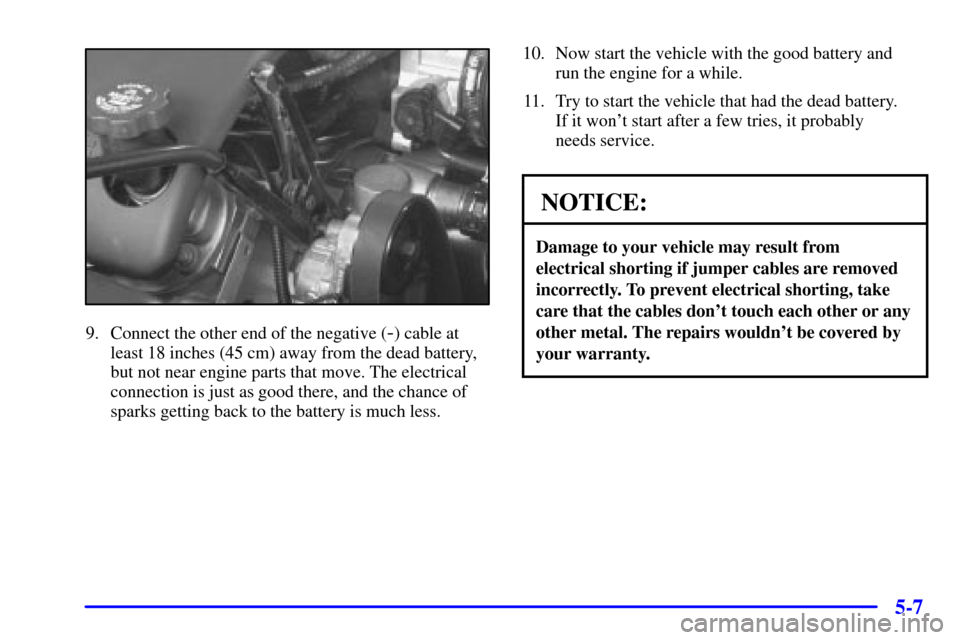
9. Connect the other end of the negative (-) cable at
least 18 inches (45 cm) away from the dead battery,
but not near engine parts that move. The electrical
connection is just as good there, and the chance of
sparks getting back to the battery is much less.10. Now start the vehicle with the good battery and
run the engine for a while.
11. Try to start the vehicle that had the dead battery.
If it won't start after a few tries, it probably
needs service.
NOTICE:
Damage to your vehicle may result from
electrical shorting if jumper cables are removed
incorrectly. To prevent electrical shorting, take
care that the cables don't touch each other or any
other metal. The repairs wouldn't be covered by
your warranty.
Page 253 of 384
5-8
Jumper Cable Removal
A. Heavy, Unpainted Metal Engine Part
B. Good Battery
C. Dead BatteryTo disconnect the jumper cables from both vehicles,
do the following:
1. Disconnect the black negative (
-) cable from the
vehicle that had the dead battery.
2. Disconnect the black negative (
-) cable from the
vehicle with the good battery.
3. Disconnect the red positive (+) cable from the
vehicle with the good battery.
4. Disconnect the red positive (+) cable from the
other vehicle.
Towing Your Vehicle
Consult your dealer or a professional towing service
if you need to have your disabled vehicle towed.
See ªRoadside Assistanceº in the Index.
Page 256 of 384
5-11
NOTICE:
If your engine catches fire because you keep
driving with no coolant, your vehicle can be
badly damaged. The costly repairs would not
be covered by your warranty. See ªOverheated
Engine Protection Operating Modeº in the Index
for information on driving to a safe place in
an emergency.
If No Steam Is Coming From Your Engine
If you get an engine overheat warning but see or hear no
steam, the problem may not be too serious. Sometimes
the engine can get a little too hot when you:
�Climb a long hill on a hot day.
�Stop after high
-speed driving.
�Idle for long periods in traffic.If you get the overheat warning with no sign of steam,
try this for a minute or so:
1. If your air conditioner is on, turn it off.
2. Turn on your heater to full hot at the highest fan
speed and open the window as necessary.
3. If you're in a traffic jam, shift to NEUTRAL (N);
otherwise, shift to the highest gear while
driving
-- AUTOMATIC OVERDRIVE (�)
or THIRD (3) for automatic transmissions.
If you no longer have the overheat warning, you can drive.
Just to be safe, drive slower for about 10 minutes. If the
warning doesn't come back on, you can drive normally.
If the warning continues, pull over, stop, and park your
vehicle right away.
If there's still no sign of steam, idle the engine for
three minutes while you're parked. If you still have the
warning, turn off the engine and get everyone out of
the vehicle until it cools down. Also, see ªOverheated
Engine Protection Operating Modeº listed previously
in this section.
You may decide not to lift the hood but to get service
help right away.