Page 195 of 384
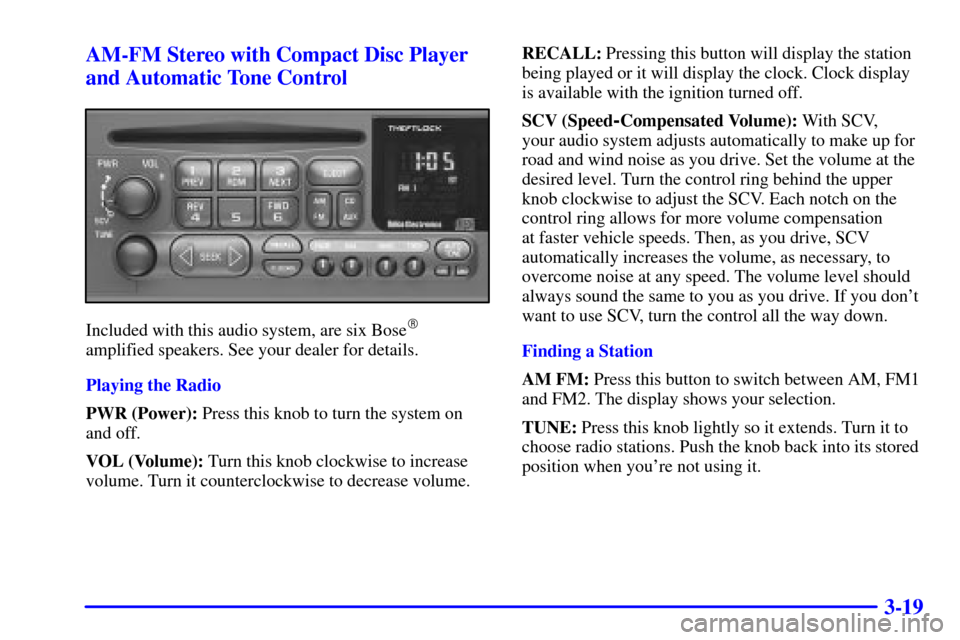
3-19 AM-FM Stereo with Compact Disc Player
and Automatic Tone Control
Included with this audio system, are six Bose�
amplified speakers. See your dealer for details.
Playing the Radio
PWR (Power): Press this knob to turn the system on
and off.
VOL (Volume): Turn this knob clockwise to increase
volume. Turn it counterclockwise to decrease volume.RECALL: Pressing this button will display the station
being played or it will display the clock. Clock display
is available with the ignition turned off.
SCV (Speed
-Compensated Volume): With SCV,
your audio system adjusts automatically to make up for
road and wind noise as you drive. Set the volume at the
desired level. Turn the control ring behind the upper
knob clockwise to adjust the SCV. Each notch on the
control ring allows for more volume compensation
at faster vehicle speeds. Then, as you drive, SCV
automatically increases the volume, as necessary, to
overcome noise at any speed. The volume level should
always sound the same to you as you drive. If you don't
want to use SCV, turn the control all the way down.
Finding a Station
AM FM: Press this button to switch between AM, FM1
and FM2. The display shows your selection.
TUNE: Press this knob lightly so it extends. Turn it to
choose radio stations. Push the knob back into its stored
position when you're not using it.
Page 197 of 384
3-21
Setting the Tone (Bass/Treble)
BASS: Press this knob lightly so it extends. Turn the
knob clockwise to increase bass and counterclockwise to
decrease bass.
TREB (Treble): Press this knob lightly so it
extends. Turn the knob clockwise to increase treble
and counterclockwise to decrease treble. If a station is
weak or noisy, you may want to decrease the treble.
Push these knobs back into their stored positions when
you're not using them.
AUTO TONE: This feature allows you to choose
bass and treble equalization settings designed for
country/western, jazz, talk, pop, rock and classical
stations. C/W will appear on the display when you
first press AUTO TONE.
Each time you press the AUTO TONE button, this
feature will switch to one of these program types.
To return the bass and treble to the manual mode,
either press and release the AUTO TONE button until
the display goes blank or press and release the BASS or
TREB knob and turn it until the display goes blank.Adjusting the Speakers (Balance/Fade)
BAL (Balance): Press this knob lightly so it extends.
Turn the knob clockwise for the right speakers and
counterclockwise for the left speakers. The middle
position balances the sound between the speakers.
FADE: Press this knob lightly so it extends. Turn the
knob clockwise to adjust the sound to the front speakers
and counterclockwise for the rear speakers. The middle
position balances the sound between the speakers.
Push these knobs back into their stored positions
when you're not using them.
Playing a Compact Disc
Insert a disc partway into the slot, label side up.
The player will pull it in. The disc should begin
playing. The display will show CD and the CD symbol.
If you want to insert a compact disc with the ignition
off, first press RECALL or EJECT.
If an error appears on the display, see ªCompact Disc
Messagesº later in this section.
Page 306 of 384
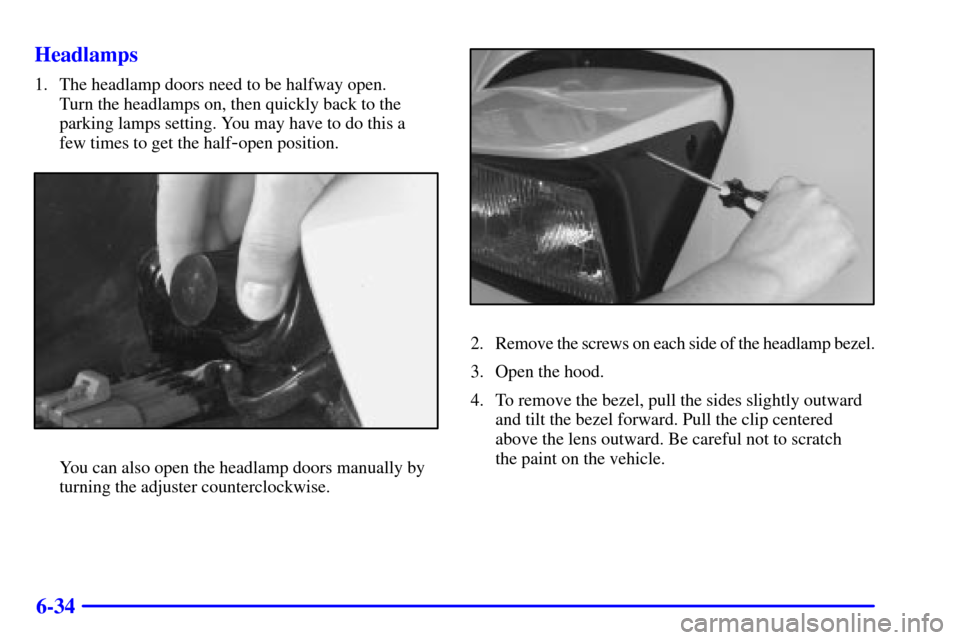
6-34 Headlamps
1. The headlamp doors need to be halfway open.
Turn the headlamps on, then quickly back to the
parking lamps setting. You may have to do this a
few times to get the half
-open position.
You can also open the headlamp doors manually by
turning the adjuster counterclockwise.
2. Remove the screws on each side of the headlamp bezel.
3. Open the hood.
4. To remove the bezel, pull the sides slightly outward
and tilt the bezel forward. Pull the clip centered
above the lens outward. Be careful not to scratch
the paint on the vehicle.