Page 73 of 331
2-30
Tilt Wheel (If Equipped)
A tilt steering wheel allows you to adjust the steering
wheel before you drive. You can also raise it to the
highest level to give your legs more room when you
enter and exit your vehicle.
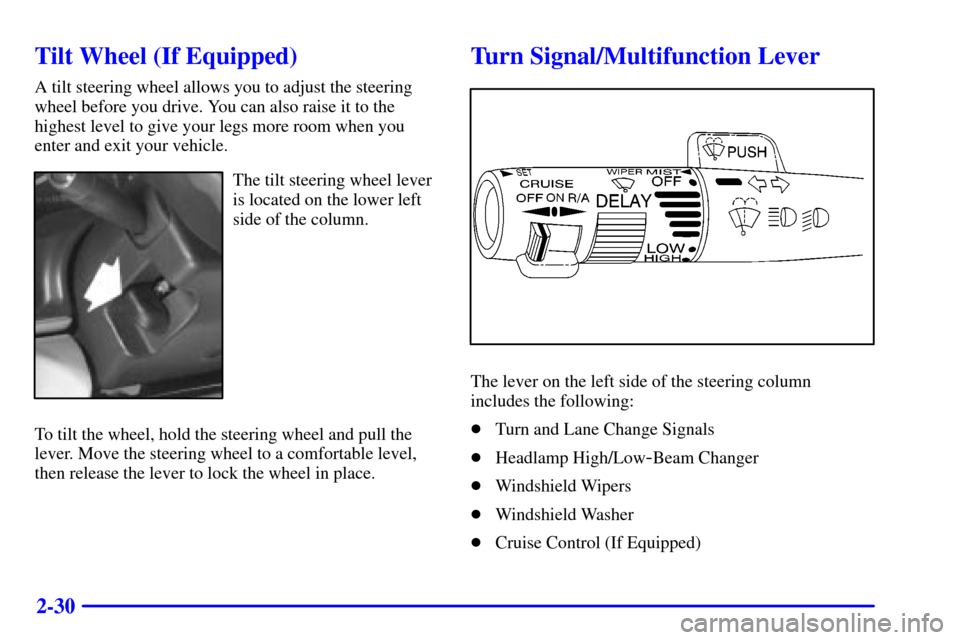
The tilt steering wheel lever
is located on the lower left
side of the column.
To tilt the wheel, hold the steering wheel and pull the
lever. Move the steering wheel to a comfortable level,
then release the lever to lock the wheel in place.
Turn Signal/Multifunction Lever
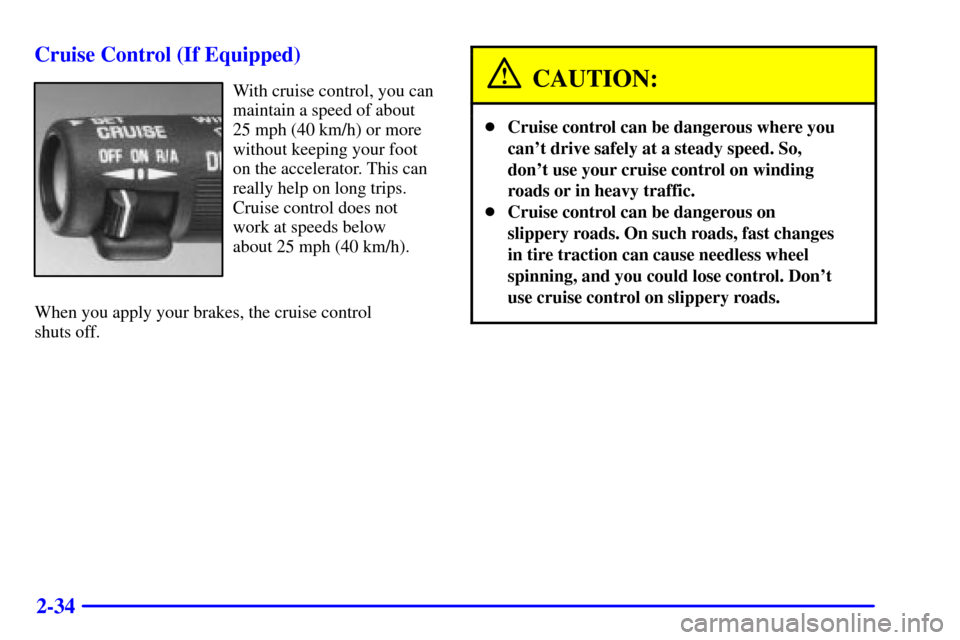
The lever on the left side of the steering column
includes the following:
�Turn and Lane Change Signals
�Headlamp High/Low
-Beam Changer
�Windshield Wipers
�Windshield Washer
�Cruise Control (If Equipped)
Page 77 of 331
2-34 Cruise Control (If Equipped)
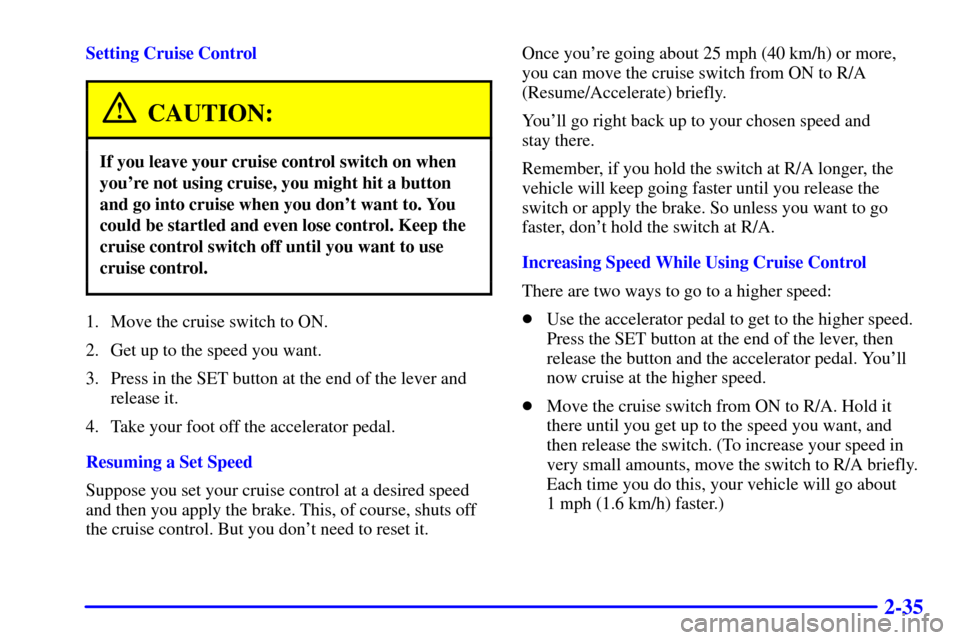
With cruise control, you can
maintain a speed of about
25 mph (40 km/h) or more
without keeping your foot
on the accelerator. This can
really help on long trips.
Cruise control does not
work at speeds below
about 25 mph (40 km/h).
When you apply your brakes, the cruise control
shuts off.CAUTION:
�Cruise control can be dangerous where you
can't drive safely at a steady speed. So,
don't use your cruise control on winding
roads or in heavy traffic.
�Cruise control can be dangerous on
slippery roads. On such roads, fast changes
in tire traction can cause needless wheel
spinning, and you could lose control. Don't
use cruise control on slippery roads.
Page 78 of 331
2-35
Setting Cruise Control
CAUTION:
If you leave your cruise control switch on when
you're not using cruise, you might hit a button
and go into cruise when you don't want to. You
could be startled and even lose control. Keep the
cruise control switch off until you want to use
cruise control.
1. Move the cruise switch to ON.
2. Get up to the speed you want.
3. Press in the SET button at the end of the lever and
release it.
4. Take your foot off the accelerator pedal.
Resuming a Set Speed
Suppose you set your cruise control at a desired speed
and then you apply the brake. This, of course, shuts off
the cruise control. But you don't need to reset it.Once you're going about 25 mph (40 km/h) or more,
you can move the cruise switch from ON to R/A
(Resume/Accelerate) briefly.
You'll go right back up to your chosen speed and
stay there.
Remember, if you hold the switch at R/A longer, the
vehicle will keep going faster until you release the
switch or apply the brake. So unless you want to go
faster, don't hold the switch at R/A.
Increasing Speed While Using Cruise Control
There are two ways to go to a higher speed:
�Use the accelerator pedal to get to the higher speed.
Press the SET button at the end of the lever, then
release the button and the accelerator pedal. You'll
now cruise at the higher speed.
�Move the cruise switch from ON to R/A. Hold it
there until you get up to the speed you want, and
then release the switch. (To increase your speed in
very small amounts, move the switch to R/A briefly.
Each time you do this, your vehicle will go about
1 mph (1.6 km/h) faster.)
Page 79 of 331
2-36
Reducing Speed While Using Cruise Control
There are two ways to reduce your speed while using
cruise control:
�Press the SET button at the end of the lever until you
reach the lower speed you want, then release it.
�To slow down in very small amounts, press the SET
button briefly. Each time you do this, you'll go about
1 mph (1.6 km/h) slower.
Passing Another Vehicle While Using Cruise Control
Use the accelerator pedal to increase your speed. When
you take your foot off the pedal, your vehicle will slow
down to the cruise control speed you set earlier.Using Cruise Control on Hills
How well your cruise control will work on hills depends
upon your speed, load and the steepness of the hills.
When going up steep hills, you may have to step on the
accelerator pedal to maintain your speed. If the
steepness of the hill causes the vehicle speed to drop
more than 15 mph (24 km/h) below the set speed, your
cruise control will automatically disengage. When going
downhill, you may have to brake or shift to a lower gear
to keep your speed down. Of course, applying the brake
takes you out of cruise control. Many drivers find this to
be too much trouble and don't use cruise control on
steep hills.
Ending Cruise Control
There are two ways to turn off the cruise control:
�Step lightly on the brake pedal or
�move the cruise switch to OFF.
Erasing Speed Memory
When you turn off the cruise control or the ignition,
your cruise control set speed memory is erased.
Page 171 of 331
4-39
NOTICE:
Using a PTO for more than four hours without
driving your vehicle can damage the transmission.
If using a PTO for more than four hours without
driving your vehicle, drive your vehicle for a while
to allow the transmission to cool.
Preset Mode: PTO speed control mode is used for
stationary applications. This mode provides a default
standby speed of 850 rpm (800 rpm with automatic
transmission) and two default PTO operation speeds
which follow:
1. PTO Set Speed of 1250 rpm, or
2. PTO Resume Speed of 1700 rpm.
The standby speed (800/850 rpm) is not to be used
as a PTO control speed. Vehicles not equipped with
cruise control will not have the resume speed capability.Using PTO speed control in Preset Mode
(Factory Setting):
1. Engage the PTO.
2. Select PARK (P) or NEUTRAL (N) range.
Apply the parking brake if NEUTRAL (N)
is selected.
3. Make sure your foot is off the brake pedal
(and off the clutch on vehicles equipped with
a manual transmission). Select the desired
engine speed for PTO operation. Be sure to
read the following Preset Mode information
regarding operation.
To engage PTO for mobile applications
(manual transmission):
If you are going to drive the vehicle, shift the
transmission into the gear you want, apply the
regular brakes and release the parking brake.
Release the clutch (and the regular brakes) as you
normally would. When you release the clutch,
the PTO will start.
Page 172 of 331

4-40
To engage a PTO while the vehicle is moving:
1. Hold the clutch pedal down.
2. Shift the transmission into NEUTRAL.
3. Engage the PTO.
4. Shift the transmission into the gear you want.
5. Release the clutch as you normally would.
When you release the clutch, the PTO will start.
Variable Mode: PTO speed control mode can be used
for both stationary and mobile applications. This mode
allows PTO to be controlled in a fashion similar to how
cruise control sets vehicle speed. The operator can set an
rpm (between 800 and 2200) with the cruise control
feature or with the SET position on the PTO switch.
The operator is then able to increase rpm in increments
of 100, or ªtap,º with the resume position on the
cruise control. Or, the operator can decrease rpm in
increments of 100 with either of the SET switches on
the PTO or the cruise control. Vehicles not equipped
with cruise control will not be able to increase in
100 rpm increments.Using PTO speed control in Variable Mode:
1. Engage the PTO.
2. Make sure your foot is off the brake pedal
(and off the clutch for vehicles equipped with
a manual transmission).
3. Select the desired engine speed (with the foot pedal)
and select SET on the PTO switch or with the
cruise control.
Engine speed will be governed to the PTO maximum
engine speed (2,200 rpm) while in either the preset or
variable PTO modes. All engine speed values listed
above are factory preset values. With the exception of
the ªtapº increment (100 rpm), all of these values are
programmable and can be adjusted by your GM dealer
or body upfitter. If the PTO software settings do not
match the settings shown here, then they may have
already been altered in order to satisfy the requirements
of the installed PTO system and body equipment.
Page 257 of 331
6-62
Fuse/Circuit
BreakerUsage
1 Stop/TCC Switch, Buzzer,
Center High Mounted Stop Lamp,
Hazard Lamps, Stoplamps
2 Not Used
3 Courtesy Lamps, Cargo Lamp,
Glove Box Lamp, Dome/Reading
Lamps, Vanity Mirrors
4 Instrument Cluster, DRL Relay,
Lamp Switch, Keyless Entry,
Low Coolant Module,
Illuminated Entry Module,
DRAC (Diesel Engine)
5 Not Used
6 Cruise Control
7 Auxiliary Power Outlet
8 Crank
Page 258 of 331
6-63
Fuse/Circuit
BreakerUsage
9 License Lamp, Parking Lamps,
Taillamps, Roof Marker
Lamps, Front Sidemarkers,
Door Switch Illumination,
Headlamp Switch Illumination
10 Not Used
11 Wiper Motor, Washer Pump
12 A/C, A/C Blower,
High Blower Relay
13 Power Amp, Cigarette Lighter,
Door Lock Relay
14 Cluster, Comfort Controls,
Instrument Switches, Radio
Illumination, Chime Module
15 DRL Relay
16 Front and Rear Turn Signals,
Back
-Up LampsFuse/Circuit
BreakerUsage
17 Radio (Ignition)
18 4WAL/VCM, Antilock Braking
System, Cruise Control
19 Radio (Battery)
20 PRNDL, Automatic Transmission,
Speedometer, Check Gages
Warning Light
21 Security/Steering
22 Not Used
23 Not Used
24 TP2 Relay (Gasoline Engine)
A Power Door Lock, Keyless
Entry Module
B Power Windows