Page 112 of 488
2-46
Running Your Engine While You're
Parked (Automatic Transmission)
It's better not to park with the engine running. But if you
ever have to, here are some things to know.
CAUTION:
Idling the engine with the climate control
system off could allow dangerous exhaust into
your vehicle. See the earlier Caution under
ªEngine Exhaust.º
Also, idling in a closed-in place can let deadly
carbon monoxide (CO) into your vehicle even
if the fan is at the highest setting. One place
this can happen is a garage. Exhaust
-- with
CO
-- can come in easily. NEVER park in a
garage with the engine running.
Another closed-in place can be a blizzard.
See ªBlizzardº in the Index.
CAUTION:
It can be dangerous to get out of your vehicle if
the shift lever is not fully in PARK (P) with the
parking brake firmly set. Your vehicle can roll.
Don't leave your vehicle when the engine is
running unless you have to. If you've left the
engine running, the vehicle can move suddenly.
You or others could be injured. To be sure your
vehicle won't move, even when you're on fairly
level ground, always set your parking brake and
move the shift lever to PARK (P).
If you have four-wheel drive, your vehicle will
be free to roll
-- even if your shift lever is in
PARK (P)
-- if your transfer case is in
NEUTRAL. So be sure the transfer case is in a
drive gear
-- not in NEUTRAL. See ªFour-Wheel
Drive (Automatic Transfer Case)º in the Index.
Follow the proper steps to be sure your vehicle won't
move. See ªShifting Into PARK (P)º in the Index.
If you're pulling a trailer, see ªTowing a Trailerº in
the Index.
Page 118 of 488
2-52
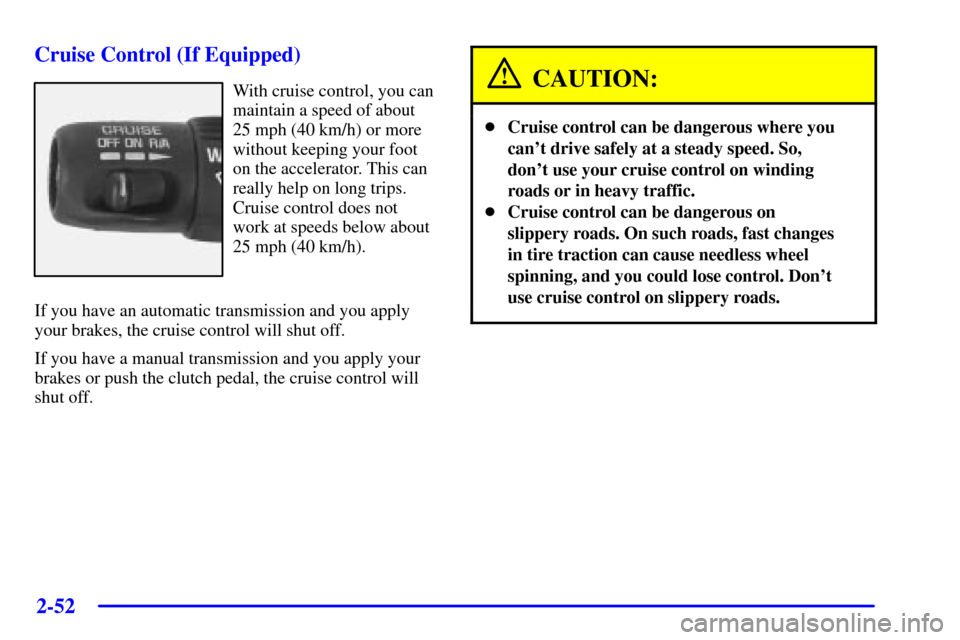
Cruise Control (If Equipped)
With cruise control, you can
maintain a speed of about
25 mph (40 km/h) or more
without keeping your foot
on the accelerator. This can
really help on long trips.
Cruise control does not
work at speeds below about
25 mph (40 km/h).
If you have an automatic transmission and you apply
your brakes, the cruise control will shut off.
If you have a manual transmission and you apply your
brakes or push the clutch pedal, the cruise control will
shut off.CAUTION:
�Cruise control can be dangerous where you
can't drive safely at a steady speed. So,
don't use your cruise control on winding
roads or in heavy traffic.
�Cruise control can be dangerous on
slippery roads. On such roads, fast changes
in tire traction can cause needless wheel
spinning, and you could lose control. Don't
use cruise control on slippery roads.
Page 120 of 488
2-54
Increasing Speed While Using Cruise Control
There are two ways to go to a higher speed:
�Use the accelerator pedal to get to the higher speed.
Press the button at the end of the lever, then release
the button and the accelerator pedal. You'll now
cruise at the higher speed.
�Move the cruise switch from ON to R/A. Hold it
there until you get up to the speed you want, and
then release the switch. To increase your speed in
very small amounts, move the switch briefly to R/A.
Each time you do this, your vehicle will go about
1 mph (1.6 km/h) faster.
Reducing Speed While Using Cruise Control
�Press in the SET button at the end of the lever until
you reach the lower speed you want, then release it.
�To slow down in very small amounts, press the SET
button briefly. Each time you do this, you'll go about
1 mph (1.6 km/h) slower.
Passing Another Vehicle While Using Cruise Control
Use the accelerator pedal to increase your speed. When
you take your foot off the pedal, your vehicle will slow
down to the cruise control speed you set earlier.Using Cruise Control on Hills
How well your cruise control will work on hills depends
upon your speed, load and the steepness of the hills.
When going up steep hills, you may want to step on the
accelerator pedal to maintain your speed. When going
downhill, you may have to brake or shift to a lower gear
to keep your speed down. Of course, applying the brake
takes you out of cruise control. Many drivers find this to
be too much trouble and don't use cruise control on
steep hills.
Ending Cruise Control
There are two ways to turn off the cruise control:
�Step lightly on the brake pedal or push the clutch
pedal, if you have a manual transmission.
�Move the cruise switch to OFF.
Erasing Speed Memory
When you turn off the cruise control or the ignition,
your cruise control set speed memory is erased.
Page 123 of 488

2-57
Daytime Running Lamps
Daytime Running Lamps (DRL) can make it easier for
others to see the front of your vehicle during the day.
DRL can be helpful in many different driving
conditions, but they can be especially helpful in the
short periods after dawn and before sunset. Fully
functional daytime running lamps are required on all
vehicles first sold in Canada.
The DRL system will make your headlamps come
on at reduced brightness when the following conditions
are met:
�The ignition is on,
�the exterior lamp control is in OFF,
�the sensor detects daytime light,
�an automatic transmission is not in PARK (P), and
�the parking brake is released.
When the DRL are on, only your headlamps will be on.
The taillamps, sidemarker and other lamps won't be on.
The instrument panel won't be lit up either.
When it begins to get dark, the headlamps will
automatically switch from DRL to the regular
headlamps.The DRL system on some vehicles may turn off
temporarily while the turn signals are activated.
To idle an automatic transmission vehicle with the DRL
off, put the transmission in PARK (P). To idle a manual
transmission vehicle with the DRL off, set the parking
brake. The DRL will stay off until you shift out of
PARK (P) or release the parking brake.
The following does not apply to vehicles sold in Canada.
When necessary, you may turn off the automatic
headlamp system and the Daytime Running Lamps
(DRL) feature by following the steps below:
1. Turn the ignition to RUN.
2. Press the DOME OVERRIDE button four times
within six seconds. After the fourth press of the
button, a chime will sound informing you that the
system is off. The system will revert back to the
automatic on mode when the ignition is turned to
OFF and then to RUN again.
3. To return to the automatic mode, push the DOME
OVERRIDE button four times within six seconds
(a chime will sound), or turn the ignition to OFF and
then to RUN again.
As with any vehicle, you should turn on the regular
headlamp system when you need it.
Page 145 of 488

2-79
Programming the HomeLink Transmitter
Do not use the HomeLink Transmitter with any garage
door opener that does not have the ªstop and reverseº
feature. This includes any garage door opener model
manufactured before April 1, 1982.
Be sure that people and objects are clear of the garage
door you are programming.
It is recommended that a new battery be installed in
your hand
-held transmitter for quicker and more
accurate transmission of the radio frequency.
Your vehicle's engine should be turned off while
programming the transmitter. Follow these steps to
program up to three channels:
1. Decide which one of the three channels (one of the
HomeLink buttons) you want to program.
2. Press and hold the desired button on HomeLink
through Step 3.3. When the HomeLink indicator light begins to blink
slowly (this may take up to 30 seconds), hold the
hand
-held transmitter about 1 to 3 inches (3 to 8 cm)
away from HomeLink and then press and hold the
transmit button on the hand
-held transmitter.
Continue to hold both buttons until the indicator
light on HomeLink begins to flash rapidly (this may
take up to 90 seconds).
If you have trouble programming HomeLink, make sure
that you have followed the directions exactly as
described and that the battery in the hand
-held
transmitter is not weak. If you still cannot program it,
move the hand
-held transmitter to the left or right or
forward or backward or flip it upside down. HomeLink
may not work with older garage door openers that do
not meet current Federal Consumer Safety Standards.
If you cannot program the transmitter after repeated
attempts, refer to ªTraining a Garage Door Opener with
Rolling Codesº later in this section or contact the
manufacturer of HomeLink at 1
-800-355-3515, or on
the internet at www.homelink.com.
Be sure to keep the original hand
-held transmitter in
case you need to erase and reprogram HomeLink.
Page 150 of 488
2-84
Instrument Panel Cluster
Your instrument panel cluster is designed to let you know at a glance how your vehicle is running. You'll know how
fast you're going, about how much fuel you've used, and many other things you'll need to know to drive safely and
economically.
Base Level cluster with Automatic Transmission United States, Canada cluster similar
Page 151 of 488
2-85
Uplevel cluster with Automatic Transmission United States, Canada cluster similar
Page 152 of 488
2-86
Speedometer and Odometer
Your speedometer lets you see your speed in both miles
per hour (mph) and kilometers per hour (km/h).
Your odometer shows how far your vehicle has been
driven, in either miles (used in the United States) or
kilometers (used in Canada).
The odometer mileage can be checked without the
vehicle running. Simply press the trip odometer button.
You may wonder what happens if your vehicle needs a
new odometer installed. If the new one can be set to the
mileage total of the old odometer, then it must be. But if
it can't, then it's set at zero, and a label must be put on
the driver's door to show the old mileage reading when
the new odometer was installed.
Trip Odometer
The trip odometer can tell you how far your vehicle has
been driven since you last set the trip odometer to zero.
To view the trip odometer, press the button near the
readout. To reset the trip odometer, hold the button until
it resets.
Tachometer (If Equipped)
The tachometer displays the engine speed in revolutions
per minute (rpm).
NOTICE:
On vehicles with a manual transmission, if you
operate the engine with the tachometer in the
shaded warning areas, your vehicle's engine or
other parts of your vehicle could be damaged.
Damage to your engine or vehicle caused by
operating the engine with the tachometer in the
shaded warning areas isn't covered by your
vehicle warranty. Don't operate the tachometer
in the shaded warning areas.