Page 58 of 368
1-52
To remove the child restraint, just unbuckle the vehicle's
safety belt. It will be ready to work for an adult or larger
child passenger.
Securing a Child Restraint in the Right
Front Seat Position
Your vehicle has a right front passenger air bag. Never
put a rear
-facing child restraint in this seat. Here's why:
CAUTION:
A child in a rear-facing child restraint can be
seriously injured or killed if the right front
passenger's air bag inflates. This is because the
back of the rear
-facing child restraint would be
very close to the inflating air bag. Always secure
a rear
-facing child restraint in the rear seat.
Although a rear seat is a safer place, you can secure a
forward
-facing child restraint in the right front seat.
Page 59 of 368
1-53
You'll be using the lap-shoulder belt. See the earlier part
about the top strap if the child restraint has one. Be sure
to follow the instructions that came with the child
restraint. Secure the child in the child restraint when and
as the instructions say.
1. Because your vehicle has a right front passenger air
bag, always move the seat as far back as it will go
before securing a forward
-facing child restraint.
See ªSeatsº in the Index.
2. Put the restraint on the seat.
3. Pick up the latch plate, and run the lap and shoulder
portions of the vehicle's safety belt through or
around the restraint. The child restraint instructions
will show you how.
If the shoulder belt goes in front of the child's face or
neck, put it behind the child restraint.
4. Buckle the belt. Make sure the release button is
positioned so you would be able to unbuckle the
safety belt quickly if you ever had to.
Page 60 of 368
1-54
5. Pull the rest of the shoulder belt all the way out of
the retractor to set the lock.6. To tighten the belt, feed the shoulder belt back into the
retractor while you push down on the child restraint.
You may find it helpful to use your knee to push down
on the child restraint as you tighten the belt.
7. Push and pull the child restraint in different
directions to be sure it is secure.
To remove the child restraint, just unbuckle the vehicle's
safety belt and let it go back all the way. The safety belt
will move freely again and be ready to work for an adult
or larger child passenger.
Page 71 of 368

2-7 Power Door Locks
Your vehicle is equipped
with front power door lock
switches. Press a power
door lock switch to lock
or unlock all doors.
The rear doors do not have power door lock switches.
Use the manual lock levers to lock or unlock each
rear door.
Programmable Automatic Power
Door Locks
Programmable automatic power door locks are intended
to provide enhanced security and convenience by
automatically locking and unlocking doors. This
feature provides four operating modes.Programmable Modes
Your vehicle can be programmed to one of the
following modes.
Mode 1: No automatic door lock or unlock.
Mode 2:
�Automatic all
-door lock when the transaxle is shifted
out of PARK (P); no automatic door unlock.
�Automatic door relock when any door is unlocked,
opened and then all doors are again closed while the
vehicle is not in PARK (P) or NEUTRAL (N) and
the driver's foot is on the brake pedal.
Mode 3:
�Automatic all
-door lock when the transaxle is shifted
out of PARK (P).
�Automatic all
-door unlock when the transaxle is
shifted into PARK (P).
�Automatic door relock when any door is unlocked,
opened and then all doors are closed again while the
vehicle is not in PARK (P) or NEUTRAL (N) and
the driver's foot is on the brake pedal.
Page 73 of 368
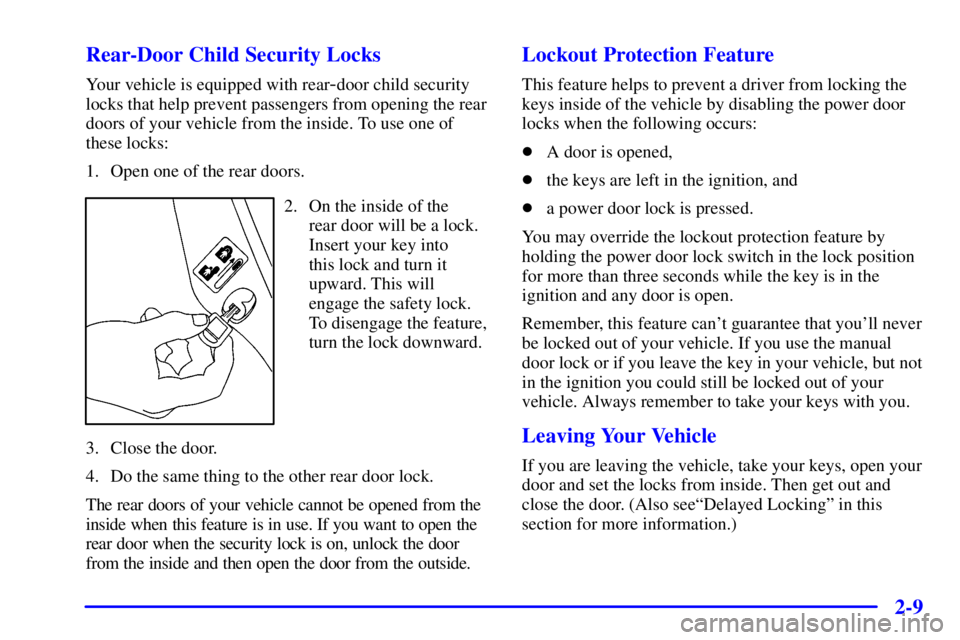
2-9 Rear-Door Child Security Locks
Your vehicle is equipped with rear-door child security
locks that help prevent passengers from opening the rear
doors of your vehicle from the inside. To use one of
these locks:
1. Open one of the rear doors.
2. On the inside of the
rear door will be a lock.
Insert your key into
this lock and turn it
upward. This will
engage the safety lock.
To disengage the feature,
turn the lock downward.
3. Close the door.
4. Do the same thing to the other rear door lock.
The rear doors of your vehicle cannot be opened from the
inside when this feature is in use. If you want to open the
rear door when the security lock is on, unlock the door
from the inside and then open the door from the outside.
Lockout Protection Feature
This feature helps to prevent a driver from locking the
keys inside of the vehicle by disabling the power door
locks when the following occurs:
�A door is opened,
�the keys are left in the ignition, and
�a power door lock is pressed.
You may override the lockout protection feature by
holding the power door lock switch in the lock position
for more than three seconds while the key is in the
ignition and any door is open.
Remember, this feature can't guarantee that you'll never
be locked out of your vehicle. If you use the manual
door lock or if you leave the key in your vehicle, but not
in the ignition you could still be locked out of your
vehicle. Always remember to take your keys with you.
Leaving Your Vehicle
If you are leaving the vehicle, take your keys, open your
door and set the locks from inside. Then get out and
close the door. (Also seeªDelayed Lockingº in this
section for more information.)
Page 75 of 368

2-11 Operation
Press UNLOCK once to
unlock the driver's door and
to turn on the interior lamps
(see ªIllumination on
Remote Activationº in the
Index for more details).
The perimeter lighting feature will also be activated at
night, turning on your headlamps and back
-up lamps for
approximately 25 seconds when the UNLOCK button is
pressed. (This will light the area around the vehicle.)
See ªPerimeter Lightingº in the Index.
Press UNLOCK again within five seconds to unlock all
the doors. To lock all doors, press LOCK. To unlock the
trunk, press the button with the trunk symbol on the
remote keyless entry transmitter. The trunk will only
unlock if your transaxle is in PARK (P).Panic Alarm
This feature allows you to activate an alarm by pressing a
button on the remote keyless entry transmitter. Your
ignition must be off for the panic alarm to work. When
you press the panic button with the horn symbol on it the
remote keyless entry transmitter, the headlamps will
flash, the horn will honk repeatedly, and the interior
lamps will illuminate, attracting attention if you need it.
The alarm will continue until one of the following occurs:
�You press the panic button on the remote keyless
entry transmitter a second time,
�the ignition moved to RUN, or
�an alarm period of about two minutes has elapsed.
Security Feedback
Security feedback provides audible and/or visible
feedback confirming that a remote keyless entry lock
or unlock command has been received and executed.
The ignition must be off for this feature to work.
You may select one of four operating modes for reception
of a lock command. You may also select one of four
operating modes for reception of an unlock command.
The selection and programming of the lock and unlock
operating modes are independent of each other.
Page 76 of 368

2-12
Programmable Modes
Your vehicle can be programmed to one of the
following modes.
Mode 1: No Verification
Mode 2: Horn Chirp only
Mode 3: Headlamp Flash only
Mode 4: Horn Chirp and Headlamp Flash
Before your vehicle was shipped from the factory, it
was programmed to Mode 3. The mode to which your
vehicle was programmed may have been changed since
it left the factory. To determine which security feedback
lock mode your vehicle is programmed to or to program
your vehicle to a different mode, do the following:
1. Close all doors and turn the ignition key to RUN.
2. Press and hold the power door lock switch in the
lock position.3. While holding the door lock switch in the lock
position, press and release the remote keyless
entry transmitter LOCK button. This will start the
customization mode. While in the customization
mode, the feature will sound the number of chimes
corresponding to the current lock mode. (If you
do not wish to change the current mode, you can
either exit the programming mode by following the
instructions listed here or program the next feature
available on your vehicle.)
4. Each additional press of the remote keyless entry
transmitter LOCK button will cause your vehicle to
advance the lock mode by one, starting from the
current lock mode.
5. If cycled beyond Mode 4, the vehicle will enter
Mode 1. When the door lock switch is released,
the vehicle will remain in the most recent lock mode.
Page 77 of 368

2-13
Before your vehicle was shipped from the factory, it was
programmed to Mode 3. The mode to which your vehicle
was programmed may have been changed since it left the
factory. To determine which security feedback unlock
mode your vehicle is programmed to or to program
your vehicle to a different mode, do the following:
1. Close all doors and turn the ignition key to RUN.
2. Press and hold the power door lock switch in the
unlock position. While holding the door lock switch
in the unlock position, press and release the remote
keyless entry transmitter UNLOCK button. This
will start the customization mode. While in the
customization mode, the feature will sound the
number of chimes corresponding to the current
unlock mode. (If you do not wish to change the
current mode, you can either exit the programming
mode by following the instructions listed here or
program the next feature available on your vehicle.)
3. Each additional press of the remote keyless entry
transmitter UNLOCK button will cause your vehicle
to advance the unlock mode by one, starting from the
current unlock mode.
4. If cycled beyond unlock Mode 4, the vehicle will
enter unlock Mode 1. When the door lock switch is
released, the vehicle will remain in the most recent
unlock mode.The mode you selected is now set. You can either
exit the programming mode by following the previous
instructions or program the next feature available on
your vehicle.
Disconnecting the vehicle's battery for up to a year will
not change the programmed mode for the lock and
unlock security feedback features.
Delayed Locking
Delayed locking allows the doors to be locked while
the passengers are exiting the vehicle. This feature also
allows a brief time period for you to re
-enter the vehicle
after the doors have been closed and locked. Delayed
locking is user programmable for enabling or disabling
the feature.
Delayed locking is activated when a door lock switch is
pressed while the key is not in the vehicle's ignition, and
a door is open. The door lock switch may be either the
lock switch on the door or on the remote keyless entry
transmitter (see ªRemote Keyless Entryº earlier in this
section for more details). The doors do not lock when
the lock switch is pressed, but instead, three chimes are
heard. These chimes indicate that the delayed locking
function has been activated.


