Page 64 of 395

2-
2-1
Section 2 Features and Controls
Here you can learn about the many standard and optional features on your vehicle, and information on starting,
shifting and braking. Also explained are the instrument panel and the warning systems that tell you if everything is
working properly
-- and what to do if you have a problem.
2
-2 Windows
2
-4 Keys
2
-6 Door Locks
2
-11 Remote Keyless Entry System (If Equipped)
2
-16 Trunk
2
-19 Theft
2
-20 Content Theft-Deterrent System
2
-21 PASS-Key� III
2
-23 New Vehicle ªBreak-Inº
2
-24 Ignition Positions
2
-25 Starting Your Engine
2
-27 Engine Coolant Heater (If Equipped)
2
-28 Automatic Transaxle Operation
2
-31 Parking Brake
2
-32 Shifting Into PARK (P)
2
-35 Shifting Out of PARK (P)
2
-35 Parking Over Things That Burn
2
-36 Engine Exhaust
2
-36 Running Your Engine While You're Parked2
-37 Tilt Wheel
2
-38 Turn Signal/Multifunction Lever
2
-45 Exterior Lamps
2
-47 Interior Lamps
2
-50 Mirrors
2
-54 Storage Compartments
2
-62 OnStar� System (If Equipped)
2
-66 Sunroof (Option)
2
-67 HomeLink� Transmitter (If Equipped)
2
-70 The Instrument Panel -- Your
Information System
2
-72 Instrument Panel Clusters
2
-75 Warning Lights, Gages and Indicators
2
-87 Driver Information Center (DIC) (If
Equipped)
2
-97 Head-Up Display (HUD) (If Equipped)
2
-99 Ultrasonic Rear Parking Assist
(URPA) (Option)
Page 101 of 395

2-38
Turn Signal/Multifunction Lever
The lever on the left side of the steering column
includes the following:
�Turn and Lane
-Change Signals
�Headlamp High/Low Beam Changer
�Flash
-to-Pass Feature
�Windshield Wipers
�Windshield Washer
�Cruise Control
For information on the exterior lamps, see ªExterior
Lampsº later in this section.
Turn and Lane-Change Signals
The turn signal has two upward (for right) and two
downward (for left) positions. These positions allow you
to signal a turn or a lane change.
To signal a turn, move the lever all the way up or down.
When the turn is finished, the lever will return automatically.
An arrow on the instrument
panel cluster will flash in
the direction of the turn or
lane change.
If your vehicle is equipped with the Head
-Up Display
(HUD), an arrow will also appear in the display area to
indicate the direction of the turn or lane change.
See ªHead
-Up Display (HUD)º in the Index
for more information.
To signal a lane change, just raise or lower the lever
until the arrow starts to flash. Hold it there until you
complete your lane change. The lever will return by
itself when you release it.
Page 108 of 395
2-45
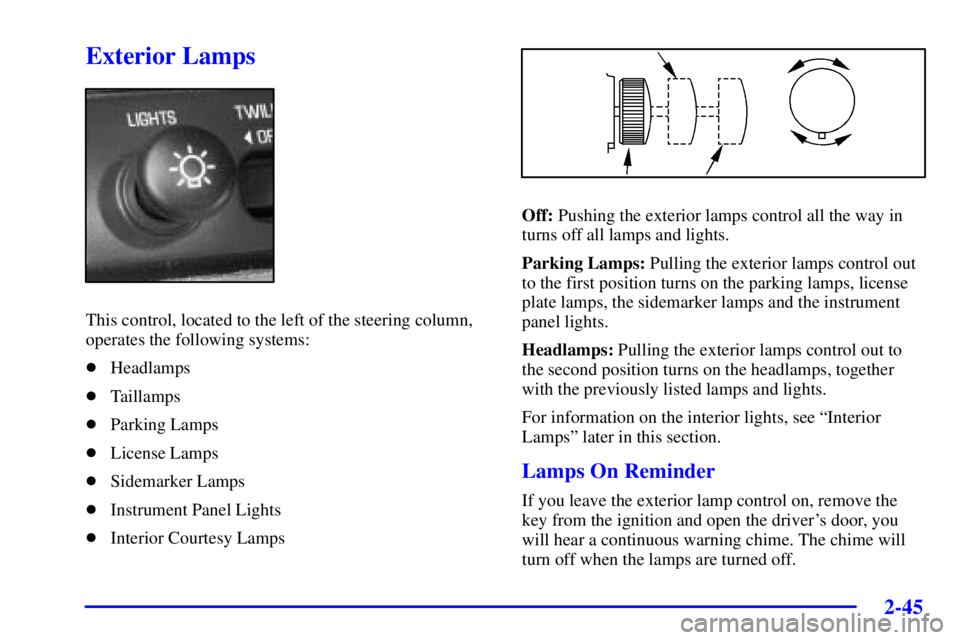
Exterior Lamps
This control, located to the left of the steering column,
operates the following systems:
�Headlamps
�Taillamps
�Parking Lamps
�License Lamps
�Sidemarker Lamps
�Instrument Panel Lights
�Interior Courtesy Lamps
Off: Pushing the exterior lamps control all the way in
turns off all lamps and lights.
Parking Lamps: Pulling the exterior lamps control out
to the first position turns on the parking lamps, license
plate lamps, the sidemarker lamps and the instrument
panel lights.
Headlamps: Pulling the exterior lamps control out to
the second position turns on the headlamps, together
with the previously listed lamps and lights.
For information on the interior lights, see ªInterior
Lampsº later in this section.
Lamps On Reminder
If you leave the exterior lamp control on, remove the
key from the ignition and open the driver's door, you
will hear a continuous warning chime. The chime will
turn off when the lamps are turned off.
Page 117 of 395

2-54
Convex Outside Mirror
Your passenger's side mirror is convex. A convex
mirror's surface is curved so you can see more from the
driver's seat.
CAUTION:
A convex mirror can make things (like other
vehicles) look farther away than they really are.
If you cut too sharply into the right lane, you
could hit a vehicle on your right. Check your
inside mirror or glance over your shoulder
before changing lanes.
Automatic Dimming/Heated Outside
Rearview Mirror (If Equipped)
If you have this feature, the driver's side outside
rearview mirror will adjust for the glare of headlamps
behind you. This feature is controlled using the on and
off settings on the automatic electrochromic day/night
rearview mirror. See ªAutomatic Electrochromic
Day/Night Rearview Mirrorº earlier in this section.
If you have this feature, the left and right outside mirrors
are also heated when you activate the rear window
defogger. See ªRear Window Defoggerº in the Index.
Both outside mirrors can be folded forward or rearward.
In the rearward position, they will fold flush with the
vehicle. This feature is particularly useful in automatic
car washes.
Storage Compartments
Glove Box
Use the key to lock and unlock the glove box. To
open the glove box, pull the handle upward until the
latch opens.
Page 131 of 395

2-68
3. When the HomeLink indicator light begins to blink
slowly (this may take up to 30 seconds), hold the
hand
-held transmitter about 1 to 3 inches (3 to 8 cm)
from HomeLink and then press and hold the transmit
button on the hand
-held transmitter. Continue to
hold both buttons until the indicator light on
HomeLink begins to flash rapidly (this may take
up to 90 seconds).
If you have trouble programming HomeLink, make
sure that you have followed the directions exactly as
described and that the battery in the hand
-held
transmitter is not weak. If you still cannot program it,
move the hand
-held transmitter to the left or right or
forward or backward or flip it upside down. HomeLink
may not work with older garage door openers that do
not meet current Federal Consumer Safety Standards.
If you cannot program the transmitter after repeated
attempts, refer to ªTraining a Garage Door Opener with
Rolling Codesº later in this section or contact the
manufacturer of HomeLink at 1
-800-355-3515, or on
the internet at www.homelink.com.
Be sure to keep the original hand
-held transmitter in
case you need to erase and reprogram HomeLink.
Training a Garage Opener with aªRolling
Codeº Feature (If Equipped)
If you have not previously programmed the hand-held
transmitter to HomeLink, see ªProgramming the
HomeLink Transmitterº listed previously. If you have
completed this programming already, you now need to
train the garage door opener motor head unit to
recognize HomeLink.
1. Find the ªLearnº or ªSmartº button on the
garage door opener motor head unit. The exact
location and color will vary by garage door opener
brand. If you have difficulty finding the Learn or
Smart button, refer to your garage door opener
owner's manual or contact the manufacturer of
HomeLink at 1
-800-355-3515, or on the
internet at www.homelink.com.
Because of the steps involved, it may be helpful
to have another person assist in programming
the transmitter.
Page 138 of 395

2-75
Warning Lights, Gages
and Indicators
This part describes the warning lights and gages that
may be on your vehicle. The pictures will help you
locate them.
Warning lights and gages can signal that something is
wrong before it becomes serious enough to cause an
expensive repair or replacement. Paying attention to
your warning lights and gages could also save you or
others from injury.
Warning lights come on when there may be or is a
problem with one of your vehicle's functions. As you
will see in the details on the next few pages, some
warning lights come on briefly when you start the
engine just to let you know they're working. If you
are familiar with this section, you should not be alarmed
when this happens.Gages can indicate when there may be or is a problem
with one of your vehicle's functions. Often gages and
warning lights work together to let you know when
there's a problem with your vehicle.
When one of the warning lights comes on and stays on
when you are driving, or when one of the gages shows
there may be a problem, check the section that tells you
what to do about it. Please follow this manual's advice.
Waiting to do repairs can be costly
-- and even
dangerous. So please get to know your warning lights
and gages. They're a big help.
Your vehicle may also have a Driver Information Center
(DIC) that works along with the warning lights and
gages. See ªDriver Information Centerº in the Index.
Page 142 of 395

2-79 Anti-Lock Brake System Warning Light
With the anti-lock brake
system, the light(s) will
come on when your engine
is started and may stay
on for several seconds.
That's normal.
If the light stays on and the chime sounds, turn the
ignition to OFF. Or, if the light comes on and the chime
sounds when you're driving, stop as soon as possible
and turn the ignition off. Then start the engine again to
reset the system. If the light still stays on and the chime
sounds, or the light comes on again while you're
driving, your vehicle needs service. If the regular brake
system warning light isn't on, you still have brakes, but
you don't have anti
-lock brakes. If the regular brake
system warning light is also on, you don't have anti
-lock
brakes and there's a problem with your regular brakes.
See ªBrake System Warning Lightº earlier in
this section.
The anti
-lock brake system warning light should come
on briefly when you turn the ignition key to RUN. If the
light doesn't come on then, have it fixed so it will be
ready to warn you if there is a problem.
Traction Control System Warning
Light (Option)
This warning light should
come on briefly when the
engine is started.
If the warning light doesn't come on then, have it fixed
so it will be ready to warn you if there's a problem. If it
stays on, or comes on when you're driving, there may be
a problem with your traction control system and your
vehicle may need service. When this warning light is
on, the system will not limit wheel spin. Adjust your
driving accordingly.
Page 164 of 395

3-
3-1
Section 3 Comfort Controls and Audio Systems
In this section, you'll find out how to operate the comfort control and audio systems offered with your vehicle.
Be sure to read about the particular systems supplied with your vehicle.
3
-2 Comfort Controls
3
-2 Dual Automatic ComforTemp�
Climate Control
3
-4 Air Conditioning
3
-5 Heating
3
-5 Defogging and Defrosting
3
-5 Rear Window Defogger
3
-6 Passenger Climate Control
3
-6 Personal Choice Comfort Controls
(If Equipped)
3
-7 Ventilation System
3
-8 Steering Wheel Controls for Climate Control
3
-8 Audio Systems
3
-8 Setting the Clock3
-9AM-FM Stereo with Cassette Tape Player and
Automatic Tone Control (If Equipped)
3
-13 AM-FM Stereo with Cassette Tape and
Compact Disc Player with Automatic Tone
Control (If Equipped)
3
-19 Trunk-Mounted CD Changer (Option)
3
-23 Personal Choice Radio Controls (If Equipped)
3
-23 Theft-Deterrent Feature
3
-25 Audio Steering Wheel Controls
3
-26 Understanding Radio Reception
3
-27 Tips About Your Audio System
3
-28 Care of Your Cassette Tape Player
3
-29 Care of Your Compact Discs
3
-29 Care of Your Compact Disc Player
3
-29 Heated Backlite Antenna