2002 BMW 745LI SEDAN key
[x] Cancel search: keyPage 109 of 208
Practical interior accessories
108
Practical interior accessoriesUniversal Garage Door
Opener*
The concept The Universal Garage Door Opener can
replace as many as three hand-held trans-
mitters for various accessories, such as
door openers, alarms and door-locking
systems. The Universal Garage Door
Opener registers and stores signals from
the original hand-held transmitters.
The signal of an original hand-held trans-
mitter can be programmed on one of the
three channel keys. Following that, each of
the devices can be actuated with the
appropriately-programmed channel key.
The indicator lamp flashes to confirm trans-
mission of the signal.
If the vehicle is sold, the memory of the
channel keys should be cleared as
described on page 109.
To prevent possible damage or injury,
before programming or using the
Universal Garage Door Opener always
inspect the immediate area to make certain
that no people, animals or objects are
within the travel range of the device. Also,
comply with the safety precautions of the
original hand-held transmitter.< Original hand-held transmitter
If you see this symbol on the pack-
aging or in the manual supplied with
the original remote control unit, it is
safe to assume that it is compatible with
the Universal Garage Door Opener.
To check for alternating codes To determine whether the original hand-
held transmitter operates using an alter-
nating code, you should either consult the
manual enclosed with it or program a
channel key as described in the Program-
ming section. After programming, press and hold down
the key on the Universal Garage Door
Opener. If the indicator lamp on the
Universal Garage Door Opener flashes for
two seconds before remaining on continu-
ously, this indicates that the original hand-
held transmitter uses an alernating code. In
this case, you can program the channel
keys using the procedure described on the
next page in the section on programming
alternating-code transmitters.
If you have additional questions,
please consult your BMW center or
call 1-800-355-3515.
You can also visit these websites:
www.bmwusa.com or
www.homelink.com.
HomeLink is a registered trademark owned
by Johnson Controls, Inc.<
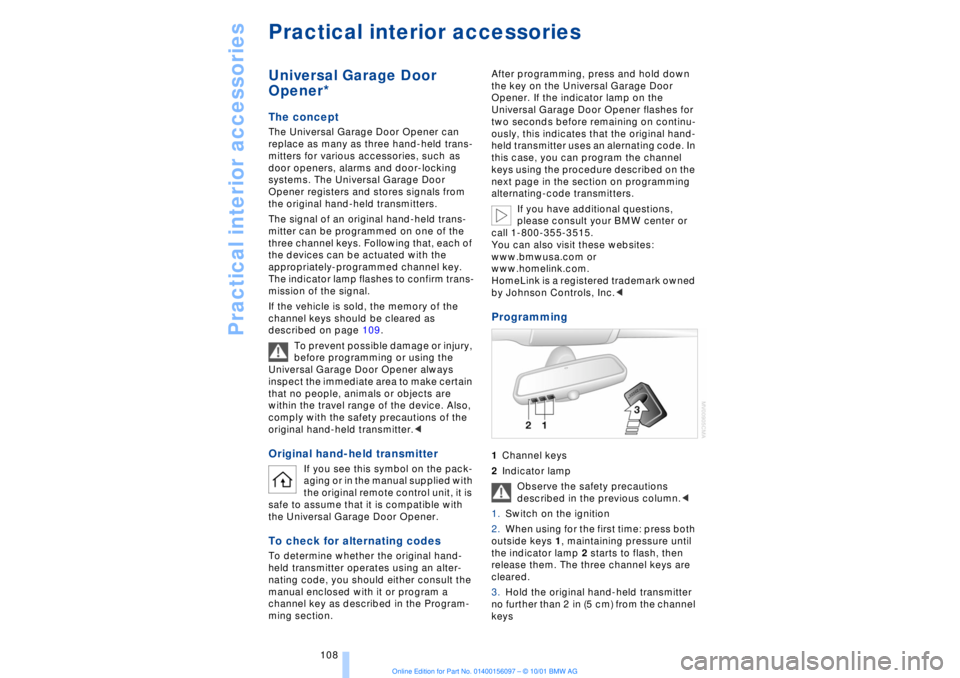
Programming 1Channel keys
2Indicator lamp
Observe the safety precautions
described in the previous column.<
1.Switch on the ignition
2.When using for the first time: press both
outside keys 1, maintaining pressure until
the indicator lamp 2 starts to flash, then
release them. The three channel keys are
cleared.
3.Hold the original hand-held transmitter
no further than 2 in (5 cm) from the channel
keys
Page 110 of 208
At a glanceControlsDriving tipsCommunicationsNavigationEntertainmentMobilityReference
109
4.Simultaneously press the transmit key
on the original hand-held transmitter,
arrow 3 and the selected channel key 1
on the Universal Garage Door Opener.
Release both keys as soon as the indicator
lamp flashes rapidly
5.To program other original hand-held
transmitters, repeat steps 3 and 4.
The corresponding channel key is now
programmed with the signal of the original
hand-held transmitter. Programming alternating-code
transmitters
Observe all of the safety precautions
described on the previous page.<
Consult the unit's operating instructions
when programming the Universal Garage
Door Opener.
When programming hand-held transmitters
that employ an alternating code, please
observe the following supplementary
instructions:
Programming will be easier with the
aid of a second person.<
1.Program the Universal Garage Door
Opener by following the instructions given
above under Programming.
2.Maintain pressure on the alternating-
code transmitter for roughly two seconds,
continuing until the program lamp lights up.
3.Press the selected channel key on the
Universal Garage Door Opener three times.
If you have any additional questions,
please contact your BMW center.<
To clear channel keys
Observe all of the safety precautions
described on the previous page.<
The memory of individual channel keys
cannot be deleted. However, the three
channel keys can be cleared together as
follows:
>Press both outside keys on the Universal
Garage Door Opener; maintain pressure
until the indicator lamp starts to flash, then
release the key.
Sun blinds*
Rear window sun blind Activate by pressing the button with the
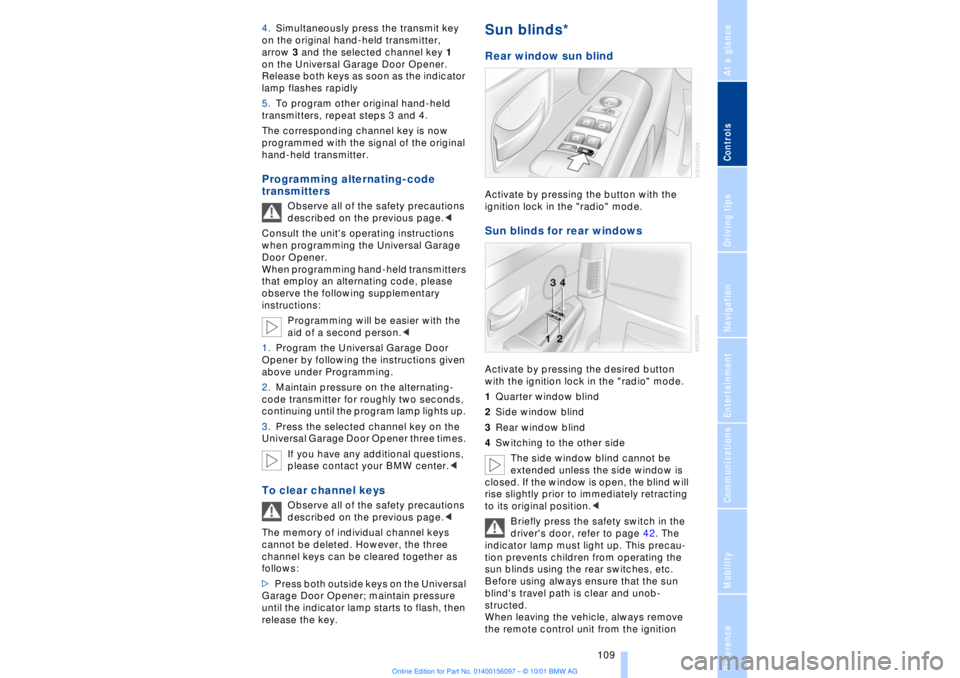
ignition lock in the "radio" mode. Sun blinds for rear windows Activate by pressing the desired button
with the ignition lock in the "radio" mode.
1Quarter window blind
2Side window blind
3Rear window blind
4Switching to the other side
The side window blind cannot be
extended unless the side window is
closed. If the window is open, the blind will
rise slightly prior to immediately retracting
to its original position.<
Briefly press the safety switch in the
driver's door, refer to page 42. The
indicator lamp must light up. This precau-
tion prevents children from operating the
sun blinds using the rear switches, etc.
Before using always ensure that the sun
blind's travel path is clear and unob-
structed.
When leaving the vehicle, always remove
the remote control unit from the ignition
Page 112 of 208
At a glanceControlsDriving tipsCommunicationsNavigationEntertainmentMobilityReference
111
Rechargeable flashlight The flashlight is located on the left-hand
side of the glove compartment.
It features integral overload protection, so
it can be left in its holder continuously.
Be sure that the flashlight is switched
off when it is inserted into its holder.
Failure to comply with this precaution
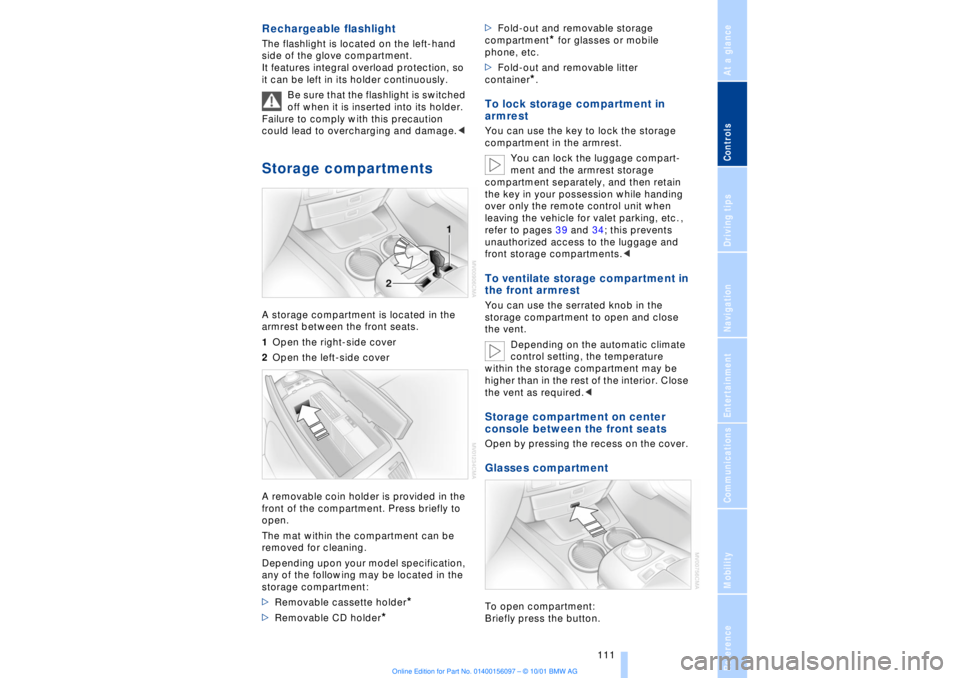
could lead to overcharging and damage.< Storage compartments A storage compartment is located in the
armrest between the front seats.
1Open the right-side cover
2Open the left-side cover
A removable coin holder is provided in the
front of the compartment. Press briefly to
open.
The mat within the compartment can be
removed for cleaning.
Depending upon your model specification,
any of the following may be located in the
storage compartment:
>Removable cassette holder
*
>Removable CD holder
* >Fold-out and removable storage
compartment
* for glasses or mobile
phone, etc.
>Fold-out and removable litter
container
*.
To lock storage compartment in
armrest You can use the key to lock the storage
compartment in the armrest.
You can lock the luggage compart-
ment and the armrest storage
compartment separately, and then retain
the key in your possession while handing
over only the remote control unit when
leaving the vehicle for valet parking, etc. ,
refer to pages 39 and 34; this prevents
unauthorized access to the luggage and
front storage compartments.< To ventilate storage compartment in
the front armrest You can use the serrated knob in the
storage compartment to open and close
the vent.
Depending on the automatic climate
control setting, the temperature
within the storage compartment may be
higher than in the rest of the interior. Close
the vent as required.< Storage compartment on center
console between the front seats Open by pressing the recess on the cover. Glasses compartment To open compartment:
Briefly press the button.
Page 160 of 208
At a glanceControlsDriving tipsCommunicationsNavigationEntertainmentMobilityReference
159
Batteries
Never attempt to open your BMW
mobile phone or its battery. Use only
approved battery types Ð the wrong battery
can destroy your cell phone.
To avoid possible short circuits, after
removing a battery you should never allow
it to come into contact with metallic
surfaces of any kind.<
Disposing of used batteries
Return used batteries to a recycling
collection point or to your BMW
center.<
Care instructionsYou can find everything you need to know
about caring for your mobile phone in the
separate "Mobile Phone" manual and in our
supplementary publication on "Car care." Operation
For information on operating your
mobile phone please consult the
separate manual.<
You can also operate your BMW mobile
phone using the
>controls on the steering wheel, refer to
page 18
>Control Display
>Key Pad
>voice command system.
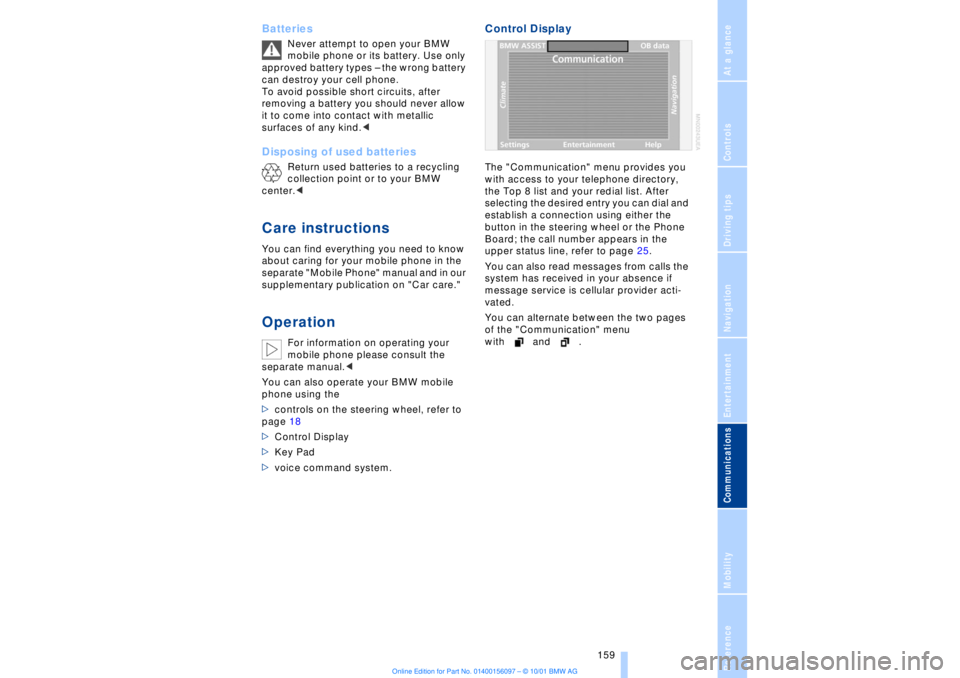
Control DisplayThe "Communication" menu provides you
with access to your telephone directory,
the Top 8 list and your redial list. After
selecting the desired entry you can dial and
establish a connection using either the
button in the steering wheel or the Phone
Board; the call number appears in the
upper status line, refer to page 25.
You can also read messages from calls the
system has received in your absence if
message service is cellular provider acti-
vated.
You can alternate between the two pages
of the "Communication" menu
with and .
Page 161 of 208
Using your mobile phone
160
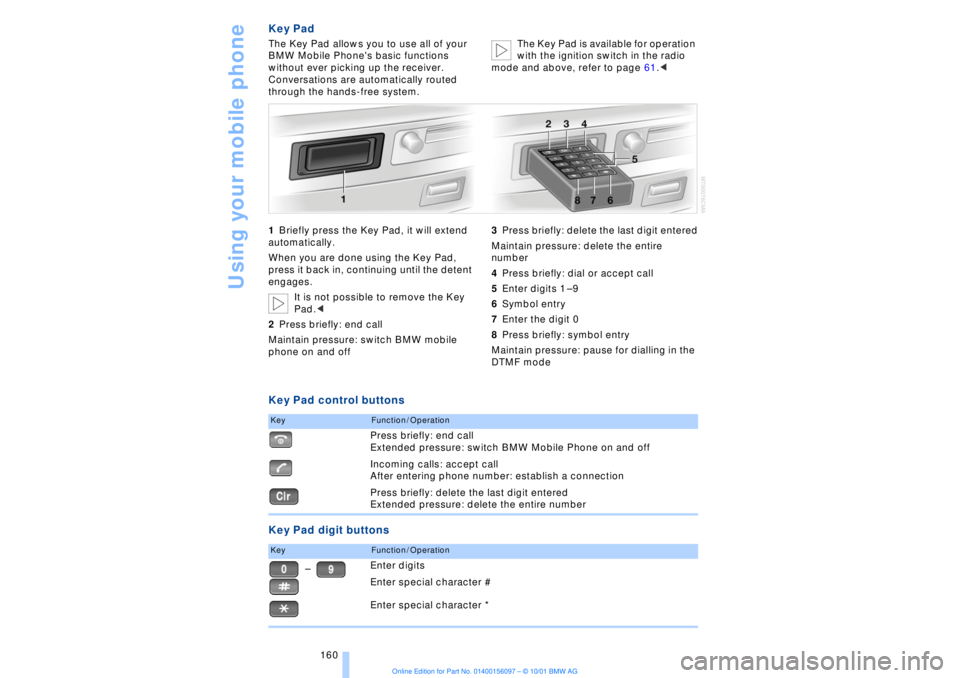
Key PadThe Key Pad allows you to use all of your
BMW Mobile Phone's basic functions
without ever picking up the receiver.
Conversations are automatically routed
through the hands-free system.The Key Pad is available for operation
with the ignition switch in the radio
mode and above, refer to page 61.<
1Briefly press the Key Pad, it will extend
automatically.
When you are done using the Key Pad,
press it back in, continuing until the detent
engages.
It is not possible to remove the Key
Pad.<
2Press briefly: end call
Maintain pressure: switch BMW mobile
phone on and off3Press briefly: delete the last digit entered
Maintain pressure: delete the entire
number
4Press briefly: dial or accept call
5Enter digits 1 Ð 9
6Symbol entry
7Enter the digit 0
8Press briefly: symbol entry
Maintain pressure: pause for dialling in the
DTMF modeKey Pad control buttons
Key Pad digit buttonsKey
Function / OperationPress briefly: end call
Extended pressure: switch BMW Mobile Phone on and off
Incoming calls: accept call
After entering phone number: establish a connection
Press briefly: delete the last digit entered
Extended pressure: delete the entire number
Key
Function / OperationEnter digits
Enter special character #
Enter special character *
Ð
Page 162 of 208
At a glanceControlsDriving tipsCommunicationsNavigationEntertainmentMobilityReference
161
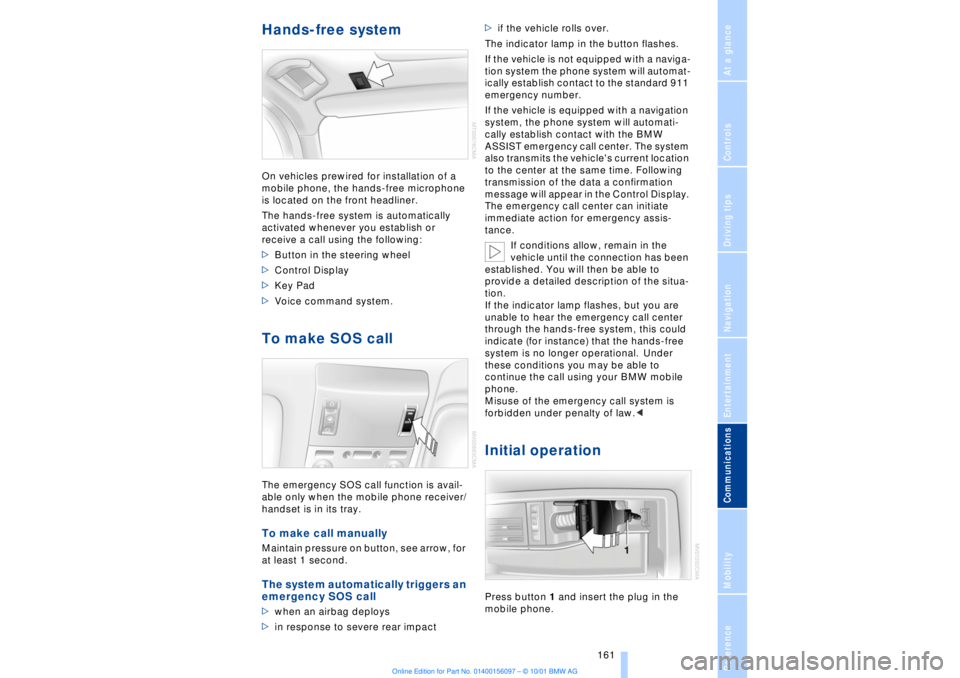
Hands-free system On vehicles prewired for installation of a
mobile phone, the hands-free microphone
is located on the front headliner.
The hands-free system is automatically
activated whenever you establish or
receive a call using the following:
>Button in the steering wheel
>Control Display
>Key Pad
>Voice command system.To make SOS call The emergency SOS call function is avail-
able only when the mobile phone receiver/
handset is in its tray.To make call manually Maintain pressure on button, see arrow, for
at least 1 second. The system automatically triggers an
emergency SOS call >when an airbag deploys
>in response to severe rear impact >if the vehicle rolls over.
The indicator lamp in the button flashes.
If the vehicle is not equipped with a naviga-
tion system the phone system will automat-
ically establish contact to the standard 911
emergency number.
If the vehicle is equipped with a navigation
system, the phone system will automati-
cally establish contact with the BMW
ASSIST emergency call center. The system
also transmits the vehicle's current location
to the center at the same time. Following
transmission of the data a confirmation
message will appear in the Control Display.
The emergency call center can initiate
immediate action for emergency assis-
tance.
If conditions allow, remain in the
vehicle until the connection has been
established. You will then be able to
provide a detailed description of the situa-
tion.
If the indicator lamp flashes, but you are
unable to hear the emergency call center
through the hands-free system, this could
indicate (for instance) that the hands-free
system is no longer operational. Under
these conditions you may be able to
continue the call using your BMW mobile
phone.
Misuse of the emergency call system is
forbidden under penalty of law.<
Initial operationPress button 1 and insert the plug in the
mobile phone.
Page 163 of 208
Using your mobile phone
162 Before starting off place the BMW
mobile phone in the tray, see arrow.
You can then operate it with the in-car
controls. Terminate calls using the same
control feature with which the call was initi-
ated.<
Getting startedSwitching your BMW mobile phone
on and off
You can switch your BMW mobile
phone on and off by maintaining
extended pressure on the Key Pad.
Using the Voice Command system:
>>Telephone on<<.<
Enter lock codeIf, after switching on the telephone, you are
requested by a message from the Control
Display to enter the lock code:
Enter lock code, for instance 1234 .
Confirm your entry with the
key.To place a callEnter the desired phone number
Press.
The phone number appears in the Control
Display's status line. If a number that you
dialed earlier appears maintain pressure on
the
button.
The new phone number can now be dialed.
Using the voice command system:1.>>Dial (telephone) number<<
2.Enter the phone number
>To delete the entire number:
>>Delete (number)<< (>>Wrong<<,
>>Correction<<)
3.>>Done<< (>>Save<<, >>Dial<<).<
Always remember to enter the
complete telephone number,
including the area code, even if you are
currently in the same area as the number
that you wish to contact.<
End callPress
After conducting a call using the button in
the steering wheel or the voice command
system, you can terminate the call using
the button.Telephone directoryYou must enter your mobile phone's tele-
phone directory in the voice command
system before it will be available for access
using voice commands. This creates a
special voice command telephone direc-
tory. If changes are then made to the direc-
tory using the voice command system,
these modifications will apply exclusively
to the voice directory, and not to the direc-
tory in the mobile phone.Creating and updating voice
command telephone directory
1.>>Telephone (menu)<<
2.>>Load telephone book<<
(>>Update telephone book<<)<
The entries in the mobile phone's tele-
phone directory appear sequentially in the
Info Display.
You must assign a specific name to each
number that you wish to transfer to the
voice command telephone directory. These
numbers will no longer be requested during
updates.
Page 164 of 208
At a glanceControlsDriving tipsCommunicationsNavigationEntertainmentMobilityReference
163
To make a new entry in the voice
command telephone directory Using the voice command system:
1.>>Save name<<
2.Enter name and repeat entry upon
request
3.Enter phone numbers
4.>>Save<<.
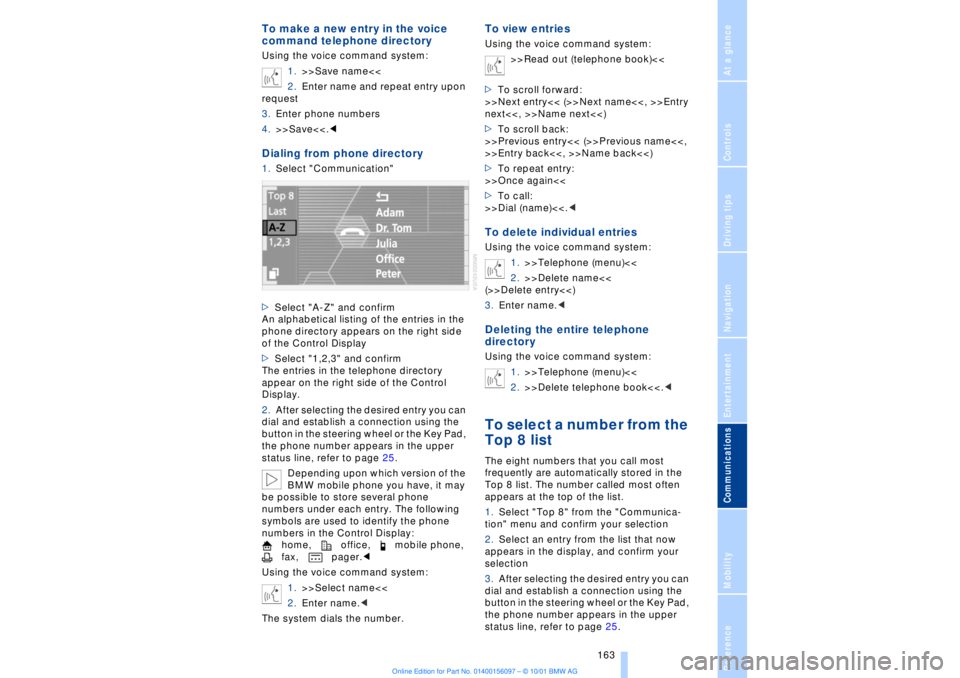
An alphabetical listing of the entries in the
phone directory appears on the right side
of the Control Display
>Select "1,2,3" and confirm
The entries in the telephone directory
appear on the right side of the Control
Display.
2.After selecting the desired entry you can
dial and establish a connection using the
button in the steering wheel or the Key Pad,
the phone number appears in the upper
status line, refer to page 25.
Depending upon which version of the
BMW mobile phone you have, it may
be possible to store several phone
numbers under each entry. The following
symbols are used to identify the phone
numbers in the Control Display:
home, office, mobile phone,
fax, pager.<
Using the voice command system:
1.>>Select name<<
2.Enter name.<
The system dials the number.
To view entriesUsing the voice command system:
>>Read out (telephone book)<<
>To scroll forward:
>>Next entry<< (>>Next name<<, >>Entry
next<<, >>Name next<<)
>To scroll back:
>>Previous entry<< (>>Previous name<<,
>>Entry back<<, >>Name back<<)
>To repeat entry:
>>Once again<<
>To call:
>>Dial (name)<<.
2.>>Delete name<<
(>>Delete entry<<)
3.Enter name.
1.>>Telephone (menu)<<
2.>>Delete telephone book<<.
frequently are automatically stored in the
Top 8 list. The number called most often
appears at the top of the list.
1.Select "Top 8" from the "Communica-
tion" menu and confirm your selection
2.Select an entry from the list that now
appears in the display, and confirm your
selection
3.After selecting the desired entry you can
dial and establish a connection using the
button in the steering wheel or the Key Pad,
the phone number appears in the upper
status line, refer to page 25.