2002 BMW 745LI SEDAN sunroof
[x] Cancel search: sunroofPage 44 of 208
At a glanceControlsDriving tipsCommunicationsNavigationEntertainmentMobilityReference
43
indicator lamp lights up when this safety
feature is activated.
Press the safety switch whenever
children are riding in the rear of the
vehicle. Careless use of the power
windows can lead to injury.<
The remote control unit must be
locked in position in the ignition lock
before this safety feature can be deacti-
vated.< After installing accessories After installing any accessory Ð such as a
clamp-on antenna for a mobile phone Ð
within the window's travel range, you will
need to have the system reinitialized for
use under the new conditions . Please
contact your BMW center for assistance. Sliding/tilt sunroof*
To prevent injuries, exercise care
when closing the sliding/tilt sunroof
and keep it in your field of vision until it is
shut.
When leaving the vehicle, always disen-
gage the remote control in the ignition lock
and close the doors to prevent children
from operating the sunroof and injuring
themselves, etc.<
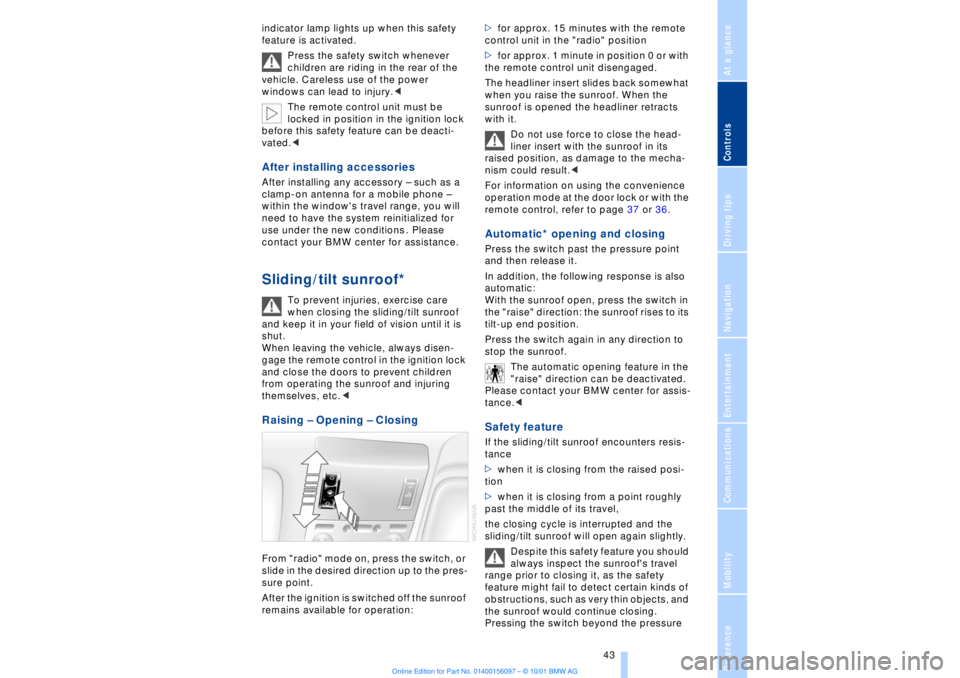
Raising Ð Opening Ð Closing From "radio" mode on, press the switch, or
slide in the desired direction up to the pres-
sure point.
After the ignition is switched off the sunroof
remains available for operation:>for approx. 15 minutes with the remote
control unit in the "radio" position
>for approx. 1 minute in position 0 or with
the remote control unit disengaged.
The headliner insert slides back somewhat
when you raise the sunroof. When the
sunroof is opened the headliner retracts
with it.
Do not use force to close the head-
liner insert with the sunroof in its
raised position, as damage to the mecha-
nism could result.<
For information on using the convenience
operation mode at the door lock or with the
remote control, refer to page 37 or 36.
Automatic* opening and closing Press the switch past the pressure point
and then release it.
In addition, the following response is also
automatic:
With the sunroof open, press the switch in
the "raise" direction: the sunroof rises to its
tilt-up end position.
Press the switch again in any direction to
stop the sunroof.
The automatic opening feature in the
"raise" direction can be deactivated.
Please contact your BMW center for assis-
tance.< Safety feature If the sliding/tilt sunroof encounters resis-
tance
>when it is closing from the raised posi-
tion
>when it is closing from a point roughly
past the middle of its travel,
the closing cycle is interrupted and the
sliding/tilt sunroof will open again slightly.
Despite this safety feature you should
always inspect the sunroof's travel
range prior to closing it, as the safety
feature might fail to detect certain kinds of
obstructions, such as very thin objects, and
the sunroof would continue closing.
Pressing the switch beyond the pressure
Page 45 of 208
Opening and closing
44 point and holding it limits the response of
the safety feature. The sunroof only opens
a short distance.
If you again press the switch past the pres-
sure point and hold it in position within
about 1.5 seconds, the safety feature will
be deactivated.<
When you close the sliding/tilt-
sunroof it will slow down as it
approaches the end of its travel path; this is
to allow the safety feature to respond more
precisely to any obstructions encountered
in this critical range.<
Following interruptions in electrical
power supply Following interruptions in electrical power
(for instance, when the battery is discon-
nected), it is possible that the sliding/tilt-
sunroof will extend to its tilt-up position,
but fail to respond to other commands.
Should this occur, please have the sunroof
reinitialized at your BMW center.Malfunctions In the event of an electrical malfunction,
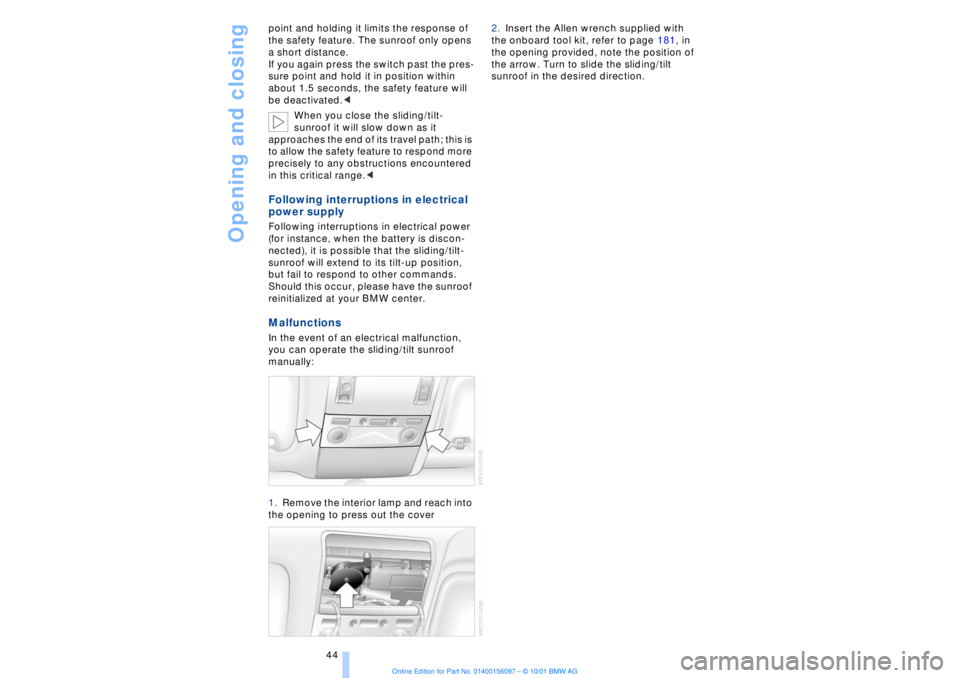
you can operate the sliding/tilt sunroof
manually:
1.Remove the interior lamp and reach into
the opening to press out the cover 2.Insert the Allen wrench supplied with
the onboard tool kit, refer to page 181, in
the opening provided, note the position of
the arrow. Turn to slide the sliding/tilt
sunroof in the desired direction.
Page 121 of 208
Things to remember when driving
120
Cargo loadingStowing cargo >Load heavy cargo as far forward and as
low as possible, placing it directly behind
the bulkhead behind the rear seats
>Cover sharp edges and corners
>For very heavy loads when the rear seat
is not occupied, secure each safety belt in
the opposite buckle. Securing the load >Use the luggage net
* or securing straps
to hold down small and light-weight
luggage and cargo, refer to page 40
>Heavy-duty cargo straps for securing
larger and heavier objects are available at
your BMW center
*. Anchorages for
attaching these heavy-duty straps have
been provided in your vehicle's luggage
compartment, refer to the illustration
>Please observe the special instructions
supplied with the cargo straps.
Always position and secure the load
correctly. If you do not, it can
endanger the passengers during braking or
evasive maneuvers.
Never exceed either the approved gross vehicle weight or either of the approved
axle loads, refer to page 194, as excessive
loads can pose a safety hazard, and may
also place you in violation of highway
safety laws.
You should never transport heavy or hard
objects unsecured in the passenger
compartment, as they could fly around and
pose a safety hazard to the vehicle's occu-
pants during abrupt braking or evasive
maneuvers .<
Roof-mounted luggage
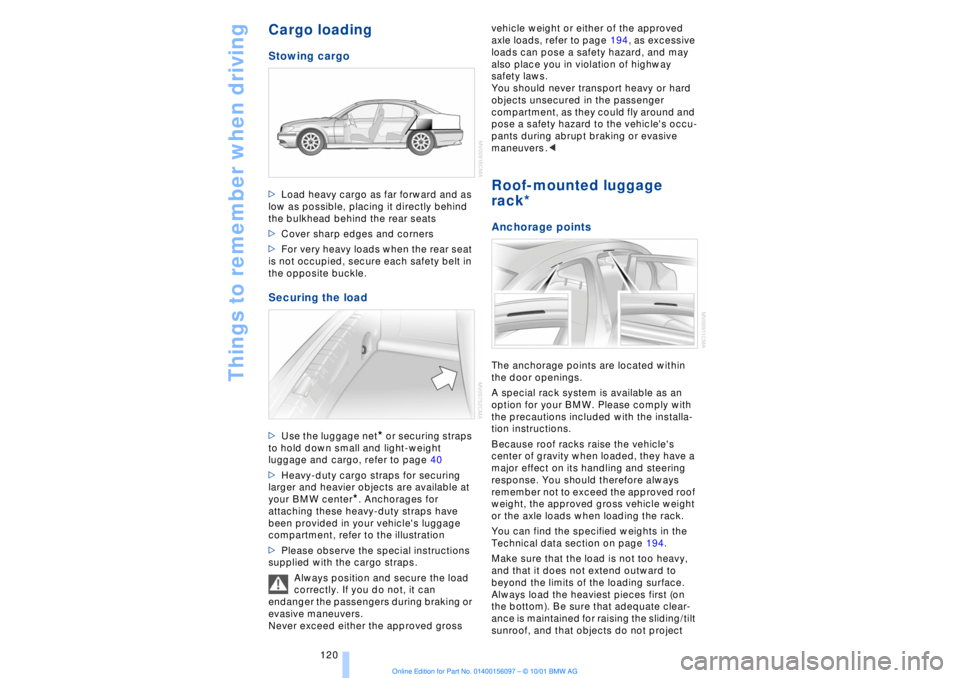
rack* Anchorage pointsThe anchorage points are located within
the door openings.
A special rack system is available as an
option for your BMW. Please comply with
the precautions included with the installa-
tion instructions.
Because roof racks raise the vehicle's
center of gravity when loaded, they have a
major effect on its handling and steering
response. You should therefore always
remember not to exceed the approved roof
weight, the approved gross vehicle weight
or the axle loads when loading the rack.
You can find the specified weights in the
Technical data section on page 194.
Make sure that the load is not too heavy,
and that it does not extend outward to
beyond the limits of the loading surface.
Always load the heaviest pieces first (on
the bottom). Be sure that adequate clear-
ance is maintained for raising the sliding/tilt
sunroof, and that objects do not project
Page 198 of 208
197
At a glanceControlsDriving tipsCommunicationsNavigationEntertainmentMobilityReference
Computer 81
Ð automatic climate
control 103
Ð "BC" 84
Ð changing settings 86
Ð changing time and
date 86
Ð Control Display screen
contents 83
Ð displays, menus 22
Ð language selection 86
Ð status lines 24
Ð symbols 20
Computer, refer to Control
Center 19
Condition Based Service
(CBS) 179
Connecting car vacuum
cleaner 113
Consumption display 82
Control Center 19
Ð assistance window 23
Ð automatic climate
control 103
Ð changing menu page 20
Ð changing settings 86
Ð confirm selection or
entry 20
Ð display help texts 23
Ð displays, menus 22
Ð language selection 86
Ð lists 20
Ð menu entry selection 19
Ð selecting units of measure
and display format 86
Ð setting time and date 86
Ð status lines 24
Ð symbols 20
Ð symbols and lists 20
Control Display 19
Controller, refer to Control
Center 19
Convenience operation of
windows and sliding/tilt
sunroof 36, 37
Convenience starting
feature 62
"Coolant" 179
Coolant 176, 177
Cooler, refer to Rear
cooler 110Cooling adjustment
Ð rear air conditioner 105
Copyright 2
Cornering Brake Control
(CBC) 91
Courtesy lamps 98
Cruise control 73
Cruise control, see Pro-
grammable cruise
control 73
Cruising range 82
Cup holder, refer to Bever-
age holder 112
Curb lamp
Ð bulb replacement 182
Curb weight 194
Current fuel
consumption 83
D"Date" 86
Daytime driving lamp
mode 96
DBC (Dynamic Brake
Control) 91
Deactivating
Ð tilt alarm sensor 36, 41
Defrosting, windows 101
Defrost setting 101
"DELETE" for
navigation 130
Destination entry 126
Destination for navigation
system
Ð selecting in
"Information" 129
Destination memory 129
"Destinations" 126
"Dest. input" 126
Dialed numbers 164
Dimensions 193
Dimming mirrors 52
Dipstick, engine oil 176
Direction
Ð arrow 132
Ð to destination 131
Ð voice instructions 133
Directional indicators, see
Turn signal indicators 71Directory creation
Ð with navigation
system 134
"Dir. of travel" with naviga-
tion system 132
"Dir. to north" with naviga-
tion system 132
Disc brakes 119
Displacement 192
Display, refer to Control
Display 19
Display format and units of
measure in Control
Display, changing 86
Display illumination, refer to
Instrument lighting 97
Displays 14
Ð computer 22
Ð Control Center 22
Distance 83
Distance to destination 83
Distance warning 88
Door keys 34
Doors
Ð locking and unlocking 35
Ð manual operation 37
Ð remote control 35
DOT Quality Grades 172
Draft-free ventilation 102
Drink holders, refer to
Beverage holders 112
Driving stability control 89
Driving tips 118
"DSC" 90
DSC (Dynamic Stability
Control) 89
"DTC" 90
DTC (Dynamic Traction
Control) 15, 90
Dynamic Brake Control
(DBC) 91
Dynamic Drive 91
Dynamic Stability Control
(DSC) 89
Dynamic Traction Control
(DTC) 15, 90
EEBV (Electronic Brake-
force Distribution) 91
Page 199 of 208
Everything from A to Z
198 "EDC" 92
Ð "Comfort" 92
Ð "Sport" 92
EDC (Electronic Damping
Control) 92
Electrical malfunction
Ð automatic transmission
lockout 70
Ð fuel filler door 168
Ð parking brake, emergency
use 65
Ð sliding/tilt sunroof 44
Electric power seats 46
Electric power windows 42
Electric seats 46
Electric steering column
adjustment 53
Electronic Brake-force Dis-
tribution (EBV) 91
Electronic Damping Control
(EDC) 92
Elements of operation 12
Emergency operation
Ð doors 37
Ð fuel filler door 168
Ð luggage compartment
lid 40
Ð sliding/tilt sunroof 44
Ð transmission lockout
(automatic
transmission) 70
Emergency SOS call
Ð automatic activation 161
"Emissions inspection" 79
Energy Control 83
Engine compartment 176
Engine coolant 176, 177
"Engine oil" 179
Engine oil
Ð consumption 176
Ð grades 177
Engine oils 177
Engine output, data 192
Engine specifications 192
"Entertainment" 19, 22
Estimated time of arrival 83
Extended vehicle storage,
see supplemental Car
care manual
Exterior mirrors 52
Ð automatic dimming 52"Extra" in "Climate"
menu 103
"Extra" with rear air
conditioner 105
"Extra" with rear cooler 110
FFactory preparations for
phone installation 161
Fader 141
Failure of an electrical
accessory 186
"Fastest route" 131
Fastest route 131
Fault displays 80
Filling the washer
reservoir 73
Filling the windshield
washer reservoir 73
First-aid kit 187
Fittings, tow-starting and
towing 189
Flashlight 111
Flat tires 171
"FM..." 140, 143
FM waveband 143
Fog lamps 97
"Footwell" 103
Footwell lamps 98
Forward lamps 98
Front armrest 111
Front seat adjustment 45
Fuel 169
Fuel consumption
display 83
Fuel economy 83
Fuel filler cap cover 168
Fuel filler door
Ð releasing in the event of
electrical defect 168
Fuel gauge 82
Fuel level display 82, 83
Fuel specifications 169
Fuel tank capacity 168
Fuses 186
GGarage door opener, refer
to Universal garage door
opener 108
Gasoline 169
General operating
information 118
Glasses compartment 111
Glove compartment 110
GPS, refer to Navigation
system 124
GPS navigation system 124
Ð address book, refer to
Creating a directory 134
Ð current location 135
Ð destination entry 126
Ð destination guidance in
assistance window 125
Ð destination list 130
Ð digital coverage area 124
Ð directory 128
Ð manual entry of destina-
tion address 126
Ð map CD 124
Ð map-guided destination
selection 128
Ð new route 133
Ð recent destinations 130
Ð route display 132
Ð route list 132
Ð route selection 130
Ð safety 124
Ð selecting destination in
"Information" 129
Ð selecting points of
interest 129
Ð selection options 126
Ð start active guidance 131
Ð starting 125
Ð terminate/interrupt active
guidance 134
Ð voice guidance 133
Ð wordmatch principle 136
Guidance
Ð terminate 134
Guidance system
Ð interrupt 134
Ð starting 131
Page 201 of 208
Everything from A to Z
200 Manual operation
Ð doors 37
Ð sliding/tilt sunroof 44
Manual release
Ð automatic transmission
lockout 70
Ð fuel filler door 168
Ð luggage compartment
lid 40
Manual station search 143
Map CD 124
"Map facing N." with navi-
gation system 132
Maximum axle loads 194
Maximum roof weight 194
Maximum speed, see
Limit 84
"MD" 140, 151
MD player 151
Ð fast forward 151
Ð random play 152
Ð reverse 151
Ð sampling 152
Ð scan function 152
Ð switching on 151
Ð track skip 151
"Memo" 86
"Memorize"
Ð "Individual" 104
Memory, refer to Seat, mir-
ror and steering wheel
memory 54
"Memory" for audio
system 140
"Menu name" 23
Menus
Ð computer 22
Ð Control Display 22
"MFL" 53
"M FM" 144, 145
"Microfilter" 179
Microfilter 104
Microphone for hands-free
system 161
MiniDisc, refer to MD 151
Mirrors 52
Ð mirror heaters 52
Ð mirror memory 54
"Missed" 164
Missed calls 164Mobile phone
Ð calling 162
Ð call termination 162
Ð controlling with the but-
tons on the steering
wheel 18
Ð emergency calls 161
Ð hands-free system 161
Ð missed calls 164
Ð operating using the
Control Display 159
Ð redialing 164
Ð selecting phone
numbers 162
Ð switching on and off 162
Ð Top 8 list 163
Ð using with Key Pad 160
Mobile phone, refer to
separate mobile phone
manual 158
Mobile phone battery 159
Mobile phone codes 162
Modifications,
technical 8, 98
Monitor, refer to Control
Center 19
Most frequently called
numbers 163
Most recent mobile phone
numbers 164
N"Navigation" 19, 22
Navigation computer
Ð installation location 124
Navigation destination
Ð manual entry 126
Ð selecting with map 128
Navigation system
Ð destination list 130
Ð digital coverage area 124
Ð town and city centers 136
Ð voice guidance 133
Navigation system
"ACCEPT" command 135
Navigation system "View"
function 132
Navigation target
cursor 128, 129
"Navi info" 54"New route" 133
"Next"
Ð map-guided destination
selection 129
Ð searching for points of
interest 130
Nozzles 99
O"OB data" 19, 22
OBD interface socket 180
Occupant-restraint
systems 50, 55
Odometer 77
Oil additives 177
Oil change intervals, refer
to Service Interval
Display 78
Oil consumption 176
Oil dipstick 176
Oil specifications 177
"ON / OFF" speed limit 84
Onboard Diagnostic (OBD)
system 180
Ð interface socket 180
Onboard tool kit 181
"On country" 130
"On current loc." 129
"1,2,3" 163
"On town/city" 130
Opening and closing
Ð from the inside 37
Ð from the outside 37
Oral note 27
Orientation
Ð changing the display 132
Orientation menu 19
Orientation to north 132
Outside temperature
display 77PPaint and finish care, refer
to Car care manual
Panic mode 36
Park Distance Control
(PDC) 88
Parked-car ventilation 106
Parking aid 88
Page 203 of 208
Everything from A to Z
202 Sampling
Ð CD changer 149
Ð MD player 152
Satellite 124
Scan
Ð CD player 147
Ð MiniDisc 152
Ð radio 143
Scan, station sampling
Ð radio 143
Scan audio sampling
Ð CD 147
Scan mode
Ð radio 144
"SCAN" with CD
changer 149
"SCAN" with CD player 147
"SCAN" with MD
player 152
Seat heating 50
Seat memory 54
Seats
Ð adjusting 45
Ð correct position 45
"Seat temp." 51, 103
Seat ventilation, see Active
seat ventilation 51
Securing cargo, see
Cargo 120
Securing the load 114
Selecting new route with
navigation system 133
Selecting new scale for
navigation system
display 132
Selecting stored radio
stations 145
Selector lever, automatic
transmission 67
Select "Route" 133
"Service" 78, 179
Ð "Emissions inspection" 79
Ð "Spark plugs" 78
Ð "State inspection" 79
Service and Warranty Infor-
mation Booklet (US
models) 179
Service brakes 119
Service Guide Booklet
(Canadian models) 179Service Interval
Display 78, 179
Service Requirement Dis-
play, see Service Interval
Display 179
"SET", refer to Setting
speed limit 84
Set time 106
"Settings" 19, 22
Setting time and date 86
Shifting, refer to Automatic
transmission with
Steptronic 69
Shiftlock 67
"Shortest route" 131
Shortest travel
distance 131
Shoulder support 46
"Side" in sound system
operation 153
Side window blind, see Sun
blinds 109
Sitting correctly 45
Ski bag 114
Sliding/tilt sunroof 43
Ð closing in the event of an
electrical defect 44
Ð convenience mode 37
Snow chains 173, 174
Soft Close Automatic
Ð doors 38
Ð luggage compartment
lid 39
SOS call
Ð using SOS button 161
Sound system
Ð switching on and off 140
Ð volume 141
Sound system adjustments
Ð balance 141
Ð bass 141
Ð default settings 142
Ð fader, front/rear 141
Ð left/right 141
Ð treble 141
Sound system "AUTO"
function 145
Sound system "Balance"
adjustment 141
Sound system "Bass"
adjustment 141Sound system "Dolby..."
feature 153
Sound system "Fader"
adjustment 141
Sound system "MANUAL"
selection mode 144
Sound system "Memorize"
feature 144
Sound system "Memory"
feature 141, 144
Sound system "Reset"
function 142
Sound system "Speed Vol."
feature 142
Spare fuses 186
Spare key 34
Ð adapter 34
Spare tire 184
"Spark plugs" 78, 179
Specifications for engine
oil 177
Speed limit
Ð "Limit" 84
Speed limit selection,
revision 84
Speedometer 14
"Sport"
Ð "EDC" 92
Stability control, refer to
Driving stability control 89
Standing lamps 97
Start/stop button 61
Starting 62
Starting assistance 187
Starting problems 62, 188
Starting the engine 62
"State inspection" 79
Station
Ð sample 143
Ð scan mode 144
Status lines in Control
Center 24
Steering column
Ð adjustment 53
Steering wheel 18
Ð individual button assign-
ment options 53
Steering wheel adjustment,
automatic 53
Steering wheel heater 53
Steering wheel memory 54