2001 VOLVO S60 instrument panel
[x] Cancel search: instrument panelPage 4 of 128
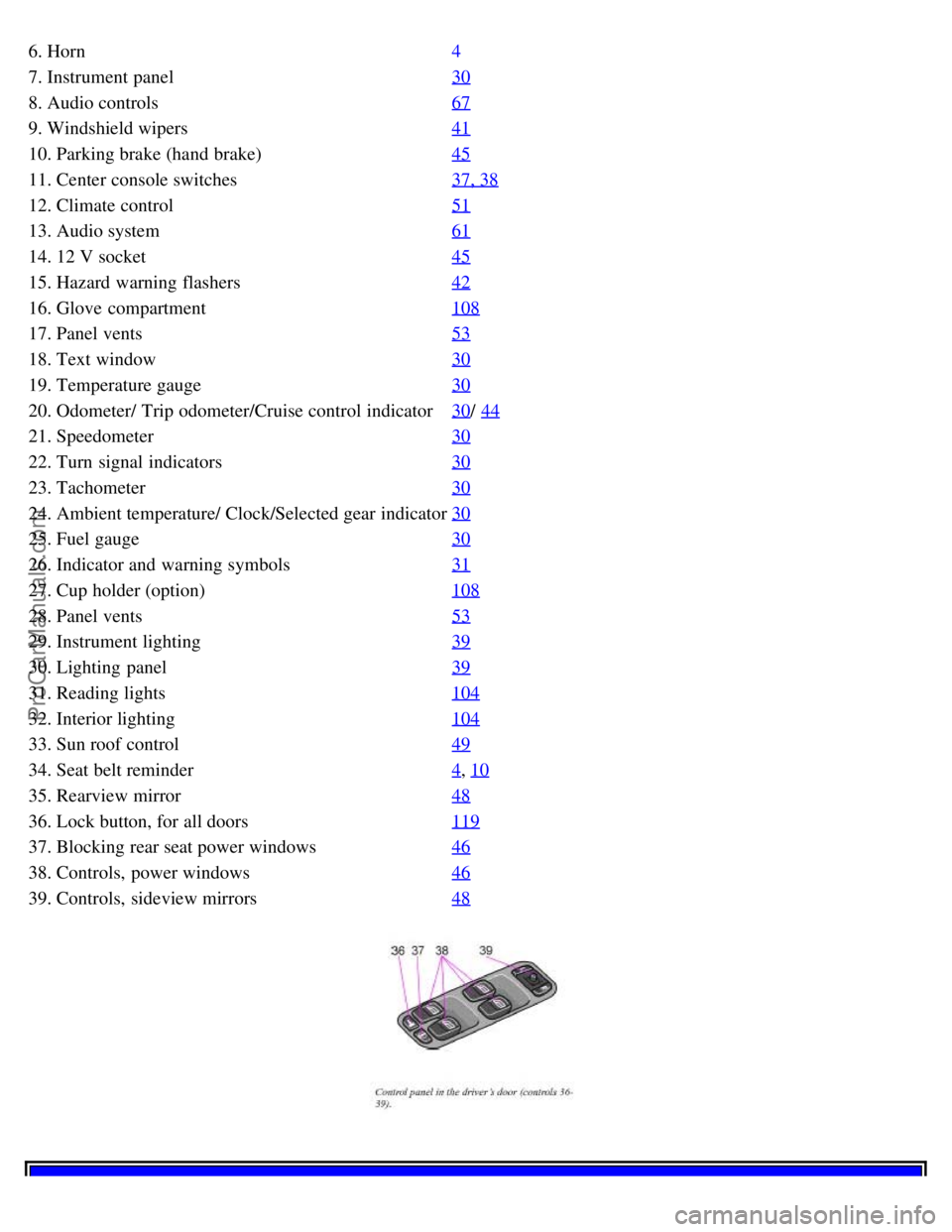
6. Horn4
7. Instrument panel30
8. Audio controls67
9. Windshield wipers41
10. Parking brake (hand brake)45
11. Center console switches37, 38
12. Climate control51
13. Audio system61
14. 12 V socket45
15. Hazard warning flashers42
16. Glove compartment108
17. Panel vents53
18. Text window30
19. Temperature gauge30
20. Odometer/ Trip odometer/Cruise control indicator30/ 44
21. Speedometer30
22. Turn signal indicators30
23. Tachometer30
24. Ambient temperature/ Clock/Selected gear indicator30
25. Fuel gauge30
26. Indicator and warning symbols31
27. Cup holder (option)108
28. Panel vents53
29. Instrument lighting39
30. Lighting panel39
31. Reading lights104
32. Interior lighting104
33. Sun roof control49
34. Seat belt reminder4, 10
35. Rearview mirror48
36. Lock button, for all doors119
37. Blocking rear seat power windows46
38. Controls, power windows46
39. Controls, sideview mirrors48
ProCarManuals.com
Page 6 of 128

2 0 0 1
VOLVO S60
Instruments and controls
pg. 29 Instruments and controls
Instrument panel 30
Indicator and warning symbols31
Steering wheel adjustment36
Switches in the center console37
Lighting panel39
Turn signals40
Windshield wipers/ washer41
Hazard warning flashers, rear window/ sideview mirror defroster, heated front seats42
Trip computer (option)43
Cruise control44
Parking brake, electric socket/ cigarette lighter45
Electrically operated windows46
Rearview mirror/ sideview mirrors48
Electrically operated sun roof49
pg. 30 Instrument panel
1. Turn signal indicators - right - left
2. Text window
The text window displays information and warning messages.
3. Temperature gauge
The pointer should be approximately midway on the gauge when driving. Do not drive the car if the warning light is
on. The text window will provide you with additional information. If the engine temperature remains high, check
coolant level - see page 169
.
4. Trip odometer
The trip odometers are used for measuring shorter distances. The right- hand digit gives tenth of a mile/ kilometer.
Press the button for more than 2 seconds to reset. Change between trip odometers 1 and 2 using one short press on the
button.
ProCarManuals.com
Page 10 of 128

If the indicator light remains on, drive to an authorized Volvo retailer to have the system inspected.
pg. 35 Indicator and warning symbols
Messages in the text window
When a warning light in the instrument panel comes on, a message is also displayed in the text window. After you
have read the message, you can erase it by pressing button A (see illus- tration).
NOTE: Certain messages cannot be erased until the condition has been corrected. If a warning message is displayed
when e. g. you are using the trip computer or would like to use the telephone, this message must be erased before you
can access the function of your choice. Press button A to erase the warning message.
You can scroll through the stored messages by pressing button A (see illustration). The text window can be cleared
(the message will be returned to memory) by pressing button A again.
MessageMeaning:
REDUCE SPEED This message may be displayed when STC or DSTC are not switched on.
STOP SAFELY ASAP Stop and switch off the engine. Serious risk of damage.
STOP ENGINE Stop and switch off the engine. Serious risk of damage.
SERVICE URGENT Take your car in for service immediately.
SEE MANUAL Consult your owner's manual.
SERVICE REQUIRED Take your car in for service as soon as possible.
FIX NEXT SERVICE Have your car checked at the next service interval.
pg. 36 Steering wheel adjustment
Both the height and the reach of the steering wheel can be adjusted to a comfortable position for the driver. Pull down
the lever on the left of the steering column. Adjust the steering wheel to a suitable position and press the lever back
into place to lock the steering wheel in the new position. Check that the steering wheel is locked in the new position.
WARNING!
Never adjust the steering wheel while driving.
pg. 37 Switches in the center console
ProCarManuals.com
Page 11 of 128

1. Folding head restraints (option)
This button is used to fold down the outboard rear head restraints. The ignition key must be in position I or II or the
engine must be running.
NOTE: If the head restraints have been folded down, they must be returned to their original position manually. The
head restraints should be in the upright position before the rear seat backrests are folded down.
WARNING!
For safety reasons, no one should be allowed to sit in the outboard rear seat positions if the head restraints are
folded down. If these positions are occupied, the head restraints should be in the upright (fixed) position.
2. Not in use.
3. Not in use
4. Stability Traction Control system (option)
NOTE: Press this switch for at least half a second to turn the STC system on or off. An LED in the switch will light
up to indicate that the system is on. See page 139
for more information on STC. This system should be switched off if
you, for any reason, temporarily have to drive with tires of different dimensions (e. g., spare tire).
NOTE: To help reduce the risk that this system is turned off inadvertently, the switch must be held in for at least half
a second to turn STC off. The warning symbol in the instrument panel will light up to indicate that STC is OFF.
pg. 38 Switches in the center console
5. Dynamic Stability Traction Control system (option)
This button is used to switch DSTC off. When the LED in the button is ON, this indicates that the system is ON (the
light will also come on if a fault has been detected in the system).
NOTE: To avoid inadvertently switching the system off, the button must be pressed for at least half a second before
DSTC is deactivated. The text "DSTC off" will be displayed briefly in the text window. The warning symbol will
come on to indicate that DSTC has been switched off. The system is automatically switched on when the engine is
started. DSTC should be switched off if the steering wheel position or the front wheels are not properly aligned.
See page 140
for more information on
WARNING!
ProCarManuals.com
Page 12 of 128

Please be aware that the car's handling characteristics may be affected if Dynamic Stability Traction Control
(DSTC) is switched off.
6. Temporarily disconnecting the alarm sensors (option)
See page 123
for more details.
7. Not in use
8. 12 volt socket
This 12 volt socket can be used to plug in certain accessories such as cellular telephones, etc. The ignition key must
be in position 1 (or higher) for the auxiliary socket to function.
NOTE: The auxiliary sockets can also be used for cigarette lighters, which are available at your Volvo retailer.
pg. 39 Lighting panel
A - Headlights and parking lights
All lighting off.
Models with daytime running lights:
Low beam headlights will automatically come on if the ignition key is in position II. Front and rear parking lights and
license plate lights will also be on. Volvo recommends the use of daytime running lights. If, however, you would
prefer to have these lights turned off (USA only), please consult your Volvo retailer. Please note that the use of
daytime running lights is mandatory in Canada.
Parking lights on. The parking lights should be switched off when you leave the car to help avoid battery
drain.
Headlights, parking lights, license plate lights and instrument panel illumination are on if the ignition key is in
position II.
If the headlight switch is in this position, all lights will go out when the ignition is switched off.
The headlight switch must be in this position before the high beams will function.
Switch from high to low beams and vice versa by pulling the turn signal switch lever on the left side of steering
column toward you.
B - Instrument lighting
Move the thumb wheel up to increase brightness or down to decrease brightness. There is also an instrument panel
illumination sensor (see illustration on page 54
) which automatically adjusts the level of illumination.
The symbols have maximum illumination in daylight (only the background lighting can be adjusted). At night, both
the symbol light and background lighting can be adjusted.
ProCarManuals.com
Page 18 of 128
Temporarily disengaging cruise control
Press 0 to temporarily disengage cruise control. Press "resume" to return to the previously set speed.
Press the brake pedal. Press "resume" to return to the previously set speed..
WARNING!
Cruise control should not be used in heavy traffic or when driving on wet or slippery roads. Cruise control may not
maintain set speed on steep downgrades.
pg. 45 Parking brake, electric socket/ cigarette lighter
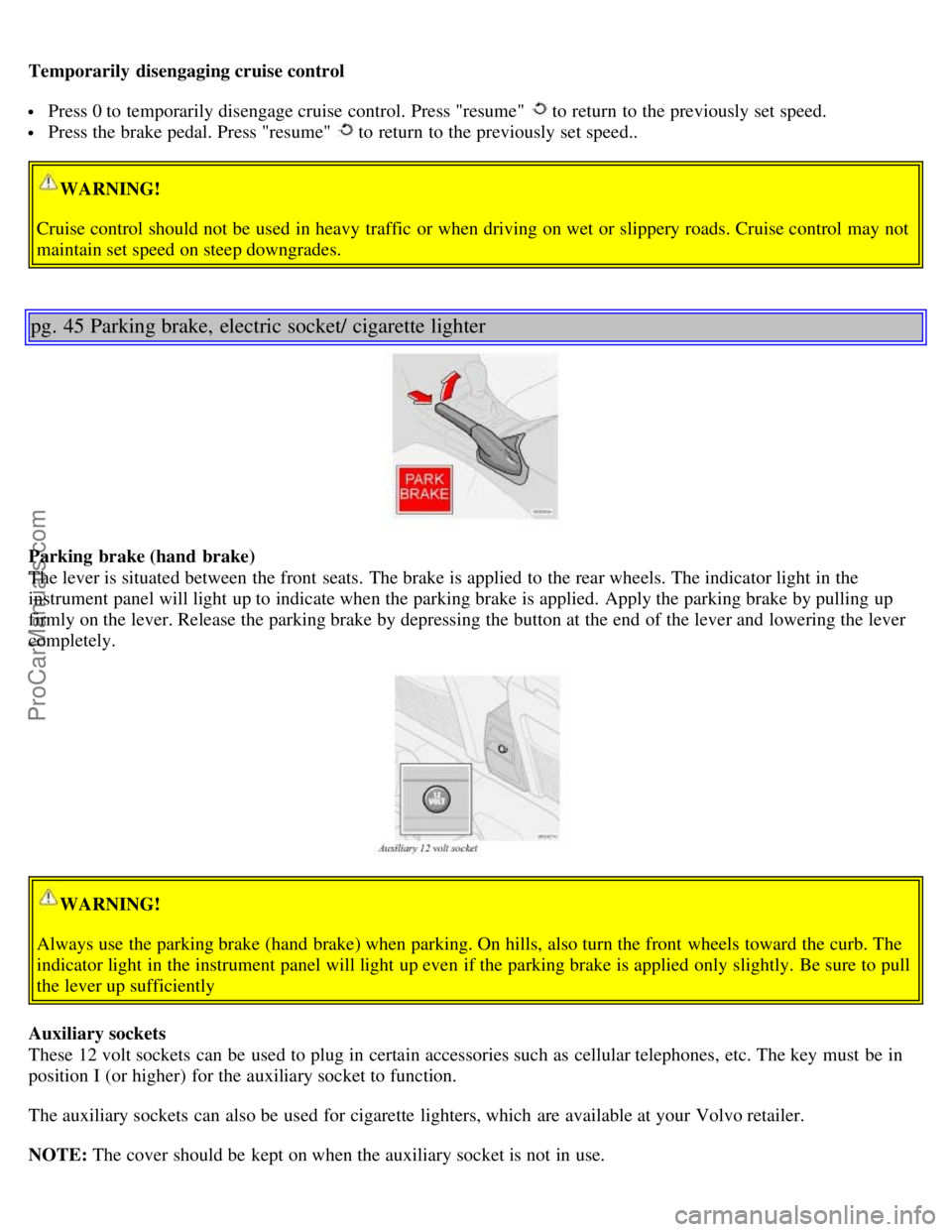
Parking brake (hand brake)
The lever is situated between the front seats. The brake is applied to the rear wheels. The indicator light in the
instrument panel will light up to indicate when the parking brake is applied. Apply the parking brake by pulling up
firmly on the lever. Release the parking brake by depressing the button at the end of the lever and lowering the lever
completely.
WARNING!
Always use the parking brake (hand brake) when parking. On hills, also turn the front wheels toward the curb. The
indicator light in the instrument panel will light up even if the parking brake is applied only slightly. Be sure to pull
the lever up sufficiently
Auxiliary sockets
These 12 volt sockets can be used to plug in certain accessories such as cellular telephones, etc. The key must be in
position I (or higher) for the auxiliary socket to function.
The auxiliary sockets can also be used for cigarette lighters, which are available at your Volvo retailer.
NOTE: The cover should be kept on when the auxiliary socket is not in use.
ProCarManuals.com
Page 27 of 128
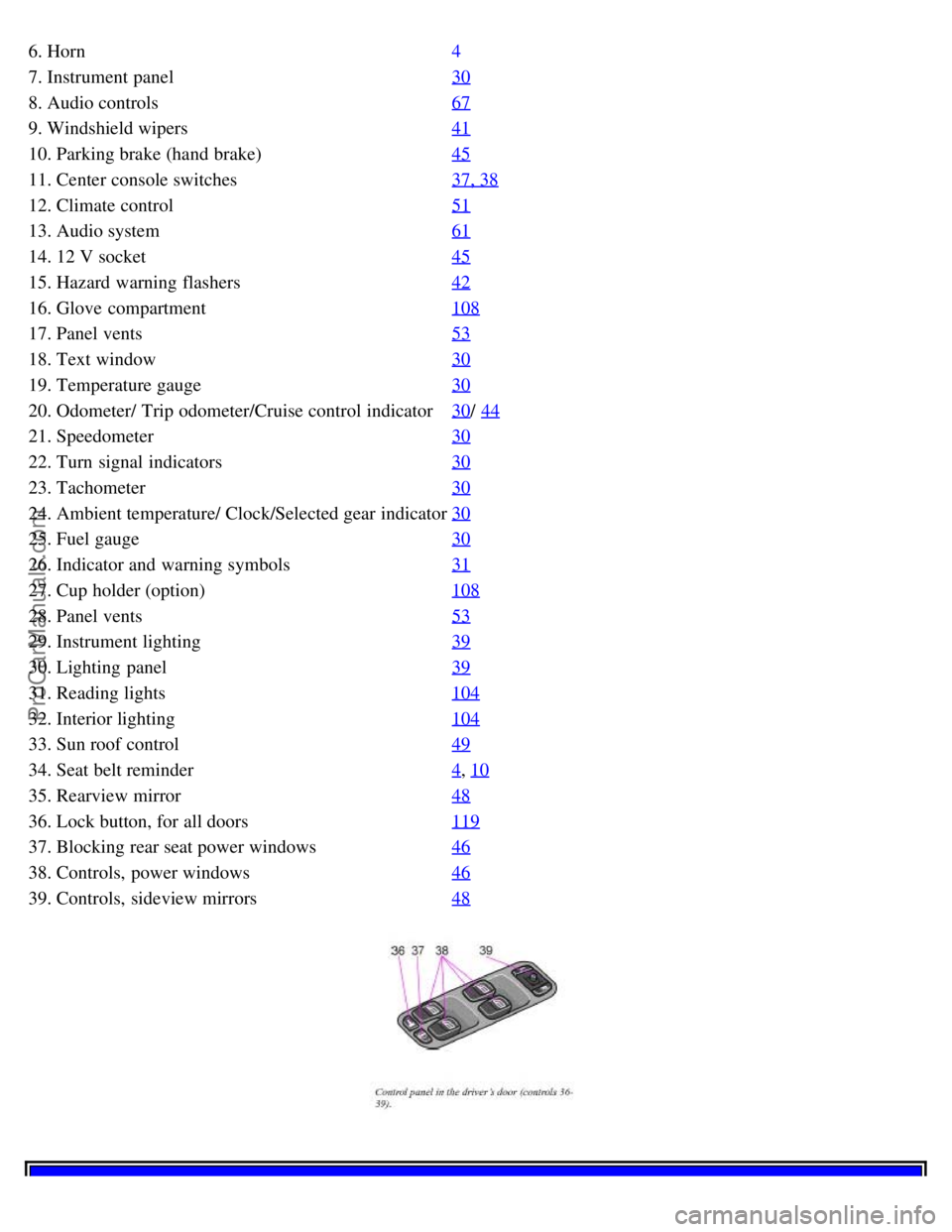
6. Horn4
7. Instrument panel30
8. Audio controls67
9. Windshield wipers41
10. Parking brake (hand brake)45
11. Center console switches37, 38
12. Climate control51
13. Audio system61
14. 12 V socket45
15. Hazard warning flashers42
16. Glove compartment108
17. Panel vents53
18. Text window30
19. Temperature gauge30
20. Odometer/ Trip odometer/Cruise control indicator30/ 44
21. Speedometer30
22. Turn signal indicators30
23. Tachometer30
24. Ambient temperature/ Clock/Selected gear indicator30
25. Fuel gauge30
26. Indicator and warning symbols31
27. Cup holder (option)108
28. Panel vents53
29. Instrument lighting39
30. Lighting panel39
31. Reading lights104
32. Interior lighting104
33. Sun roof control49
34. Seat belt reminder4, 10
35. Rearview mirror48
36. Lock button, for all doors119
37. Blocking rear seat power windows46
38. Controls, power windows46
39. Controls, sideview mirrors48
ProCarManuals.com
Page 64 of 128

release of the powder may appear as smoke- like matter. This is a normal characteristic and does not indicate fire.
NOTE: Volvo's dual- threshold, dual- stage airbags use special sensors that are integrated with the front seat buckles.
The point at which the airbag deploys is determined by whether or not the seat belt is being used, as well as the
severity of the collision. Collisions can occur where only one of the airbags deploys.
If the impact is less severe, but severe enough to present a clear injury risk, the dual- stage airbags are triggered at
just 70% of their total capacity. If the impact is more severe, the dual- stage airbags are triggered at full capacity.
WARNING!
Do not use child safety seats or child booster cushions/ backrests in the front passenger's seat. We also recommend
that occupants under 4 feet 7 inches (140 cm) in height who have outgrown these devices sit in the rear seat with the
seat belt fastened. Never drive with the airbags deployed. The fact that they hang out can impair the steering of your
car. Other safety systems can also be damaged. The smoke and dust formed when the airbags are deployed can
cause skin and eye irritation in the event of prolonged exposure.
pg. 14 Airbags (Supplemental Restraint System)
WARNING!
Children must never be allowed in the front passenger's seat. Volvo recommends that ALL occupants (adults and
children) shorter than 4 feet 7 inches (140 cm) be seated in the back seat of any vehicle with a front passenger -side
airbag. See page 28
for guidelines.
Occupants in the front passenger's seat must never sit on the edge of the seat, sit leaning toward the instrument
panel or otherwise sit out of position. The occupant's back must be as upright as comfort allows and be against the
seat back with the seat belt properly fastened.
Feet must be on the floor, e. g. not on the dash, seat or out of the window. No objects or accessory equipment, e. g.
dash covers, may be placed on, attached to, or installed near the SRS hatch (the area above the glove compartment)
or the area affected by airbag deployment (see illustration on page 12
).
There should be no loose articles, e. g. coffee cups, on the floor, seat or dash area. Never try to open the SRS cover
on the steering wheel or the passenger side dash. This should only be done by an authorized Volvo service
technician.
Failure to follow these instructions can result in injury to the vehicle occupants
Warning light in the instrument panel
A self - diagnostic system incorporated in the sensor monitors the SRS. This system does not, however, monitor the
Side Impact Protection System (SIPS) airbags. If a fault is detected, the warning light will illuminate. The light is
included in the warning/ indicator light cluster in the instrument panel. Normally, the SRS warning lamp should light
ProCarManuals.com