Page 1264 of 1943
DI±724
± DIAGNOSTICSBODY CONTROL SYSTEM
2001 PRIUS (RM778U)
INSPECTION PROCEDURE
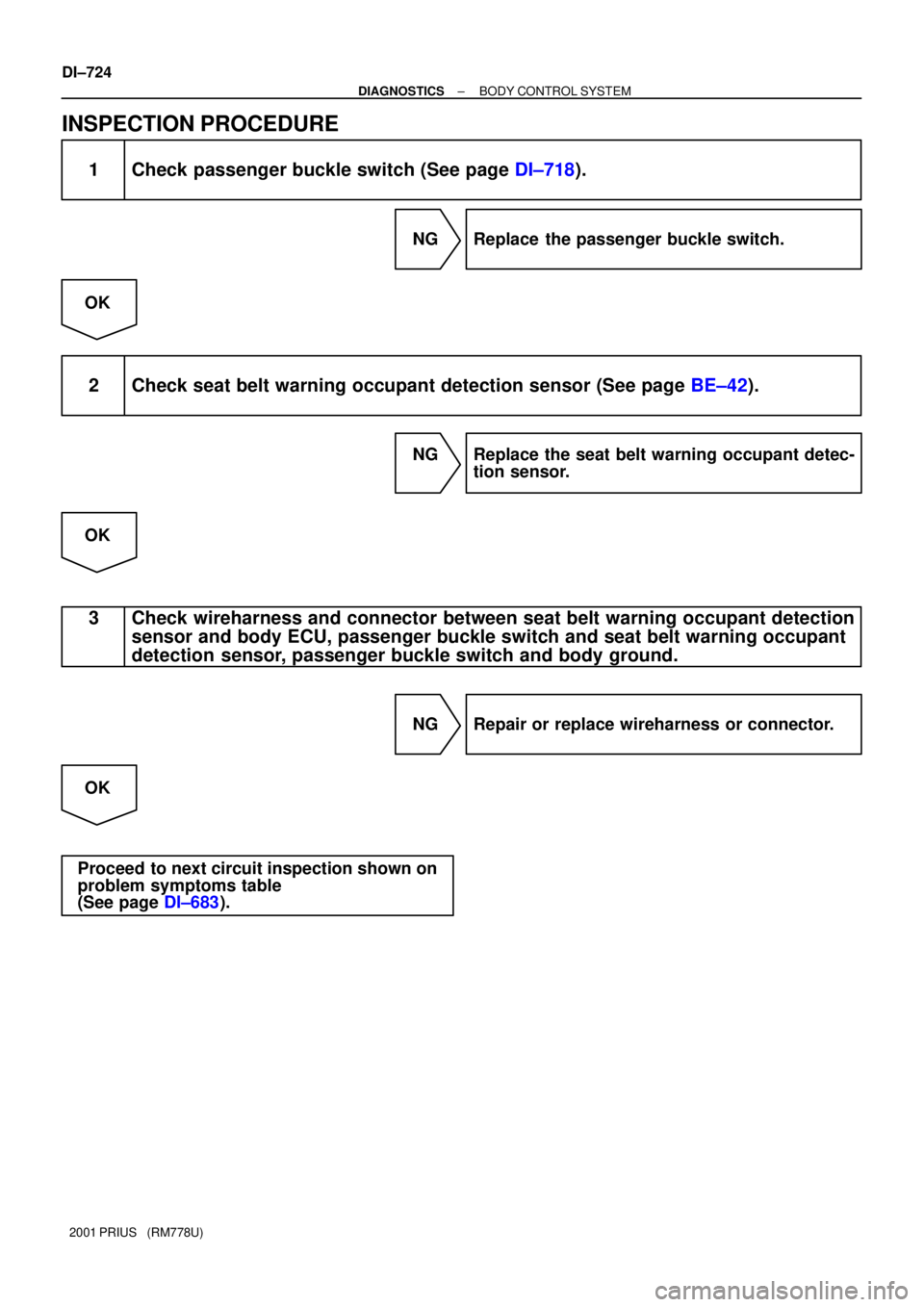
1 Check passenger buckle switch (See page DI±718).
NG Replace the passenger buckle switch.
OK
2 Check seat belt warning occupant detection sensor (See page BE±42).
NG Replace the seat belt warning occupant detec-
tion sensor.
OK
3 Check wireharness and connector between seat belt warning occupant detection
sensor and body ECU, passenger buckle switch and seat belt warning occupant
detection sensor, passenger buckle switch and body ground.
NG Repair or replace wireharness or connector.
OK
Proceed to next circuit inspection shown on
problem symptoms table
(See page DI±683).
Page 1330 of 1943
I17095
Diagnosis MENU
screen switch GPS information
mode screen switch
Vehicle sensor mode
screen switch
Color bar check
mode screen switch
± DIAGNOSTICSNAVIGATION SYSTEM
DI±803
2001 PRIUS (RM778U)
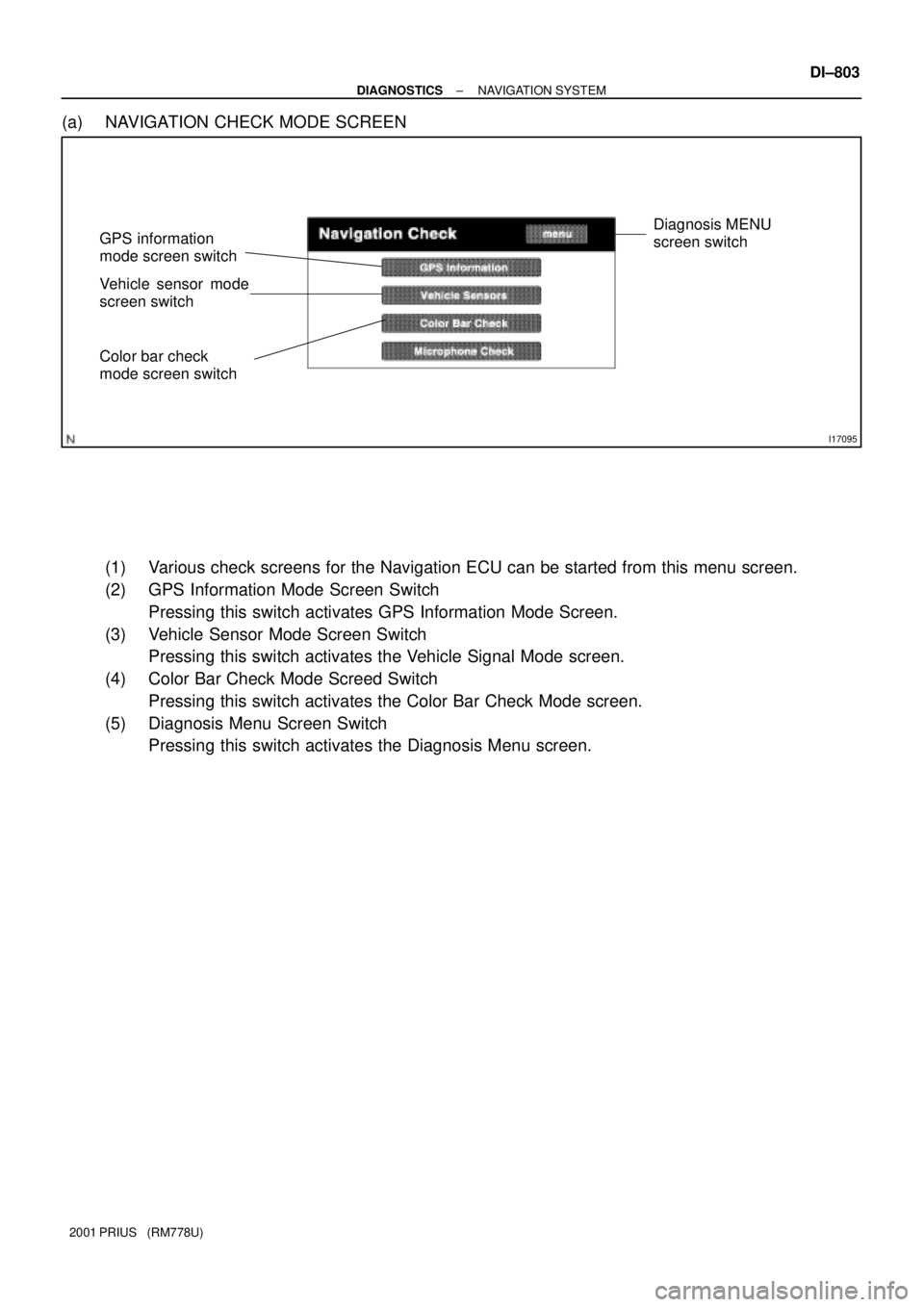
(a) NAVIGATION CHECK MODE SCREEN
(1) Various check screens for the Navigation ECU can be started from this menu screen.
(2) GPS Information Mode Screen Switch
Pressing this switch activates GPS Information Mode Screen.
(3) Vehicle Sensor Mode Screen Switch
Pressing this switch activates the Vehicle Signal Mode screen.
(4) Color Bar Check Mode Screed Switch
Pressing this switch activates the Color Bar Check Mode screen.
(5) Diagnosis Menu Screen Switch
Pressing this switch activates the Diagnosis Menu screen.
Page 1332 of 1943
I17097
Navigation check
screen switch
± DIAGNOSTICSNAVIGATION SYSTEM
DI±805
2001 PRIUS (RM778U)
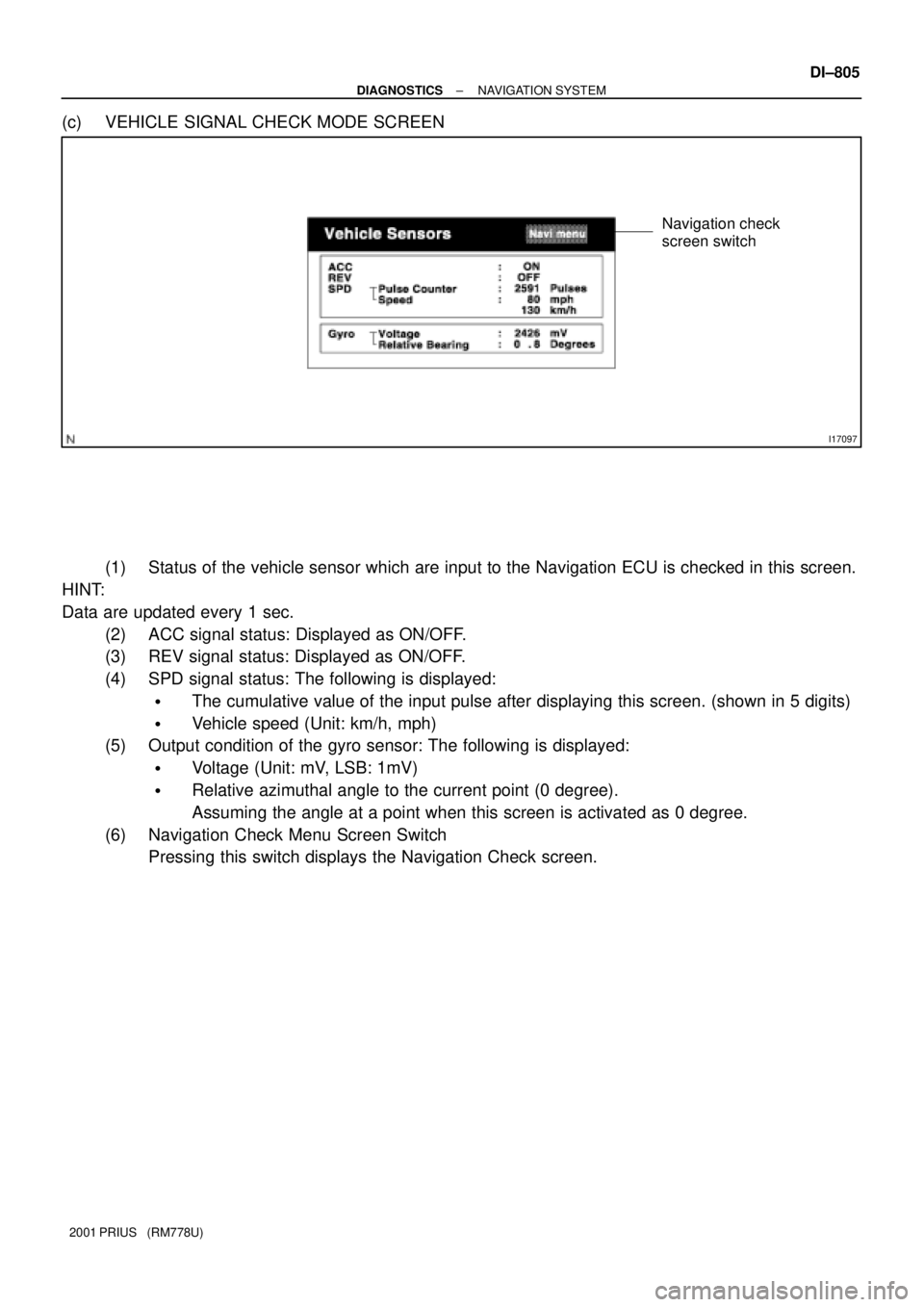
(c) VEHICLE SIGNAL CHECK MODE SCREEN
(1) Status of the vehicle sensor which are input to the Navigation ECU is checked in this screen.
HINT:
Data are updated every 1 sec.
(2) ACC signal status: Displayed as ON/OFF.
(3) REV signal status: Displayed as ON/OFF.
(4) SPD signal status: The following is displayed:
�The cumulative value of the input pulse after displaying this screen. (shown in 5 digits)
�Vehicle speed (Unit: km/h, mph)
(5) Output condition of the gyro sensor: The following is displayed:
�Voltage (Unit: mV, LSB: 1mV)
�Relative azimuthal angle to the current point (0 degree).
Assuming the angle at a point when this screen is activated as 0 degree.
(6) Navigation Check Menu Screen Switch
Pressing this switch displays the Navigation Check screen.
Page 1340 of 1943

DI27Z±05
Physical address
Logical addressMeaning
Three±digit code (shown in hexadecimal) which is given to each component comprising the
AVC ± LAN
Corresponding to the function, individual symbols are specified..
Two±digit code (shown in hexadecimal) which is given to each function comprising the inner system
of the AVC ± LAN.
Physical address: 110 Multi display
Diagnosis item
Panel Switch
Error
Touch Switch
ErrorDiagnosis contentCountermeasure and
inspected parts
Error in panel switch input part is de-
tected.
(Error in switch control part, or inter-
nal communication error with switch
control part is detected.)
Error in touch switch sensor is de-
tected. � Inspect all switches on touch
switch test screen in display check
mode. If any of lines and point does
not react, replace multi±display as-
sembly.
� If all switches function without
problem, observe them for a while.
� Inspect all touch switches on
touch switch test screen in display
check mode. If any of lines does
not react, replace multi±display as-
sembly.
� If all of vertical and horizontal
lines react normally, observe them
for a while. Logical address
21 *1
(Switch)
Replace multi±display assembly.
21
(Switch)
34
(Front passenger
monitor)
DTC
11
10
Error in power supply system for
picture circuit (abnormal voltage) is
detected. Error in Picture
Circuit 10
Decline in power output from in-
verter circuit for backlight. Backlight Error
(No current)Replace multi±display assembly.
34
(Front passenger
monitor)11
Excess power output from inverter
circuit for backlight.Replace multi±display assembly.
34
(Front passenger
monitor)12
Backlight Error
(Excess
current)
Abnormal condition of ROM is de-
tected.Replace multi±display assembly.
01
(Communication
control)21ROM Error
Abnormal condition of RAM is de-
tected.Replace multi±display assembly.
01
(Communication
control)22RAM Error
Terms
*1: Check if the operation in Touch Point Check or Touch Switch Check screen is normal. If it operates without any
problem, see how things go for a while.
Although this code is defined as Panel Switch Error, there are touch switches only on the display. If the internal com-
munication is erroneous, however, this code is stored.
± DIAGNOSTICSNAVIGATION SYSTEM
DI±813
2001 PRIUS (RM778U)
DIAGNOSTIC TROUBLE CODE CHART
Page 1344 of 1943

EJECT Error 45 62
(CD player)Magazine cannot be ejected.
Scratched/
Reversed Disc 46 62
(CD player)Scratches or dirt is found on CD sur-
face or CD is set upside down.Replace radio receiver assembly.
Inspect CD.
Physical address: 178 Navigation ECU
Gyro Error Error in gyro sensor is detected.
(Abnormal value in voltage output
from sensor is detected for more
than specified time.)� Check the Gyro voltage in the
diagnosis system mode. 10 58
(Navigation ECU)
Map Disc Error Data cannot be read for a specified
time due to scratches or dirt on disc
surface or insertion of music CD.� Inspect disc and replace if neces-
sary. (Visually check disc surface
and wipe it with soft cloth.) 42 58
(Navigation ECU)
Vehicle speed
sensor Signal
ErrorInput error of vehicle speed sensor
signal is detected. (When no vehicle
speed sensor signal has been input
for a specified time.)� Check the vehicle speed signal in
the diagnosis system mode.
� Inspect wire harness for vehicle
speed signal.
� If wire harness is normal, replace
navigation ECU. 43 58
(Navigation ECU)
Player Error Malfunction of player continues for a
specified length of time.� Check if disc can be inserted/tak-
en out or not. If not , replace naviga-
tion ECU.
� When the same code is detected
in recheck after deleting the DTC
memory. 44 58
(Navigation ECU)
GPS Receiver
ErrorOperation error of GPS receiver is
detected.� At an outdoor site with a clear
view, operate to display the GPS in-
formation screen of the diagnosis
system. If GPS time stamp is not
properly displayed after 15 min. or
more, replace navigation ECU. 11 58
(GPS receiver)
GPS Antenna
ErrorOperation condition of GPS anten-
na cable is detected. (Open circuit,
connection failure of connectors,
etc.)� Check if the GPS antenna is cor-
rectly connected or positioned or
not. After replacing the antenna, if
the error remains, replace the navi-
gation ECU. 40 58
(GPS receiver)
Power Supply
Error of GPS
AntennaAbnormal voltage of GPS antenna
cable or short circuit is detected.� Inspect GPS antenna and replace
if necessary. (When no continuity is
identified between connector's core
and sealed part, GPS antenna is
normal.)
� If GPS antenna is normal, replace
navigation ECU. 41 58
(GPS receiver)
Player Temp.
Too HighReadout cannot be done because
temperature around player's pickup
(reading part) is too high.With IG switch OFF, leave vehicle in
cool shaded place for a while and
recheck. After deleting the DTC
memory, If same code detected, re-
place navigation ECU. 45 58
(Navigation ECU)
*2: Even if no failure is detected, it may be stored depending on the battery condition or voltage for starting an engine.
*3: It is stored when 180 sec. has passed after the power supply connector is pulled out after engine start.
*4: It may be stored when the engine key is turned again 1 min. after engine start.
*5: It may be stored when the engine key is turned again after engine start.
*6: When 210 sec. has passed after pulling out the power supply connector of the master component with the ignition
switch in ACC or ON, this code is stored.
± DIAGNOSTICSNAVIGATION SYSTEM
DI±817
2001 PRIUS (RM778U)
Page 1347 of 1943
± DIAGNOSTICSNAVIGATION SYSTEM
DI±821
2001 PRIUS (RM778U) SYNC ± VG
(M6±8 ± M6±6)
Display ON
(Using an oscilloscope)0.5 V ± 1.3 V *1Screen is in disorder
TX1± (M6±10)AVC±LAN
communication circuit± Navigation system does not oper-
ate.
+B1 ± GND
(M7±1 ± M7±6)Constant10 ± 14 VNavigation system does not oper-
ate.
IG ± GND
(M7±2 ± M7±6)Ignition switch ON10 ± 14 VNavigation system does not oper-
ate.
DR ± GND
(M7±3 ± M7±6)Light control switch TAIL or HEAD
and cover the top of automatic
light control sensor9 V or moreNo problem is identified in the dis-
play.
ACC ± GND
(M7±4 ± M7±6)Ignition switch ACC10 ± 14 VNavigation system does not oper-
ate.
GND ± Body ground
(M7±6 ± Body ground)ConstantBelow 1 VAudio system is normal.
TAIL ± GND
(M7±8 ± M7±6)Light control switch TAIL or HEAD9 V or moreSwitching between Night and Day
mode cannot be done.
Page 1366 of 1943
DI±850
± DIAGNOSTICSNAVIGATION SYSTEM
2001 PRIUS (RM778U)
5 Navigation check mode (vehicle signal check mode: SPD).
NG Replace or repair speed sensor wire harness.
OK
6 Recurrence Test (Confirm the phenomenon) (Correct the current position and
drive the vehicle for a while with the GPS mark displayed).
OK Normal.
NG
Replace the navigation ECU.
7 Check if the harness is caught or sharply bent or not.
NG Navigation antenna is surely connected.
OK
8 Check optional components. (Does it become if the optionals such as the theft
deterrent system is removed?)
Yes Remove or change the position of the compo-
nents.
HINT:
Some optionals receive radio signals, and if this happens, GPS
reception may be affected.
No
Page 1378 of 1943

DI7S1±01
AT0716
0.5 Seconds
0.5 Seconds ON
OFF
With in 5 sec. after turning the ignition on,
press the A/C switch 3 times and turn the
blower switch from OFF to AUTO.
Indicator check (See step 3)
Actuator check (See step 5)
Cancel check mode and can start
A/C control.If both A/C switch and blower
switch are not operated.
: Indicates a blower switch operation
DTC check (See step 4)
Actuator check (See step 5)
After indicators blink 4 times
Auto
Except Auto
Except AutoAuto
± DIAGNOSTICSAIR CONDITIONING SYSTEM
DI±871
2001 PRIUS (RM778U)
PRE±CHECK
1. WARNING FOR A/C COMPRESSOR LOCK
If compressor lock occurs during A/C operation, the A/C switch
indicator on the A/C control assembly starts blinking.
When this occurs, check for compressor lock (DTC 22) using
diagnosis trouble code check then proceed to inspect the circuit
or the component.
Compressor lock sensor circuit. " (See page DI±891)
2. LIST OF OPERATION METHODS
By operating each of the A/C control switches as shown in the diagram below, it is possible to enter the diag-
nosis check mode.