Page 347 of 2572
'05 HIGHLANDER_U (L/O 0409)
187
2005 HIGHLANDER from Nov. '04 Prod. (OM48570U)
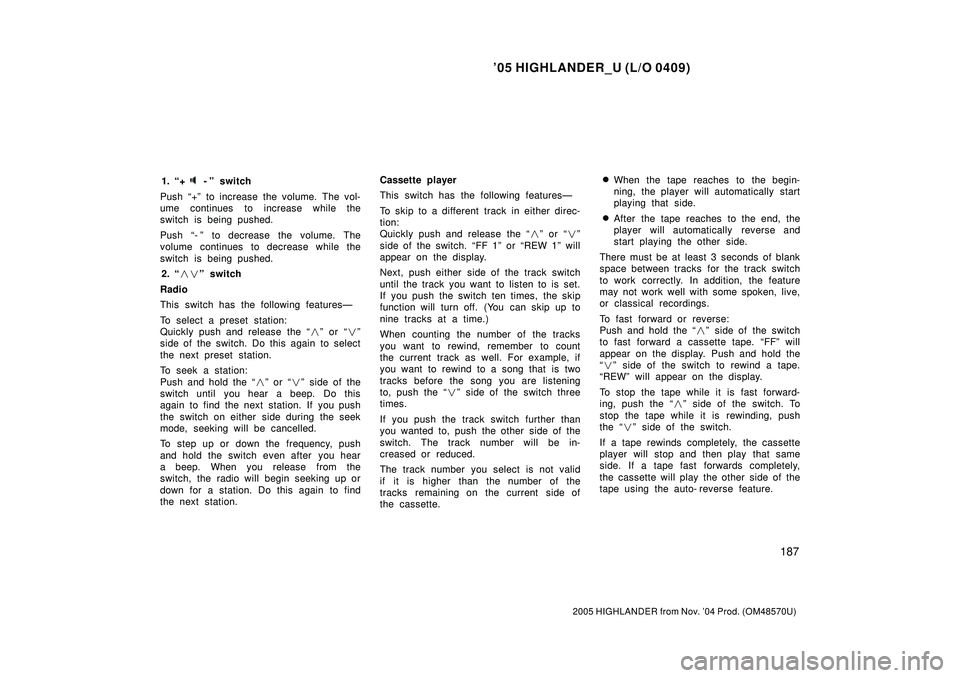
1. +-º switch
Push +º to increase the volume. The vol-
ume continues to increase while the
switch is being pushed.
Push - º to decrease the volume. The
volume continues to decrease while the
switch is being pushed.
2. ��º switch
Radio
This switch has the following featuresÐ
To select a preset station:
Quickly push and release the �º or �º
side of the switch. Do this again to select
the next preset station.
To seek a station:
Push and hold the �º or �º side of the
switch until you hear a beep. Do this
again to find the next station. If you push
the switch on either side during the seek
mode, seeking will be cancelled.
To step up or down the frequency, push
and hold the switch even after you hear
a beep. When you release from the
switch, the radio will begin seeking up or
down for a station. Do this again to find
the next station.Cassette player
This switch has the following featuresÐ
To skip to a different track in either direc-
tion:
Quickly push and release the �º or �º
side of the switch. FF 1º or REW 1º will
appear on the display.
Next, push either side of the track switch
until the track you want to listen to is set.
If you push the switch ten times, the skip
function will turn off. (You can skip up to
nine tracks at a time.)
When counting the number of the tracks
you want to rewind, remember to count
the current track as well. For example, if
you want to rewind to a song that is two
tracks before the song you are listening
to, push the �º side of the switch three
times.
If you push the track switch further than
you wanted to, push the other side of the
switch. The track number will be in-
creased or reduced.
The track number you select is not valid
if it is higher than the number of the
tracks remaining on the current side of
the cassette.�When the tape reaches to the begin-
ning, the player will automatically start
playing that side.
�After the tape reaches to the end, the
player will automatically reverse and
start playing the other side.
There must be at least 3 seconds of blank
space between tracks for the track switch
to work correctly. In addition, the feature
may not work well with some spoken, live,
or classical recordings.
To fast forward or reverse:
Push and hold the �º side of the switch
to fast forward a cassette tape. FFº will
appear on the display. Push and hold the
�º side of the switch to rewind a tape.
REWº will appear on the display.
To stop the tape while it is fast forward-
ing, push the �º side of the switch. To
stop the tape while it is rewinding, push
the �º side of the switch.
If a tape rewinds completely, the cassette
player will stop and then play that same
side. If a tape fast forwards completely,
the cassette will play the other side of the
tape using the auto- reverse feature.
Page 349 of 2572
'05 HIGHLANDER_U (L/O 0409)
189
2005 HIGHLANDER from Nov. '04 Prod. (OM48570U)
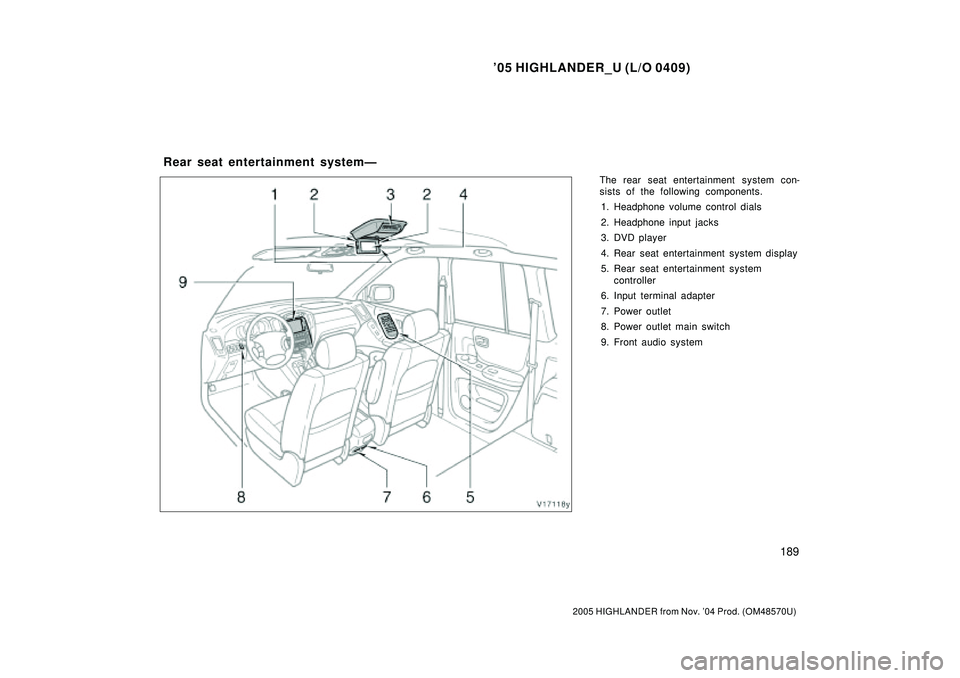
The rear seat entertainment system con-
sists of the following components.
1. Headphone volume control dials
2. Headphone input jacks
3. DVD player
4. Rear seat entertainment system display
5. Rear seat entertainment system
controller
6. Input terminal adapter
7. Power outlet
8. Power outlet main switch
9. Front audio system
Rear seat entertainment systemÐ
Page 351 of 2572
'05 HIGHLANDER_U (L/O 0409)
191
2005 HIGHLANDER from Nov. '04 Prod. (OM48570U)
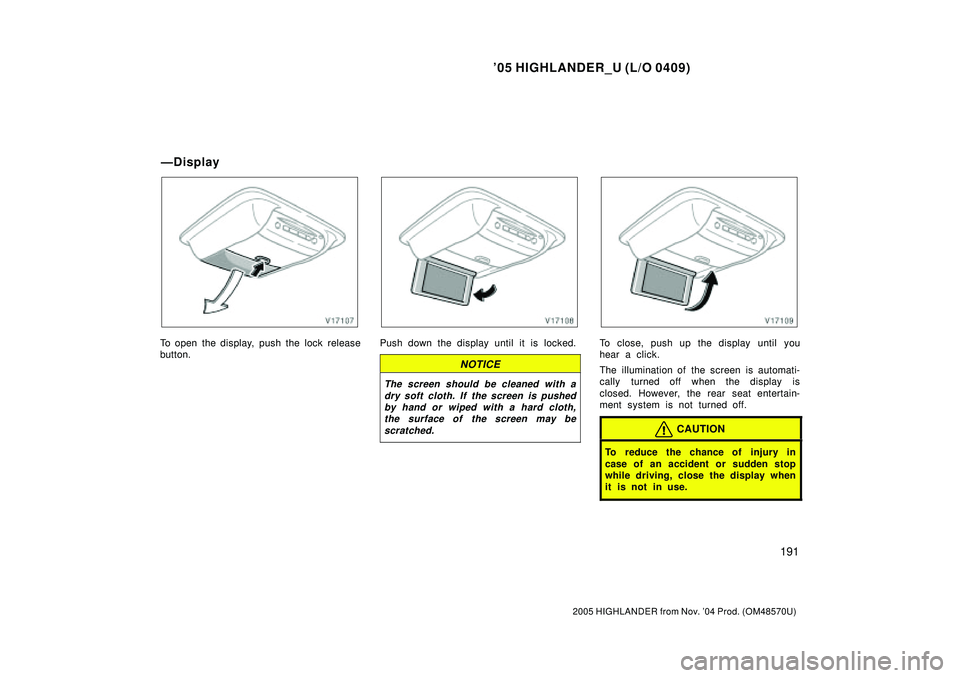
To open the display, push the lock release
button.Push down the display until it is locked.
NOTICE
The screen should be cleaned with a
dry soft cloth. If the screen is pushed
by hand or wiped with a hard cloth,
the surface of the screen may be
scratched.
To close, push up the display until you
hear a click.
The illumination of the screen is automati-
cally turned off when the display is
closed. However, the rear seat entertain-
ment system is not turned off.
CAUTION
To reduce the chance of injury in
case of an accident or sudden stop
while driving, close the display when
it is not in use.
ÐDisplay
Page 354 of 2572
'05 HIGHLANDER_U (L/O 0409)
194
2005 HIGHLANDER from Nov. '04 Prod. (OM48570U)
USING THE CONTROLLER
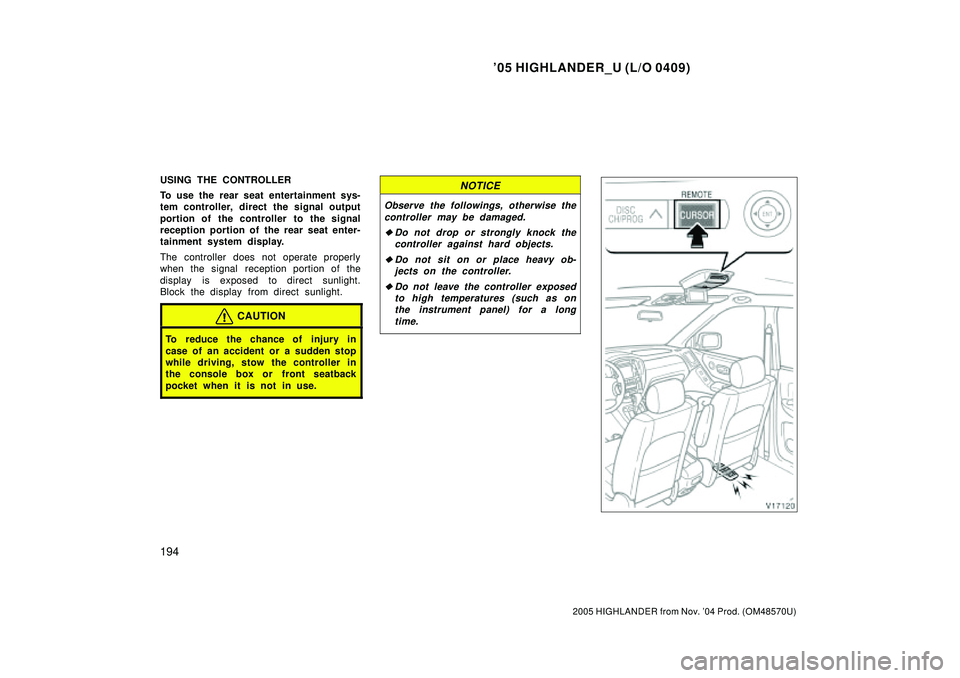
To use the rear seat entertainment sys-
tem controller, direct the signal output
portion of the controller to the signal
reception portion of the rear seat enter-
tainment system display.
The controller does not operate properly
when the signal reception portion of the
display is exposed to direct sunlight.
Block the display from direct sunlight.
CAUTION
To reduce the chance of injury in
case of an accident or a sudden stop
while driving, stow the controller in
the console box or front seatback
pocket when it is not in use.
NOTICE
Observe the followings, otherwise the
controller may be damaged.
�Do not drop or strongly knock the
controller against hard objects.
�Do not sit on or place heavy ob-
jects on the controller.
�Do not leave the controller exposed
to high temperatures (such as on
the instrument panel) for a long
time.
Page 357 of 2572
'05 HIGHLANDER_U (L/O 0409)
197
2005 HIGHLANDER from Nov. '04 Prod. (OM48570U)
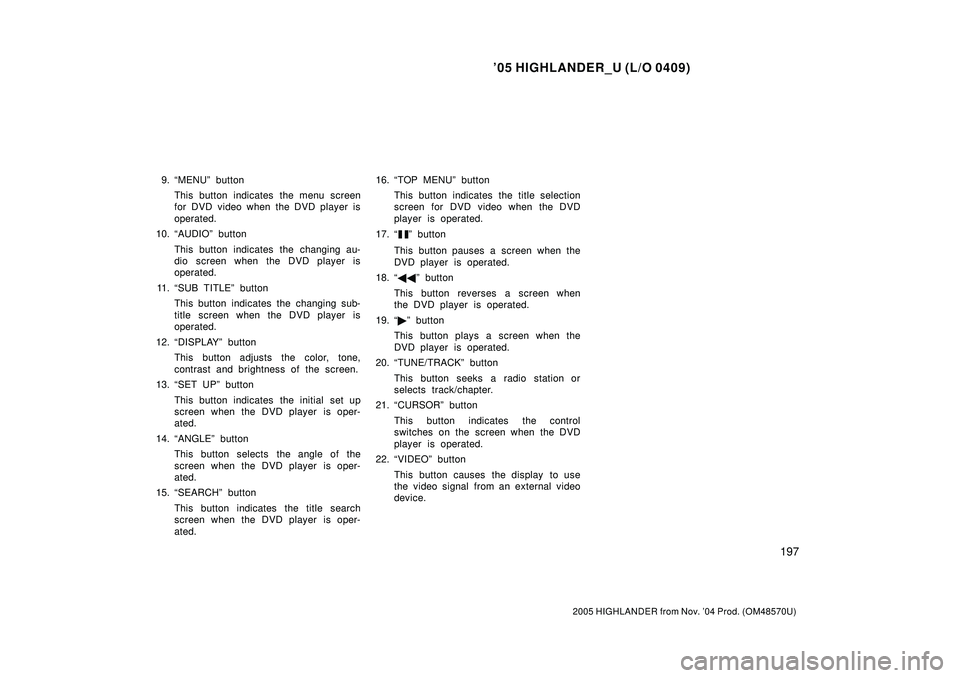
9. MENUº button
This button indicates the menu screen
for DVD video when the DVD player is
operated.
10. AUDIOº button
This button indicates the changing au-
dio screen when the DVD player is
operated.
11. SUB TITLEº button
This button indicates the changing sub-
title screen when the DVD player is
operated.
12. DISPLAYº button
This button adjusts the color, tone,
contrast and brightness of the screen.
13. SET UPº button
This button indicates the initial set up
screen when the DVD player is oper-
ated.
14. ANGLEº button
This button selects the angle of the
screen when the DVD player is oper-
ated.
15. SEARCHº button
This button indicates the title search
screen when the DVD player is oper-
ated.16. TOP MENUº button
This button indicates the title selection
screen for DVD video when the DVD
player is operated.
17.
º button
This button pauses a screen when the
DVD player is operated.
18. ��º button
This button reverses a screen when
the DVD player is operated.
19. �º button
This button plays a screen when the
DVD player is operated.
20. TUNE/TRACKº button
This button seeks a radio station or
selects track/chapter.
21. CURSORº button
This button indicates the control
switches on the screen when the DVD
player is operated.
22. VIDEOº button
This button causes the display to use
the video signal from an external video
device.
Page 361 of 2572
'05 HIGHLANDER_U (L/O 0409)
201
2005 HIGHLANDER from Nov. '04 Prod. (OM48570U)
SELECTING THE MODE
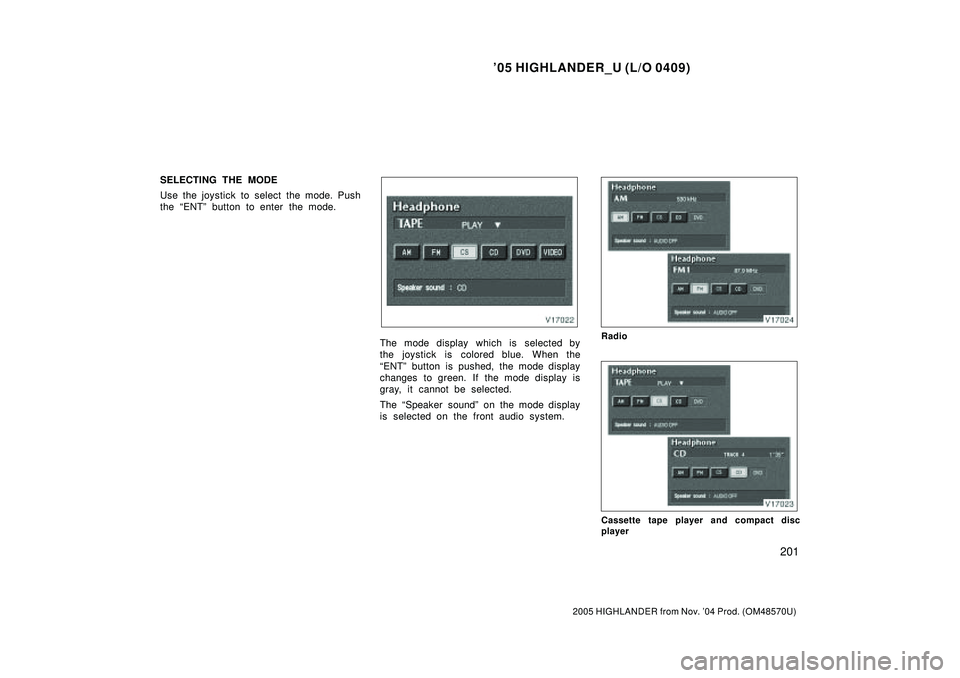
Use the joystick to select the mode. Push
the ENTº button to enter the mode.
The mode display which is selected by
the joystick is colored blue. When the
ENTº button is pushed, the mode display
changes to green. If the mode display is
gray, it cannot be selected.
The Speaker soundº on the mode display
is selected on the front audio system.Radio
Cassette tape player and compact disc
player
Page 363 of 2572
'05 HIGHLANDER_U (L/O 0409)
203
2005 HIGHLANDER from Nov. '04 Prod. (OM48570U)
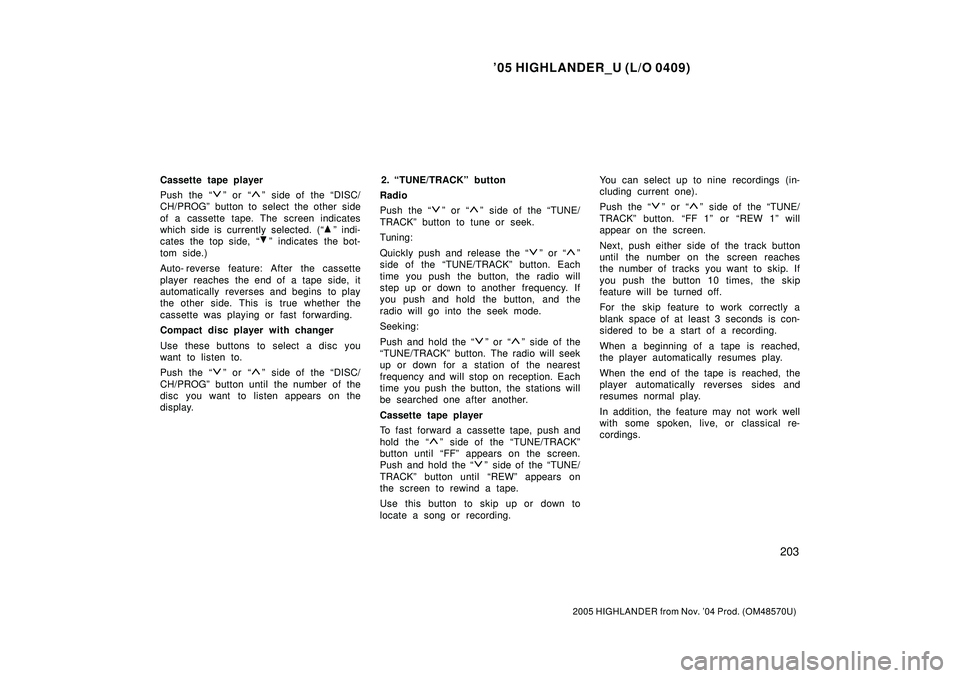
Cassette tape player
Push the
º or º side of the DISC/
CH/PROGº button to select the other side
of a cassette tape. The screen indicates
which side is currently selected. (
º indi-
cates the top side,
º indicates the bot-
tom side.)
Auto- reverse feature: After the cassette
player reaches the end of a tape side, it
automatically reverses and begins to play
the other side. This is true whether the
cassette was playing or fast forwarding.
Compact disc player with changer
Use these buttons to select a disc you
want to listen to.
Push the
º or º side of the DISC/
CH/PROGº button until the number of the
disc you want to listen appears on the
display.2. TUNE/TRACKº button
Radio
Push the
º or º side of the TUNE/
TRACKº button to tune or seek.
Tuning:
Quickly push and release the
º or º
side of the TUNE/TRACKº button. Each
time you push the button, the radio will
step up or down to another frequency. If
you push and hold the button, and the
radio will go into the seek mode.
Seeking:
Push and hold the
º or º side of the
TUNE/TRACKº button. The radio will seek
up or down for a station of the nearest
frequency and will stop on reception. Each
time you push the button, the stations will
be searched one after another.
Cassette tape player
To fast forward a cassette tape, push and
hol d the
º side of the TUNE/TRACKº
button until FFº appears on the screen.
Push and hold the
º side of the TUNE/
TRACKº button until REWº appears on
the screen to rewind a tape.
Use this button to skip up or down to
locate a song or recording.You can select up to nine recordings (in-
cluding current one).
Push the
º or º side of the TUNE/
TRACKº button. FF 1º or REW 1º will
appear on the screen.
Next, push either side of the track button
until the number on the screen reaches
the number of tracks you want to skip. If
you push the button 10 times, the skip
feature will be turned off.
For the skip feature to work correctly a
blank space of at least 3 seconds is con-
sidered to be a start of a recording.
When a beginning of a tape is reached,
the player automatically resumes play.
When the end of the tape is reached, the
player automatically reverses sides and
resumes normal play.
In addition, the feature may not work well
with some spoken, live, or classical re-
cordings.
Page 365 of 2572
'05 HIGHLANDER_U (L/O 0409)
205
2005 HIGHLANDER from Nov. '04 Prod. (OM48570U)
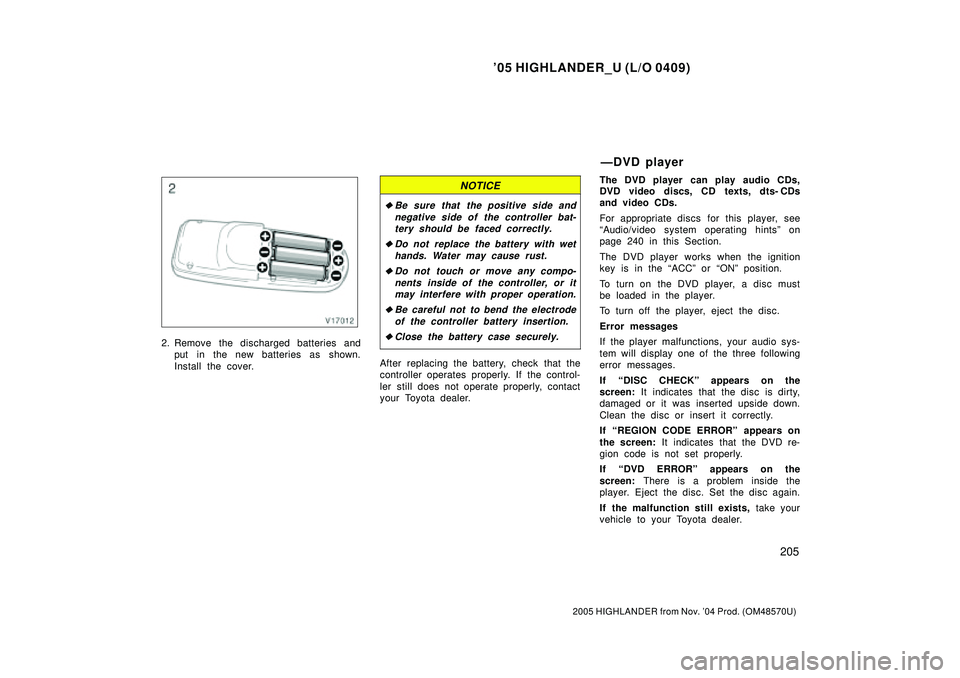
2. Remove the discharged batteries and
put in the new batteries as shown.
Install the cover.
NOTICE
�Be sure that the positive side and
negative side of the controller bat-
tery should be faced correctly.
�Do not replace the battery with wet
hands. Water may cause rust.
�Do not touch or move any compo-
nents inside of the controller, or it
may interfere with proper operation.
�Be careful not to bend the electrode
of the controller battery insertion.
�Close the battery case securely.
After replacing the battery, check that the
controller operates properly. If the control-
ler still does not operate properly, contact
your Toyota dealer.The DVD player can play audio CDs,
DVD video discs, CD texts, dts- CDs
and video CDs.
For appropriate discs for this player, see
Audio/video system operating hintsº on
page 240 in this Section.
The DVD player works when the ignition
key is in the ACCº or ONº position.
To turn on the DVD player, a disc must
be loaded in the player.
To turn off the player, eject the disc.
Error messages
If the player malfunctions, your audio sys-
tem will display one of the three following
error messages.
If DISC CHECKº appears on the
screen: It indicates that the disc is dirty,
damaged or it was inserted upside down.
Clean the disc or insert it correctly.
If REGION CODE ERRORº appears on
the screen: It indicates that the DVD re-
gion code is not set properly.
If DVD ERRORº appears on the
screen: There is a problem inside the
player. Eject the disc. Set the disc again.
If the malfunction still exists, take your
vehicle to your Toyota dealer.
ÐDVD player