Page 86 of 272

86 Saab 9-5 Audio SystemRadio Press the RADIO/BAND button (3) to switch
to the radio when another source is active. Preset station buttons (1) Press once (release within a second) to
select a preset station, e.g.
The small figure on the far right of the dis-
play is the number of the preset button
selected.
Presetting a station
Press and hold in the desired button (for
more than a second) to store the currently
tuned station. During this time, the radio will
be mute. The sound will return as soon as
the station has been stored.
Tuning (2) Automatic seek tuning:
Press briefly to search for higher fre-
quencies or for lower frequencies.
Manual tuning:
To switch to the manual-tuning function,
press or and release quickly
(a chime will sound and the M indicator will
appear on the display).
The function will revert to automatic seek
tuning two seconds after the last manual fre-
quency change has been made.
Waveband selector (3) Press the RADIO/BAND button repeatedly
to move through the waveband selections:
FM1, FM2, and AM. AS, Autostore (4) The autostore mode provides an additional
preset function that can be used to search
for and to store stations when you are in an
area where you are unfamiliar with the sta-
tions and their frequencies.
Press the AS/SEARCH button to switch the
Autostore mode ON/OFF. When the
Autostore mode is ON, the AS indicator will
show at the bottom of the display.
IB1088
ProCarManuals.com
Page 87 of 272

87 Saab 9-5 Audio System
Press and hold in the AS/SEARCH button
for more than a second to initiate a search
for the six strongest stations.
Each time the system finds and stores a sta-
tion, the number on the far right of the dis-
play will change. If the system cannot find
six stations with good reception, the remain-
ing preset buttons will be empty. If one of
these empty buttons is pressed, U**** (FM)
or AM**** will appear on the display.
When the system leaves the AS mode, it
returns to the station that was selected
before the AS mode was activated.
The AS mode can also be used in the AM
band.
WB (Weather Band) (5)Press the WB button to select the Weather
Band mode. The radio will automatically
search for the strongest national weather
service station in the area. When a weather
band station is received, the display indi-
cates ”WB”. The strongest station generally
provides the most accurate information for
the area in which you are traveling.
To exit the Weather Band mode, depress
the WB button again. Weather Band recep-
tion is available in CD, TAPE and RADIO
mode. If the radio is unable to find a suffi-
ciently strong station to lock onto, the unit
will continue to search and the display will
indicate ”NO WB”.
ProCarManuals.com
Page 90 of 272
90 Saab 9-5 Audio SystemType II (metal) tapes The cassette has an automatic tape-type
selector. Cleaning-due indicator After 30 hours’ playing time, the following
message will appear on the display:
The message will be displayed for ten
seconds each time the cassette player is
selected.
A cleaning tape should be used to clean the
heads inside the cassette player to maintain
good reproduction and to prevent unneces-
sary wear.
To reset the playing-time meter:
1 Remove the current tape.
2 Load the cleaning tape and play it for the
required time.
3 Remove the cleaning tape and reload
the other one.
Tape care Do not expose cassette tapes to direct sun-
light or to extremes of temperature as this
can damage the cassette and the tape.
Always keep cassettes in their boxes when
not in use.
If a cassette should become jammed in the
deck, seek help from an authorized Saab
dealer.
ProCarManuals.com
Page 94 of 272

94 Saab 9-5 Audio SystemIf the magazine in the CD changer is empty,
the following will appear on the display:
If the CD changer is activated right after a
magazine has been loaded, the following
will appear on the display:
The CD number will change as each CD is
played.
After a magazine has been loaded, play-
back will start with the first track on the first
CD when the CD changer is selected, and
the following will appear on the display:
Selecting CDs (1) When the CD changer is operating, the
radio preset buttons work for the six CDs in
the magazine. Press the button for the
corresponding CD.
If the selected CD is already being played,
playback will restart from the first track. If the selected CD-tray is empty, the follow-
ing will appear on the display:
After two seconds, the status of the trays in
the magazine (i.e. loaded or empty) will be
shown on the display, e.g.:
IB1104
VOL
TREBAL ON
FA D BAS
PULL PUSH
CDRDM
RADIO BAND
ASSEARCH
2 13
5 46
DOLBY B NR
SEEK
3
1
2
ProCarManuals.com
Page 95 of 272

95 Saab 9-5 Audio System
If for some reason the CD selected by the
preset button cannot be played, playback of
the current CD will continue. Track search (2) Press or repeatedly to move
to preceding or following tracks. Pressing
once will restart playback from the
beginning of the current track. Thus, to play
the preceding track, press twice. Rapid play When or is pressed and
held, rapid play will be initiated, with the time
and track showing on the display, e.g.:
If the button is depressed for more than
5 seconds, the rapid play will be even faster.
Rapid play stops when the button is
released.
Fast track search Press SEEK (mid-segment) once to switch
between the CD-PLAY and CD-TRACK
modes.
The CD-PLAY and CD-TRACK modes
change the function of and .
The selected mode will also be active the
next time the system is switched on. Choose the mode that you find most
convenient:
CD PLAY Pressing and holding
or briefly
starts Rapid play
CD TRACK Pressing and holding
or briefly
starts Fast track search
IB1104
VOL
TREBAL ON
FA D BAS
PULL PUSH
CDRDM
RADIO BAND
ASSEARCH
2 13
5 46
DOLBY B NR
SEEK
3
1
2
ProCarManuals.com
Page 97 of 272
97 Saab 9-5 Audio System
Programmable
functionsVolume-preset modeTo select the volume-preset mode, press
and hold the WB button at the same time as
you switch the Audio System on.
Use the button to select the
desired function.
The following volume settings can be
preselected:
STARTVOL - maximum volume level
when the Audio System is switched on
TEL VOL - preset volume level when an
in-car phone is activated
SP D VOL - speed-dependent volume.
The Audio System will automatically
adjust the volume level to adjust to an
increase in vehicle speed.
LOUDNESS ON/OFF - boosting of the
highest and lowest frequency ranges to
enhance the sound image when the
volume is set to a low level.
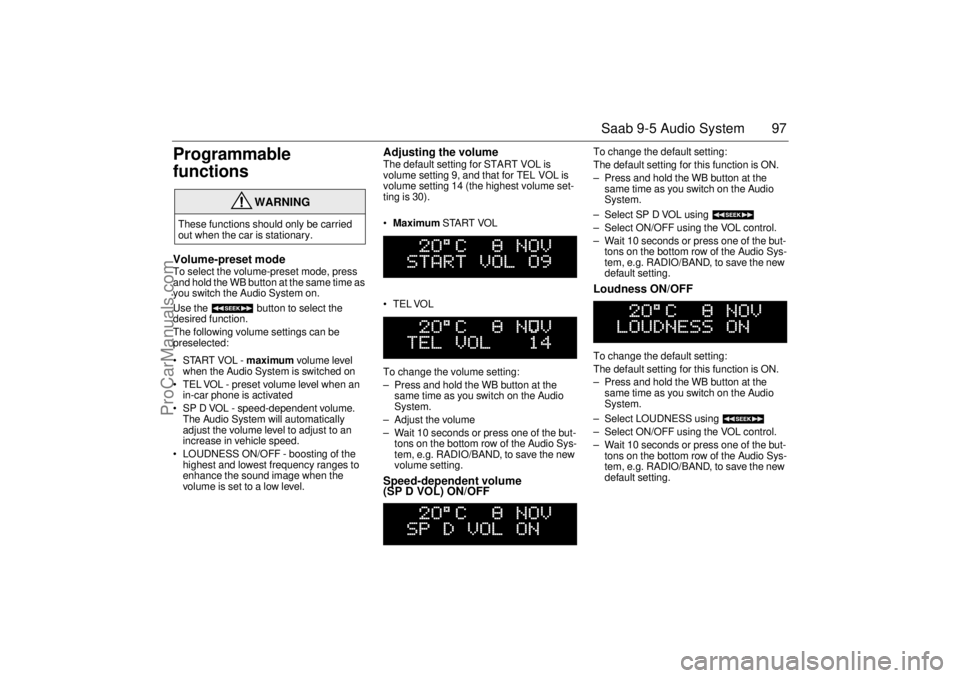
Adjusting the volume The default setting for START VOL is
volume setting 9, and that for TEL VOL is
volume setting 14 (the highest volume set-
ting is 30).
Maximum START VOL
TELVOL
To change the volume setting:
– Press and hold the WB button at the
same time as you switch on the Audio
System.
– Adjust the volume
– Wait 10 seconds or press one of the but-
tons on the bottom row of the Audio Sys-
tem, e.g. RADIO/BAND, to save the new
volume setting.Speed-dependent volume
(SP D VOL) ON/OFF
To change the default setting:
The default setting for this function is ON.
– Press and hold the WB button at the
same time as you switch on the Audio
System.
– Select SP D VOL using
– Select ON/OFF using the VOL control.
– Wait 10 seconds or press one of the but-
tons on the bottom row of the Audio Sys-
tem, e.g. RADIO/BAND, to save the new
default setting. Loudness ON/OFF To change the default setting:
The default setting for this function is ON.
– Press and hold the WB button at the
same time as you switch on the Audio
System.
– Select LOUDNESS using
– Select ON/OFF using the VOL control.
– Wait 10 seconds or press one of the but-
tons on the bottom row of the Audio Sys-
tem, e.g. RADIO/BAND, to save the new
default setting.
WARNING
These functions should only be carried
out when the car is stationary.
ProCarManuals.com
Page 99 of 272

99 Saab 9-5 Audio System
Technical data
These specifications comply with the new IHF Standard
Since the policy at Saab is one of continual improvement, we retain the right to alter
specifications and design without prior notice.
Dolby noise reduction is produced under licence from Dolby Laboratories Licensing
Corporation
”Dolby” and the double-D symbol are trademarks of Dolby Laboratories Licens-
ing Corporation
Changes or modifications not expressly approved by the manufacturer for compliance
could void the user´s authority to operate the equipment.
Tone controls
Bass ______________________ ±10 dB at 100 Hz
Treble _____________________ ±10 dB at 10,000 Hz
Power output
Premium __________________ 150 W
110 W at 1% THD (total har-
monic distortion) and 13.5 V
Prestige __________________ 200 W
150 W at 1% THD (total har-
monic distortion) and 13.5 V
Radio module
Radio system _______________ PLL dual-synthesizer tuner
Number of presets:
FM ______________________ 3 x 6
AM ______________________ 2 x 6
Frequency range:
FM ______________________ 87.9 – 107.9 MHz
MW ______________________ 530 – 1710 kHz
WB ______________________ 162.40 – 162.55 MHz
Tuning steps:
Automatic seek tuning: _______ FM 200 kHz
AM 10 kHz
WB 50 kHz
Manual tuning: _____________ FM 200 kHz
AM 10 kHzFrequency range (FM) ________ 40-15000 Hz
±1 dB
Distortion (FM) ______________ < 0.5%
Cassette player
Fast forward/rewind __________ < 120 seconds (C-60)
Frequency range _____________ 40 – 16000 Hz
±2 dB
Wow and flutter ______________ 0.2% WRMS
Signal-to-noise ratio __________ 45 dB
Dolby B/C NR effect __________ 8/16 dB
CD player and CD changer
1-bit system and 8 x oversampling
Frequency range _____________ 20-20000 Hz
±0.5 dB
Distortion __________________ < 0.008%
Dynamics __________________ > 80 dB (1 kHz)
CD-changer capacity __________ 6 discs
ProCarManuals.com
Page 102 of 272
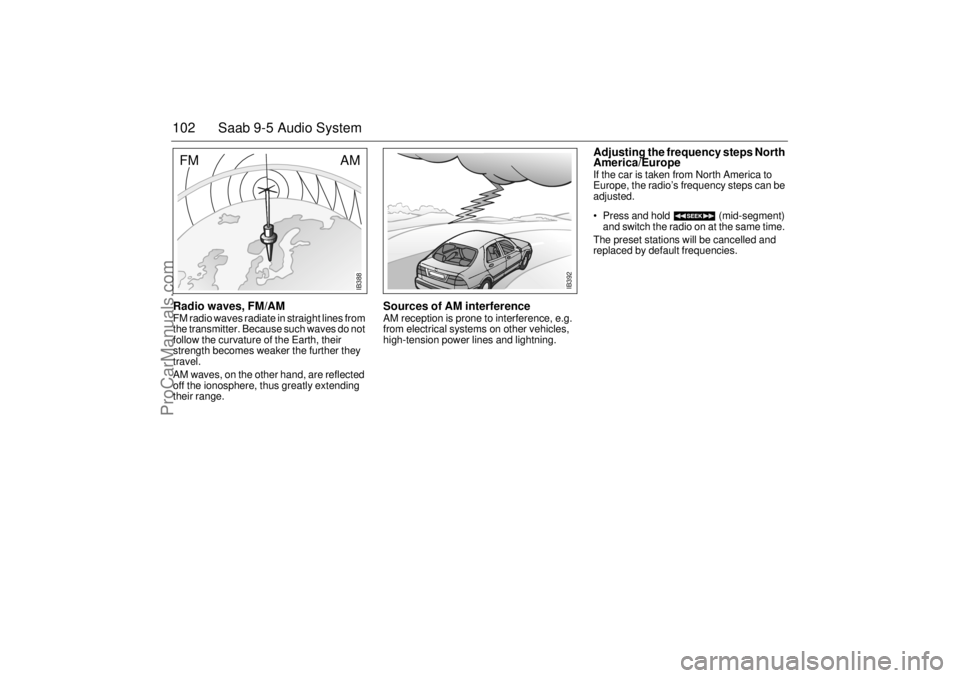
102 Saab 9-5 Audio SystemRadio waves, FM/AM FM radio waves radiate in straight lines from
the transmitter. Because such waves do not
follow the curvature of the Earth, their
strength becomes weaker the further they
travel.
AM waves, on the other hand, are reflected
off the ionosphere, thus greatly extending
their range.
Sources of AM interference AM reception is prone to interference, e.g.
from electrical systems on other vehicles,
high-tension power lines and lightning.
Adjusting the frequency steps North
America/Europe If the car is taken from North America to
Europe, the radio’s frequency steps can be
adjusted.
Press and hold (mid-segment)
and switch the radio on at the same time.
The preset stations will be cancelled and
replaced by default frequencies.
IB392
IB388
AM
FM
ProCarManuals.com