Page 213 of 413
3-40
TRACK SCAN: Press and hold one of the SEEK
arrows for two seconds until TRACK SCAN appears on
the display and you hear a beep. You will hear the first
few seconds of each track on the current disc. The sound
will mute while scanning. The SCAN icon will be lit
and the T will blink to indicate track scan mode.
Press SEEK again to stop TRACK SCAN.
DISC SCAN: Press and hold one of the SEEK arrows
for four seconds until DISC SCAN appears on the
display and you hear a double beep. You will hear the
first few seconds of track one on each disc. The sound
will mute while scanning. The SCAN icon will be lit
and the D will blink to indicate disc scan mode.
Press SEEK again to stop DISC SCAN.
Theft-Deterrent Feature RDS Radios
THEFTLOCK� is designed to discourage theft of your
radio. The feature works automatically by learning a
portion of the Vehicle Identification Number (VIN).
If the radio is moved to a different vehicle, it will not
operate and LOCKED will be displayed.
With THEFTLOCK activated, your radio will not
operate if stolen.
Audio Steering Wheel Controls
(If Equipped)
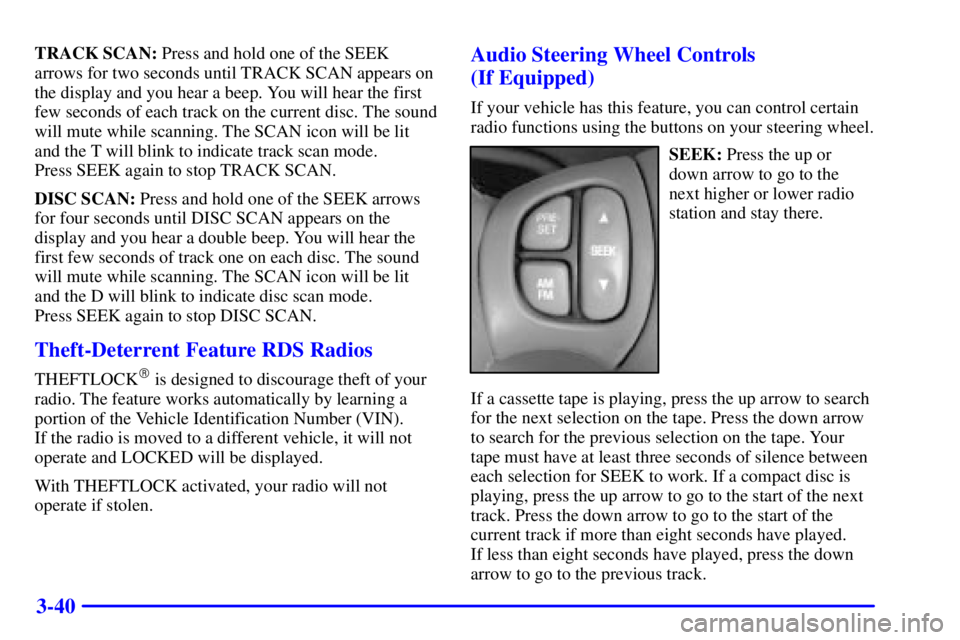
If your vehicle has this feature, you can control certain
radio functions using the buttons on your steering wheel.
SEEK: Press the up or
down arrow to go to the
next higher or lower radio
station and stay there.
If a cassette tape is playing, press the up arrow to search
for the next selection on the tape. Press the down arrow
to search for the previous selection on the tape. Your
tape must have at least three seconds of silence between
each selection for SEEK to work. If a compact disc is
playing, press the up arrow to go to the start of the next
track. Press the down arrow to go to the start of the
current track if more than eight seconds have played.
If less than eight seconds have played, press the down
arrow to go to the previous track.
Page 332 of 413

6-47
When the CHECK TIRE PRESSURE message appears
on the Driver Information Center or the systems monitor
TIRE PRESS light comes on, you should stop as soon as
you can and check all your tires for damage. If a tire is
flat, see ªIf a Tire Goes Flatº in the Index. Also check
the tire pressure in all four tires as soon as you can.
See ªInflation
-Tire Pressureº in the Index.
Any time you adjust a tire's pressure or have one or
more tires repaired or replaced, you'll need to reset
(calibrate) the check tire pressure system. You'll also
need to reset the system whenever you rotate the tires,
buy new tires, install or remove the compact spare, and
whenever the vehicle's battery has been disconnected.
Don't reset the check tire pressure system without first
correcting the cause of the problem and checking and
adjusting the pressure in all four tires. If you reset the
system when the tire pressures are incorrect, the check
tire pressure system will not work properly and may not
alert you when a tire is low or high.
To reset (calibrate) the system with a Driver Information
Center (DIC):
1. Turn the ignition switch to ON.
2. Using the MODE and SELECT buttons, change the
DIC to display TIRE PRESSURE.
3. Press and hold the RESET button for about
five seconds.4. The display should change to read TIRE PRESSURE
RESET. If TIRE PRESSURE RESET does not
appear on the display after about five seconds, see
your dealer for service.
5. When you release the button after seeing the TIRE
PRESSURE RESET message, the display will
change to read TIRE PRESSURE NORMAL.
To reset (calibrate) the system with a systems monitor:
1. Turn the ignition switch to ON.
2. Press and hold the TIRE PRESS RESET button for
about five seconds.
3. The TIRE PRESS light on the systems monitor
should begin to flash. If the TIRE PRESS light does
not begin to flash after about five seconds, see your
dealer for service.
4. Release the TIRE PRESS RESET button and the
system should reset The TIRE PRESS light will
go out.
The system completes the calibration process during
driving. Calibration time can take 45 to 90 minutes,
depending on your driving habits. After the system has
been calibrated, the system will alert the driver that a tire
is low, up to a maximum speed of 65 mph (105 km/h).
Page 407 of 413

8-9
We have quick, easy access to telephone numbers of the
following additional services depending on your needs:
�Hotels
�Glass replacement
�Tire repair facilities
�Rental vehicle or taxis
�Airports or train stations
�Police, fire department or hospitals
In many instances, mechanical failures are covered
under Pontiac's comprehensive warranty. However,
when other services are utilized, our advisors will
explain any payment obligations you might incur.
For prompt and efficient assistance when calling, please
provide the following information to give the advisor:
�Location of vehicle
�Telephone number of your location
�Vehicle model, year and color
�Mileage of vehicle
�Vehicle Identification Number (VIN)
�Vehicle license plate numberPontiac reserves the right to limit services or
reimbursement to an owner or driver when, in Pontiac's
judgement, the claims become excessive in frequency or
type of occurrence.
While we hope you never have the occasion to use our
service, it is added security while traveling for you and
your family. Remember, we're only a phone call away.
Pontiac Roadside Assistance
-- 1-800-ROADSIDE
or 1
-800-762-3743, text telephone (TTY) users,
call 1
-888-889-2438.
Canadian Roadside Assistance
Vehicles purchased in Canada have an extensive
Roadside Assistance program accessible from anywhere
in Canada or the United States. Please refer to the
separate brochure provided by the dealer or call
1
-800-268-6800 for emergency services.