2001 NISSAN ALTIMA phone
[x] Cancel search: phonePage 4 of 258

NISSAN CUSTOMER CARE PROGRAM
NISSAN CARES ...
Both NISSAN and your NISSAN dealer are dedicated to serving all your automotive needs. Your satisfaction with your vehicle and your
NISSAN dealer are our primary concerns. Your NISSAN dealer is always available to assist you with all your automobile sales and service
needs.
However, if there is something that your
NISSAN dealer cannot assist you with or
you would like to provide NISSAN directly
with comments or questions, please con-
tact the NISSAN Consumer Affairs Depart-
ment using our toll-free number:
For U.S. mainland and Alaska
customers
1-800-NISSAN-1
(1-800-647-7261)
For Hawaii customers
(808) 836-0888 (Oahu Number)
For CANADIAN customers
1-800-387-0122
The Consumer Affairs Department will ask
for the following information:
Ð Your name, address, and telephone
number
Ð Vehicle identification number (on dash-
board)
Ð Date of purchase
Ð Current odometer reading
Ð Your NISSAN dealer's name
Ð Your comments or questions
OR
You can write to NISSAN with the informa-tion on the left at:
For U.S. mainland and Alaska customers
Nissan North America Inc.
Consumer Affairs Department
P.O. Box 191
Gardena, California 90248-0191
For Hawaii customers
Nissan Motor Corporation in Hawaii
2880 Kilihau St.
Honolulu, Hawaii 96819
For Canadian customers
Nissan Canada Inc.
5290 Orbitor Drive
Mississauga, Ontario L4W 4Z5
We appreciate your interest in NISSAN and thank you for buying a quality NISSAN vehicle.
ZX
Page 64 of 258
cDo not use the switch while moving
on the highway unless unusual cir-
cumstances force you to drive so
slowly that your vehicle might be-
come a hazard to other traffic.
cTurn signals do not work when the
hazard warning flasher lights are on.
The flashers can be actuated with the igni-
tion switch either OFF or ON.
Some state laws may prohibit the use of
the hazard warning flasher switch while
driving.
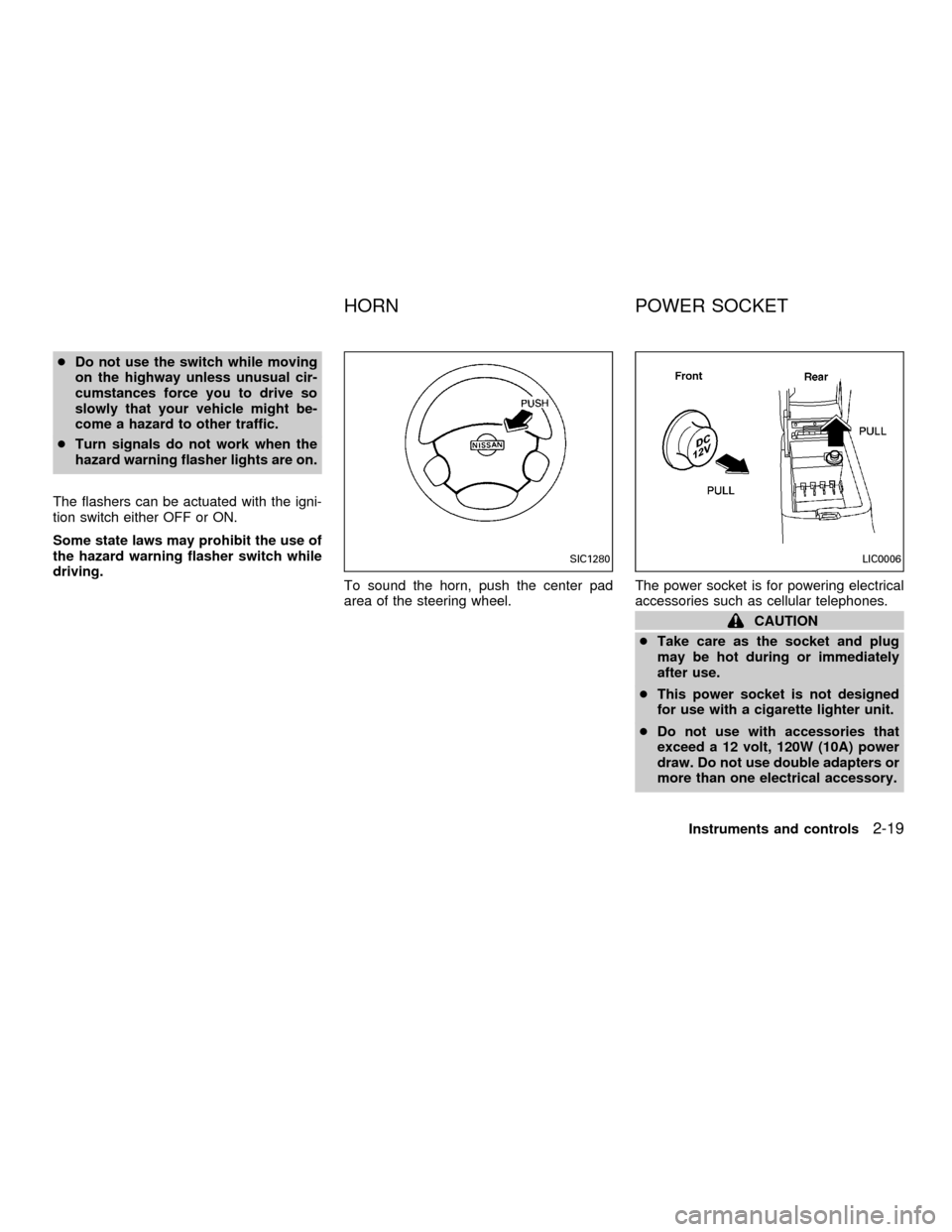
To sound the horn, push the center pad
area of the steering wheel.The power socket is for powering electrical
accessories such as cellular telephones.
CAUTION
cTake care as the socket and plug
may be hot during or immediately
after use.
cThis power socket is not designed
for use with a cigarette lighter unit.
cDo not use with accessories that
exceed a 12 volt, 120W (10A) power
draw. Do not use double adapters or
more than one electrical accessory.
SIC1280LIC0006
HORN POWER SOCKET
Instruments and controls2-19
ZX
Page 69 of 258

The upper half of the console box may be
used for storage of cellular phones. An
access hole is provided at the bottom of the
upper half of the console box for phone cord
routing to the power socket.
To route a phone cord to the power socket:
1. open the upper half of the console box
2. remove the rubber mat, and then remove
the cutout area from the mat
3. remove the access hole cover
4. install the rubber mat
5. route the phone cord through the access
hole and plug into the power socket
Lower half
Pull up on the lever to open the lower half of
the console box. A power socket is located
inside the console box and there is storage
for cassette tapes and compact discs.
Manual Transmission Models
Pull up on the lever and open the console
box. The console box can store cassette
tapes and compact discs. A business card
holder and a tissue holder are also con-
tained within the console box.
LIC0023LIC0024
2-24Instruments and controls
ZX
Page 76 of 258

PROGRAMMING HomeLinkTFOR
CANADIAN CUSTOMERS
Prior to 1992, D.O.C. regulations required
hand-held transmitters to stop transmitting
after 2 seconds. To program your hand-held
transmitter to HomeLinkT, continue to press
and hold the HomeLinkTbutton (note step 2
through 4 under ``Programming HomeLinkT'')
while you press and re-press (``cycle'') your
hand-held transmitters every 2 seconds until
the indicator light flashes rapidly (indicating
successful programming).
NOTE:
If programming a garage door opener,
etc., it is advised to unplug the device
during the ``cycling'' process to prevent
possible damage to the garage door
opener components.
OPERATING THE INTEGRATED
HomeLinkTUNIVERSAL TRANS-
CEIVER
The Integrated HomeLinkTUniversal Trans-
ceiver (once programmed) may now be
used to activate the garage door, etc. To
operate, simply press the appropriate pro-
grammed Integrated HomeLinkTUniversalTransceiver button. The red indicator light
will illuminate while the signal is being trans-
mitted.
PROGRAMMING TROUBLE-
DIAGNOSIS
If the HomeLinkTdoes not quickly learn the
hand-held transmitter information:
creplace the hand-held transmitter batter-
ies with new batteries.
cposition the hand-help transmitter with its
battery area facing away from the
HomeLinkTsurface.
cpress and hold both the HomeLinkTand
hand-held transmitter buttons without in-
terruption.
cposition the hand-held transmitter 2 to 5
inches (50 to 127 mm) away from the
HomeLinkTsurface. Hold the transmitter
in that position for up to 15 seconds. If
HomeLinkTis not programmed within
that time, try holding the transmitter in
another position - keeping the indicator
light in view at all times.
If you continue to have programming diffi-
culties, please contact the NISSAN Con-
sumer Affairs Department. The phone num-bers are located in the Foreword of this
owner's manual.
CLEARING THE PROGRAMMED
INFORMATION
Individual buttons cannot be cleared, how-
ever to clear all programming, press and
hold the two outside buttons and release
when the indicator light begins to flash
(approximately 20 seconds)
ROLLING CODE PROGRAMMING
Rolling code garage door openers (or other
rolling code devices) which are ``code pro-
tected'' and manufactured after 1996, may
be determined by the following:
A. Reference the garage door opener Own-
er's Manual for verification.
B. The hand-held transmitter appears to
program the Integrated HomeLinkTUni-
versal Transceiver but does not activate
the garage door.
C. Press and hold the trained HomeLinkT
button. If the garage door opener has the
rolling code feature, the HomeLinkTindi-
cator light will flash rapidly, then remains
on after 2 seconds.
Instruments and controls
2-31
ZX
Page 96 of 258

4Heater, air conditioner and audio systems
Ventilators ..............................................................4-2
Center ventilators ..............................................4-2
Side ventilators ..................................................4-2
Heater and air conditioner......................................4-3
Controls .............................................................4-3
Heater operation ................................................4-4
Air conditioner operation
(if so equipped)..................................................4-5
Air flow charts ....................................................4-6
Servicing air conditioner .........................................4-9Audio system ........................................................4-10
FM-AM radio with compact disc (CD)
player ...............................................................4-10
FM-AM radio with cassette player and
compact disc (CD) player ................................4-17
FM-AM radio with compact disc (CD)
changer (if so equipped) .................................4-24
Antenna ...........................................................4-37
Car phone or CB radio .........................................4-37
ZX
Page 105 of 258

FM-AM RADIO WITH COMPACT
DISC (CD) PLAYER
Audio main operation
To turn the radio on, turn the ignition key to
ACC or ON. If you listen to the radio with the
engine not running, turn the key to the ACC
position.
Radio reception is affected by station signal
strength, distance from radio transmitter,
buildings, bridges, mountains and other ex-
ternal influences. Intermittent changes in
reception quality normally are caused by
these external influences.
Using a cellular phone in or near the
vehicle may influence radio reception
quality.
Power/Volume control
Turn the ignition key to ACC or ON, then
push the power/volume control knob. The
mode (radio or CD) which was playing im-
mediately before the system was turned off
resumes playing. When no CD is loaded,
the radio comes on. Pushing the
power/volume control knob again turns the
system off.
LHA0002
AUDIO SYSTEM
4-10Heater, air conditioner and audio systems
ZX
Page 112 of 258

FM-AM RADIO WITH CASSETTE
PLAYER AND COMPACT DISC
(CD) PLAYER
Audio main operation
To turn the radio on, turn the ignition key to
ACC or ON. If you listen to the radio with the
engine not running, turn the key to the ACC
position.
Radio reception is affected by station signal
strength, distance from radio transmitter,
buildings, bridges, mountains and other ex-
ternal influences. Intermittent changes in
reception quality normally are caused by
these external influences.
Using a cellular phone in or near the
vehicle may influence radio reception
quality.
ONzOFF/VOL control knob
Turn the ignition key to ACC or ON, then
push the ONzOFF/VOL control knob button.
The mode (radio, tape or CD) which was
playing immediately before the system was
turned off resumes playing. When no CD or
tape is loaded, the radio comes on. Pushing
the ONzOFF/VOL control knob button again
turns the system off.
WHA0001
Heater, air conditioner and audio systems4-17
ZX
Page 121 of 258
4. Press TUNE/FF-REV (or)or
SEEK/TRACK (or) to adjust the
minutes.
5. Press the CLOCK button again to exit the
clock set mode.
The display will return to the regular clock
display after 7 seconds, or you may press
the CLOCK button again to return to the
regular clock display.
FM-AM radio operation
FM-AM band select
Push the AM or the FM button to change
from AM to FM reception.
The FM stereo indicator, ST, illuminates
during FM stereo reception. When the ste-
reo broadcast signal is weak, the radio
automatically changes from stereo to mon-
aural reception.
Station signal strength, distance from radio
transmitter, buildings, bridges, mountains,
and other external influences affect radio
reception. Intermittent changes in reception
quality normally are caused by these exter-
nal influences.Using a cellular phone in or near the
vehicle may influence radio reception
quality.
TUNE/FF-REV
WARNING
The radio should not be tuned while
driving so full attention may be given to
vehicle operation.
Use the
orbuttons for manual tun-
ing. To move quickly through the channels,
hold the tuning buttons down.
SEEK tuning
Push SEEK/TRACK (or). SEEK tuning
begins from low to high frequencies or high
to low frequencies, depending on which but-
ton is pressed, and stops at the next broad-
casting station. If using the up button, once
the highest broadcasting station is reached,
the radio continues in the SEEK mode at the
lowest broadcasting station. If using the
down button, once the lowest broadcasting
station is reached, the radio continues in theSEEK mode at the highest broadcasting sta-
tion.
SCAN tuning
Push the SCAN button. SCAN illuminates in
the display window. Scan tuning begins
from low to high frequencies or from high to
low frequencies. Scan tuning stops at each
broadcasting station that has sufficient sig-
nal strength for 5 seconds. When scanning,
SCAN blinks in the display. Pushing the
SCAN button again during this 5 second
period stops Scan tuning and the radio
remains tuned to that station.
4-26Heater, air conditioner and audio systems
ZX