2001 DODGE RAM radio controls
[x] Cancel search: radio controlsPage 2678 of 2889

hook formations on the lower edge of the glove box
door are engaged with and pivot on three hinge pins
integral to the lower edge of the instrument panel
support structure. The glove box door also serves as
the passenger side knee blocker. A honeycomb struc-
ture between the inner and outer glove box door pan-
els helps to absorb the impact load and distribute it
to the instrument panel structure.
²Steering Column Opening Cover- The steer-
ing column opening cover serves as the driver side
knee blocker. This molded plastic cover has an inte-
gral ribbed plastic liner concealed behind it, for
increased strength and integrity. The steering column
opening cover transfers impact loads to the instru-
ment panel structural support.
²Top Cover- The instrument panel top cover or
base trim is the molded, grained, and color impreg-
nated plastic outer skin of the instrument panel
structural support.
Hard wired circuitry connects the electrical compo-
nents on the instrument panel to each other through
the electrical system of the vehicle. These hard wired
circuits are integral to several wire harnesses, which
are routed throughout the vehicle and retained by
many different methods. These circuits may be con-
nected to each other, to the vehicle electrical system
and to the instrument panel components through the
use of a combination of soldered splices, splice block
connectors and many different types of wire harness
terminal connectors and insulators. Refer to the
appropriate wiring information. The wiring informa-
tion includes complete circuit diagrams, proper wire
and connector repair procedures, further details on
wire harness routing and retention, as well as pin-
out and location views for the various wire harness
connectors, splices, and grounds.
OPERATION
The instrument panel serves as the command cen-
ter of the vehicle, which necessarily makes it a very
complex unit. The instrument panel is designed to
house the controls and monitors for standard and
optional powertrains, climate control systems, audio
systems, safety systems, and many other comfort or
convenience items. When the components of the
instrument panel structural support are properly
assembled and secured in the vehicle they provide
superior instrument panel stiffness and integrity to
help reduce buzzes, squeaks, and rattles. This type of
construction also provides improved energy absorp-
tion which, in conjunction with the dual airbags and
seat belts, helps to improve occupant protection.
The instrument panel is also designed so that all of
the various controls can be safely reached and the
monitors can be easily viewed by the vehicle operator
when driving, while still allowing relative ease ofaccess to each of these items for service. Modular
instrument panel construction allows all of the
gauges and controls to be serviced from the front of
the panel. In addition, most of the instrument panel
electrical components can be accessed without com-
plete instrument panel removal. However, if neces-
sary, the instrument panel can be removed from the
vehicle as an assembly.
The steering column opening cover with its inte-
gral knee blocker located on the driver side of the
instrument panel works in conjunction with the air-
bag system in a frontal vehicle impact to keep the
driver properly positioned for an airbag deployment.
In addition, removal of this component provides
access to the steering column mounts, the steering
column wiring, the Junction Block (JB) (removal of a
snap-fit fuse access panel on the left end of the
instrument panel allows access to the fuses and cir-
cuit breakers), the Central Timer Module (CTM), the
Infinity speaker filter choke and relay unit, much of
the instrument panel wiring, and the gear selector
indicator cable (automatic transmission).
In a frontal collision, the glove box door on the pas-
senger side of the instrument panel provides the
same function for the front seat passenger as the
knee blocker does for the driver. The glove box door
also incorporates a recessed latch handle. Removal of
the glove box provides access to the passenger airbag,
the glove box lamp and switch, the radio antenna
coaxial cable, the heating and air conditioning vac-
uum harness connector, and additional instrument
panel wiring.
Removal of the instrument panel cluster bezel
allows access to the headlamp switch, instrument
cluster, radio, passenger airbag on-off switch, heated
seat switches (if equipped), and the heating and air
conditioning control. Removal of the instrument clus-
ter allows access to the cluster illumination and indi-
cator bulbs, and more of the instrument panel
wiring. Complete instrument panel removal is
required for service of most components internal to
the heating and air conditioning system housing,
including the heater core and the evaporator.
See the owner's manual in the vehicle glove box for
more information on the features, use and operation
of all of the components and systems mounted on or
in the instrument panel.
BR/BEINSTRUMENT PANEL SYSTEM 23 - 105
INSTRUMENT PANEL SYSTEM (Continued)
Page 2842 of 2889
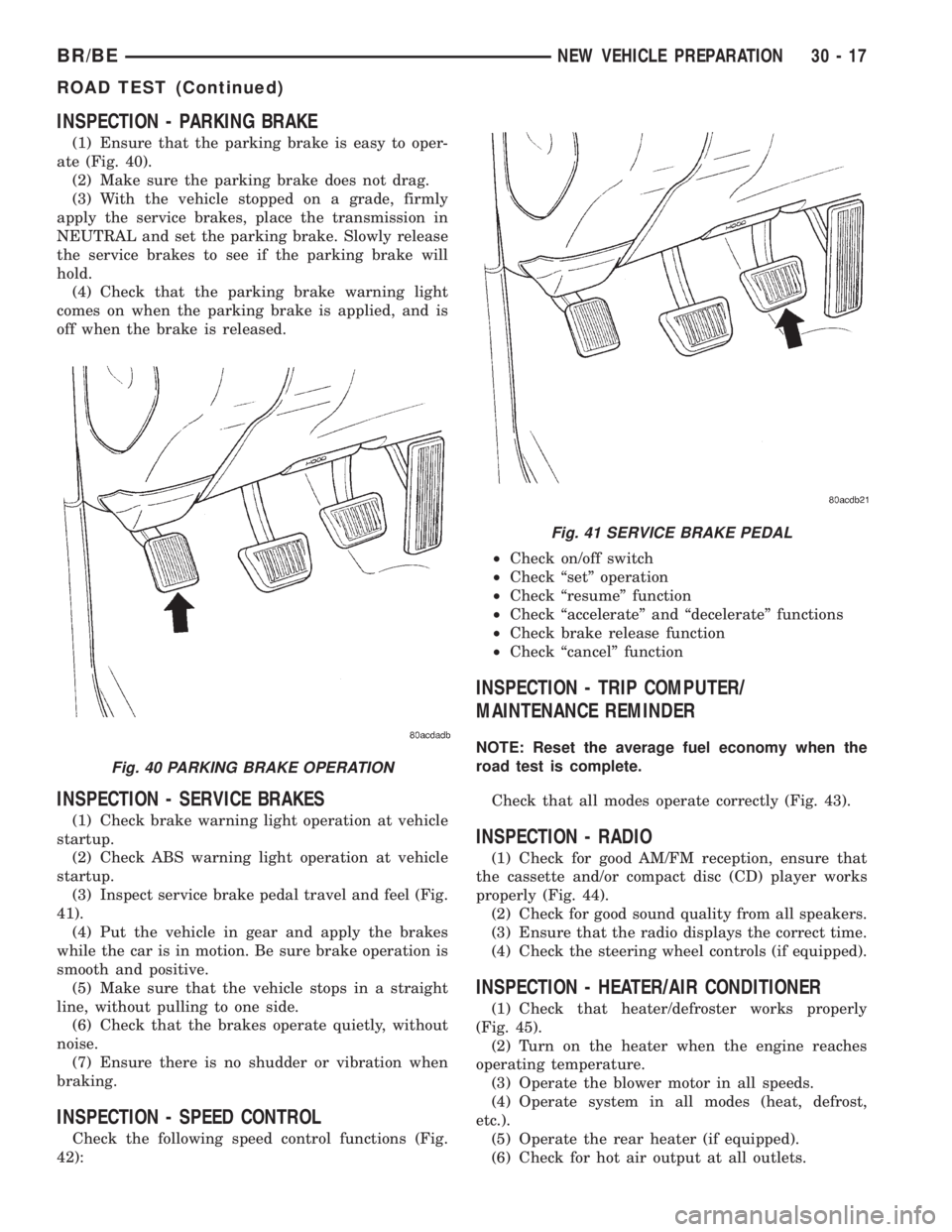
INSPECTION - PARKING BRAKE
(1) Ensure that the parking brake is easy to oper-
ate (Fig. 40).
(2) Make sure the parking brake does not drag.
(3) With the vehicle stopped on a grade, firmly
apply the service brakes, place the transmission in
NEUTRAL and set the parking brake. Slowly release
the service brakes to see if the parking brake will
hold.
(4) Check that the parking brake warning light
comes on when the parking brake is applied, and is
off when the brake is released.
INSPECTION - SERVICE BRAKES
(1) Check brake warning light operation at vehicle
startup.
(2) Check ABS warning light operation at vehicle
startup.
(3) Inspect service brake pedal travel and feel (Fig.
41).
(4) Put the vehicle in gear and apply the brakes
while the car is in motion. Be sure brake operation is
smooth and positive.
(5) Make sure that the vehicle stops in a straight
line, without pulling to one side.
(6) Check that the brakes operate quietly, without
noise.
(7) Ensure there is no shudder or vibration when
braking.
INSPECTION - SPEED CONTROL
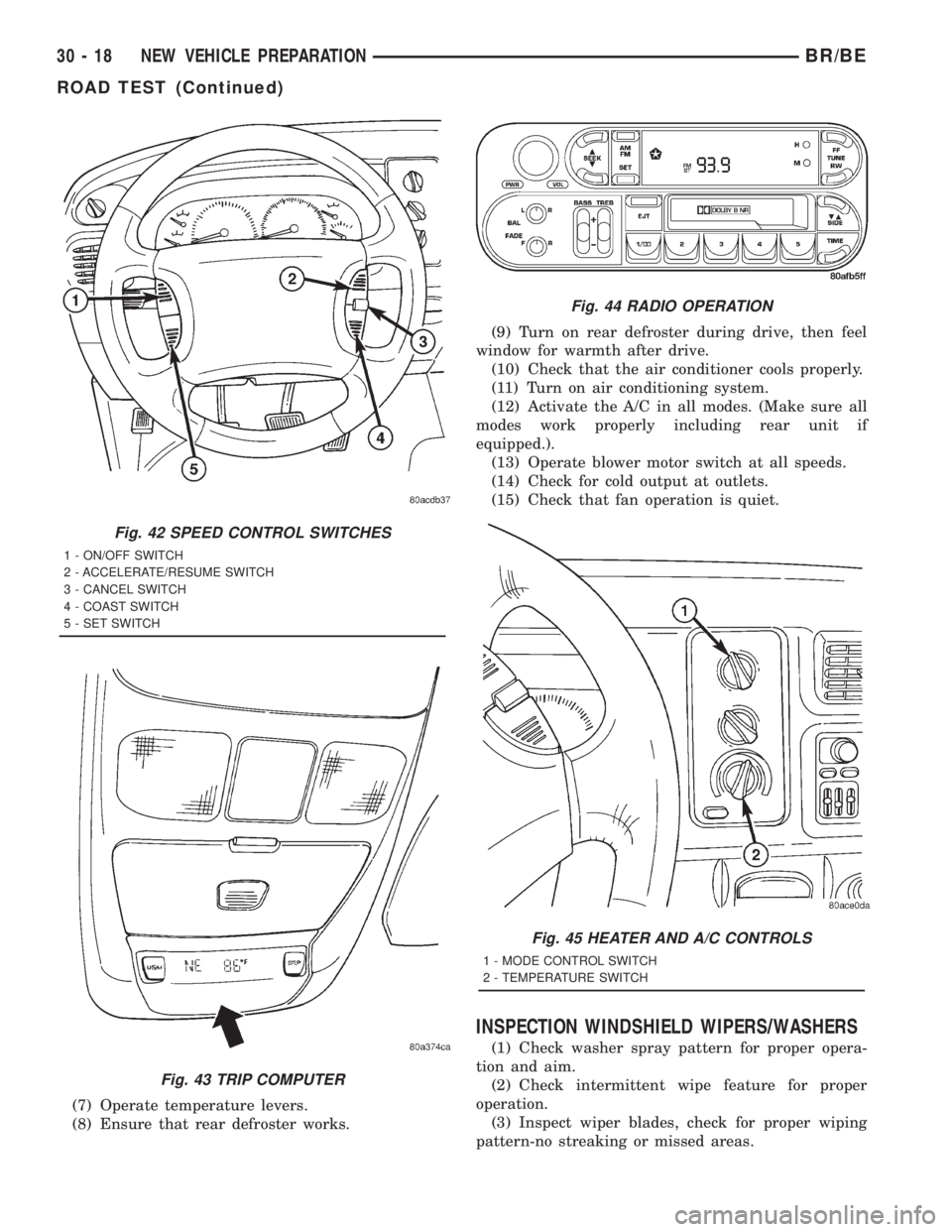
Check the following speed control functions (Fig.
42):²Check on/off switch
²Check ªsetº operation
²Check ªresumeº function
²Check ªaccelerateº and ªdecelerateº functions
²Check brake release function
²Check ªcancelº function
INSPECTION - TRIP COMPUTER/
MAINTENANCE REMINDER
NOTE: Reset the average fuel economy when the
road test is complete.
Check that all modes operate correctly (Fig. 43).
INSPECTION - RADIO
(1) Check for good AM/FM reception, ensure that
the cassette and/or compact disc (CD) player works
properly (Fig. 44).
(2) Check for good sound quality from all speakers.
(3) Ensure that the radio displays the correct time.
(4) Check the steering wheel controls (if equipped).
INSPECTION - HEATER/AIR CONDITIONER
(1) Check that heater/defroster works properly
(Fig. 45).
(2) Turn on the heater when the engine reaches
operating temperature.
(3) Operate the blower motor in all speeds.
(4) Operate system in all modes (heat, defrost,
etc.).
(5) Operate the rear heater (if equipped).
(6) Check for hot air output at all outlets.
Fig. 40 PARKING BRAKE OPERATION
Fig. 41 SERVICE BRAKE PEDAL
BR/BENEW VEHICLE PREPARATION 30 - 17
ROAD TEST (Continued)
Page 2843 of 2889
(7) Operate temperature levers.
(8) Ensure that rear defroster works.(9) Turn on rear defroster during drive, then feel
window for warmth after drive.
(10) Check that the air conditioner cools properly.
(11) Turn on air conditioning system.
(12) Activate the A/C in all modes. (Make sure all
modes work properly including rear unit if
equipped.).
(13) Operate blower motor switch at all speeds.
(14) Check for cold output at outlets.
(15) Check that fan operation is quiet.
INSPECTION WINDSHIELD WIPERS/WASHERS
(1) Check washer spray pattern for proper opera-
tion and aim.
(2) Check intermittent wipe feature for proper
operation.
(3) Inspect wiper blades, check for proper wiping
pattern-no streaking or missed areas.
Fig. 42 SPEED CONTROL SWITCHES
1 - ON/OFF SWITCH
2 - ACCELERATE/RESUME SWITCH
3 - CANCEL SWITCH
4 - COAST SWITCH
5 - SET SWITCH
Fig. 43 TRIP COMPUTER
Fig. 44 RADIO OPERATION
Fig. 45 HEATER AND A/C CONTROLS
1 - MODE CONTROL SWITCH
2 - TEMPERATURE SWITCH
30 - 18 NEW VEHICLE PREPARATIONBR/BE
ROAD TEST (Continued)