Page 94 of 333

HomeLink Universal Transmitter
Canadian Owners:
The remote control you are training from may stop transmitting after twoseconds. This is not long enough for
the HomeLink transmitter to learn
the code. Release and press the
button on the remote control every
two seconds until the transmitter has
learned the code.
5. The red light in the transmitter should begin flashing. It will flash
slowly at first, then rapidly.
6. When the red light flashes rapidly, release both buttons. The
transmitter should have learned
the code from the remote control.
7. Plug in the garage door opener motor, then test the transmitter
button by pushing it. It shouldoperate the garage door.
If the button does not work, repeat
this procedure to train it again. If it still does not work, you may have a
variable or rolling code garage door opener. Test this by pressing
and holding the HomeLink
transmitter button you just trained. If the red light blinks for two
seconds, then stays on, you have a
rolling code garage door opener.
You may be able to verify this with the manufacturer's documentation. Go to 'Training With a Rolling
Code System."
8. Repeat these steps to train the other two transmitter buttons to
operate any other remotely-
controlled devices around your
home (lighting, automatic gate, security system, etc.).
Training With a Rolling Code
System
For security purposes, newer garagedoor opening systems use a "rolling"
or variable code. Information from
the remote control and the garage door opener are needed before the
HomeLink transmitter can operate
the garage door opener.
The "Training the Transmitter" procedure trains the HomeLink
transmitter to the proper garagedoor opener code. The following
procedure synchronizes the
HomeLink transmitter to the garage door opener so they send and
receive the correct codes.
CONTINUED
Instruments and Controls
Page 95 of 333
HomeLink Universal Transmitter
It may be helpful to have someone
assist you with this procedure.
1. Make sure you have properly completed the 'Training the
Transmitter" procedure.
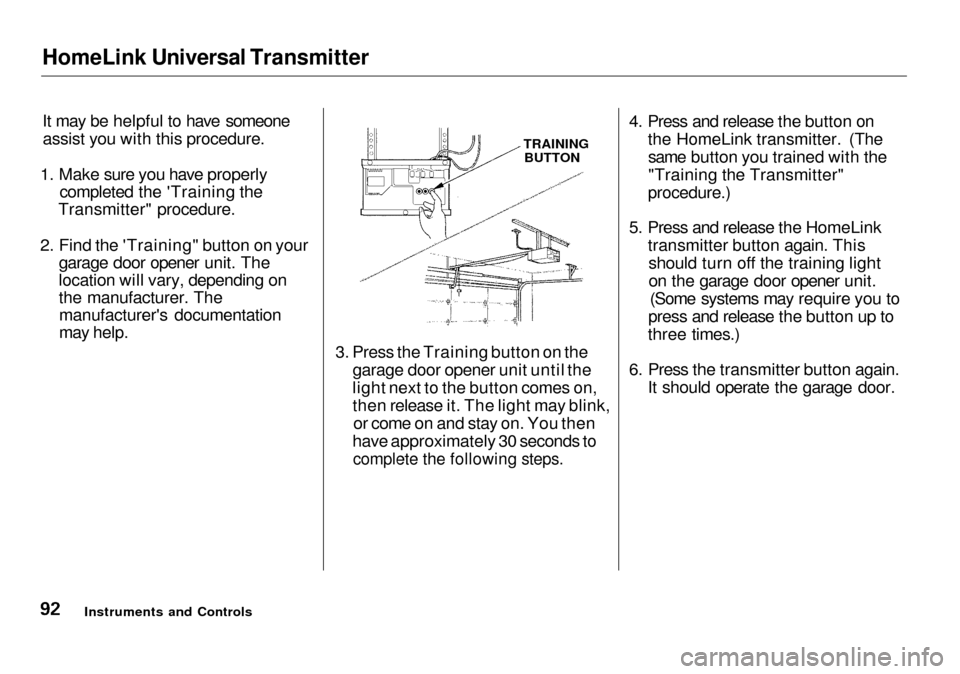
2. Find the 'Training" button on your garage door opener unit. The
location will vary, depending on
the manufacturer. Themanufacturer's documentation
may help. TRAINING
BUTTON
3. Press the Training button on the garage door opener unit until the
light next to the button comes on,
then release it. The light may blink,or come on and stay on. You then
have approximately 30 seconds to
complete the following steps.
4. Press and release the button on
the HomeLink transmitter. (Thesame button you trained with the
"Training the Transmitter"
procedure.)
5. Press and release the HomeLink transmitter button again. Thisshould turn off the training light
on the garage door opener unit. (Some systems may require you to
press and release the button up to
three times.)
6. Press the transmitter button again. It should operate the garage door.
Instruments and Controls
Page 96 of 333

HomeLink Universal Transmitter
Retraining a Button
To train an already programmed transmitter button to operate a new
device:
1. Select the transmitter button you want to train.
2. Press and hold the transmitter button until the red light begins to
flash slowly (approximately 20
seconds).
3. While continuing to hold the transmitter button, place the
remote control for the device 2 to5 inches from the HomeLink
transmitter.
4. Press and hold the button on the remote control. Hold both buttons
until the red light begins to flash
rapidly.
5. Release both buttons. The
transmitter should now be trained
to operate the device.
Erasing Codes
To erase the codes stored in all three buttons, press and hold the twooutside buttons until the red light
begins to flash, then release the
buttons.
You should erase all three codes before selling the car. As required by the FCC:
This device complies with Part 15 of the
FCC rules. Operation is subject to the
following two conditions: (1) This device
may not cause harmful interference, and (2) this device must accept any
interference received, including interference that may cause undesired operation.
Changes or modifications not expressly
approved by the party responsible for compliance could void the user's
authority to operate the equipment.
This device complies with Industry
Canada Standard RSS-210.
Operation is subject to the following two
conditions: (1) this device may not cause
interference, and (2) this device must accept any interference that may cause undesired operation of the device.
Instruments and Controls
Page 102 of 333
Mirrors
Keep the inside and outside mirrors
clean and adjusted for best visibility.
Be sure to adjust the mirrors before
you start driving.
The inside mirror has an automaticanti-glare mechanism. When the
AUTO switch is pushed in, the indicator will light. When the mirrorsenses light from the headlights of
the car behind you, the mirror surface will automatically darken to
reduce the glare. Adjusting the Power Mirrors
Adjust the outside mirrors with the adjustment button on the driver's
door armrest:
1. Turn the ignition switch ON (II).
2. Move the selector switch to L (driver's side) or R (passenger's
side).
CONTINUED
Instruments and Controls
INDICATOR
SENSOR
AUTO SWITCH SELECTOR SWITCH
Page 103 of 333
Mirrors
ADJUSTMENT BUTTON
3. Move the mirror right, left, up or
down by pushing the adjustment
button in that direction.
4. When you finish, move the
selector switch to the center (off)
position. This turns off the adjustment button so you can't
move a mirror out of position by accidentally bumping the button.
Outside mirror positions can be
stored in the driving position
memory system (see page 101).
HEATED MIRROR BUTTON
The outside mirrors are heated to re- move fog and frost. With the ignitionswitch ON (II), turn on the heaters
by pressing the button. The light in the button comes on as a reminder.
Press the button again to turn the
heaters off.
Instruments and Controls
Page 104 of 333

Driving Position Memory System
Your Acura has a memory feature for the steering wheel, driver's seat, and outside mirror positions.
Two seat, steering wheel, and outside mirror positions for different
drivers or driving conditions can be
stored in separate memories. You
select a memorized position by
pushing the appropriate button.
Storing a Driving Position in Memory
Store a driving position as explained
in this section only when the car is
parked.
1. Turn the ignition switch ON (II). You cannot add a new drivingposition in the memory unless the
ignition switch is ON (II). You canrecall a memorized position with
the ignition switch in any position.
2. Adjust the seat to a comfortable position (see page 94). Adjust
the steering wheel to acomfortable position (see page
71).
Adjust the outside mirrors for best visibility (see page 99). 3. Press and release the MEMO
button on the control panel. You
will hear a beep. Immediately press and hold one of the memory
buttons (1 or 2) until you hear two beeps. The indicator light in thememory button will come on. The
current positions of the driver's
seat, steering wheel, and outside
mirrors are now stored.
CONTINUED
Instruments and Controls
MEMO BUTTON
Page 105 of 333
Driving Position Memory System
Doing any of the following after
pressing the MEMO button will cancel the storing procedure. Not pressing a memory button
within 5 seconds. Readjusting the seat or steering
position. Readjusting the outside mirror
position.
Each memory button stores only one driving position. Storing a new
position erases the previous setting stored in that button's memory. If
you want to add a new position while retaining the current one, use the
other memory button.
All stored driving positions will be lost if your car's battery goes dead or
is disconnected.
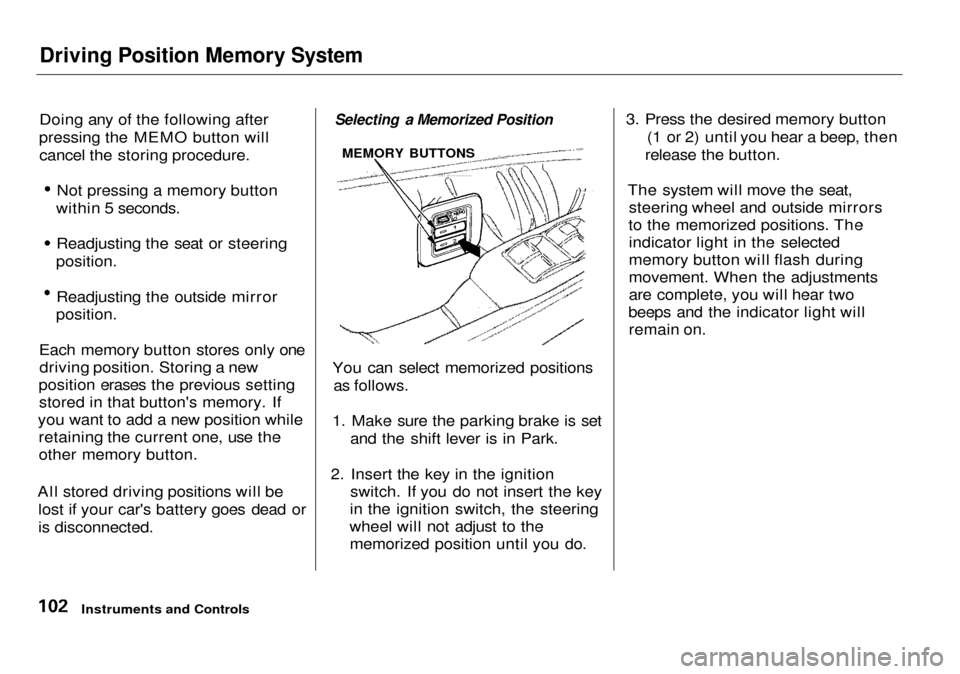
Selecting a Memorized Position
You can select memorized positions as follows.
1. Make sure the parking brake is set and the shift lever is in Park.
2. Insert the key in the ignition switch. If you do not insert the key
in the ignition switch, the steering
wheel will not adjust to the memorized position until you do. 3. Press the desired memory button
(1 or 2) until you hear a beep, then
release the button.
The system will move the seat, steering wheel and outside mirrors
to the memorized positions. The indicator light in the selected
memory button will flash during
movement. When the adjustments
are complete, you will hear two
beeps and the indicator light will remain on.
Instruments and Controls
MEMORY BUTTONS
Page 107 of 333

Seat Heaters, Ski Sleeve
The HI or LO indicator lights and remains lit until you turn it off by
pushing the opposite side of theswitch lightly. The indicator will turn
off.
In HI, the heater turns off when the
seat gets warm, and turns back on
after the seat's temperature drops. It
continues to cycle as long as you
leave it set on HI. The HI indicator
remains lit as a reminder that you
have the heater on.
In LO, the heater runs continuously.It does not cycle with temperature
changes.
Because of the sensors for the side
airbag system, there is no heater in
the passenger's seat-back. Follow these precautions whenever
you use the seat heaters: Use the HI setting only to heat the
seats quickly. Select the LO
setting when the seats feel warm.
The HI setting draws large amounts of current from the
battery. Do not use the seat heaters, even
on the LO setting, if the engine is
left idling for an extended period.
They can weaken the battery, causing hard starting.
Ski Sleeve
The ski sleeve allows you to carry skis or other long objects safely
without soiling or damaging the
interior of your car. It attaches to the
trunk pass-through.
KNOB
To use the ski sleeve: 1. Pull down the rear seat armrest. Open the trunk pass-through
cover by sliding the knob down-
ward and pulling on the cover.
Instruments and Controls
LID

